As I recently reported, the Exodus team have been hard at work on the Viewer, obtaining TPV Directory listing status as well as working on a wide range of new features and options within their Viewer.
This is now nearing completion, and as the team work towards their next formal release, they’ve implemented a new nightly build programme for the Viewer. As the name suggests, this will feature daily builds of the Viewer featuring the very latest options, functions and updates, ready for wider testing. In contacting me about the builds, Geenz Spad explained their purpose thus: “We want to get more people testing our nightly builds of Exodus as we near another stable release; those builds are updated almost on a daily basis … to get new features we’re experimenting with out to the public faster for feedback before they make it into a stable release.”
As daily builds there are a few points worth mentioning:
No support is provided – so please do not use them as your primary viewer
There will be issues both in terms of functionality and stability
Please do give constructive feedback to the team on any problems you have, crashes you experience etc.
If you’d like to help the team work towards future releases of Exodus, you can find out more by reading their blog post on the builds and by following the links below:
There have been questions and comments on Exodus floating around in various places, with people wondering what is happening and when the next release might come out. As an Exodus user myself, I fired-off an e-mail to Clix and the team recently to see if they’d be willing to shed a little light on what’s going on.
While the reply was a little shorter than I’d hoped – but then I did ask a couple of questions on releases that the team may not want to commit to, date-wise – Clix did provide a little update:
The team has been busy with personal projects and real life commitments. Naturally this has slowed down production. In addition we have been submitting code upstream to Linden Lab that has been accepted and rolled out in the most recent official viewer release.
Exodus is being actively worked on and will feature a wide range of fixes, performance improvements as well as some neat new features. Our next release will address any and all license concerns. We will continue to produce the best TPV for gamers and visual artists in Second Life. Stay tuned for new feature announcements!
The license concerns mentioned potentially refer to J2C / KDU usage issues. Whether or not this is the case, it is fairly clear from comments passed elsewhere that there has been strong cooperation between LL and the Exodus team in sorting any problems out, which has to be seen as being a good indicator when it comes to LL / TPV cooperation in general, something that has been grumbled about by some commentators following changes to the TPV Policy recently.
One thing is very certain: given the popularity of Exodus amongst users, that the Viewer is being actively worked on will come a good news to many, so keep an eye on the Exodus blog page.
Earlier this month I took a quick look at the Preview Release of Niran’s Viewer 1.33, focusing on the UI work NiranV Dean has been carrying out within the release – part of an ongoing project to provide a more efficient Viewer front-end. Today sees the launch for the final version of 1.33, and in NiranV’s own words, this is a “major, major release” for a wide range of reasons. As promised in my last report on the Viewer, I’ve taken time to have a nice, long play with the Windows version.
TPVD Listing
First and foremost, after a long and incredible development curve, Niran’s Viewer has been accepted for listing in the Third-party Viewer Directory and should appear there in the next week or so – congratulations to Niran on all the work that has gone into the Viewer, and to Tarnix for the development of the Linux version.
Two Versions
The 1.33 release comes in two flavours: without and with the Mesh Parametric Deformer. The reason for this is simple, the code doesn’t set well with the Viewer – which might be, as NiranV acknowledges, due to issues with the Deformer working on his development hardware, but which could also be related to conflicts between the code and the Viewer’s rendering pipe. However, as NiranV notes in his blog: “You should be able to experience the Deformer mostly normal if you activate Deferred, Shadows and Ambient Occlusion, meaning that the separate release is only for those who can run [in this mode] and [who] want to test it to give Qarl Feedback.”
Installation
The Windows installer package weighs-in at 40Mb, and now creates a desktop shortcut icon (yay! no more hunting through Explorer and shunting bits around). Installation itself is, as always, fast and smooth, with the change log displayed in the opening window for those who are curious but who haven’t actually delved into Niran’s blog to read the information there.
On start-up, and for the first time with Niran’s Viewer, I did encounter a virus threat warning from AVG. This is something that is not uncommon among Viewers, with a number of TPVs (and the odd release of the Official Viewer) throwing up warnings on occasion. It certainly be taken to mean the Viewer is up to mischief. LL themselves provide some guidance on avoiding false threats. As the alert was related to the slplugin.exe file (a common cause of false virus alerts), I felt confident in marking the alert as a false flag and continuing.
The UI
As mentioned above, the User Interface is very much one of the focal points of NiranV’s work on the Viewer, and I took a look at some of the upcoming features in my overview of the initial Preview release. As such this is the logical place to start with this look.
The first noticeable thing with this release is the on logging-in the UI is extremely clean and minimal. with both bars and buttons only appearing at the top of the window, rather than the top and left, as with earlier versions.
UI: functionally minimalist
The buttons displayed by default are Speak, Voice, People, Picks, Places, View, Inventory and Appearance, which represent an interesting mix and which, in a nod to Kirsten’s Viewer, are initially displayed in “S19” format. There’s still no option to left/right align buttons either at the top or the bottom of the window (or to the top/bottom of the window if you place buttons on either side of your world view), so I’ll keep pestering NiranV on this :).
If I’m totally honest, the top button bar is something I’m personally not overly keen on: when active, it actually blocks the uppermost section of the screen from use, so you can’t “dock” (or more correctly in the case of the 3.2 FUI align) floaters with the top bars: there will always be a gap. But this is just a personal niggle on my part.
A nice touch with Niran’s Viewer, for those who don’t use the top of the window for anything at all, is the ability to hide the Navigation Bar, etc., at the top of the screen completely when not in use (the mini-Location bar is automatically displayed in its place) by setting Preferences->User Interface Options->UI Customisation->HIDE TOPBAR AUTOMATICALLY. Introduced a couple of releases ago, this is still something I like rather a lot, given I don’t use the top button bar.
In terms of the button options, Niran’s Viewer presents pretty much the standard set of buttons that come with the Official Viewer, so there is not the massive range of buttons that are displayed by other TPVs – which itself isn’t really a problem. One Button that does make its debut with this release is the SCRIPT button, which opens the Script Information floater.
Colours
When it comes to colours, Niran’s Viewer presents the most customisable UI of any Viewer, something I’ve again covered in the past. With this release, NiranV adds a new tweak to the use of colour: to denote options in both menus and Preferences tabs which may result in Viewer issues and / or crashes, or which should be used with caution on the part of users unfamiliar with them. Those options where caution is advised are coloured orange with this release, with the more experimental / specialised options coloured red (see right). NiranV indicates that these colours may change with a future release, but the idea is certainly a good one in terms of being a visual indicator (although there is a risk colouring an option will encourage people to “click and see”).
In a slightly tongue-in-cheek move, NiranV has coloured the option to Exit the Viewer red because after all, as he says, it does close down the Viewer and logs you out of Second Life!
Fix it!
A new addition to UI floaters comes in the form a pin icon in the top right corner of most (not all) floaters. Called “Fix it!”, this locks a given panel in the position in which it is currently displayed on-screen. Once active, the floater cannot be accidentally dragged elsewhere on the screen. For those involved in activities such as photography, machinima and combat, I imagine this could prove a useful option. The option is also likely to appeal to those who like to have certain core panels (such as inventory) function in a similar manner to when the Sidebar was available (i.e. always appearing on the right of the screen), as they can “lock-in” the floaters to do so – although in the latter case, it should be noted that the functionality currently isn’t persistent between re-logs, although this should be fixed in a future update.
Frame Rates
All Viewers include the option to include a “lag meter” in the top right corner of the menu bar, which shows the Viewer’s performance in terms of a colour-coded graphics bar. NiranV has improved this by allowing you to toggle between the bar and a numeric frame rate display.
Again, this is only a subjective measure of performance, but for those puzzled as to whether the traditional bar is indicative of good or bad performance, the numeric display should help clarify matters.
Super Smooth
The bet way to describe using the Niran’s Viewer UI is smooth. That you’re in something very different to other Viewers is evident the first time you move your camera view – everything pans and slides very smoothly, almost as if you’re on a cushion of air, with motion gliding to a gentle halt. Of course, you can achieve the same in other Viewers by altering your camera movement options, but NiranV has done it for you, making the entire experience a lot .. well … smoother.
This approach can be seen elsewhere in the Viewer, particularly the way options and sub-panels in floaters slide gracefully in or out of view. Take a look at one of Niran’s excellent videos for a practical demonstration:
Preferences
Preferences are the clearest instance of significant changes to the UI. NiranV has done a considerable amount of work in this area to try to rationalise both the way in which Preferences presents options to us, and how we interact with it. A lot of this I covered last time around, but NiranV has continued to refine and improve.
Preferences: overhauls and rationalised
The first noticeable thing on the redesign – at least for those who used the Preview 1 release of 1.33, is that the Preferences panel now auto-sizes itself correctly according to your screen resolution; there are no more scroll options to the left / right of the panel as described in my look at the initial Preview release.
Those coming to Niran’s Viewer for the first time are liable to find the Preferences panel something of a “?!” moment when first opening it; who wouldn’t after the basic layout of the panel having remained pretty much unchanged (other than for custom tabs) almost since the dawn of time? However, I have to say that, with a couple of very minor reservations, NiranV has produced an alternative Preferences panel that makes a heck of a lot of sense and encourages fast, easy use.
At the top are five major category tabs, most of which are pretty self-explanatory. Each of these has up to three sub-tabs (displayed at the bottom of the floater) which help rationalise and order functions and options. Additionally, some tabs may have context-specific options that are only display when certain options are enabled (such as with advanced rendering in the Display and Audio tab, or many have additional toggle buttons on the right to shift between sub-groups of options.
One of the things that has always attracted me to Niran’s Viewer – and is drawing back to it now that performance has once again improved on my hardware – is the fact that NiranV Dean is constantly looking at the UI as a seasoned user of SL and other immersive software and trying to find ways to reorganise things within the UI – particularly menus and floaters. This has led to Niran’s Viewer being highly innovative in both look and feel.
In recent releases, this has been reflected in the fact that right from the moment you load the Viewer, you know you’re using something very unique: The log-in / splash screen has been markedly different from other Viewer for a while, and recently gained a video element to replace static images. The video – shot in the Insilico region – demonstrates the power of Niran’s Viewer as a Machinimatographer’s tool, and is beautifully overlaid with the log-in options without the latter intruding on the video itself.
I’d still link to see some kind of link to the Grid Status page (indeed, given LL won’t step-up to the plate on this one and provide a Viewer-based means for users to be aware of SL issues prior to logging in (not everyone uses the Dashboard). I’d like to see all TPV take a leaf from Firestorm’s book in this regard), but other than that Niran’s approach to the log-in splash screen is enticing. Once you’ve entered your credentials, the screen reverts to the familiar images, progress bar, mandelbrot-like animation and Niran’s famous (and amusing) tips.
Of Floaters and Preferences
Given this is a Preview of an upcoming release, I don’t intend to cover everything that NiranV is doing with the Viewer – I’ll take a broader look once a former release is made. Instead, I’d like to focus on the massive amount of work he’s been putting into the various UI floater panels – which, with this release – reaches the Preferences floater itself.
Now, I’ll be the first to admit that when NiranV first started to work on redesigning the floaters (the Build floater in fact, after revising the World Map), I wasn’t entirely convinced as to the result. Since that time, he’s continued to refine and improve his layouts and I have no hesitation in saying that they are reaching a point where my early concerns have been completely invalidated.
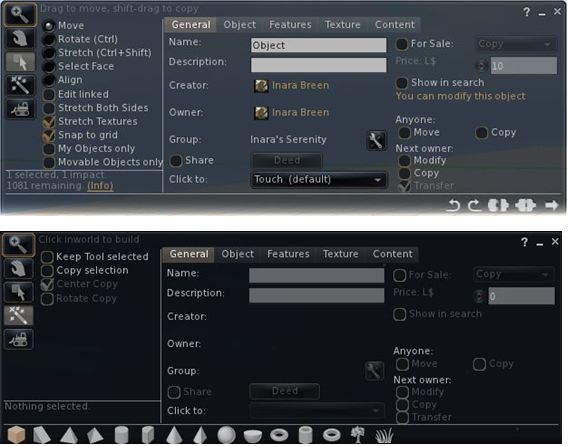
And evolutionary process: the redesigned Build floater as it first appeared in Niran’s viewer (top) and how it looks today
More recently, the work has extended to the People floater, allowing information of friends and groups to be presented in a way that easily scans on the eye and doesn’t require floater resizing or other messing around with each update that comes out.
The People floater showing the Nearby tab with mini-map enabled, and the Groups tab (edited for privacy)
Other examples of Niran’s work can be found in elements such as the Mesh Upload floater, which I looked at recently and which presents the necessary information and options without putting a size 14 footprint all over the in-world view.
Preferences: a Complete Overhaul
Version 1.33 of Niran’s Viewer brings with it something we’ve never really seen in the entire history of the SL Viewer: a radical redesign of the Preferences floater.
That you’re into new territory when accessing Niran’s Preferences is immediately obvious: there are no left-side tabs. Instead, primary options are accessed from a left / right scrollable tab list at the top of the floater, with additional sub-categories for a given option are displayed in sub-tabs access at the bottom of the current Preferences page being viewed.
Options have also been renamed in an attempt to make the tabs more reflective of the options they contain. By default, Preferences will open on the Communications Options tab (above). However, and in a move long overdue in Viewers: the floater will actually re-open to display the last tab actually in use / displayed when OK was pressed / X was clicked on to close the floater.
The tabs as currently displayed in Preferences comprise (from left to right across the top scroll area):
User Options: includes three sub-tabs:
General: analogous to the General tab in the official Viewer and containing the familiar language, content access (General, Mature, Adult), name tag display options and busy response, together with options to set name tag colours
Advanced: provides access to all popular camera, movement and mouselook options found within the official Viewer and TPVs
Privacy: displays the Privacy tab options (clear history, log file options, options for setting who can see you are on-line, etc.
Display and Audio Options: Combines the Graphics and Sound & Media tabs and comprises three sub-tubs:
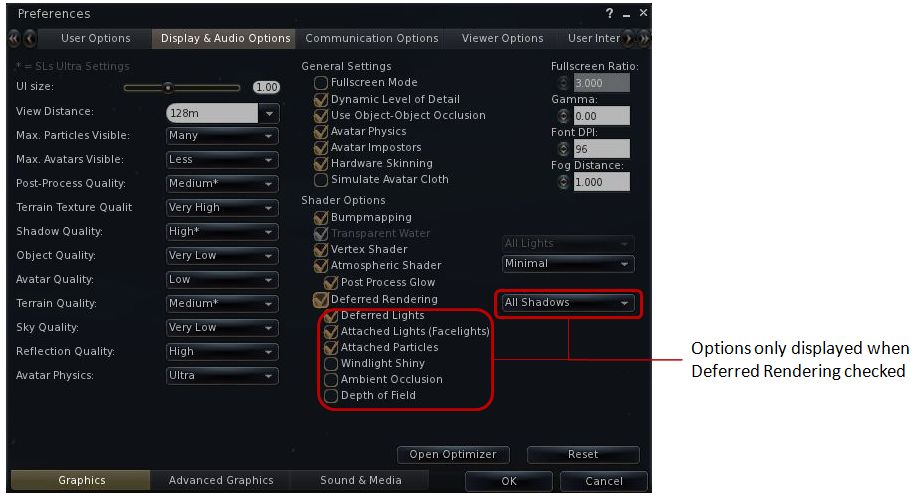
Graphics: displays a re-ordered and improved graphics settings option list as shown below, with advanced options for deferred rendering only displayed when the deferred rendering option is checked. This tab also includes a button for accessing Niran’s own Optimiser floater
Re-ordered and clearer graphics settings
Advanced Graphics: displays all major advanced graphics options (glow definition, lighting, performance options (including visual auto-mute), etc., all logically grouped and accessed via dedicated buttons
Sound and Media: includes the volume controls, media playback options, Voice settings, etc., as found in Sound & Media in other Viewers
Communications Options: brings together the communications options variously found under Chat, Notifications and Colors, and presents them in three sub-tabs which also include the relevant popular TPV options such as MU* poses, OOC auto-complete, etc.
Viewer Options: presents those options usually associated with setting-up the Viewer, including the Setup tab, the Advanced tab and also include a dedicated sub-tab for RLV/a options, all in their own dedicated sub-tabs.
User Interface Options: includes all of Niran’s Viewer’s comprehensive UI customisation options, including the ability to set the colour and transparency of all commonly used floaters in the UI. Includes three sub-tabs: UI Colors, Skins & Themes and UI customisation.
Feedback and Thoughts
NiranV Dean continues to push the envelope in terms of re-working the Viewer UI. In terms of the changes to Preferences, I think the approach taken has a lot of merit and actually provides a much faster means for one to locate options (after traversing the initial learning curve). The layout is easy to use and options have been brought together with considerable thought. Obviously, there is a degree of re-training one must go through to use the Preferences with ease, but this isn’t exactly mountainous and shouldn’t be cause for complaint.
Were I to critique it at all, it would be in that the User Options and Viewer Options contain some degree of cross-over in terms of what they do. As such, even after spending a good deal of time using the Viewer it can still be confusing as to where a given set-up function might be – do I go to User or Viewer (or even the Viewer sub-tab under User Options?). I’m not sure how this could be avoided without having something of a mess in terms of one page displayed a multitude of sub-tabs, but I do feel that these are areas where further work may be required – and is probably being considered, given this is only a preview.
Now, if Niran provides a means to left / right align buttons (I’m not so much fussed by top / bottom alignment on the left/ right, if I’m honest, as I don’t place buttons to the side of the screen) and gets the chat bar so it can be “docked” to (or at least aligned with) the bottom of the Viewer window, I’ll be one very happy bunny!
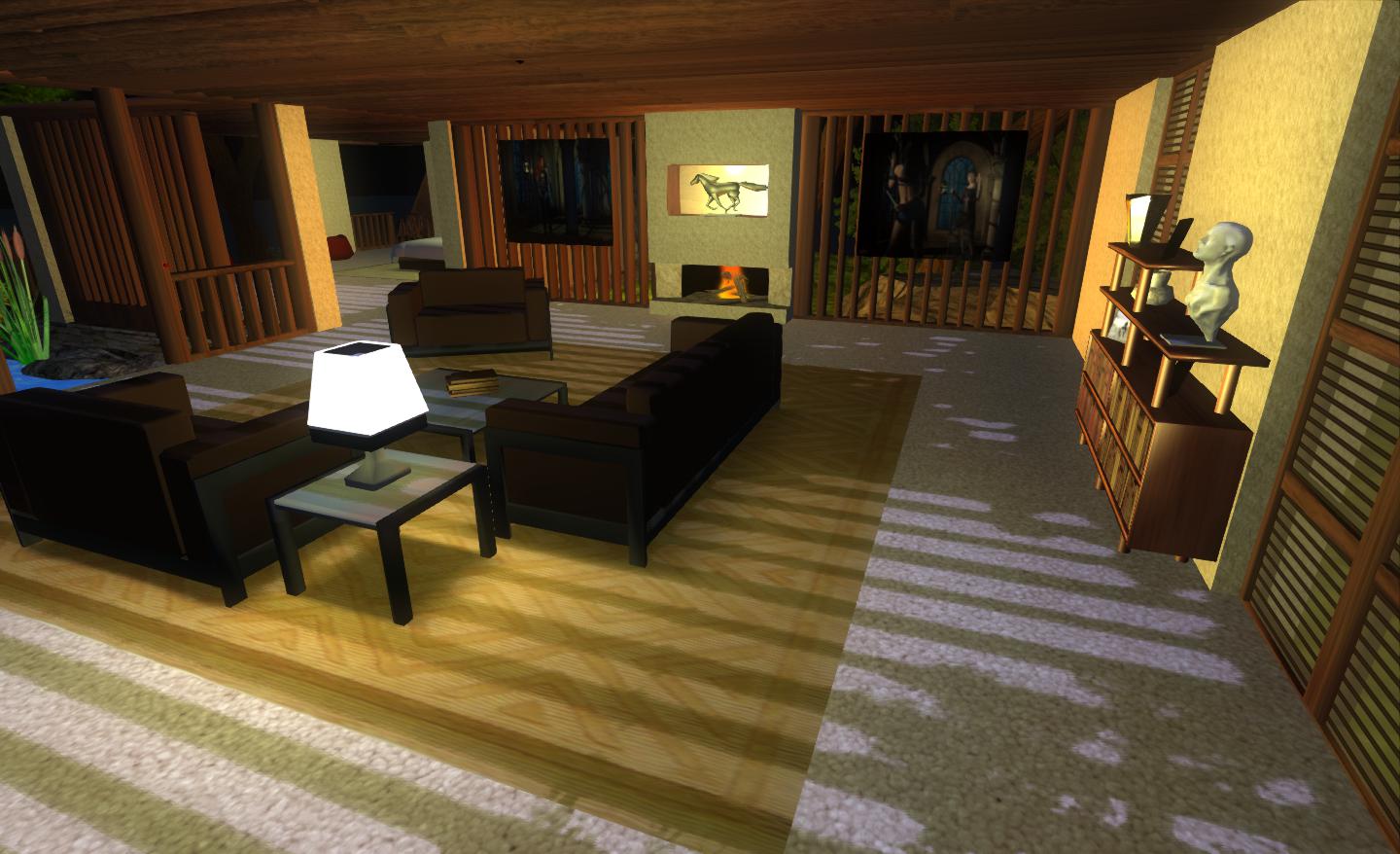
Performance-wise, 1.33 is perhaps the best release of Niran’s Viewer I’ve run on my PC recently, with respectable frame rates at my standard settings in the high 20s / low 30s. Enabling deferred and shadows does still crash this – and rather more so than recently LL Viewer releases, with an average frame rate of just 7-9fps with shadows on running my normal defaults (see the Review System panel on the right of the main page of this blog). However, Niran’s seriously kicks bottoms when it comes to the sheer quality of the world-view generated when running deferred with shadows: the lattice-work of the roof of my house casts beautifully crisp shadows that suffer none of the “greying” or blocky fuzziness I’ve experienced with other Viewers.
Crisp shadows
I’ll have a further look at updates and changes to 1.33 when it reaches a full release status.
Phoenix 1.6.1.1691 has been released today. This has been expected since the recent updates to the TPV Policy required the removal of the on-line truth status from the profile floater.
More importantly, the update prepares Phoenix for the forthcoming roll-out of Direct Delivery, scheduled for this Wednesday, the 21st March. As such, it is very important for Phoenix users to upgrade to this release if they wish to be able to use the SL Marketplace to receive items once Direct Delivery is launched and merchants switch over to it. Additionally, the Viewer includes the V2 inventory fetch system.
Other updates include:
RLV updates (Kitty Barnett)
Optional support group viewer version identification (Zi Ree, Kadah Koba)
GPU table updates (TankMaster Finesmith)
Added CHOP, MAINT, EXP, SINV, PATHBUG, and DOC to jira parser (TankMaster Finesmith)
Option to show script time in either ms or µSeconds (Kadah Coba)
Allow /me’ when using viewer prefix (Inusaito Kanya)
Support for CreateInventoryCategory capability (Henri Beauchamp)
Backport of V3 inventory loading at login (Henri Beauchamp & Singularity Viewer)
Additional fast timers from V3 (Henri Beauchamp)
It is recommended that a clean install is performed for this release.
 As I recently reported, the Exodus team have been hard at work on the Viewer, obtaining TPV Directory listing status as well as working on a wide range of new features and options within their Viewer.






 Inara Pey: Living in a Modemworld