A brief start-of week update with an important item on the LSL llHTTPRequest function.
Tuesday October 23rd saw an update to the main channel which should have minimal impact on things, “It’s a change that should make simulators run better on our new hardware,” Simon Linden explained at the Simulator User Group meeting on the 23rd.
Wednesday 24th, as previously indicated, should see the RC channels updated as follows:
Magnum should receive bug fixes together with Baker Linden’s Group Services project code (the viewer side of which is still blocked)
LeTigre should receive further updates for the new Havok code (which presumably include fixes for the crash loop situation Maestro reported in the Server Beta UG meeting (see above)
BlueSteel should receive, “Some more invisible changes that should help us deal with some problems like full disks that make servers very unhappy.”
Details on the deployments are, as usual, posted in the Second Life Server section of the Technology forum.
Third-party Web Caching and llHTTPREQUEST
Kelly Linden indicated that the updates to LeTigre in week 42 had some library updates. One of these updates was to the cURL library which changed its behavior specifically around caching.
Until now, outgoing requests on have a Pragma: no-cache header in them, because cURL added this to all requests, and thus ensured fresh data was returned. The change made to the cURL library on LeTigre means that this is no longer the case, so if the third-party web server has caching enabled, any outgoing llHTTPRequest might return previously cached results from the server, rather than fresh data.
Kelly noted that, “Systems that are most likely to be affected are those that frequently hit the exact same URL and expect the data to change. Maybe they are getting a counter or checking on something’s status, leading to problems with the likes of breedables dying, and so on.”
A workaround for this has been implemented for the llHTTPRequest in the form of a HTTP_CUSTOM_HEADER flag, which enables Pragma: no-cache to be specified manually.
While there have currently been no reports of this or similar happening so far, LL are continuing to discuss the potential impact. Further, it is expected that the , Kelly continued, “If anyone uses or develops systems they think *might* be affected please give them a try on LeTigre this week and let me know. Or if you know others that might, encourage them to test on LeTigre this week. Thanks.”
So, if you have created a product which uses an external web server for updates in the manner described above, etc. (or know anyone that does), you may want to test behaviours on a LeTigre region to see if your product is impacted prior to this change rolling out further across the grid.
SL Issues
Network Traffic and Sim Lag / Crash
This issue has been going on since the start of the month, and appears to affect regions with large numbers of people.
A bug report was raised on the issue (BUG-355), and has been imported by LL as a MAINT issue (MAINT-1682). However, there has been no feedback from LL as to the underlying cause, although investigations are continuing.
Linden Lab have launched, somewhat unexpectedly, a new project viewer, called CHUI. While sounding like a character from Star Wars (CHU-EE, geddit? *Ahem*. Sorry), it stands for Communications Hub User Interface. The blog post states:
With so many ways for users to communicate with one another in Second Life, there are quite a few communications tools in the Viewer. To make it easier to find, learn and use these tools, today we released a project Viewer that introduces CHUI (Communications Hub User Interface). In addition to bringing most of these communications tools “under one roof,” CHUI also introduces some new and improved features.
Among the listed features are:
The Conversation Log: providing you have enabled the option to save chat and IM logs to your computer, this allows you to open the entire history of a conversation with another user held in the past 30 days directly in your viewer, or review off-line IMs received from both friends and non-friends
Expanded conference calls: with CHUI it is possible to add people to a conference call after it’s started, or add someone to an existing one-on-one IM session
The ability to easily move your voice connection between open conversations including nearby chat, private IM, conference chat or group chat. Click the “add voice” button on any conversation to move your voice connection to that conversation. Click the “hang up” button and your voice connection is returned to nearby chat.
The ability to access chat preferences in a single click from the Conversation window
Change the volume of a single person’s voice by simply clicking on that person’s speaking icon in the Conversations window
A multi-line chat entry box which expands as you type.
CHUI Conversation Log
These features primarily found in two floaters: Conversations Log and a revised Conversations floater. The Conversations Log window lists all recent and past conversations, allowing them to be to scrolled through and opened for reading. As I’ve only jut started using the project viewer, I’ve actually not investigated this in-depth. Clicking on a listed conversation will open in the Conversations floater, and the Conversation Log contains two buttons for sorting the listed conversations (by name, by date, etc.), and a gear cog button for access various options – start an IM, enter a voice call, view profile, etc., for a selected conversation in the list.
For those who use TPVs with tabbed IM capabilities, the revised Conversations floater will look remarkably familiar, bringing as it does local chat and all IM conversations into a single floater panel. Any conversations in the Conversation Loge will also open here as well.
The Conversations floater
The panel includes a number of buttons. These again allow conversation to be sorted, closed individually, etc., and also include a number of additional options:
Add someone else to an existing IM conversation, and establish a conference call. This will open the Choose Resident Floater, allowing you to pick a friend, someone nearby or search for someone.
Start a Voice conversation with a person or hang-up from a Voice conversation (the icon will change on the button, depending on the status of the call)
Open the Choose Resident floater to select someone with whom to start an IM or Voice conversation.
Break-out any conversation into its own floater.
The Conversations floater can also be compacted down into one of three sizes, using the left / right double chevron arrows. These help reduce the amount of space the floater takes up on your screen when not actively in use. It can be expanded either using these buttons or using the right-pointing arrows next to the names in the conversations list.
The three compact views of the Conversations floater
Overall, this is a significant attempt to centralise in-world communications, and there are some nice features here, particularly in the extended Voice options.
For Linden Lab, this is very much experimental, as noted in the blog post itself, and they are asking for people’s feedback on the features:
We’ve been testing CHUI inside Linden Lab for some time, but any major redesign requires a lot of people using it to make it as smooth and useful as it can be. This is where you come in.
Please think about these questions as you use the CHUI project viewer:
Are the new features useful?
Do the functions you commonly use seem more streamlined, or do they require more clicks than before?
Are all of the functions, both old and new, easy to find?
We’ll ask you to complete a survey in approximately one week to gather your thoughts on these questions.
There is a publicly accessible JIRA (https://jira.secondlife.com/browse/chuibug) available for the viewer, and if you do try it out and find a bug, LL request you report it there.
Also tucked away in the blog post is news that blocked users and objects can now be viewed from within the People floater, rather than via a separate menu option, and can also be unblocked from here via the right-click context menu.
There is a lot going-on server-wise at the moment, so best to break it down by heading.
Server Rebalancing
The Lab is currently engaged in a rebalancing exercise in an attempt to put neighbouring regions on the same server and generally do a logical organizing of the grid to help improve various aspects of performance. Speaking at the Server Beta User Group on Thursday 18th October, Oskar Linden explained that there has been a lot of moving around (in terms of regions) within and between the Lab’s co-location facilities, and so the re-balancing is warranted and needed.
This work takes time – a rebalancing operation earlier this year took around 6 weeks to complete. It requires that regions are organized into groups and then generally moved twice: the first time to a temporary sever, the second to the target machine, each move requiring a reboot, so people may notice additional and unexpected restarts to regions they are in as the work progresses. Two moves are required because the server topology is so tight, it often isn’t possible to move regions directly from one server to a target server, so an intermediary is required.
While this work will take time to complete, the result should be improvements in stability and performance with the likes of teleports, etc, and even improved region crossings.
More on the Server Deployments for Week 42
Main channel: Oskar provided some more information on the main channel update of Tuesday 16th October, saying, “The main channel got a tweak this week, but it was a really small change, and no sim code got changed. We recognised that we had some inefficient SQL queries where large groups were concerned, so we optimised them, and the effect was quite noticeable. The databases are more responsive [and] this helps at all levels.” He went on to clarify that these changes were not Baker Linden’s Group Services code changes, after some in the meeting appeared to think this might have been the case
BlueSteel received the updates which were tested in the network pile-on test in week 42. At the time, I commented that teleporting seemed a lot faster, but that might have been a placebo effect of being on Aditi. It was. Commenting on the test, Oskar said, “There were no simulator changes in that test code. We were just testing backend tweaks.”
Magnum received no update per se, as previously reported, but was merged with trunk and then redeployed
LeTigre received the biggest update, which included new LSL functions ad updates, and most importantly of all, a new version of Havok (see below). Of the LSL functions, Maestro had a warning about the new OBJECT_PATHFINDING_TYPE parameter in the pathfinding command llGetObjectDetails, “We misspelled a constant, OPT_UNKNOWN, so we plan to fix that.” The fix will probably be next week.
Havok
As mentioned above, Havok on LeTigre was updated to version 2012.1. The update enables Havok’s built-in terrain optimisation and should lead to improved performance as a result of the physics shape of the terrain being simplified. Prior to the deployment, there were concerns that it would lead to issues with mesh vehicles trying to cross between regions running different version fo Havok, as has previously been the case.
As reported in part one of this update, these concerns led to Andrew Linden contacting the deployment team in LL to check whether it would be possible to ensure none of the Blake Sea regions remained on LeTigre while two versions of Havok running on the grid to help alleviate at least some of the pain people would feel when using mesh vehicles there. This apparently happened, whether it was before or after the deployment is unclear, as some people did report issues following the roll-out. There was also a little confusion as to what had been swapped where.
At the Server Beta meeting, Oskar gave the impression that all Blake Sea regions were on LeTigre. However, at the Simulator User Group meeting on Friday 19th October, Andrew Linden indicated that records showed none of the Blake Sea regions are running on LeTigre, although they are spread across the other channels. Given that there were (according to Andrew) around six Blake Sea regions running on LeTigre to start with, it would appear to make sense that they have been rotated off to another channel, rather than attempting to rotate all of Blake Sea on to LeTigre.
Please use the page numbers below left to continue reading this article
After hopes that the latest beta version of the viewer would prove stable enough for things to start flowing again, it turns out that its crash rate is hovering around the 14% mark, with Oz reporting that a substantial portion of the crashes, which still appear to be related to memory problems, occurring as users exit the viewer. While these may go unnoticed by users, LL still want to bring the rate down to something closer to the release viewer (which is currently 10%).
As such, further candidate version of the beta viewer is being built, which should be released on Monday 22nd October with the hope that the changes being made will do just that. However, it is fair to say that the level of optimism within the Lab that this will be the case is currently low. Until the problem is resolved, further releases of code for projects are likely to remain blocked.
This issue is now the primary delay in moving a number of projects forward, including the Baker Linden’s Group Service project, Monty Linden’s HTTP texture project, updates for the Steam link-up and a host of other internal and contributed elements.
Mesh Deformer
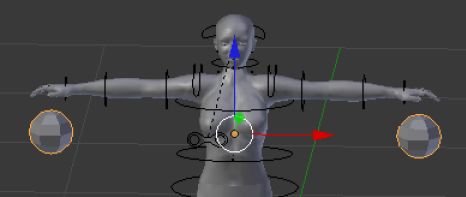
A revised version of Darien Caldwell’s proposed addition for arbitrary shapes in the mesh uploader for us with the deformer
Darien Caldwell has been continuing to work on getting the deformer to work with arbitrary human shapes, and has some success. She has also ben working to refine the new options on the mesh uploader to cater for custom shapes, indenting the options to make it clear that they are a part of the Deform to Avatar Shape check box item (see right). Also, and while awaiting feedback from LL, she has moved the option to export an avatar shape as an XML file from a sub-menu on the Develop Menu (DEVELOP -> AVATAR -> APPEARANCE TO XML) to the Advanced Menu on her version of the Mesh Deformer project viewer.
However, as she comments on the JIRA (STORM-1716) for the deformer, there is also a problem.
Essentially, there are certain sliders (eleven in all) associated with armature bone length, which already deform mesh without using the deformer (see her JIRA comment for the full list of sliders). When these are adjusted to create a custom shape for making mesh items, problems arise because they are then deformed by both the viewer and the deformer, leading to odd results under certain situations.
The issue appears most pronounced when working on individual body elements, such as the upper body (as defined by SL) when using a custom shape (such as when creating a jacket). However, in a “full body” mesh, the problem is somewhat less pronounced.
Deformation issue: on the left, an “upper body” flesh-tome mesh (analogous to, say, a jacket) built to a custom shape is worn on that custom shape (in black). Note the mis-match. On the right, the same mesh, but combined with lower body elements applied to the same custom avatar shape. A much closer fit
As the sliders are placed closer to their default values, the issues become less and less pronounced. Darien had suspected this might be an issue, but until she started working with shapes other than the default, she had no way of determining if a problem existed. She has also a nagging concern that a small adjustment made to the deformer code itself might be having an unforeseen impact. However, from his own understanding as to how the deformer works and when discussing the matter at a delayed OpenDev meeting on Thursday 18th October, Oz Linden agreed this was unlikely to be the case.
When using custom shapes with the “problem” armatures set closer to their defaults, the problem is still present in “upper body” meshes (l) but is somewhat less pronounced, and again is barely noticeable on a “full body” mesh (r)
Currently, and assuming I’m understanding the matter correctly, the “fix” for this problem seems to be to define a custom avatar shape in SL, then adjust the eleven “problem” sliders to their default values prior to exporting the shape data to an XML file which is used shape to create the required mesh items (body, clothing). Once the finished items has been uploaded to SL, it can be worn with the shape and the desired settings for the eleven affected sliders can then be restored with the result that the mesh should deform as expected.
Darien will be carrying out further tests on the issue prior to offering her version of the deformer for wider use.
HTTP Libraries
As a result of beta viewer issues, it’ll be a while before everyone benefits from faster texture rezzing – but work continues on related services
While the viewer side of the new texture fetch library is blocked from going further than a project viewer at the moment, Monty Linden has resumed work on the server-side of things. Commenting on this at the TPV/Dev meeting on Friday 19th October, Monty had this to say, “I’ve been working on server-side work … and as part of the next part of the HTTP work, there will be a server change, grid change. sim OS change. And I just want to let everyone know that at some point we’re going to have to put up some beta servers on the beta grid and start some testing … It will be an interesting change to the services.”
This work is related to the number of connection an agent can have open to a given service – essentially the development of a “fairness policy” with regards to service connections. The changes and the policy itself are liable to be fairly dynamic as they come into effect and LL monitor use and potential abuse and start to focus down on ensuring a reasonable balance is met. This will require extensive testing from TPVs to ensure their viewers are handling the new services correctly, whether they can operate within the policy in terms of number of retries or back-offs on a failed connection, etc., and whether they need to limit the number of connections users can manually open (where this is the case).
Other Bits
Viewer and FMOD
No major news on this since reporting it in week 41. It is still LL’s intention to do something about it, however no resource has been allocated to it as yet – with emphasis on the “yet” from Oz Linden. One of the hold-ups here is (again) the ongoing problems with the beta viewer, which require resources and effort to resolve.
Mountain Lion Support
The the TPV/Dev meeting on Friday 19th October, Oz reported that the Lab were making “great strides” on updating their Mac support for OSX 10.8 Mountain Lion, including gatekeeper support, and that the information should be available “quite shortly”.
64-bit Builds of the Official Viewer
The subject of 64-bit one that frequently arises in relation to the official viewer, particularly when mentions is made of memory leaks and the like, and it comes up not only among users. Remarking on it in the TPV/Dev meeting, Oz Linden said, “It is a bullet we have not yet decided to bite, but at some point we’re going to have to.”
He went on to point out that LL are already approaching a point where they’ll have to build OSX versions of the viewer in both 32-, and 64-bit, and that, “At some point the cost/benefit will tip the other way.” As such, he stated that any help LL can get from TPV developers in getting the code “64-bit clean”, etc., would be welcomed. In the meantime LAA support for the viewer has been merged into the development viewer (viewer dev) and is locked behind the current issues with the beta viewer.
The main channel deployment took place as planned on Tuesday 16th October. As previously indicated, this was the code deployed to the BlueSteel RC channel in week 41 (essentially an improved database query that should help with the back-end system load).
Of the Release Candidate channels, these are due to be updated on Wednesday 17th October as follows:
Magnum – will not receive an update, but will continue to run with the code deployed in week 41, probably in the same configuration
BlueSteel – will get code that’s almost the same as the main channel, with some OS-level configuration changes that shouldn’t be visible to anyone
LeTigre – will be getting a minor update to the Havok library which is mostly about getting our servers to build under Visual Studio 2010 on Windows and autobuild on Linux.
The LeTigre update will use “slightly newer” versions of the Havok libraries, so concerns were raised at the Server / Sim meeting on Tuesday 16th October as to whether this may lead to a resumption of the problem with mesh vehicles being unable to travel between regions running different versions of Havok.Andrew Linden confirmed this might well be the case for mesh vehicles moving between LeTigre regions and other regions following the deployment.
To help reduce issues with situations like this arise, it was suggested that areas such as the Blake Sea regions are either removed from the RC channels, or placed on the same channel. While this would not solve the problem grid-wide, it would reduce the impact somewhat for people using mesh vehicles in these regions. A query was put to the LL deployment team on this by Andrew Linden, and they agreed to try to make the Blake Sea regions more homogenous by ensuring they are all on the same channel.
SL Viewer
A further stability test build for the beta viewer was made on Friday October 12th, and reached the download page on Tuesday 16th (3.4.1.265898 – release notes) after being cleared by QA. This should be the last stability test release and should see the OK for code merges to resume. Merges and release priorities are still being looked at, and speaking at the Open Dev meeting on Monday 15th October, Oz indicated that there are “a few open source contributions in the pipeline that are in the mix”, as well as the anticipated LL merges such as the Steam code, Monty Linden’s HTTP library updates, Baker Linden’s Group Services project code, Apple OSX Mountain Lion support (including gatekeeper compatibility), etc.
Kelly Linden reports fixing SVC-7870 (Edit Linked Parts isn’t returning creator/owner), but given the current backlog, it may be a while before this makes it through to a beta / release viewer.
Avatar Baking
The aim of this work (Project Sunshine) is to improve issues around avatar baking and to eliminate bake fail issues. It will primarily focus on moving the emphasis for the baking process from the viewer to a new Texture Compositing server. The viewer will retain some elements involved in avatar baking – the actual baking of the avatar shape (i.e. shape values and IDs) will still take place on the viewer side, for example.
As of Monday 15th October, no major news. Commenting at the Content Creation / Mesh Import meeting, Nyx Linden said, “Still plugging along at it :). It’s a complex project with many moving pieces, we’ll let you know when there are updates, and I will definitely be asking for beta testers here when we’re ready for feedback”.
Interest Lists and Object Caching
The focus of this project is to optimise the data being sent to the viewer, information already cached on the viewer and the manner in which that data is used in order to ensure it is used more efficiently so that things rez both faster and in a more orderly manner than is currently the case.
Interest lists and object rezzing: ironing-out the bugs, wherever they are
Andrew Linden continues to iron-out the bugs in the interests lists project, including one in the main viewer codebase wherein after crossing a region boundary the connection to the region you were just in will get reset after about 60 seconds. This is impacting the interest lists work and requires resolving, so Andrew is currently focused on trying to sort it out. A problem has also been reported with objects rezzing in the test regions on Aditi (e.g. Ahern) when moving through them in a vehicle, and will be looked into.
Pathfinding
A question was raised at the Content Creation / Mesh Import meeting on the 15th October as to why a 1-prim pathfinding character has a land impact of 15. The reason for this is due to the increase physics load on the character. As previously covered, while this may seem harsh, it actually means that characters with a much higher prim count will also have a land impact of 15 (for example, a 30-prim character will still only have a land impact of 15), unless other factors (such as streaming cost) come into effect.
There are a couple of other issues with pathfinding characters which are being (or are about to be) looking at:
A bug whereby copies of single-prim characters only have a land impact of one (not 15). This problem is being addressed under PATHBUG-194.
A problem wherebypathfinding characters suddenly appear to “fly away” when adjusting your camera position, almost as if they are suffering from lag, and then reappearing there they should actually be (I gather this tends to happen when looking at a pathfinding character, which is following a set path then turning the camera away and then back again). Andrew Linden believes the problem is related to interest list updates, and will be looking into it.
Mesh
The patch to enhance the mesh uploader when dealing with rigged mesh items was discussed at the Content Creation Mesh Import group meeting on October 15th, with Nyx expressing interest in the idea, and agreeing with a suggestion that the patch needs to be formally submitted to LL’s bit bucket repo applied to a cloned version of the development viewer, supported by a JIRA outlining the patch and with a link to the repro.
Mesh uploda enhancement: suggested that it is submitted as a patch to LL
SH-3055 is a bug relating to mesh uploads which has been around for a while, but which appears to be affecting more people of late. With it, mesh uploads fail without any error message or warning on clicking CALCULATE or UPLOAD on the mesh upload floater. The issue is hard to track down (or even reproduce) as it doesn’t occur with any consistency. Either the upload works, or it simply sits as if waiting for something – whether it is waiting for data to be returned by the server, or whether it is receiving information and failing to action upon it.
Darien Caldwell and Nicky Dasmijn have been working with a debug viewer in an attempt to pin the problem down, but so far without success. One school of thought they are pursuing is that it is a problem with the viewer’s cURL wrapper (which is also thought to have been responsible for the recent crash issues being experienced in the beta viewer). The thinking behind this is that the problem appeared to come about with the introduction of a multi-threaded cURL in v3.2.5 of the viewer – with 3.2.4 having exhibited no major issues with uploading.Nyx Linden has stated he’ll take the problem to the team work on cURL to see if they can identify anything.
Materials Processing
No further updates. When talking to Geenz Spad and Oz Linden on Tuesday 16th October, Geenz could only say, “There’s not much to really report on materials for the time being unfortunately, but when there is something I’ll be more than happy to tell everyone.” Oz then added, “We’ll do more than tell you – we’ll give you something to play with :-)”.
Network Pile-on Test Update
Commenting on the thread for the pile-on test, Oskar Linden said: “All of the tests passed and the code will be going to RC next week. Thank you all for your help!”
With thanks to Baz deSantis for information on the Sim / server Group meeting.
Thursday October 11th saw a huge response to Oskar Linden’s request for assistance with network optimisation tests, with many people logging-in to Aditi to join is Beta User Group meeting (I actually made it for the first time myself, the time of his meeting is generally a little awkward for me). More were available on the IRC channel established for the test as well.
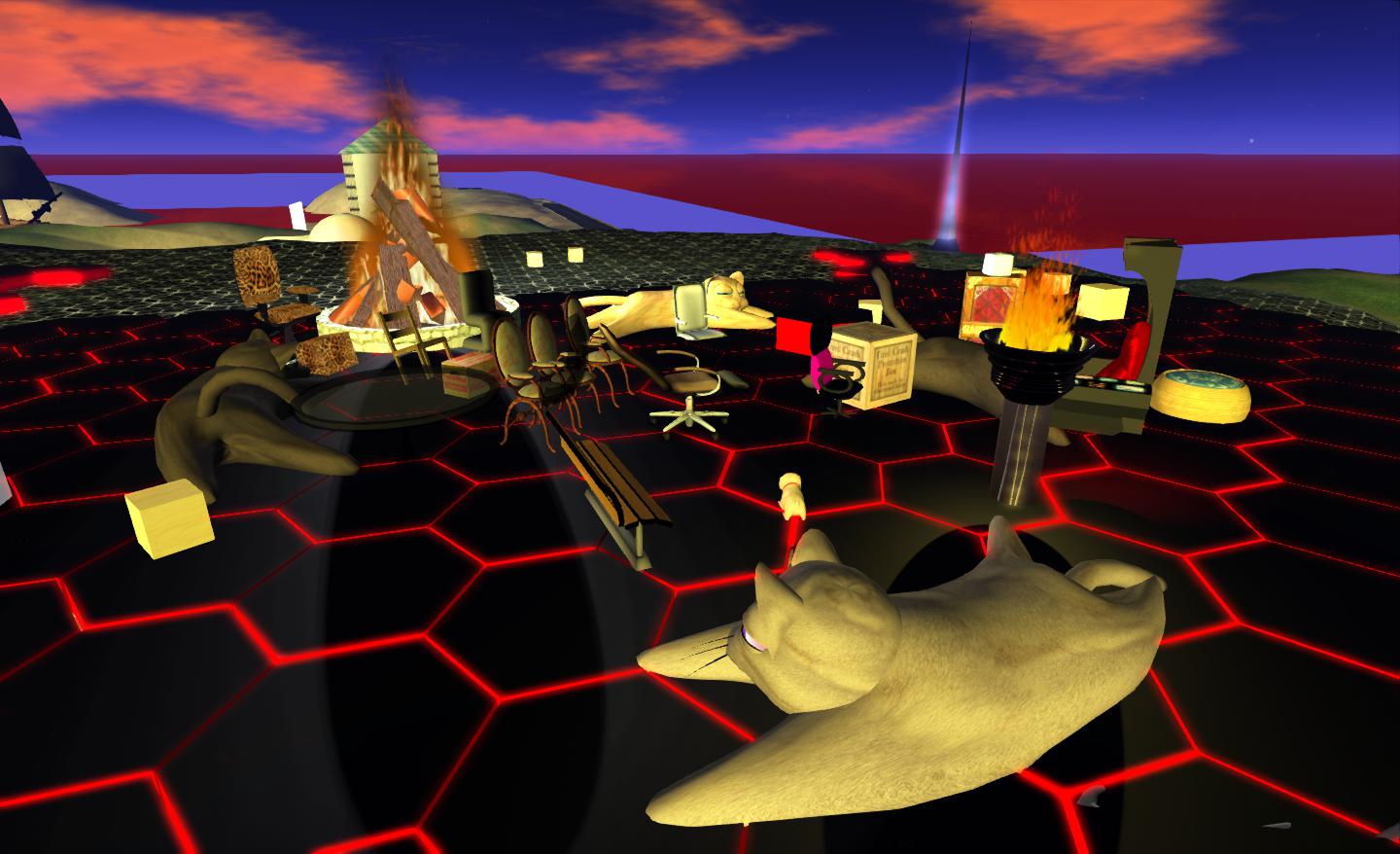
Oskar’s meeting place at Morris on Aditi.
Things got off to a rocky start; mid-way through the Beta UG meeting everyone received the royal order of the boot, and problems occurred attempting to log back in. It transpired that an SSL certificate had expired at LL’s end and had to be renewed (through until 2015). Even so, not everyone appeared to make it back (or at least, not with their primary accounts!). Maestro Linden did make it back with the rest of us, and immediately sought protection in a state-of-the-art anti-crash system from Ordinal Malaprop* created (or is that crated?). No amount of coaxing could get him out, either:
Darien Caldwell: you can come out of the box now Maestro. Crash is over ;p
Mæstro Linden (maestro.linden): I’ll come out when I feel safe 🙂
People getting back after the crash and finding we have a Maestro Linden-in the-box
The meeting also had some disruption from an unhappy camper or two complaining about bans. One of them made it back following the initial forced log-out, and as final preparations were made for the test, appeared to successfully crash the region. Shortly before this happened, concerns were raised that this individual may have been trying to disrupt the IRC test channel, as they appeared to be passing commands aimed at IRC in local chat (at one point a little later, a similar command appeared in the IRC channel, and I and a number of others were, coincidentally or otherwise, disconnected).
The testing itself proceeded pretty much as planned, with everyone logging-in to a specified region at more-or-less the same time, testing the network capabilities in handling a large number of log-in updates in a single region. From my perspective, this went well, and as one of the initial people to log-in, I didn’t appear to suffer from the kind of lag usually associated with moving around in a region where there are a large number of people arriving.
Following the en-masse arrival, we dispersed to two regions for a group chat load test. I cannot actually say how this went, as I arrived at my designated region, only to take three steps and crash (an issue at my end of the SL equation rather than anything else).
I made it back to participate in the IM tests, which comprised piling-on a mass of IMs to targeted avatars and then awaiting their reply. I think I was one of the first to IM and one of the last to get a reply, Again, not through any failure in the system, but simply because Pey’s Law affected the tester I was IMing – he replied on receiving my first message, but forgot to press ENTER to send :).
The final part of the test was a mass teleport to a specified region, again presumably to test how the network handled a large number of arrivials within a region. While this may have been a placebo effect from being on Aditi, the teleport itself seemed to me to be somewhat faster than is usual, with the progress bar merely flicking up on the screen and then vanishing as I arrived. Once, there I also found walking around with people people teleporting-in also did seem to be as prone to mini-freezes or stutters as can be the case. However, the load on the target region (selected at the last-minute due to problems with the intended destination) may have been lighter than hoped, as it had a cap of 21 on the number of avatars allowed into it, and a number of people did report they were unable to teleport-in as a result (there were probably around 40-50 listed on the IRC chat page).
Pile-on Test Medal
Overall the tests made for a fun social gathering, with a lot of good humour all around, and Oskar and his team apparently gathering the data they wanted.
Hopefully, there will be further follow-up on the overall intent of the tests and the results in an upcoming Sim / Server UG meeting. Oskar certainly appeared pleased with the outcome, and was on the main grid after the tests to hand out medals to the participants (providing they knew the sekrit password! 🙂 ).
* With thanks to DD Ra for pointing this out; I missed checking the creator details earlier.