Logos representative only and should not be seen as an endorsement / preference / recommendation
Updates from the week through to Sunday, January 22nd, 2023
This summary is generally published every Monday, and is a list of SL viewer / client releases (official and TPV) made during the previous week. When reading it, please note:
It is based on my Current Viewer Releases Page, a list of all Second Life viewers and clients that are in popular use (and of which I am aware), and which are recognised as adhering to the TPV Policy. This page includes comprehensive links to download pages, blog notes, release notes, etc., as well as links to any / all reviews of specific viewers / clients made within this blog.
By its nature, this summary presented here will always be in arrears, please refer to the Current Viewer Release Page for more up-to-date information.
Note that for purposes of length, TPV test viewers, preview / beta viewers / nightly builds are generally not recorded in these summaries.
Official LL Viewers
Release viewer: Maintenance P (Preferences, Position and Paste) RC viewer version 6.6.8.576863 Monday, December 12.
Release channel cohorts:
Maintenance R RC viewer, version 6.6.9.577678, released January 19- translation updates and the return of slam bits.
Maintenance (Q)uality RC viewer, version 6.6.9.577581, January 18, 2023.
Project viewers:
glTF / PBR Materials project viewer, version 7.0.0.577610, January 19, 2023 – Screen Space Reflections update + fixes. This viewer will only function on the following Aditi (beta grid) regions: Materials1; Materials Adult and Rumpus Room 1 through 4.
Where Our Journey Begins, November 2022 – blog post
The following notes were taken from
My audio recording and chat log transcript of the Content Creation User Group (CCUG) meeting held on Thursday, January 19th 2023 at 13:00 SLT.
Pantera’s video of the Third Part Viewer Developer (TPVD) meeting held on Friday, January 20th, 2023 at 13:00 SLT, embedded at the end of this article.
These meetings are chaired by Vir Linden, and their dates and times can be obtained from the SL Public Calendar; also note that the following is a summary of the key topics discussed in the meetings and is not intended to be a full transcript of all points raised.
Note, The TPVD meeting was abbreviated to 20 mins.
Official Viewers Status – TPV Meeting
Available Viewers
On Thursday, January 19th, 2023, the Maintenance R RC viewer was updated to version 6.6.9.577678 – translation updates and the return of slam bits.
On Wednesday, January18th, 2023:
The Maintenance (Q)uality RC viewer was updated to version on 6.6.9.577581 – new Debug settings UI, quality of life improvements.
The PBR Materials project viewer updated to version 7.0.0.577610, on January 19, 2023 – SSR support.
This viewer has been reported as “broken” when running on systems with AMD GPUs, a situation that was being investigation as these notes were being written.
This leaves the rest of the currently-available official viewer as:
Release viewer: Maintenance P (Preferences, Position and Paste) RC viewer version 6.6.8.576863 Monday, December 12, 2022.
Release Candidate viewers:
Performance Floater / Auto-FPS RC viewer, version 6.6.9.577251, January 4, 2023.
Project viewers:
Puppetry project viewer, version 6.6.8.576972, December 8, 2022.
General Viewer Notes
Vir pointed out that as Microsoft has ended support for Windows 8 on January 10th, 2023, it is no longer regarded as a supported operating system for running Second Life, and the viewer will not be tested against it (and the System Requirements page has been updated to reflect this, specifying Windows 10+ most recent service pack as the baseline supported Windows OS.
The second phase of the Github work in on-going, notably updating all the viewer build libraries.
Inventory Enhancement Project – Both Meetings
Linden Lab is looking to enhance the Inventory system.
The first element of this work is to be the addition of a fixed-resolution thumbnail preview capability, allowing users to see a small image of a given object (where this makes sense – so the likes of note cards and scripts would be excluded) within inventory, with these thumbnails either being of individual items or entire folders.
This work has now started, but it will be “some time” before there is anything user-facing to show.
A code contribution from Kitty Barnett (Catznip) for an inventory texture tool tip / preview may well be folded in to this work.
Once the thumbnail preview work has been completed, it is possible the Lab will look to further enhancements to inventory management. One future enhancement under consideration is support for folders to be included in the Contents inventory of individual objects.
glTF Materials and Reflection Probes – CCUG
Project Summary
To provide support for PBR materials using the core glTF 2.0 specification Section 3.9 and using mikkTSpace tangents, including the ability to have PBR Materials assets which can be applied to surfaces and also traded / sold.
To provide support for reflection probes and cubemap reflections.
The overall goal is to provide as much support for the glTF 2.0 specification as possible.
The project viewer is available via the Alternate Viewers page, but will only work on the following regions on Aditi (the Beta grid): Materials1; Materials Adult and Rumpus Room 1 through 4.
Screen Space Reflections (SSR) has now been integrated into the Project Viewer, (January 19th onwards), although work around this is still being finalised, notably mixed Reflection Probes with SSR.
Some fixing is required to the default colour curves in the viewer.
Stability issues have been noted on Intel integrated graphics hardware, and these are being investigated / fixed.
There have now been a total of two further weeks focused on optimising the viewer’s performance, and the results of this work should be available in the next update to the Project Viewer.
UI updates: the viewer will likely see some UI updates as it progresses:
The next update will likely include a new dedicated icon for on the Build floater for creating Reflection Probes.
The drop-down in the Build floater Textures tab (Currently Materials and Media on the release viewer, may be re-labelled for PBR (where it is Materials, Media, PBR) to more clearly differentiate between the current materials maps system and “new”” PBR materials.
Similarly, the new Materials Inventory folder in the Project Viewer may also be renamed to avoid the potential for confusion between the use of PBR materials assets and the current materials maps system.
Further, the menu option Build → Upload → Materials (in the Project Viewer) may be reamed to more clearly reflect it is for PBR materials, not material maps.
Exactly was terms will be used is TBD, but the general push (from LL’s perspective is to use meaningful lbeels on options and menus which can be Googled with some relevance by those wanting to know more about the underpinning file formats / standards, etc.
Work is going into messaging between the back-end and the viewer to ensure it will scale once the viewer starts to see widespread use.
In Brief
As the PBR Materials project is approaching a possible RC release, the questions has been asked as to what is next on the graphics front. While no formal decision has been made, options include:
A return to looking at adding something like Vulkan / MoltenVK (for OS X) API support alongside of the OpenGL API (which has been slated for deprecation by Apple and is growing increasingly long in the tooth). This work is being looked at more as a performance optimisation rather than a visual boost to rendering (e.g. allowing SL to be less CPU-bound and make more use of the GPU, reducing the volume of draw calls, etc.).
Further expansion of the glTF work to include mesh (and moving away from Collada .DAE), animations, etc. But again, no definitive plans / direction has been agreed within the Lab.
While there is a appetite at the Lab to support as much as the glTF 2.0 specification, some aspects will be excluded from the list – mentioned at the meeting were Setting the filter mode and sampler state of textures, both of which were described as “problematic” for implementation within SL.
Overhauling / updating support / options for ground textures.
The CCUG meeting saw a general discussion on animations, the skeleton and all that it involves (bones, attachment points, collision volumes, rigging, etc., and the rules / policies surrounding them, couched initially in the potential for expanding the skeleton / avatar system – for which there are currently no plans to do so beyond what has already been done.
Pivot points: (related to the above) past CCUG meeting saw some extended discussion on implementing pivot points on the skeleton, and LL indicated they would investigate this. Since then, it has become increasingly apparent that a node hierarchy would be beneficial and potentially easier to implement; ergo pivot points have been pulled into the pot for a future hierarchy project.
There is a known bug where Premium Plus users – who gain free texture uploads – are being charged for textures included in mesh uploads. An upcoming simulator-side maintenance update should correct this.
A request was made at the CCUG meeting to allow mesh uploads greater than the 64m single object size limit, to make it easier to import large structures / scenes without having to curt them into sections (and thus avoid potential issues in fit, scale, update, etc, and can result in Interest List related rendering issues).
LL is unlikely to change the limit, but would prefer to provide improved tools that can help content creators / scene builders.
One should tool discussed – which is currently not in development – is that of a “scene view” tool which identifies every individual instance of an object in scene, and provides a mechanism to allow (subject to permissions, obviously) them to be swapped-out to fix things like “broken” items / those for which there is an update / replacement.
The following notes were taken from the Tuesday, January 17th, 2023 Simulator User Group (SUG) meeting. They form a summary of the items discussed and is not intended to be a full transcript. A video of the entire meeting is embedded at the end of the article for those wishing to review the meeting in full – my thanks to Pantera for recording it.
Server Deployments
On Tuesday, January 17th 2023, the simhosts on the Main SLS channel were restarted with no deployment, leaving them on simulator version 576542.
On Wednesday, January 18th, 2023: the RC simhosts should receive two new simulator updates:
577628 – (Le Tigre RC Channel) an update for HTTP_CUSTOM_HEADER usage in llHTTPRequest(). Previously, a maximum of 8 custom headers were allowed, and each header had a hardcoded limit of 253 bytes. With this update, both of these limits have been removed; the only limitation is that the total custom HTTP header size must be under 4096 bytes.
The cryptographic signing utilities – potentially llHMAC (per BUG-233005) and llSignRSA and llVerifyRSA (per BUG-233009) had to be delayed due to “last minute snag” requiring a further look at the functions.
577595 – (Bluesteel and Magnum RC channels) contains stability improvements, fixes a few miscellaneous bug. It also fixes the bug preventing 30-second sound loops from being played back, and introduces new functions to the LSL API to allow for sound playback across any prim in a linkset. The new LSL functions include:
Maintenance (Q)uality RC viewer, version 6.6.9.577418, January 4, 2023.
Performance Floater / Auto-FPS RC viewer, version 6.6.9.577251, January 4, 2023.
Project viewers:
PBR Materials project viewer, version 7.0.0.577486, January 11, 2023.
This viewer will only function on the following Aditi (beta grid) regions: Materials1; Materials Adult and Rumpus Room 1 through 4.
Puppetry project viewer, version 6.6.8.576972, December 8, 2022.
In Brief
As well as the crypto signing noted above, there are a couple of new functions coming down the pipe dealing with cryptographic hashing which are described as being useful for things like JWT or other HTTP auth schemes:
It has been suggested that the server-side of Pathfinding might be in line for a re-visit, although no time frame for when this might be or what it might comprise has been determined as yet.
It is reported that llRequestAgentData(id,DATA_NAME); is failing with increased frequency (the issue was first reported in BUG-231884), with other request functions also reported as having issues (e.g. llRequestSimulatorData incorrectly reporting a region’s online status until the region is restarted). It’s not clear at this point in time what is causing these problems, but server-side caching errors might be the cause of some.
A request has (again) been made for the servers to have valid SSL certificates. A Jira has been filed on this, and the engineering team are going to try to get it moved forward with TPTB.
BUG-227303 “collisions makes a script stop running and revert its mono status”, is now described a “high on the list” of things to be addressed.
BUG-10442 “llGetHTTPHeader does not accept custom headers” has been raised as something to be addressed given the upcoming release of Simulator RC 577628.
BUG-233107 “Objects failing to render is happening more frequently of late” continues to be an issue, an might be occurring more frequently for some, and its priority has been raised.
BUG-233140 “LSL Feature Request: PSYS_PART_TEXTURE_ANIM” a feature request relating to animated particles has been raised and accepted. Whilst seen as a 2nice to have”, and something that might spark renewed interest at poking at the particle system (viewer performance permitting) – it generated interest and discussion at the meeting.
On Monday January 16th, 2023 (PDT), the Firestorm team released version 6.6.8 of their viewer.
This is another release which might be described as more a maintenance update, intended to keep Firestorm in step with the current official viewer code base, together with focus on bug fixes more than new features.
However, that said, there are some significant updates to be found in this release, both from Linden Lab (as with the incorporation of Legacy Profiles) and also from the Firestorm Team (notably the Mesh Preview Upload by Beq Janus).
So, without further ado, lets get into things and see what’s what. And please note that as per all my articles on viewer updates and releases, this is not a full blow-by-blow breakdown of absolutely everything in the release; rather, it is intended to highlight the more significant updates and fixes people are liable to find useful, and offer some general notes .
For a complete breakdown of changes, please see the official release notes for Firestorm 6.6.8.
Installation
There is no need to perform a clean install with this release if you do not wish to.
Do, however, make sure you back-up all your settings safely so you can restore them after installing 6.6.8.
Linden Lab Updates
Firestorm 6.6.8.68380 is fully merged up to the Linden 6.6.7 code-base, plus some cherry-picked items from upstream, per the notes below.
Hotfix Releases
MFA / ToS Hotfix, viewer version 6.6.7.576223, November 2022 – ensures the viewer correctly required a double-entry of MFA tokens on launching the viewer and on accepting a Terms of Service update.
Modal Hot Fix, viewer version 6.6.4.575022, September 2022 – correcting a crasher within the viewer code.
Fix for a transparency “alpha” blending issues in the above viewer release. In cases of many layers of textures that included transparencies, this would cause some of the lower layers to not render at all.
Improved reporting of spam and phishing attempts from the Group Chat and IM window with the addition of Report Abuse right-click option
Improved land sale option: when selling land, Sell land to “specific person” will show your own name in the “Near Me” list in the people picker – BUG-231954.
Ability to restrict media on a prim to this parcel via World → Parcel Details → Sound → Obscure MOAP – BUG-10416.
Media on a Prim fixes: media will no longer loop when it should not; audio for media no longer plays when the object is edited.
Fixed the Search floater opening without appropriate search results after performing a search from the NavBar
Fixed the “360 snapshot” floater not being refreshed after second clicking on the “World” → “360 snapshot” menu item.
Legacy Profiles
In 2022, Linden Lab made the formal transition back to present avatar profiles through an integrated floater within the viewer with the promotion of viewer version 6.6.3.574158 was promoted to de facto release status in August of that year (although the web-based version of profiles can still be accessed – with reduced functionality – via my.secondlife.com).
With Firestorm 6.6.8, Firestorm incorporates the Lab’s Legacy Profiles code into their existing Profiles floater, with some changes to the latter as noted below.
Firestorm Profiles floater: as it was (l) and as it is with Firestorm 6.6.8 (onwards) (r)
These tabs / options / buttons have been renamed, but the functions remain the same, unless noted below. Note that Interests has been removed.
The Web tab is renamed Feed and displays the user’s Second Life Feed (under my.secondlife.com).
2nd Life and 1st Life tab images:
The 2nd Life Profile picture has a revised aspect ratio.
Within your own profile: clicking the image swatch in either will open a texture picker, allowing you to select an image for either.
Within your own 1st Life tab are three buttons:
Upload Photo – allows you to upload an image from your computer to the 1st Life Tab to preview it (image must still be uploaded to inventory and applied, if it is to be saved & used).
Change Photo – opens a texture picker, allowing you to select an image from inventory to add to your 1st Life tab.
Remove Photo – removes any displayed image from the swatch.
Display Name / Multi-option button:
When viewing your own Profile, the tool button to open the Display Name edit fields is opened.
When viewing the Profile of a Friend, displays a pop-up with the following check-box options:
See when I’m online.
Find me on the world map.
Edit, delete or take my objects.
Note that active options will appear in white on the displayed profile, and inactive will appear greyed out, for eas of reference.
When viewing the Profile on a non-Friend, this area is blank.
Unknown: a new status option (alongside Online and Offline), displayed when the person concerned is not someone you have friended, and who has their viewer set to only show their on-line status to friends.
In addition, and to reduce drama, if a Friend is hiding their status, they will show as Offline, rather than the status in their Profile being blank.
Firestorm Updates and Improvements
Github Actions
Firestorm 6.6.8 is the first set of releases built through the GitHub Actions infrastructure rather than depending on individual developers. This is a significant shift in emphasis for viewer development – and one mirroring moves being made in the same direction by Linden Lab. Benefits include removal of single-person for feature development and providing a more reliable, repeatable build mechanism.
Building and Scripting – Local Mesh (Beta)
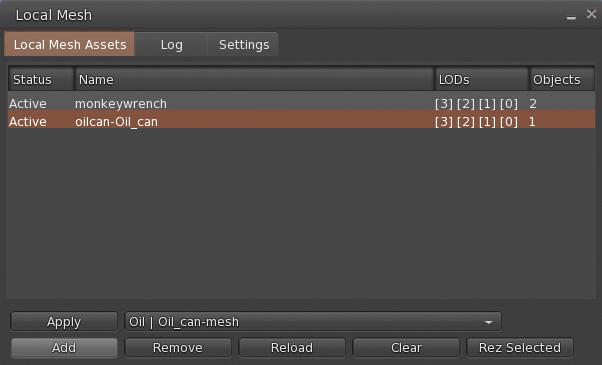
Firestorm 6.6.8 introduces Local Mesh as a beta implementation. Developed by Beq Janus, Local Mesh is intended to allow users able to upload mesh to preview their objects in-world (using a “surrogate” object, which can be as simple as a cube prim), and also see edits made to the .DAE file in real time.
The primary aim of this capability is to allow creators check their creations without having to go through the unpredictability of access to Aditi (the Beta grid) for such checks / tests, as well as presenting that real-time viewing of edits to the .DAE file.
The capability works for unrigged mesh, worn rigged mesh and Animesh, and once rendered, the object can have textures and materials applied for testing, as required.
Local Mesh follows the same basic principles as Local Textures, notably:
Meshes are only visible to you through the viewer instance used to apply them.
Meshes only remain visible to you during the current log-in session. A relog will both clear the list of Local Mesh Assets and reduce the “surrogate” object for any local mesh you have “rezzed” in-world to a basic shape.
Local Mesh is accessed via the Build menu: Build → Local Mesh, which in turn opens a new floater, comprising 3 tabs.
The Local Mesh floater. Credit: Beq Janus
Local Mesh Assets Tab
Displays the current list of .DAE files obtained from your computer which are available for potential rendering in-world to view. Objects are listed in the middle section of the tab, together with their assigned LODs. When more that one file is listed, the highlighted file name is the one that will be acted upon.
This tab includes the following buttons:
Add: opens a file picker and allows you to navigate to and select a .DAE file from your computer. When the file is selected and Open in the picker is clicked, the file is added to the list of available .DAE files.
Remove: will remove the highlighted .DAE file from the Local Mesh Assets list and should clears any corresponding in-world object.
Reload: Re-loads the selected file in the Local Mesh list and reapplies it to the Mesh object inworld so use this to applies the most recent edits to your .DAE file to your in-world object.
Clear: Reverts a selected Local Mesh object inworld to it’s normal state (so, if a cube prim was used, the object will revert to a cube).
Apply: if you have a suitable mesh in-world yo can select it and click this button to apply the properties of the file highlighted in Local Mesh Assets to it.
Rez Selected: will prompt you to rez a primitive in-world (via the Build floater, and then applies the properties of the file highlighted in Local Mesh Assets to the rezzed prim.
The Local Mesh workflow
Log Tab
Logging for Local Mesh
If the status of your Local Mesh file in the Local Mesh Assets list shows “Error” instead of “Active”, check the log for the cause of the error.
Settings Tab
Assume scale is in metres:- Ignore the cm scale units used by tools such as Maya,
LOD Suffixes: Choose a standard or manually edit
SL Standard – Lowest is LOD0, High has no suffix
Game Engine Standard – Unity.UES etc, Lowest is LOD3, High is LOD0
LOD names – English LOD names, Lowest is LOWEST, High is HIGH
Converting a Local Mesh to a Local Animesh
Right-click → Edit the required local mesh (in-world or worn).
Add your animations and control scripts to the object.
Select the Features tab in the Build floater and check the Animated Mesh option.
Additional Information
For a complete overview of Local Mesh functionality, please refer to Announcing Local Mesh, by Beq Janus, principal developer of the capability, and which can be found on her blog – which is a must-read for anyone interested in content creation and the technicalities of Second Life. In addition, the ? button of the Local Mesh floater will display web-based Help pages based on the floater tab in which the ? button is clicked.
Building and Scripting – General Updates
Build Floater:
Face selection cycle now starts at face 1 instead of face 0 – FIRE-32282.
Shift+clicking the link/faces button now includes the next face/link into the selection (Build → Select Elements → “Include next part or face” / “Include previous part or face”) – BUG-232757.
Physics updates:
Mesh physics options in mesh upload preview floater
The bounding box now sets a physics cube around the entire mesh even if it is multi part in the mesh uplaoder.
eshes with a hull based (non triangle) user physics will not be convexified when scaled to below 0.5m – BUG-232869 and FIRE-32359.
Animation upload preview on own avatar should no longer fail when the Firestorm AO is enabled – FIRE-32315.
Logos representative only and should not be seen as an endorsement / preference / recommendation
Updates from the week through to Sunday, January 15th, 2023
This summary is generally published every Monday, and is a list of SL viewer / client releases (official and TPV) made during the previous week. When reading it, please note:
It is based on my Current Viewer Releases Page, a list of all Second Life viewers and clients that are in popular use (and of which I am aware), and which are recognised as adhering to the TPV Policy. This page includes comprehensive links to download pages, blog notes, release notes, etc., as well as links to any / all reviews of specific viewers / clients made within this blog.
By its nature, this summary presented here will always be in arrears, please refer to the Current Viewer Release Page for more up-to-date information.
Note that for purposes of length, TPV test viewers, preview / beta viewers / nightly builds are generally not recorded in these summaries.
Official LL Viewers
Release viewer: Maintenance P (Preferences, Position and Paste) RC viewer version 6.6.8.576863 Monday, December 12.
Release channel cohorts:
No updates.
Project viewers:
glTF / PBR Materials project viewer updated to version 7.0.0.577486 on January 11, 2023.
Puppetry demonstration via Linden Lab – see below. Demos video with the LL comment “We have some basic things working with a webcam and Second Life but there’s more to do before it’s as animated as we want.”
The following notes have been taken from chat logs and audio recording of the Thursday, January 12th, 2023 Puppetry Project meetings held at the Castelet Puppetry Theatre on Aditi. These meetings are generally held on alternate weeks to the Content Creation User Group (CCUG), on same day / time (Thursdays at 13:00 SLT).
Notes in these summaries are not intended to be a full transcript of every meeting, but to highlight project progress / major topics of discussion.
Project Summary
General description of the project and its inception:
LL’s renewed interest in puppetry was primarily instigated by Philip joining LL as official advisor, and so it really was about streaming mocap. That is what Philip was interested in and why we started looking at it again. However since Puppetry’s announcement what I’ve been hearing from many SL Residents is: what they really want from “puppetry” is more physicality of the avatar in-world: picking up objects, holding hands, higher fidelity collisions.
As a result, that is what I’ve been contemplating: how to improve the control and physicality of the the avatar. Can that be the new improved direction of the Puppetry project? How to do it?
Leviathan Linden
Previously referred to as “avatar expressiveness”, Puppetry is intended to provide a means by which avatars can mimic physical world actions by their owners (e.g. head, hand, arm movements) through tools such as a webcam and using technologies like inverse kinematics (IK) and the LLSD Event API Plug-in (LEAP) system.
Note that facial expressions and finger movements are not currently enabled.
Most movement is in the 2D plain (e.g., hand movements from side-to-side but not forward / back), due to limitations with things like depth of field tracking through a webcam, which has yet to be addressed.
The back-end support for the capability is only available on Aditi (the Beta grid) and within the following regions: Bunraku, Marionette, and Castelet.
Puppetry requires the use of a dedicated viewer, the Project Puppetry viewer, available through the official Second Life Alternate Viewers page.
No other special needs beyond the project viewer are required to “see” Puppetry animations. However, to use the capability to animate your own avatar and broadcast the results, requires additional work – refer to the links below.
This project is taking in a lot of additional ideas – animation standards, improving the current animation system, enabling truer avatar / avatar and avatar object interactions such that it is likely to evolve into a rolling development, with immediate targets for development / implementation as they are agreed upon, to be followed by future enhancements.
As such, much of what goes into the meetings at present is general discussion and recommendations for consideration, rather than confirmed lines o development.
There is a Puppetry Discord channel – those wishing to join it should contact members of LL’s puppetry team, e.g. Aura Linden, Simon Linden, Rider Linden, Leviathan Linden (not a full list of names at this time – my apologies to those involved whom I have missed).
Bugs, Feature Requests and Code Submissions
For those experimenting with Puppetry, Jiras (bug reports / fixes or feature requests) should be filed with “[Puppetry]” at the start of the Jira title.
See: OPEN-375: “LSL Functions for reading avatar animation positions”.
Rider Linden is starting to look at LSL integration – the first step being to make the simulator aware of what is actually animating.
Currently, the code he has developed lets the server know the position of an avatars attachment points; this sends details of 55 points (HUD points excepted). Attachment points have been selected over bones, as the simulator already has a solid concept of attachment points, and it avoids complications with rigged meshes “doing their own thing” with bone positions.
A concern with this is the number of updates being sent to the server for processing.
One idea is to refine the the code so that only the attachment points which change relative to the avatar centre (avatar frame/Local Position relative to the avatar) actually send information to the server, in order to reduce the number of updates being generated.
Another idea might be to only send updates every n frames, rather than every frame. This would reduce the fidelity of movement, but could still provide sufficient data while reducing the load on the simulator, particularly where multiple avatars in a region are using puppetry.
This issue is related to synchronising puppetry actions across multiple viewers as well; a long-standing issues, given that animation playback of animations is viewer-side, and not genuinely across viewers (the resync function found in some TPVs only does so locally).
All of the above lead to a discussions of ways and means to best allow LSL integration with animations and ensure a reasonable transmission of results together with decent synchronisation between the viewer and the simulator, whether by frame count or time stamp, in order to ensure predictability of results across multiple viewers. .
In addition, the discussion included the advantage in enhancing Second Life to support procedural animations as well as the current canned animations.
Rider is also looking into a script enhancement to register collisions.
There was some conflating of ideas during the discussion – immediate first steps in opening Puppetry to LSL, and more far reaching goals – setting position, registering collisions (per the above), defining better interpolation for positioning (e.g. as defined in the Khronos glTF specification), etc., which caused a degree of confusion.
However, the openness towards making Puppetry a good foundation for future enhancement (such as moving more to procedural-based animations, enabling SL to support “industry standard” animation workflows to encourage animators into the platform, etc., remains, together with (hopefully) enabling more realistic avatar / avatar and avatar / object interactions.
That said, Simon Linden did offer a not of caution to all discussing the work:
Not to pop the bubble, but every one please keep in mind all the stuff we’re talked about is experimental and really interesting. I have no idea what we can make into real features and what can work with crowds and all the other interesting problems to make it happen well – we’ll see what we all can do this year 🙂



 On Monday January 16th, 2023 (PDT), the Firestorm team released version 6.6.8 of their viewer.



 Inara Pey: Living in a Modemworld