Avatar Baking: “and the clock has started!”

Update, April 6th, 2013: Please also see my updated status report.

The new avatar baking project took a step closer on December 14th, as LL started to release more in the way of technical details on the project and launched a project viewer.
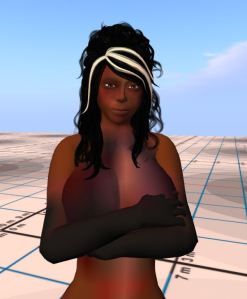
Avatar bake fail
Avatar bake fail

Code-named Project Sunshine, and a part of the Shining Project, this work is aimed at improving avatar baking and at eliminate bake fail issues.

The project represents a sizeable change in how Second Life works, and as such will take time to fully implement, requiring extensive changes to the viewer itself – something which Nyx Linden has previously referred to as, “Some pretty scary viewer re-architecting”, as well as a good part of the back-end services – hence why it has taken so long for the project to mature. Because of the degree of changes taking place, Linden Lab have consistently promised, via Oz Linden, that TPV developers would some eight weeks notice prior to any initial deployment of the new service in order for them to ensure they can integrate the required viewer-side code changes, test them, and ensure they can support the new service.

Speaking at the TPV Developer meeting on Friday 14th December, Oz reiterated the 8-week lead time before adding, “Today begins the clock! … You get at least two months from now before we begin rolling server-side baking out to the main grid, at least beyond a test region or two.” So while the precise timescale as to when the new baking service will start to appear on the main (Agni) grid remains open, TPVs can now start to engage in the project, a step which itself brings it one step closer to reaching the grid.

A Quick Recap: How It Is and How It Will Be

Currently, avatar baking is essentially driven from the viewer. In summary (and without drilling too much into detail), this means that when a system layer outfit or item of clothing is changed (including alpha layers), the updates are applied locally in the user’s viewer. They are then uploaded to the server the user is connected to, which then passes the updates out to the other viewers connected to it, so that other users get to see the change as well. This process has several points of potential failure: communications between the viewer and the server may be interrupted, for example, with the result that the server doesn’t receive all the information pertaining to an outfit change, with the result that  – again as just one example – the user sees their avatar perfectly fine, but others see the avatar as blurred / grey. In some instances, the process can fail such that while the user sees their avatar wearing the desired outfit, other see the same avatar still wearing the “old” outfit.

The new service will hopefully eliminate these issues by moving much of the emphasis for the baking process from the viewer to a new “Texture Compositing Service”. The viewer will retain some elements involved in avatar baking – the actual baking of the avatar shape (i.e. shape values and IDs) will still take place on the viewer side, for example. However, the new compositing service will take over most the donkey-work and handle the majority of avatar baking data and communications (excluding prim-based attachments).

As with many of the new services being introduced into Second Life by LL, the new baking service will be HTTP driven (the current system is UDP protocol based) which should have an additional benefit of speeding up the entire avatar load process when logging-in to SL and in fetching textures.

How the entire process should work can be summarised as follows:

  • The new service will use the Current Outfit folder as its viewer-side driver. This means that in order to use the service a viewer must have the Current Outfit folder properly implemented
  • When a rebake request is due (e.g. after a user has finished editing their appearance) the viewer sends a message to the baking service essentially asking it to look at the contents of the viewer’s Current Outfit folder and then return an updated appearance based on the contents of that folder
  • At the same time as the data is returned to the user’s viewer, it is also sent to the simulator to which the user’s viewer is connected, so that the simulator can send the appearance information to all other viewers connected to it.

To further TPV developers understand the new system and answer their questions,  Nyx Linden dropped by the TPV developer meeting on Friday 14th December. Note that what follows is an overview of Nyx’s discussion from the point-of-view of providing digestible information on the new service for “general” users, rather than a in-depth review of the full technicalities of the system and Q&A session.

Nyx linden discusses server-side baking at the TPV Developer meeting, Friday 14th December

Please use the page numbers below to continue reading this article

Calling all Phoenix users

PhoenixJessica Lyon has announced she and the Phoenix  / Firestorm team will be holding an Office Hour meeting, and all users are invited. Jessica is particularly keen to have users on Phoenix attend the meeting, commenting:

Everyone is invited and encouraged to attend but I especially want to see Phoenix Viewer users in attendance as the primary topic will be about Phoenix and its future. I also would like to see all you angry people who have been flaming and hating on us in our blog comments. I’d like to address your complaints so please at least be on the stream if you can. 

Because the lack of Phoenix Viewer development and in fact the future of the Phoenix Viewer itself needs to be discussed and your questions/concerns need to be addressed.

Firestorm users are also obviously welcome.

Event Details

Those wishing to attend / join the stream are advised to turn up around 30 minutes ahead of the meeting. As there are limited slots for both the in-world event and the stream, it would be advisable if those attending the event don’t also run the stream, as this could prevent others who are unable to get in-world from watching and listening on-line.

The event will be recorded for future playback.

SL project news: week 50/1: Server, JIRA, mesh and Shining

Server Deployments

Due to the offline e-mail issue involving scripted objects, as reported in my last news update, there has been no Main Channel deployment this week. Two RC deployments are currently planned for Wednesday 12th December, however. These are:

  • BlueSteel and LeTigre: should receive the same maint-server project that rolled to Magnum in week 49, with bug fixes arising from that deployment. The release notes are available for review
  • Magnum should receive a superset of the changes scheduled for BlueSteel and LeTigre, which includes extra bug fixes, including stability improvements and a memory leak fix.  
    • The only new feature new to Magnum is an increase in the allowed animation asset size – the 60KB size limit on animation assets has been raised to 120KB. This change is to allow for longer and more complex animations to be made in the future, once an viewer-side update to allow 60-second animation loops has been implemented. Magnum’s release notes can be read here.
So be sure to read them :-) (with thanks to Whirly Fizzle for the link)
So be sure to read them 🙂 (with thanks to Whirly Fizzle for the link)

Update on Key Region Issues

Physics Memory / Region Performance

As reported last time, the physics memory issues affecting some regions, which I reported in week 47, had been tracked down by Simon Linden to a Havok issue related to navmesh rebakes. His fix for this problem cleared QA and forms a part of the RC deployments for the 12th December, together with a fix for a low-level threading problem within the simulator code which has also been causing region crashes.

Offline IMs from In-world Objects Failing to Forward to E-mail

This issue, linked to llInstantMessage(llGetOwner(), caused the RC deployments in week 49 to be rolled back on Thursday 6th December. A fix has been developed and tested and is included in all three RC deployments planned for Wednesday 12th December.

Code Freeze / No Change Windows

Again, to re-iterate from my last report, there will be no server-side code changes over the holiday period as follows:

  • Week 52  – commencing Monday December 24th
  • Week 1, 2013 – commencing Monday December 31st

Simon Linden still hoped that one of the code being deployed to the RC channels this week can be rolled to the Main Channel in week 51. There will likely be a further update on this following the Thursday Server Beta UG.

JIRA / Bug Tracker Update

Linden Lab are still mulling the September closure of the old public JIRA system. Since the initial shut-down, things have opened up a little. Additional JIRAs have been left open as read only beyond the initial triage, while others have been opened and have had their comments enabled in order to allow feedback – such as the CHUI JIRA, which is being very constructively used for comments and feedback and shows how, in an ideal world, the system might work.

Currently, it appears that “nothing definitive” has been decided on the change, although it has been under internal discussion.

Feedback from those in the two JIRA support groups (developers who have significantly contributed code and those who have in the past supplied significant support in handling JIRAs) has been interesting. It appears that the number of feared duplicates on issues has been a lot smaller than had been feared. The overall quality of input given using the new form also appears to have been significantly improved since it was introduced.

Continue reading “SL project news: week 50/1: Server, JIRA, mesh and Shining” →

Viewer release summary 2012: week 49

This summary is published every Monday and is a list of SL viewer / client releases (official and TPV) made during the previous week. When reading it, please note:

  • It is based on my Viewer Round-up Page, a list of  all Second Life viewers and clients that are in popular use (and of which I am aware) and which are recognised as adhering to the TPV Policy
  • By its nature, this summary will always be in arrears
  • The Viewer Round-up Page is updated as soon as I’m aware of any releases / changes to viewers & clients, and should be referred to for more up-to-date information as the week progresses
  • The Viewer Round-up Page also includes comprehensive links to download pages, blog notes, release notes, etc., as well as links to any / all reviews of specific viewers / clients made within this blog.  

Updates for the week ending: 9 December, 2012

  • SL Viewer updates:
      • Beta version rolled to 3.4.3.267755  on December 5 – core updates: GPU table updates; snapshot tiling bug fix – release notes
      • Development rolled to 3.4.3.267614 on December 4
  • Dolphin rolled to 3.4.5.26752 – core updates: changes to graphics setting to reflect latest updates from LL reflecting the underlying changes to how graphics cards are grouped into classes; “rebake region” button moved into a menu option in Build/Pathfinding; adds fix for edge-on rotation always behaving as if “snap to grid” is enabled; columns in the Area Search floater can now be properly resized; IM tabs can now be vertically stacked in the Conversations floater – release notes
  • Firestorm rolled to a FULL release – 3.4.1.31155 on December 3 core updates: too many to mention; please see the release notes and my view  (beta release review here)
  • Kukua Beta rolled to Kokua Beta 3.4.2.25211 on December 5 and then to 3.4.3. on December 9 – no release notes available, but appears to be merged with latest LL beta release, including tiling bug fix; also back-out of Opensim texture fetch spamming issue, see here for details
  • Cool VL updates:
    • Stable branch rolled to 1.26.4.42 and Experimental branch rolled to 1.26.5.22, both on December 8 – core updates: shared media implemented; updated and improved fast timers; additional nVidia GPU support added in line with LL’s updates; crash fixes including port from Firestorm for some notecards no auto-opening and reversion of Gimbal Lock Fix to present crashes; code clean-up and optimisations
    • Release notes
  • Lumiya rolled to 2.3.3 on December 5 – core updates: improved texture support incl. terrtain texture rendering; HUD support; flying controls in 3D world view; copy chat / avatar keys to clipboard; clear cache option; restart sim option for land owners; device LED support; assorted fixes – release notes; latest review
  • Libretto – removed from round-up page due to website being unavailable and client removed from the SL Third-party Viewer Directory.

Related Links

SL project news week 49

SL Viewer Updates

Things have been relatively quiet viewer-wise with only two updates to the official viewer branches. The development viewer rolled to 3.4.4.267614 December 4th, while on December 5th, the beta viewer rolled to 3.4.3.267755. The latter included a good crop of updates, including a number of graphics and GPU support related changes, and the long-await snapshot tiling fix.

Rough the same image shot using the new beta viewer at the same resolution  - no tiling line (click to enlarge)
The MAINT-628 fix in action: an image taken with the latest beta viewer running in deferred mode and at a resolution of 3500×2154 pixels, well above the 1400×900 of my monitor – and no tiling! There are limits to how well the fix works at ultra-high resolutions, as noted in the JIRA comments included in my report on the release.

Server Deployments

Following-on from last week’s RC deployment issues, there was no main channel deployment on Tuesday December 4th, although a number of regions were restarted during the course of the day.

Wednesday December 5th saw the same maintenance release rolled to all three RC channels. This comprised the release originally aimed at Magum in week 48 and which included all bugs fixes for the problems which required the roll-back on Thursday 29th November. Initial statistics for this update during the brief time it was available last week showed a clear improvement in stability, and this seems to have continued with this week’s release, although there has been one major issue come to light and is under investigation.

This relates to IM messages sent by scripted objects failing to trigger e-mails to the object’s owner if they are off-line. The problem appears to be related to the use of llInstantMessage(llGetOwner(), and appears to affect regions on all three RC channels, but not every case where llInstantMessage(llGetOwner() is used appears to be affected.

Currently, it is thought that a fix will be available for deployment during week 50, and should reach the RC channels om Wednesday December 11th.

Details of the week’s RC release can be found in the release notes and in the forum discussion thread (including some discussion on the current scripted object / e-mail issue).

Continue reading “SL project news week 49” →

Lumiya 2.3.3: bringing texture to your world

lumiya-logoDecember 5th sees a further update to Lumiya, with the release of version 2.3.3.

Over the course of the last year Lumiya has developed from a basic text client into a app which rivals the viewer in terms of its capabilities – 3D rendering, avatar rendering, inventory access and management, outfits, touch, pay, OpenSim support. What’s more, all this has been ahieved in less than a year; it’s an incredible testament to Alina Lyvette’s abilities and determination to develop a functional, credible mobile client for virtual worlds like Second Life.

With version 2.3.3, Alina again raises the bar with a host of new features, as well a a number of fixes and updates:

  • Texture updates, including textured terrain in 3D view and option high-quality textures
  • Flying controls in 3D view
  • HUD support
  • “Clear cache” option in settings
  • Chat messages and user keys can be copied to clipboard
  • Option to restart sim for land owners
  • Configurable LED blinking for notifications
  • NEON-optimized code for texture decompression

Textures

The first big update with Lumiya 2.3.3 is textures and texture handling. First and foremost, Lumiya will now render ground textures in the 3D view, something which immediately increases the attractiveness of outdoor scenes when rendered.

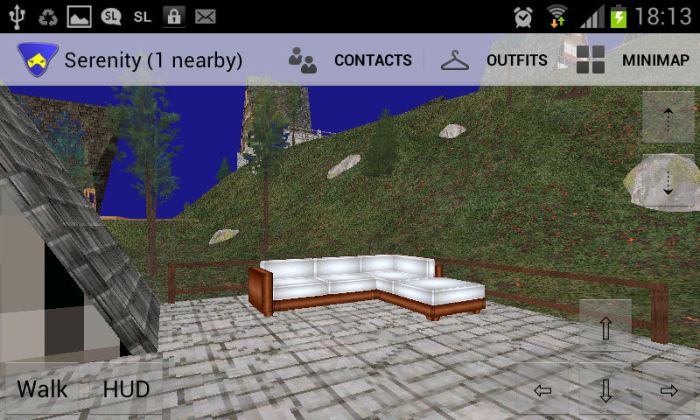
We haz teh grass! Lumiya now displays terrain textures

Lumiya also includes a number of configurable texture options available through the 3D View section of Settings (tap the menu button on your device, then tap Settings). These are:

  • High Quality Textures: toggles the high quality option on and off – this can put a device’s GPU under considerable stress and lead to extended rezzing times
  • Texture Memory Limit: set the maximum limit your device can use for textures from a set of four defaults: 32MB, 64MB, 128MB and 256MB. Note that Android can limit GPU memory use to 128MB, so using the 256MB may cause problems on some devices, including locked the application completely
  • Concurrent Texture Downloads: set how many textures can be downloaded concurrently (2, 4, 8, or 16)
  • Terrain textures: toggle the terrain texture rendering on / off.

Flying Controls

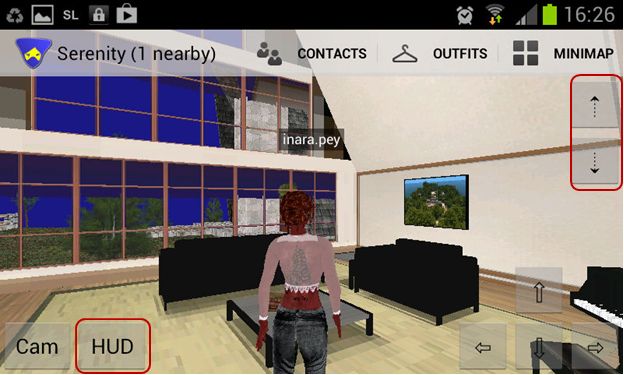
Lumiya 2.3.3 sees three new buttons appear on the 3D world view, two of which (in the top right corner of the screen) allow you to fly, as with a full viewer. Tap the UP arrow key to start flying / fly up, and the DOWN arrow to descent / land. Fly forwards / backwards using the movement keys in the lower right corner of the screen.

The new Fly buttons (top right) and HUD access button

When you start flying, a STOP FLYING button is displayed. One being tapped, it does precisely what it says: stops you flying – complete with the traditional falling animation as well!

Continue reading “Lumiya 2.3.3: bringing texture to your world” →