SL project updates week 17/1: server, viewer, Avatar Complexity

221B Baker Street; Inara Pey, April 2015, on Flickr 221B Baker Street, circa 2012-2015, as seen in the BBC’s series Sherlock – and in Second Life – blog post

Server Deployments, Week 17

As always, please refer to the server deployment thread for the latest updates.

  • On Tuesday, April 20th, the Main (SLS) channel received the server maintenance package deployed to all three RC channel in week #16, which comprises internal server logging changes and new flags for llGetObjectDetails()
    • OBJECT_BODY_SHAPE_TYPE – returned list entry is a float between 0.0 and 1.0. Anything > 0.5 is male, otherwise female; -1.0 if the avatar is not found
    • OBJECT_HOVER_HEIGHT – returned list entry is a float, -1.0 if the avatar is not found.
  • There will be no deployment or restart on the three RC channels on Wednesday, April 22nd.

This means there will be no Main channel roll in week #18, but there should be a new RC update, although this is still being worked on.

SL Viewer

The Avatar Layer Limits RC viewer updated to version 3.7.28.301019 on April 20th. This viewer allows users to wear up to 60 wearable layers (jackets, shirts, tattoo, alpha, etc.) in any combination and any number per layer up to the overall maximum of 60, rather than each individual layer being limited to a maximum of 5 items.

The Tools Update RC viewer has been performing very well since the last update (April 15th), and there has been something of a debate in the Lab as to whether or not to promote it to the de facto release viewer. While there is no hard-and-fast rule about when an RC is promoted to release status, very often the Lab prefers to leave two weeks between releases unless something is urgently required. Sticking to this would mean the viewer won’t be promoted until week #18 (week commencing Monday, 27th April); however we’re still early in the week, and things might change.

Viewer Managed Marketplace Beta

The Viewer-Managed Marketplace (VMM) officially started an open beta test on the main grid, which is scheduled to last for about a month for details see:

Avatar Complexity

Avatar Complexity is the term the Lab has settled upon for the upcoming functionality which provides greater control to user to define how other avatars are rendered in their world-view.

The idea is that as avatars can often be the single biggest impact on the viewer in terms of rendering, particularly in crowded places, so  Avatar Complexity will present a means by which avatars which require a load of render processing by your GPU can be rendered as a solid colour instead, which should help with performance on lower specification systems. Due to their solid colours, avatars rendered in this way have already been dubbed Jelly Babies or Rainbow People.

At the Open-source Developer’s meeting on Monday, April 20th, Oz Linden explained that “Avatar Complexity” has been chosen for the name of the capability to distinguish it from avatar imposter rendering, which will remain in the viewer alongside Avatar Complexity when it arrives. The difference between the two can be summarised as:

  • Avatar impostor rendering is a simplified and less frequent rendering of avatars further away from you, while those close to you remain fully rendered
  • Avatar Complexity renders any avatar exceeding the value set within your viewer as a single, solid colour, regardless of the avatar’s distance from you.
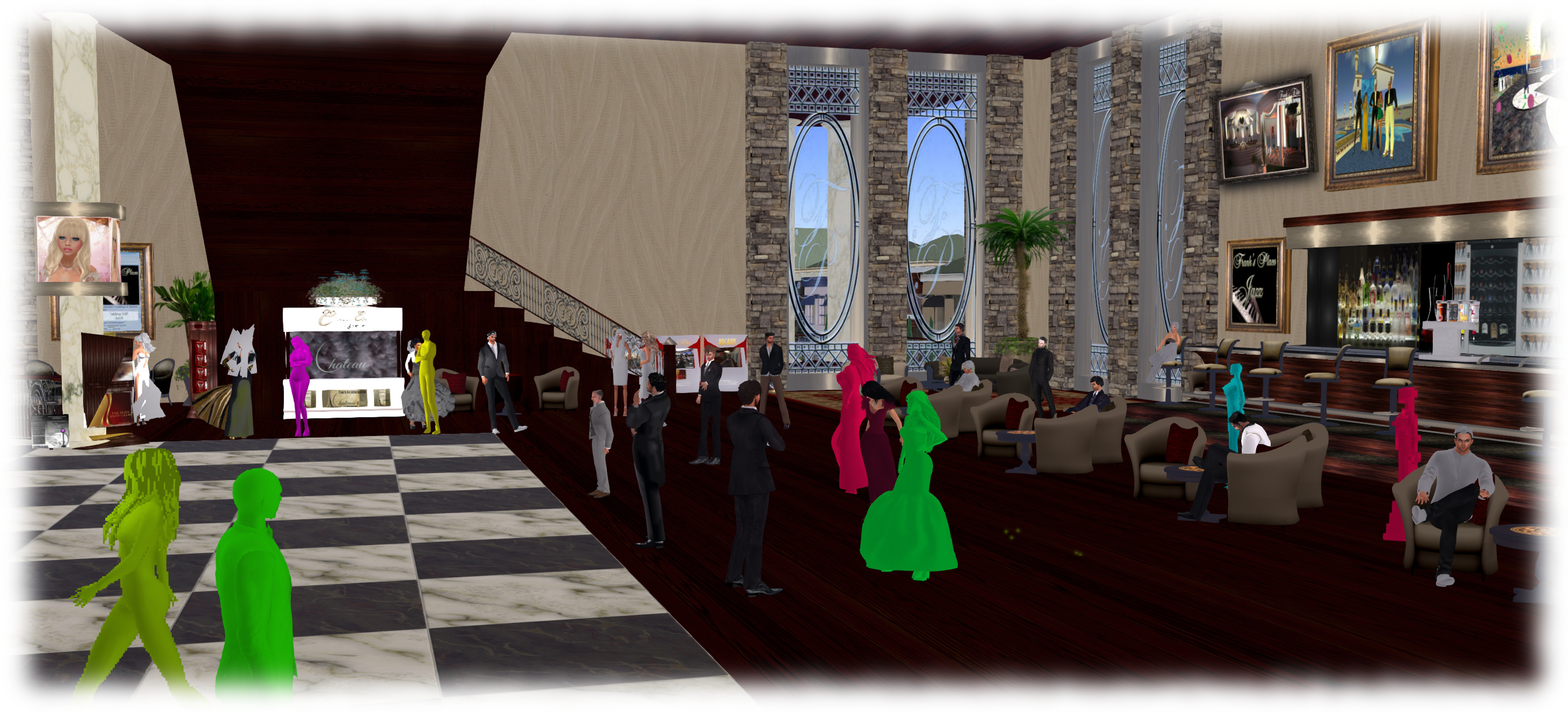
Avatar complexity is intended to help those who may hit performance issues as a result of their GPU struggling to render complex (hight render cost) avatars, by rendering such avatars as solid colours.

Oz further indicated that Avatar Complexity will be managed via the Advanced panel in Preferences > Graphics, and will initially be enabled / disabled in the official viewer based on your GPU’s benchmark (the value use to determine the viewer’s default graphics settings when first installed). Some TPVs may opt to leave the capability disabled by default (once the code is available for inclusion in TPVs), and allow users determine whether they wish to use it or not.

Currently, work at the Lab is focusing on a couple of aspects of the functionality:

  • Toning down the colours used by the viewer when rendering avatars in this way – as the functionality can currently be tested via two debug settings within the viewer, there have already been strong criticisms of that “Jelly Baby” rendering on account of the brightness of the colours
  • Server support is being added to pass on the counts of avatars that are and are not rendering to those using Avatar Complexity.

It is also probable that before the capability appears in a project viewer, it will also be set to  display notifications when you change your own complexity, and when the number of avatars not rendering you changes.

If you wish to experiment with the settings are they are at the moment, go to Advanced > Debug Settings and type-in RenderAutoMute. Select RENDERAUTOMUTEFUNCTIONS and set it to 7, then experiment with values under RENDERAUTOMUTERENDERWEIGHTLIMIT (start with 100,000, and increase or decrease it to alter the number of avatars around you rendered as solid colours (lower values = more avatars rendered as colours).

2015 viewer release summaries: week 16

Updates for the week ending: Sunday, April 19th, 2015

This summary is published every Monday, and is a list of SL viewer / client releases (official and TPV) made during the previous week. When reading it, please note:

  • It is based on my Current Viewer Releases Page, a list of all Second Life viewers and clients that are in popular use (and of which I am aware), and which are recognised as adhering to the TPV Policy. This page includes comprehensive links to download pages, blog notes, release notes, etc., as well as links to any / all reviews of specific viewers / clients made within this blog
  • By its nature, this summary presented here will always be in arrears, please refer to the Current Viewer Release Page for more up-to-date information.

Official LL Viewers

  • Current Release version updated to version 3.7.27.300636 on April 13th (formerly the Maintenance RC viewer) download page, release notes
  • Release channel cohorts (See my notes on manually installing RC viewer versions if you wish to install any release candidate(s) yourself):
    • Experience RC viewer updated to version 3.8.0.300963 on April 17th – provides support for viewing and managing Experiences and for contributing content for Experiences (download and release notes)
    • Tools Update project viewer updated to version  3.7.28.300918 on April 15th – builds Windows and Mac viewers using the new tool chain and autobuild process and also incorporates the revised viewer log-in screen (download and release notes)
  • Project viewers:
    • Attachment fixes project viewer (Project BigBird) updated to version 3.7.28.300856 on April 17th – core updates: a number of fixes for various attachment issues (download and release notes)
    • Viewer-managed Marketplace project viewer updated to version 3.7.28.300920 on April 16 – allows Merchants to manage inventory associated with Marketplace Listings from within the viewer + sale of items which Merchants do not have the right copy will now be supported with the Direct Delivery purchase mechanism (download and release notes)

LL Viewer Resources

Third-party Viewers

V3-style

  • UKanDo Viewer updated to version 3.2.27.28099 on April 16th – core updates: parity with LL 3.7.27 code base and RLV 2.9.8 (release notes)

V1-style

Mobile / Other Clients

  • No updates.

Additional TPV Resources

Related Links

SL project updates week 16/1: server, viewer updates, misc

The City Skyline - Remnants of Earth
The city – Remnants of Earth – blog post

Server Deployments Week 16

As always, please refer to the server deployment thread in the forums for the latest information and updates.

On Tuesday, April 14th the Main (SLS) channel was updated with the server maintenance package previously deployed to all three RC channels. This comprises a crash fix, minor CDN configuration updates and an internal server configuration update.

On Wednesday, April 15th, all three RC channels should receive a new server maintenance package, which comprises internal server logging changes and new flags for llGetObjectDetails()

  • OBJECT_BODY_SHAPE_TYPE – returned list entry is a float between 0.0 and 1.0. Anything > 0.5 is male, otherwise female; -1.0 if the avatar is not found
  • OBJECT_HOVER_HEIGHT – returned list entry is a float, -1.0 if the avatar is not found.

SL Viewer Updates

The Maintenance RC viewer, version 3.7.27.300636 was promoted to the de facto release viewer on April 13th. The viewer contains multiple fixes and improvements, as detailed in the release notes.

This release also includes the fix for the URI parsing error, which was originally issued in the HeatWave RC viewer (formally version 3.7.27.300424, which has been withdrawn from the release channel as a result.

Webkit Replacement, Flash and Quicktime

As I’ve reported on a number of occasions, Webkit is a third-party library which has been used within the viewer for a number of media-related tasks (powering the built-in web browser, displaying profiles, and is used with MOAP  and many in-world TVs). However, it has been something of a problem for the Lab,  with out-of-date libraries and other issues.

Because of this, there is a project under-way in the Lab to replace webkit with the Chrome Embedded Framework (CEF). Work on this within the Lab has been progressing, and they now have CEF working with the windows version of the viewer, and are now focusing on getting it working on the Mac version.  There are no plans to release a test or project viewer with CEF support until it is running on both platforms (it is thought that Linux will be able to use the Mac version).

Avatar Complexity (RenderAutoMute Functions)

The new rendering controls will allow users to set a level above which avatars will be rendered as a solid colour
The new rendering controls will allow users to set a level above which avatars will be rendered as a solid colour “jelly baby”

In week #47. 2014, I reported on how the Lab is working to give greater control to users over how other avatars are rendered in their own view.

Avatars can frequently have very high render costs associated with them which, even in modestly populated areas, can have a detrimental impact on viewer performance on lower specification hardware.

The idea with the new, still-to-be-released functionality is that users will be able to define a render weight for their viewer when drawing avatars. Any avatar that exceeds this limit will be rendered as a solid colour “imposter”, regardless as to how near / far they are from a person’s viewpoint.  Thus, the rendering load is reduced, improving overall performance.  Because of the solid colour aspect of the avatars when rendered in this way, they were somewhat quickly dubbed “Jelly Babies” after the sweets of that name. note they are only rendered like this in your own view, it doesn’t affect how others see them.

This work has been going on for some time, now, and is approaching maturity. Commenting on it at the Open-source Developer’s meeting on Monday, April 12th, Oz Linden indicated that things are currently waiting server side updates. Included in the functionality is a means by which someone can see the number of other people who are rendering their avatar as a “jelly baby”.

The capability can actually be experimented with at the moment, although it is a case of trial and error until the new UI controls are added to the viewer. Should you wish to try, go to Advanced > Debug Settings and type-in RenderAutoMute. This will list a series of options, of which RENDERAUTOMUTEFUNCTIONS and RENDERAUTOMUTERENDERWEIGHTLIMIT are the two you need:

  • RENDERAUTOMUTEFUNCTIONS is essentially the “on / off” option for enabling the other options, and must be set to 7 in order for any of them to work
  • RENDERAUTOMUTERENDERWEIGHTLIMIT is the function that determines how avatars are rendered. Try starting with a value of around 100,000 and experimenting from there.

Group Chat

BUG-9020 reports issues with people being unable to see anything typed in certain group chats they belong to – either their own messages, or anything typed by anyone else. The problem appears to possibly be more widespread than the report indicates – if you are experiencing a problem, please consider adding the details to the report: the specific groups, etc., and specific issues. The Lab is currently looking into this and checking through the additional logging / diagnostic tools they’ve added to the group chat services to see if anything is showing-up as causing the problem.

Other Items

In-viewer Translation Tool Fix

As noted in my week #12 update, the built-in viewer translation tools are now pretty much broken (Google and Bing). Nalates Urriah filed a bug report on the Bing situation recently (see: BUG-8794 “The Bing API used by the viewer is depreciated [sic]”).

Commenting on the situation at the Open-source Developer’s meeting on Monday, April 13th, Cinder Roxley indicated that the Alchemy TPV team are working to get the viewer translation tool working again, although there is currently no ETA on this. The fix is liable to appear in the Alchemy viewer, but the code will be contributed to Linden Lab.

Forum Log-in Issue

As noted in BUG-8953, there is currently an issue with signing-in to the the SL forums, and staying logged-in. the problems are broadly two-fold. In short, people are finding they are being randomly logged-out of the forums for no apparent reason, or are being redirected to the top-level community page when logging-in, rather than being redirected back to the page in the forums they had displayed prior to the log-in request being displayed (e.g. when replying to a post).

2015 viewer release summaries: week 15

Updates for the week ending: Sunday, April 12th, 2015

This summary is published every Monday, and is a list of SL viewer / client releases (official and TPV) made during the previous week. When reading it, please note:

  • It is based on my Current Viewer Releases Page, a list of all Second Life viewers and clients that are in popular use (and of which I am aware), and which are recognised as adhering to the TPV Policy. This page includes comprehensive links to download pages, blog notes, release notes, etc., as well as links to any / all reviews of specific viewers / clients made within this blog
  • By its nature, this summary presented here will always be in arrears, please refer to the Current Viewer Release Page for more up-to-date information.

Official LL Viewers

  • Current Release version updated to version 3.7.26.299635 on March 24th (formerly the Avatar Hover Height viewer) download page, release notes, wiki page, AHH overview
  • Release channel cohorts (See my notes on manually installing RC viewer versions if you wish to install any release candidate(s) yourself):
    • Maintenance RC viewer updated to version .7.27.300636 on April 9th – multiple fixes and improvements (download and release notes)
    • Avatar Layer Limits RC viewer version 3.7.27.300567 released on April 9th– allows users to wear up to 60 wearable layers (jackets, shirts, tattoo, alpha, etc.) in any combination  (download and release notes)
  • Project viewers:
    • Viewer-managed Marketplace project viewer updated to version 3.7.27.300470 on April 7 – allows Merchants to manage inventory associated with Marketplace Listings from within the viewer + sale of items which Merchants do not have the right copy will now be supported with the Direct Delivery purchase mechanism (download and release notes)

LL Viewer Resources

Third-party Viewers

V3-style

  • Restrained Love Viewer updated to version 2.9.9  on April 8th – core updates: re-enabling HTTP Inventory as a default (previously disabled by default), linking the hover height slider at the top of the viewer to the Lab’s Avatar hover Height capability (release notes)

V1-style

Mobile / Other Clients

  • Group Tools updated to version 2.2.33.3 on April 9th – core updates: unknown, release notes  / change log not supplied
  • CasperTech announce their withdrawal from curating and maintaining Metabolt – see my post here.

Additional TPV Resources

Related Links

CasperTech cease Metabolt client development

Metabolt, the 3rd-party text-based client appears to have ceased development, this time possibly permanently.

Rumours that development work on the client had ceased first arose in late 2013, after an extended period which had seen no updates or releases. However, in February 2014, news circulated that CasperTech were set to take over the curation of the project and continue it in the spirit in which it had been started.

The updated METAbolt log-in / splash screen from February 2014, the first indication that Metabolt would be continuing after several months of what appeared to be suspended development.
The updated METAbolt log-in / splash screen from February 2014 gave the first indication that Metabolt would be continuing after several months of what appeared to be suspended development.

The announcement was followed in June 2014 with an update to the client – version 0.9.71.0. However, since then, there haven’t been any further releases, which had again left some wondering if the client was still being actively developed.

It now appears the reason for the more recent lack of releases may in part be due to a dispute between CasperTech and the original developer of Metabolt over the use of the client’s name. A dispute which has resulted CasperTech withdrawing from active development of the client, as a recent terse announcement on the Metabolt web page makes clear:

The recent CasperTech announcement

Obviously, whatever arrangement (if any) had originally been reached between CasperTech and the original developer on how the client might be continued under its original branding is a matter for the two parties concerned, and not something for idle speculation. However, given a disagreement has now arisen on the matter, then as the CasperTech announcement states, this would appear to be the end of the line for the client in its current form at this point in time.

As can be seen from the notice, CasperTech are intending to issue an alternative client in the near future, although no time frames appear to be available at the time of writing this article. I’ll of course provide a review of any new client from them once it does appear.

Firestorm: counting down to the next release

firestorm-logoThe Firestorm team are working towards  their next major release. This has been in the works for a while now, and will represent a significant step forward for the viewer, as it will bring it up to parity with  the Lab 3.7.26, and also includes a number of cherry-picked fixes and updates from the more recent maintenance fixes, etc..

This means the viewer will include updates such as the revised snapshot floater, as originally re-designed by Niran V Dean as a contribution to Linden Lab, together with additional effects filters; the new Avatar Hover Height capability, the latest updates for HTTP pipelining and fastpipe changes, plus the recent AIS v3 changes, and much, much more, including numerous updates and improvements made by the Firestorm team and  from other TPVs.

Preview Testers Wanted

Beta versions of the release have been undergoing assorted tests for the last several weeks. However, prior to it reaching a formal release status, the team want to expose it to more extensive testing among users. To this end, a call has been put out through the Firestorm blog requesting more people to consider joining their Preview group.

Things you can expect in Firestorm 4.7.0: the revised snapshot floater (as developed by Niran V Dean), complete with an expanded set of default filter effects

If you are a Firestorm user and have a good working knowledge of the viewer, do please read the blog post and consider joining the Preview group. However, do keep in mind the following guidelines:

  • You will be required to give feedback on any Preview release you receive. This includes being prepared to report them through the Preview group and raise bug reports on the Firestorm JIRA – if you’ve never filed a bug report before, you can find guidelines on the Firestorm wiki. There is also a Reporting Bugs class which may also help
  • Please, do not join the group simply to get your hands on shiny new versions of the viewer – not only will this defeat the object of trying to test the viewer and uncover any issues possibly missed during QA and beta testing, you could find yourself running a viewer than has bugs, etc., and for which you cannot get assistance through the normal Firestorm support channels
  • Please do not share any links you are given to Preview versions of the viewer to people outside of the Preview group. Again, this defeats the object of controlled testing, and it runs the risk that if there is a significant issue with the viewer, then it means limiting the impact of the issue is that much harder (if not impossible).
Things you can expect in Firestorm 4.7.0: Avatar Hover Height

The Current Release Plan

As it stands, Firestorm hope to ramp-up to a formal release over the next few weeks as follows:

  • A further release to the Beta test group ready for the week commencing Monday, April 13th
  • If no significant issues with this release are found by the Beta testers, it will be released to the Preview group for wider testing
  • A further release is then likely to be made to the Beta and Preview groups for final testing and assessment.

Assuming nothing major is found to be a problem with the second preview release, a formal release of the viewer will then be made – potentially around three weeks (ish) from the date of this article.

Things you can expect in Firestorm 4.7.0: the Preferences floater has been completely overhauled and sub-tabs / options rationalised for easier use

It is possible that when it is made, the formal release will be classified as a “Public Beta”, rather than a “full” release. Part of the reason for this is that there are a number of further updates coming out of the Lab – such as the new Viewer-Managed Marketplace (VMM) functionality, once it has cleared its beta testing – and the Firestorm team will want to incorporate these updates as soon as they can into a follow-up release, allowing for the Lab’s own release schedule.

However, whether a “Public Beta” or a “full” release, I’ll of course be providing an overview / review of the viewer once it is available to everyone.