This summary is published every Monday, and is a list of SL viewer / client releases (official and TPV) made during the previous week. When reading it, please note:
It is based on my Current Viewer Releases Page, a list of all Second Life viewers and clients that are in popular use (and of which I am aware), and which are recognised as adhering to the TPV Policy. This page includes comprehensive links to download pages, blog notes, release notes, etc., as well as links to any / all reviews of specific viewers / clients made within this blog
By its nature, this summary presented here will always be in arrears, please refer to the Current Viewer Release Page for more up-to-date information.
Project Azumarill (HTTP updates) RC viewer version 3.8.5.305771 released on October 9 – provides improved performance and stability. Impacts include: asset uploads, AISv3 inventory manipulation, VMM, Experience management, LSL compilation, Simhost event polling, etc. (download and release notes)
Project viewers:
Project Valhalla (CEF media update) project viewer version 4.0.0.305703 released on October 7 – replaces the ageing LLQTWebKit system used in the Web media plugin with a shiny new one based on the Chromium Embedded Framework (CEF) that supports modern web technologies (download and release notes)
The following notes are primarily taken from the TPV Developer (TPVD) meeting held on Friday, October 9th, 2015. A video of the meeting is included at the end of this report, although the opening few minutes of the meeting are missing. Because of this, I’ve included an audio file as well to cover the opening of the meeting. Time stamps to both the audio and the video are provided, and my thanks as always to North for the video recording and providing it for embedding.
Please note that any extraneous noises on either the audio or the video are the result of an open mic in the meeting itself, and not from myself or North
Server Deployments: Week 41 – Recap
As per the server deployment thread, there were no scheduled deployments / restarts for the three RC channels during the week, while the Main (SLS) channel received the same server maintenance package deployed to the RCs in week #40.
SL Viewer Updates
[00:00 – 02:10 on audio]
CEF Project Viewer
On Wednesday, October 7th, the Lab issued the long-awaited project viewer utilises the Chromium Embedded Framework (CEF) for media handling – and more – in Second Life. Version 4.0.0.305703 sees CEF replace the ageing llqtwebkit functionality for media management in Second Life (also see my separate update).
[13:25 video] The emphasis from the Lab is that if you use web media in-world test your products / projects / uses thoroughly with the CEF project viewer, and make sure you continue to test as the project viewer is updated, in order that specific issues encountered can be reported and looked at while the lab is still developing the viewer.
It also appears that QuickTime media may still work on this viewer, rather than being disabled, as had been indicated in my last TPVD update. However, this should not be taken to mean either QuickTime or Flash will be supported by the Lab going forward, or that media using them will be viewable by all users. CEF, HTML 5, etc., are the future of media in SL.
Other Viewer Updates
On Friday, October 9th the HTTP updates viewer (project Azumarill) was promoted to release Candidate status with the release of version 3.8.5.305771. This viewer provides improved performance and stability. Impacts include: asset uploads, AISv3 inventory manipulation, VMM, Experience management, LSL compilation, Simhost event polling, etc.
Currently, it appears as though the Maintenance RC viewer, version 3.8.5.305531, is in line to be promoted to the de facto release viewer in week #42 (week commencing Monday, October 12th).
An update for the Oculus Rift project viewer (currently version 3.7.18.295296, and now almost a year old), is still expected, but it is subject to other work being undertaken at this point in time.
Attachment Loss on Region Crossings
[03:44 audio; 00:00 video]
The Lab recently carried out extensive work to reduce the number of attachment loss issues occurring as a result of issues caused directly within the viewer itself (project Big Bird). However, while this work fixed a lot of issues, some still remain, particularly during region crossings, whether physical or via teleport (see BUG-7761 as an example).
Essentially, what happens when moving from one region to another is that all of the attachments on your avatar must get new IDs from the simulator to which you are moving. The viewer then has to associate these new IDs with the attachments you are wearing, and the locations where those item as actually attached. In doing so, it attempts to preserve continuity by keeping things where they were according to the region you’re leaving, and then updating them with the information it receives from the new region.
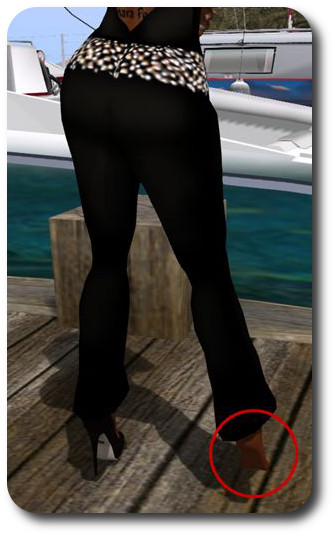
A problem I sometimes encounter when flying / boating is returning home and finding one of my scripted mesh shoes has been detached at some point during the trip
This obviously involves a lot of messages being passed back and forth between server and viewer – and the more attachments you have, the greater the number of messages being passed back and forth.
Additionally, if the attachments are scripted, further messages relating to script states, etc., also need to be passed relating to their state, etc., which adds to the load. Finally, all of these messages may use different transport mechanisms to pass between server and viewer.
This means there are many opportunities for messages to arrive out-of order due to race conditions, etc., or to be dropped and lost because of possible network issues and some messaging mechanisms not having a retry option, etc. It is these problems which tend to result in issues with attachments being removed, etc.
The Lab is interested in trying to eliminate as many of these problems as they can (allowing for the fact some might be related to your network connection, and possibly outside of their ability to control). However, in order to do so, they first need to identify exactly what is going on, and this requires examples of attachment losses, etc., that are consistently reproducible (e.g. attachment type X will always detach when crossing between regions Y and Z, for example). It is these kinds of consistent examples which are proving hard to find – so if you do know of one, please raise a JIRA outlining it step-by-step.
A light week this week. As per the server deployment thread, there will be no scheduled deployments / restarts for the three RC channels during the week. The Main (SLS) channel will, however, receive the same server maintenance package deployed to the RCs in week #40.
SL Viewer Updates – Quick Graphics Viewer
The Quick Graphics viewer reached release candidate status on Friday, October 2nd with the release of version 3.8.5.305528. This is the view which provides the new Avatar Complexity options and the new graphics preset capabilities for setting, saving and restoring graphic settings for use in difference environments / circumstances.
The revised Advanced Graphics floater for the RC, first seen in later iterations of the project viewer
One of the more visible changes within this RC for those who may have used the initial project releases of this viewer, but not the more recent iterations, is that the Advanced Graphics floater has undergone further changes, and is now presented as a two column floater, rather than the single huge floater seen in the first releases of the viewer.
In terms of the graphic presets as well, it should be noted that this RC update does not appear to resolve BUG-10398 “Graphics preset changes to None each time the Advanced Graphics floater is opened, even when no changes are made”.
The colours used for “Jelly Baby” avatars exceeding a user’s complexity limit have been further toned down in the Quick Graphics RC update
For Avatar complexity, the RC update sees further tweaks to the default Complexity value you will see displayed in the Advanced Graphics floater, which is based on your system’s capabilities. The colours used for avatars which are “Jelly Babied” for exceeding your Complexity setting have also been further toned down so that they are not quite so glaring.
However, a number of Avatar complexity issues still appear to be unresolved with this release, and which appear to be related to avatars with very high attachment byte sizes (the 4th value displayed over avatar heads by the viewer when showing Avatar Complexity information):
BUG-9962 – Avatars often permanently stuck as jelly babies even when Max complexity = No Limit
BUG-10401 – Blocked avatars are always fully rendered when imposters are disabled & other odd new behaviour with blocked avatars
BUG-10330 – Some avatars remain invisible until imposters are disabled.
Note: I’ve seen a couple of comments in some group IMs and elsewhere suggesting some people are under the impression this viewer should produce faster in-world rendering (presumably because of the”quick graphics” project title). This isn’t actually the case; however, and depending on variables outside of the Lab’s control, much improved rendering should be seen when using the project Azumarill viewer.
On Saturday, October 3rd, the Oculus Rift supporting CtrlAltStudio viewer updated on Windows to version 1.2.5.43397.
The release sees the viewer reach parity with the Oculus SDK 0.6. However, it is not at this point being regarded as a “formal” release, as David Rowe, the viewer’s developer, notes that it requires additional user testing.
David lists the other changes of note with the release as being:
The viewer works in both direct and extended Rift display modes
If using extended mode you no longer need to drag the viewer onto the Rift’s screen before toggling into Riftlook view
If you switch between direct and extended Rift display modes, you’ll need to restart the Oculus Configuration Utility and the Oculus VR Runtime Service.
Advanced Lighting Model no longer needs to be enabled in order for Riftlook to work
The hardware cursor used in previous versions has been replaced with a basic cross hair software cursor. It may not look pretty but it should still work as before
There’s a new “Mirror Rift display to desktop” option in Preferences > Graphics > Display Output
The scale of the UI depth Display Output option has been altered to work with the updated Rift rendering
A “Mirror Rift display to desktop” Display Output option has been added
The following Display Output options, which are no longer available in the Rift SDK,have been removed from the viewer: Timewarp, Timewarp waits, V sync, and Pixel overdrive
If you install over the top of a previous version you’ll probably want to press the “Reset” button for the “UI depth” Display Output option.
The 1.2.5.43397 updates sees the removal of the Timewarp, Timewarp waits, V sync, and Pixel overdrive from Preferences > Graphics > Display Output, and the addition of a new Mirror Rift display to desktop option
As always, for a full list of changes and updates, please refer to the release notes.
David also goes on to note:
I can achieve a pretty smooth 75 FPS experience on the Rift if the scene’s not too complex, though only if I have my main monitor set to 120Hz. If I set it to 60Hz I only get a somewhat juddery 65 FPS on the Rift. I haven’t looked into this yet and am keen to hear how other people get on. Note: You can use Ctrl+Shift+1 to display a statistics window in Riftlook.
The release doesn’t see the viewer updates to a more recent Firestorm code base than 4.6.9, and there is no corresponding Mac release at this time.
This summary is published every Monday, and is a list of SL viewer / client releases (official and TPV) made during the previous week. When reading it, please note:
It is based on my Current Viewer Releases Page, a list of all Second Life viewers and clients that are in popular use (and of which I am aware), and which are recognised as adhering to the TPV Policy. This page includes comprehensive links to download pages, blog notes, release notes, etc., as well as links to any / all reviews of specific viewers / clients made within this blog
By its nature, this summary presented here will always be in arrears, please refer to the Current Viewer Release Page for more up-to-date information.
Official LL Viewers
Current Release version: 3.8.4.305119, September 29 – formerly the Importer RC viewer download page, release notes
Quick Graphics RC viewer version 3.8.5.305528 released on October 2 – provides the new Avatar Complexity options and the new graphics preset capabilities for setting, saving and restoring graphic settings for use in difference environments / circumstances (download and release notes)
Notifications RC viewer version 3.8.5.305555 released on October 1 – new Notifications floater separates incoming notifications into System, Transactions, Invitations, and Group. It provides a better way to view, interact with, prioritize and manage incoming notices for busy residents (download and release notes)
Maintenance RC viewer version 3.8.5.305531 released on September 30 – 90+ fixes, updates and feature requests (download and release notes)
Kokua updated to version 3.8.4.37073 on September 28th – core updates: parity with the LL mesh importer viewer code (3.8.4) and RLV 2.9.14 (release notes)
UKanDo updated to version 3.8.4.28149 on September 30th – core updates: parity with the LL mesh importer viewer code (3.8.4) and RLV 2.9.14 (release notes)
V1-style
Cool VL Viewer updated as follows: stable branch to version 1.26.14.8, experimental to version 1.24.15.7, both on October 3rd – release notes
On Tuesday, September 29th, the Main (SLS) channel was updated with the server maintenance package previously deployed in week #39 to all three RC channels, comprising internal fixes to improve inventory performance.
On Wednesday, September 30th, the three RC channels all received the same server maintenance package, comprising: a fix for Region Debug Console help text and a fix for a server crash issue.
SL Viewer Updates
On Thursday, October 1st the Notification viewer updated to RC status with the release of version 3.8.5.305555. This viewer provides a new Notifications floater, which separates incoming notifications into four categories:
System – Displays general notifications, such as inventory transfers and friendship status changes.
Transactions – Displays notifications that result from Linden dollar (L$) transactions.
Invitations – Displays group invitations.
Group – Displays notices from groups you are in.
Each notification in a list can be expanded or collapsed by clicking the arrow at the bottom right of the listing. The Collapse All button to collapse any expanded notifications. Notifications can be deleted individually using the X button, or collectively for a tab using the Delete All button.
The new Notifications floater splits incoming notifications into 4 categories, as defined by the tab.
You can find out more by reading my initial overview of the viewer, provided when the viewer was first released as a project viewer.
On Wednesday, September 30th, a new Maintenance viewer RC was released. Version 3.8.5.305531 brings with it 90+ fixes, updates and feature requests. Please refer to the release notes for further details.
Mesh Uploader and Materials
The recently promoted mesh uploader viewer (version 3.8.4.305119, appears to bring with it one or two problems when using materials in uploaded mesh models. See the notes and links on Nalates Urriah’s blog for details.
Other Items
Project Azumarill (HTTP) Viewer
The new HTTP viewer, version 3.8.4.304871, released on September 8th, and known by the code name of Azumarill, has been causing some light-hearted disappointment in some quarters. It seems the viewer works so well, that for some, it spoils the game of “guess which texture will render next”, because textures can render very quickly on it!
However, these is a more irritating issue which can be encountered when using this viewer. The issue itself, which has been an intermittent problem on some viewer versions appears as an object permissions error which some people are reporting as encountering on every single log-in (see the forum thread above, and BUG-9066).
UKanDo Viewer Update
Not actually a Lab-drive SL update, but the UKanDo v3-style TPV updated to version 3.8.4.28149 on Wednesday, October 30th. The update sees the viewer gain parity with the LL 3.8.4 code-base (mesh uploader), and also RLV through to release 2.9.4. The the viewer’s release notes for details.