This summary is published every Monday, and is a list of SL viewer / client releases (official and TPV) made during the previous week. When reading it, please note:
It is based on my Current Viewer Releases Page, a list of all Second Life viewers and clients that are in popular use (and of which I am aware), and which are recognised as adhering to the TPV Policy. This page includes comprehensive links to download pages, blog notes, release notes, etc., as well as links to any / all reviews of specific viewers / clients made within this blog
By its nature, this summary presented here will always be in arrears, please refer to the Current Viewer Release Page for more up-to-date information.
Official LL Viewers
Current Release version: 4.0.1.310054, January 15 – formerly the Maintenance RC viewer download page, release notes
HTTP updates and Vivox RC viewer version 4.0.1.309943 released on January 14 – combines the Project Azumarill RC and Vivox Voice RC updates into a single viewer (download and release notes)
The following notes are primarily taken from the Server Beta User Group meeting of Thursday, January 14th and the TPV Developer (TPVD) meeting held on Friday, January 15th, 2016. A video of the meeting is included at the end of this report, my thanks as always to North for the video recording and providing it for embedding.
Server Deployments – Recap
There was no deployment to the Main (SLS) channel on Tuesday, January 12th. On Wednesday, January 13th, all three RC channels received the same sever maintenance package comprising:
Feature Request: llGetObjectDetails() constant OBJECT_TOTAL_INVENTORY_COUNT – when targeting an object, OBJECT_TOTAL_INVENTORY_COUNT will return the total of all inventory types in each link of the linkset. See BUG-10575 for further details
Feature Request: llGetObjectDetails() constant OBJECT_PRIM_COUNT – provides a means to get a worn attachment’s prim count (rather than just returning 0). See BUG-10646 for further details.
Simulator crash fixes.
RC Server Deployment Week #3
The RC server deployment scheduled for week #3 (week commencing Monday, January 18th), should include the feature request for llGetObjectDetails ( myKey, [OBJECT_REZZER_KEY] ), which returns the parent_id of any task in the region:
If the object came from an object rezzer it returns the ID of the parent object
If it was rezzed by an avatar, it returns the agent ID of the avatar.
It will only return details for those objects rezzed in-world after the code has been implemented. Objects already in-world prior to deployment will be ignored (NULL_KEY is returned).
SL Viewer Updates
[00:30] The Maintenance RC viewer, version 4.0.1.310054, was promoted to de facto release status on Friday, January 15. This view comprises some 38 fixes and improvements, including updates for some regressions introduced into the viewer with the previous release viewer, and some CEF bugs.
The Project Azumarill HTTP updates RC viewer and the Vivox voice updates RC viewer have been merged into a single release candidate, version 4.0.1.309943, release on Thursday, January 14th, 2016. This is expected to be updated in the next week to deal with a further issue, after which it is anticipated it will be promoted relatively soon to the de facto release viewer.
[01:43] The Quick Graphics RC (Avatar Complexity and graphics presets) is still undoing further refinement, particularly in the way that Avatar Complexity is calculated as a result of feedback provided by users testing the current RC version (4.0.1.309320 at the time of writing).
[0213] There is an update to the Oculus Rift project viewer (3.7.18.295296 at the time of writing) in progress, but no ETA on when it will appear.
Issues with the Bento project viewer are viewed as a priority by the Lab. However, no time frames are being set for updates as the project is very much still in beta on Aditi.
There will be a “show and tell” event on Aditi on Tuesday, January 19th, where content creators working the new avatar skeleton extensions will be demonstrating their work for an upcoming episode of The Drax Files World Makers, which takes a look behind the scenes at the project.
CEF and 64-bit Official Viewers
[12:00] The switch to CEF has forced the Lab to re-think its position on 64-bit viewers. Essentially, the CEF code comes as a package, and those producing it ceased supporting Mac 32-bit a while ago (so CEF on the Mac viewer from the Lab is actually a release or so behind the version on Windows).
As a result, the Lab has started on a 64-bit viewer build project, which includes both Windows and Mac. It is possible that as a result of this, and once the 64-bit versions of the viewer are ready to go, the Lab may cease in offering a 32-bit Mac version of the viewer (obviously Windows will continue to be offered in both 32-, and 64-bit flavours).
The 64-bit versions of the official viewer will include 64-bit specific contributions from TPV developers, and Oz has also requested that a number of other open-source contributions which have been languishing since submission are folded into the project.
Aditi Log-in Issues and Inventory Syncing
[06:40] There are still issues being experienced by some people when logging-in to Aditi, which see them redirected to a “safe” zone (most frequently ACME H), rather than to their last log-in point. This is still subject to investigation by the Lab.
The new process for inventory syncing (see my report from 2015 week #52 for full details) between Agni and Aditi still has yet to be implemented. In essence, once this comes into effect, a password change will no longer trigger any syncing between your Agni and Aditi inventories. Instead, logging-in to Aditi will flag your account for inventory syncing. This takes place overnight (Pacific time), and cause your Agni inventory to be merged with your Aditi inventory, rather than overwriting it, thus preserving content unique to your Aditi inventory.
In the meantime, if you need your inventories syncing between the two grids, file a support ticket requesting a manual synchronising of inventories.
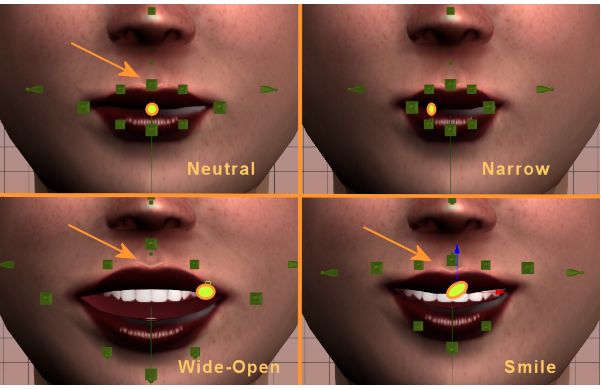
Project Bento extends the avatar skeleton, adding a significant set of bones (e.g. 30 for the face, 30 for the hands (both of which can be seen inaction in the image above of an avatar by Matrice Laville), plus bones for wings, tails, additional limbs and ears / antennae
The second public user group meeting for Project Bento took place on Thursday, January 14th 2016, continuing discussions on the new avatar skeleton extensions for Second Life. The following is intended to provide a summary of the discussion, together with audio excerpts from the meeting. It is not, however, intended to present a full transcript.
Additional / Alternative Bones and Experimental Region
The experimental region for those wishing to try additional / alternative bones (see my report from the first Bento public UG meeting), is now available on Aditi at BentoExperimental1. It had been misbehaving when first set-up, but is now thought to be running smoothly.
Aki Shichiroji demonstrates her (untextured and in-development) centaur avatar, which uses the new wing bones to animate the rear legs
One concern among content creators who are already working on Bento is the potential for additional / alternative bones to be disruptive, that has they are added, it will break content being used for ongoing testing of Bento, particularly for those working on complex, multi-limbed avatars.
Vir pointed out that while the Lab don’t want to necessarily add to the workload in testing new bones, it’s better to look at possible additions / alternatives sooner rather than later, and accept test content may break if charges are to be made in the near future as a part of developing the project.
He also pointed out that so far, the focus on additional / alternative bones has been on the face, which shouldn’t have any impact on those working with the new wing bones, etc. Although that said, there is no limitation on proposing additional bones for wings, legs, etc., even if they do prove a little disruptive at this point in time.
End dates and Selecting New Bones
Currently, the Lab hasn’t determined any date by which proposals for additional / alternative bones must be made, or the process by which any of the proposals might be adopted. However, creators are encouraged to use the experimental region to develop models as demonstrations sooner rather than later.
While it is not 100% certain, given there is currently no clear consensus as to what additional / alternative bones might be seen as a priority among those proposing them, the Lab is considering making any potential selection the matter of a poll at some point in the future, and make any determination based on that.
Vir also indicated that ideally, the Lab would like to make as few further changes to the skeleton as possible, and so may opt to add additional bones as a single pass in the viewer, rather than gradually adding them (which might also cause problems when testing, due to the repeated risk of breaking test models as noted above). Either way, the code will be stabilised well before any attempt is made to move Bento to the main grid, in order to ensure that people have adequate time to test things and to allow TPVs sufficient lead-time to integrate the Bento code into their offerings so that they can support it when it is deployed.
Oz flew into the Bento meeting directly from the Lab’s monthly “all hands” review
IK Bone Issues
A problem has been noted within the skeleton between the new toe bones and the IK (inverse kinematics) bones which connect the avatar physically to the world. The latter are focused on the foot bone in the avatar skeleton, with the result that when the new toes bones are used to animate the avatar (as might be the case with digitgrade legs), a conflict with the IK bones can occur, causing the animation to go awry. It doesn’t happen all the time, but when it does, it is very noticeable.
Exactly what can be done to deal with this is open to question; Vir’s initial thoughts were to consider changing the logic so that IK bones are focused on the toe, rather than the foot. Alternatively, Oz suggested adding a new flag which would allow a mesh to indicate it does not want a joint manipulated by IK, and idea which was seen by some creators as offering greater potential for use.
To help the Lab better understand issues and gain a thorough insight what might be required in order to address issues where they can, a request was once again put forward for very concise in-world examples and models.
Both Oz and Vir concurred that any large-scale alternations to the IK chain, such as extending it to include the new bones is unlikely, due to the risk of breakage with existing content on the main grid and due to the additional overheads it will place on Bento in terms of testing, lead times, etc.
There was no deployment to the Main (SLS) channel on Tuesday, January 12th. On Wednesday, January 13th, all three RC channels should receive the same sever maintenance package comprising:
Feature Request: llGetObjectDetails() constant OBJECT_TOTAL_INVENTORY_COUNT – when targeting an object, OBJECT_TOTAL_INVENTORY_COUNT will return the total of all inventory types in each link of the linkset. See BUG-10575 for further details
Feature Request: llGetObjectDetails() constant OBJECT_PRIM_COUNT – provides a means to get a worn attachment’s prim count (rather than just returning 0). See BUG-10646 for further details.
Simulator crash fixes.
SL Viewer
So far, no promotions or updates to the current batch of RC and project viewers, leaving the list as it stood in week #1:
Current Release version: 4.0.0.309247, December 17, 2015 – formerly the Chromium Embedded Framework RC viewer download page, release notes
RC viewers:
Project Azumarill (HTTP updates) RC viewer, version 4.0.1.309333, dated January 5th
Quick Graphics (Avatar complexity & graphics presets) RC viewer, version 4.0.1.309320, dated January 5th
Maintenance (30+ fixes and improvements) RC viewer, version 4.0.1.309460, dated January 5th
Vivox (Voice fixes and improvements) RC viewer, version 3.8.7.307744, dated November 17, 2015
Project viewers:
Project Bento (avatar skeleton extensions) version 5.0.0.309171, dated December 16, 2015
Oculus Rift project viewer, version 3.7.18.295296, dated October 13th, 2015
Obsolete platform viewer (SL access for Win XP / Mac OS X10.6 users), version 3.7.28.300847 dated May 8, 2015.
During the last TPV Developer meeting of 2015, it had been indicated that the Vivox RC viewer and the HTTP RC viewer were being merged into a single offering. If this is still the case, we can likely expect the updated RC viewer to be appearing soon.
Weekend Issues
For those who may have missed it, April Linden from the Lab’s Operation’s team (who are responsible for trying to keep the grid available 24/7), provided a blog post on the issues Second Life experienced over the weekend of January 9th / 10th 2016, which I also covered in a separate blog post.
This summary is published every Monday, and is a list of SL viewer / client releases (official and TPV) made during the previous week. When reading it, please note:
It is based on my Current Viewer Releases Page, a list of all Second Life viewers and clients that are in popular use (and of which I am aware), and which are recognised as adhering to the TPV Policy. This page includes comprehensive links to download pages, blog notes, release notes, etc., as well as links to any / all reviews of specific viewers / clients made within this blog
By its nature, this summary presented here will always be in arrears, please refer to the Current Viewer Release Page for more up-to-date information.
Official LL Viewers
Current Release version: 4.0.0.309247, December 17th – no change
Project Azumarill (HTTP updates) RC viewer updated to version 4.0.1.309333 on January 6th – a complete replacement of the under the hood HTTP infrastructure within the viewer (download and release notes)
Maintenance RC viewer updated to version 4.0.1.309460 on January 5th – core updates: some 38 fixes and improvements, including updates for some regressions introduced into the viewer with the current release viewer (download and release notes)
Quick Graphics RC viewer updated to version 4.0.1.309320 on January 5th – provides the new Avatar Complexity options and the new graphics preset capabilities for setting, saving and restoring graphic settings for use in difference environments / circumstances (download and release notes)
Project Bento extends the avatar skeleton, adding a significant set of bones, notably providing facial expressions, finger movement, and better support for wings, tails, additional limbs, etc. (model by Matrice Laville)
The first public user group meeting for Project Bento took place on Thursday, January 7th 2016, marking the start of what will be a regular event, although the exact frequency, particularly in terms of day and time, may vary, at least initially.
The purpose of the meeting is to provide an open forum for more direct and real-time conversations between the Lab and content creators about Project Bento than can perhaps be achieved through forum posts, etc. This, and the reports which follow from it are intended to provide a synthesis of these meetings, together with relevant audio of discussions and feedback, where appropriate. My apologies for the quality of the audio in places; these was partially the result of recording over voice and also due to the audio strength dropping out on me quite frequently.
People arrive for the first public Bento user group meeting on Aditi
Translation vs. Rotation
As I’ve previously reported, there has been an ongoing discussion about providing bone translation rather than just rotation in order to better handle facial expressions (see BUG-1090, “[Bento] A formal method of bone-translating animations is vital for the creation of proper facial expressions”), with the initial disallowing of translations within Bento (where they had previously been possible by means of a workaround) being a particular point of contention. Medhue Simoni was one of those particularly concerned at the lack of available translation capabilities, and as I noted in my coverage of the 100th Drax Files podcast, he has produced a fairly comprehensive video explaining the issue.
Given the amount of conversation that has been generated, it should not be that surprising to learn that this was the first item up for discussion in the meeting. In particular, Vir announced that the Lab has revised its thinking on the matter pointing to a Bento forum posted providing more of the Lab’s original concerns. So with this change, animations using translations can now be uploaded to most regions on Aditi.
Vir on the rethink concerning allowing bone translations
So does this mean translations will be allowed going forward? Vir was cautious in his reply, noting that nothing about Bento will be finalised until such time as it goes to the main grid, so there is no definitive decision on the matter at present. However, based on the way things are going, it would seem likely that translations will be enabled and there is nothing the Lab currently has planned which might cause them to be disallowed. However, Vir did warn that were this to be the case, there may be bugs / limitations in how they work.
Vir on whether or not translations will be allowed going forward
Stretching and Scaling Bones
The current mechanism for stretching / scaling bones is via the shape slider, and Vir indicated that it is not likely that the Lab will be moving to support scaling in animations as a part of this phase of Bento, although they might revisit doing so at some point in the future (without any guarantee they would).
As a part of the explanation for why this is the case, Oz indicated that the Lab’s belief in approaching Bento was that for most non-human avatars and shapes, their expectation was that creators would do the basic repositioning of joints as a part of the mesh prior to upload, and then adjust them as needed, and so the need for translation would be marginalised.
However, as several of those present at the meeting pointed out, effectively “baking” positions into a mesh in this manner prior to upload is itself limiting, and translations can help handle odd glithes in the avatar shape which can occur. Given this, and the shift in stance on translation mentioned above, Oz indicated he’s very interested to hear back from people on what might be considered “best practice” for handling bone repositioning, scaling, stretching, etc.
Vir and Oz on scaling and stretching bones and the Lab’s initial approach to Bento
Avatar Deformation and Resetting
One of the things the Lab is trying to achieve through Bento is a means of more reliably providing a mechanism by which avatars suffering from deformations as a result of rigged meshes, complex shapes, etc., can be reliably restored.
One of the things the Lab would like to do is offer a consistent means of resetting avatars deformed by things like multiple joint repositions to a “default” state which includes adjustment to bones made via mesh and attachments
As Vir noted in the meeting, the Lab has been working on trying to make mesh positions behave better, but there is still a lot going on under the hood, such as changes made by sliders or attachments or animations, or a combination thereof,, the initial values defined by the skeleton, etc., which can influence the overall shape / appearance in an unpredictable order which can leave someone in a difficult to resolve state.
In particular, and as stated by Oz, the Lab would like to be able to offer the capability that if a user experiences deformations as a result of running animations, they can be reliably reset to a default position that includes and joint position movements implied by any mesh attachments worn at the time the issue occurred (with the exception of those implied by animations).
To this end, he and Vir urged people to file bug reports on any issues of deformation they encounter when using the Bento project viewer (as well as any other issues they encounter), even if the issue has been previously encountered prior to Bento but has remained unresolved, and to provide specific examples of the problem with related models, etc., so that the Lab can use the project to attempt to investigate and resolve as many issues of this kind as they can. The Lab cannot promise that everything will be fixed, but by the same standard, it shouldn’t be assumed that just because something hasn’t been addressed thus far, effort won’t be put into trying to see if it can be resolved.
Vir and Oz on bug resolutions and seeking a means to consistently reset deformed avatars