Logos representative only and should not be seen as an endorsement / preference / recommendation
Updates from the week ending Sunday, April 3rd, 2022
This summary is generally published every Monday, and is a list of SL viewer / client releases (official and TPV) made during the previous week. When reading it, please note:
It is based on my Current Viewer Releases Page, a list of all Second Life viewers and clients that are in popular use (and of which I am aware), and which are recognised as adhering to the TPV Policy. This page includes comprehensive links to download pages, blog notes, release notes, etc., as well as links to any / all reviews of specific viewers / clients made within this blog.
By its nature, this summary presented here will always be in arrears, please refer to the Current Viewer Release Page for more up-to-date information.
Note that for purposes of length, TPV test viewers, preview / beta viewers / nightly builds are generally not recorded in these summaries.
Official LL Viewers
Release viewer: version version 6.5.3.568554 – formerly the Maintenance J&K RC viewer, promoted Monday, February 28 – no change.
Where Our Journey Begins, February 2022 – blog post
The following notes were taken from my audio recording and chat log of the Content Creation User Group (CCUG) meeting held on Thursday, March 31st 2022 at 13:00 SLT. These meetings are chaired by Vir Linden, and their respective dates and times can be obtained from the SL Public Calendar.
This is a summary of the key topics discussed in the meeting and is not intended to be a full transcript.
Available Viewers
Current SL viewer pipelines:
Release viewer: version version 6.5.3.568554 – formerly the Maintenance J&K RC viewer, promoted Monday, February 28 – No Change
MFA RC viewer, update to version 6.5.4.569725, on March 24.
Performance Improvements RC viewer version 6.6.0.569349, dated March 14.
Lao-Lao Maintenance RC viewer, version 6.5.4.569191, issued on March 11.
Project viewers:
Performance Floater project viewer, version 6.5.4.569531, March 18.
Mesh Optimizer project viewer, version 6.5.2.566858, dated January 5, issued after January 10.
Legacy Profiles viewer, version 6.4.11.550519, dated October 26, 2020.
Copy / Paste viewer, version 6.3.5.533365, dated December 9, 2019.
General Viewer Notes
There is a general request out that people try the Performance Improvements RC viewer even if they are not in the cohort to auto-receive it as a viewer update.
Additional Materials Support – CCUG Meeting
LL are actively considering expanding the SL materials system to handle materials surfaces (imported in glTF format).
The initial idea is that when done, it will result in a “materials asset” containing all the settings that can be stored in inventory and re-used on object faces.
The primary motivators for this are a) to help people who are creating content in the likes of Substance 3D Painter, so that then can import and then adjust the parameters are required; and b) to act as a foundational step as SL moves towards supporting PBR, as PBR will require additional texture channels, etc., and LL believe this approach offers a means to start holing that additional information.
However, as assets, materials, while copyable / reusable, would not initially be editable in-world when in use.
To start this off, LL are looking to:
Better understand “typical” workflows used by content creators (notably the specific tools creators would like to see supported), and how they might better support those workflows.
Gain feedback on how creators might want to use an expanded materials system.
It is felt that to be of value, the entire SL reflection model would require an extensive overhaul to better support specularity handling. However, LL are still determining overall support for materials, and have suggested specularity could be handled in one of two ways:
The glTF could be adapted to the existing SL texture entry parameter;
Or (seen as preferable) add glTF support to the render engine for materials exactly as they come out of Substance 3D Painter and similar tools, allowing reflection models produced within them to be properly represented.
Support for the latter is already available within the viewer, but is not currently readily accessible for use.
Some form of user group may well be established to help manage discussions going forward and help understand how different tools implement glTF and how creators utilise those tools.
Provision of materials support for Bakes on Mesh is not a part of this work.
In Brief
A lot of general discussion on a number of topics, none of which is currently the focus of any Lab project, including:
“Flexi-mesh”: .a frequent request to have mesh react to physics in the same manner as flexiprims.
Technically this could be made possible by treating the flexiprim physics as part of the skeleton rather than as just a primitive path.
However, there is a real risk that were this to be done, it would break existing flexiprim content.
Currently, there are no plans to touch the flexiprim code; or offer support for “flexi-mesh”. However, if a well-conceived feature request on the subject is submitted, then it might be something that the Lab could look at in the future to see how it might be addressed.
Physics enhancements (e.g. altering the rate at which an avatar sinks in Linden Water so as to be more realistic) – no plans at present to touch the physics system.
There has been a request to completely overhaul the mesh importer to provide a much better means of previewing models prior to upload (e.g. see things like lighting effects, how textures appear, etc.).
Doing so is seen as assisting workflows by allowing models to be previewed without the need to log-in to the beta grid (for free uploads), easing the workflow when working on the Main grid.
Again, shy of a detailed feature request, there are no plans to overhaul the mesh importer in a dramatic way.
BUG-231985 “LL Incoming Damage Cap” is a new feature request to make the SL damage system more flexible to creators of combat, etc., environments / games when damage is a factor (e.g. by allowing a max damage per hit cap to be set for a region / parcel, so that players aren’t automatically “dead” on the first hit).
Setting animation priority via script: frequently requested, but not yet on the roadmap, although LL are aware of the popularity of the request.
The following summary notes were taken from the Tuesday, March 29th, 2022 Simulator User Group (SUG) meeting. It forms a summary of the items discussed, and a video of the entire meeting is embedded at the end of the article – my thanks to Pantera for recording it.
Tuesday, March 29th: the Main SLS channel simulators were restarted, but without any update deployment.
Wednesday March 30th: all RC channel will be updated with simulator release 569934, which primarily contains a update to support the move of profile information back to the viewer, hopefully allowing the Legacy Profiles viewer (see below) to move forward.
Available Official Viewers
All official viewer pipelines remain as follows:
Release viewer: version version 6.5.3.568554 – formerly the Maintenance J&K RC viewer, promoted Monday, February 28 – No Change
MFA RC viewer, update to version 6.5.4.569725, on March 24.
Performance Improvements RC viewer version 6.6.0.569349, dated March 14.
Lao-Lao Maintenance RC viewer, version 6.5.4.569191, issued on March 11.
Project viewers:
Performance Floater project viewer, version 6.5.4.569531, March 18.
Mesh Optimizer project viewer, version 6.5.2.566858, dated January 5, issued after January 10.
Legacy Profiles viewer, version 6.4.11.550519, dated October 26, 2020.
Copy / Paste viewer, version 6.3.5.533365, dated December 9, 2019.
In Brief
Note: this meeting was another live music event, so discussions were limited. So very little to report.
BUG-231876 “llRequestSimulatorData() frequently and silently fails” – a fix has been developed for this issue and is currently with QA for testing. It had been hoped this would be ready for a deployment this week, but unfortunately this is not the case.
Some have been reporting an issue whereby their Friends list reports all (or most) contacts as off-line when logging into a region the first time after a restart, requiring them to TP to another region entire for a Friends list update, or (if they are the region holder) restarting / requesting a s restart for the culprit region. LL have no information as yet on why this is occurring.
Logos representative only and should not be seen as an endorsement / preference / recommendation
Updates from the week ending Sunday, March 27th, 2022
This summary is generally published every Monday, and is a list of SL viewer / client releases (official and TPV) made during the previous week. When reading it, please note:
It is based on my Current Viewer Releases Page, a list of all Second Life viewers and clients that are in popular use (and of which I am aware), and which are recognised as adhering to the TPV Policy. This page includes comprehensive links to download pages, blog notes, release notes, etc., as well as links to any / all reviews of specific viewers / clients made within this blog.
By its nature, this summary presented here will always be in arrears, please refer to the Current Viewer Release Page for more up-to-date information.
Note that for purposes of length, TPV test viewers, preview / beta viewers / nightly builds are generally not recorded in these summaries.
Official LL Viewers
Release viewer: version version 6.5.3.568554 – formerly the Maintenance J&K RC viewer, promoted Monday, February 28 – no change.
Release channel cohorts:
MFA RC viewer updated to version 6.5.4.569725 on March 24.
The following summary notes were taken from the Tuesday, March 22nd, 2022 Simulator User Group (SUG) meeting. It forms a summary of the items discussed, and a video of the entire meeting is embedded at the end of the article – my thanks to Pantera for recording it.
Server Deployments
There are no planned deployments for week #12, although all channels will be restarted – Main on Tuesday, March 22nd, RCs on Wednesday, March 23rd, 2022.
Available Official Viewers
All official viewer pipelines remain as follows:
Release viewer: version version 6.5.3.568554 – formerly the Maintenance J&K RC viewer, promoted Monday, February 28 – No Change
MFA RC viewer, version 6.5.4.569309, issued on March 15.
Performance Improvements RC viewer version 6.6.0.569349, dated March 14.
Lao-Lao Maintenance RC viewer, version 6.5.4.569191, issued on March 11.
Project viewers:
Performance Floater project viewer, version 6.4.23.562625, September 2, 2021.
Mesh Optimizer project viewer, version 6.5.2.566858, dated January 5, issued after January 10.
Legacy Profiles viewer, version 6.4.11.550519, dated October 26, 2020.
Copy / Paste viewer, version 6.3.5.533365, dated December 9, 2019.
In Brief
BUG-231876 “llRequestSimulatorData() frequently and silently fails” – a fix has been developed for this issue and is currently with QA for testing. If all goes well, the fix should be in an RC update in the next week or two. Leviathan Linden described the issue thus:
The problem was introduced after overhaul to the ScriptDataCache implementation.In short: when the cache was full then pending requests could sometimes be invalidated by a new request. There was not enough distinction between a valid but not yet expired value and a valid but not yet harvested by its request value.
The ScriptDataCache is currently limited to 8192 slots. Not all dataserver functions use it, but yes the only data therein are dataserver requests. Some dataserver requests used to use the cache but have been migrated over the years to use different web services instead of actually hitting the dataservers themselves. the DataServerCache size with my recent fix: only 1024 slots. The size of the cache shouldn’t really matter all that much when it is working correctly. That is… its size is really there to protect the dataservers from overload.
Monty Linden is poking at region crossing issues, but no updates. This sparked further general discussion on region crossings. Please refer to the video.
General discussion about two bugs that occur when the viewer is minimised, but where the simulator should really have authority (and thus the issue not occur):
BUG-202856 “Rotating a sitter’s rotation by script does not update their global rotation at the server if the sitter has their viewer minimised.”
BUG-230616 “A user’s scripts and attachments do not load in a region if they are teleported while their viewer is minimized. The server shows no attachments, scripts, script memory or timing.”
On Monday, March 21st, 2022, the Firestorm team released version 6.5.3 of their viewer.
This is a significant update to Firestorm, containing major new elements aimed at helping to improve viewer performance / the user experience. As such, these elements for the major focus for the notes below.
As per usual, it also brings Firestorm closer to the current official SL release viewer by including a number of updates and capabilities previously released by LL. Again, from an end-user perspective, one of the most noticeable of this is likely to the incorporation of the 360º snapshot capability, which is also looked at in detail below.
Also as per usual, Firestorm 6.5.3 includes additional fixes and updates directly from the Firestorm team to also improve the user experience. Not all of these are covered in the notes below, and readers are referred to the official release notes alongside of this article.
There is no need to perform a clean install with this release if you do not wish to.
Do, however, make sure you back-up all your settings safely so you can restore them after installing 6.5.3.
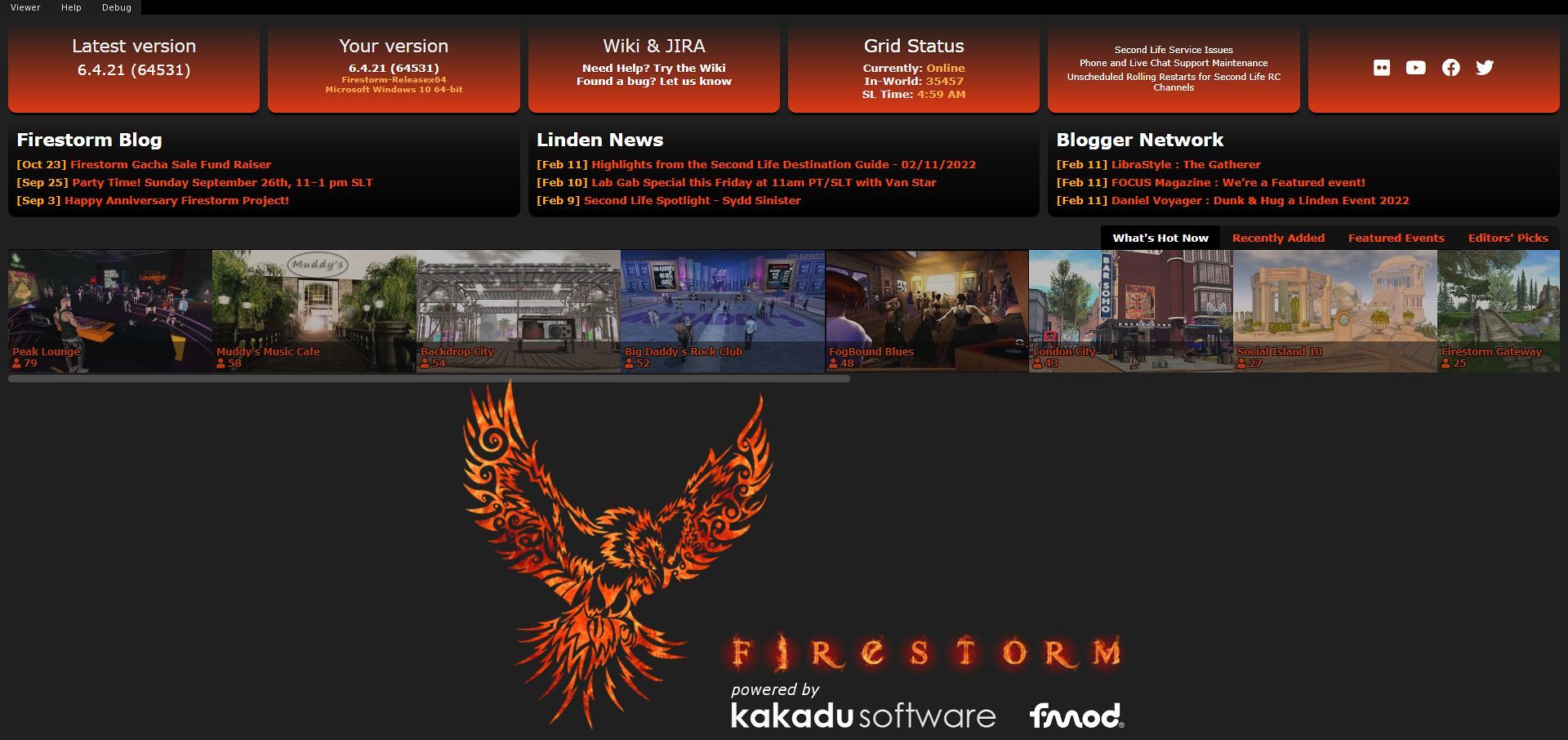
Splash Screen Update
Whilst not strictly part of the 6.5.3 release, having been prototyped with and added to the 6.4.21 release, Firestorm now has a new splash / log-in screen. It incorporates elements familiar to Firestorm users and also to users of viewers that use splash screens more closely modelled on Lab’s own.
In all, the “new” Splash screen can be split into five elements:
A set of six panels at the top, four of which are Firestorm-specific (version details, wiki and Jira links, and on the far right, Firestorm social media links), and two related to official SL information (grid status data and links to information on current grid issues, LL support and grid status updates).
A three-panel selection of blog links from the Firestorm blog, the official SL Featured News blog and the SL Blogger’s Network.
An expandable scrollable list of currently-popular destinations in Second Life (complete with a count of recent visitors).
These are drawn from the What’s Hot Now (default), Recently Added, Featured Events and Editors Picks sections of the Destination Guide (the corresponding links on the right of the panel to select these).
Clicking on any of the displayed thumbnails will provide further information on the destination in a pop-up floater, complete with the option to Visit This Destination after logging-in.
The Firestorm & associated software logos.
The log-in panel at the bottom (unchanged, and not shown below).
The updated Firestorm splash screen (click for full size)
Linden Lab Viewer Parity
This release brings Firestorm up to parity with the official viewer release 6.5.2, and so includes updates seen in the following official viewer releases:
Mac Voice hotfix viewer, version 6.5.2.567427, dated January 13th, 2022.
Cache + 360º Capture viewer, version 6.5.1.566335, dated December 7th, promoted December 15th – see below for more on the 360º capture.
Maintenance RC viewer version 6.5.0.565607, dated November 10th, promoted November 15th, 2021.
The Apple Notarisation Fix viewer, version 6.4.23.564172, issued September 24th and promoted October 15th, 2021.
CEF update viewer, version 6.4.22.561752, dated July 24th, promoted August 10th, 2021.
Fernet Maintenance RC, version 6.4.21.561414, dated July 14th, promoted July 19th, 2021.
More Robust Encryption of Login Credentials
In line with changes from Linden Lab, the way Firestorm encrypts your log-in credentials has been changed to make it more robust and to reduce the number of times stored passwords will have to be re-entered. The update to the new method is automatic on logging-in to SL for the first time using Firestorm 6.5.3; however, it means that should you switch back to using an older version of Firestorm, you will have to re-enter your credentials.
Note: this update is not in any way related to multi-factor authentication in the viewer, which is currently in RC testing in the official viewer.
360º Snapshots
Linden Lab’s 360º snapshot capability allows you to capture of 360º degree panoramic images of environment around your avatar / camera position (if freecamming). The images are automatically processed by the viewer so that they can be uploaded to most platforms supporting 360º panoramic images (e.g. Flickr, Meta), and for embedding into blogs that support 360º images (such as WordPress).
Within Firestorm, the capability can be accessed in one of three ways (Firestorm have disabled the shortcut option of CTRL-ALT-SHIFT-S, as this combination is bound to opening the viewer’s Debug settings):
Via Avatar → 360 Snapshot.
By clicking on the links seen in the expanded Preview image view of the Snapshot floater.
Via a toolbar button (when enabled in a toolbar area).
The 360º snapshot viewer and two of the means of accessing in – via the the Avatar menu and the toolbar button (must be added to your toolbar)
Taking an image comprises a few simple steps:
Position your camera.
Select the image quality – for finished images you’ll need to set High or Maximum quality using the radio buttons.
Click the Create 360º Image button to generate a preview in the floater’s preview panel.
Click on the preview image and drag it around to ensure what you’re seeing is what you want / that things like textures have actually rendered correctly.
Check the Hide All Avatars option, if required – if not, the process to include all avatars present, which could be blurred if they are moving at the time the image elements are captured.
When you are satisfied with the preview, click Save As… to save it to your hard drive, renaming it if / as required.
Note: if you change the image quality, you must also click Create 360 button to update the preview AND image capture process to the new image quality, before clicking Save As… once more.
Further information on the capability can be found in the following blog posts :
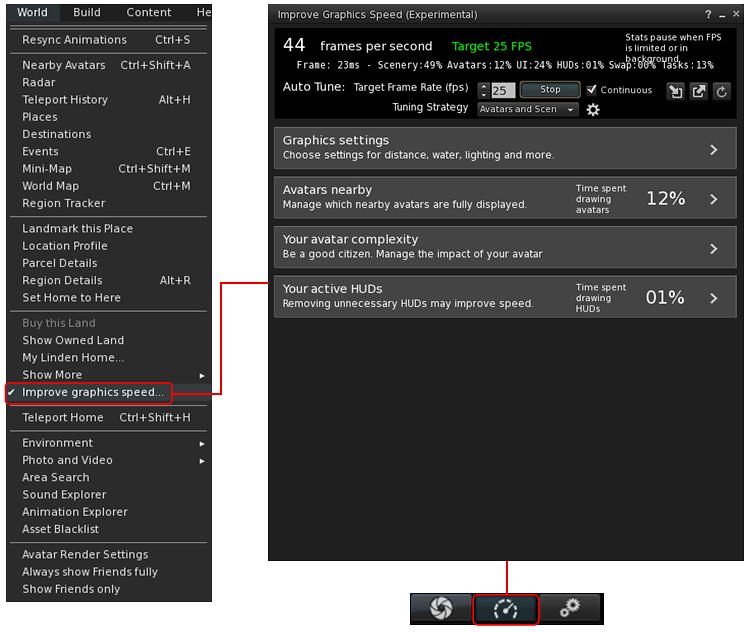
This is a new UI floater Developed by Beq Janus. It brings together a range of viewer graphics options and is intended to help keep you better informed of the viewer’s performance in terms of frame rates, rendering, etc.), and make your own adjustments to suit the environment you’re in. It is also intended to help users be better informed about viewer performance.
The floater comprises three core elements:
The Frame / Performance Summary.
An Auto Tune Capability.
Four additional floater panels that can be used together / individually and independently of Auto Tune. These bring together some of the most commonly-user graphics / rendering options, allowing you to make changes quickly and easily to manually adjust performance, including defining how avatars around you are individually rendered, and lowering to load your own avatar places on both your system and those of the people around you.
This section is intended to provide an overview to the new floater, and offer general notes on the various options and their use. When reading it, please remember:
The entire panel – and particularly the Auto Tune capability – is experimental. Options presented may well change over time (such as in reference to LL’s own performance improvement work).
While intended to try to optimise the viewer’s performance, please note: these options will not magically make elderly (e.g. 6+ year old) computers with outdated CPUs / GPUs suddenly zoom along at rates seen with the latest high-end gaming rigs; everything is very much dependent on the capabilities of your hardware.
Also, and in respect of Auto Tune:
While it will try to maintain your frame rate at the expense of other settings (such as overall graphics quality). So, depending on your system, the frame rate selected, the complexity of the scene, you may find other aspects of your experience suffering.
Does not run on Mac M1 systems at present.
If you experience particularly awkward results or are unhappy with how the in-world scene looks, you can disable all performance optimisation, and the floater includes the means to quickly load / revert to any Graphics Presets you have previously set-up.
Accessing the Floater
The Improve Graphics Speed floater can be accessed in two ways:
Via World → Improve Graphics Speed.
Via a toolbar button (when enabled in a toolbar area).
Accessing the Improve Graphics Speed floater
The various options and panel displays are examined in the sections below.



 On Monday, March 21st, 2022, the Firestorm team released version 6.5.3 of their viewer.
 The updated Firestorm splash screen (click for full size)
 Inara Pey: Living in a Modemworld