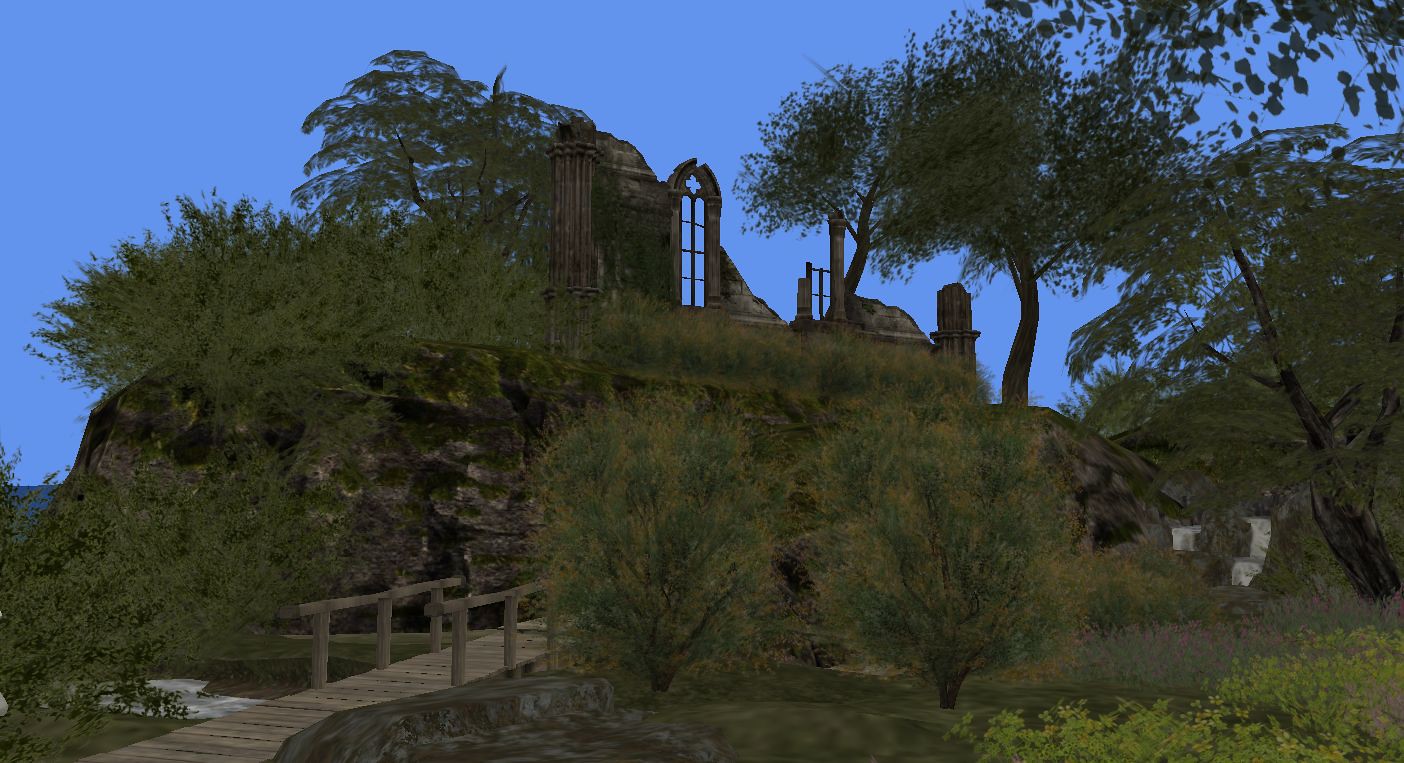
Firestorm 6.4.21: catching up with the Lab

On Wednesday, July 28th, 2021, the Firestorm team released version 6.4.21 of their viewer.

The majority of the updates contained within this release are from recent releases of the official viewer, with a minimal number of Firestorm-derived updates, as Firestorm continues to move closer to a quarterly cadence of releases.

That said, as well as fixes and updates, this release includes a number of additional and new capabilities added by the Firestorm team, and these form the focus of this overview.

As is usual for me, this is not a review of every individual change to be found within this latest release of Firestorm. Rather, it is an overview of those changes that will be most noticeable to the majority of users. Given this, please refer to the official release notes for a complete list of fixes and changes.

Table of Contents

Installation

  • There is no need to perform a clean install with this release if you do not wish to.
  • Do, however, make sure you back-up all your settings safely so you can restore them after installing 6.4.21.
  • Again, please refer to the Firestorm 6.4.21 release notes for additional details of all changes and updates in this release.

Linden Lab Viewer Parity

Firestorm 6.4.21 incorporates updates from a number of recent Linden Lab viewer releases, as follows:

Jelly Updates, February 2021

Viewer release: 6.4.13.555567.

Most notably, this alters the behaviour of “jellydolled” avatars for better performance. Those avatars explicitly set not to render or have an Avatar Rendering Complexity (ARC) that exceeds the threshold set within the viewer (e.g. via Quick Prefs → Max Complexity slider):

  • Are now rendered a single grey, rather than appearing in a range of solid colours and as a basic humanoid shape.
  • No longer have any attachments or other customisations rendered and do not play animations.

Simplified Cache Viewer, March 2021

Viewer release: 6.4.14.556088.

This viewer introduced a less complex file caching system to save local copies of frequently used assets such as meshes, sounds and animations, but without the issues that impacted the original deployment of that viewer.

Custom Key Mappings Viewer, April 2021

Viewer release:  6.4.17.557391.

This release allows users to define their own key mappings for a number of viewer functions, via Preferences → Control .
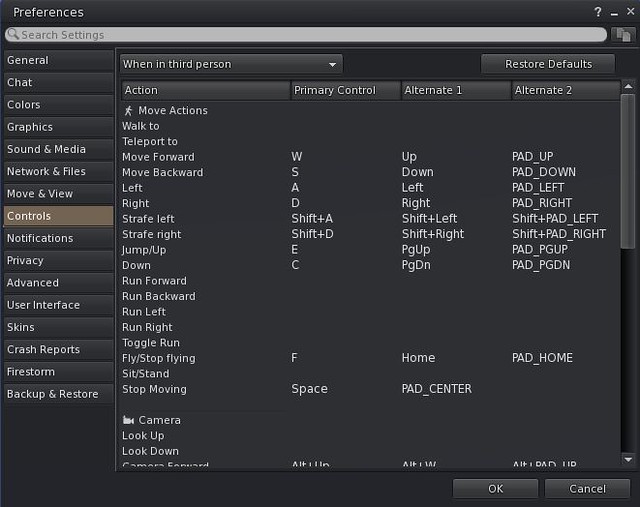
The Custom Key Mappings panel in Preferences

Maintenance Eau de Vie, April 2021

Viewer release: 6.4.18.558266.

A further round of viewer bug fixes from Linden Lab. Perhaps most notable among them changes to the detection of Intel HD 2500 and 4000 and 400 GPUs (if running the latest drivers), that result in users of those graphics cards now being offered the 64bit version of the viewer.

Love Me Render 5, June 2021

Viewer release: 6.4.19.560171.

A maintenance viewer focused on rendering and graphics fixes, including a number of EEP improvements.

UI and Voice Updates Viewer, June 2021

New Guidebook

Viewer release: 6.4.20.560520.

This viewer introduced the first in a series of viewer UI updates, these specifically aimed at new users, notably a new Guidebook to getting started in Second Life following sign-up, and which is intended to be used within the new Welcome Islands.

The new user Guidebook, as developed by Linden Lab as a part of a new user experience
The Guidebook is access via a dedicated Toolbar Button, which if not automatically displayed in your viewer (clean installation) can be accessed by opening the Toolbar Buttons panel (right-click any button area and select Toolbar Buttons …) and then dragging the Guidebook button to your preferred button area.

Not that both the Guidebook and the new Welcome islands are subject to on-going testing and so may see further revisions.

Menu Updates

In addition, this release of the view included a number of menu changes to the official viewer. These have been implemented somewhat differently in Firestorm, and so are dealt with below.

EEP: Azimuth and Elevation Sliders

A further UI change with this viewer is the addition of new EEP sliders for those who have issues using the Trackballs in the Sun / Moon tabs of the Fixed Sky and Day Cycle floaters, and in the Personal Lighting floater. These sliders are:

  • Azimuth – which might be thought of as the east / west position of the Sun or Moon (technically, azimuth is more than this, but it’ll do for these notes).
  • Elevation – the position of the Sun or Moon over or under) the horizon, relative to azimuth.

They are tied to the Sun / Moon movement, so when used, the trackball locations for the Sun and Moon will also move.
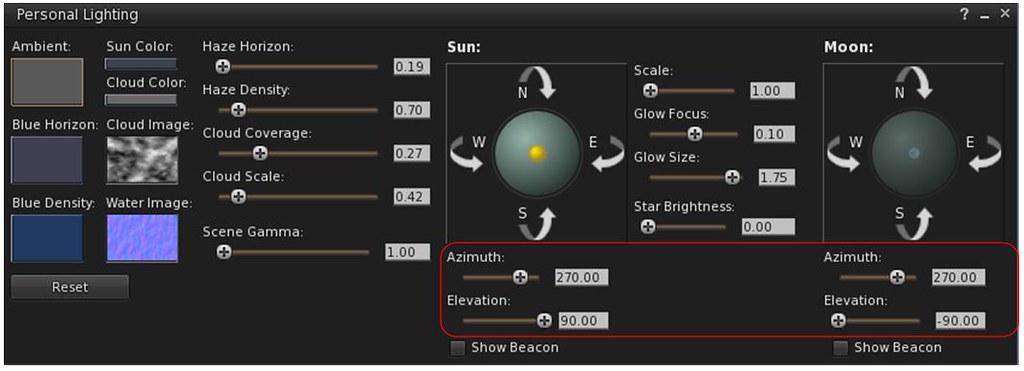
The EEP Azimuth and Elevation sliders (Personal Lighting floater shown)
Voice Updates

Finally, this viewer brings a series of improvements to the viewer’s Voice settings a range of improvements to Voice handling, including changing to default Voice settings in the viewer intended to help prevent issues of drop-out when talking, and which have reportedly all but eliminated drop-outs for those using the new settings. Additionally, the VIVOX VAD options have been exposed via Debug Settings, and detailed notes on these can be found in the official viewer release notes, linked to above.

Continue reading “Firestorm 6.4.21: catching up with the Lab” →

Legends in Art in Second Life

Art Korner Gallery II: Seduce – Legends

Update, June 27th, 2022: Art Korner has Closed.

Currently on display at Art Korner,, owned and operated by Frank Atisso, is a truly stunning selection of art by an artist known as Seduce. And whilst I can use superlatives when writing about the art I appreciate, the use of “stunning” here is accurate: these are pieces that are truly exceptional in their composition, narrative and sheer beauty.

Hailing from France, and with a background in advertising, Seduce has been active in Second Life for over a decade, but has only – within the last twelve months or so – entered the world of Second Life photography. The latter is something that is hard to grasp given his work is easily among the most evocative of avatar-centric art to be created through the platform. Each piece, so beautiful composited and post-processed, carries a strong cinematic subtext that is glorious whilst being offered as a work that echoes some of the great masters of art in the physical world.

This is very much in evidence within the selection of pieces gathered for display at Art Korner under the title of Legends. Comprising 8 large-format pieces, the exhibition takes as its theme the tales of Ancient Greece and Rome – fact and fiction.

Art Korner Gallery II: Seduce – Legends

Around the walls of the gallery space – itself dressed to evoke a Greco-Roman flavour, and quite effectively so – several of the pieces allow us to witness Caesar’s fateful crossing of the Rubicon in 49 BC (the piece suitably entitled Alea Iacta Est – the words attributed to Caesar as he did so by the historian Suetonius), or to visit Pompeii at the moment Vesuvius erupts or become embroiled in one of Alexander the Great’s conquests. Others take us into the realms of mythology as effectively as a any blockbuster, so we might see Theseus confronted by the Minotaur and Poseidon rising up from the depths (possibly against Odysseus and his crew as they attempt to return home to Ithaca), whilst still others evoke Ridley Scott’s 2000 epic Gladiator.

But what makes these pieces so extraordinary is their depth, particularly those where multiple characters are featured – such as with Alea Iacta Est, Last Kiss in Pompeii and Alexander and Bucephalus.

A close examination of these three will reveal a certain likeness between several of the characters within them whose faces are visible. This is because Seduce has apparently use his avatar(s) numerous times to produce individual images (presumably against a white / green / blue backdrop) which he has then carefully composited into the main image layer by layer, so creating a marvellous story-within-a-frame that on first encounter is breathtakingly unique.

Art Korner Gallery II: Seduce – Legends

Painstaking the work might be, but the end results really are magnificent to look at – so much so that I feel somewhat guilty about only writing about Legends now, when the exhibit is perhaps nearer the end of its run that the start. Hence why I do thoroughly recommend that anyone with a love of SL photography and art as whole make sure they stop by Art Korner Gallery II sooner rather than later, so as not to miss the most extraordinary of exhibitions.

SLurl Details

Kokua: release 6.4.21 and Radegast 2.34

Kokua released version 6.4.21 of their viewer on Saturday, July 24th, bring it up to parity with the official viewer version 6.4.21 (formerly the Fernet RC viewer, version  6.4.21.561414), and which also sees a further porting of options from Firestorm, together with a series of updates and fixes implemented by the Kokua team.

As always, all of the information relating to updates and fixes can be found in the official release notes; the following notes highlight the more directly user-facing changes.

Lab-Derived Updates

Kokua 6.4.21 includes all Linden Lab viewer updates through to the Fernet release. Most notably these include a range of improvements to Voice handling, including changing to default Voice settings in the viewer intended to help prevent issues of drop-out when talking, and which have reportedly all but eliminated drop-outs for those using the new settings. Additionally, the VIVOX VAD options have been exposed via Debug Settings, and detailed notes on these can be found in the official viewer release notes.

Preferences → Graphics Redesign

Kokua 6.4.21 sees an overhaul of Preferences → Graphics that to eliminate the Advanced panel and instead incorporate its content on three new tabs within the Graphics panel: General/Avatar, Hardware, Level of Detail / Shaders.

In addition, one of the never tab ports the dynamic sizing of texture memory developed by Ansariel Hiller for Firestorm.. More on this below.

The updated Preferences → Graphics panel with the new tab-style layout

The additional tabs provide a logical and clear-cut breakdown of options:

  • The General/Avatar tab presents the options perhaps used most frequently by the majority of users: Draw Distance, avatar complexity / number of imposter avatars, post-process, detail and physics quality settings.
  • The Level of Detail/Shaders tab provides access to the controls for the viewer shaders, and general rendering quality sliders (terrain, trees, objects, etc.).

The remaining tab, Hardware, is the tab that incorporates the dynamic texture memory sizing option. The idea with this is that it allows the viewer to use more of the available graphics memory whilst still reserving space for other uses (subject to the overall dedicated graphics memory / system memory that is available – you obviously cannot use more memory than your system actually has!).

The Preferences Graphics tab, showing the new (to Kokua) dynamic texture memory options (from Firestorm)

KKA-878 Add Option to Always Pop-up Chat/IM toasts

This is a fix for a noticeable issue with how Kokua handles chat notifications.

Until now, the default pop-up / Toast behaviour is as toasts show unless the local chat panel is visible and not overlaid by another floater. This is counter-intuitive in that the purpose of pop-ups / Toasts are designed to inform because floaters / panels may be obscured.

The new option to Always Pop-up the message, which is common to all of the drop-down lists on the Chat → Notifications tab in Preferences

BugSplat Updates

This release also includes a number of fixes for Kokua crashing whilst attempting to send information to the BugSplat reporting tool, before sufficient information can obtained to help pin down what might have been happening leading up to the crash, rather than just reporting where a crash happened. Please refer to the release notes for more on this.

Radegast 2.34

Radegast, the lightweight client for Second Life and OpenSim updated to version 2.34 on July 26th.

The majority of the updates included in the release are “under the hood” changes, specifically designed to:

  • Paving the way for future UI changes.
  • Providing better non-Windows platform and mobile support.

However, there have been improvements  to image processing, with JPEG2000 decoding and encoding times now improved.

Radegast JPEG2000 decoding and encoding times should help with elements of in-world rendering

As noted in the release notes, these improvements also require the installed version of Radegast to be specific to your computer’s architecture (e.g. the x64 version on Windows 64-bit system).

Also note that the 3D world rendering can give variable results (as it always has), depending on aspects of the system on which Radegast is being run, etc. While it has been a while since I last used the client in anger, the 3D rendering appeared to be a lot smoother than I remember, although it still includes issues in rendering mesh clothing correctly rigged to the avatar, and also demonstrated a familiar issue of failing to render textures on all prim faces.

For the full list of updates and fixes, please refer to the official 2.34 release notes.

Given it has now been several years since I’ve reviewed Radegast in-depth (it’s actually been a decade since my first review, and just a month shy of that since me first review of the client’s rendering capabilities), I will endeavour to offer a complete refresh in the future.

Links

2021 SUG meeting week #30 summary

Valkyrie Light Transport Railroad, April 2021 – – blog post

The following notes were taken from the Tuesday, July 27th, 2021 Simulator User Group (SUG) meeting. The meeting was recorded by Pantera Północy, and the video is embedded at the end of this summary.

Server Deployments

Please refer to the server deployment thread for updates.

  • All simhosts not restarted in the last week were updated to version 561609, which which should not see any changes to the behaviour of simulators, nor to the configuration of the machines running those simulators.
  • The planned deployment for Wednesday, July 28th has been cancelled.

Mesh Physics Issue

The Lab is experimenting with optimising the configuration of the cloud simhosts to increase performance. However, a side effect of this has been that some meshes have a different physics impact calculation, which may be higher or lower than previously shown. This will affect both new and existing uploads. If you experience this issue, please file a Jira or contact support.

From Rider Linde on this matter:

It seems that for very very thin prims with physics there is a difference in the way Havok calculates their cost and that difference bubbles up into land impact.

From Simon Linden:

We had a problem reported where the costs changed. It wasn’t drastic, but this object was designed to be really close to a limit. The shift was small but enough to get noticed and we need to figure out why for those exact same reasons – it can cause some real headaches.

SL Viewer

There have been no updates to the current batch of official viewers to mark the start of the week, leaving the pipelines as follows:

  • Release viewer: Fernet Maintenance RC, version 6.4.21.561414, dated July 14, promoted July 19 – NEW.
  • Release channel cohorts:
    • None.
  • Project viewers:
    • Legacy Profiles viewer, version 6.4.11.550519, dated October 26.
    • Copy / Paste viewer, version 6.3.5.533365, dated December 9, 2019.
    • Project Muscadine (Animesh follow-on) project viewer, version 6.4.0.532999, dated November 22, 2019.
    • 360 Snapshot project viewer, version 6.2.4.529111, dated July 16, 2019.

In Brief

  • Gaming bugs:
    • BUG-10908 “Ghost Objects Left over when things are removed from play” is an issue that has been around for several years, but appears to be increasing in incidence, particularly within games in SL. Some work was put into developing a fix for the issue, but the current status of that work needed to be established before the issue could be commented on further.
    • There are also reports that BUG-7084 “Prim properties visually revert to an earlier state since Interesting” being encountered more frequently, again within some hunt games.
    • Both appear to be related to Interest List updates, and conflicts with full / terse updates to objects within a region. Essentially, if an object is updated (e.g. rendered transparent because it has been “collected” by a player), and that the object is not in the interest list for the viewer of another player at the time of the update, then the update isn’t registered until that player attempts to touch the object – at which point it vanishes.

A re-visit to L2 Gallery and LHOOQ Gallery in Second Life

L2 Studio and LLOOQ Gallery, July 2021 – click any image for full size

In checking back through my visit history, I was surprised to see the last time I dropped into L2 Studio & LHOOQ Gallery, the Full region held and operated by Lindini2 (Lindini2 Lane) and Jessica (jessicabelmer) was in 2016.

Surprised, because the region – the home to Lindini2’s store and Jessica’s art gallery respectively – used to be on my list of places to visit semi-regularly due to it being highly attractive and subject to periodic changes, and I enjoyed dropping-in semi-regularly to see what had changed. So this being the case, I took a trip to see had things are today.

L2 Studio and LLOOQ Gallery, July 2021

No landing point is enforced, although one is defined – and used as the SLurl here – that brings folk down in the gardens between the L2 store and the LHOOQ gallery, allowing quick access to Lindini2’s creations (including teleports up to the demo areas in the sky for her buildings) and to appreciate Jessica’s art

The gallery and store are located on the largest island in the region, where they sit within the south-east corner, forming two of the biggest structures within the setting. The gallery in particularly is impressive, its design light and airy, the two floors offering plenty of space for Jessica’s work to be displayed in a fairly large format.

L2 Studio and LLOOQ Gallery, July 2021

Surrounding them, the gardens and land beyond are presented as a something of a wildling environment that is both managed and also left to grow fairly free: manicured cypresses mixing with shaggy fir, the grass mixing with scrub and rock whilst being maintained more by the munching of sheep than by any bladed means. It’s an effective, natural environment that climbs westward to where a Japanese teahouse sits within stone walls, the passage through its grounds literally forming the gateway between east and west

The teahouse is not the only structure to be found when wandering the paths around the studio and gallery, nor are the sheep the only animals waiting to be found. Some of the former are obvious, others take a little more discovery as they meander around and climb up and down through the landscape. The easiest to follow will lead you to an old gazebo, the way up to the teahouse close by; others might take you to a folly guarded by foxes or a little fenced garden offering a way down to a shingle beach and a view out to the north-west, or off to the north-east side of the land, of which more anon.

L2 Studio and LLOOQ Gallery, July 2021

Nor are the foxes and sheep alone in claiming the wildling setting as theirs; horses wander the grasses. An attempt has been made to cultivate a small part of the wildling, but I did find myself wondering how long it might last, given the way some of the sheep appeared to be eyeing things!

The store and gallery are balanced to the south-west by a house with garden and outhouses. A narrow neck of rock connects this headland with the rest of the main island, pools of water feeding waterfalls on either side.

L2 Studio and LLOOQ Gallery, July 2021

Such is the design here that it is hard not to avoid the feeling the water – whilst crossed by a hump of rock – is there to form a natural barrier to indicate the house and gardens beyond are perhaps private property, a feeling added to by the steep shoulder of a hill rising between the falls and the house beyond that is sans obvious path up or around its slope. There are no signs to confirm this, but is did leave me a little circumspect in my wanderings so as not to trespass, just in case.

To the north, the region is given over to settings that showcase Lindini2’s houses. The first of these is laid one in a manner suggestive of Dutch waterways, although the houses are perhaps more North American in styling. Water forms a narrow basin with walled sides and cobbled road surfaces surrounding it and a pair of little bridges arching over it. Four house sit on the cobbled ways, while across a narrow channel of water, a low-lying, sandy island offers a beach-like setting for more houses.

L2 Studio and LLOOQ Gallery, July 2021

The final element of the landscape is a little town are that sits sandwiched between the island houses and the store and gallery. Located on its own little promontory, it balances the hill-top teahouse in having a Japanese vibe to its styling (perhaps with the exception of the little hi;;top greenhouse overlooking it, set is it is form a spot of very English afternoon tea!). There is a wealth of detail packed into this little town that it makes for its own entirely photogenic spot.

Finished with multiple touches that help bring a sense of life to it, from boats on the water to the animals and birds and the various places visitors are encouraged to sit and pass the time, L2 Studio & LHOOQ Gallery is richly detailed and a visually engaging visit. The layout allows exploration to be carried out in a single visit, over a course of days, depending on your mood.

L2 Studio and LLOOQ Gallery, July 2021

However, all this does come at a price; the the vast majority of the region’s land impact has been used, so there is a lot of mesh and textures for the viewer to handle, which can impact performance, so depending on your settings, you my need to make some adjustments. I found it a lot easier to get around by turning off Shadows when exploring, and only using them for photographs.

Even so, I would say the region remains enticingly photogenic, and is well worth a visit be shutter bugs, and Jessica’s photography stands as a very worthy reason for patrons of SL arts to also hop over and visit.

L2 Studio and LLOOQ Gallery, July 2021

SLurl Details

2021 viewer release summaries week #29

Logos representative only and should not be seen as an endorsement / preference / recommendation

Updates from the week ending Sunday, July 25th

This summary is generally published every Monday, and is a list of SL viewer / client releases (official and TPV) made during the previous week. When reading it, please note:

  • It is based on my Current Viewer Releases Page, a list of all Second Life viewers and clients that are in popular use (and of which I am aware), and which are recognised as adhering to the TPV Policy. This page includes comprehensive links to download pages, blog notes, release notes, etc., as well as links to any / all reviews of specific viewers / clients made within this blog.
  • By its nature, this summary presented here will always be in arrears, please refer to the Current Viewer Release Page for more up-to-date information.
  • Note that for purposes of length, TPV test viewers, preview / beta viewers / nightly builds are generally not recorded in these summaries.

Official LL Viewers

  • Release viewer: Fernet Maintenance RC, version 6.4.21.561414, dated July 14th, promoted July 19th – NEW.
  • Release channel cohorts:
  • Project viewers:
    • No updates.

LL Viewer Resources

Third-party Viewers

V6-style

V1-style

  • No updates.

Mobile / Other Clients

Additional TPV Resources

Related Links