360 Capture viewer now de facto SL release viewer

via Linden Lab

Note: for those wishing to know how to embed 360º snaps taken with this viewer / capability into WordPress posts and pages, please refer to Embedding Second Life 360 images directly into WordPress.

On Wednesday, December 15th, Linden Lab issued the Cache +360º viewer as the de facto official viewer release, marking the last viewer promotion for 2021.

As the second part of its name suggests, this viewer is designed to capture and produce 360º degree panoramic still images of the location / environment around your avatar / camera position (if freecamming) in a format that makes them suitable for viewing through platform supporting 360º panoramic images (including Flickr). It does this by simultaneously taking six images around the current camera position – one each at the four cardinal points, plus one directly overhead, and one directly looking down, all of which are then “stitched” into an equirectangular projection image.

The first iteration of 360º photo capability first appeared in the official viewer in October 2016, and came with a certain amount of complexity involved. Later iterations of the viewer improved on this, but the viewer continued to be hit by conflicts with the Interest List, and these and other issues forced work on the capability to be pushed into the background.

However, work resumed earlier this year, and as I reported at the time, an updated project viewer was issued in September 2021 (see Lab Issues Updated Projected 360 Capture Viewer). This release represents the latest iteration of that version whilst also being combined with the former Simplified Cache RC viewer, of which more below.

The 360º capture capability is utilised via a dedicated floater which can be accessed via the World menu and / or a dedicated toolbar button and / or a link in the original snapshot viewer and / or by pressing CTRL-ALT-SHIFT-S

Accessing the 360º snapshot floater (this can also be done via CTRL-ALT-SHIFT-S or by expanding the standard snapshot floater to show the full preview and clicking the Take 360º snapshot link in the lower right corner of the preview panel

Actually taking an image comprises a few simple steps:

  1. Position your camera.
  2. Select the image quality – for finished images you’ll need to set High or Maximum quality using the radio buttons.
  3. Click the Create 360º Image button to generate a preview in the floater’s preview panel.
  4. Click on the preview image and drag it around to ensure what you’re seeing is what you want / that things like textures have actually rendered correctly.
  5. Check the Hide All Avatars option, if required – this will cause the process to include all avatars present (it will not alter their in-world rendering).
  6. When you are satisfied with the preview, click Save As… to save it to your hard drive, renaming it if / as required.

Just remember that if you change the image quality, you must also click Create 360 button to update the preview AND image capture process to the new image quality, before click Save As… again.

Note that the required metadata to have image correctly show in Flickr and FB / Meta (and others) is included in the image – so if you save it to disk and upload it, it should render correctly, as per the image below).

An “unwrapped” Maximum quality 360º image captured using the Project 360 Capture viewer, showing the 6 captured images “stitched” together (click on this image to see it in 360º format in Flickr)
This viewer also included updated code for the viewer’s cache. This code is an update to the Simple Cache viewer originally issued in March 2021, but which to be rolled back after it was found to have a number of significant bugs, such as BUG-230337 “Simplified cache viewer is ignoring cache path” and BUG-230295 “Cannot upload images on the Simplified Cache Viewer”.

In particular the code replaces the VFS cache system used to save local copies of frequently used assets such as meshes, sounds and animations with a simplified cache, and should make loading / reuse of these assets smoother.

Given the level of interest that has been shown in the 360º Capture viewer, this code will hopefully find its way into TPVs in relatively short order, holiday period allowing. In the meantime, the official can be obtain through the official viewer download page.
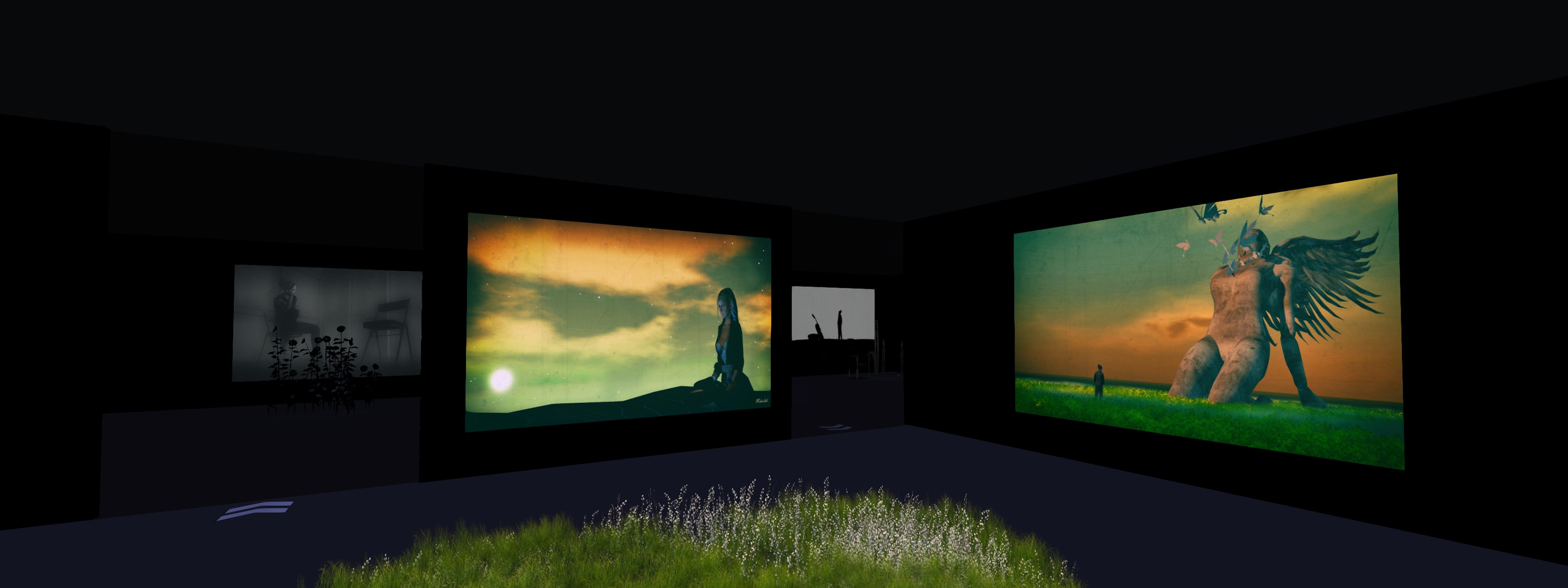
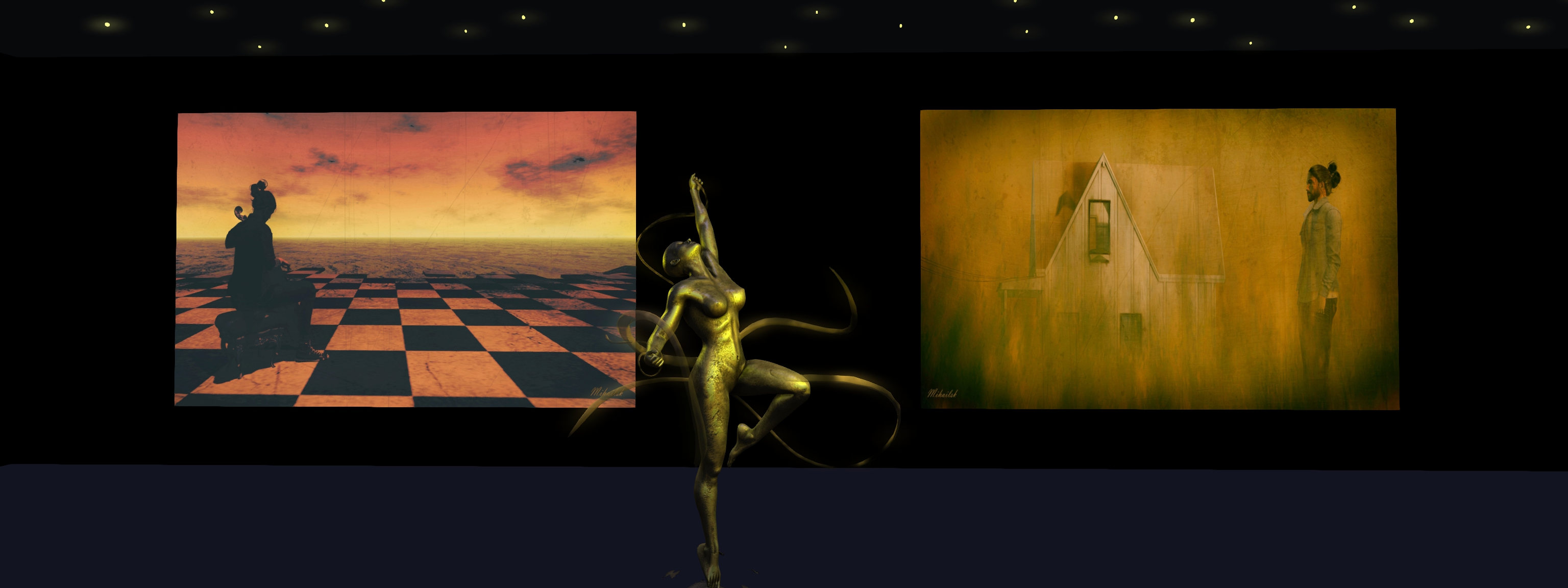
Ego: travels with an artist in Second Life

Art Korner Gallery II: Mihailsk – Ego

Update, June 27th, 2022: Art Korner has Closed.

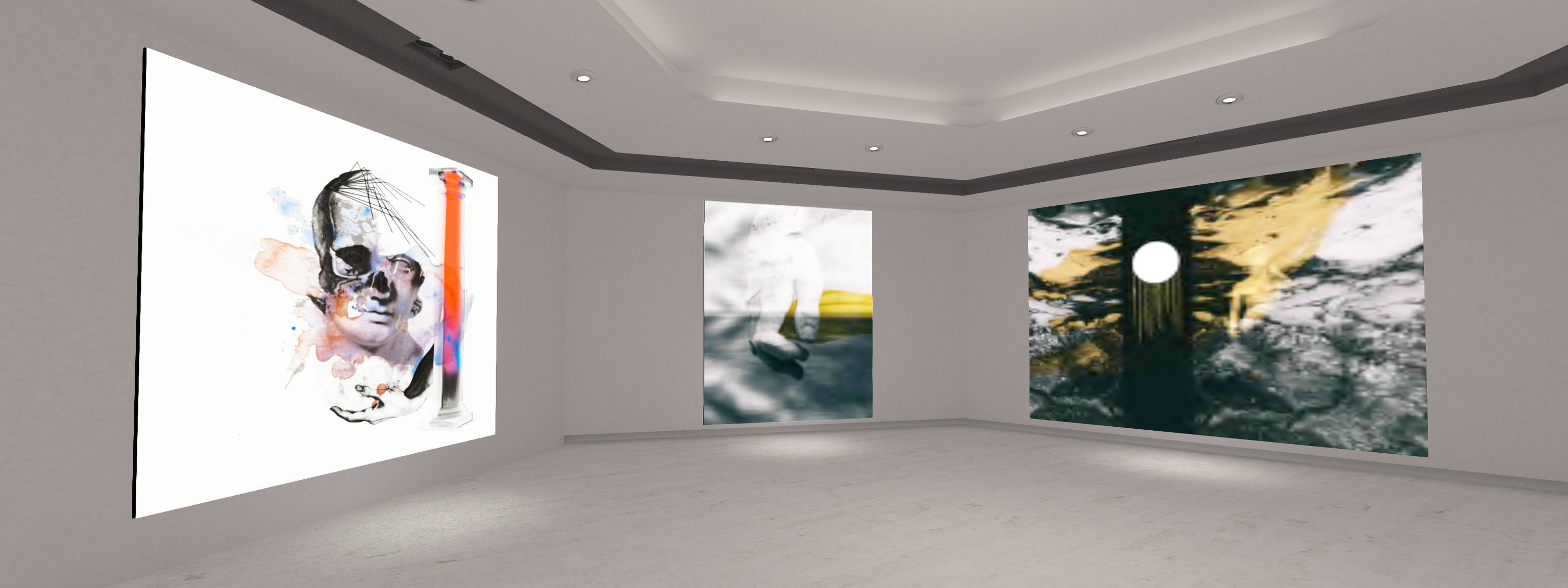
Yes, this exhibition is me. Me, the explorer in SL, who travels from light to dark, from colour to monochrome, depending on the mood and moment.
Each of my works expresses a moment with a different mood. Sometimes visible and sometimes hidden. But do not try to look for hidden meanings and symbolism behind the images, because there is none.is none. All my images represent an aspect of me/show a part of who I am.

– Mihailsk in Ego, his latest exhibition

I first encountered the photography of Mihailsk in July 2021, at his very first public exhibition. Despite being active in SL for several years, he had only relatively recently entered the world of SL photography and artistic creation, and his first exhibition came as a result of encouragement on the part of Dido Haas, who hosted that exhibition – and indeed, Mihailsk’s second exhibition – at her Nitroglobus Roof Gallery(see: Mihailsk’s Baptism of Fire in Second Life and Mihailsk’s Red Sky at Nitroglobus in Second Life).

From the start, I was captivated by his approach to Second Life photography; whilst avatar-centric, his work is not precisely focused on his avatar as a subject for / of study in the manner of many SL photographers; rather he utilises his avatar as part of a larger canvas, one that brings together both avatar and location (as in region, rather than constructed studio setting) to offer an expression of a moment, a mood; something reflective of his own mood at the time the image was created. And I’m not alone in finding his work captivating.

Art Korner Gallery II: Mihailsk – Ego

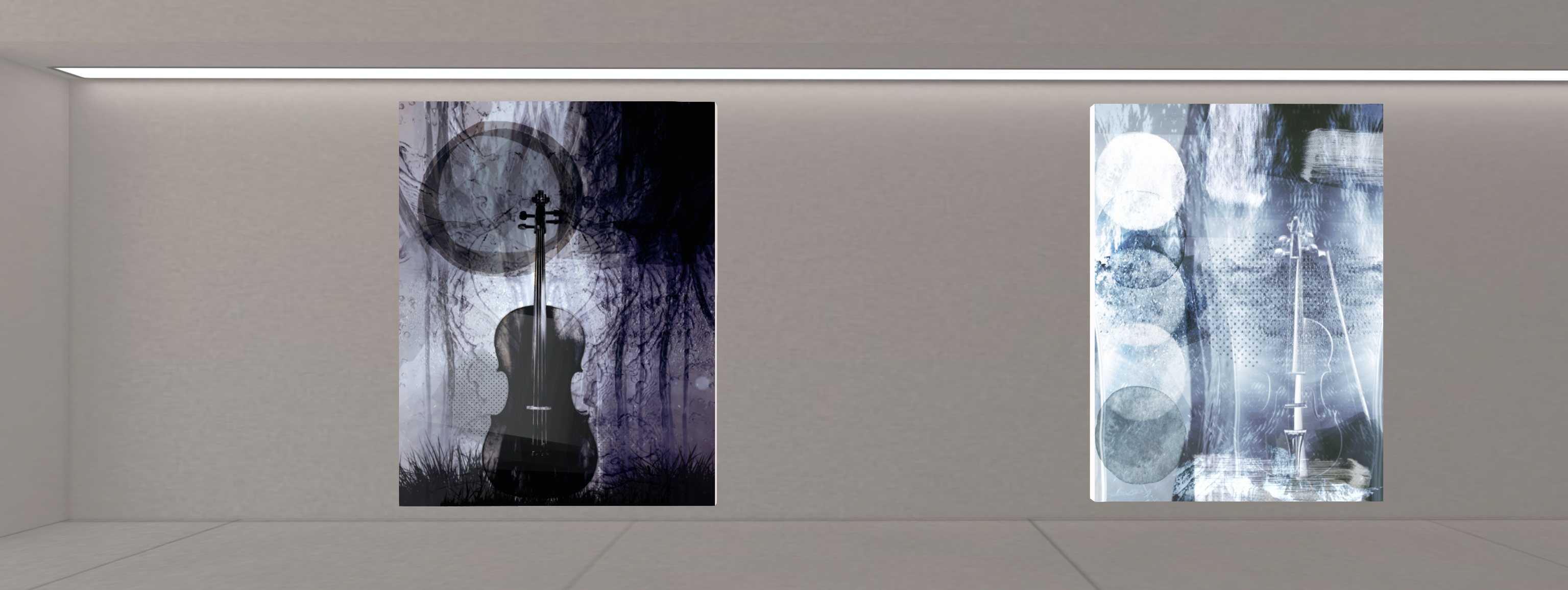
Further appreciation of his work can currently be gained at Art Korner Gallery II, curated by Frank Atisso., where Mihailsk presented his largest exhibition to date. Comprising more than 30 pieces specifically produced for it, Ego is a remarkable journey through the art and mind of the artist. And by “journey”, I am not just talking metaphorically; the pieces again represent the artist’s explorations of many popular places in Second Life, and have also been arranged in a manner that takes us on a journey through them, as we pass through seven rooms within the gallery space, each one offering at least 5 images.

The images in each room carry a theme, defined by the use of a selected colour. The colours used include green (nature, and our relationship with the natural world), yellow (the Sun, life, warm (of feel, touch, etc.)), blue: tranquillity and coolness (of thought and emotions) and monochrome (purity/ clarity of thought and emotion – as in seeing everything in black and white). Each room also includes a quote or passage by a writer or poet, the majority of whom hail from Mihailsk’s native Greece, although in the first room is a piece by George Gordon Byron, better known as Lord Byron, that might be taken as an exhortation of how to live life, and which can also be seen as a code by which Mihailsk approaches his art.

Art Korner Gallery II: Mihailsk – Ego

The use of the quotes within each each is particularly interesting, because while Mihailsk states that his images are not intended to carry “hidden” meaning or symbolism, the words nevertheless encourage us to a certain outlook  that cannot help but add a further layer of possible meaning or interpretation to the pieces in each room. At the same time, thy offer us insight into the artist’s thoughts and moods whilst capturing and processing each piece.

Expressive, vital, and beautiful in the manner in which they frame avatar (either Mihailsk or Dido) together with setting / background with little more than a pose (remember, these are not images that us purpose-built sets, but have been captured during Mihailsk’s travels through Second Life), Ego (the word in this instance being used in its purest sense: to mean “I”, or “me”) is a compelling exhibition, and will be available for people’s appreciation through the Christmas period. When visiting, done make sure you have your viewer set to Use Shared Environment (World → Environment) and have Advanced Lighting Model enabled (Preferences → Graphics).

SLurl Details

A Blue Hour Winter Holiday in Second Life

Blue Hour Winter Holiday Village, December 2021 – click any image for full size
This will be a briefer than usual travelogue piece for today, as I’m currently going in several directions at once, both in and out of SL – it’s that time of year, after all! But I wanted to get notes down about Vita Camino’s most recent public offering, one specifically for the 2021 / 2022 winter holiday season.

Occupying a sky platform above Vita’s My Little Venice – a location I hope to visit in the future – Blue Hour Winter Holiday Village offers another winter / Christmas setting ideal for seasonal photography.  As the name suggests, this is something of a rural / urban setting; the landing point Vita provides drops visitors onto a track that is slowly being hidden by falling snow as it winds through woodland in the hours of twilight. Forming a large loop, and periodically lit by lanterns hung from tall posts, it connects a number of small, outlying rental properties with a small town centre.

Blue Hour Winter Holiday Village, December 2021

With a winter market at one end of its L-shaped street, the town is marked by a number pseudo-Tudor building that from shops on their ground floors and living spaces above, Along one arm of the street, these buildings face a row of houses that might be said to be more Victorian in look. The other arm of the street is bracketed by a park-come recreational area, a small café nestled  to one side to offer a warm welcome to those needing relief from the snow.

A large pond sits to one side of the shops, a place for a spot of skating, while the lights of cottages light the rocky outland beyond. While these are merely shells of buildings, their presence on the stepped rocks gives the setting a sense of depth.

Blue Hour Winter Holiday Village, December 2021

Additional depth is given through the presences of static NPCs indoors and out, together with vehicles carrying presents and Christmas trees home, as well as providing further opportunities for photography.

Easy to explore, rich in detail, Blue Winter Christmas Village is open for your enjoyment – and should you fancy a Christmas vacation in-world, a couple of of the rental cabins were still available during my visit. However, given this is a foreshortened write-up, I’ll leave you with a couple more images and the SLurl so you can see for yourselves.

Blue Hour Winter Holiday Village, December 2021

With thanks to Tara (TaraLiaMe) for the Landmark.

SLurl Details

2021 SUG meeting week #50 summary

Hidden Bottle, October 2021 – blog post

The following notes were taken from the Tuesday, December 14th, 2021 Simulator User Group (SUG) meeting. The meeting was recorded by Pantera Północy, and the video is embedded at the end of this summary. Note this summary focuses on the key points of the meeting; where there is something to report, the video should be referred to should full details of the meeting wish to be reviewed.

Server Deployments

See the server deployment thread for further updates.

  • On Tuesday, December 14th, all simulators on the SLS Main channel received a new simulator version 566406, which includes back-end support for the new IMs-to-e-mail options that go live on December 15th – see Lab announces change to e-mail preferences for Group notices).
  • On Wednesday, December 15th, the tools update simulator will be deployed to all remaining RC channels.

These deployments mark the end of planned simulator deployments for 2021. Monday, December 20th marks the start of the end-of-year No Change window.

The Main channel deployment / restart also saw a number of regions become inaccessible for an extended period (up or and possibly exceeding 3 hours), the latest to due so. These longer restarts are the result of LL still trying to get the concurrency – how many regions can be restarted in a pass – right.

Available Viewers

This list reflects those viewers available via Linden Lab.

  • Release viewer: version version 6.5.0.565607, formerly the Maintenance RC and dated November 10, promoted November 15 – this viewer now contains a fix for the media issues caused by the Apple Notarisation viewer.
  • Release channel cohorts (please see my notes on manually installing RC viewer versions if you wish to install any release candidate(s) yourself):
    • The combined Simplified Cache and 360 Snapshot project viewer, version 6.5.1.566335, issued on December 7.
    • The Jenever Maintenance RC viewer, version 6.5.1.566306, issued on December 6.
    • The Koaliang Maintenance 2 RC viewer, version 6.5.1.565905, issued on December 6.
    • The Tracy Integration RC viewer version 6.4.23.563771 (dated Friday, November 5) issued Tuesday, November 9.
  • Project viewers:
    • Performance Improvements project viewer updated to version 6.5.1.566443, dated December 8.
    • Performance Floater project viewer, version 6.4.23.562625, issued September 2.
    • Mesh Optimizer project viewer, version 6.4.23.562614, issued September 1.
    • Legacy Profiles viewer, version 6.4.11.550519, dated October 26, 2020.
    • Copy / Paste viewer, version 6.3.5.533365, dated December 9, 2019.

In Brief

  • The SUG meeting on Tuesday December 21st, 2021 will be a party to mark the winter solstice. As such, this is liable to be my last SUG summary for 2021.
  • There has been a report of the viewer recording failing/timing out event polls for neighbouring regions, as seen from within a region.
    • This is something that has not apparently been reported to LL via Jira, and it is not clear if it is specific to a region.
    • The concern raised was that it might impact region crossings, but LL do not see why this should be so.
  • Map API:
    • The issue of “empty” land showing on the World Map was raised (i.e. just the terrain, no buildings, etc., despite the land being built-out). This is usually (but not exclusively) the result of a known map issue in rendering mesh objects, particularly if the mash structure is large, but has a very small prim root.
    • It has been reported that the World Map API (used to interrogate the Map and produce things like the web-based maps for SL) seems “happy” to return region name/location data for a “large number” of regions that no longer exists (search for them with the in-world Map, and you’ll get a “None Found” error.
The Lab’s experiment with using textures on “empty” Map tiles offers this compass.
    • As a side-note to this – and while revealed some time ago by Alexa Linden – Simon Linden noted the Lab has a proof-of-concept for replacing map tiles with textures, offered in the form of a compass rose visible on one part of the World Map. There are obviously some concerns over how such a capability might be used were it to be rolled out to users, so the idea appears to be to allow LL provide additional info on map tiles via “empty” spaces.


Eskol: music, art and sound (& a photo contest) in Second Life

Eskol: Morlita Quan

Morlita Quan is a multi-faceted artist I’ve long admired, having written about her art and installations within Second Life on numerous occasions within this blog. So when I received a request from her recently – of which more further down in this article – I decided to take an opportunity to hop over to Eskol, her mixed-media art and events region, and spend a little time there.

The first thing to note about Eskol is that it is far from your “normal” events-style region in Second Life. Nor, in bringing together music, art and sound, is it any kind of conventional “club”; rather, it is the embodiment of Morlita’s multi-faceted talents as an artist, designer and musician. Within the region are various locations, linked via a teleport HUD (look for the little robot HUD givers, click and accept, and then add the HUD), each of which is presented as a means of exploring those various facets.

As a musician, Morlita started playing the guitar at the age of eight, and by her mid-teens had discovered the magic of mixing decks and consoles, tools that allowed her to start experimenting with music as form of artistic expression, first as a DJ, then as a recording artists working independently and the via the Naïf record label. Within Second Life, Mori’s music has led her into numerous collaborations in the realms of music and film, working with the likes of Bsukmet Stormcrow in the former and providing compositional elements for machinima by the likes of Glaz Decuir, NicoleX Moonwall, Cherry Manga and Theda Tammas.

Eskol: Morlita Quan

Give this, the music spaces found within Eskol aren’t intended to be considered “clubs” or dance venues per se; traffic and avatar counts are not a driving metric. Rather, the Eskol Main Stage area and Sound Scape locations are offered as places where different, minority / lesser-known styles of music can be presented and appreciated, although the aesthetics of both locations are very music in keeping with Mori’s approach to digital art and design.

As an artist, Mori has collaborated with other Second Life artists and with various universities and galleries both in her native Spain and around the world. Like her music, her art is very much experimental / abstract , carrying within it a natural fluidity that gives it its own form of life. This is achieved by Mori mixing classical painting with post graphic design processing, while always retaining a core inspirations drawn from Nature, and most often utilising geometry as a further expressive value.

This can most clearly be see within the gallery level at Eskol, where two wings of art displays might be found. the larger, single-level wing presents a broad range of Mori’s 2D art, whilst the smaller, 2-level gallery present her more recent works.

Eskol: Morlita Quan

It is art – or photography – that formed the core of Morlita’s request I mentioned at the top of this article, and which prompted my visit.

Eskol is an evolving environment, offering facilities for fun and presentation, as duly noted in part in this piece. One of the current elements to be form within the region is that of the Eskol Photo Contest, of which Morlita graciously aske me to serve on the judging panel – a request I was delighted to accept.

Eskol: Main Stage

Eskol 2021/2022 Photo Contest

General notes:

  • Prize: L$5,000 single prize to the winner, as judged by the contest jury.
  • Closing date for entries: January 1st, 2022.
  • Maximum number of submissions per entrant: 2.
  • Method of entry: e-mail submission.

How to Enter:

  • Visit the Eskol Photo Contest area.
  • Use any of the 6 supplied photo booths to take up to two photographs featuring your avatar(s)
    • You may invite additional models.
    • If you are submitting 2 images, you may use a different booth for each.
  • You may post-process / crop / cut your image(s) as required.
  • When you are satisfied, e-mail your entries to eskolsecondlife@gmail.com, together with your avatar name.
    • Note that only images submitted to this address with be accepted; submissions to the Eskol Facebook group, or in-world to Morlita Quan or via any other medium will be rejected.
Eskol: one of the contest photo booths

Exhibition and Prize:

  • After the closing date for submissions, all entries will be exhibited at ESKOL for a period of  one month.
  • During this time, the entries will be subject to judging by the jury of Morlita Quan,  Lanjran Choche and Inara Pey.
    • Judging will be on the basis of aesthetics and originality.
    • The jury will select one image at the prize winner, and the artist will be awarded the L$5,000 prize.
  • The winner will be officially announced during January via the Eskol in-world group, and the Eskol Facebook group (I will also review the exhibition of entries during January, and include details of the winner).

SLurl Details

2021 viewer release summaries week #49

Logos representative only and should not be seen as an endorsement / preference / recommendation

Updates from the week ending Sunday, December 12th

This summary is generally published every Monday, and is a list of SL viewer / client releases (official and TPV) made during the previous week. When reading it, please note:

  • It is based on my Current Viewer Releases Page, a list of all Second Life viewers and clients that are in popular use (and of which I am aware), and which are recognised as adhering to the TPV Policy. This page includes comprehensive links to download pages, blog notes, release notes, etc., as well as links to any / all reviews of specific viewers / clients made within this blog.
  • By its nature, this summary presented here will always be in arrears, please refer to the Current Viewer Release Page for more up-to-date information.
  • Note that for purposes of length, TPV test viewers, preview / beta viewers / nightly builds are generally not recorded in these summaries.

Official LL Viewers

  • Release viewer: version version 6.5.0.565607, formerly the Maintenance RC and dated November 10, promoted November 15 – this viewer now contains a fix for the media issues caused by the Apple Notarisation viewer.
  • Release channel cohorts:
    • The combined Simplified Cache and 360 Snapshot project viewer, version 6.5.1.566335, issued on December 7.
    • The Jenever Maintenance RC viewer, version 6.5.1.566306, issued on December 6.
    • The Koaliang Maintenance 2 RC viewer, version 6.5.1.565905, issued on December 6.
  • Project viewers:
    • Performance Improvements project viewer updated to version 6.5.1.566443, dated December 8.

LL Viewer Resources

Third-party Viewers

V6-style

  • No updates.

V1-style

Mobile / Other Clients

  • MetaChat updated to version 1.2.9135 on December 7.
  • Radegast updated to version 2.37 on December 7.

Additional TPV Resources

Related Links