2023 SL SUG meetings week #33 summary

Seogyeo Town, Seogyeoshire, May 2023 – blog post

The following notes were taken from the Tuesday,  August 15th Simulator User Group (SUG) meeting. They form a summary of the items discussed and is not intended to be a full transcript. A video of the entire meeting is embedded at the end of the article for those wishing to review the meeting in full – my thanks to Pantera for recording it.

Meeting Overview

  • The Simulator User Group (also referred to by its older name of Server User Group) exists to provide an opportunity for discussion about simulator technology, bugs, and feature ideas.
  • These meetings are conducted (as a rule):
  • They are open to anyone with a concern / interest in the above topics, and form one of a series of regular / semi-regular User Group meetings conducted by Linden Lab.
  • Dates and times of all current meetings can be found on the Second Life Public Calendar, and descriptions of meetings are defined on the SL wiki.

Server Deployments

  • On Tuesday, August 15th, all simhosts on the the SLS Main were restarted, but remain on simulator version 581251.
  • On Wednesday, August 16th, the Blueteel RC channel should be updated with simulator update 581292. Included in this release are:
    • The ability to (once more) see channel names via Help → About (and potentially announced via pop-up within TPVs supporting this capability).
    • Objects rezzed by scripts will now be correctly returned by estate managers + the throttle on llReturnObjectsByOwner has been removed.
    • GroupMemberData (used by viewers to return information about the members of a group) has been intermittently returning “well-formed but incorrect data” for several years. With this update, it should return “well-formed and correct data”.

Upcoming Simulator Releases

  • The simulator update “Dog Days” is being packaged for QA. This includes:
    • The unbinding of the Experience KVP database read / write functions from land (users will still require an Experience to access the KVP database).
    • A scripted ability to set CLICK_ACTION_IGNORE, allowing an object to be clicked-through to reach an object behind it – a flag supporting this is included in the Maintenance U RC viewer.
    • PRIM_CLICK_ACTION is added to llSet/GetPrimParams so you can set the click action on prims in a linkset.

Viewer Updates

  • Maintenance V(ersatility) RC viewer, version 6.6.14.581315, issued on August 15.
    • Ability to display user-customized keybindings in chat, making it easier to provide key binding instructions to end users for vehicles, HUDs or anything utilising custom keybindings. See URI_Name_Space for more.
  • The Inventory Extensions RC viewer updated to version 6.6.14.581357 on August 14.

The rest of the available official viewers remain as:

  • Release viewer version 6.6.13.580918, formerly the Maintenance T RC viewer, July 14.
  • Release channel cohorts:
    • glTF / PBR Materials viewer, version 7.0.0.581126, June 26.
    • Maintenance U(pbeat) RC viewer, version, 6.6.14.581101 July 21.
  • Project viewers:

Note: the alternate viewer page also lists “Win32+MacOS<10.13 – 6.6.12.579987” as an RC viewer. However, the Win 32 + pre-Mac OS 10.13 was promoted to release status on July 5th, and viewer version 6.6.12.579987 points to the Maintenance S viewer, promoted to release status on May 16th.

Scripting Discussion

  • LSL contains a number of long-standing code errors / issues / limitations which have been around so long they have either become expected behaviour or have had a number of work-arounds implemented. This makes any attempt to correct the code difficult, as it can result in unintended script breakage, and because of this, LL has tended to take the attitude of, “we aren’t going to fix that because it is too ingrained.”
  • However, one idea now being considered for allowing such script issues to be fixed and hopefully avoid the potential for script breakage in the process, is to introduce a “compatibility” mode to LSL.
  • Such a mode would be set via some form of option (check box or button or something).
    • By default, with would be “off”, for all scripts (existing and new), and they would as they do now (“classic” behaviour), preserving any “incorrect” behaviour.
    • When toggled “on” for a script, the script will run in the “updated” mode, allowing it leverage the corrected LSL code / functions and any future behavioural changes.
  • This led to an extended discussion on the approach – which was broadly favourably viewed – which touched various ideas such as version numbering and other methods of differentiating “versions” of LSL (given it does not itself have any built-in notion of versions), the historical context on the introduction of Mono, the use of compilers

General Discussion

Please refer to the video for the following:

  • There is said to be increasing reports of avatars failing to load correctly following teleporting into a popular location (notably those at altitude) and of inventory attachment queuing and loading taking longer. Some thinking is that this may be interest list related, however, Bug reports have yet to be filed to allow for investigation.
  • Leviathan Linden put out a request for feedback:
I’ve been thinking about how to improve vehicles in SL so I’m soliciting input for the next week or so. You can email me directly (leviathan-at-lindenlab.com) you can IM me, or I’m even willing to schedule a chat/voice session if anyone wants to talk about vehicles: cars, airplanes, boats, motorcycles, etc. What got me on this subject were two things: (1) the idea of giving LSL scripts direct access to game controller inputs (joystick, button state, etc), and also (2) different API for configuring vehicles. For example, maybe airplanes would be better described using a thrust, stall-speed, attack-angle, aileron state model.
  • The above led to some additional discussion on options – as per the last 20 minutes of the meeting.
  • Rider Linden noted that during the LL engineering meeting in week #33, the subject of improved camera controls. Nothing firm on what might be done, but again, this sparked discussion during the last 10 minutes of the meeting.


† The header images included in these summaries are not intended to represent anything discussed at the meetings; they are simply here to avoid a repeated image of a rooftop of people every week. They are taken from my list of region visits, with a link to the post for those interested.

Firestorm 6.6.14: maintenance catch-up and new features

On Monday August 14th, 2023 (SLT), the Firestorm team released version 6.6.14.69596 of their viewer.
This is another release which might be described as more a maintenance update rather thana major features release, intended to keep Firestorm in step with the current official viewer code base. However, it does include some new capabilities.

When reading the following, please note:

  • This article is not intended to over every update  / change / improvement within the release. These can be found within the Firestorm 6.6.14. release notes, which also provide full credit details for the changes.
  • This review focuses primarily on the new features included with Firestorm 6.6.14, together with an overview of its parity with Linden Lab’s official viewer code base and and overviews of various updates, improvements and fixes I believe will be of specific interest to Firestorm users in general.
Table of Contents

Finally, I have not had time to personally try this release to any great extent, so am not offering any personal feedback on it.

Update, August 17th: a JIRA has been filed that rigged meshes viewed in this version of Firestorm using the Local Mesh (BETA) capability (i.e. visible only to the person testing the mesh) introduced in Firestorm 6.6.8 may result in issues. If you are a content creator who uses the Firestorm Local Mesh (BETA) for viewing your rigged mesh creations, please see FIRE-33157

General Notes

Installation

  • Only download Firestorm from the Firestorm website. Do not utilise and other third-party site purporting to offer the Firestorm viewer, and remember Firestorm will never ask for log-in credentials in order to download a release version of their viewer.
  • There is no need to perform a clean install with this release if you do not wish to.
  • Do, however, make sure you back-up all your settings safely so you can restore them after installing 6.6.14.

Version Blocking

As per the Firestorm’s teams standard practice of only supporting 3 active versions of the viewer at any time, note that version 6.5.6 will be blocked from accessing Second Life three weeks from the date of version 6.6.14’s release.

Special Note: Windows 32-Bit Support

This release of Firestorm is likely the last to fully support the 32-bit version of thee Windows operating system. This is in keeping with LL’s announcement that Windows 32-bit is not longer a supported operating system (see: End of Support for Second Life 32-bit Windows Viewer and Updated Minimum System Requirements for MacOS to 10.13 or Second Life: Win 32-bit support ending; MacOS system requirements updating). A further reason for this is that as a part of the forthcoming switch to using physically based rendering (PBR) under the Kronos glTF 2.0 specification, Linden Lab will only be sub-licensing the 64-bit versions Havok physics library used within the viewer – it is further possible that in the future, other libraries needed by the viewer will only be supported in their 64-bit versions.

Those who are using the 32-bit version of Windows (estimated as around 2% of the Firestorm user base) are advised to check their systems – and if they are using hardware capable of supporting a 64-bit version, to make any necessary upgrades that may be required (generally in the area of RAM), and switch to Windows 64-bit.

An important point to note with this is that 32-bit versions of Windows will not be blocked from accessing Second Life. Rather, viewer upgrades (including the use of required build libraries) will no longer be checked for compatibility with Windows 32-bit. For Firestorm in particular, current 32-bit builds will remain available for the time being; however, no guarantee is given that this will continue to be the case with future releases.

Linden Lab Updates

Firestorm 6.6.14.69596 is fully merged up to the  Linden 6.6.14 code-base, per the notes below.

Maintenance T – Maintenance Transparent Translation

  • Viewer version 6.6.13.580918, July 2023.
  • Primarily focused on the shift of translation services (accessed via Preferences → Chat → Typing → Translation) from Microsoft Bing to  Microsoft Azure and DeepL. Also includes a range of Profile-related updates.

Maintenance S – Superlative Supports

  • Viewer version 6.6.12.579987, May 2023.
  • Predominantly translation updates.

Performance Floater & Auto FPS

  • Viewer version 6.6.11.579629, April 2023.
  • The official implementation of the Performance Floater & Auto FPS feature first implemented in Firestorm 6.5.3.65658 see my review here.

Maintenance R – Resident Inspired Improvements

Maintenance Q Viewer – Quality Contributions

  • Viewer version 6.6.9.577968, February 2023.
  • Assorted quality of life improvements in the viewer.

Maintenance P Viewer – Preferences, Positions and Paste fixes

Firestorm New Features

Building: Select (and Replace) All Matching Textures

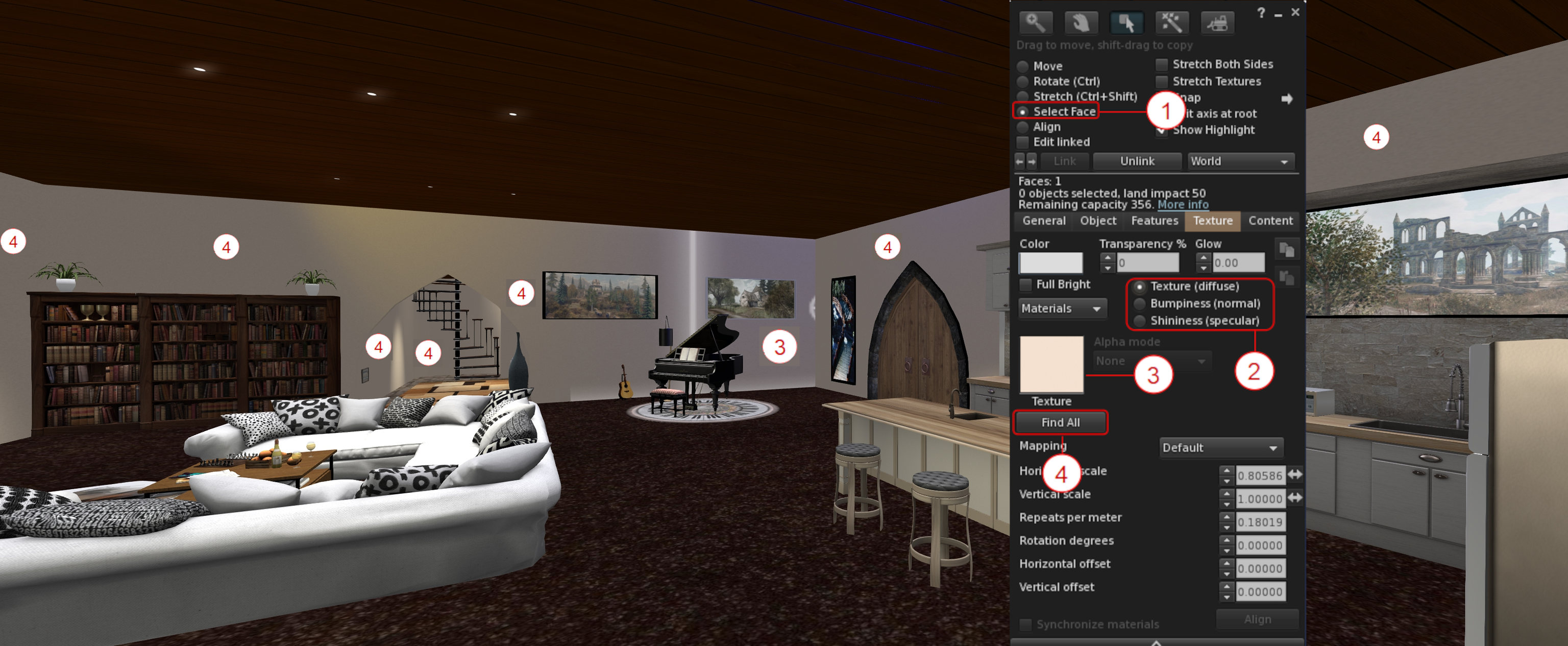
A new option – Find All – within the Build / Edit floater’s Texture tab, allows all faces in an object or linkset using the same diffuse (texture) or normal or specular map, to be updated at once.

  • Right-click on the item / linkset to be updated and select Edit from the Context / Pie menu.
  • In the upper part of the Edit / Build floater click the Select Face radio button – (1) in the mage below.
  • Click the floater’s Texture tab to open it (shown in the image below), and:
    • Use the Texture / Bumpiness (Normal) or Glossiness (Specular) radio buttons – (2) in the image below – to select the map type to be updated.
    • Click on a face of the object / linkset containing the map to be updated. The face will be highlighted, and the selected map will be displayed in the Texture Swatch box on the Edit / Build floater  – (3) on the image below.
    •  Click on the Find All button to select ALL of the object faces containing the selected map – (4) in the image below.
  • When you are satisfied you have selected the correct map / surfaces, click the Texture Swatch in the Edit / Build floater to open the Texture Picker floater and pick the map you wish to use and apply it to all the selected faces in the usual manner.
The Find All button for selecting all instances of texture / normal / specular map used on an object / linkset. See notes above for an explanation of the numbers

Building: Strip Unwanted Alpha Channels During Image Uploads

Images uploaded to Second Life can include an empty / almost empty alpha channel which can lead to rendering issues  (such as textures flipping back and forth on one another as the camera moves, impacting rendering performance) when the texture is viewed in-world. While such empty / near-empty alpha channels may be intentional, they are generally an accidental or unwanted artefact, and should be removed from the image to avoid issues such as those mentioned above.

To achieve this, Firestorm 6.6.14 introduces an automatic scan of images being uploaded to Second Life to check for alpha channels which are either empty or almost empty.

  • If such channels are found in an image, the Upload Preview floater will display an additional warning and checkbox: Empty Alpha Channel Will Be Removed (see the image below, left).
  • Leaving this warning checked will cause the the unwanted transparency information to be stripped from the image when it is uploaded.
  • If there is a need to have the transparency information uploaded with the image, the warning should be unchecked. However, note that doing so will display an additional caution and explanation on the impact of including alpha channels in images, together with two buttons, as shown in the image below, right.
  • Click the required button displayed by the caution to clear it, then click the upload button to proceed with the image upload.
Stripping unwanted alpha channels from images at upload

Additional notes:

  • The alpha state for the image, once uploaded – “no alpha” or “with alpha” – is displayed at the bottom of the upload floater, alongside the uploaded image size (as arrowed at the button of the image on the left, above).
  • The Uploaded Size field has been fixed to correctly show the size of the uploaded image in all cases. see: FIRE-32944.

Inventory: Show Only Coalesced Objects

Show only coalesced objects in Inventory

Firestorm 6.6.14 adds a new inventory option to display only coalesced objects (i.e. multiple items returned to inventory as a single group, rather than being returned individually).

  • The option can be found within the Inventory gear icon menu (the gear icon being located at the bottom left of the Inventory floater), directly under those for showing only Modifiable, Copyable or Transferable items in inventory.
  • Toggle the option on (check mark visible) and off (no check mark) as required.
  • Note the option works in cooperation with all other options in the menu.
  • This feature was added in response to FIRE-31369.

Blacklisting: Blacklist Animations via the Animation Explorer

With this release, it is possible to add any animation associated with your avatars and listed by the Animation Explorer to the Firestorm Asset Blacklist:

  • Open the animation Explorer (World → Animation Explorer).
  • Select the animation to be blacklisted and click the Blacklist button in the lower right section of the Explorer floater.
  • Repeat for any other animations, as required and close the floater when done.
  • Blocked animations can be reviewed / unblocked via the Asset Blacklist floater (World → Asset Blacklist).

Notes:

  • Blocking only applies to animations played through the simulator. Those played locally (i.e. within your viewer) will still be seen by you as playing, even if blocked.
  • A Blacklisted animation my still be seen by others for a brief period after blocking, as it will take a second or so for the block information to be propagated through the simulator.

Audio Streaming: Stream Title Floater and Track History

It is now possible to display information on the current song title and artist playing on the parcel audio stream (if active), and a history of the last 10 played music tracks. The information is displayed is its own floaters, accessed via the menu bar → World → Stream Title.

Enabling the music stream information, together with the additional recently played history (ported from Kokua)

Additional Firestorm Improvements of Note

Inventory

  • Reload Received Items: a button within the Received Items section of the Inventory floater will refresh the list of items in the section.
Received Items reload button
  • Ungroup folder: A request to confirm has been added when ungrouping a folder in inventory.
  • Inventory offer sound: the Inventory Offer sound (Preferences → Sound & Media → UI Sounds 3 → Inventory Offer) will now play when Automatically Accept New Inventory Items and the following Log Auto-Accepted Inventory Items to Chat are enabled (both under Preferences → Privacy → General). This is is response to FIRE-32396 .

Building and Scripting

    • Floater improvements: the floater can now be resized, lists will now scroll, and clipping of text on the Settings tab has been fixed. All in response to FIRE-32624.
    • Floater should now recognise and load all forms of “.DAE” (e.g. Dae DAe DAE dAE and daE). See FIRE-32180.
    • Meshes exported with Autodesk Collada should not longer fail, fixing FIRE-32599.
    • Scaling and rigged mesh handling corrected in accordance with FIRE-32604 and FIRE-32681.
  • Script Editor: A fix for the unindent after } when a previous line had a word wrap. See: FIRE-19959.

Animation Playback Floater and Preferences

The additional information displayed in the Animation Playback floater (Priority, Duration, Loop, Ease In, Ease Out and Joints) can now be toggled on/off using a drop-down button (see below).

Firestorm Animation Playback floater: advanced animation information can be shown / hidden via the drop-down button

In addition, the default state of the Playback Floater can be set via Preferences → Firestorm → Build 2 → Always Expand Animation Preview Advanced Information. By default the option is unchecked, meaning the advanced information will not be displayed when the Animation Playback floater is displayed.

General UI / Floater Updates of Note

  • Profile updates:
    • The View Profile option has been removed from the Context menu for your own avatar, as its already listed in the Community sub-menu. See: FIRE-32304.
    • Profile description text should not longer be truncated in some cases. See: FIRE-32901.
    • Unsaved text in the Notes tab of another avatar’s Profile should no longer be discarded when the Profile owner enters or leaves the region at the same time. See: FIRE-32926.
  • Area Search: updates have been made to Area Search to prevent some of the aggressive culling which is impacted Area Search results.
    • However, to get the best results when doing an Area Search, you will still need to turn slowly on the spot once, to fully load all the objects.
    • In addition, once an item is added to the Area Search it will/should not vanish a few seconds later as had been the observed behaviour with previous releases.
    • There are all partial fixes for FIRE-32688.
  • Assorted floater design, typographic corrections, layout corrections and tooltip updates, per the release notes.

Other Updates of Note

Asset Cache Update

Until now, automatic purging of the Asset Cache would only commence when the “max_cache” value was exceeded. This essentially meant that a) the Asset Cache could exceed this value, and b) once started, automatic purging would be pretty much constant, impacting viewer performance.

With Firestorm 6.6.14, this has been changed:

  • The “max_cache” value means just that: the largest size the Asset Cache will reach.
  • Two thresholds are set via debug settings:
    • A” high water” threshold set to 95% of the “max_cache” value. When this is reached, purging of the oldest caches files will commence.
    • A “low water” threshold set to 70% of the “max_cache” value. When this is reached, automatic purging will stop.
  • These two values  will ensure:
    • The “high water” threshold leaves 5% capacity available within the Asset Cache, allowing incoming data from a simulator to be properly caches during any automatic purging.
    • The “low water” threshold means that automatic purging, once started, will not be constant, potentially impacting viewer performance.
  • This also means that users can now set their cache to a ramdisk if they really want and it won’t (normally) overflow.

Library Updates

  • FMOD Studio updated to version 2.02.15.
  • Havok TPV library updated to version 1.0.577418, in line with LL.

Linux Updates

  • Improvement: Firestorm now uses system-wide fontconfig and freetype directly from the user’s system, rather than using 3p libraries packaged with the viewer.
  • Fixes:
    • A fix for the “alpha triangles bug”(see FIRE-23370).
    • WIP to get Linux crash reporting working with Bugsplat.
    • The ability to toggle between internal/external browsers in preferences on Linux (Preferences → Network & Files → Connection → Web Browser).
  • Updates:
    • Apr suite updated to version 1.4.5.230351228.
    • OpenJpeg Library updated to version 2.5.0.
    • CEF updated to version 1.12.2.202210012157_92.0.27.
    • Colladadom updated to version 2.3.230940029.
    • Libxml2 updated to version 2-2.10.3.230940019.
    • Xmlrpc updated to version 0.54.2.230940042

OpenSim Updates

  • Opensim VarRregions with non-power of 2 sizes no longer flood logs.
  • Avatar Profile fixes including: correct loading; UDP profiles restored; profile picks + notes should load, 1st Life notes should save back to the server.
  • Additional fixes per the release notes.

Links

Of art and a Caged Bird in Second Life

Red Dot Gallery

In July of 2023, I has the distinct pleasure of visiting  Auguries of Innocence, a thoroughly engaging exhibition of art by Janus Falls structured around William Blake’s poem of the same name. Within it, Janus echoed and extended ideas found within Blake’s work, uniquely re-interpreting theme through colour and image. As one can tell from my review of that exhibit, I was deeply captivated by the expressiveness found within it, and so – although admittedly somewhat belatedly – I made a point of visiting another collection of images inspired by a poem Janus is currently exhibiting.

Hosted within her own gallery space – Red Dot GalleryI know Why the Caged Bird Sings presents a series of 14 avatar studies inspired by Maya Angelou’s poem Caged Bird (also referred to as I Know Why the Caged Bird Sings, which is also the title of the first volume of Angelou’s autobiography, itself referenced by the poem). First published in her fourth collection of poetry entitled Shaker, Why Don’t You Sing? (1983), the poem is focused on the themes of freedom, racial oppression using the metaphors of the free and the caged bird.

Red Dot Gallery: Janus Falls – I Know Why the Caged Bird Sings

Through its structure use of mixed meter and irregular rhyme, Caged Bird is again a powerful statement oppression and hope for a brighter future. It’s a message that, in a world where basic human caring, acceptance and social concern are increasing seen as something to be reviled and differences in outlook, gender, sexuality and – yes, race – are reasons to ostracize and condemn, the poem stands not only as a reminder of the past, but also a very real underscoring of the fact that the oppression not only continues, but is spreading insidiously; that all of us who have an ounce of human dignity and compassion need to be firmly raising our voices against it, such that those who might otherwise find themselves caged by the ignorance of others might again have their voices – their rights and freedoms – accepted and restored.

In this, the art of I know Why the Caged Bird Sings presents a visual essay, one running sequentially through the gallery’s space from entrance (where Caged Bird can be read), and around the lower floor back to the upper and thence around the images there, which carries us from images of captivity to freedom and from sorrow to happiness (again reflecting the poem’s (admittedly more layered) mixing of joy and sadness).

Red Dot Gallery: Janus Falls – I Know Why the Caged Bird Sings

Within these images, Janus again shows a consummate skill in using visual contrasts  – light and dark, tone and shading, depth of field and focal point – to draw us into her art and the story it has to tell – as deftly as Angelou uses anapest and iambic meter and stressed and unstressed pairings of ideas   to draw us into the meaning of her poem.

In exploring these pieces, it is also hard not to escape the feeling there is a further message here; one directly connected to our digital world. Second Life is a place that, for many of us, is liberating; through it we can give wing to our innermost truths, wants and desires through the expressiveness of our avatars ad / or our creativity. It presents us with a place where the bars of life in whatever form they take – physical, mental, social, familial, etc., can be escaped (if only, admittedly for a time) and we can find comfort, joy, happiness – even acceptance. Given we have been so fortunate to be able to experience this richness and freedom of expression, do we not owe it to ourselves and those around us to ensure that no matter who and where we are, such freedom is to be as open, as cherished as available to all who seek it within the physical world?

Red Dot Gallery: Janus Falls – I Know Why the Caged Bird Sings

SLurl Details

A view through an Azure Window in Second Life

Dwejra, August 2023 – click any image for full size

Malta stands as a small but proud island nation within the Mediterranean Sea. For much of Human history, it’s location roughly in the middle of that sea has made it hugely strategically important across successive civilisations. From the Phoenicians and Carthaginians through the likes of the  Romans and Greeks through to French and British to name but a few, it has been claimed by many and inhabited since around 6000 BCE. Indeed, until 1963, it was home to what were regarded as the oldest free-standing structures on Earth: the Megalithic Temples of Malta, although the title was taken by the structures at Göbekli Tepe, Turkey – a location also featured in SL courtesy of Konrad (Kaiju Kohime) and Saskia Rieko – see A Night Sky with a touch of history in Second Life.

As well as being steeped in history, Malta is also an archipelago of stunning natural beauty and uniqueness – including having its own endemic sub-species of bee (from which its current name name might be in part derived). The coastlines of Malta’s two major islands have a number of captivating bays, cliffs and more – but potentially one of the most engaging (particularly in terms of tourism) lies on Gozo, Malta’s second largest island. It is that of Dwejra, and it is this location Moonstone (Hecatolite) has chosen to reproduce as a public space in Second Life.

Dwejra, August 2023

Moonstone’s Dwejra, however, is not one that portrays the bay as it is, but rather as it was up until March 8th, 2017: the place famous for the the massive and impressive Azure Window, a huge natural arch 28 metres tall, carved into a limestone promontory extending outwards from the island’s coast.

Sadly, both arch and promontory were lost as a result of a particularly violent storm which struck the island in 2017. However, through her work, Moonstone has ensured we can for a time appreciate it in-world in a manner very similar in appearance to how it stood for most of it’s roughly 200-year history, if minus the spray and foam almost always present as a result of the ebb and surge of the tide breaking over remnants of the cave to which it is believed the Window once provided access prior to the entire cave collapsing into the sea to leave the arch standing alone.

Dwejra, August 2023

However, the Azure Window is not the only natural formation for which Dwejra is famous. There is also Qawra, the Inland Sea and its associated Blue Hole dive site just offshore, said to have been one of Jacques Cousteau’s favourite places to dive.

Qawra is a saltwater lagoon marked by a gently shelving shale beach to one side and high limestone cliffs on the other, through which another archway provides passage for seawater, fish and marine life  – and small fishing boats, the lagoon offering a safe harbour from the latter, its beachside area now the home to a small village.

Dwejra, August 2023

The Inland Sea is very much in evidence within Moonstone’s Homestead design, complete with arched tunnel winding through the cliffs to reach the open waters. In addition to these natural sights (and sites!), it includes some of those built by human hands which have become associated with the location. There is the little fishing enclave huddled on the protected shoreline of the Inland Sea whilst behind them on a grassy rise sits a small chapel, perhaps representative of St. Anne’s Chapel – itself famous for being located close to cart tracks connecting Dwejra to Il-Mixta, one of several locations scattered across Gozo which are believed to be the sites of the island’s earliest settlers.

Across the landscape from the church and sitting on another low hill is a house which is perhaps representative of the house from which the area takes its current name (others of which include Doviera and Dueira). Between the house and the village and the chapel the land forms open fields and grazing typical for the region in the – physical world, and  Moonstone has clearly used a line of cliffs to the east and false road tunnel through them to give the impression that were one to pass through the tunnel, they’d find themselves within the greater landscape of Gozo island as a whole.

Dwejra, August 2023

The village is mostly empty building shells (hardly surprising, given this is a homestead region), but for those willing to explore the foot of the cliffs curling away from the Inland Sea and around the house on its west side might find a route up to their flat tops. If you do, and continue your explorations along the rugged back of the cliffs, you’ll doubtless find a couple of adventure activities awaiting in the form of hang-gliding and cliff diving (off the promontory beyond the Azure Window). Also awaiting discovery back down at sea level is a small rock pool typical of many to be found around the islands of Malta. This one is set out for a little quiet sunbathing whilst those fancying a swim ca do so via a buoy bobbing a few metres offshore from the pool’s surrounding ring of rock.

It would have been nice to see the Dwejra Tower featured in this build. Constructed in 1652, it is one of several coastal watchtowers built to keep an eye out for (and warn against) the arrival of raiding corsairs, and it sits atop the cliffs within observation distance of the Inland Sea and the former Azure Window. However, these towers were of a particular design (and Homesteads do have limited Land Capacity to play with as already noted), so finding a design which fits the look and doesn’t gobble LI isn’t going to be easy, so its absence is both easy to forgive and doesn’t, push come to shove, detract in any way from the finished build.

Dwejra, August 2023

In all, Dwejra in Second Life is beautifully realised given the constraints of region size in SL, and more than captures the look and feel of its namesake. Rich in photographic opportunities and offering opportunities for the aforementioned activities, it is a place which should be visited and appreciated by all Second Life explorers.

SLurl Details

  • Dwejra (Love Temptations, rated Moderate)

Art and emotion: Theresa Hermit in Second Life

St Elizabeth’s University Original Campus Gallery: Theresa Hermit

Saturday, July 29th, 2023 saw the opening of an exhibition of photography and art from the physical world by Theresa Hermit at the Original Campus Gallery within St. Elizabeth’s University.

I believe this is the first time I’ve witnessed Theresa’s work, but am unsure as to whether this is her first complete exhibition, or the first to be widely advertised. The term “introducing” is used in the advertising, but I gather from chatting with Pat Wheelwright, Director of Residential Living at St. Elizabeth’s, that Theresa has displayed her work there in the past (she is also both the university’s Art History teacher and current president), but these may have been limited in terms of audience, being only advertised within the university’s membership. Either way, I’m glad to have had the opportunity to witness this exhibition, which offers quite the showcase for Theresa’s multi-faceted artistic talents.

St Elizabeth’s University Original Campus Gallery: Theresa Hermit

In the physical world, Theresa holds a Bachelor of Fines Arts (BFA) degree and has recently completed her Master of Fine Arts (MFA). For those not clear on the difference between these and the Bachelor of Arts (BA) and Master of Arts (MA), the latter two usually centre on the scholarly, academic and critical study, whilst the BFA and MFA centre on professional artistic practice within the chosen field of study. Her work encompasses multiple mediums including watercolour (including gouache), oil, and printmaking, whilst also enjoying drawing and  – as demonstrated in this exhibition – photography, where she also develops her own images as well as taking them.

The latter is located on the ground level of the gallery space – the exhibition covering a total of three floors within the gallery – presenting a fascinating series of black and white photographs, mostly taken at a farm in Connecticut. These show a keen eye for composition whilst the use of black and white film brings a sense of time and age to the buildings, furniture and hardware which is sublime in giving a deeper sense of narrative and history that might otherwise have not been apparent.

St Elizabeth’s University Original Campus Gallery: Theresa Hermit

Within this selection are also images quite fittingly captured at a property once owned by Edward Steichen. He was both a pioneer in the craft of fashion photography and, more particularly in this case, often credited with elevating photography into a recognised art form – and I have little doubt that were he to view the images here, he would embrace them as such.

The middle and upper levels of the gallery  – and the stairways linking them – are host to a selection of Theresa’s paintings covering a range of subjects. In this, and as Theresa herself notes, she is not so much led by the artistic opportunity of something she sees, but by the emotional response she feels towards what she sees. This is perhaps most clearly seen within Darkness Falls, a painting of sunflowers set against a backdrop of smoke / dust, painted as a personal response to the events of September 11th, 2001.

St Elizabeth’s University Original Campus Gallery: Theresa Hermit

Theresa also notes that she eschews “realism” in many of her paintings in favour of her emotions (what she refers to as her work being “representational”), and this further adds a personal depth to her paintings. Again, take GGP Wedding; this is a reflection of the wedding of Theresa’s great-grandparents, taken from a photograph of that event. Within it, the newly weds are shown almost ghostlike; figures and details blurred – a perfect reflection of an event that might be recalled from a time when the eye and mind were too young to capture and imprint all that was seen firmly into memory, allowing the details to become misty over time.

What is also striking about this exhibition are the notes Theresa provides (click the small, wall-mounted signs offered close to the entrances of all three levels of the gallery space). These offer a richness of information, examining the origins of the photographs and paintings, the influences that helped inform their creation, and insights into the approaches she takes to her work. These notes help carry us into Theresa’s creative processes in a very personal way.

St Elizabeth’s University Original Campus Gallery: Theresa Hermit

A genuinely personal, engaging exhibition, and my thanks to Cayla (YumiYukimura) for the invite to visit!

SLurl Details

An aquatic Waterfall Café in Second Life

The Waterfall Café, August 2023

‘Twas off to explore a quarter full region build recently, after SunShine Kukulcan passed a tip suggesting a multi-level setting I’d enjoy exploring – and she was right!

Designed and built by Katie (Katie Luckstone), The Waterfall Café is an engaging setting which, whilst predominantly occupying the sky, captures the richness and beauty of undersea realms, combining them with a sense of fantasy (and a twist of sci-fi in places) to present a location alive with colour and with an engaging sense of life and wonder, all intended to offer a retreat-come-hangout for all those wishing to escape from the “norm” and relax with friends.

At the time of my visit, The Waterfall Café offered five locations open to the public: The Kraken (which is a very good place to start explorations),  Waterfall Café itself, Mystic Café, a a ground level coastal setting, and the Night Train. These are all connected via a teleport system (which also provides access to a non-public – I presume – work area), although it is possible to move between The Kraken and the Waterfall Café on foot, which I’d suggest is worthwhile.

The Waterfall Café, August 2023
As you step into this café, you will be transported to a world of whimsy and wonder. The aquatic theme infuses every aspect of the space, creating a visually stunning and immersive experience. Whether you prefer to sit in the main dining area or explore our secret underwater dining area, you will be surrounded by a mystical atmosphere that is both calming and captivating. As the sun sets, the mood shifts to a more intimate and romantic vibe, perfect for a cosy dinner for two on the night train which adds an extra touch of mystery and adventure.

– The Waterfall Café About Land description

The Kraken is a small lounge area offered in vibrant greens and with turquoise walls suggestive of a cavern below the waves. In keeping with its name, the lounge has a distinct octopi theme – although one not in any way menacing -, although the leaf-like seats set out before the bar offer an interesting elven-like counterpoint. The bar itself is a novel affair: those serving drinks are able to do so whilst relaxing on pool loungers floating on the water flowing outwards from where it falls from the rocks behind the bar (doubtless helping to keep the bottled beverages on the shelves there nicely cool), the bar itself holding said water in check, preventing it from soaking the feet of those occupying the leaf chairs.

Just through the doors of this curiously inviting lounge is a teleport disk connecting with the rest of the location, and a tunnel with water flowing outwards over its stone floor directing feet down to where The Waterfall Café awaits.

The Waterfall Café, August 2023

The end of his tunnel takes the form of a L-shaped passageway, the waters descending from above spreading to form a pool over the paved floor to a depth of a few centimetres, allowing vines and plants to form a floating carpet. Windows line the passageway’s walls, mixing views out to a coral reef with wall-mounted tanks to one side, whilst windows and doorways look inwards toward the rest of Café on the other as tables and chairs – some suspended from the ceiling – long both arms of the passageway present places to sit pass the time.

At the far end of the longer arm of this passageway is a huge watertight door. Swung back against its big hinge, it suggests a secret lying beyond, thus beckoning visitors to step through. But while it does indeed hide a secret, it should not be the immediate focus for explorers. Rather, that lies around halfway along the passage’s length, and the open rectangle of a stone doorway as it provides access to what had at one time been a large vaulted hall.

Lit by the phosphoresce of sea plants and the light of aquariums, the chamber has been split into two levels through the addition of a wooden floor. This leaves the lower level as something of a large entrance hall serving four small rooms and passages leading deeper into the Café. Each of the smaller rooms offers an intimate, private space, lit by water from tanks (or possibly windows to the world outside – you decide!), whilst one of the passages leading the way deeper into the Café passes over a glass panel through which the ocean floor can be seen, together with dolphins swimming by, unconcerned by whatever might be going on above their heads.

The Waterfall Café, August 2023
Aged wooden stairs climb to the added floor above where, under the vaulted ceiling a more open and decidedly sci-fi looking seating area awaits, comfortable armchairs floating serenely under their own power. Aquariums and animated digital murals set into the archways around the room’s side give the impression of it being exposed within the oceans depths, while alongside the stairs climbing up to it, a further doorway provides access to a large viewing area, modelled to look like a cave with one wall again apparently open to the sea – or at least separated from it by an near invisible transparent wall.

Beyond this first hall with its two floors, the Waterfall Café offers more visual delights in the form of multiple chambers of varying sizes and styles. I could potentially wibble on at length about these, but I’ll save you the pain because, frankly, the entire complex really should be witnessed first-hand. Just be sure to take your time in exploring, as these are spaces where careful camming is required in the larger space in order to appreciate the amount of detail they contain, and where there is a wealth of artistic expression on Katie’s part deserving of discovery.

The Waterfall Café, August 2023

One of these inner halls of the Café forms the “official” landing point for the location, providing another of the teleport disks. There are the only (in the case of the Night Train and Mystic Café) or most obvious (in the case of the ground level locations) for getting to see the rest of the location’s public offerings.

Both the Night Train and Mystic Café are much smaller that The Waterfall Café. The former offers an intimate ride through a night-time setting aboard a train carriage comprising its own private dining area and lounge / bedroom, whilst the latter presents a pavilion-like café-bar sitting within an otherworldly garden. It’s a dreamy setting, perhaps only lacking a dance system for those so inclined but which does offer an interesting selection of music (local sounds, not the audio stream), featuring extracts from the soundtrack of Beetlejuice.

Finally – almost – there is the ground-level coastal area. Sitting under a turquoise night sky, it is home to a number of tiki-style cabins with solid walls, all open to the public and the largest of which sits out over the waters, proudly raised on stilts which anchor it to a small rocky outcrop. It’s a romantically-inclined setting suggestive of tropic island paradises – and one that hides a secret. It find it through discovery, you’ll need to backtrack to the big watertight door at The Waterfall Café; but I’ll leave you to discover it in piece.

The Waterfall Café, August 2023

All told, a deeply satisfying visit – and my thanks to SunShine for the pointer!

SLurl Details

(Loveless Unity is rated Moderate)