Logos representative only and should not be seen as an endorsement / preference / recommendation
Updates from the week through to Sunday, August 20th, 2023
This summary is generally published every Monday, and is a list of SL viewer / client releases (official and TPV) made during the previous week. When reading it, please note:
It is based on my Current Viewer Releases Page, a list of all Second Life viewers and clients that are in popular use (and of which I am aware), and which are recognised as adhering to the TPV Policy. This page includes comprehensive links to download pages, blog notes, release notes, etc., as well as links to any / all reviews of specific viewers / clients made within this blog.
By its nature, this summary presented here will always be in arrears, please refer to the Current Viewer Release Page for more up-to-date information.
Note that for purposes of length, TPV test viewers, preview / beta viewers / nightly builds are generally not recorded in these summaries.
Official LL Viewers
Release viewer, version 6.6.13.580918, formerly the Maintenance T RC viewer, promoted July 14 – No Change.
Maintenance V(ersatility) RC viewer updated to version 6.6.14.581315 on August 15.
Inventory Extensions RC viewer updated to version 6.6.14.581357 on August 14.
Project viewers:
No updates.
Note: The Alternative Viewers page appears to have suffered a hiccup, listing version 6.6.12.579987 as the “Win32+MacOS<10.13” RC viewer. However, the Win 32 + Pre-MAC OS 10.3 viewer was actually version 6.6.13.580794, promoted to release status on July 5; 6.6.12.579987 was the version number assigned to the Maintenance S RC viewer promoted to release status on May 16th.
Chang’an, May 2023 – click any image for full size – blog post †
The following notes were taken from my audio recording and chat log transcript of the Content Creation User Group (CCUG) meeting held on Thursday, August 17th, 2023.
The CCUG meeting is for discussion of work related to content creation in Second Life, including current and upcoming LL projects, and encompasses requests or comments from the community, together with viewer development work.
As a rule, these meetings are:
Held in-world and chaired by Vir Linden.
Conducted in a mix of voice and text.
Held at 13:00 SLT on their respective days.
Are subject to the schedule set within the SL Public Calendar, which includes locations for both meetings (also included at the end of these reports).
Open to all with an interest in content creation.
Additional note: this meeting suffered several drop-outs (for whatever reason) plus my own Internet connection also went out; as such this is not a complete reflection of the meeting and all topics.
Viewer Status
Release viewer version 6.6.13.580918, formerly the Maintenance T RC viewer, July 14.
Maintenance V(ersatility) RC viewer, version 6.6.14.581315, August 15.
Inventory Extensions RC viewer updated to version 6.6.14.581357, August 14.
glTF / PBR Materials viewer, version 7.0.0.581126, July 26.
Maintenance U(pbeat) RC viewer, version, 6.6.14.581101 July 21.
Project viewers:
Emoji project viewer, version 6.6.13.580279, May 30.
Puppetry project viewer, version 6.6.12.579958, May 11.
General Viewer Notes
There are a couple of issues with the Inventory Extensions RC viewer which need to be addressed before this progresses to being ready for promotion to release status.
The internal discussions on font changes in the Emoji viewer (see my last CCUG / TPV meeting summary) will likely be split into a separate project, allowing the Emoji viewer to progress forward as it is.
glTF Materials and Reflection Probes
Project Summary
To provide support for PBR materials using the core glTF 2.0 specification Section 3.9 and using mikkTSpace tangents, including the ability to have PBR Materials assets which can be applied to surfaces and also traded / sold.
The overall goal is to provide as much support for the glTF 2.0 specification as possible.
Up to four texture maps are supported for PBR Materials: the base colour (which includes the alpha); normal; metallic / roughness; and emissive, each with independent scaling.
In the near-term, glTF materials assets are materials scenes that don’t have any nodes / geometry, they only have the materials array, and there is only one material in that array.
As a part of this work, PBR Materials will see the introduction of reflection probes which can be used to generate reflections (via cubemaps) on in-world surfaces. These will be a mix of automatically-place and manually place probes (with the ability to move either).
List of tools and libraries supporting glTF: https://github.khronos.org/glTF-Project-Explorer/ – note that Substance Painter is also used as a guiding principal for how PBR materials should look in Second Life.
The communications bloat driven by multiple script-driven glTF materials updates generating multiple connections between the viewer and the simulator (thus impacting performance) continues to be addressed. The outcome of this work is liable to result in protocol changes as and when the work is complete.
A number of permission-related fixes have been implemented.
Lighting / Ambient Lighting
The issue over the rendering changes the glTF project will bring to Second Life. It has been well-established that the PBR system removes the forward render pipe (aka “non-Advanced Lighting Model (ALM)”) from the viewer’s renderer.
Equally, over the last several meetings (and as noted in my CCUG summaries covering PBR) there has been discussion on the fact that PBR utilises HDR + tone mapping with rendering / lighting. This is a significant change to Second Life, particularly when it comes to the amount of rendered ambient light (until now SL has rendered a lot of additional ambient light), resulting in two related issues:
Because it is intended to mimic real-world ambient lighting, environments rendered on the PBR viewer with HDR + tone mapping enabled can look a lot darker than when viewed with a non-PBR viewer, and baked lighting really does not work (and can end up looking very bad) – scripted / direct lighting is required – something for which many store owners and users in general might not be prepared.
While disabling the ambient HDR rendering is possible within the PBR viewer (potentially eliminating the above issues), it conversely results in any PBR content within the scene looking “bad” or “broken”, risking content creators trying to find workarounds to the glTF specification in order to make their content “look good” under either lighting condition – something they absolutely should not do.
Discussions are still on-going at the Lab on how best to handle this conflict between PBR and non-PBR rendering as the latter is deployed and gradually gains broader use. As a part of this, it has been recognised that one of the most direct means to alert users is via communication.
To this end, a form of “best practices” and guidelines for PBR are being developed with the intention to make them available to users in advance of PBR being fully deployed / released. Expect to (hopefully) hear more about this via future CCUG meetings.
Mirrors
Geenz Linden is currently refactoring the Hero probes which will be automatically selected for generating higher resolution reflections based on an avatar’s proximity to a planar mirror surface (and initially limited to 1 (or possibly 2 per scene – the second being for Linden Water reflections, but this has yet to be confirmed).
This work will see the Hero probes treated as their own class of reflection probes with their own filtering, etc., to avoid conflicts (debugging, etc.) with the “general” reflection matte manger. This will also better support the higher resolution of the Hero probes and possibly allow for additional Hero probes to be supported within the viewer in the future.
Building Tools
PBR will see a significant change to the Edit / Build floater as the project becomes more widely deployed, and this has started internal discussions at LL about the state of the in-world build tools, and what might be done to improve them for general use. Ideas put forward at the meeting included:
More flexible means of cutting holes in prims (e.g. offset from the Z axis of the prim), such as through the introduction of a Boolean support.
Making text entry within the floater consistent (e.g. clicking on some fields, the existing content is highlighted for over-writing, in others it isn’t).
Inclusion of a prim alignments capability (as found in some TPVs) as a default tool + making the alignment more flexible that just to the sides / edges of the bounding boxes of the objects.
A broader range of primitive shapes (e.g. simple step units) and improved tools for torturing prims to produce custom shapes.
Better exposure of some of the build options on the official viewer (e.g. making the Local Textures option a radio button option in the Texture tab, rather than hidden in a drop-down) to make them more visible.
Also making it clearer that an object includes Local Textures, such as via a pop-up, to remind the creator to apply an actual texture to the affected face(s).
These idea will be fed back into discussions at LL.
Senra Avatars
[Note: this section is abbreviated as I lost my Internet connection for some 14 minutes of the meeting & this was followed by the meeting being disrupted a further 2 times.]
Further discussion over the continued confusion / concern over the Senra avatar system (outside of the ongoing disquiet over the licensing agreement), including:
Frustration / confusion over the amount of conflicting information being offered by Linden Lab – e.g. the dev kit application form states applicants “must” own a store but Patch Linden has stated in a forum post that owning a store “is not” a requirement.
Negativity on the use of an application requirement at all:
Some see it as presenting an unnecessary barrier for some (e.g. users who just want to create Senra-related items for their personal, rather than commercial, use).
Concerns over privacy / security with the devkit application form being outside of SL (where it is subject to potential abuse) rather than – as with the Mesh Upload Status form – being included within the Secondlife.com dashboard, where it would be both secure and firmly linked to an account.
Further questioning as to why AvaStar has been determined to be a core requirement for the devkit, rather than simply relying on Blender.
More general frustration was voiced at the idea that the “Senra team” only appear to be willing to engage through the forum threads on the topic, and then only in what is perceived as being a narrow focus of engagement, with no-one appearing willing to attend the CCUG meeting – which given Linden Lab want creators to produce content for Senra would seem to be a pretty good place for them to actively address feedback in real time, at least in lieu of any Senra-focused meeting(s).
In Brief
While they are not in anyway directly connected or related, Cosmic Linden noted that her work on enabling PDR materials as terrain textures in the viewer is being used as a testbed for possible approaches to enabling PBR with avatar Bakes on Mesh – although the latter is not currently an active project.
† The header images included in these summaries are not intended to represent anything discussed at the meetings; they are simply here to avoid a repeated image of a gathering of people every week. They are taken from my list of region visits, with a link to the post for those interested.
Meditation Mountain, August 2023 – click any image for full size
In continuing my mainland meanderings, which of late have tended to lean toward Heterocera (more by coincidence than design), I found myself on the north side of the continent and atop the peaks and plateaux of the continent’s mountain range as it seeks to encircle the inner sea and its atoll.
It is here, 200 metres above the highway that traces its way around the foot of the mountains, that a mesa-like plateau towers upwards, entirely cut off from the world around it by the sheer cliffs that fall away on all sides, offering not path or foot-borne means of reaching the steplike terraces of its upper reaches and top. Yet despite its seemingly inaccessible nature, this lonely plateau is nevertheless occupied and built upon, being home to a build by Don Setzer (with the aid of Albane Claray and Dante DeVulgaris (Gian Fetuccio)) entitled Meditation Mountain, and offered to the public as a quiet retreat and place of reflection.
Meditation Mountain, August 2023
This is a curiously fascinating setting, covering roughly a half full region in area, raising multiple questions for those who like to contextualise the places they visit in Second Life – as is often my wont -, whilst also being a place which might be enjoyed purely for its design and setting. Visits begin at the landing point, located at the uppermost terrace of the plateau and directly before the largest building within the location: a massive medieval / gothic style cathedral; a structure responsible (to me at least) for raising the first of the questions concerning this setting.
The landing point sits as a crossroads of paths, one arm of which leads to the doors of the building while its opposite number points away from it and to a terrace looking out over the lowest step of the plateau. The two remaining paths lead visitors to the gardens running along either side of the cathedral. One of these reaches as far as the north arm of the cathedral’s transept, where the mesa abruptly narrows and a cliff drops away, leaving a precarious-looking set of trestle-mounted wooden steps descending to a man-made terrace and seating area as it extends outwards from the cliffs as a high perch.
Meditation Mountain, August 2023
The path on the southern side of the cathedral parallels a second (and gravel-topped) path marking the edge of a cliff prior to the two roughly meeting. The gravel path then switchbacks its way down the cliff to where a second broad tabletop of rock sits as the home to a further garden. This is dominated by a a Romanesque temple-style building face a copse of trees across a rock incline, grassy paths rising on either side to border (and run under) the trees to jointly and separately offer the way to where the turn towards one another and meet, a fenced meadow to one side, complete with horses quietly grazing, and a walled garden on the other; the latter has its walls and gates so heavily covered in ivy and vines it is almost possible to miss it.
At the western end of the gardens surrounding the Romanesque temple there sits another of the wooden stairways rising back up the eastern end of the cathedral’s bulk. A place connects this to a third such stairway offers the way down to the western end of the setting. This sits as a promontory extending outside from below the cathedral, home to a helipad and waiting helicopter, thus revealing how visitors might otherwise visit this high retreat. This sits before – of all things – a spa pool of distinctly modern design and which itself sits before the gigantic maw of a long cavern running directly under the cathedral.
Meditation Mountain, August 2023
Open at both ends, the cavern is filled with vegetation, ponds, trails, places to sit and – for those willing to seek it out – the way down to an hidden cave. As open at its western end as at its eastern, the cavern provides access to another broad step of rock, this one covered in wild grass and flowers and reached via a stone bridge spanning a swift flowing stream cutting across the rock between two sets of falls. Stepping stones offer a path across this meadow garden, lading visitors to a rock pool sitting as a home for waterfowl, fish and birds.
Alongside the falls giving rising to the stream sits a path zigzagging its way back up the rocks to another path. This connects back to those at the walled garden and its neighbouring meadow, thus forming something of a complete loop around the setting for visitors to follow.
Meditation Mountain, August 2023
The fascination with this sitting comes in the question: just how did the cathedral – now given over as a place of introspection and music rather than as a religious centre – come to be here? There are no obvious paths up the high cliffs to reach it; so was its masonry hewn can shaped from the very rocks on the high table on which its stands?
Or is it perhaps only neo-gothic in style and of a far younger age than its design might suggest? Young enough to allow the materials used in its construction to arrive in the same manner as some of its visitors: by air? Certainly, the thoroughly regular cut of its facing stonework and that of the Romanesque temple (itself a salon rather than place of deity worship) suggest modern tools may have played a part. But then why build since a monumental structure in so inaccessible place? How these questions are answered lies within the realm of individual imaginations, so I’ll leave you to visit and create your own back-story to the setting.
Meditation Mountain, August 2023
There are one or two rough edges to the setting, particularly in terms of texturing and overlaps, and I admit that to may eyes, the wooden stairways detract from the overall design; give the nature of the setting, I’d have thought stone stairways set into / onto the rocks would have been more fitting. But this is just a personal opinion; when taken as a whole, there is no denying Meditation Mountain is an interesting and unique design, one with many opportunities for photography.
Seogyeo Town, Seogyeoshire, May 2023 – blog post †
The following notes were taken from the Tuesday, August 15th Simulator User Group (SUG) meeting. They form a summary of the items discussed and is not intended to be a full transcript. A video of the entire meeting is embedded at the end of the article for those wishing to review the meeting in full – my thanks to Pantera for recording it.
Meeting Overview
The Simulator User Group (also referred to by its older name of Server User Group) exists to provide an opportunity for discussion about simulator technology, bugs, and feature ideas.
They are open to anyone with a concern / interest in the above topics, and form one of a series of regular / semi-regular User Group meetings conducted by Linden Lab.
Dates and times of all current meetings can be found on the Second Life Public Calendar, and descriptions of meetings are defined on the SL wiki.
Server Deployments
On Tuesday, August 15th, all simhosts on the the SLS Main were restarted, but remain on simulator version 581251.
On Wednesday, August 16th, the Blueteel RC channel should be updated with simulator update 581292. Included in this release are:
The ability to (once more) see channel names via Help → About (and potentially announced via pop-up within TPVs supporting this capability).
Objects rezzed by scripts will now be correctly returned by estate managers + the throttle on llReturnObjectsByOwner has been removed.
GroupMemberData (used by viewers to return information about the members of a group) has been intermittently returning “well-formed but incorrect data” for several years. With this update, it should return “well-formed and correct data”.
Upcoming Simulator Releases
The simulator update “Dog Days” is being packaged for QA. This includes:
The unbinding of the Experience KVP database read / write functions from land (users will still require an Experience to access the KVP database).
A scripted ability to set CLICK_ACTION_IGNORE, allowing an object to be clicked-through to reach an object behind it – a flag supporting this is included in the Maintenance U RC viewer.
PRIM_CLICK_ACTION is added to llSet/GetPrimParams so you can set the click action on prims in a linkset.
Viewer Updates
Maintenance V(ersatility) RC viewer, version 6.6.14.581315, issued on August 15.
Ability to display user-customized keybindings in chat, making it easier to provide key binding instructions to end users for vehicles, HUDs or anything utilising custom keybindings. See URI_Name_Space for more.
The Inventory Extensions RC viewer updated to version 6.6.14.581357 on August 14.
The rest of the available official viewers remain as:
Release viewer version 6.6.13.580918, formerly the Maintenance T RC viewer, July 14.
Release channel cohorts:
glTF / PBR Materials viewer, version 7.0.0.581126, June 26.
Maintenance U(pbeat) RC viewer, version, 6.6.14.581101 July 21.
Project viewers:
Emoji project viewer, version 6.6.13.580279, May 30.
Puppetry project viewer, version 6.6.12.579958, May 11.
Note: the alternate viewer page also lists “Win32+MacOS<10.13 – 6.6.12.579987” as an RC viewer. However, the Win 32 + pre-Mac OS 10.13 was promoted to release status on July 5th, and viewer version 6.6.12.579987 points to the Maintenance S viewer, promoted to release status on May 16th.
Scripting Discussion
LSL contains a number of long-standing code errors / issues / limitations which have been around so long they have either become expected behaviour or have had a number of work-arounds implemented. This makes any attempt to correct the code difficult, as it can result in unintended script breakage, and because of this, LL has tended to take the attitude of, “we aren’t going to fix that because it is too ingrained.”
However, one idea now being considered for allowing such script issues to be fixed and hopefully avoid the potential for script breakage in the process, is to introduce a “compatibility” mode to LSL.
Such a mode would be set via some form of option (check box or button or something).
By default, with would be “off”, for all scripts (existing and new), and they would as they do now (“classic” behaviour), preserving any “incorrect” behaviour.
When toggled “on” for a script, the script will run in the “updated” mode, allowing it leverage the corrected LSL code / functions and any future behavioural changes.
This led to an extended discussion on the approach – which was broadly favourably viewed – which touched various ideas such as version numbering and other methods of differentiating “versions” of LSL (given it does not itself have any built-in notion of versions), the historical context on the introduction of Mono, the use of compilers
General Discussion
Please refer to the video for the following:
There is said to be increasing reports of avatars failing to load correctly following teleporting into a popular location (notably those at altitude) and of inventory attachment queuing and loading taking longer. Some thinking is that this may be interest list related, however, Bug reports have yet to be filed to allow for investigation.
Leviathan Linden put out a request for feedback:
I’ve been thinking about how to improve vehicles in SL so I’m soliciting input for the next week or so. You can email me directly (leviathan-at-lindenlab.com) you can IM me, or I’m even willing to schedule a chat/voice session if anyone wants to talk about vehicles: cars, airplanes, boats, motorcycles, etc. What got me on this subject were two things: (1) the idea of giving LSL scripts direct access to game controller inputs (joystick, button state, etc), and also (2) different API for configuring vehicles. For example, maybe airplanes would be better described using a thrust, stall-speed, attack-angle, aileron state model.
The above led to some additional discussion on options – as per the last 20 minutes of the meeting.
Rider Linden noted that during the LL engineering meeting in week #33, the subject of improved camera controls. Nothing firm on what might be done, but again, this sparked discussion during the last 10 minutes of the meeting.
† The header images included in these summaries are not intended to represent anything discussed at the meetings; they are simply here to avoid a repeated image of a rooftop of people every week. They are taken from my list of region visits, with a link to the post for those interested.
On Monday August 14th, 2023 (SLT), the Firestorm team released version 6.6.14.69596 of their viewer.
This is another release which might be described as more a maintenance update rather thana major features release, intended to keep Firestorm in step with the current official viewer code base. However, it does include some new capabilities.
When reading the following, please note:
This article is not intended to over every update / change / improvement within the release. These can be found within the Firestorm 6.6.14. release notes, which also provide full credit details for the changes.
This review focuses primarily on the new features included with Firestorm 6.6.14, together with an overview of its parity with Linden Lab’s official viewer code base and and overviews of various updates, improvements and fixes I believe will be of specific interest to Firestorm users in general.
Finally, I have not had time to personally try this release to any great extent, so am not offering any personal feedback on it.
Update, August 17th: a JIRA has been filed that rigged meshes viewed in this version of Firestorm using the Local Mesh (BETA) capability (i.e. visible only to the person testing the mesh) introduced in Firestorm 6.6.8 may result in issues. If you are a content creator who uses the Firestorm Local Mesh (BETA) for viewing your rigged mesh creations, please see FIRE-33157.
General Notes
Installation
Only download Firestorm from the Firestorm website. Do not utilise and other third-party site purporting to offer the Firestorm viewer, and remember Firestorm will never ask for log-in credentials in order to download a release version of their viewer.
There is no need to perform a clean install with this release if you do not wish to.
Do, however, make sure you back-up all your settings safely so you can restore them after installing 6.6.14.
Version Blocking
As per the Firestorm’s teams standard practice of only supporting 3 active versions of the viewer at any time, note that version 6.5.6 will be blocked from accessing Second Life three weeks from the date of version 6.6.14’s release.
Those who are using the 32-bit version of Windows (estimated as around 2% of the Firestorm user base) are advised to check their systems – and if they are using hardware capable of supporting a 64-bit version, to make any necessary upgrades that may be required (generally in the area of RAM), and switch to Windows 64-bit.
An important point to note with this is that 32-bit versions of Windows will not be blocked from accessing Second Life. Rather, viewer upgrades (including the use of required build libraries) will no longer be checked for compatibility with Windows 32-bit. For Firestorm in particular, current 32-bit builds will remain available for the time being; however, no guarantee is given that this will continue to be the case with future releases.
Linden Lab Updates
Firestorm 6.6.14.69596 is fully merged up to the Linden 6.6.14 code-base, per the notes below.
Maintenance T – Maintenance Transparent Translation
Primarily focused on the shift of translation services (accessed via Preferences → Chat → Typing → Translation) from Microsoft Bing to Microsoft Azure and DeepL. Also includes a range of Profile-related updates.
Building: Select (and Replace) All Matching Textures
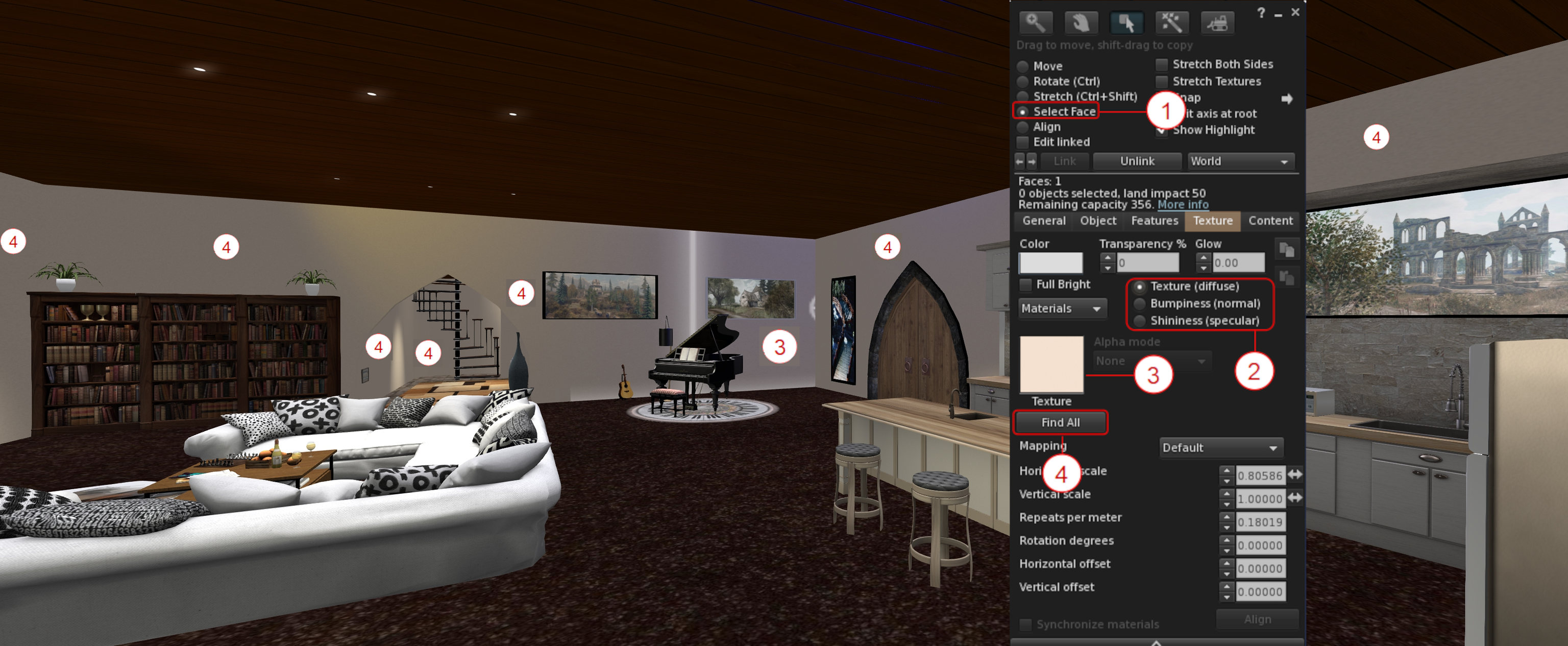
A new option – Find All – within the Build / Edit floater’s Texture tab, allows all faces in an object or linkset using the same diffuse (texture) or normal or specular map, to be updated at once.
Right-click on the item / linkset to be updated and select Edit from the Context / Pie menu.
In the upper part of the Edit / Build floater click the Select Face radio button – (1) in the mage below.
Click the floater’s Texture tab to open it (shown in the image below), and:
Use the Texture / Bumpiness (Normal) or Glossiness (Specular) radio buttons – (2) in the image below – to select the map type to be updated.
Click on a face of the object / linkset containing the map to be updated. The face will be highlighted, and the selected map will be displayed in the Texture Swatch box on the Edit / Build floater – (3) on the image below.
Click on the Find All button to select ALL of the object faces containing the selected map – (4) in the image below.
When you are satisfied you have selected the correct map / surfaces, click the Texture Swatch in the Edit / Build floater to open the Texture Picker floater and pick the map you wish to use and apply it to all the selected faces in the usual manner.
The Find All button for selecting all instances of texture / normal / specular map used on an object / linkset. See notes above for an explanation of the numbers
Building: Strip Unwanted Alpha Channels During Image Uploads
Images uploaded to Second Life can include an empty / almost empty alpha channel which can lead to rendering issues (such as textures flipping back and forth on one another as the camera moves, impacting rendering performance) when the texture is viewed in-world. While such empty / near-empty alpha channels may be intentional, they are generally an accidental or unwanted artefact, and should be removed from the image to avoid issues such as those mentioned above.
To achieve this, Firestorm 6.6.14 introduces an automatic scan of images being uploaded to Second Life to check for alpha channels which are either empty or almost empty.
If such channels are found in an image, the Upload Preview floater will display an additional warning and checkbox: Empty Alpha Channel Will Be Removed (see the image below, left).
Leaving this warning checked will cause the the unwanted transparency information to be stripped from the image when it is uploaded.
If there is a need to have the transparency information uploaded with the image, the warning should be unchecked. However, note that doing so will display an additional caution and explanation on the impact of including alpha channels in images, together with two buttons, as shown in the image below, right.
Click the required button displayed by the caution to clear it, then click the upload button to proceed with the image upload.
Stripping unwanted alpha channels from images at upload
Additional notes:
The alpha state for the image, once uploaded – “no alpha” or “with alpha” – is displayed at the bottom of the upload floater, alongside the uploaded image size (as arrowed at the button of the image on the left, above).
The Uploaded Size field has been fixed to correctly show the size of the uploaded image in all cases. see: FIRE-32944.
Inventory: Show Only Coalesced Objects
Show only coalesced objects in Inventory
Firestorm 6.6.14 adds a new inventory option to display only coalesced objects (i.e. multiple items returned to inventory as a single group, rather than being returned individually).
The option can be found within the Inventory gear icon menu (the gear icon being located at the bottom left of the Inventory floater), directly under those for showing only Modifiable, Copyable or Transferable items in inventory.
Toggle the option on (check mark visible) and off (no check mark) as required.
Note the option works in cooperation with all other options in the menu.
Open the animation Explorer (World → Animation Explorer).
Select the animation to be blacklisted and click the Blacklist button in the lower right section of the Explorer floater.
Repeat for any other animations, as required and close the floater when done.
Blocked animations can be reviewed / unblocked via the Asset Blacklist floater (World → Asset Blacklist).
Notes:
Blocking only applies to animations played through the simulator. Those played locally (i.e. within your viewer) will still be seen by you as playing, even if blocked.
A Blacklisted animation my still be seen by others for a brief period after blocking, as it will take a second or so for the block information to be propagated through the simulator.
Audio Streaming: Stream Title Floater and Track History
It is now possible to display information on the current song title and artist playing on the parcel audio stream (if active), and a history of the last 10 played music tracks. The information is displayed is its own floaters, accessed via the menu bar → World → Stream Title.
Enabling the music stream information, together with the additional recently played history (ported from Kokua)
Additional Firestorm Improvements of Note
Inventory
Reload Received Items: a button within the Received Items section of the Inventory floater will refresh the list of items in the section.
Received Items reload button
Ungroup folder: A request to confirm has been added when ungrouping a folder in inventory.
Inventory offer sound: the Inventory Offer sound (Preferences → Sound & Media → UI Sounds 3 → Inventory Offer) will now play when Automatically Accept New Inventory Items and the following Log Auto-Accepted Inventory Items to Chat are enabled (both under Preferences → Privacy → General). This is is response to FIRE-32396 .
Floater improvements: the floater can now be resized, lists will now scroll, and clipping of text on the Settings tab has been fixed. All in response to FIRE-32624.
Floater should now recognise and load all forms of “.DAE” (e.g. Dae DAe DAE dAE and daE). See FIRE-32180.
Meshes exported with Autodesk Collada should not longer fail, fixing FIRE-32599.
Scaling and rigged mesh handling corrected in accordance with FIRE-32604 and FIRE-32681.
Script Editor: A fix for the unindent after } when a previous line had a word wrap. See: FIRE-19959.
Animation Playback Floater and Preferences
The additional information displayed in the Animation Playback floater (Priority, Duration, Loop, Ease In, Ease Out and Joints) can now be toggled on/off using a drop-down button (see below).
Firestorm Animation Playback floater: advanced animation information can be shown / hidden via the drop-down button
In addition, the default state of the Playback Floater can be set via Preferences → Firestorm → Build 2 → Always Expand Animation Preview Advanced Information. By default the option is unchecked, meaning the advanced information will not be displayed when the Animation Playback floater is displayed.
General UI / Floater Updates of Note
Profile updates:
The View Profile option has been removed from the Context menu for your own avatar, as its already listed in the Community sub-menu. See: FIRE-32304.
Profile description text should not longer be truncated in some cases. See: FIRE-32901.
Unsaved text in the Notes tab of another avatar’s Profile should no longer be discarded when the Profile owner enters or leaves the region at the same time. See: FIRE-32926.
Area Search: updates have been made to Area Search to prevent some of the aggressive culling which is impacted Area Search results.
However, to get the best results when doing an Area Search, you will still need to turn slowly on the spot once, to fully load all the objects.
In addition, once an item is added to the Area Search it will/should not vanish a few seconds later as had been the observed behaviour with previous releases.
Assorted floater design, typographic corrections, layout corrections and tooltip updates, per the release notes.
Other Updates of Note
Asset Cache Update
Until now, automatic purging of the Asset Cache would only commence when the “max_cache” value was exceeded. This essentially meant that a) the Asset Cache could exceed this value, and b) once started, automatic purging would be pretty much constant, impacting viewer performance.
With Firestorm 6.6.14, this has been changed:
The “max_cache” value means just that: the largest size the Asset Cache will reach.
Two thresholds are set via debug settings:
A” high water” threshold set to 95% of the “max_cache” value. When this is reached, purging of the oldest caches files will commence.
A “low water” threshold set to 70% of the “max_cache” value. When this is reached, automatic purging will stop.
These two values will ensure:
The “high water” threshold leaves 5% capacity available within the Asset Cache, allowing incoming data from a simulator to be properly caches during any automatic purging.
The “low water” threshold means that automatic purging, once started, will not be constant, potentially impacting viewer performance.
This also means that users can now set their cache to a ramdisk if they really want and it won’t (normally) overflow.
Library Updates
FMOD Studio updated to version 2.02.15.
Havok TPV library updated to version 1.0.577418, in line with LL.
Linux Updates
Improvement: Firestorm now uses system-wide fontconfig and freetype directly from the user’s system, rather than using 3p libraries packaged with the viewer.
Fixes:
A fix for the “alpha triangles bug”(see FIRE-23370).
WIP to get Linux crash reporting working with Bugsplat.
The ability to toggle between internal/external browsers in preferences on Linux (Preferences → Network & Files → Connection → Web Browser).
Updates:
Apr suite updated to version 1.4.5.230351228.
OpenJpeg Library updated to version 2.5.0.
CEF updated to version 1.12.2.202210012157_92.0.27.
Colladadom updated to version 2.3.230940029.
Libxml2 updated to version 2-2.10.3.230940019.
Xmlrpc updated to version 0.54.2.230940042
OpenSim Updates
Opensim VarRregions with non-power of 2 sizes no longer flood logs.
Avatar Profile fixes including: correct loading; UDP profiles restored; profile picks + notes should load, 1st Life notes should save back to the server.
In July of 2023, I has the distinct pleasure of visiting Auguries of Innocence, a thoroughly engaging exhibition of art by Janus Falls structured around William Blake’s poem of the same name. Within it, Janus echoed and extended ideas found within Blake’s work, uniquely re-interpreting theme through colour and image. As one can tell from my review of that exhibit, I was deeply captivated by the expressiveness found within it, and so – although admittedly somewhat belatedly – I made a point of visiting another collection of images inspired by a poem Janus is currently exhibiting.
Hosted within her own gallery space – Red Dot Gallery – I know Why the Caged Bird Sings presents a series of 14 avatar studies inspired by Maya Angelou’s poem Caged Bird (also referred to as I Know Why the Caged Bird Sings, which is also the title of the first volume of Angelou’s autobiography, itself referenced by the poem). First published in her fourth collection of poetry entitled Shaker, Why Don’t You Sing? (1983), the poem is focused on the themes of freedom, racial oppression using the metaphors of the free and the caged bird.
Red Dot Gallery: Janus Falls – I Know Why the Caged Bird Sings
Through its structure use of mixed meter and irregular rhyme, Caged Bird is again a powerful statement oppression and hope for a brighter future. It’s a message that, in a world where basic human caring, acceptance and social concern are increasing seen as something to be reviled and differences in outlook, gender, sexuality and – yes, race – are reasons to ostracize and condemn, the poem stands not only as a reminder of the past, but also a very real underscoring of the fact that the oppression not only continues, but is spreading insidiously; that all of us who have an ounce of human dignity and compassion need to be firmly raising our voices against it, such that those who might otherwise find themselves caged by the ignorance of others might again have their voices – their rights and freedoms – accepted and restored.
In this, the art of I know Why the Caged Bird Sings presents a visual essay, one running sequentially through the gallery’s space from entrance (where Caged Bird can be read), and around the lower floor back to the upper and thence around the images there, which carries us from images of captivity to freedom and from sorrow to happiness (again reflecting the poem’s (admittedly more layered) mixing of joy and sadness).
Red Dot Gallery: Janus Falls – I Know Why the Caged Bird Sings
Within these images, Janus again shows a consummate skill in using visual contrasts – light and dark, tone and shading, depth of field and focal point – to draw us into her art and the story it has to tell – as deftly as Angelou uses anapest and iambic meter and stressed and unstressed pairings of ideas to draw us into the meaning of her poem.
In exploring these pieces, it is also hard not to escape the feeling there is a further message here; one directly connected to our digital world. Second Life is a place that, for many of us, is liberating; through it we can give wing to our innermost truths, wants and desires through the expressiveness of our avatars ad / or our creativity. It presents us with a place where the bars of life in whatever form they take – physical, mental, social, familial, etc., can be escaped (if only, admittedly for a time) and we can find comfort, joy, happiness – even acceptance. Given we have been so fortunate to be able to experience this richness and freedom of expression, do we not owe it to ourselves and those around us to ensure that no matter who and where we are, such freedom is to be as open, as cherished as available to all who seek it within the physical world?
Red Dot Gallery: Janus Falls – I Know Why the Caged Bird Sings



 On Monday August 14th, 2023 (SLT), the Firestorm team released version 6.6.14.69596 of their viewer.


 Inara Pey: Living in a Modemworld