As per my coverage of the increased LI allowance across Second Life (see here and here), the Lab announced the availability of an additional 10K LI for full private regions on December 7th, 2016.
The recent LI increases represented, on average, a 33% increase across regions. now – as announced in Upgrade Your Full Private Region to 30,000 Land Impact Today! – owners of FULL private regions can increase their LI allowance by a further 50% – taking them from 20,000 to 30,000.
Upgrades can be requested by submitting a case through the support portal on the Second Life website under the case type Land & Region > Land Impact Change Request. However, when making a request, keep in mind:
There is a one-off upgrade fee of US $30 applicable to each Full region being increased to 30,000 Land Capacity.
There is an additional monthly maintenance fee applicable to each updated region. This stands at US $30 per month at the time of writing, but please refer to Land Impact Change in the Managing Private Regions Knowledge Base article for current fees.
The upgrade must be maintained for a minimum of one calendar month.
Downgrading to 20,000 Land Capacity will incur a further one-off charge of US $30.
No pro-rating or discounts are permitted with the upgrade.
On December 1st, 2016, Linden Lab announced they would be accepting a new round of applications from those interested in becoming Skill Gaming Operators and / or Skill Gaming Creators.
Applications will officially open on Tuesday, January 3rd, 2017, and the blog post announcing the move reads in part:
As we blogged back in the Summer of 2014, gambling is strictly prohibited in Second Life and operating or participating in a game of chance that provides a Linden Dollar payout is a violation of our Terms of Service.
However, games of skill are legally permitted in many jurisdictions, and we’ve seen that many Second Life users are interested in playing such games for Linden Dollars. We updated our gaming policy in Second Life at that time and opened applications for Skill Gaming. Skill Gaming applications will reopen on January 3, 2017, for those who wish to become authorized creators and/or operators of Skill Games in Second Life.
Skill Gaming is covered by the Second Life Skill Gaming Policy, which in turn is supported by a Skill Gaming FAQ.The latter will have a link to the Skill Gaming Application form, once applications have re-opened on January 3rd, 2017.
In short, Skill Games are games which, in the Lab’s words:
1) whose outcome is determined by skill and is not contingent, in whole or in material part, upon chance; 2) requires or permits the payment of Linden Dollars to play; 3) provides a payout in Linden Dollars; and 4) is legally authorized by applicable United States and international law.
All Skill Games in Second Life must be created and / or operated by Lab approved Skill Gaming Creators (SGCs) and / or Skill Gaming Operators (SGOs), and must be located within Skill Gaming Regions. The latter must be Full regions, which cannot be located on the Mainland, and cannot be located adjacent to non-Skill Gaming Regions. They have an increased maintenance fee (tier), which (at the time of writing) is US $345 / month. Existing Full regions meeting the criteria above can be converted to Skill Gaming Regions for a one-off fee of US $100 per region.
Applications for those wishing to become Skill Gaming Operators and / or Skill Gaming Creators re-open on Tuesday, January 3rd, 2017
The Skill Gaming Policy sets out all requirements in full, and should be read, along with the FAQ, by anyone wishing to become a Skill Gaming Operator and / or Creator, or who wishes to access Skill Gaming regions and participate in the games on offer.
The first round of Skill Gaming applications in 2014, took somewhat longer to come into effect than the Lab had planned, and several applicants experienced some delay between submitting their application and receiving confirmation of acceptance (or refusal). In the end, some 45 SGOs, five of whom are also registered as SGCs, and between them, they provide 44 skill games in Second Life.
In August 2016, and as a way of introducing Second Life users to Skill Gaming, Linden Lab introduced Gaming Islands. These can be accessed either directly or via the Portal Parks and provide information on what Skill Games are, the kinds of games user might encounter, how and where they can be played – and why, in some instances, users may not be allowed to access the regions where they can be played.
On Monday, November 28th, Linden Lab launched their new Grid Status update service.
Now delivered by a new service provider, it is designed to provide more detailed information on the overall status of the grid and Second Lifer services, whilst making it easier for the Lab to update the information presented through the pages.
While the new Grid Status pages are hosted by a different provider, existing grid status page and RSS links should redirect automatically.
Steven Linden first announced these changes would be coming during the TPV Developer meeting held on Friday, November 19th. The new page is more informative, with the most recent update / information displayed at the top, with drop-down sections displayed beneath it, with historical information displayed below these.
The drop-down sections can be used to display expanded information on the three main grid simulator channels; information on the various SL web-based services (secondlife.com, marketplace, wiki, community pages, JIRA, etc.); updates on major in-world services, (group chat, L$ transactions, rezzing, Voice services, teleporting, inventory, etc) as well as further information on various external services such as the log-in service and the chat / phone / Case support services.
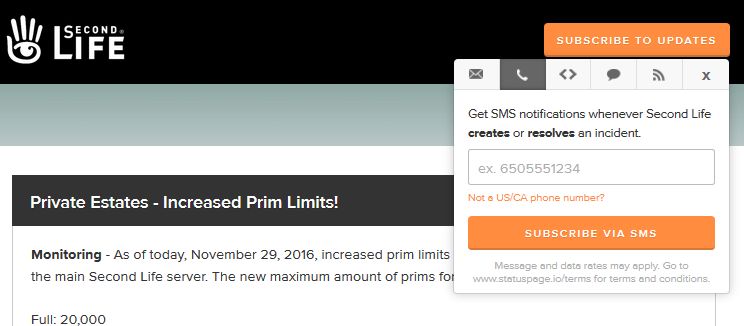
As well as more information being available on the page, there is also an expanded set of subscriptions options to the service. These can be accessed via the orange button in the top right corner of the page, and they include the option to have Grid Status updates SMS’d directly to a mobile ‘phone. In addition, a separate option can be used to subscribe directly to a specific incident in progress via e-mail and / or SMS.
The grid status subscription options, which comprise e-mail, SMS messaging, webhooks and RSS, together with a link to the SL support portal
The new service also means the Lab’s Operations team can now update incident reports directly via a bot system, rather than relying on a manual update process involving different teams, as was the case in the past. This should help ensure the status information reflect updates and situations in a more timely manner.
With a faster means for staff to update information, more means by which users can access updates outside of visiting the Grid Status page itself (so often a bottleneck in the past), this new service should hopefully prove to be a lot more flexible, informative and accessible to SL users.
Note: at the time of writing, the Grid Status section on users’ secondlife.com dashboards was reporting “RSS Feed has no items”, suggest the RSS feed to the dashboard may have just to be updated. This has been reported to the Lab.
On Tuesday, November 29th, the Lab ran a rolling restart across regions on the Main channel which saw the increased LI / prim allowances for private regions on that channel come into effect.
As I’ve previously reported, the prim increase started to appear with Mainland regions on Tuesday, November 1st with the change indicated in a blog post from the Lab. However, full details on the changes weren’t released until Thursday, November 3rd, with an interview with Patch Linden, Senior Director of Product Operations at Linden Lab, in this blog, and a Designing Worlds special held on the same day.
Following the Main channel restart on Tuesday, November 29th. private regions on that channel now have the following standard land capacity allowances:
Private full region: 20,000 LI
Private Homestead region: 5,000 LI
Private OpenSpace: 1,000 LI
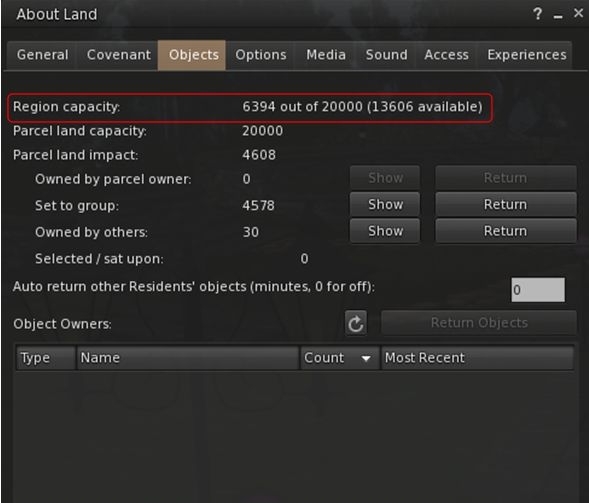
In addition, landholders directly responsible for full regions will be able to further increase the capacity on those regions to 30,000 LI for an additional monthly payment of US $30 to Linden Lab (with a one-off $30 upgrade payment, and a single additional $30 downgrade payment should they later opt to remove the additional 10K allocation). Details on this will be announced soon.
Private full regions now have a standard 20,000 LI capacity (with an optional further 10K available at a fee of US $30 a month)
There is a server maintenance package deployment scheduled for the three RC channels (Magnum, LeTigre and BlueSteel) on Wednesday, November 30th, and this should see the LI increase deployed to private regions on those channels as well. Once completed, this will mean region capacities across the grid will be:
Full Regions:
Mainland: 22,500 (from 15,000)
Private estates:
20,000 (from 15,000) at the same tier price OR
30,000 for an additional US $30 a month (+a one-off US $30 conversion fee to add / remove the extra 10K allowance) – this option to be launched soon.
Homesteads: 5,000 (Mainland and private) – from 3750.
OpenSpace: 1,000 (Mainland and private) – from 750.
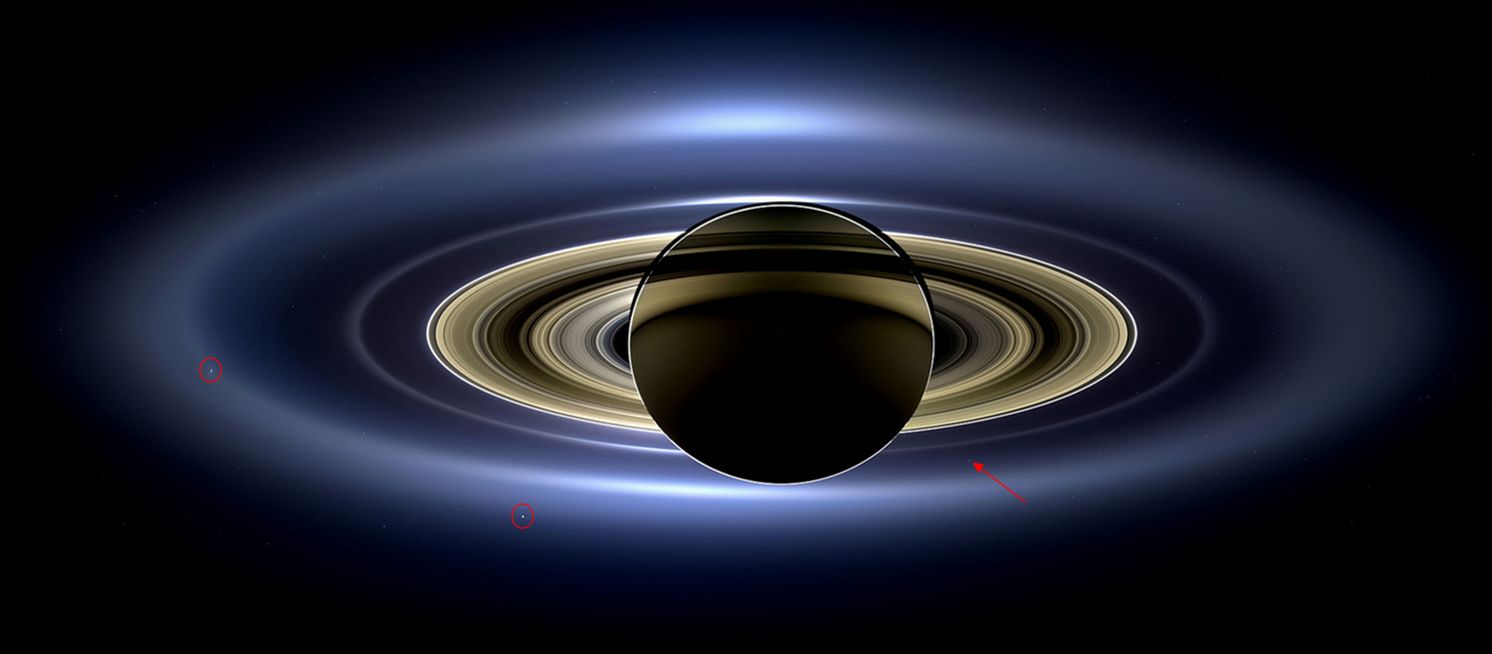
On July 19th, 2013, Cassini captured this remarkable shot of Saturn and its entire ring system as they eclipsed the Sun. Taken from a distance of 1.2 million km (746,000 mi) from the planet, it spans a distance of 651,591 km (404,880 mi) across and uses 141 wide-angle shots collected over a 4-hour period. In it can be seen the haze of Saturn’s outermost “E” ring and, inward of it, the “G” ring, with Earth a tiny dot (arrowed) sitting between them. The more visible rings, “F” ring through to the innermost “D” are visible, together with seven of Saturn’s moons, of which two are ringed: Enceladus, on the left and Tethys, lower left – click for full size to see clearly. The colours seen are true, and have not been artificially enhanced. Credit: NASA/JPL / Space Science Institute
In 2005, along with friends, I attended a dinner at which a UK scientist, John Zarnecki, was honoured. His name might not be familiar to some, but Professor Zarnecki, currently serving as the Director of the International Space Science Institute in Berne, Switzerland, has been involved in a number of high-profile space missions, including the Hubble Space Telescope, the Giotto probe that visited Halley’s Comet, and UK’s Beagle 2 mission to Mars. He is currently leading the European ExoMars rover mission, scheduled for 2020.
However, it is probably with the NASA / ESA Cassini-Huygens mission that he has the deepest association. At the time of the dinner, Professor Zarnecki had already been involved in that programme for fifteen years. His primary responsibility was the Huygens probe, which became the first vehicle to land there in January, 2005, and still holds the record for the furthest landing from Earth a spacecraft has so far made.
I mention this, because while the Titan surface mission effectively came to an end 90 minutes after the lander arrived there, the Cassini vehicle has remained in operation around Saturn and its moons, gathering a huge amount of data in the process. However, its own mission is now coming to an end after almost 20 years. In September 2017, Cassini will complete its last full orbit of Saturn and then fall to is destruction.
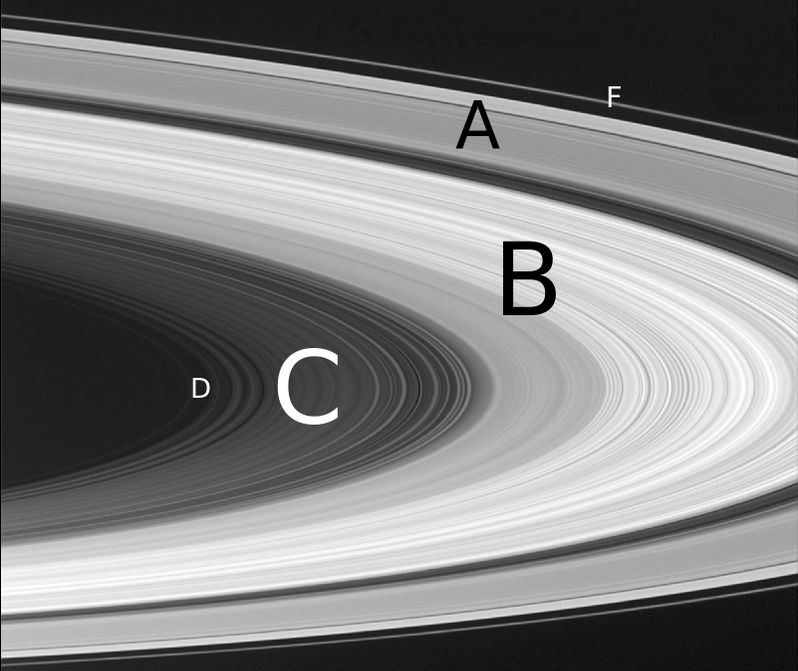
Saturn’s complex ring system, the gaps between them crated by a mixture of so-called “shepherd moons” in orbits between the rings and stabilising and destabilizing orbital resonances caused by Saturn’s larger moons.
Before then, however, and starting on November 30th, 2016, the orbiter will commence the penultimate phase of its mission. Having gradually shifted itself into a more polar orbit around Saturn Cassini will commence a series of “ring-grazing orbits”, coming to within 7,800 km (4,850 mi) of what is regarded as the outer edge of Saturn’s major series of rings, the F-ring.
These orbits, which will extend through April 22nd, 2017, will see the spacecraft dive through the more diffuse G-ring once every seven days for a total of 20 times in what will be the first attempt to directly sample the icy particles and gas molecules which are located at the edge of the rings and also image the tiny moons of Atlas, Pan, Daphnis and Pandora, which play a role in “shepherding” the rings around Saturn.
Over time it will slowly close on the outer edge of the denser F-ring, until in March and April 2017, it is passing through the outer reaches of that ring, some 140,180km (87,612.5 mi) from the centre of Saturn. The F-ring is regarded as perhaps the most active ring in the Solar System, with features changing on a timescale of hours.
A 2007 artist impression of the aggregates of icy particles that form the ‘solid’ portions of Saturn’s rings. These elongated clumps are continually forming and dispersing. The largest particles are a few metres across. Credit: NASA/JPL / University of Colorado
Exactly how the majority of Saturn’s rings formed is still unknown;, with ideas focused on one of two theories. In the first, the material in the rings is the original material “left over” from the formation of Saturn and its larger moons, pulled into a disc around the planet by gravitational tides. In the second, the material is all that remains of a form er – called Veritas after the Roman goddess – which either crossed the Roche limit to be pulled apart by gravitation forces or was destroyed by the impact with another body such as a large comet or asteroid.
However, in both of these cases it is not unreasonable to assume that the material making up the rings would be of a mixed nature: dust, ices, rocky matter, etc. However the majority of the ring matter is icy particles, with little else. This has given rise to a variation on the destroyed moon theory: that the particles are all that remains of the icy mantle of a much larger, Titan-sized moon, stripped away as it spiralled into Saturn during the planet’s formation.
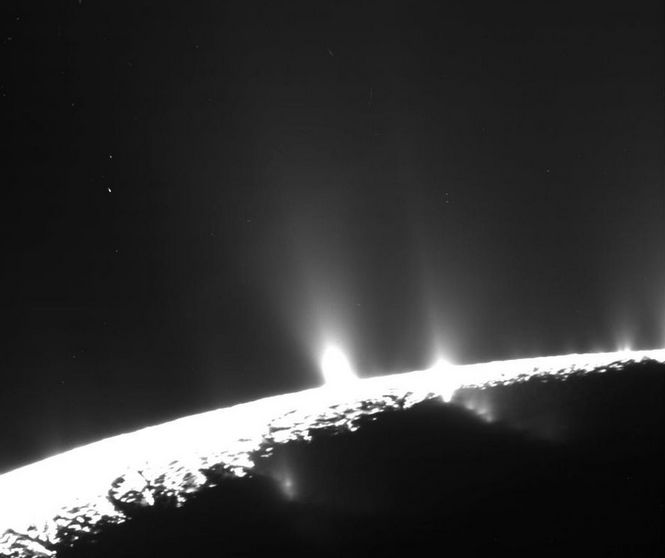
Geyser on Enceladus, orbiting within the E-ring, throw vast amounts of ice particles into space, replenishing and supporting the E-ring. Credit: NASA/JPL / Space Science Institute
On Tuesday, November 15th, the Lab launched the Premium members’ Horizon community, a “retro-futuristic” environment featuring 36 residential regions each with 24 parcels available for auction to Premium members. The auctions opened on Friday, November 18th, with parcels being auction in batches.
One week on, and a total of 87 parcels have been or are up for auction, of which, 67 have closed as of Friday, November 25th, marking the first week of auctions. Whirly Fizzle and I have been tracking things during the week, so we’d thought we’d offer an update on how things are going.
Auction Results Fri Nov 18th Through Friday Nov 25th
GENERAL INFORMATION
Total parcels
Auctioned to date
For re-sale
For rent
Commercial
Residential
Unknown
864
67
26
13
5
11
12
Notes
“Unknown” parcels are those which appear likely to be put up for sale or rent. Of these:
Four have been obtained by land sellers, with 2 initially put on sale, then withdrawn.
Five have been obtained by land renters but are not currently for rent.
Three could go either way.
Of the commercial parcels, four appear to be rentals; one is parcel holder / store operator.
“Residential” refers to those parcels purchased by individuals without any obvious land marketing in their profiles & who have not won auctions for other parcels. These could still be sold / rented out or used commercially.
RESULTS BY LOT
Lot
Parcels
Top bid
Lowest bid
Average bid
Av sqm bid
Total L$ paid
1
10
57,270
30,133
43,689.80
42.66
436898
2
12
65,010
30,121
39,976.75
39.04
479721
3
15
40,030
29,510 (x3)
31,306.73
28.65
469601
4
10
42,670
31,110 (x4)
35,464.50
34.53
354645
5
10
40,110
26,010 (x2)
37,751.80
30.91
317518
6
10
33,009
27,887
29,790.20
29.09
297902
REVENUE
Date
No of lots
L$ raised in auction
Approx US $
Nov18th-25th
67
2,356,285
9,000
Notes
Taking the lowest bid price for all auctions closed to date, and applying it to all remaining parcel yields a potential total revenue of L$24,582,224 / approx US $94,500.
Taking a median bid price of L$36,330 based on closed auctions to date, and applying it to all remaining parcels yields a potential total revenue of L$28,955,010 / approx US $111,365.
PARCEL RE-SALE PRICING, FRIDAY NOV 25
Total
Av sqm auction price
Av sqm sale price
Av sqm mark-up
Highest initial price
Highest current price
Price spread
26
28.05
57.38
104.56%
L$100,000 (x3)
L$99,000 (x1)
L$33,000 (x4) – L$99,000 (x1)
Notes
The figures above are only a snapshot – re-sale prices are fluctuating; prices set for parcels auctioned in lots 5 and 6 are likely to be reduced.
Initially, 28 parcels were put up for sale. Two were withdrawn on Friday 25th.
Of the remaining 26 parcels currently for sale:
Six parcels were initially priced at between 25 and 3 times their auction price; all have had their re-sale price reduced by an average of 50%.
Four parcels have seen a reduction in price since first being placed for sale of between 2.5% and 21.52% per parcel.
Eight parcels are currently for sale at a median of 2.5 times their auction price (ave L$70,000 per parcel). current tends suggest these will be reduced.
 As per my coverage of the increased LI allowance across Second Life (see here and here), the Lab announced the availability of an additional 10K LI for full private regions on December 7th, 2016.




 Inara Pey: Living in a Modemworld