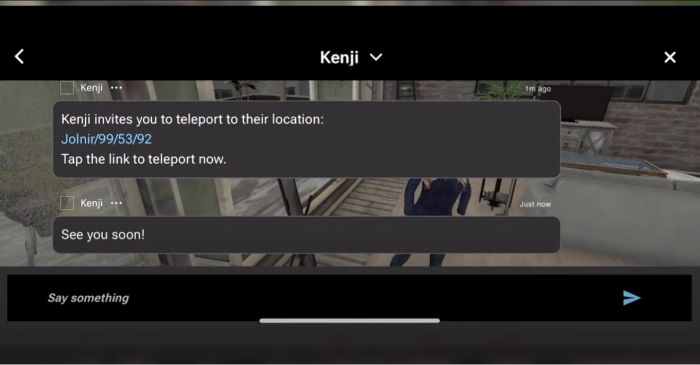
SL Mobile, December 2023 – screen cap via Linden Lab
Update, December 13th: – the Lab now has an official blog post on the Alpha.
Linden Lab have announced – by way of a You Tube video (at the time of writing, I’ve not seen any official blog or forum post commentary to accompany it) – the launch of a Second Life Mobile “Private Alpha” allowing Premium Plus subscribers to sign-up for the opportunity to take the app for a test drive and provide feedback to help with development.
Narrated by – I believe – user Boston Blaisdale, the short video (just over a minute in length) introduces the features and capabilities those accepted into the alpha will be able to try. These include:
See your avatar & edit appearance / change outfits.
Explore the world via the Destination Guide, mobile showcase, teleport, deep links, TP offers.
Interact with the world through a limited set of movements (walk, run, fly, sit, stand) and object interactions (touch, sit) – or park your avatar and explore via flycam.
Socialise and stay connected (nearby chat, group chat, IM, group notices, find contacts, inspect profiles).
Create and log in with a new account.
The app is currently available on the following platforms:
iOS (minimum: iPhone X running iOS 16.6.1).
Android: mid-to-high-end Android device (comparable to Google Pixel 6 or higher) running Android OS 13 or higher.
Those participating on iOS will also require the TestFlight app for testing and feedback, whilst Android users will need to provide feedback through Google Play.
Premium Plus subscribers can find out more by following this Support Page link and (I believe) submitting a support ticket. There is also a link on this page to a FAQ on the Mobile app. It is not clear if this testing is subject to any form of NDA.
SL Mobile, December 2023 – screen cap via Linden Lab
Commenting on more general availability for the app, Linden Lab state:
It’s still early days for our mobile app. Our mobile team has been hard at work building a mobile-centred design and foundational features so that we can all enjoy Second Life anywhere we want. We’re ready to share what we’ve built so far with our most dedicated residents and we ask for your help as we continue to develop this project through this early Alpha stage, but we do not have a date for the next phase of testing or full release at this time.
Using Premium Plus members for initial feedback is an interesting choice. On the one hand, it would appear to greatly limit the potential resource pool of people willing to work on the app and give objective feedback; on the other it does allow Linden Lab to manage the size of the pool of likely applications at this point in time. Whilst some might feel snubbed at the restrictive nature of this initial Alpha, it is probably worthwhile noting that the SL Mobile app has already had input from users and will continue to do so; so will hopefully include more broad-based Alpha and Beta testing using an expanded pool of users in 2024, as LL continue to develop the app.
On Monday, October 9th, Linden Lab sort-of formally launched the new Linden Homes Store for Second Life, showcasing all the Linden Home types and themes available to those users holding a qualifying subscription account (at the time of writing, Premium / Premium Plus), and which had been previously semi-previewed in a September 27th official blog post.
The new Linden Home Store is part of a project to completely overhaul what Linden Lab calls the “Land Journey” in order to provide a resource hub for all matters pertaining to land holdings in Second Life: how to lease one or more regions from Linden Lab, types of regions available, how to obtain Mainland, even how to go about locating and renting land from private estates / land providers.
The first part of this work actually launched in February 2023 in the form of the Land Portal, the core of the new hub. At that time, the Portal was little more than a “front page” showing what was to come, so rather than devote a full post to it, I covered it in one of my Web User Group meetings, as it was at one of those meetings where the launch of the portal was announced. While it does gather together information related to buying / renting land from existing sources, the Linden Homes Store is really the first major piece of meat on the bones in terms of a new suite of pages for the Portal – so what’s been done and how does it look?
The upper part of the new Linden Homes Store main page, as seen by someone in possession of a Linden Home.
General Overview
Store Home Page
In terms of looks, the first thing that hits the eye is that the store has – unsurprisingly – been produced using the new general page style and colours which have started to roll out across the Second Life web properties, as was the case with things like the Destination Guide. The Linden Home Store also borrows from DG in some elements of its look and feel, thus helping to further instil a sense of platform identity in to the pages whilst encouraging a degree of familiarity to help promote confidence of use.
But to get down to specifics. The Store’s home page offers two slightly different layouts, depending on whether a user is either logged in our out of their secondlife.com account and / or has a qualifying subscription account with a Linden Home already associated with it or not, per the images above and below.
upper part of the new Linden Homes Store main page, as seen by someone who does not have a qualifying account type / is not logged into the the Second Life web properties.
The What Next? section of pages displayed for qualifying accounts has some curiosities within it which raised my eyebrows:
The “Your home’s content pack” links to third -party purchasable add-ons for “2019+” Linden Homes. Whilst these are a handy resource, they actually have bugger all to do with the Content Packs actually supplied with the various themes – so why name the link thus? It’s unnecessarily confusing for those interested in seeing the different selections of items supplied with the various Linden Home themes.
Why on Earth utilise a video from 2010 which has nothing to say about the far more recent Linden Homes themes, which are liable to be of the most interest to recently upgraded account holders? Could not a more up-to-date video have been produced prior to the launch? If nothing else, a video that properly encompasses all of the Linden Homes products also lends itself to acting as a promotional tool aimed at anyone accessing the Store, regardless of their account type.
Why on Earth is “Choose a different home” so called? It’s a link to the SL wiki page serving to introduce and describe “2019+” Linden Homes – so why not call it “Introducing Linden Homes” or something? As it is, the title suggests that by clicking it, the user will be magically whisked to where they can swap their existing home without the need to scroll further.
A closer look at the What Next? section of the Linden homes Store, as displayed to qualifying account holders with the niggling links (your home’s contents pack, Video tutorial and Choose a different home).
Beneath the What Next? / Amenities section of the page, is the main store listing. This comprises information panels for all Linden Homes, 2019+ and 2010., with panels listing slightly different information:
2010 Linden Homes only provide a photograph of the house type, the name of its theme (e.g. “Tahoe” or “Meadowbrook”), and the parcel size.
“2019+” Linden Homes are listed by theme name (e.g. Ranch, Log House, Silt House, etc.), provide a photograph of one of the styles from the theme, number of layouts (styles) within the theme, location and parcel size.
This listing is periodically updated to reflect the current status of all Linden Homes: available themes / types are listed firt in the order Premium Plus Homes then Premium 2019+ Homes then Premium 2010 / 51w sq m parcel homes. And themes or types currently unavailable are then listed in the same order and labelled NOT AVAILABLE.
For those on non-eligible (for Linden Homes) accounts / who are not logged-in to the SL web properties, the Store will go on to display additional useful information on Linden Homes below the index list.
House Panels / Information
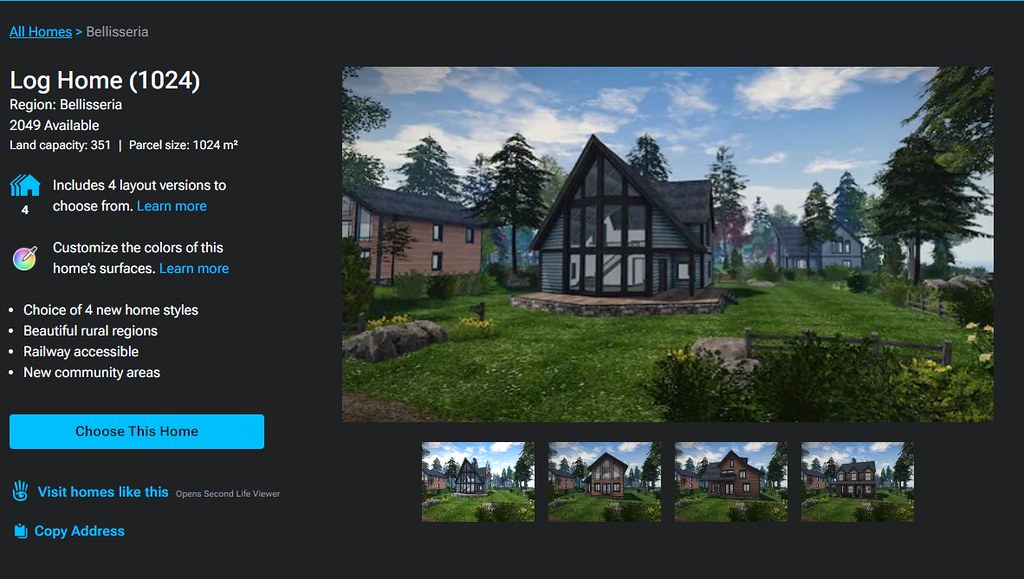
Clicking on a specific house / theme in the Store’s index list will refresh the page and display expanded information on the selected house / theme that the top, with the more recent Linden Home themes having more information available than the 2010 Homes, per the images below. The listing of homes will then continue below this expanded panel.
An information panel within the Linden Home Store for one of “2010” styles of Linden Home. Note the information on the left.
That the “2019+” homes have more information associated with them is not surprising, simply because they have more to offer. however, it did again give rise to some niggles:
The text “Includes X layout versions to choose from” (where X is a number) is followed by a link called Learn More. This gives the impression that clicking the link will display further information directly related to the theme (such as what the layouts are). Instead, it takes the user out of the Land Store and to the 2019 Linden Homes wiki page.
While this does contain some information related to the various themes, it’s hardly more informative that the information displayed within the Store and totally disrupts what has thus far been a relatively contained, seamless experience.
Given the effort put into the Store, it’s a shame time wasn’t taken towards building more detailed pages (with images) for the themes ahead of any launch.
Similarly, the text “Customise the colours of this home’s surfaces” is perhaps mis-labelled, and would be better called “About the Linden Homes Controller”, given it links to the section of the SL wiki page devoted to all of the Controller’s options, not just decorating.
An information panel within the Linden Home Store for one of “2019+” themes of Linden Home. Note the expanded information on the left, and the critquies of it noted in the above bullet points.
Some have also commented that listing the “2019+” Linden Homes within the Store in terms of their collective theme (e.g. Houseboat) rather than style (e.g. Windlass, Barnacle, Jolly Roger, etc.), and doing the reverse for the “2010” Homes, listing them by style (e.g. Aspen, Birch Cedar) rather than collective theme (e.g. Tahoe) is further confusing.
However, while I can understand thinking this way, I’d actually point out that it does in fact make sense: all “2019+” Lindon Home styles within a given are available through a rezzing system on the parcel, allowing the user to swap between them whenever they wish. However, this is not the case with the “2010” homes; regardless of the over-arching theme (Tahoe, Meadowbrook, etc.)., the only way to swap from one theme to another is to physically swap homes through the Store – ergo, listing them by style rather than trying to group them by theme does in fact make sense.
General Observations
I will confess, other than kicking the tyres of the new Linden Home Store as described above, I’ve not taken it for a drive in terms of using it to obtain a Linden Home; frankly, I’m perfectly happy with the location of my current Linden Houseboat, and I have no desire to pack-up and be randomly moved for the sake of a test. Sorry.
That said, it should be noted that whilst you can see the various types and themes of Linden Home currently available when browsing the Store, while the actual house type / theme you pick might be in-world is still down to a random selection from the available stock; you cannot puck a specific parcel in a specific region. Nor should this be expected: building a system to list all the locations of a given house type / theme when these could run into the hundreds just isn’t reasonable; thus Support ticket remains the means but which to request a specific location.
I do find several other points in the design niggling / confusing. Why, for example, are “2019+” Linden homes on 512 and 1024 sq m parcels listed as “Free with Premium Membership” when they are in fact available to both Premium and Premium Plus? Why do Basic and Plus members who might not realise have to get half-way through the Choose This Home before being told they are not eligible? Would it not be better to divert them to the account updates page on clicking the Choose button, rather than displaying angry red text when they try to Confirm Their Choice? Why wasn’t the store hooked into the Linden Homes widget in the top right of the secondlife.com dashboard for Premium / Premium Plus members from the outset (and which currently still links to the “old” Linden Homes store)?
The updates page for choosing a Linden home. It is only at this point that Basic and Plus users are informed they are ineligible for a Linden Home and need to upgrade – diverting them to the account upgrade page on chick the earlier Choose This Home button might be friendlier.
These are all small points, and to be fair, LL does have a long history of releasing not-quite-baked features and updates into the wild and then tweaking them after the fact. As such, there is the potential for all of these personal annoyances to be be address as a natural part and parcel of that work. However, the fact that there are all these little niggles and potential points of confusion does negatively impact first impressions. Which is a shame, because overall, it has to be said this new Linden Home Store is a significant and welcome improvement to to previous version.
Midway through its run at Selen’s Gallery, operated and curated by Selen Minotaur, is Far From by Bamboo Barnes, featuring previously unseen works by the arts drawn together in a theme I always find fascinating: the nature of time and its relationship with personal experiences and the formation of self.
It’s a subject I’ve been fascinated by since first reading Burnt Norton, the first poem in what would become T.S. Eliot’s Four Quartets, a discussion on the nature of time, the relationship between past and future and both of them with the current moment in time, alternate realities, the contrast between the experience of the modern man and spirituality, mixed with ideas of unity with the cosmos, and more. Whilst The more spiritual reflections of time and human nature are not necessarily a part of Bamboo’s Far From, the central theme of Burnt Norton’s opening (perhaps the most famous lines of the poem / The Four Quartets as a whole) was immediately brought to mind for me when reading Bamboo’s introduction to Far From.
What do you feel now if you close your eyes? Do you see the faint flicker of light that your memory gives you as you reach out in total darkness? Or is it something you wish you could have forgotten? A past that has become distant yet drawing you in heavily. The now that seems so far from it, but it is a part of you. A part of you that can never be denied.
– Bamboo Barnes, Far From
Selen’s Gallery: Bamboo Barnes – Far From
In other words, what we has gone before, given if not fully remembered – even if we no longer wish to recall it – is as much a part of us today, just as what we now do will become a part of our tomorrow; that while we might live in the “now”, we also live with the shadows and light of the past, factors which perhaps distort, or at least consciously or not, direct our way towards the future, subliminally or directly influencing as they do the decisions we make in the now.
Compare this with Eliot’s opening reflection from Burnt Norton:
Time present and time past Are both perhaps present in time future, And time future contained in time past. If all time is eternally present All time is unredeemable.
– T.S. Eliot, Burnt Norton
Again, which is not to say the Bamboo’s art is intended to be any kind of visual essay on Eliot’s works; far from it – this is a subjective parallel I saw, and which other may not see or agree to. However, it is these kinds of parallels I so often find in Bamboo’s work and which – for me – further elevate her art.
That is, within Far From she offers a unique and highly visual meditation on then theme of the interconnectedness of time, just as Eliot does through the ideas he offers within the five parts of Burn Norton. Bamboo does this not only through her introduction to this exhibition, but in the manner of the images themselves. Each is distorted, some somewhat fragmented, all utilise colour in a striking manner.
Selen’s Gallery: Bamboo Barnes – Far From
These approaches are all elements which set Bamboo’s work apart from that of others, and can be found in many of her pieces. Here they combine to visually represent those memories and events which have shaped who are are now, and how we came to be who / where we are within our life (and, particularly, in our understanding of our own self). At the same time, elements of the images, combined with the 3D elements Bamboo has included in the exhibition space engage in themes of the past and present combing to shape our personal future – and that, but for decisions of the past, the idea that our life’s path might have taken a different course; the the flow of decision as much as the fluidity direct our lives.
This latter point might must clearly be suggested by the animated mosaic Bamboo presents as the landing point for the exhibition. The interconnectedness of past, present and future might also be see within those images which use repetition of images, the different colours within them underpinning the influence of past on present, and present on future (and, if we opt to extend – the manner in which the future itself informed those past actions which have brought us to where we are today.
Selen’s Gallery: Bamboo Barnes – Far From
A further beauty of Bamboo’s art is that her images can be enjoyed in their own right, as essays in style, colour, light, shade, subject and composition, each one standing entirely independently to the others around it. Thus, whether or not – like me – you opt to see an elegant artistic treatise within Far From, it offers a collection of richly engaging pieces which can each be appreciated on its own merits, making it a very worthwhile visit, and it will remain open to view through into August 2023.
On Monday, June 26th, Linden Lab announced a pair of “limited availability lifetime memberships”, wherein Second Life users have the opportunity to make a one-time payment to Linden Lab in return for a “lifetime” membership to Second Life based on either the Premium Account type or the Premium Plus account type.
Offered as a part of the Second Life 20th Birthday celebrations, these memberships are described by Linden Lab as follows:
For Second Life’s 20th birthday, we will be offering a limited number of lifetime memberships for both Premium and Premium Plus! This will give Residents who upgrade to this membership type the benefits of a Premium or Premium Plus membership for the lifetime of their account! You can see a comprehensive list of what Premium and Premium Plus Memberships are being granted on a first come first serve basis.
Provide all of the benefits applicable to either the Premium Account subscription package or the Premium Plus Account subscription package, depending on which LifeTime membership is applied for.
The currently list of benefits for each account type can be found here.
Cost:
US $749.00 at the time of upgrade for SecondLifeTime Premium.
US $1,749.00 at the time of upgrade for SecondLifeTime Premium Plus.
Are limited to:
200 applications for SecondLifeTime Premium.
20 applications for SecondLifeTime Premium Plus.
Will remain in effect:
Even if the account holder cancels their membership – if they re-join later, they will be able to continue with their Second LifeTime membership.
As long as Second Life remains operational.
Due to there nature, LifeTime memberships:
May not be available to upgrade to other account types (e.g. from SecondLifeTime Premium to Premium Plus). However, requests for upgrade can be submitted via support ticket for case-by-case review.
Will not be available for downgrade, but will become the base-level membership account type for the holder.
Are being granted on a first-come, first-serve basis.
Click the orange Submit A Ticket button on the top right of any page of the support portal, and sign in if you have not already.
In the support ticket form, select the ticket type Account Issue, and choose Request SecondLifetime Premium Account from the second drop down that appears.
Select which membership type you would like – SecondLifeTime Premium or SecondLifeTime Premium Plus.
Check the box that states, I accept the fee. This will be required for support ticket submission, and will allow your membership to be processed as quickly as possible.
Fill out any additional necessary details in the description section (e.g. if you have recently renewed either your Premium or Premium Plus subscription, add the date of renewal) and click Submit.
Allow up to 10 business days for Second LifeTime membership support ticket requests to be processed.
So, around 30 minutes after I publish my unofficial guide to SL20B, an e-mail arrives announcing the SL20B Sweepstakes – something which I admit I’d missed when visiting the event’s Welcome Area.
Why is this newsworthy? Because the prizes – particularly for those in the United States – are pretty impressive, including as they do:
A physical world Chevrolet Bolt EV car (US residents only).
A physical world Asus high-end gaming laptop (US Residents only).
A Second Life Lifetime Premium membership.
A 1 Year Premium Plus membership.
DAILY 1 Year Premium membership.
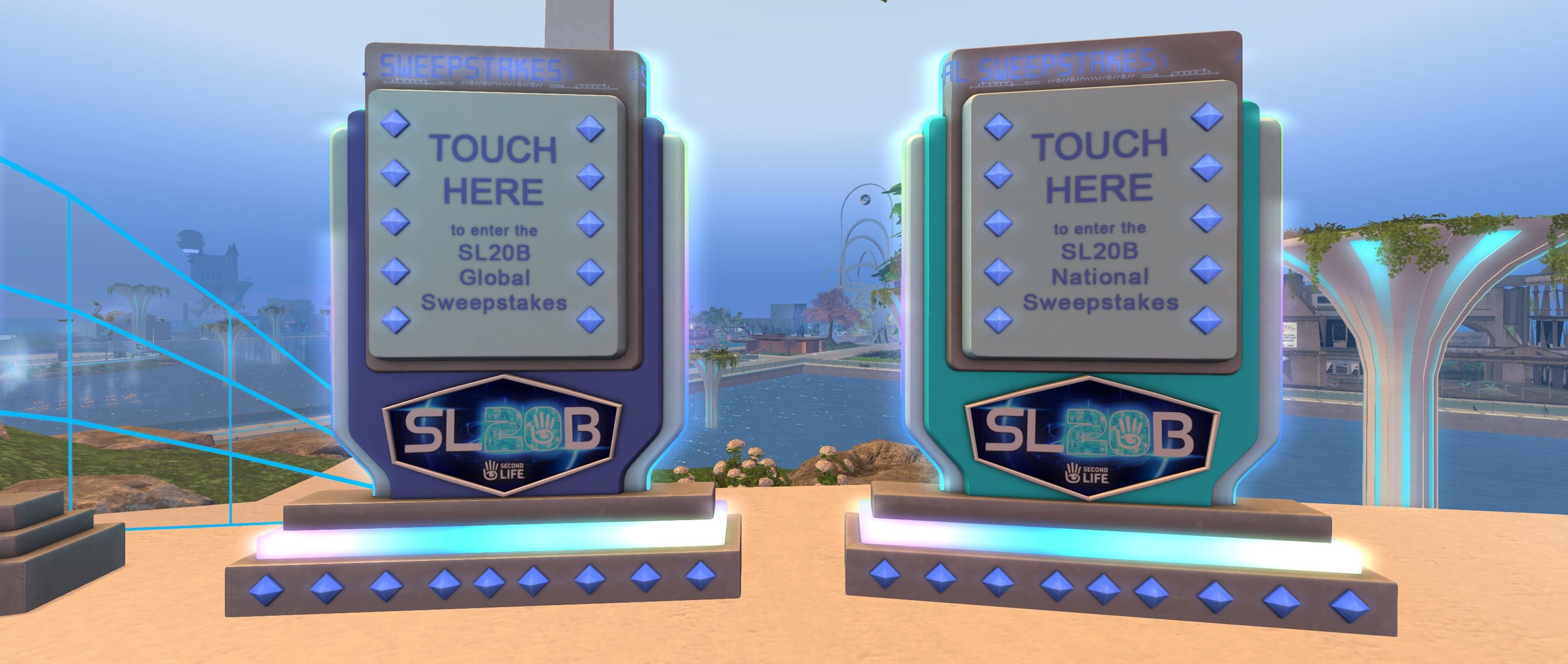
No purchases are necessary to enter the sweepstakes, just a visit to the SL20B Welcome Area during the festivities, and click on one (or both, in the case of US residents) Sweepstakes kiosks.
The National (US residents only) and Global (US residents + rest of the world) Sweepstakes kiosks at the SL20B Welcome Area
There are also a couple of official web pages providing more information and rules, and which run a clock giving the time remaining to enter:
A screen cap of part of the official Global Sweepstakes website for SL20B
So why not give it a go – the Daily Premium prizes are worth a visit on their own, to say nothing of the rest. Just expect the Welcome Area to be busy!
A quick reminder that the Second Life Marketplace will be undergoing infrastructure upgrades for an estimated period of one hour, commencing at 10:00 SLT on Wednesday, May 31st, 2023.
This work will involve, among other things, a reset of the shopping cart functionality, and any items users may have placed in their shopping carts for future purchase will not be saved.
To to avoid any upset in having shopping carts emptied, Linden Lab recommends shoppers take one or both of the following steps:
Finalise all purchases ahead of the maintenance period, and complete pending transactions to clear your shopping cart.
For those items you are not in a position to purchase ahead of the maintenance period, or do not wish to purchase at this time but would like to keep recorded for future reference, list them either in your favourites or your wishlist.
During the maintenance period, the Marketplace will be unavailable for either shoppers or merchants to access. For complete details, please refer to this official blog post, and to the SL Grid Status pages for updates.






 A quick reminder that the Second Life Marketplace will be undergoing infrastructure upgrades for an estimated period of one hour, commencing at 10:00 SLT on Wednesday, May 31st, 2023.
 Inara Pey: Living in a Modemworld