The Lab has entered into the spirit of New Year with an avatar makeover competition with a L$5000 first prize, plus runners-up prizes.
The announcement reads, in part:
An Image is Worth a thousand words – and sometimes it can be worth L$5000, too! Out with the old and in with the new – show off your dramatic Second Life makeovers with a before-and-after picture that highlights a new look you will be rocking this year in Second Life. There will be one grand prize winner (L$5000) and three runners-up (L$1000 each). Think of all the shopping you can do with that kind of allowance!
And goes on:
How to participate: Take a before and after image of your virtual makeover. It’s as easy as taking your before snapshot and placing it on a prim, then stand in front of it with your new look and taking another snapshot, or stitching together two images – one of you before your Second Life makeover, and one after. Save the image to your computer so you can upload your submission for the contest. Keep an eye out for the contest to go live in the People Forum.
The winners will be on the basis of popular voting by users – with only one vote per avatar. Entries will be available for viewing from today through to the 18th January.
…such a shame I completed my make-over in 2010; ah well, I can still be self-indulgent and publish a “before” and “after” set of pictures!
Me: before and after my 2010 makeover
IMPORTANT NOTE
Several people have IM’d me (and one has commented here) that they’ve been unable to submit entries, as the NEW ENTRY button on the contest pages is greyed-out, and they get a message “Sorry, you do not have permission to post media to this contest”.
If this happens to you, you need to sign-in to the forum pages (user name and password), using the link at the top right of the page (see below).
You’ll need to be logged-in to add your entry
Once you’ve logged-in, the button will be enabled, and you should be able to post your entry.
Direct Delivery (DD) – the mechanism that will replace Magic Boxes for merchants using the SL Marketplace and which should bring improvements to the overall delivery of items purchased on the Marketplace – is in open beta for people to try on the Beta (Aditi) grid.
Direct Delivery has been subject to many ups and down over the last twelve months, but this beta should bring it a step closer to reality. Given LL’s overall track record on the delivery of new Marketplace services, this is something that has merchants understandably nervous and concerned.
Documentation relating to the new system has also been updated, including the release notes and a set of getting started instructions – both of which are worth a read, although the latter are somewhat irritating (see below), and will be rationalised and clarified prior to DD going live.
For those (merchants especially – although it would seem those curious as to how purchasing goods using the new system can also have a bit of a go) wishing to try-out the system:
You’ll need to have the Direct Delivery Project Viewer (version 3.2.7.247349/dated 10th Jan or later), complete with its funky blur-tinted UI elements (new to this Project Viewer, or sign of another change coming to the UI?)
You’ll need to have an active account on Aditi and should log into that first if you’ve not done so in a while (indeed, you might want to change your password as per the linked instructions & force an account update if you haven’t)
You’ll need to be able to log-in to the Aditi Marketplace (this may throw up a security certificate warning, depending upon your web browser settings).
Testing Purchases
For those simply curious as to how they’ll be affected when purchasing goods, it’s very straightforward:
When logged into the Beta Marketplace, simply purchase any item commencing with “DD”.
Open your Inventory panel and click on the RECEIVED ITEMS tab at the bottom of the Inventory panel to expand it – and your purchased items should be in a folder, ready to be moved into the location of your choice in your Inventory.
Note: Items purchased on the Beta grid will only be available in your Beta grid inventory and purchasing them will not impact your Main grid L$ account balance. If your Beta grid account does not have a L$ balance, you can raise a support ticket. Funds cannot be transferred between the Beta and Main grids.
Direct Delivery: from the Marketplace to you (some Marketplace steps omitted) – click to enlarge
Testing Uploads (Merchants)
Items using Direct Delivery no longer need to be boxed-up – part of the idea being that people receiving goods will no longer need to rez a package in-world and unpack it (although if you wish to box items still (and some of the limitations of the system actually mean you may still need to), you can.). Nor do they require a Magic Box; instead they use a new addition to the Viewer – the Merchant Outbox – to upload goods to the Marketplace.
You can organise your items either in your inventory itself, or within the new Merchant Outbox panel (located in the ME menu on the Project Viewer) prior to uploading. Of the two options, the former is probably the preferred, given that anything organised solely in the Merchant Outbox will vanish as soon as it has been uploaded.
The basic steps are:
Open your Inventory and the Merchant Outbox (ME->MERCHANT OUTBOX).
Drag the items from your Inventory panel to the Merchant Outbox panel.
If required, organise items by folders in the Merchant Outbox (individual items dropped into the Merchant Outbox will automatically be placed in their own folders).
Click the SEND TO MARKETPLACE button.
You should get an on-screen confirmation when all items have been sent.
Click on My Marketplace (top right) and select MERCHANT HOME.
On the MERCHANT HOME page, click on MANAGE LISTINGS on the left (or click on INVENTORY at the top and then select MANAGE LISTINGS from the drop-down).
Your listings are displayed, with unassociated items at the top.
Use the ACTIONS option to the right of each item to create a new Marketplace listing in the usual way.
Obviously, multiple items can be uploaded via the Merchant Outbox, I’m using a single item purely for demo purposes.
From you to your Marketplace store & ready to be listed: Direct Delivery (click to enlarge)
Irritating
The tests themselves are easy to carry out. What is irritating is the lack of attention paid to the “getting started” instructions. Vis:
The instructions wibble on about downloading a Magic Box (this is testing Direct Delivery, right?) – a Magic box isn’t required for a basic test of the DD functions – either when purchasing goods or uploading them
They direct you to place the Magic box at one of two locations on the Beta grid – one of which is – or was during my testing – (wait for it) NO REZ (virtuatrade Campus S).
If mention of Magic Boxes is included for those who wish to carry out more involved testing (such as comparing what happens on uploading, how the system handles / differentiates items uploaded via either mechanism, etc.), then this should really be made clear in the instructions. Also, and as a minor quibble, why isn’t the Magic Box itself set-up as a DD item? That would kill two birds with one stone (get a Magic Box for more involved testing and test the receipt of DD items in a single pass).
There is also an error in the Selling in the Marketplace instructions which might lead some to get a little confused. These direct people to their MERCHANT HOME page, and then to click on MANAGE INVENTORY, when in actual fact the required link is MANAGE LISTINGS, which is located under the INVENTORY heading.
Feedback
I’m not entirely sure why this level of testing is now required, as it all seems very basic. But then, I wasn’t involved in the closed beta testing and I haven’t been keeping up with discussions on DD via the Merchant’s forum. As it stands – and leaving aside the inevitable amount of work required to shunt stuff from Magic boxes to the DD system, this process seems straightforward and easy to understand for merchants and consumers alike (“getting started” instructions for the Beta notwithstanding).
My tests here are, of course, pretty basic. It’ll be worth keeping an eye on the Merchants’ forum and the Beta thread to see if any major issues come out of the beta process, as well taking a read through the documentation listed below.
Dec 13 22:45: post updated with new information at the end.
Well…here’s interesting – and with thanks to Daniel Voyager, who is ever-vigilant on so many fronts, for picking-up on it and relaying the news.
It seems that the campaign to see a return of the last name option has gained traction in Linden Lab. As pointed out by Daniel, Rodvik commented on the last name situation via his web profile feed, thus:
This is excellent news – not only do last names seem set to return, Rodvik has gone so far as to indicate a planned implementation of early in the new year (albeit with the caveat of “hopefully”) – see update at the end.
This revelation is excellent news and demonstrates that in some areas, LL are still quietly listening and taking things on-board – so kudos to them.
What is especially interesting in Rodvik’s post is the comments on identity – these would seem to suggest that the new last name facility might be free-format (rather than selecting from a proscribed list that changes periodically, as with the “old” last name system), or that it might include an option for people to use their real name as their avatar name on signing up. If this is the case, then Rodvik’s comments on identity make perfect sense – people need to understand that providing their real life name as their avatar name is not a requirement of SL, or those that do need to understand the possible implications of doing so.
So – last names are set to return – good news indeed!
Update: 22:45 BST, 13 Dec
As this news has been spreading, Rodvik has made a further post on the subject:
Just to be clear Jan is when we will be giving a timeline/ plans on what we will be doing 🙂 Expect Q1 2012 for it actually to be done.
So the actual change will be later in Q1 2012 (quite possibly mid-to-later Q1, I suspect, given Rodvik’s clarified caveat).
Update Dec 2nd:I spoke to Tiggs Linden today regarding the HUD issue, and he has now fixed the problem.
Linden Labs have announced that Linden Realms, the crystal-hunting game is now open to everyone.
Portals are now available across the grid, allowing users to teleport to the game areas.
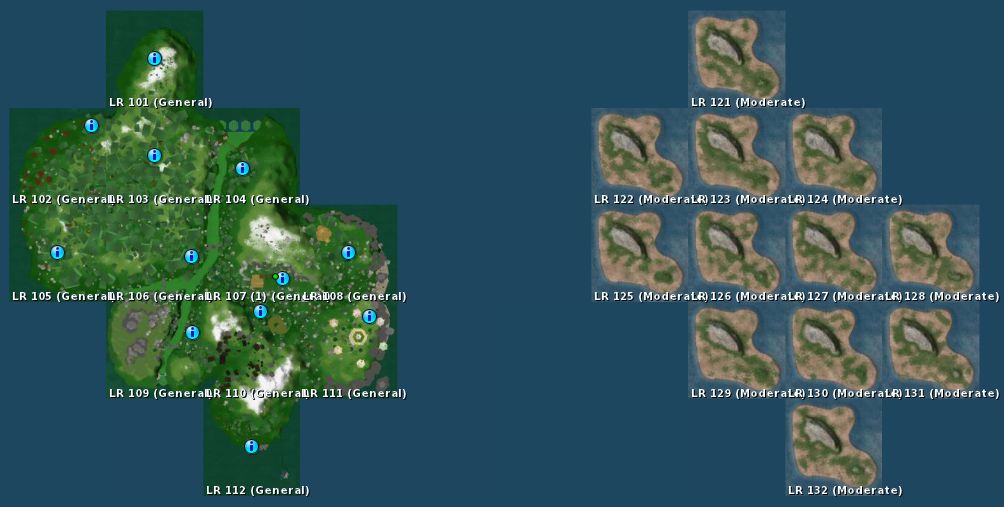
Some six “island clusters” of 12 regions each have been established to provide space for users to play the game without undue lag. From the map, it would appear another two further “islands” of 12 regions apiece may be under development for further expansion of the game, should they be deemed necessary – or perhaps they’re being prepared for the next Linden Realms project?
Linden Realms 12-region game “island” (l) and another Linden Realm area apparently under development (r)
Note that you cannot teleport directly to the game areas – you must go through one of the designated portals.
Game Portal
I reviewed the game a while back, the objective is to collect crystals, avoid various rock monsters and other obstacles and, as a side benefit, earn L$ (but don’t look to make a fortune – that not the point!).
I took a quick look at the expanded gaming areas earlier, and did find there seemed to be a slight issue: some people were arriving and failing to receive the game HUDs. As these also provide instructions – and the LL blog post announcing the game to be open doesn’t mentioned them at all, I actually encountered quite a few very confused people wandering around wondering what was going on and what they were supposed to be doing. I actually tried the portals at Barbarossa, Eldervale and Degrand – and failed to receive a HUD through any.
Hopefully, this issue will be fixed in short order.
The game is a lot of fun – and there is a rumour further quests may be added; if true, I’m not overly sure it’s a good idea. The aim of the game (from LL’s perspective) is to introduce mechanics and features that are to be made available to all – as such building an entire multi-quest game smacks a little of biting the hand of content creators – who are the people who should be using the tools to make engaging, fun and very different experiences for people to enjoy.
That said, I recommend that if you have 30 mins to spare – and once the initial rush has died down (and the HUD issue fixed), why not give it a try?
They’re now doing it again. This time the offer is for longer – an entire week, starting at 08:00 SLT/PST today, Monday 21st November, and ending at 08:00 SLT/PST on Monday 28th November.
As with the original offer
The discount only applies to Quarterly membership billing plans
Only the first quarter will be discounted the rest of the year will be charged at the full Quarterly membership rate.
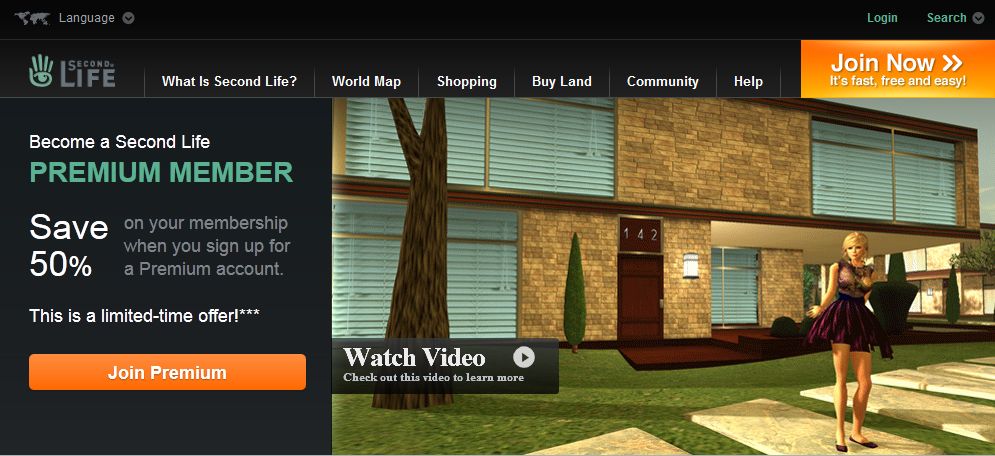
There’s even a cheesy video this time – although I still dispute some of the claims made:
More space? How, exactly? 512sq m (even with a Linden Home), isn’t a huge amount of space
More privacy? Again, how, exactly?
More Access? Really? Where?
Fact is, as far as these claims are concerned, they can all be matched via Basic membership, and I still find LL’s use of them as promotional tools mildly misleading. For space – you can rent land (OK, making a payout, but the space will be way more than the free 512 from Premium); you’ll get privacy to the same degree as Premium (if you have your own land – right down to the same parcel settings). Access? simply go PIOF and age verified (no longer the big bad bogeyman it once was), and you’ll enjoy the same access.
It’s going to be interesting how well this is received – not they we really got any indication as to the success of September’s promotion.
What will be more interesting is whether or not this may lead to a repeat of the Land Sale that LL held towards the end of October to follow-up on the Premium drive, and if so, how long for – both schemes original ran just for a weekend in their first outings.Should LL opt to run with the Land Sale again, then it could come up as a little Christmas enticement (assuming they’re not seriously contemplating doing anything drastic with tier in the New Year).
So, if you feel up for going Premium, now’s the time to try – you might want to read my reports on the upgrade process and things like Linden Homes and the Premium Sandboxes. That said, I actually don’t think the Quarterly membership, even with a single discount offers that great value for money – if you want to go for Premium, best to go directly for Annual. Yes, you’re making a greater commitment, but the return on your membership is greater – and you arguably have greater protection against account suspension due to a payment error / failure.
A frend in-world pointed me towards the SL forums today, and an interesting post from Kelly Linden on upcoming functionality which will allow scripts that pay out L$ to determine whether or not the transfer is successful, fails or is refused by the recipients.
The new functions are called llTransferLindenDollars and transaction_result.
LSL event triggered from an llTransfer* call (currently only llTransferLindenDollars).
transaction_id matches the return value of the llTransfer call. If the transaction was successful the id will match the transaction id shown in the transaction history on secondlife.com.
success is TRUE if the transfer succeeded otherwise FALSE.
data will contain a CSV of destination id and amount transferred on success and an error tag on failure.
Kelly further explains:
llTransferLindenDollars has all the exact same limitations and restrictions as llGiveMoney – no more and no less. The only difference is that the result of that transaction is routed back to the script when llTransferLindenDollars is used.
Technical details:
L$ transactions in Second Life are managed by a service internally termed “L$ API”. This includes llGiveMoney and direct agent to agent transfers – and anything else that transfers L$. The new function doesn’t actually “pull the transaction data from the LL servers”, it just passes back the results from using the L$ API.
It is true that this service operates on HTTPS hence the possibility of it giving an “HTTP status code other than 200”. This is expected to be extremely rare. As for the incident today on the beta regions: in order to reproduce this error (and ensure it works as expected) QA forced a configuration change such that this particular region host believed the L$ API existed at a nonsense address. Resetting the configuration to default fixed it of course.
To be extra clear:
There are no cases where llTransferLindenDollars could succeed when llGiveMoney would fail.
There are no cases where llTransferLindenDollars could fail when llGiveMoney would succeed.
There are some rare edge cases, mostly relating to LSL limitations:
LSL scripts do not process more than one event at a time. If the script gets reset, the object taken, or the region restarted while the transaction_result is pending in a queue (because the script is busy in another event) then the result may get lost. This risk can be mitigated by using scripts that are mostly idle while waiting for the transaction_result event. This is not unique to the new features but applies to all events in LSL.
LSL scripts have a max event queue size of 64. If the event queue is full new transaction_result events will get dropped. This risk can be mitigated by ensuring the script handling the transaction_result does not build up a queue of events. This is not unique to the new features but applies to all events in LSL.
The only script in an object which will get a transaction_result event is the script that called llTransferLindenDollars. This is similar to how the http_request event works.
This functionality is currently undergoing testing on the Aditi Beta grid on channel DRTSIM-111 in the following regions (SLurls): Bethel, Fortuna and Sandbox Wanderton.
You can follow / join the discussion on these functions in the SL forums.



 Inara Pey: Living in a Modemworld