Eternity is the name of the fifth experience by C3rb3rus that I’ve visited in Sansar. I’ve previously blogged three of the others – 2077 and Darkwood Forest in-depth and The Diner as a part of my coverage of the Sansar’s Scariest competition – I have yet to write about Floating Temple, as I’m waiting to see if it develops further!).
Eternity is on a much smaller scale than the previous designs by C3rb3rus – but it is intricately and beautifully detailed and animated, making a visit a must. It’s a single scene environment, presenting an enormous structure in two parts, standing atop an island of floating rock, serenely suspended in the air.
The first part of this structure is open to the sky above, its high walls an intricate lattice of wood (or copper?) supported by beautifully embossed metal ribs. In general design, it appears church-like: a long, narrow nave leading to a short transept / choir / apse. The aisles either side of the nave are represented by two intricately patterned ramps which gently slope up along the line of the structure to follow the outward curve of the walls. Directly in front of the landing area, almost blocking the way forward, is a great mechanical horse running at the gallop without ever-moving.
To call this a work of art would be an understatement; it is quite simply magnificent. held above a platform on which gears turn and roll by a single supporting pole, this horse is a masterpiece of construction. Burnished in bronze, its legs are fully and naturally articulated, moving with the fluid grace of a horse, head and neck moving in unison with its strides. Partially covered by engraved plates and partially open to the world, the beast has a mechanised interior which rocks and moves in response to its gallop, almost as if driving it, even though none of the gear wheels (understandably) are turning.
Beyond the horse – which can be viewed from the rough floor of the structure or the ramps on either side – visitors can make their way to the “transept” where more mechanical wonders await. The “floor” here resembles the partially exposed inner workings of a clock or pocket watch with gears meshing and turning and flywheels rocking. A raised dais continues this theme, stretching back towards a single opening. Overhead, an orrery turns embossed metal worlds in orbits around a central point. While one of these worlds is ringed like our Saturn, they do not otherwise appear to be representative of our own solar system.
It’s a stunning, magical setting – but again, the orrery and floor workings can easily be overlooked as eyes are drawn to the far wall of their structure. Solid in nature, all of its entire face is a fabulous tribute to the elegance of clockwork mechanisms, complete with a great brass-like device standing in the middle, above that open doorway mentioned above.
Surrounded by the copper / bronze gears and flywheels, this round face has the look of both a clock – albeit it one telling time in a way foreign to the human mind – and the great circular window of a church or cathedral. Indeed, the vertical face on which it is mounted – part of the second, fully enclosed structure in the scene – does through its very shape, heighten the feeling of this being a church, a place raised to the glory of Time.
Eternity is a marvellous portrayal of both our relationship with, and insignificance before, Time itself. The horse running at the gallop is the very embodiment of tempus fugit, the orrery a reminder that some things endure within the passage of time for far longer than we do, while the great engraved heart suspended by chains above it perhaps stands testament to our own fleeting mortality.
A marvellous, richly detailed and evocative installation.
The following notes are taken from the Sansar Product Meeting held at 9:30am PST on Friday, February 9th, 2018 – unfortunately, I was unable to attend the afternoon meeting, so have not notes from that.
These Product Meetings are open to anyone to attend, are a mix of voice (primarily) and text chat, and there is currently no set agenda. The official meeting notes are published in the week following each pair of meetings, while venues change each week, and are listed in the Meet-up Announcements and the Sansar Atlas events sections.
Product Meeting Changes
The “new format” for the Product Meetings, featuring specific subject matter experts from the Lab making themselves available to answer questions from users will now likely start in the week commencing Monday, February 12th.
The meetings are liable to be held on different days of the week relative to one another, rather than both on a Friday.
Dates and topics will be announced via the usual channels (Sansar Discord channel, meeting announcements, Atlas Events).
Find And Connect Update
The Find and Connect release (see my previous Product Meeting report) was updated on Wednesday, February 7th, 2018, comprising fixes for some known issues. A list of changes / remaining known issues is available in the release notes. The following provide a little more context on the update.
Character Editor
A couple of avatar issues have been fixed, forcing users logging-on for the first time after the update to go to the LookBook (avatar app). These are:
The avatar’s head only having limited movement (particularly noticeable in VR).
Switching between avatar genders could merge female and male avatars together.
Experience Loading and Progress Indicators
This was noted in my previous meeting notes, the progress bar seen on an experience splash screen is still in its first iteration, and can appear to “hang” while loading content for uncached scenes.
It’s been suggested a count of assets loaded (e.g. 23 out of 96 or something) could help prevent feelings that the load process has hung.
It’s been noticed that on occasion, an experience can hang on loading, then quiting and restarting the client / reloading the experience can cause it to load and start OK.
This was noted before the progress bar was added, and has been more noticed since the addition of the progress bar, which might be indicative of a load problem / connection issue upsetting the load process.
Experience Concurrency Indicator
The experience concurrency indicator (green icon in the top left of the experience Atlas thumbnail / description image) is reporting avatars as being present in experiences when no-one is in fact visiting.
This is a known issue, caused in part by a degree of latency which can occur between people entering and leaving an experience, and the Atlas being updated, and the Lab is looking to improve this.
If the Atlas has been left open for an extended period, refreshing it (e.g. reloading the page in the case of the web Atlas) might force an update of the concurrency indicators for experiences that have seen a change in the number of people visiting.
Note that this indicator only applies to visitors in a published experience, it doesn’t count people actively editing the scene associated with the experience.
General Feedback
Outside of the points raised above, general feedback for the Find and Connect update is:
Load times have (in general) improved.
Performance has improved within experiences, probably as a result of the update optimisations included in the release.
LookBook is a lot more responsive and gives a smoother experience.
Issues of names not showing in Desktop Mode when hovering the mouse over an avatar seem to have increased, and dropping into / out of LookBook and re-spawning in an experience no longer consistently fixes the issue. This is a known to the Lab and is being investigated.
Voice and Text
Voice Indicators
The debate on how to more easily identify who is speaking continues both at the Lab and among users. Ideas put forward include:
A over-the-head indicator of some kind (a-la Second Life) – perhaps a an illuminated dot only seen when speaking. There is some resistance at the Lab to this approach as it “breaks immersion”
A voice indicator in Sansar’s people floater. Potential problems here:
It requires people to always have the people floater open, which could be intrusive and “immersion breaking” for some (possibly more so than a dot that only illuminates when someone is speaking).
It currently wouldn’t work for people in VR, who cannot see the chat / people floaters.
An auto-rezzing “speaker’s stick” indicator that automatically rezzes in front of the avatar of someone speaking, and vanishes when they are silent.
An avatar animation (again a-la Second Life “speaking” animation gestures); but again, this might be a problem for users in VR using hand controllers.
Currently, this issue s not on the immediate road map to be addressed.
Text Chat / People Floater in VR Mode
This is still being considered at the Lab and not currently on the implementation road map.
It is possible that the first iteration will allow VR to see text chat, but not necessarily have the means to type text.
Users may have the option to toggle this on or off.
Some form of indicator that messages have been left in text chat, even if the text panel isn’t visible is also seen as advantageous.
The ability for VR users to respond in text is seen as a longer-term issue to resolve.
Voice vs. Text Debate
There is an ongoing debate about preferred communications in Sansar.
The platform is a lot more geared towards voice use; so there is a concern that encouraging text chat (as with making text visible to VR users) could shift the bias away from voice to text.
There are situations where text chat is the better means of communication, e.g:
As a means of saving a transcript of a business discussion / arrangement.
To assist with character role-play (e.g. no issues of a voice failing to match a character – orc, dragon, elephant, etc), or a male user having a female character or vice versa, etc.
Discord has been pointed to as a “solution” to group chat, etc., with Sansar. However, while there are advantages to this (e.g. Linden Lab do not have to develop a Discord-like environment within Sansar) there are also disadvantages (e.g. Discord is not particularly intuitive for a new user; it actually means time in Discord is time potentially away from Sansar; it means placing data and information in the hands of yet another third-party, etc.).
There is potentially a bias towards Discord at present, as it does only have a very small community of Sansar users involved within it. There are questions as to how well it scale should Sansar reach tens of thousands of active users trying to engage in group conversations, locate groups, etc.
Conversely, can Linden Lab realistically encompass everything users need directly within Sansar without overwhelming the ease-of-use aspects the platform is supposed to have, and are approaches used in Second Life (e.g. full group integration) the most optimal solution?
The Voice / chat debate and options for text chat and voice indicators may form a part of one of the new focused Product Meetings in the future.
David Hall’s Dwarven Fortress – setting for the Friday afternoon Product Meeting
The following notes are taken from the Sansar Product Meetings held at 9:30am and 4:00pm PST on Friday, February 2nd, 2018. These Product Meetings are open to anyone to attend, are a mix of voice (primarily) and text chat, and there is currently no set agenda. The official meeting notes are published in the week following each pair of meetings, while venues change each week, and are listed in the Meet-up Announcements and the Sansar Atlas events sections.
Meeting Changes
Up until now, the Product Meetings have been free-form, general Q&A sessions, largely guided by whoever from the Lab’s Sansar team has been able to join each meeting. In the future, there is liable to be more of a roadmap to meetings, with advanced notice being given on specific subject matter experts from the Lab who will be attending each meeting, to allow for more focused discussions on topics, with Q&A on the specific subjects being covered. These changes may start with week #6 (commencing Monday, February 5th, 2018), or shortly thereafter.
Free Creator Subscription Period Ends
On Thursday, February 1st, 2018, the “Free Creator Preview” period closed for Sansar users. The announcement was made via e-mail, and means those not on a subscription plan have been downgraded to the Free account status, and limited to just three experiences.
Those who have created more experiences under the Preview period are able to save the scenes for all there experiences, allowing them to swap between published experiences, but can only have three published for public access at any one time. Specific issues with changes required by the ending of the Preview period should be raised with support. Details on Sansar subscription packages for those wanting to have more than three active experiences can be found here.
Find and Connect Release
The January 2018 Sansar release, previously referred to as”Release 17″, now called Find and Connect, was deployed on Friday, February 2nd, 2018. The release notes are available on the Sansar website – please refer to these for a complete breakdown of the release contents, particularly fixes and known issues. The following is a summary of the major updates and initial feeback.
Atlas
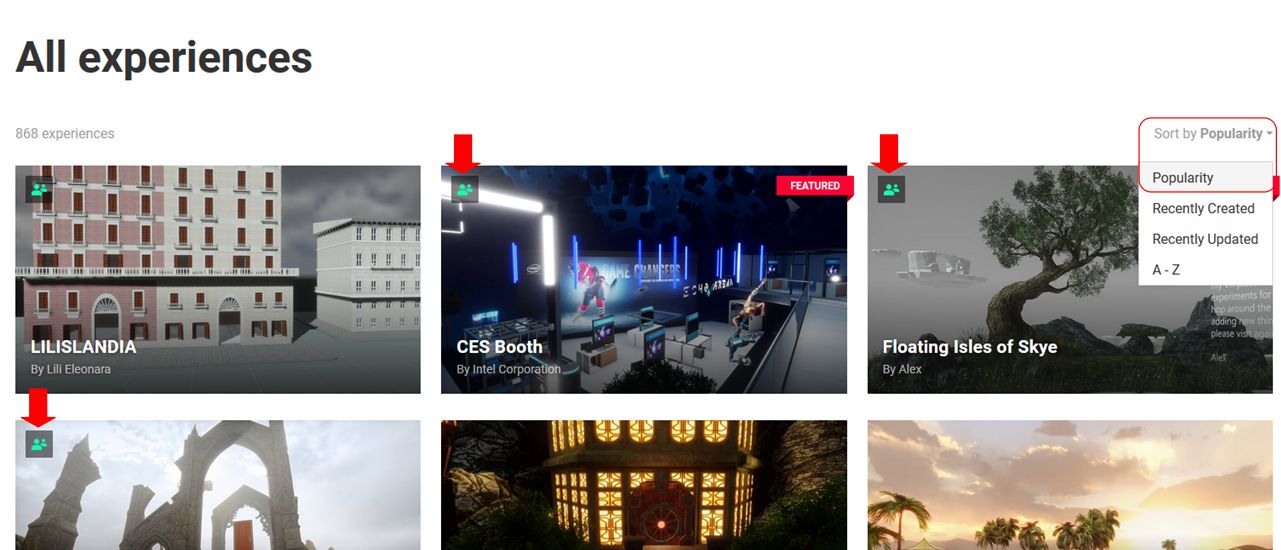
The Client Atlas now includes a popularity search option and a concurrency indicator for experiences.
When selected from the sort drop-down menu (see below), the Popularity option orders the listed experiences in a tab by current real-time use, so those with avatars actually visiting them will be listed first.
Experiences with avatars in them have a concurrency indicator in the top left corner of their thumbnail image. This is a near real-time indicator that the experience is in use at the time it is seen in the Atlas.
Client Atlas: popularity in sort drop-down (circled, right), and the concurrency indicators (highlighted in the top three thumbnails) available for all experiences with avatars in them on all tabs
Note: while listed in the Find and Connect release notes, these two updates were actually released on January 22nd, 2018.
Event times in the Atlas (client and web) are now displayed in local time, and no longer only in PST. So if you are on the East Coast, the time will be displayed in EST / EDT; in the UK the time will display in BST or GMT, etc.
Experience Loading Progress Indicators
Indirectly linked to the Atlas, and in response to numerous requests, the splash screens for experiences now display a progress bar and status notices on the condition of the loading process (e.g. “loading scene resources”, “loading avatar”, etc.).
This is a first pass at offering a progress bar, and the hope is it can be further refined to be more informative, particularly as the load process can seem to pause whilst loading an uncached experience. Ideas being considered are a percentage count, a count of assets loaded (e.g. 23 out of 96 or something), but no decisions at this time, as any count – percent, assets, etc., can still be subject to pauses which can give the appearance that the load has stalled.
Experience splash screen with progress bar and status notices
Audio
Live Streaming: live video streaming from Twitch and YouTube.
Multiple sound streams: multiple sound streams can be attached to a scene with easy changing between channels, and labels can be assigned to each.
Multiple audio emitters: sound streams or a media stream’s sound can be played across multiple emitters in your scene.
Play media stream sounds in the background: audio output of media streams can be channelled to play globally in an experience.
Avatar And Clothing
The avatar rest pose in Desktop Mode has been revised, as the “looking over each shoulder” action recently introduced didn’t find favour. Instead, the avatar moves in a more subtle and natural manner.
The underwear skinning for the female avatar has been revised to reduce the areas covered by the bra and (hopefully) make it easier for clothing creators to produce designs such as backless gowns, etc. This should not affect already uploaded clothing.
The knowledge base documentation previously stated that hair should not be more than 5,000 triangles. This should have been 8,000 triangles and has now been amended.
The Lookbook has received a lot of optimisation and intelligent caching to reduce load times.
Marvelous Design updates:
Marvelous Designer creator resources updated, and creators are encouraged to update to the latest skeleton to ensure all new clothing will upload to Sansar. This should not affect existing clothing in Sansar / the Sansar Store.
Cloth simulation is a lot smoother in the Lookbook.
The latest MD update allows users to use UV maps on the UV guide and fixes issues with exporting clothing to .SAMD. See here for more.
Known Issue: following the update, all “ear” attachments vanished from Lookbook (avatar app). This is being looked into.
Known issue: avatar head movement in VR mode is constrained (e.g. the head will turn more in one direction than the other). There is a fix for this that didn’t make the cut for this release.
The following notes are taken from the Sansar Product Meetings held at 9:30am and 4:00pm PST on Friday, January 26th, 2018. These Product Meetings are open to anyone to attend, are a mix of voice (primarily) and text chat, and there is currently no set agenda. The official meeting notes are published in the week following each pair of meetings, while venues change each week, and are listed in the Meet-up Announcements and the Sansar Atlas events sections.
Nyx, Cara and Carolyn from the product team joined Jennifer for the meetings.
Inventory Updates
Filter / sort / search: the Lab is trying to fine-tune inventory to allow better sorting and filtering. This will hopefully include a search by item name function. This is seen as the first improvement to inventory for 2018, and at the time of writing was still being worked on, so it is not clear if tit will make the January release (Release 17 – see below for a re-cap on this).
Folders: inventory folders are frequently requested. These are now something the Lab hopes to start working on “soon”.
Scene Templates: the scene templates (currently available from the Scene Template drop-down list to the System Object menu to allow for easier drag-and-drop of scene templates at any time.
An update to the WEB Atlas means that events are now shown in your local times zone – not PST. A similar update will be deployed to the Client Atlas soon
Release 17
As note on my 2018 week #3 notes, the January release is simply called “Release 17” by the Lab, and focuses on:
Bug fixes.
Performance improvements – for example, the amount of data sent to the client for avatar and dynamic object animations has been reduced by some 60%, which will hopefully make things more fluid for users in busy experiences.
An experience loading progress bar has been coded, although the scene loading page has yet to be revised to show it, and it is hoped this will be in Release 17, or deployed shortly thereafter.
At the time of writing, the Lab is aiming to deploy the release around mid-week in week #5 (commencing Monday, January 29th, 2018).
Valentine’s Day Store “Express Your Love” Event
Jennifer has blogged about a special Valentine’s Day store event called Express Your Love. It has a very short lead-time (official closing date January 31st, 2018, although submissions may still be accepted beyond that), and creators are invited to submit wearables / clothing with a strong Valentine’s Day theme (e.g. chocolates, roses, jewellery in the case of wearables, gowns or suits for a romantic evening out for clothing) for inclusion in a special Sansar Store Valentine’s Day collection, which will be available from February 1st through February 14th.
Attachment Poly Counts / MD Issues
Currently the poly count for individual avatar attachment is restricted to 15K triangles. As the Lab is looking at various optimisations to help improve Sansar’s performance, this is unlikely to change in the immediate future. Some of the requests to increase the poly count is as a result of issues being encountered in using Marvelous Designer (MD). Cara understands that higher poly counts can be avoided when importing MD clothing if the particle distance is not smaller than 20mm – which matches that of the Sansar avatar. It is acknowledged that this may cause problems in some designs, and so is offered as a suggestion, rather than a hard-and-fast recommendation.
Suggestions have been made on how complex clothing might be better handled, such as splitting a rigged gown into two parts, but having them annotated such that they are handled within Sansar as a single item when worn. In response, Nyx reiterated that what was made available in the Fashion Release was only an initial release, and the Lab are looking at further refinements and improvement options, so final limits on things like poly counts and options for handling clothing and attachments are still being examined and considered.
Functionality over Immersion?
While not ideal, Second Life does have the floating dot over people’s heads, and the visible green sound bars flashing when someone is actually speaking. This eases locating someone talking at a meeting a lot easier (as can having the people floater open and checking for the voice indicator there).
A similar approach in Sansar has been seen by the Lab as “immersion breaking”, but its is now being recognised as there needs to be some easier means to locating who is speaking rather than trying to spot moving avatar lips. Suggests put forward for such a capability include:
A voice indicator in Sansar’s people floater.
An auto-rezzing “speaker’s stick” indicator that automatically rezzes in front of (or over?) the avatar of someone speaking, and vanishes when they are silent.
Sansar Store
Product updates: the Lab is working on a mechanism to allow creators to offer product updates to purchasers.
Merchant / customer communications: offering merchants the ability to better communicate with their customers is on the radar and being looked at.
Gifts / Gifting: the ability to gift items in the Store to people is “on the radar”, but is seen as lower on the priority list, so no work has started on it as yet.
In Brief
Building Gizmo: it’s been noted that the gizmo used to move and position models in a scene is not easy to see and manipulate when handling very large models. The Lab is a ware of this and looking at options for improving the tool.
Level of detail: there are plans to add level of detail (LOD) capabilities / optimisations to Sansar, but these are still a little further down the road.
Advertising outreach: options for people to be able to better advertise / promote goods, services, activities, etc., are being thought about. These could include user profiles and group options similar to those found in SL; an ability to “follow” others and receive updates and notifications from them, etc.
Events promotion: the Lab is working on a mechanism for people to submit their own Sansar events directly to the events calendar without having to e-mail a member of the Community team. This will not be in Release 17, but will hopefully be deployed in a future release update.
Improved Desktop Mode interactivity options: the ability to click on buttons, etc., in Desktop Mode, is being looked into, and additional engineering expertise has been brought in to work on interactivity in Sansar in general.
Sitting: an initial ability to allow avatars to sit is being investigated. Avatar animations in general are also being considered – please refer to recent Product Meeting notes in these pages for more.
Chat: improvements to Sansar’s chat capabilities are being planned, including things like group chat sessions independent of people all being in the same experience, etc., and it is hoped these will start being deployed later in 2018.
The Chat App currently does not support copy from the chat history. However, the Lab is looking into trying to offer a text copy capability within the local chat window once more (the “original” ability to do so having been a bug).
PayPal support: still on the road map, but no work carried out as yet.
Subscription plans & experiences: there are currently no plans to change the current number of experiences per Sansar subscription plan.
As per my 2018 week #3 Product Meeting notes, the Sansar Client Atlas has been updates to include the new Popularity sort option and currency indicator.
When selected from the sort drop-down menu (see below), the Popularity option orders the listed experiences in a tab by current real-time use, so those with avatars actually visiting them will be listed first. In addition, those experiences with avatars in them have a concurrency indicator in the top left corner of their thumbnail image. This is a near real-time indicator that the experience is in use at the time it is seen in the Atlas.
Client Atlas: popularity in sort drop-down (circled), and the concurrency indicators (arrowed) available for all experiences with avatars in them on all tabs
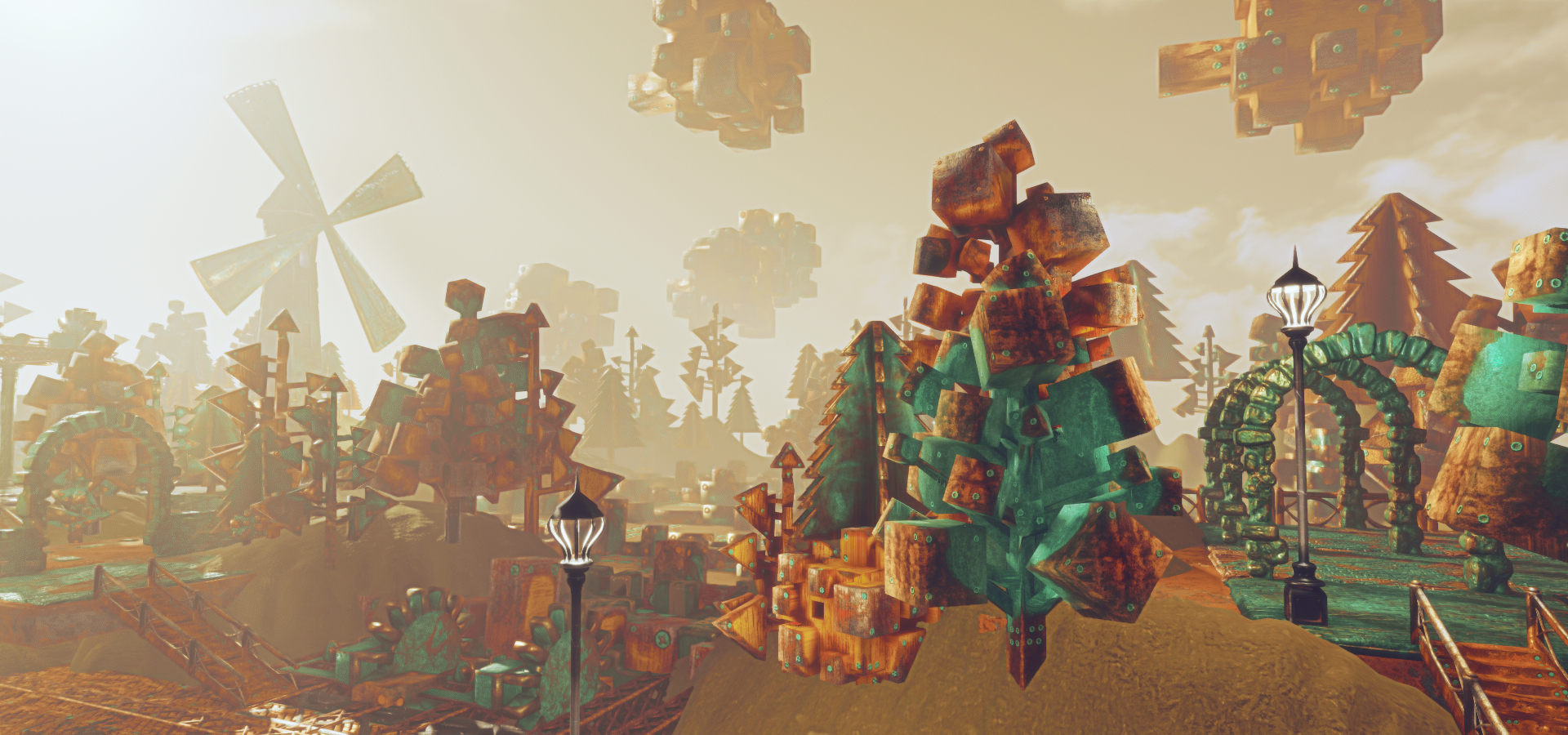
The banner images from that Product Meeting report was an advanced look at a new experience by Anu Amun, which is now publicly listed in the Atlas, by the name Copper Valley. A work-in-progress, it offers a mechanoid landscape inspired by steampunk.
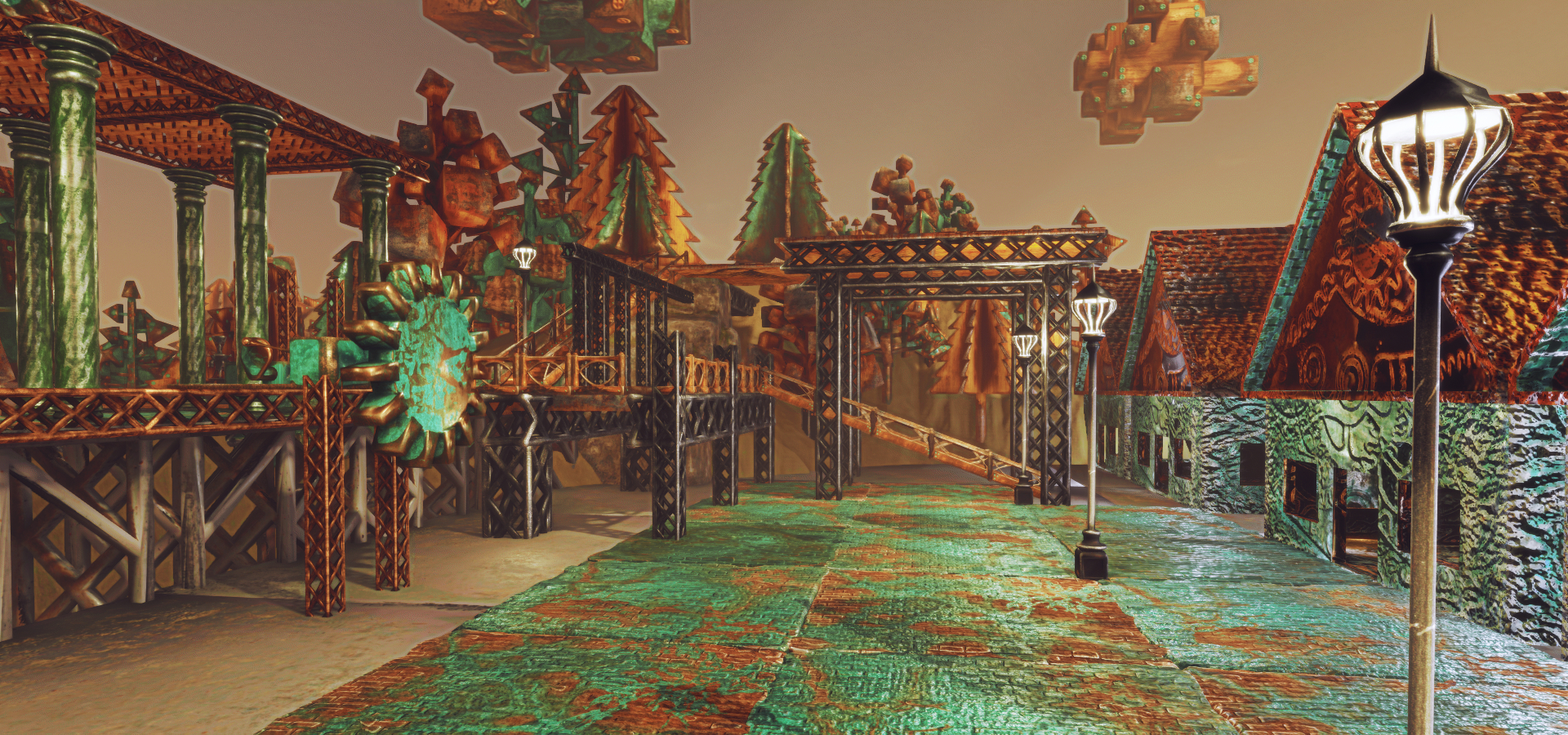
The spawn point for the experience drops visitors onto a platform roughly in the middle of this curious landscape. A raised walkway runs behind the spawn point, linking a tall windmill, sails slowly turning, with stairs leading up to another platform. Steps also offer ways down to the lands below – on one side a row of little houses, their walls and roofs seemingly made of copper – walls green and aged-looking, the roofs pristine.
On the other side, through peculiar trees, looking like they’ve been cut from blocks of metal or cut from heavy sheets, and past Mecano-like seats, to where massive blocks rotate as if on long axles hidden just below ground, rising and falling from flat fields of screwed-down metal plates. Overhead, great bulky clouds drift across a dusty sky with “normal” clouds at much higher altitudes.
It’s a strange environment, complete with it own enchantment; a mechanical place where the sandy hills are gradually giving way to more of the metal plate fields with their rotating axles of blocks. So much so, that in one corner, the “fields” are still under construction. Exploring this realm is a case of following the elevated paths, climbing the stairs, descending the steps and following your nose – but be warned! Some surfaces aren’t as solid as others.
Sneaking a peep at Anu Amun’s new steampunk experience
The following notes are taken from the Sansar Product Meetings held at 4:00pm PST on the afternoon of Friday, January 19th, 2018. These Product Meetings are open to anyone to attend, are a mix of voice (primarily) and text chat, and there is currently no set agenda. The official meeting notes are published in the week following each pair of meetings, while venues change each week, and are listed in the Meet-up Announcements. and the Sansar Atlas events section.
Ebbe Altberg and Paul (aka Pierre), Alex and Nyx Linden from the Sansar product team joined meeting host Jennifer for the event. Audio extracts from the meeting are included below for reference to key points in the discussions. Note that some subjects were discussed at different points in the meeting, and so some of the audio extracts here represent a concatenation of the different points at which a particular topic may have been discussed.
Web Atlas – Concurrency Indicators
The Web Atlas has been updated with a new search category – Popularity – and concurrency indicator. When selected from the sort drop-down menu (see below), the Popularity option orders the listed experiences in a tab by current real-time use, so those with avatars actually visiting them will be listed first.
In addition, those experiences with avatars in them have a concurrency indicator in the top left corner of their thumbnail image. This is a near real-time indicator that the experience is in use at the time it is seen in the Atlas.
Web Atlas: popularity in the sort drop-down (circled), and the concurrency indicators (arrowed) available for all experiences with avatars in them on all tabs. Note the relatively low number of “active” experience in this image may appear low as it was captured at 10:40am UK time on a Saturday morning, a typical time for low concurrency numbers for VWs
The popularity search option and the concurrency indicator will be added to the client Atlas, possibly as an update in week #4. Both present a first step in presenting users with more information on popular experiences and in helping them locate spaces which have a “social” presence in Sansar.
Sansar Store Tags
It is now possible for creators to tag items when creating Sansar Store listings, and the Store Guidelines have been updated to reflect this.
January Release
The January 2018 release, referred to internally at the Lab as “Release 17” (the Fashion release having been Release 16), is primarily code / performance focused. In particular this update includes:
Bug fixes.
Performance improvements – for example, the amount of data sent to the client for avatar and dynamic object animations has been reduced by some 60%, which will hopefully make things more fluid for users in busy experiences.
An experience loading progress bar has been coded, although the scene loading page has yet to be revised to show it, and it is hoped this will be in Release 17, or deployed shortly thereafter.
User Sign-up / On-Boarding Process
The Sansar product team believe the current sign-up / on-boarding process for Sansar (see here for the basics) is too complex. It is hoped that a more streamlined sign-up process will form the nucleus of the February 2018 release, and that these updates, together with the Atlas popularity ratings / indicators, will make it easier for incoming users to sign-up and start finding experiences where they can meet and interact with other Sansar users.
Under discussion at the Lab is whether or not to create a dedicated “on-boarding” experience towards which incoming new users could be directed following sign-up, rather than just leaving them to find their way around the Atlas. This would not be part of the February release, and could be more of an exercise in testing which route – via sign-up and then Atlas, or sign-up and “learning / tutorial” experience – is preferred by in-coming users / helps improve retention levels among new users.
Should Sansar have “on boarding” experiences akin to SL’s Social and Learning islands (shown above)? If so, should they be split between “general / consumer” users, and “content creator users”? How would such learning centres, as part of a sign-up / on-boarding process sit with experience creators providing their own gateways to their experiences? These are some of the questions the Lab is asking itself
One issue with providing any “centralised” on-boarding experience is how will it sit with user-created experiences? Part of the idea with Sansar is not to have a central / main “gateway” into the platform (as is the case with Second Life), but to allow experience creators to develop their own gateways directly to their own experiences (e.g. through a dedicated web presence, a corporate website, or via Facebook or Twitter, etc.). So, how do any on-boarding experiences supplied by the Lab fit with these routes of access?
Should a user signing-up to Sansar through a specific experience gateway be “diverted” to a Lab-created learning experience and then dropped into the experience they were signing-up to join? If so, how exactly should that work? Should they simply be dropped into the experience they were expecting, and be left to work it out for themselves / complete any tutorial options provided by the experience creator?
There’s also the question of how deep does any on-boarding experience have to go – can things be made easier to understand through the client itself – keeping the UI straightforward, offering on-screen indicators for controller buttons options when required, etc?
Mentors / Greeters
A suggest was made to have a “learning welcome” space where volunteer “Sansar ambassadors” (akin to Second Life mentors) can spend time helping new arrivals gain familiarity with using the Sansar client – the atlas, settings, walking, running, chatting in text, IMing, etc.
In response, Ebbe noted that – contrary to anecdotal views in Second Life – having mentors (either at their own welcome environments or those at the various Community Gateways in operation around Second Life) does not actually lead to any greater levels of retention among new users than the self-teach environments that have been presented to incoming users over the years. However, the is a willingness to experience with methods – with the use of AI-driven NPCs or the provision of some kind of “learning HUD” also being mentioned as possible options to help new users.
Events
Pierre reiterated his comments from the previous Product Meeting, that additional tools to help creators / users mount and promote their own experiences will be appearing in the very near future. This is again seen as a component in helping to drive user interest in Sansar.
Avatar and Fashion
Currently, the Sansar avatar is not – outside of the head / face – customisable other than with clothing and accessories. As recorded in my 2018 week #2 notes, there are plans to enhance the degree of customisation available within the avatar, starting with the head, and then with work on the body. This led to concerns on how additional avatar customisation capabilities might impact clothing design. Animator and creator Medhue Simoni in particular laid out his concerns in a video on the matter, which apparently became the subject of discussion at the first Sansar Fashion Product Meeting (which I was unable to attend), with it being indicated that the Lab’s Fashion Team had watched the video, taken note of the concerns raised etc.
As the avatar is enhanced, there may well be a need for clothing designers to go back and re-rig clothing created outside of Marvelous Designer (MD), although it should be possible to re-simulate MD clothing over a changed avatar body shape once this capability has been enabled with Sansar.
In the short-term for Fashion, there will be an update to fix the UV issues people are experiencing with MD, wherein the export to Sansar is using a different UV space to the export to other formats. However, the avatar customisations capabilities will be added gradually over a longer period of time.
To help compensate for the avatar updates, requests have been made for a deformer mechanism to be added to Sansar to allow rigged mesh clothing to more easily adjust to the avatar shape (and changes to it – think Fitmesh is Second Life as a broad idea), while potentially avoiding the need for clothing to be supplied in a range of sizes. This may not be so easy to introduce.
However, and whether it will be possible to implement or not is still unknown, the Lab is trying to determine if, where different clothing sizes are required, the platform itself can auto-generate different default sizes rather than the designer having to upload them all (e.g. if a designer uploaded an item in a “standard medium” size, the “standard large” and “standard small” sizes would be auto-generated from it).
One of the things the Lab wants to do is keep the fashion creation flow relatively straightforward, and avoid placing too many requirements on designers. They are therefore keen to avoid things like morph-based solutions and blend shapes (thus negating designers having to implement a whole series of body morphs into their designs or having to run through some conversion process to handle blend shapes, etc.).






 Inara Pey: Living in a Modemworld