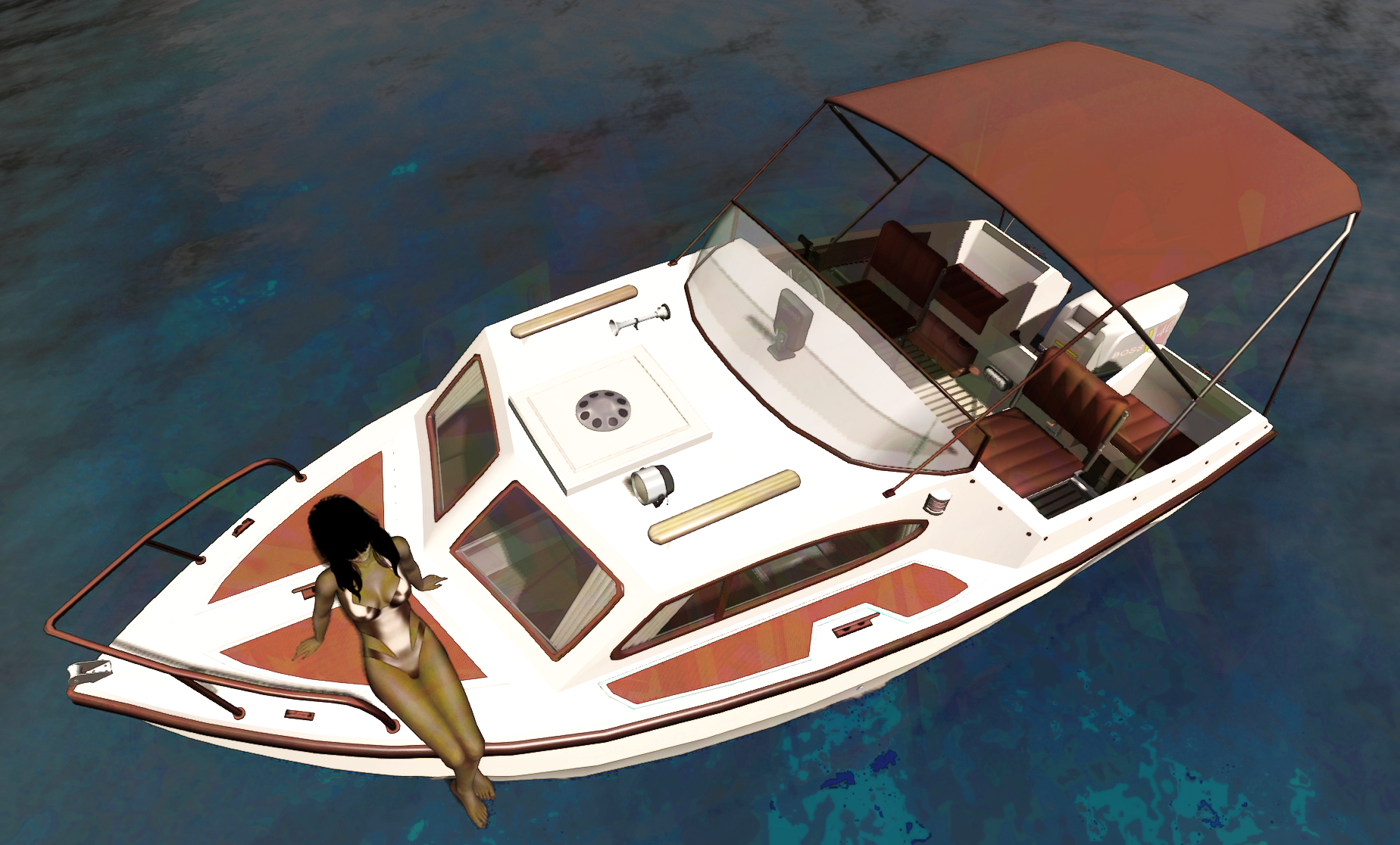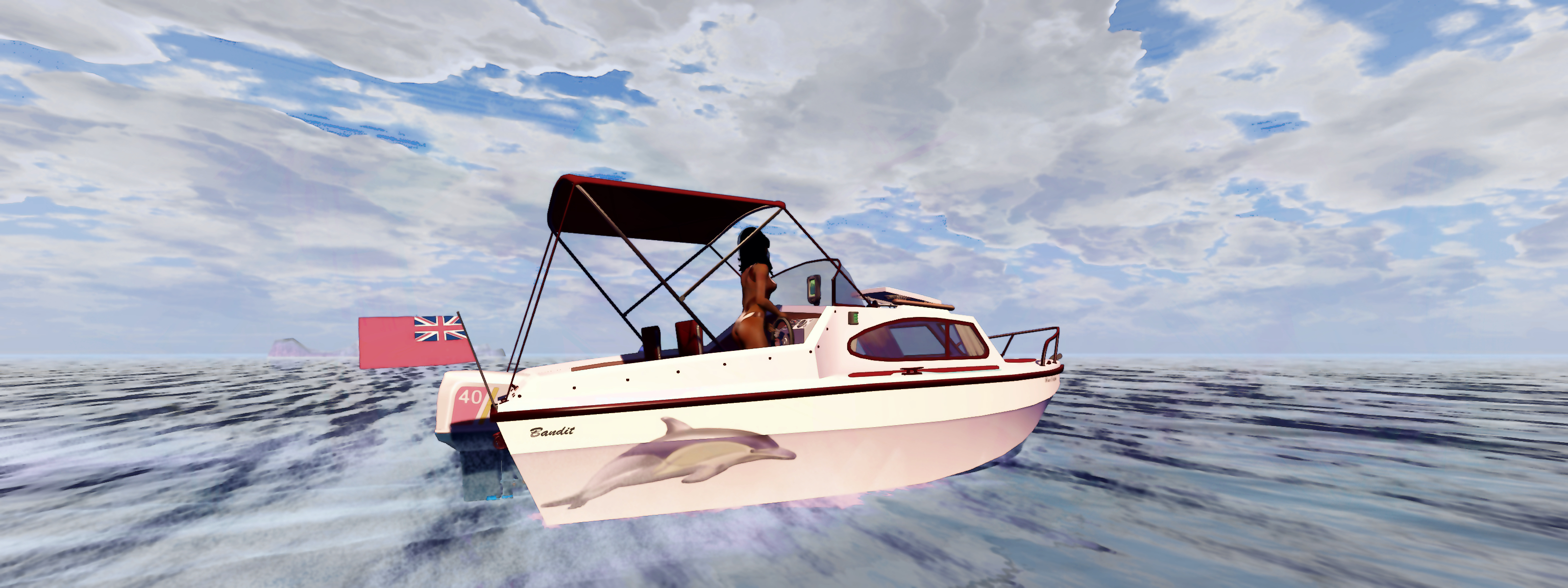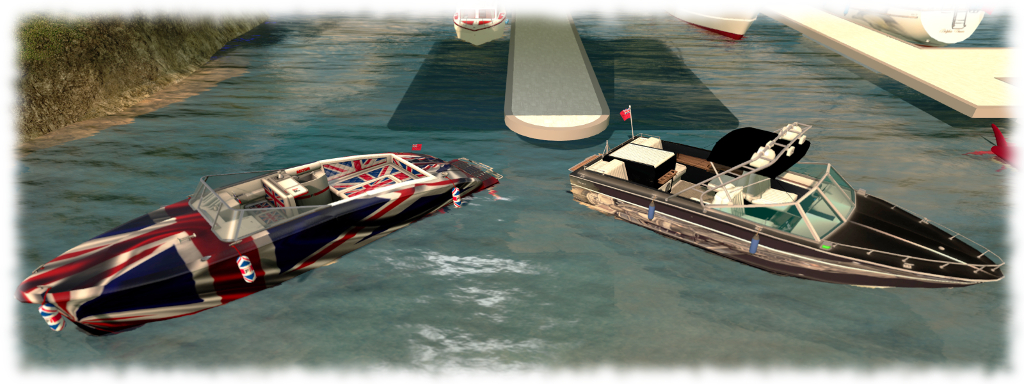
Side-by-side, the SRV-210 and Little Bee on Second Life

The Piaggio Little Bee (l) and the Bandit SRV 210 (r) in custom finishes

As regulars to these pages know, I enjoy sailing, motor boating, cruising and flying in SL, and I sometimes review the vehicles I obtain. As a result, I often get asked for a recommendation from people curious about vehicles in SL.

Answering such questions isn’t easy, in part because we all like different things, but mostly because – in all honesty – my experience is not that wide-ranging; I don’t have a huge stockpile of craft, and I tend to restrict myself to just a handful of creators on a regular basis, so there is potentially a lot out there that I’m missing.

However, my preview of the Bandit 170, which will be on general release soon, has resulted in people asking me about what I would recommend as a versatile, fun boat motor boat that looks good and doesn’t take up a huge amount of space. There are potentially hundreds of such craft to be had in Second Life – and the Bandit 170 is definitely a good place to start, in my opinion, allowing for the final details (including cost) on it to be settled.
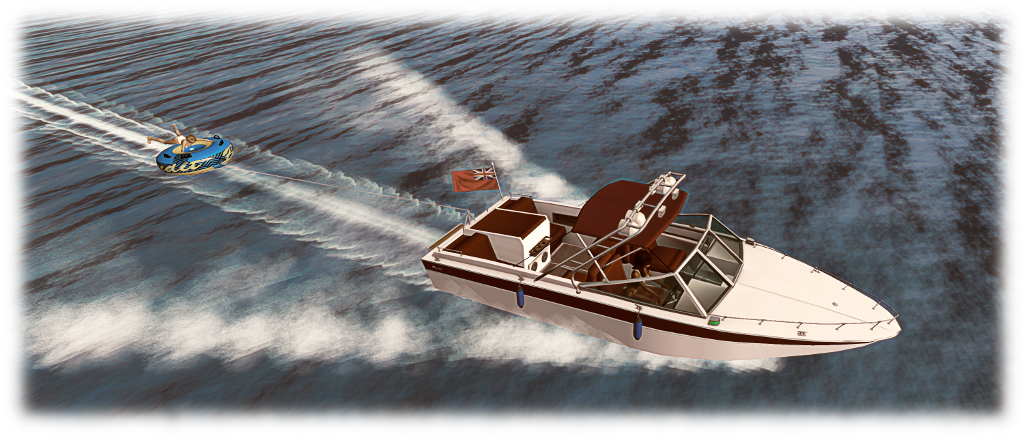
The Bandit includes a towable float tube

That said, the two boats that I find simply cannot be beaten  – and indeed, have actually stopped me from buying boats I’ve tried elsewhere, simply because they are so much fun – are the Bandit SRV 210 and the Piaggio Little Bee. Both of these boats offer so much, they are genuinely hard to beat in terms of use and value for money.

The Little Bee is the oldest of the two in terms of its time on the market, having been around since August 2015. It is based on a classic tender style speedboat design, giving it classic, clean lines. The cockpit offers plenty of space and seating, with three forward seats (including the driver) and a large rear seating area behind, with floor section that can be raised to form a bed. Two novel items with the main cockpit are the hand basin and the espresso machine with hotplate – which will deliver a brew!

The Little Bee with a custom paint finish

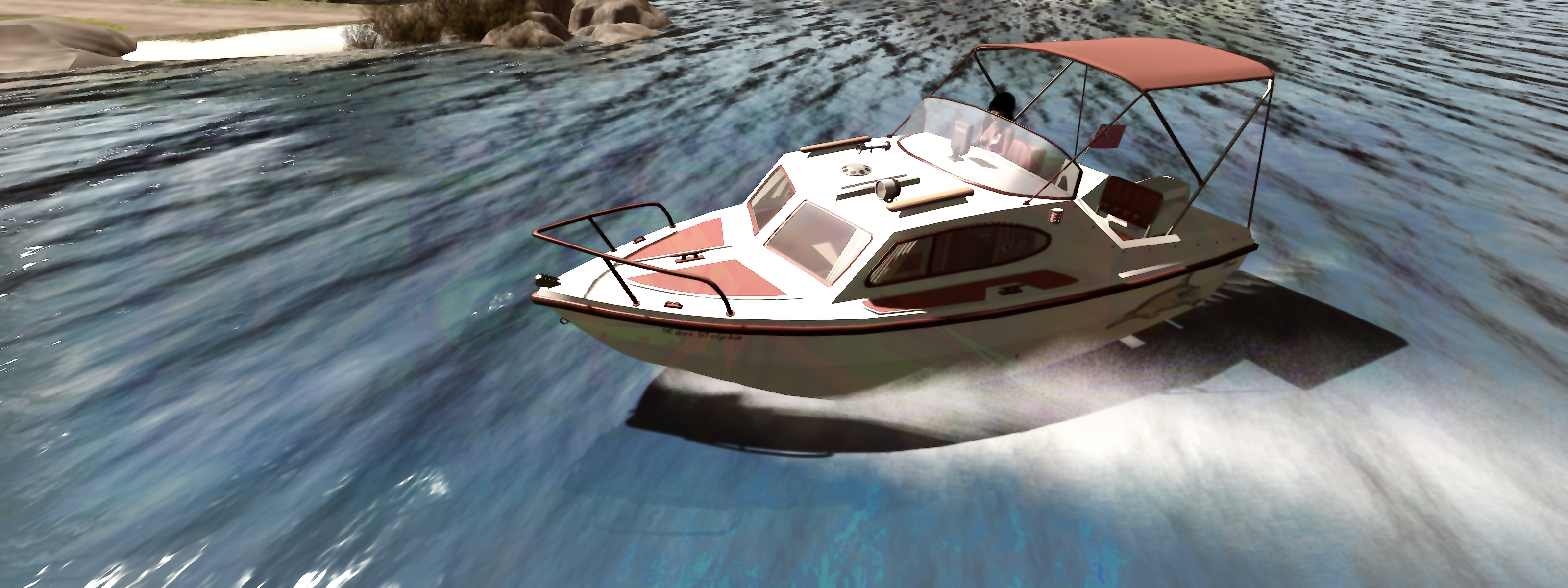
The SRV-210 has been around since 2018, and is built along the lines of the deep v-hulled fibreglass sports boats of the 1970s / 80s. The cockpit is smaller but broader than the Little Bee, and provides seating for up to 6, including the driver. The boat is equipped with a Bimini sun screen and a full tent, both of which are chat-enabled (as are many of the commands with the boat, and some of the commands with the Little Bee). Two versions are offered – one with an enclosed forward cabin, and the other with an open forward cockpit (and which may have additional poses as a result – as I don’t have that version, I’m not familiar with its capabilities).

The two boats handle remarkably well and similarly, providing a good ride experience, although the SRV 210’s ride is a little more physical, in that the boat (and camera smoothness) respond to speed and wave force, which adds to the realism of driving it. The overall controls are pretty much the same, within the exception that the Little Bee has a hydrofoil capability;  this is both novel for a speedboat and makes it exceptionally fast with the foils deployed.
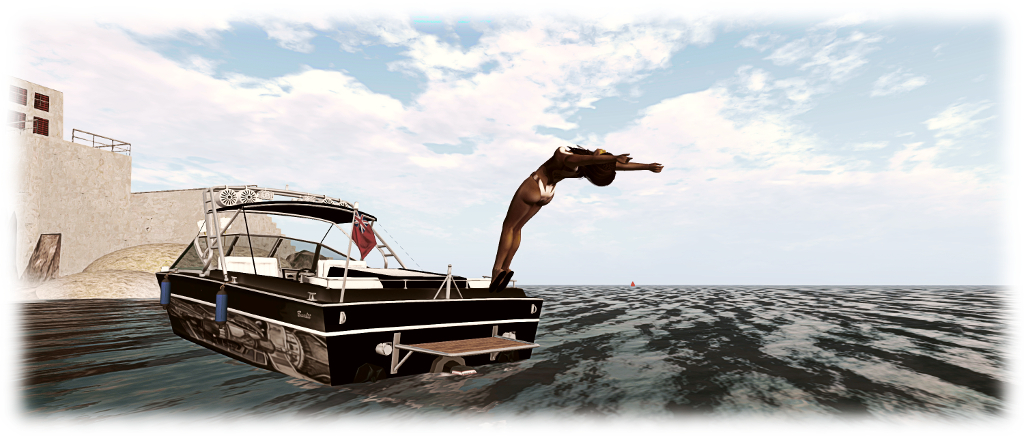
The SRV includes both diving and swimming animations, as well as on-board poses / animations

Each boat comes with a range of options some of which are common to both – paint files, media system, towing trailer, etc. The SRV 210 is supplied with a full paint finish and a set of textures for the flag. The Little Bee is supplied with a basic paint finish, but comes with far more options, including a car to tow the boat and trailer (called the TugBee and resembling a VW Beetle), a wakeboard and a parasail (a wakeboard for the SRV 210 can be purchased separately), while paint options can either be applied manually or via scripted means. Rez it on land, and it will automatically rez a cradle under it that it will sit on.

Continue reading “Side-by-side, the SRV-210 and Little Bee on Second Life”
Bandit 170: a pocket cruiser that’s coming Second Life

Bandit 170

I logged in to Second Life to find I had an unexpected gift waiting for me: a preview version of the Bandit 170, the latest motor boat by Analyse Dean. It’s a cute little craft modelled, as Ana’s boats are, after a physical world boat, as is noted in the 170’s user guide.

The Bandit 170 DeLuxe is modelled after the small recreational pocket cruisers of the 1970’s, like the Inter 500 and the Marina M17, they were popular then, and are still popular now.

Due to the small size they are easily stored, can be pulled on a trailer behind a compact car, they are fuel efficient when puttering around, but fast and fun to drive when you open up the throttle, and you can camp out in the cosy cabin for a weekend fishing trip.

At 6.6 metres in overall deck length, this really is a small boat – smaller than the Bandit SRV-210 speedboat, which I reviewed two years ago, when it was first released. Nevertheless, it come packed with details: a range of cabin and deck sits, the ability to tow a passenger carrying tube or and optional wakeboard (the 170 is compatible with Ape Piaggio’s wakeboards, which can be purchased at Ape’s store at Dutch Harbor).

Bandit 170

The 170 is very much a faithful reproduction of the Inter 500 / Marina M17 (Ana provides a pair of photos of the Inter 500 so you can see for yourself). The stern well provides room for four, while the compact cabin offers sleeping / sitting space for  in reasonable comfort. It is powered by 40 hp outboard motor that may not have a huge turn of speed in the physical world when compared to speed boats and larger cruisers, but which is for Second Life more than adequate, and at the upper end of its speed scale, makes this a manoeuvrable, nippy little craft.

The controls for the boat follow the usual layout: when seated, the pilot types “start” (no quotes) to start the engine and “stop” to turn it off, while the Left / Right keys will turn the boat in the appropriate direction, and the Up / Down keys increase / decrease the throttle. From start, a tap on Page Up will fully open the throttle while tapping the Down Key when in motion will drop the throttle back to idle. If Page Down is tapped when the throttle is idling, it will drop the boat into full reverse, and Page Up will bring the throttle back up to idle.

A range of chat commands unlock other features, including deploying the Bimini (Sun shade over the open boat well) or the tent (completely encloses the boat well), setting the camera position, turning the hover text HUD on / off, dropping / raise the anchor, deploy the fenders – and more, as detailed in the the user guide. Touching the boat can either access the range of sit / pose options (of which there are a fair few, singles, couples and fun) or activate various controls  / options – such the the ventilation hatch in the cabin roof, boil the kettle, (and give you a mug of a hot beverage), toggle the control panel switches for the boat’s lights, stow / unstow the forward seats in the boat’s well or the table in the cabin, put out a larger bed, etc.

Bandit 170

Like many of Ana’s boats, the Bandit 170 is a very physical craft: it really will bounce through waves when at speed; as a consequence, you can suffer a fair amount of camera juddering. This can be lessened by using the mouse scroll wheel to push your camera back a little from the boat. And talking of the camera, for those times when it skews and locks at a weird position on a region crossing, the pilot can generally recover by toggling between the two camera modes (cam 1 and cam 2). It may not always work – but such is the nature of SL.

For those who like first-person driving, the Bandit 170 is a capable craft, the dashboard has a single instrument – the speedometer. When driving in third-person mode, a little practice will show there’s no need for the hover text HUD.

The boat’s package includes a range of extras: a dock with scripted auto-mooring, a trailer for towing the boat, a complete texture pack for producing custom paint finishes (and which includes a couple of pre set paint options; textures are applied by right-clicking the boat and selecting the required face – just refer to the texture currently in place on the boat to confirm which texture goes where). A pack of flag textures are also included, together with the aforementioned towable tube – see the user manual for details on this.

The Bandit 170 on its trailer

An interesting twist with the Bandit 170 is that it comes ready for a new game Ana is working on with Ape Piaggio, Rez Grey (the originator of Get The Freight out) and Dutch Mainsail. Called OMFG (that’s One More Fishing Game before you jump other conclusions!), it is a grid-wide fishing game that Ana describes thus:

It’s 100% database driven, so all the water in SL is mapped out, meaning you’d really have to go out with your boat, look at the fish finder to see if there is fish, and then stop and cast a line, what you catch depends on what gear/bait you use, and where you are (also, how much you had to drink, if that’s a lot, you start catching really weird things…

The game has yet to be finalised, which means the eventual retail price of the Bandit 170 is still TBC. However, those who would like early access to the boat (without the game option) can obtain it from the Bandit stall at Uber. Those buying the boat from there will receive a free game update once the latter is available.

Bandit 170 o the rivers of Bellisseria

One of the things I like about this little cruiser is that its small size, shallow draft and low speeds make it ideal for navigating inland waterways around SL – I had a lot of fun (low bridges allowing) pootling around the rivers of Bellisseria.

All told, a great addition to the Bandit ranged of power boats, one that could well be a popular item among boating enthusiasts, bringing with it a land impact of 35. If you don’t fancy trying to fight your way into Uber to grab one, you can hop to Dutch Harbor and at least take the demo version for a run.

Blog navigation update, March 2020

The updated menus in this blog

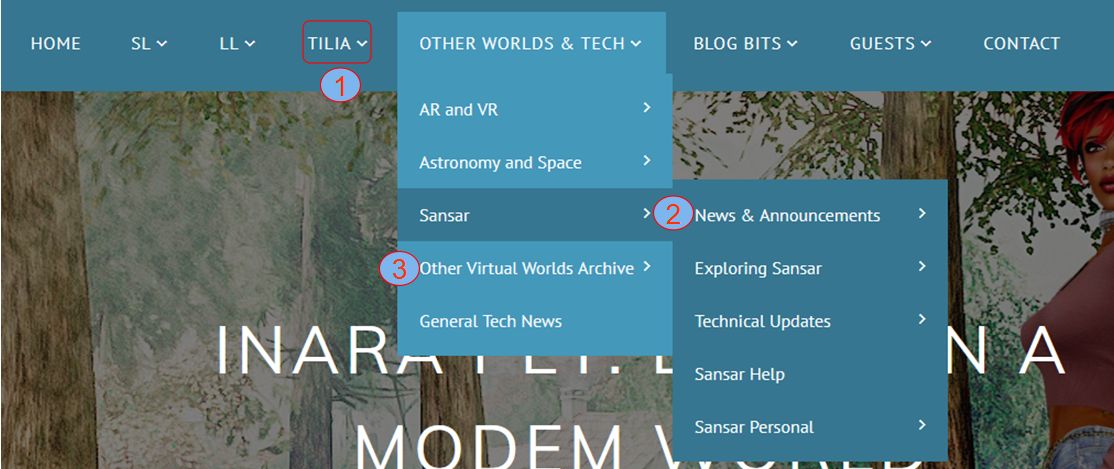
As a result of Sansar’s departure from Linden Lab to pastures new (see Linden Lab confirm the sale of Sansar to Wookey Project Corp – updated), I’ve made some minor updates to the menus and navigation in this blog, as shown in the image above and explained below:

  1. A new top-level blog menu Category, Tilia, replaces the Sansar category. This will be used for information and updates relating to Linden Lab’s Tilia Inc., subsidiary, and includes sub-menu options for general news on Tilia, and articles about Tilia  / Tilia operations that are specific to Second Life.
  2. The Sansar category, with all sub-menus relating to it,  has been moved to appear under the Other Worlds and Tech menu category.
  3. Sansar is kept distinct from those worlds I’ve covered in the past (Blue Mars, Cloud Party, High Fidelity, OpenSim grids, etc.), to distinguish it as a platform I’m still currently reporting on. Other worlds / platforms are listed under the Other Virtual Worlds Archive sub-menu (not shown above).

The menus will hopefully remain in this format for the foreseeable future (allowing for the resumption of work on Sansar and my ability to report on it), and I’ll leave this post up as a sticky for the next few days just so people are aware of the changes.


Bringing a little (Studio Skye) Zen to your SL garden

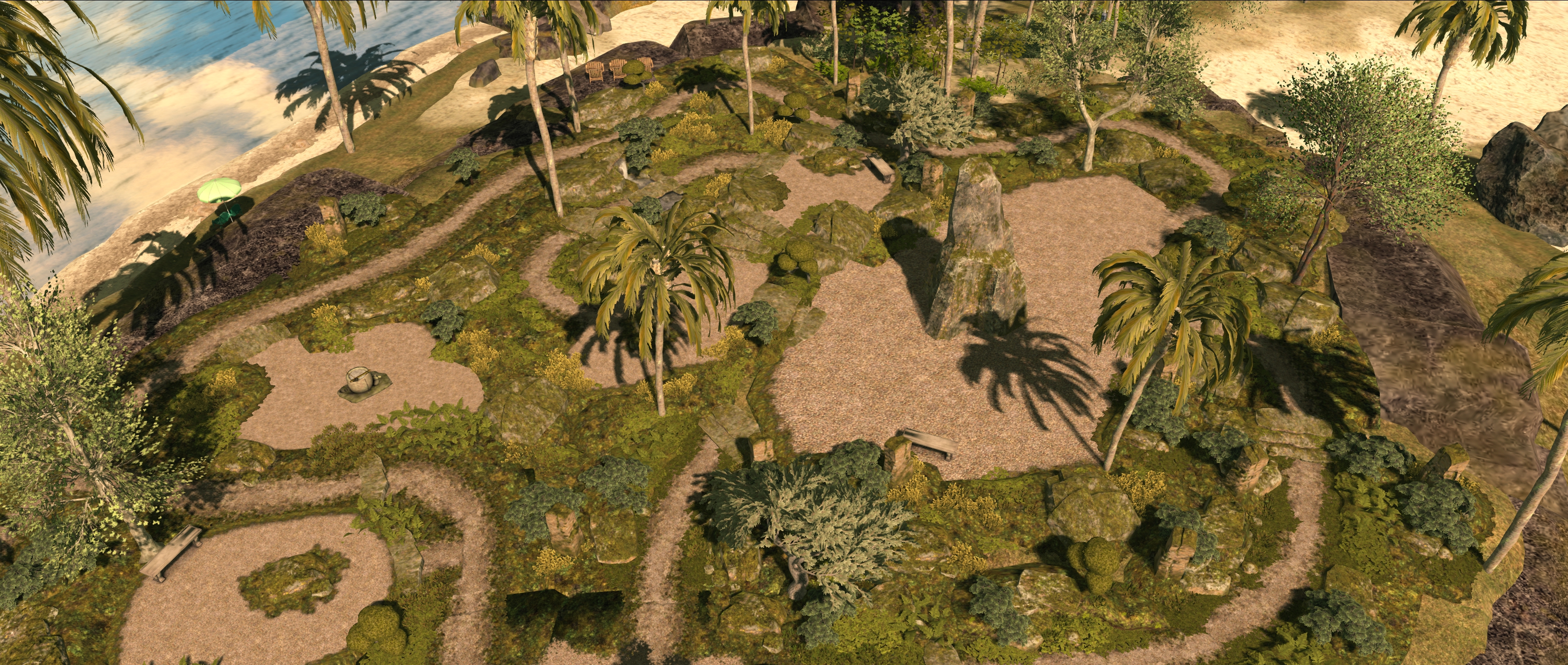
The zen garden at Isla Pey

While visiting JimGarand’s Grauland in January 2020 (see: Grauland’s touch of Japanese Zen in Second Life), I was struck by the zen garden included within the region design. An examination of the core elements in the design revealed them to be from the Zen Garden Building Set by Alex Bader, sold under his Studio Skye brand.

Alex has a reputation for producing excellent landscape building kits – and I’ve used several in constructing places like Holy Kai, although there are admittedly some that while mouth-watering in terms of my desire to put them to good use, such as his stream building sets, I simply haven’t (thus far) had the space in which to do them real justice. However, the Zen Garden kit was one that I immediately had a familiar “me want!” itch about, so that after a couple of days of pondering how it might work within Isla Pey, I snagged a copy from the Marketplace. And I have to say, it is simply superb.

The zen garden at Isla Pey  viewed from the house balcony

At L$899, the kit includes some 24 individual elements: rocks, gravel surfaces, gravel path sections, plants, shrubs, ground cover, ground pieces, stone steps, edging pieces (combinations of rocks and plants), and so on. All of this offers a comprehensive means to build a garden network of paths, plants and open spaces, which can both be used to provide places to sit or include additional features as well as being easily integrated into a broader landscape.

In addition, for those who might be daunted at the thought of trying to glue everything together themselves, Alex provides two “pre-built” and rezzer based examples of gardens: one 32m on a side (96 LI when rezzed) and the other 26x18m (46 LI). Also, a couple of textures are also provided for the purposes of blending any additional items – fillers and the like – that might be required to ensure a good pairing of garden to surrounding landscape elements.

The zen garden display at Studio Skye

Given they are “ready to go”, so to speak, the two example gardens are a good place to start with a design. As they are supplied in rezzers, also that’s required is a couple of clicks with the rezzers, and they can be put together in moments and the rezzer then used to position them as required. Just click the Finish option once placed, remove the rez box and then modify or extend the garden or blend it with a broader landscape using both the additional components in the kit and whatever else you have that you feel might work with it.

I opted to take this approach myself, using the 32mx32m garden as my starting point. To this I added some of the base, path and edge pieces to provide a basic design (one which currently uses the garden’s featured rock monolith seen in the photos here, although I’m debating swapping that out and creating a “formal” element common to zen gardens: an area of sand raked to resemble ripples on water). To this I added our selection of sculptures by Ciottolina Xue and Silas Merlin, plus trees by AzaleaBluebell originally offered as a Fantasy Faire hunt gift, together with a selection of shrubs to provide more of a garden feel.

The more extensive zen garden at Grauland

There are some additional nice touches with the set, together with a couple of “does” and “don’ts”. For example, the water elements include a volume control for adjusting / changing the sound being generated by their little falls. The edges of the individual paths are nicely “feathered” so that path sections can be more easily placed together and blended. Also, the kit is compatible with the Studio Skye 4-Seasons bolt on – although this is where the “don’t” comes into play. If you do plan to use season changing bolt-on, don’t link elements of the garden together, as doing so will adversely affect how textures get applied when changing the seasons.

Also, do take care should you vertically resize elements (e.g. so the base better connects with whatever is under it): many of the pieces have horizontal faces painted as edge cover, and resizing can leave these “floating” above the rocks / pathway section on which they are supposed to be growing, or no longer aligning with edges they are supposed to be draped over.

The zen garden at Isla Pey with the house behind

But, as noted at the top of this piece, this is a minor niggle. For those looking for a different look to their garden – one that can be unique to them whilst leveraging other plants and garden items they have, the Studio Skye Zen Garden Building Kit makes for a excellent purchase.

Links

Note: the statuary, trees, large bushes and benches seen in the images here do not form a part of the Zen Garden Building Kit, but have been purchased separately.

A decade (+) of blogging: thoughts on Second Life

On the occasions of my 13th SL rezday, Erik Mondrian reminded me that 2019 marks my 10th year of blogging via WordPress (I’d used another platform for a couple of years prior to that). With his reminder, Erik presented me with a challenge:

A slightly belated Happy Rez Day, Inara! And, if I may, perhaps a challenge? Not that you’re short of things to write about, but if you have time: In the last 10 years, what do you feel has been one of the best changes/additions to SL? And what are your hopes for the next 5?

– Erik Mondrian, via Twitter

As I stated in my reply to that tweet, I’m note sure I could pin thoughts down to any one thing in terms of what has positively happened to Second Life; there are simply too many – and some tend to be interconnected in some ways. However, I’ve been cogitating Erik’s challenge, and here is (slightly later than planned) an abbreviated list of some of the things that I believe have either benefited SL or had a positive impact on it over the last decade or so, and which I’ve particularly appreciated during my time using the platform.

Communications with the Lab: the relationship between the Lab and SL users has tended to be a complex one. At the time I moved to blogging via WordPress, things were at a low ebb. There had been the Homestead region situation, together with the drive to make SL a more “business oriented” platform (vis: Mitch Kapor’s SL5B crossing the chasm address that appeared to suggest SL’s early adopters were interfering with trying to reach an early majority audience; suggestions that parts of the Mainland should be made “business only”; the (ill-fated) Second Life Enterprise (SLE) product development; lectures from form Lab employees on how users should dress their avatars “for business”, etc), all of which left a lot of SL users felling pretty disenfranchised.

However, starting with Rod Humble and particularly with Ebbe Altberg, the Lab has sought to strongly re-engage with its users and embrace them. Things haven’t always worked out in their entirety (communications did go a little backwards towards the end of Humble’s tenure); but there is no denying the improvements seen through activities such regular Town Hall / Lab Chat / Meet the Lindens events plus the likes of VWBPE addresses and Designing Worlds interviews, and the simple expedient of allowing LL staff to once again openly engage with users whilst using their “official” accounts.

Windlight: although it was originally introduced in 2007, Windlight had a profound effect on the appearance of Second Life that’s hard to overlook. Originally a third-party product Linden Lab acquired and which didn’t see all of its potential capabilities implemented (for whatever reason), the overall impact of Windlight shouldn’t be trivialised.  If you need an idea of how SL looked pre-Windlight  – with the exception of the old particle clouds – just disable the Basic Shaders in the viewer.

Open sourcing the viewer code: also introduced in 2007 and not without its share of hiccups / controversies (the Emerald viewer situation, for example), the open-source project has undoubtedly served SL well. It has allowed third-party viewers to thrive within a reasonable framework, and both exposing features hidden with the viewer’s debug settings and allowing developers to add their own options, allowing users a greater choice of client options. It has also provided the means for users to contribute potential improvements to the viewer back the the Lab, generating a a largely positive synergy between developers and the Lab.

Mesh model import: admittedly, the impact of mesh modelling in Second life cuts both ways: positive and negative. Leaving aside what might be regarded as its negative aspects, it has helped to improve SL’s look and feel, potentially made region design more accessible / attractive, and helped bring improvements to the avatar we might otherwise not have seen, or which may have not have been implemented until later in the platform’s life (e.g. Bento and Animesh).

Performance improvements: over the last decade, LL has worked extensively “under the hood” with Second Life to try to improve overall improvements, such as the long-term Project Shining. Running for some 2 years with the aim of improving object and avatar performance, it was followed by further projects and efforts to help improve performance in assorted areas. Some have had mixed initial impact, but all of which have, overall, helped to improve things for most users, even if only incrementally in some cases.

Materials, Bento and Animesh: all three have helped improve the look and feel of Second Life, making it more attractive to users old and new.

Looking to the next 5 years, there is much that might happen or which many would like to see happen – from technical aspects such as further improvements in simulator performance (e.g. script and physics performance, region crossing management), through to more esoteric aspects such as audience growth / user retention, fee balancing, etc. However, I’ll restrict my thoughts for the future to one topic: the transition to the cloud.

This work has already eaten into the Lab’s engineering and operating time over the two years, and will doubtless continue to be a significant focus for 2020. However, it is a leap into the unknown for Linden Lab and Second Life, both technically and in terms of operating outlay / revenue generation (e.g. capping the cost of having cloud servers running 24/7 in a manner that doesn’t require uncomfortable fee increases).

On the technical side, it’s more than likely that the focus on moving to the cloud has a higher priority that developing significant new features for SL – and perhaps even curtailed implementing updates that might be seen as having a limited lifespan, such as infrastructure changes that could be rendered obsolete following the cloud uplift, but which are nevertheless causing a lot of teeth grinding amongst users.

Even when the uplift itself is completed, it is likely that the transition will still require a significant among of settling-in and adjustments that will continue to occupy the operations and engineering teams. So there is a lot hinging on this move that will continue into the next couple of years, and that is important to the overall future of the platform.

Happy New Year 2020!

Wishing you all the best for 2020 in whatever you do, and may your Second Life continue to be as rewarding and enjoyable for you as 2019!