Linden Lab launches Versu

LL logoOn Thursday 14th February, when most of us had our attention on One Billion Rising in Second Life, Linden Lab launched Versu on the iPad.

The much-anticipated storytelling app is being made free-of-charge and is bundled with a tutorial, a “scene” and a “full length” story, with other titles to be offered at $4.99 each and offered “periodically”.

The press release announcing the lauch reads in part:

A product of Linden Lab’s acquisition of LittleTextPeople earlier this year, Versu provides unique narrative experiences in which the reader is an integral part of character-driven interactive stories. In Versu, you take on a character with distinct preferences, concerns, and desires, as you explore and change a story through your decisions and interactions with other characters. The characters you encounter are endowed with sophisticated artificial intelligence and have their own unique personalities, motivations, and emotional reactions as you interact with them. The decisions you make and how you treat other characters define your character in the story and influence the narrative, giving each title the potential for many unique experiences to explore. In the future, the tool set used to build these immersive stories will be made available to users, enabling readers to insert their own characters and scenes into the narratives they explore.

The Versu website provides more information on the titles released with the app:

An Introduction to Society: a piece approximately 5 minutes in length and designed as a tutorial / introduction to Versu with a lighthearted theme, covering the basics of interacting with the app – understanding objectives and achievements, playing settings and directing a chosen character. The story involves Lucy, a schoolgirl receiving instruction from her grandmother about how to behave herself in polite society. There are several possible outcomes to the story, as well as a little background on characters who may appear again in future titles.

The Unwelcome Proposal: in this scene, adapted from Pride and Prejudice and which runs some 5 – 10 minutes as a further introducion to Versu, Elizabeth’s cousin Mr Collins is full of reasons why they should be married. She disagrees, but can she convince him her refusal is sincere? Users can play as either Elizabeth or Mr Collins, exploring routes through Austen’s story and drawing heavily on her original text.

The first Versu title, offered at $4.99

The House on the Cliff: a full-length original story running to some 30-45 minutes by Emily Short. An accident to a carriage and mail-coach strand a group of strangers in a desolate stretch of coastland. The only source of shelter is an ancient, rambling estate, where neither servants nor master appear to be at home. Users can pick character from a wide selection and play through the story, forming alliances or finding enemies among the other travelers. Tasks within the story include working to recover from the crash, uncovering the secrets of the estate, and the option to pursue aims unique to the chosen character.

A Family Supper: offered at $4.99, this is a full length story of around 30-45 minutes. The Quinn family is hosting a small house party, but an unconventional guest threatens their peace with sonnets, vegetarianism, and a gift for finding everyone’s sore points. When secrets start coming to light and a corpse appears, it’s up to you to bring about justice – if justice is what you want. Players can choose between one of two characters, Lucy, who is staying with her hosts, or another character who is present only for supper — at the Quinns’ estate. As the evening progresses and things begin to go wrong, help to discover what has really happened, and decide how it should best be resolved — if you don’t provoke your hosts to throw you out of the house first, that is!

Of these stories A Family Supper is perhaps somewhat familiar, given the story outline was referred to briefly when the Versu wesbite was open to public viewing at the start of 2013, so presumably, the other character which can be adopted by users is that of “Miss. Bates”. Similarly, The House on the Cliff would appear to be the ghost story hinted at as well. Where there is a very clear difference between the accidental exposure if the website and the launch of the product, is that the “leak” of the website indicated that Versu would be browser-based, rather than a dedicated app.

While Versu is initially only available for the iPad, a version for Android is promised soon. Going on the launch of Creatorverse, any wait for this to happen shouldn’t be that long – although it is uncertain whether the Android product will be aimed solely at tablets or accessible on devices with smaller screens.

A video released with the launch, explains more about the app and the stories, with insights from creators Emily Short and Richard Evans, as well as an unusually gravel voiced Rod Humble.

An interesting aspect with Versu – and in keeping with the idea of “shared creative spaces” – is that while the initial offerings are authored by the team from LittleTextPeople, users will in the future have the option of writing and published their own Versu stories, as noted on the Versu website:

As a content creator, you’ll be able to create your own characters, improvise new dialogue and gestures for them, and even build entirely new stories and games for others to enjoy.

How this will work, and what options may be included in order for budding authors to monetise their stories is unclear – so eyes need to be kept on the Linden Research and Versu websites to catch upcoming announcements as / when the self-authoring capabilities are launched. However, this does go some way to explaining the references to “user-generated” content found in the Versu Terms of Service during the time when the website was accidentally revealed to the public in January.

Of all the new products the Lab initially announced, Versu is the one that has grabbed my attention the most, although I admit I was surprised by dio, launched at the end of January. The press release, Versu website and launch video have again piqued my interest even if, as a non-Apple user, I’ll have to be patient before I can get my little paws on a version (assuming that the Android version will be playable on small-screen devices as well). Certainly, of all the products launched to date, Versu would seem to have the most solid means of building a reliable (if possibly not overly large) revenue stream from the off, through the periodical release of engaging titles, should the app build up a reasonable following.

Related Links

More dabbling in dio and some thoughts

dio-logoUpdate, February 19th, 2014: dio was discontinued by Linden Lab on February 19th, 2014. Links to the dio website, etc., have therefore been removed from this article.

Last week, Linden Lab launched dio, and I provided something of an initial look and feel for using the product.

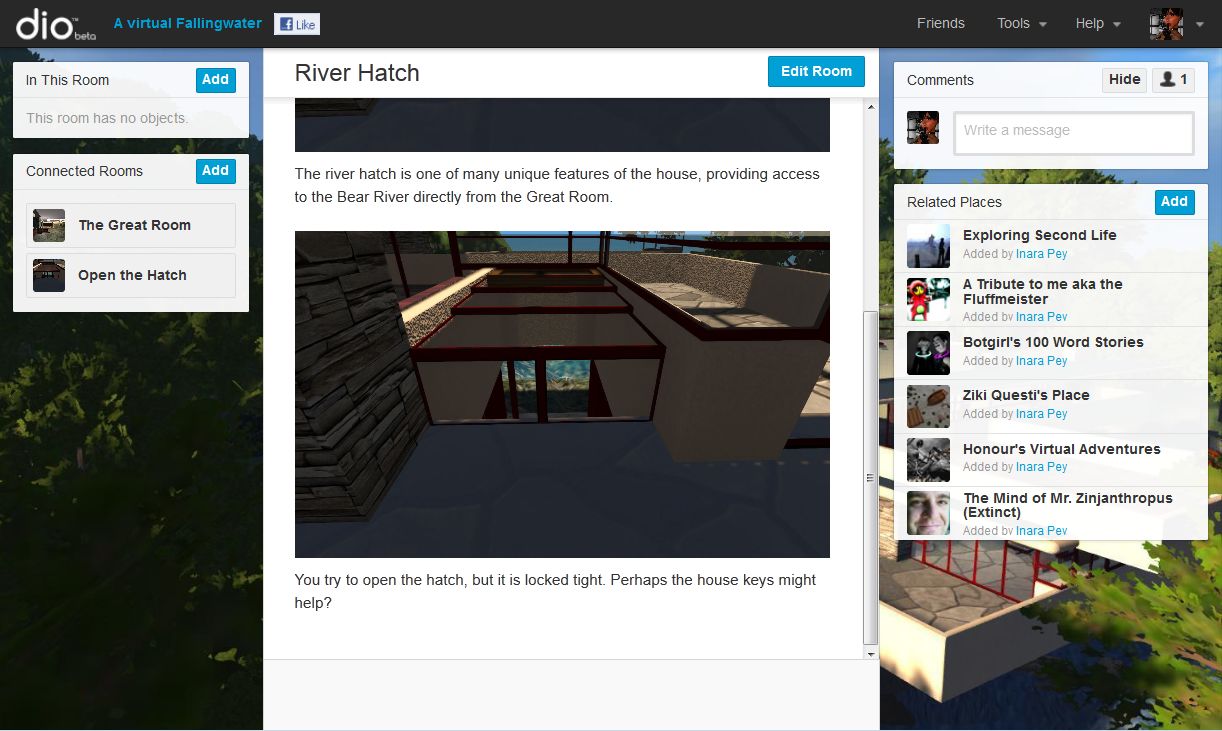
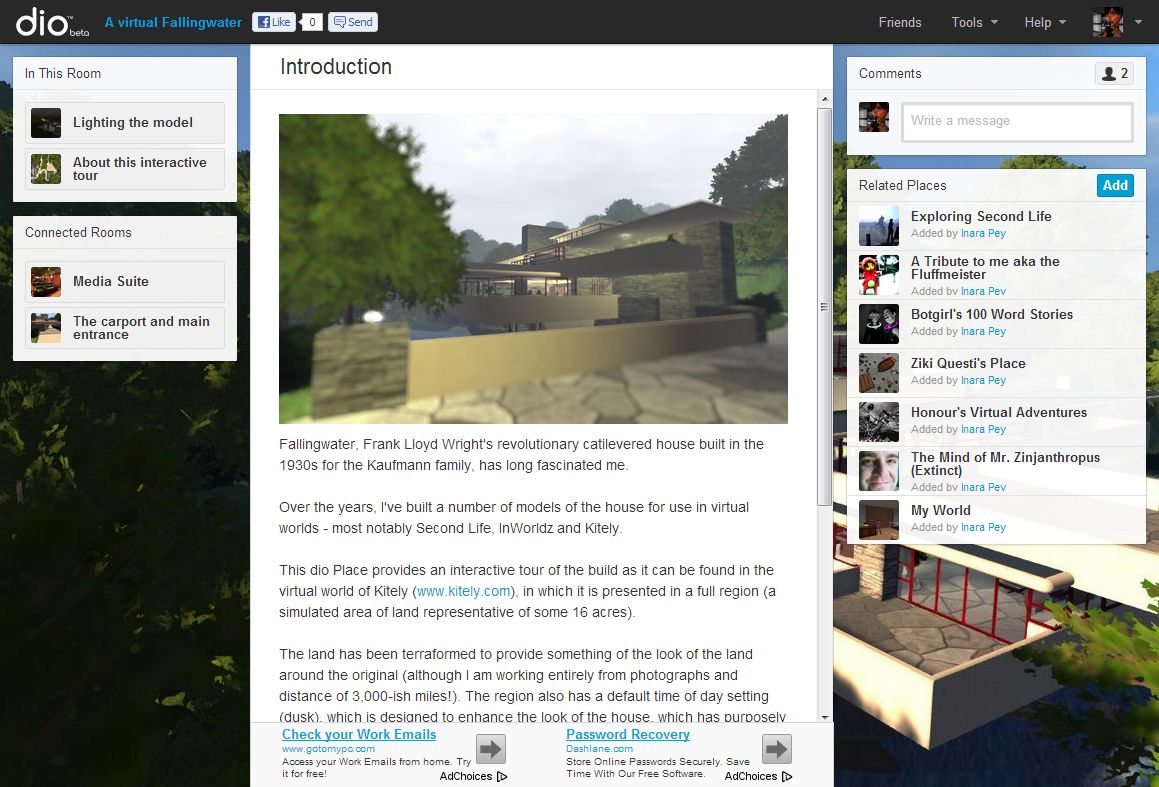
Since then, as time allows (and there hasn’t been a lot of it), I’ve been dabbling some more and building various bits. The first of these is an attempt to build an interactive tour. Unsurprisingly, the subject matter is Fallingwater, Frank Lloyd Wright’s seminal build, and particularly my efforts to emulate this remarkable house in the virtual world of Kitely.

The start of the tour: An introductory page isn't a requirement for a dio place, however, I've included one to give people some background on things.
The start of the tour: An introductory page isn’t a requirement for a dio place, however, I’ve included one to give people some background on things.

The tour is intended to let people understand something of the build – what it is, where it resides, etc., before allowing them to set off to explore it on their own, moving through the various dio “rooms” (which I’ve roughly aligned to rooms and parts of the Fallingwater build) where they can see images and find out more about both the real and virtual Fallingwater as interpreted by myself.

To add a little fun, I’ve added one (so far) inventory item, which must be collected in order for the house to be fully explored (I may add more at some point), and also added some other interaction  using the “Appear / Disappear” actions.

Adding a little interactivity

There is a degree of logic to be followed with the tour – the introduction and the “media suite” can only be accessed at the start. This is to encourage people to do a complete circuit of the place (in whatever direction they choose), but I’m also aware it might be a tad irritating to some. So I’ll be curious as to feedback – if any …

The tour can be found on the dio Community page, or for those signed-up to dio, you can jump to it from here.

The "Explore" object is a means by which I've hidden objects until such time as Explore is opened - a useful means of controlling information flow in complex rooms
The “Explore” object is a means by which I’ve hidden objects until such time as Explore is opened – a useful means of controlling information flow in complex rooms

Continue reading “More dabbling in dio and some thoughts”

Inside dio

dio-logoUpdate, February 19th, 2014: dio was discontinued by Linden Lab on February 19th, 2014. Links to the dio website, etc., have therefore been removed from this article.

On Tuesday 29th January, Linden Lab launched dio, the latest in their suite of new products. The Lab describes dio as a browser-based space in which:

You create places by adding text, photos, videos, and interactive objects into interconnected ‘rooms’ that give spatial context to the content you share. You can keep your places private, share them with friends and family, or allow everyone to explore and enjoy them. Live and persistent chat allows you to socialize with other users as you discover and explore dio places together and see what those who came before you had to say. In the future, dio users will be able to monetize the dio places they create, enabling them to profit from their own creativity.

Here’s a look inside dio written after spending a few hours paddling around and setting things up, tearing them down and generally poking around.

Signing-up

dio is currently free to join, and users have a choice of doing so using either a Facebook account or e-mail address. As I avoid Facebook in much the same way as a cat avoids the Atlantic Ocean, I used the e-mail option, giving my name, e-mail and a password. Seconds later an e-mail arrived from the dio website asking me to confirm my details with a click. I did – and there I was, sitting on the log-in page, my credentials filled-out and a single remaining click needed to see me into the site. Simples!

Browsing

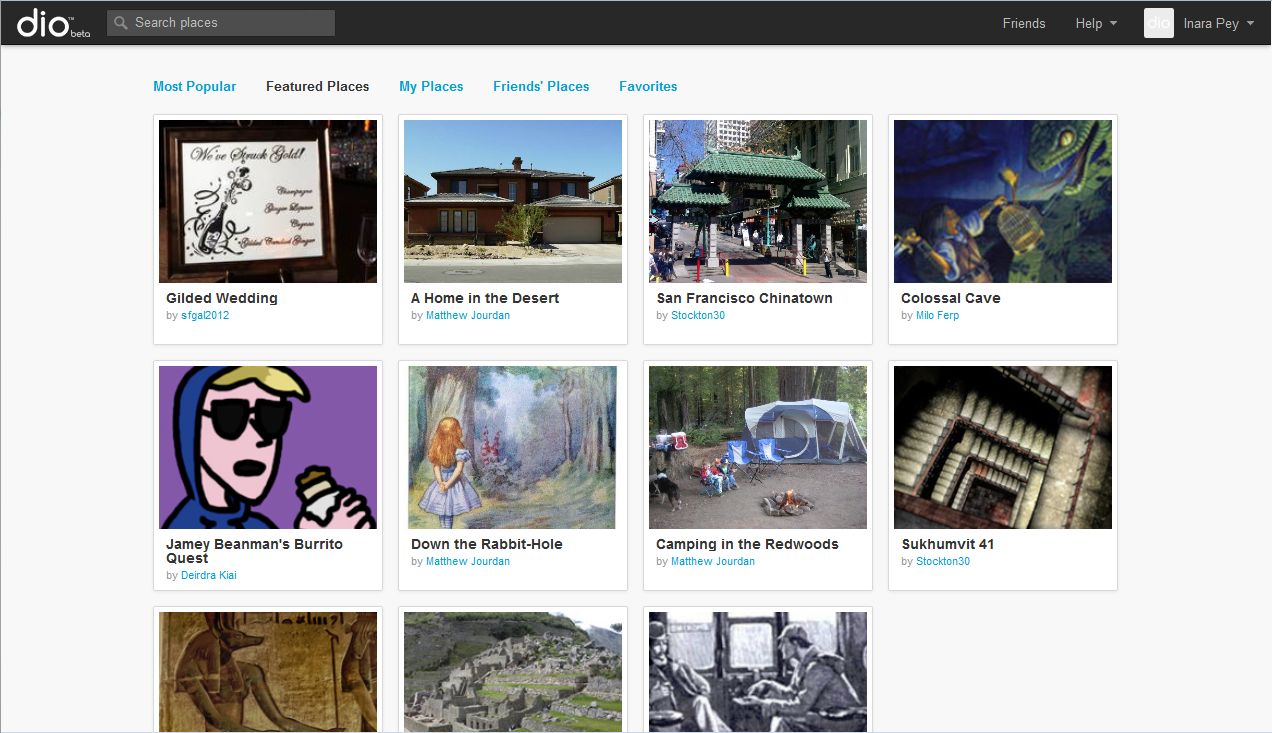
dio places
dio places

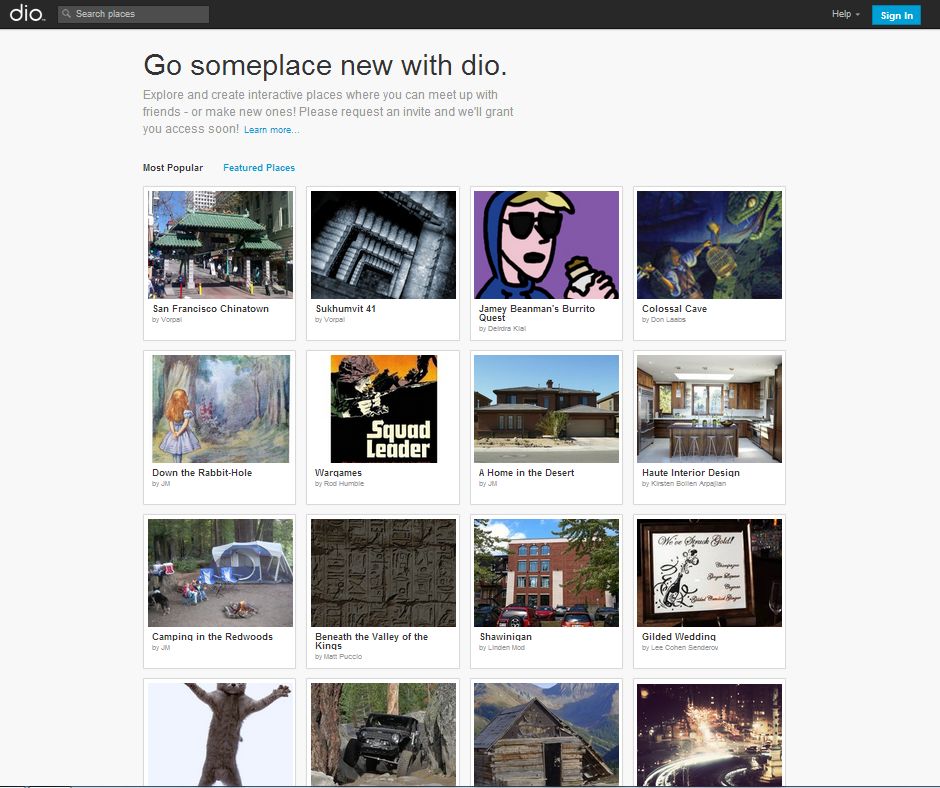
The homepage – or Community page, as LL call it – presents you with places people have already created. Some of these have obviously been created by closed beta testers, but there are already a number of places which appear to have been created by those who, like me, have just signed-up and are playing with things.

Places are listed in terms of Most Popular (most frequently visited) and Featured (criteria unclear). Additionally, users can create “albums” of their favourite places or those belonging to their friends, while also having an “album” of their places.

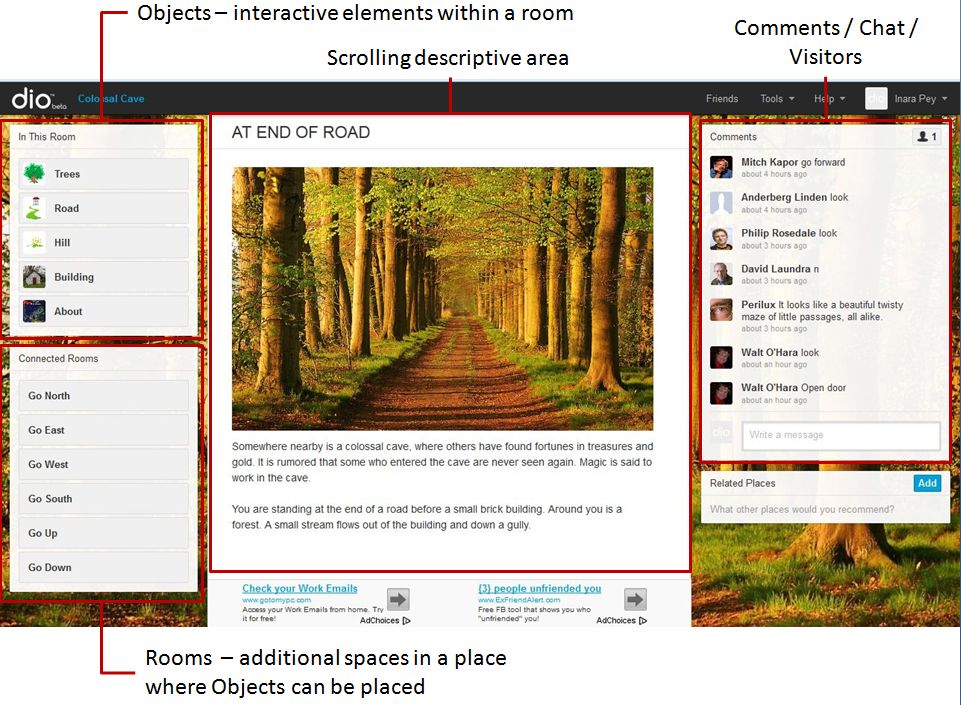
A place is accessed by clicking on it. If you’re logged-in to dio, a summary page for the place is displayed. If you’re not already logged-in, you’ll be prompted to do so or to create an account (if you are completely new to the site). Clicking ENTER from the summary page will take you into the place itself. This is effectively a web page comprising a number of elements.

A dio place screen elements
A dio place page elements
  • Objects (In This Room): this is a list of interactive objects contained in a room. Objects can currently be any combination of:
    • Photographs with descriptive text
    • Videos with descriptive text
    • Custom objects which can be coupled with a set of pre-defined actions to present a further element of interaction for visitors to a room. Custom objects can be examined, taken to inventory, drunk, eaten, used, locked, unlocked, opened, used to trigger other actions, and so on
  • Connected Rooms: a list of additional spaces within the current place visitors can move between, each containing objects of its own and/or leading to other rooms. As with objects, custom actions can also be defined for rooms (for example, a room can be “locked” and require a key object taken from another room in order to unlock it and enter)
  • Descriptive area: the main display area wherein images, videos and the results of a visitor’s interactions with objects in the room are displayed / reported here
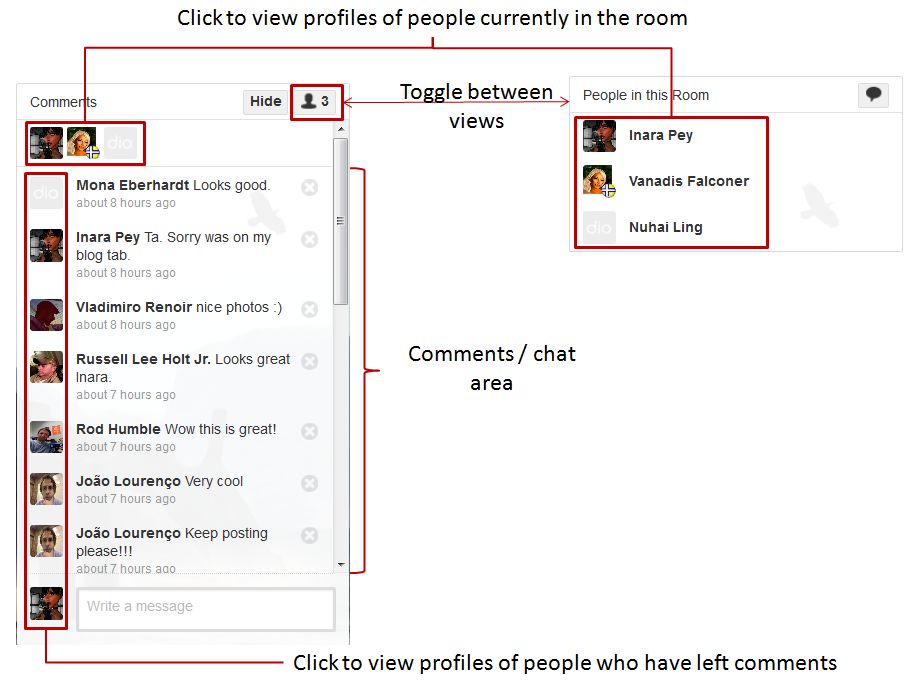
  • Comments / Chat / People: this is where the “persistent and live chat” sits – although currently it is more of a Twitter / Plurk-like comments stream than a means for engaging in conversation, and there is no instant / direct messaging capability. It also displays the people currently in the room at the, moment and can be used to access their profiles. When not required, the panel can be collapsed (HIDE). The image below provides further information on this panel.
The comments  / people panel
The comments / people panel

There are three further areas to a place page:

  • The Related Places panel, wherein links to similar Dio places can be added by anyone (although the creator of the place can remove links which are seen as inappropriate)
  • The Google Adservice area, which is discussed later in this piece
  • The inventory panel (which is not shown in images here). This is displayed beneath the Connected Rooms panel, but only if / when you have collected inventory items, which are themselves interactive objects found within a room.

Continue reading “Inside dio”

Dio beta launched – and it might be more than it seems

LL logoUpdate, February 19th, 2014: dio was discontinued by Linden Lab on February 19th, 2014. Links to the dio website, etc have therefore been removed from this article.

Linden Lab has officially launched dio, the latest in its new product line, in a beta release on Tuesday 29th January.

dio has been subject to much speculation since the original website was accidentally left accessible to enquiring noses back in May 2012. More recently, the site has been extensively updated, giving some clues as to what it is about.

The new Dio website homepage - launched on 29th January (click to enlarge)
The dio website homepage – launched on 29th January

The press release announcing the launch reads in part:

In dio, you create places by adding text, photos, videos, and interactive objects into interconnected ‘rooms’ that give spatial context to the content you share. You can keep your places private, share them with friends and family, or allow everyone to explore and enjoy them. Live and persistent chat allows you to socialize with other users as you discover and explore dio places together and see what those who came before you had to say. In the future, dio users will be able to monetize the dio places they create, enabling them to profit from their own creativity.

The Learn More link on the site provides more information on the site, and there is an introuctory vdieo to accompany the launch.

Within dio, users can create places – such as their own homes – or recreate events in their lives, such as their wedding, or make picture-based games, and so on, and then select how to share them. All of these aspects cane be combined, as dio Producer Bo Barfield explained in an interview with Forbes Magazine to mark the launch:

You can combine these game-like experiences in places where they traditionally wouldn’t be. As an example, a hotel that’s trying to find a new way to advertise and make money can recreate their hotel in dio, and then make a short and easy game that takes a few minutes. Say Clare Danes lost her beloved emerald earrings. Find it somewhere in the hotel, and you get a free bottle of champagne with your stay. It’s using gamification in a richer way. It’s not just about getting badges or achievements: It gets customers imagining themselves in your hotel or whatever it is you’re trying to market.

Questions as to how dio will be monetised, both for the Lab and for users, are also answered – to a point – within the  Forbes article, where Barfield states:

We want to implement revenue sharing with the content creators of dio to give people an incentive to create interesting spaces. We’re going to give them a cut of the advertising revenue that they bring.

We’ve seen that work exceptionally well in Second Life, where users can monetize their own creation…. If I create a dio place that’s very compelling and is getting lots of traffic, then I’ll be able to monetize that as a share with Linden Lab.

So it would appear to be that dio is perhaps the Lab’s most ambitious product to date, aiming at a very broad cross-section of users, from individuals through to businesses.

Interestingly, the dio Terms of Service still make reference to the use of Linden Dollars. Given the website is still beta, this may be down to the fact that the ToS is still boilerplated from the Second Life ToS – a point I’ve previously made. While I’m still somewhat drawn to this being the case, it is nevertheless interesting to speculate where and how Linden Dollars might be linked to dio, and what form any cross-pollination between dio and Second Life (were there to be any) might take.

Also accompanying the launch is a set of video tutorials on You Tube.

The response from Frobes’ contributor Carol Pinchefsky is broadly positive towards the platform. Those wishing to sign-up can do so (it’s free), either by using their Facebook account or using their e-mail address.

I’ll be looking at dio in-depth in an upcoming article.

Related Links

Blocksworld – LL’s latest acquistion

LL logoI actually missed this yesterday, despite tending to look-in on LL’s Press Room on a daily basis. I did so yesterday, but Pete Linden must have been waiting until I’d done so before slipping the announcement that LL have acquired Blocksworld in their latest move in the world of “shared creative spaces”

Blocksworld is created by Boldai AB, a team of three programmers who jokingly refer to themselves as being, “From the country that gave you Minecraft and the country next to the country that invented Lego”, and is described as, “A perfect mix of Lego and Minecraft.”

Currently available for the iPad – although the Bodai website suggests there are (or were) plans to port the game to other platforms – Blocksworld allows users to create 3D models of just about anything they can image from a set of defined shapes / tools such as cubes, wedges, rockets, wheels, motors These models – which can be cars, planes, animals, people, spaceships, etc., come alive with realistic physics simulation, and users can play, interact with, or even blow-up their creations.

Commenting on the acquisition, Linden Lab’s CEO, Rod Humble, said, “Blocksworld is a great fit with what we do at Linden Lab,” said Rod Humble, CEO of Linden Lab. “It’s a very user-friendly complement to our portfolio of shared creative spaces. We’re happy to have the Blocksworld team join Linden Lab and are looking forward to bringing Blocksworld to the App Store worldwide soon!”

As with Creatorverse, a key aspect of Blockeworld is the ability for users to share their creations with others to explore, play with, and modify / remix them to make them their own.

Blocksworld looks designed to appeal to the creatively minded of all ages, with an intuitive, easy-to use interface. To promote the product, the team behind it last year produced as couple of video trailers, one of which – the “Honest Trailer” is a slight tongue-in-cheek piece which promotes the product in an imaginative and fun way which perfectly encapsulates the product and fixes it firmly in one’s mind.

…Perhaps LL should let the Boldai team brainstorm how to promote SL?

Related Links

Versu: Regency England with murder, ghosts and romance

Update January 3rd, 2012: following posts on the Versu FAQ from myself and Ciaran Laval, the FAQ has been removed from the Versu website.  The Dio Help page still remains available for that product – at least for the present!
ALL logofter my brief look at the Versu and Dio websites on New Year’s Eve, I poked a little deeper into the Versu site, taking time to paw over the FAQ, which sheds a little more light on things than I’d initially realised.

As has already been indicated by Rod Humble, Versu is an interactive storytelling medium which relies on strong character interaction, with the plot and character behaviours driven by the actions and reactions of the player through their character.

The Versu website placeholder from Linden Research, December 2012

Versu will initially be browser-based only, although there are expectations at the Lab that a tablet version will be available in the future. Access will apparently be – initially, at least – via Facebook, with the FAQ stating that there is a “limited number” of development accounts available for those wishing to access the game without going via Facebook. The game is largely text-based, again has already been indicated, but will include images of the other non-player characters in the immediate vicinity of the player’s character.

Versu's stories will initially be set in Regency England (1811-1820)
Versu’s stories will initially be set in Regency England (1811-1820)

The initial story appears to be a murder mystery, and features a choice of principal characters – “Lucy” or “Miss Bates”. The FAQ indicates that two additional stories are in development, “A ghost story and a romance story in the same time period (Regency England [1811-1820]) are already partially drafted and will be presented at launch.” It goes on to say that, “In the future, we will also include episodes from other settings — anything from spy thrillers to comedy to noir detective stories. Anything that involves strong character interaction is a good fit for the Versu engine.”

Progress through the story is up to the player. For example, a player can select from a list of available scenes, then chose to interact or not. How they interact with the other non-player characters will shape how those characters react to the player in the future (so flinging a bread roll at Mr. Quinn may not endear you to him). If a player chooses not to interact, the story will still progress, making for interesting variations in gameplay – particularly on the “what if” department (“What if I’d left dinner before X, and gone to Y?”; “what if I’d selected A instead of B?” and so on).

Interestingly, some progress through the story is down to what amounts to random chance. To quote the FAQ again, “Whether a character spills something by accident, or selects one conversation gambit or another, might be the result of randomization.”

Progress through gameplay is also marked by the player’s character completing assigned tasks, which doubtless help guide the player through the story to one of several potential conclusions. Progress through tasks can be reviewed via an “Achievements” page.

Games will be entirely self-contained, such that while there are several potential ways to reach the denouement to a story, and the story itself has a number of different endings depending on choices made and actions taken, the cast list will remain the same for each. Thus, any characters previously “killed off” will be brought “back to life” at the start of the next game.

There are also some limitations with the game:

  • The initial release will be single-player only; multiplayer capabilities (such as playing together in different roles or working with other players to resolve a story) are planned for the future
  • There will be no option to save gameplay with the initial release.

Also, players will not initially be able to generate their own characters. However, the FAQ indicates that this is again planned for the future and will include the ability for players to, “Define your own character, complete with appearance and expressions, personal preferences and unique dialogue options”.

An interesting note with Versu is that the Terms of Service refers to user-generated content (section 4.4). This may simply be because the ToS has been largely boilerplated from Second Life, and thus may not be indicative of how the ToS will appear one it has been fully edited. However, the linked DMCA page is similarly “Versu’d”, so it does raise a question as to what user-generated content might be applicable, particularly if Versu is to fit under the Lab’s umbrella of “Makers of Shared Creative Spaces”.

Is section 4.4 of the ToS simply a reference to a player’s ability to generate their own character and character image, or is it something more?  Again, could the FAQ reference that, “Anything that involves strong character interaction is a good fit for the Versu engine”, mean that the engine might be opened to third-party developers for future stories?

The Facebook access is also interesting, as mirrors what appears to be Dio’s preferred access mechanism (at least initially). As such, it would seem that both Versu and Dio are an attempt by LL to tap-into the large, potentially ready-made Facebook audience. Currently, there is no real indication as to how either will be leveraged from the point of view of generating revenue, although a few thoughts have sprung to mind on that subject.

All told, the website give more information on Versu than I’d initially given it credit, as does the “Help” option on Dio provides a little more information there. Hopefully, and depending on access, I’ll have more information on both in the near future.