
Firestorm 6.6.3: performance improvements

On Friday, September 9th, 2022 (PDT), the Firestorm team released version 6.6.3 of their viewer – the first such release since indicating they would be stepping up the cadence of releases with more in the way of “maintenance” cycles in order to better keep place with updates and improvements coming out of Linden Lab with the core viewer code.

Whilst technically a maintenance release, version 6.6.3 is significant for Firestorm users as it includes the Lab’s Performance Improvements code, which for this user yielded noticeable performance improvements in terms of general FPS. In addition, there are a number of additional updates from both the Lab and the Firestorm team.

Table of Contents

As per usual, this article is a not a full blow-by-blow breakdown of absolutely everything in this release, but it does include notes on some of the more significant updates and fixes people are liable to find useful, and some general notes.

For a complete breakdown of changes, please see the official release notes for Firestorm 6.6.3.

Sidebar: some may have received a premature notification of this article, together with an invalid URL. My apologies for any confusion: I boobed – sorry!

Installation

  • There is no need to perform a clean install with this release if you do not wish to.
  • Do, however, make sure you back-up all your settings safely so you can restore them after installing 6.6.3.

Linden Lab Updates

Firestorm 6.6.3.67470 is fully merged up to the 6.6.2 Linden code-base, plus some cherry-picked fixes from upstream, per the notes below.

Maintenance2 Viewer Updates

Viewer version 6.6.2.573358, August 2022

  • Copy and Paste capabilities in the build tools.
  • World  Map Legend: can now be hidden / revealed by clicking on the arrows on  the right side Map border.
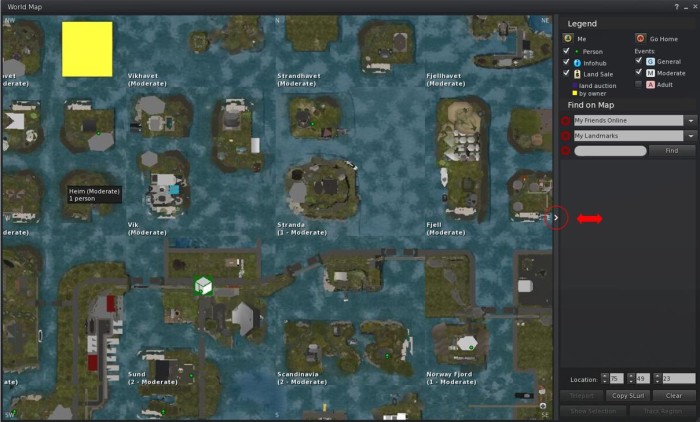
The World Map Legend can now be hidden / revealed by clicking on the arrows on the right-side border of the World Map
  • Create and ungroup folders:
    • Create:
      1. Select multiple items within an inventory folder using SHIFT and or CTRL-left click.
      2. Right click on any part of the selection and select Create Folder From Selected the menu.
      3. A pop-up is displayed, prompting you for a folder name. Enter a suitable name and click OK.
      4. The folder is created and the selected items moved into it.
    •  Ungroup:
      1. Right click an inventory sub-folder.
      2. Select → Ungroup folder items.
      3. The items in the selected sub-folder are moved to its parent folder, and the subfolder is deleted.
  • Show avatar attachment in Inventory: right-click a worn attachment or HUD and select on of the following:
    • Context menu: Show In Inventory
    • Pie menu: More → Show In Inventory.

Maintenance (M)akgeolli Viewer Updates

Viewer version 6.6.1.572458, June 2022.

  • Edit Shape menu previously included every attachment, slowing down preview thumbnails significantly. With this update, only rigged attachments are displayed, in addition to prior avatar preview thumbnails .
  • Assorted fixes and UI tweaks.
  • Improved mouse responsiveness in situations where previously it would over-react to inputs.

Performance Improvements

Viewer version 6.6.0.571939, May 2022.

  • This update should see reduced image decoding time, decreased frame stalls and decreased initial font rendering time, and the viewer should feel generally more responsive.
  • These changes include updates to Vsync (vertical synchronisation):
    • Vsync can now be toggled on / off via Preferences → Graphics → Hardware Settings.
    • When enabled, Vsync will synchronise (/cap) frame rates to your monitor screen refresh rate (e.g. if you have a 60 Hz screen, FPS will be capped at 60 fps) and should deliver smoother game-play.
  • The Performance Improvements viewer also includes the MeshOptimizer Project .
    • By default, this replaces obsolete GLOD’s mesh simplification in the mesh uploader with the newer and more powerful MeshOptimizer package to provide better level of detail (LOD) modelling during the upload process.
    • Note that as an option, Firestorm also retains the GLOD capability – see below for more.

Tracy integration Viewer Updates

Viewer version 6.4.23.563771, November 2021.

  • This update adds the Tracy Profiler to the viewer to help developers interested in or working on performance improvements. For developers/self-compilers:
    • Running autobuild configured with –tracy will enable the telemetry.
    • At any time while running the telemetry recording can be disabled/minimised by deactivating it using the Developer menu entry profiling/telemetry → Profiling .
  • It contains no other user-visible changes.

Firestorm Updates and Improvements

UI Updates and Improvements

Notecards – Font Style, Size and Colour

Firestorm 6.6.3 brings the following capabilities to Notecards:

  • Set the font style and size:
    • Style: one of San Serif, Monospace, Scripting or Cascadia Code.
    • Size: one of Monospace, Scripting, Cascadia Code, Small, Medium or Large.
    • These can be set via Preferences → User Interface → Font → Notecard Editor Font drop-downs.
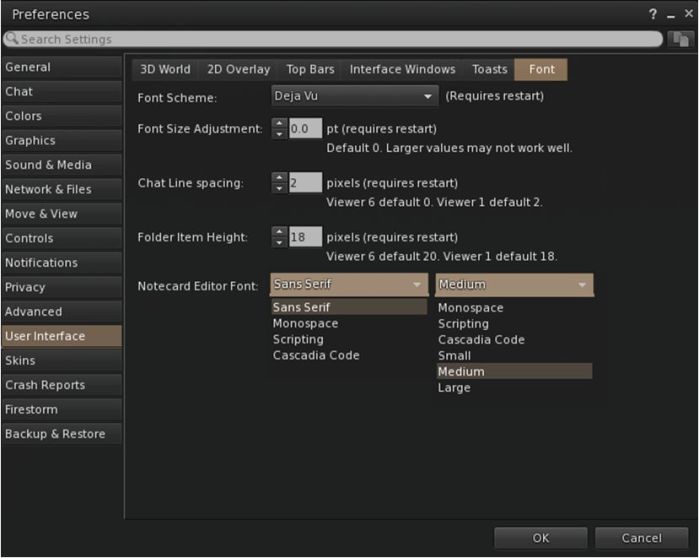
The new Notecard font options in Firestorm’s Preferences
  • Set the colour of: a notecard background, text, cursor and highlighted text.
    • Set via Preferences → Colors → Miscellaneous → Notecard Colors .

Note: these setting will only apply to notecards you view in Firestorm. Other users will see the notecards you send in whatever font / colours (if the latter can be set should the FS code be adopted by other TPVs) set within their viewer.

Other UI Updates
  • Inventory:
    • It is now possible to open Inventory folders in their own floaters. Right click an inventory folder → Show in new window.
    • The selection count is  now given when deleting multiple items from inventory (FIRE-31816).
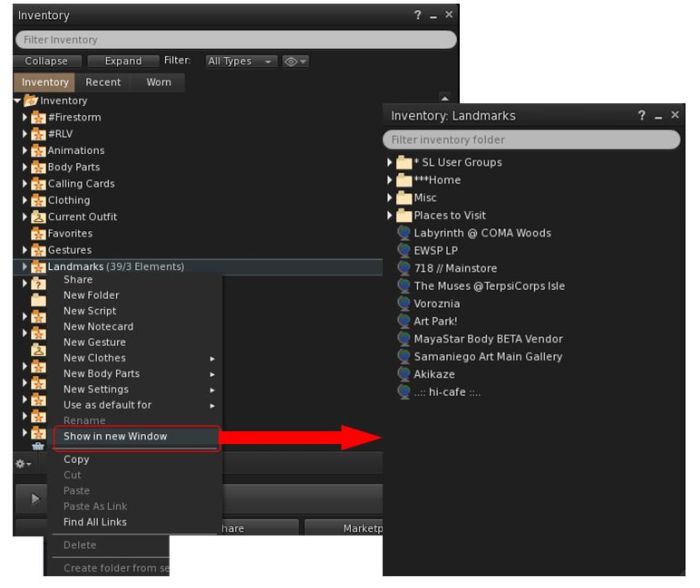
With Firestorm 6.6.3 you can open an inventory folder in its own floater
  • The Create Landmark floater (menu bar → World → Landmark this Place) will now open centred on the viewer window by default.
  • 360-degree snapshot floater should now open at last-used quality setting  in a session.
  • Region Details → Region should now:
    • Show the correct length of the region name text (no truncations).
    • Report the correct grid position for the region.

Avatar and Appearance

  • Avatar:
    • The avatar should now turn the full 180-degrees when editing appearance (FIRE-31959 / BUG-232502).
    • All mesh bodies/objects should now show in the shape editor previews (FIRE-31966 / BUG-232503).
    • Animesh attachments should no longer show in shape editor previews.
  • Appearance:
    • Attempted fix for mesh attachments sometimes vanishing after teleports which should either fix / reduce the number of cases where this may occur (FIRE-31906).
    • Update to the warning given when attaching rigged meshes to HUD.
      • The new message reads: “An attachment named ”[NAME]“ contains rigged mesh but is attached to the HUD point ”[HUD POINT]“,/a>
      • Attaching rigged meshes to HUD was never supposed to be supported, per BUG-232489.
      • Also see: FIRE-31955.

Building and Scripting Updates

GLOD Option In Mesh Uploader

As noted above, Linden Lab introduced Mesh Optimizer as a new way to generate improved level of detail (LOD) models for mesh uploads. However, this can lead to higher upload costs and can cause issues in maintaining UV layout. To help prevent issues Firestorm 6.6.3 retains GLOD alongside of Mesh Optimizer.

To this end the Firestorm mesh uploader presents the following options when specifying a model’s LOD:

  • Load from file: Manually upload .DAE files for models at any level of detail. This enables you to control how your model looks at each level of detail, preserving key visual features that the automated algorithms may otherwise distort. If the viewer could “auto-detect” lower LOD models when it first loaded the model, these will be shown in the corresponding LOD “slots” here.
  • Generate Auto: Generate a new model at the currently previewed level of detail based on the model you uploaded. This method currently defaults to using the sloppy method and tries to set a target number of triangles based upon the high LOD. This is the method applied when first selecting your model if no auto-detected LODs are found.
  • Generate Precise: Uses the newer method (Mesh Optimizer) to construct a LOD model. This is more accurate than the “sloppy” method but will result in a more detailed model. Target triangle settings and thresholds are very loosely adhered to.
  • Generate Sloppy: Uses the newer method (Mesh Optimizer) to construct a LOD model. The “sloppiness” relates to the accuracy of the result compared with the original. Target triangle settings and thresholds are very loosely adhered to .
  • Generate Reliable: Uses the older method (GLOD) to construct a LOD model. This method is what we have been used to in the past; it gives reliable results based upon the target settings.

For more information, please refer to: Mesh Upload – Level of Detail.

Other Building / Scripting Related Updates
  • The “remaining capacity” LI count has been returned to the Edit / Build floater.
  • Flip texture scale buttons should no longer “magically jump” when switching texture modes.
  • The animation preview window should now have a link to the correct wiki page (FIRE-31836).
  • Full bright rigged meshes should now correctly display as full bright.
  • Full bright transparent objects should no longer render as solid when using highlight transparent – CTRL-ALT-T (FIRE-31986).
  • 100% transparent objects on HUDs should now show when highlighting transparent – CTRL-ALT-T (FIRE-31917).
  • The Firestorm Bridge can now display object rez time with the Script info in extended info mode (enabled via Preferences → Firestorm → Build 2 → Enable extended script info details).

Other Updates of Note + Key Fixes

Third-Party Library + RLV Updates

  • FMOD Studio updated to version to 2.02.07.
  • Updated Collada with a C++17 compatible version.
  • Firestorm 6.6.3 is running Restrained Love API RLV v3.4.3 / RLVa v2.4.2.67470, and includes a fix for focus going unexpectedly to menu bar after calling llMapDestination with “@showworldmap=n” (FIRE-31920).

Linux Updates

  • 3p Library Updates:
    • Boost updated to boost-1.72-linux64-222121224.
    • Collada updated to colladadom-2.3.222130404-linux64-222130404.
    • Curl updated to curl-7.81.0.222121724-linux64-222121724.
    • Libxml updated to libxml2-2.9.4.222130358-linux64-222130358.
    • Meshoptimizer updated to meshoptimizer-0.16.222121104-linux64-222121104.
    • Minizip updated to minizip_ng-3.0.2.222121607-linux64-222121607.
  • New Simple DirectMedia Layer-2 (SDL2) support for Linux to future-proof Firestorm, providing better low-level access to audio, keyboard, mouse, joystick, and graphics hardware via OpenGL and Direct3D. See the SDL2 Documentation.
  • The Linux viewer now uses xdg-open ahead of x-www-browser, as requested in FIRE-31929.

OpenSim Updates

There are no OpenSim updates with Firestorm 6.6.3.

Key Fixes

  • FIRE-31852 – Modified hotkey gestures should no longer play from any window.
  • FIRE-31823 / FIRE-31648 – torn-off menus should now correctly update enabled/visible state
  • FIRE-31882, FIRE-31896 / BUG-232463 – The main menu bar should no longer become the focus when minimising docked floater or after changing graphics preset
  • FIRE-31913 – CTRL+Tab should now correctly switch to the active floater.
  • Crash fixes:
    • FIRE-31818 – Firestorm should not longer crash when inspecting a Linden tree.
    • FIRE-31942 – Firestorm should no longer crash when taking a 360 snapshot when “Improve graphics speed” is enabled – note that this may mean that slower machines timeout during a 360 snapshot, so a new debug setting FSUseCoRoFor360Capture – Use co-routine to extract 360 photos – has been added. By default, this is set to False to prevent crashing. Setting it to True may result in crashes.
    • FIRE-31473 – “Internal Error”/“Uncaught Exception”.
  • Again, please refer to the 6.6.3 release notes for the full list of fixes with this release.

Feedback

As noted towards the top of this article, Firestorm 6.6.3 is the first release of the viewer since the Firestorm team moved towards a faster release cadence, allowing the viewer to pretty much reached parity with the official viewer, which should ease matters of parity going forward, assuming a 6-8 week release cadence can be maintained – and hopefully, it will be.

Probably the most significant inclusion in this release is that of the Lab’s updated viewer code and thread handling, intended to improve general performance. As I noted at the time this code reached release status in the official viewer, this code gave me an average boost of around 20 fps compared to a version without the improvements; in comparing Firestorm 6.5.6 and 6.6.3, I noted a similar fps boost. This is also the first viewer I’ve ready played around with the updated Vsync functionality, and have found that it does offer a far smoother experience for me when flycamming.

Elsewise, I’ve not had a a lot of time to test this release, but have found it to be stable during my personal use, so those updating may want to keep an eye on the Firestorm in-world support groups and the Jira for info on any possible issues.

Related Links

Landscapes and Shadows in Second Life

Michiel Bechir Gallery, September 2022 – Vanessa Jane

Currently on display at the Michiel Bechir Gallery – itself sporting a new frontage, décor and outdoor events area – are three exhibitions by well-established Second Life photographers, which between them offer a set of contrasts that make for an interesting trio of displays.

On the ground level of the gallery, and bracketing the main foyer are exhibits by Vanessa Jane (VanessaJane66) and Raisa Reimse (RaisaReimse). Both are known and highly regarded for their SL landscape photography and capable hands with post-processing, and while both focus on landscape pieces within there respective halls, both have contrasting styles which also compliment one another.

Michiel Bechir Gallery, September 2022 – Vanessa Jane

Within her display, Vanessa Jane offers 15 pieces, many of which offer broad, almost panoramic views of settings within Second Life, re-touched to offer views that contain a degree of romance and / or offer present the richness of the location in a single frame.

Architecture also sits as a focus with several of these pieces, with Vanessa ably demonstrating her ability to bring the character of a building or structure to life, and to wrap a narrative around her images. Capped by three images which are largely black-and-white, this is and engaging selection of art.

Michiel Bechir Gallery, September 2022 – Raisa Reimse

By contrast and across the foyer, Raisa Reimse presents a selection of 14 pieces which carry with them a rich sense of painting in the style of the great landscape artists. In part, this sense is due to both the ratio of the images themselves and their framing – but which is mostly imbued through Raisa’s rich use of colour, which offers a depth to these pieces that is genuinely captivating.

These are pieces that also carry a sense of life and motion whilst also demonstrating that Raisa understands the effective use of depth of field and angle to present a unique image / story. In these latter points I’d particularly point to Dream of Fall, with its suggestion of capturing a diorama, and In Flight, which so richly conveys the motion of the Debonair aircraft and the solitary joy that can be found in flying.

Michiel Bechir Gallery, September 2022 – Raisa Reimse

Within the upper level hall, Scylla Rhiadra brings a selection of her evocative images together under the theme of Shadow.

The use of light and dark and how they play across surfaces and figures has long been a feature of Scylla’s work; more than a feature, really, and they tend to be central to her work and how she presents themes and ideas. This is a point she acknowledges for herself in the poetic introduction to this display:

No mystery compelling as that obscured by dark.
No beauty so heart-rending as that which lies bathed in shade.
No nakedness is more exposed than that which is clothed in garments of night.
No demons so seductive as those concealed by gloom. 
Shadow is the shape of our desire.
Michiel Bechir Gallery, September 2022 – Scylla Rhiadra

Another aspect of Scylla’s work is that of subtext; it is perhaps as important to her compositions as the contrast between light and shadow. This subtext, so often suggested through subtle placement of props as much by pose or focus or angle, gives each piece Scylla produces its fullest depth of expression and narrative. Within this series of images, this is perhaps most clearly seen within Sale, but it is also waiting to be found in each piece by those who take the time to look.

Three richly engaging artists in their own right, in being brought together by Michel within the one gallery, Scylla, Raisa and Vanessa here present a compelling trio of exhibits.

Michiel Bechir Gallery, September 2022 – Scylla Rhiadra

SLurl Details

September 2022 Web User Group summary: NUX, Premium, and MP

The Web User Group meeting venue, Denby

The following notes cover the key points from the Web User Group (WUG) meeting, held on Wednesday, September 7th, 2022.

These meetings are generally held in-world on the first Wednesday of the month, with dates and venue details available via the SL public calendar. They are usually chaired by Reed Linden, who is the Lab’s Product Manager for the Second Life front-end web properties (Marketplace, secondlife.com, the sign-up pages, the Lab’s corporate pages, etc.).

A video of the meeting, courtesy of Pantera, can be found embedded at the end of this article (my thanks to her as always!), and subject timestamps to the relevant points in the video are provided. Again, the following is a summary of key topics / discussions, not a full transcript of everything mentioned.

Updates for the Last Month

[Video: 2:47-10:20]

Land Ownership “Journey”

  • A complete re-write of every route by which users can obtain and hold land, from Premium (+Plus) Linden Homes, obtaining Mainland (incl. Abandoned Land), and private island regions, and renting from private estates.
    • This involves not only a re-write of existing land-related web pages (again, as examples, the Premium Linden Homes selection page, the Mainland auction page, the region purchase pages (which date from 2005!), etc.), and the development of completely new pages related to land “ownership”.
    • The work is being carried out using technology that is “new to Linden Lab”.
    • Initially, this work will not involve any changes to Land tools within the viewer UI. However as the project progresses, it will see changes being made to the viewer’s land management tools, etc., as well.
  • The first element of the land work to be user-facing will be the new Land Portal, which is expected to be made available in the next few weeks.
    • This will provide access to land.secondlife.com and offer a “preview” of what form the new “land journey” will take.
  • [Video: 15:36-17:15] Following the work on the Land Portal, the focus will likely either be on updating the Linden Homes pages OR the price region purchase pages.
    • Once the Portal is up and running, the Lab will be monitoring where people go on accessing it, which may influence the order in which the land-related web properties are updated.

Secondlife.com Beyond Land

  • The “land journey” work is the first phase in a larger project to completely update all of the secondlife.com web pages and portals, and which will also eventually encompass Marketplace as well.
  • Some of the thematic elements of this work can already be seen in places such as join.secondlife.com.
  • The overall aim of this work is to offer a modern look and feel to the Second Life web presence which is both easier to maintain / update and allows for new capabilities / functionality to be more easily added.

Marketplace Search

  • This work is to leverage all of the recent work put into “regular” such (e.g. the relevance engine, etc.) for Marketplace Search.
    • The current focus is on importing all the infrastructure work carried out for Search into the Marketplace search capability, including the framework for the relevance engine.
    • However, rather than using the current relevance engine, a version specific to Marketplace searches will be built for better optimisation.
    • The updated Search will likely include additional search options.
  • The overhaul of the search tools is seen as a further step that will better enable the use of Styles (i.e. single listings with multiple variances (e.g. colours) of the same product), although the first element of this work is liable to be the “next” significant release for the MP.
  • All of this work is being seen as a lead-in to the potential complete ground-up build and phased implementation of a completely new Marketplace, with 2023 being designated “the year of Marketplace”.

New User Experience

[Video 18:04-24:00]

  • The New User eXperience (NUX) has been identified by the lab’s Executive Team as a major area of focus for the at least next 12 months.
  • Some of the Lab’s work in this are has been previewed in terms of the upcoming “all mesh” New Starter Avatars (see here and here), but LL recognises more work needs to be done within the NUX as a while.
  • Questions asked at the meeting (from a Web Team perspective)  were:
    • Are there “silver bullets” existing users think might improve the overall NUX from sign-up to engagement?
    •  Is there something that could be implemented that would immediately change the NUX to improve retention?
    • What specifically could be done on the web side of things to present a more engaging NUX to incoming users?
    • Have people specific feedback from recent new users (e.g. those whom they may have asked to come try out SL) which might feed into thinking about improving the NUX (e.g. worries users have expressed in having to download and install the viewer as an “unknown” piece of software, issues of people being pressured into believing they are using the “wrong” viewer in favour of another, etc?
  • This is liable to be a major topic of conversation at the next WUG, so those with constructive ideas, particularly (but not exclusively) on the web side of NUX, are invited to attend.

Premium Subscriptions – Looking Beyond Premium Plus

[Video: 24:09-26:30]

  • Premium Plus take-up is still viewed as being “very successful” to the point the Lab is now considering ideas for other possible Premium subscription options, which may include things like:
    • “Premium Lite” – which might offer some of the options available in Premium, but not all of them, and at a lower price.
    • “Premium a-la Carte” – which might offer users the ability to pick and chose at least some of the options available to the current Premium / Plus offerings, each with its own fee, and thus pay a subscription based on the options selected.
  • No timeline on if / when any new subscription options might arise, what they might comprise or the pricing involved, as this is only in the “discussion” phase within the Lab, but feedback is being taken through the WUG meetings.

In Brief

  • Multi-factor authentication: moving beyond just the use of a third-party authentication tool (Google Authenticator / Microsoft Authenticator) to offer additional means to complete the MFA process is unlikely to come before 2023.
  • A further request was made to de-couple Homestead “ownership” from having to hold at least one Full region. While not entirely ruled out for future consideration, there are some very practical considerations around this idea that need to be considered:
    • One of these is the heavy use of Homesteads by private estates and the potential of severely damaging the market if Homesteads were to be de-coupled from Full region holding at the same price.
    • Another is the question of whether, if offered at a higher tier than when coupled to Full region holdings ($109 a month), what that tier would be in order to avoid too severe a disruption to the current land market.
  • Lower mesh upload fees for Premium Plus: this has been indicated as a future Premium Plus benefit. However, it is proving difficult to implement because unlike the other fees for uploads, etc., mesh does not have a “one fee fits all” structure – the cost varies in accordance with things like model complexity, LODs, etc., and injecting a fee reduction based on a percentage calculation into the process is proving to be a more complex task than imagined.
  • Eliminating store names appearing in Marketplace searches using item names: this is a fix currently being worked on as a part of weighting changes to search (e.g. store names and user names will not carry as much weight as item names).
    • Conversely, when searching for store names, these should have a higher weighting as the initial MP search updates are deployed.
  • SL Wiki: it was restated that, outside of various “official” pages, the SL wiki is no longer “officially” supported or subject to updated for a number of reasons.
  • Feature requests:
    • BUG-232355 “Group Name Change” given the desire to reduce the proliferation of Groups in SL and the load they can place on various back-end services, this has been a long-running request, now accepted by the Lab.
    • BUG230941 “Add a store blocklist to the Marketplace” – will possibly be amongst the “Soon ™” Marketplace updates.
    • BUG-231257 “Incorporate 360 Snapshots in to the Destination Guide” – is viewed as a more nuanced request requiring interaction across different services which may make implementation difficult, but the request has not been ruled out.

Next Meeting

  • Wednesday, October 5th, 2022. Venue and time per top of this summary.

A visit to Fellowship Falls in Second Life

Fellowship Falls, September 2022 – click any image for full size

I think I’ve sort-of hinted at the fact that I’m something of a Tolkien fan once or twice (at least!) in this blog, and with Lord of the Rings: The Rings of Power now showing on Amazon Prime as a charting of the Second Age of Middle Earth, I thought I’d bounce my way over to Fellowship Falls, a Full region utilising the private region land capacity bonus to present a setting that offers an engaging mix of elements from Tolkien’s novels with some hidden extras.

Designed by Celerdir (Chappers101), the region is described thus within its About Land description:

An Elven & Tolkien-inspired sim where all free folk are welcome. Rez a horse to ride through the forest and over hills and make your way to Rivendell. Also explore The Labyrinth of Light…an underground maze of lights that leads to the Fantasy Forest.
Fellowship Falls, September 2022

The landing point sits tucked right into the south-west corner of the region, where information on the design can be found – and it is worth a read. Not only is Celerdir still relatively new to Second Life, having been active for less than 18 months at the time of writing, Fellowship Falls is also his first region build; and it is more than a creditable design, being very well put together for both Second Life explorers and photographers, regardless of any specific knowledge or interest in matters Tolkien.

From the landing point, the region is set out in a manner to encourage exploration either on foot or horseback. Trails run from the landing point into the setting at large, while those pressed for time might make use of the stone teleport discs to hop to the major locations – although I’d recommend against this, as it risks missing  a lot of the region’s beauty.

Fellowship Falls, September 2022

The north side of the region is given over to Rivendell (aka Imladris aka the Last Homely House, the seat of Elrond half-elven during the Third Age). Whilst surrounded by off-region mountains, it sits atop a rocky table of land separated from the rest of the region by a deep valley.

This might give some Tolkien purists cause to frown, given Tolkien states Rivendell sits within a hidden valley – but this is a region inspired by Tolkien, not representative necessarily of his world as encountered in book and film. As it is Rivendell has a suitably elven feel to it, with a richness of character strongly suggestive of an elven enclave.

Fellowship Falls, September 2022

The trail climbing up through the hills to reach Rivendell passes over a couple of bridges, one of which sits below a hilltop marked by ruins which look to have been built by the hands of men rather than elves. A broad stone causeway, this bridge is guarded at one end by the presence of the Argonath, the Pillars of the Kings. Again, for Tolkien purists, this might seem anachronistic, but here the scaled-down figures of Isildur and Anárion (I’m sticking with the books here, rather than the films) work.

The reason for Rivendell being set so high is provided in the region’s description – the Labyrinth of Night. I’ll leave to you to find the entrance, but will suggest you should take time exploring the tunnels of the labyrinth, as there is more than the forest awaiting discovery, including a further Tolkien echo, this one from The Hobbit, this one a reminder of what lay deep in the halls of Erebor and gave rise to Thorin Oakenshield’s Quest.

Fellowship Falls, September 2022

This is where my one small quibble with the setting lay – not in what is presented, but in the fact that the tunnels of the labyrinth are best experienced with the viewer set to Midnight – but given the layout of this part of the region, it could have been parcelled and set so that the tunnels have their own low-level EEP, making them a little more immersive. But this is a very, very minor quibble.

It is clear that throughout the region considerable love and consideration have been poured into is creation, with many small touches awaiting discovery; there are also many places offering visitors a chance to sit and pass the time. Finished with a local sound scape (one that can be a little interrupted by the surprise in the labyrinth!) and sitting beneath a rich sky (not seen in the images here), Fellowship Falls offers a richness of exploration and photography waiting to be appreciated – so be sure to visit soon!

Fellowship Falls, September 2022

SLurl Details

2022 SUG meetings week #36 summary

Rain-Washed Soul, July 2022 – blog post

The following notes were taken from the Tuesday, September 6th, 2022 Simulator User Group (SUG) meeting. They form a summary of the items discussed and is not intended to be a full transcript. A video of the entire meeting is embedded at the end of the article for those wishing to review the meeting in full – my thanks to Pantera for recording it.

Server Deployments

For the most up-to-date information, please refer to the deployment forum thread.

  • On Tuesday, September 6th, the simhosts on the Main SLS channel were re-started without any deployment, leaving them on simulator version 574550.
  • On Wednesday, September 7th, all simhosts on the RC channels will likewise be restarted without any deployment, leaving them on simulator release 574611.

Available Official Viewers

On Tuesday, September 6th, the Maintenance P (Preferences, Position and Paste) RC viewer updated to version 6.6.4.574750.

The rest of the current official viewers remain as:

  • Release viewer: version 6.6.3.574158 – formerly the Profiles RC viewer, dated August 18, promoted August 30 – NEW.
  • Release channel cohorts (please see my notes on manually installing RC viewer versions if you wish to install any release candidate(s) yourself).
    • Izarra Maintenance RC, version 6.6.4.574724, September 1.
    • Maintenance 3 RC viewer, version 6.6.4.574727, September 1.
  • Project viewers:
    • Puppetry project viewer, version 6.6.3.574545,  issued on August 30.
    • Love Me Render (LMR) 6 graphics improvements project viewer 6.6.2.573263, July 21.
    • Performance Floater project viewer, version 6.5.4.571296, May 10.

Puppetry

  • The first of the twice-monthly Puppetry meetings will be taking place this Thursday, September 8th, at 13:00 SLT.
  • The meeting will take place at the Puppetry theatre in the Aditi  region of Castelet.
  • The focus of of initial meetings will be on development of the capability, rather than content creation.

Please refer to the video for further discussion on the capability.

In  Brief

  • A general discussion on child avatars and TPV radar system reporting the names of agents (avatars) in a region recently departed.


The artist known as Prins in Second Life

NovaOwl Gallery: Prins

Hailing from Denmark, Prins (Skylog) has been active in Second Life for more than a decade; however, he has only recently gained an interest in Second Life photography (starting in December 2021) – and in a relatively short space of time, he has established himself as a highly visual artist and something of an experimentalist. Proof of this can be found in a somewhat immersive exhibition of his work which runs through until the end of October 2022 at the ground-level exhibition space of NovaOwl Gallery in Second Life

Entitled simply Prins, this is a genuine tour de force of the artist’s work; one that literally takes over the exhibition space in what can only be described as a riot of colour.  Large-scale reproductions of his work cover walls, floors and ceilings alike, forming a backdrop to more “traditional” framed pieces. The result is a hall literally alive with art, several pieces of which are animated and all of which – be they on the floor, walls, windows or ceilings – appear to be for sale.

NovaOwl Gallery: Prins

On entering the gallery space, one is greeted by Prins himself (as a large self-portrait on the floor) whilst facing a clever view of the gallery’s centre room windows, which Prins has effectively turned into a  triptych of paired “glass” images (if I might be allowed to mangle ideas like “triptych” and “pair” like this).These are bordered to the left and right respectively by a marvellously evocative image of a sea monster entitled Nessie and a mural depicting a woman in clown-like garb and in various poses, entitled Ladies in Red.

This is the start of a three-room adventure into colour and presentation, where there is literally not a single corner without something to attract the eye. From landscapes through avatar studies to expressions of other people’s art, Prins has an ability to both capture his subjects – and our attention – in a multitude of engaging ways that speak to a natural eye for angle and focus. He is also an artist unafraid to both offer a restrained hand with post-processing and also experiment freely with layering, colour, depth and finish to present pieces that might be said to border on abstract expressionism, further captivating and holding one’s attention.

NovaOwl Gallery: Prins

Such is the immersive nature of the exhibition, it can be a little overwhelming when entering the gallery (I’d advise reducing draw distance if you’re on a lower-end system and tend to use a DD of 100m+ just to ease texture loading), it can take one or two moments to adjust to the all-inclusive use of space.

However, the very fact that every surface has been utilised, coupled with the richness of colour throughout the majority of the space, balanced here and there with the considered use of darker or more muted tones, given a sense of life to the entire exhibition, the sheer vibrancy evident in some of the pieces giving the impression they are shouting their stories in joy.

NovaOwl Gallery: Prins

As is usually the case with NovaOwl, the exhibition had a “soft” opening on September 3rd. However, there will be a more musical gathering to celebrate Prin’s work on September 11th, 2022, starting at 12:00 noon SLT, with an open invitation for anyone interested in Prins’ work and art in general in SL to attend.

SLurl Details