Getting prehistoric in Second Life

Prehistorica: Dawn of Time - apatosaurus
Prehistorica: The Dawn Kingdom – apatosaurus

Dinosaurs are a fascinating subject. Kids love them, Hollywood can’t get enough of them and BBC even took us walking with them in what was a truly ground-breaking television series in 1999.  They can also be celebrated in Second Life in a variety of ways, including through what must be one of the longer running dino adventures in-world, Prehistorica: the Dawn Kingdom, Here visitors can drop-in on the Jurassic and Cretaceous periods of pre-history, and as I last visited far (ish) back February 2014, I decided a return visit was long overdue.

Covering three regions (although parts of them are not apparently open to public roaming), Prehistorica offers the opportunity for people to explore ancient lands and witness the thunder lizards as they once more roam those environments – and, through the sky-borne store area – become a prehistoric beast of their own choosing, if they so wish.

Prehistorica: The Dawn kingdom - pteranodon (aka: "polly wants a cracker. NOW!")
Prehistorica: The Dawn Kingdom – pteranodon (aka: “Polly wants a cracker. NOW!”)

It is at the store area that visitors’ journeys begin. On arrival, you’ll be given a set of region rules – which should be read carefully. From here, you can wander the store and view the offerings or grab a freebie “time travel” outfit or mesh dinosaur and proceed to the Time Machine.

This is an Experience-driven event (for the teleport portals), and once accepted, you’ll be transferred (with a bit of a sideways kick!) to the main portal hall. This offers six destinations – Jurassic Jungle, Prehistoric Plains, Cretaceous Canyon all being above ground, and Abyss Caves, Fossil Reef and Kelp Gardens under water. I’m not sure if it was just the time when I visited, but I admit to finding the three overground destinations more engaging.

Prehistorica: The Dawn Kingdom - spinosaurus
Prehistorica: The Dawn Kingdom – spinosaurus

It is in these that you can find various denizens of the periods such as the apatosaurus, stegosaurus and triceratops representing the herbivores  and the allosaurus, tyrannosaurus rex, its “cousin” giganotosaurus and the spinosaurus representing the carnivores.  These are all wearable dinosaurs made of mesh (and can be purchased in the sky store), brought to life via interactive bots – they’ll respond to your presence – which where they pose, move … and periodically, poop. For those who don’t fancy walking, there are also dinosaurs which can be ridden / flown – just look for the arrows over them. I did try one, a gallimimus, but found I couldn’t dismount after, and had to log in order to do so.

The models themselves are beautifully detailed, and pretty much “life-sized” when compared to human avatars. Each shows off its own range of skin colours and designs  –  some of which make the dino look like it’s either wearing war paint or has been the focus of a group of street artists (prior to them becoming lunch / a light snack in the case of the carnivores?). Each of them makes for excellent an photography subject, either alone or in human company, and for those looking for somewhere different for their photo shoots,  Prehistorica could be an interesting choice – rezzing of standalone props is permitted (5 minute auto-return).

Prehistorica: The Dawn Kingdom: triceratops
Prehistorica: The Dawn Kingdom – triceratops

Role-play isn’t the primary aim of the regions, although those wishing to RP are free to do so, again within the bounds of the rules set out in the region note card. The landscapes appear suited to the times they are designed to represent, and encountering the dinos can be a fun experience. I’m just a little disappointed that there was no sign of the famous short-sighted theropod, doyouthinkhesaurus!

SLurl Details

Second Life viewer: Starlight UI skins and options

Hitomi Tiponi's Starlight set provides a total of 10 different skinning options for the official viewer, together with a range of additional UI tweaks and options
Hitomi Tiponi’s Starlight set provides a total of 10 different skinning options for the official viewer, together with a range of additional UI tweaks and options (Starlight Silver Blue skin shown on viewer 4.0.6.315555) – Click any image for full size, if required

Reader Wolf Baginski posted a comment on the subject of alternative skins for the official LL viewer, prompting me to think about Starlight. This is a set of alternative UI skins and additional options available for the official viewer (and for some TPVs, although they are outside the scope of this article), which I last wrote about in these pages page back in 2010/11 when I was using it with viewer 2.x.

So, given I haven’t written about Starlight for a good while, and given there may be users of the official viewer who haven’t previously come across it, I thought it might be a good idea to take a look at Starlight as it is today, and offer something of an introduction for those unfamiliar with it.

Overview

Produced and maintained by Hitomi Tiponi, Starlight has been available for the English language version of the viewer for a good few years, as noted above. Today, it includes no fewer than 10 alternative UI skins and a range of other UI updates and tweaks which may appeal to users. The ten skins comprise:

  • Original Orange: a dark theme with a touch of orange
  • Nostalgia Blue: features buttons and some layout changes to remind you of Viewer 1.x
  • Silver Blue: a ‘dark on light’ theme using a cool blue
  • Silver Pink: as above, but with a hint of pink
  • Mono Teal:  a high-definition black on grey / white & teal green buttons
  • Orb Red: designed to make the interface seem less one-dimensional
  • Orb Blue: as above, but a deep shade of blue
  • Original Teal: The Lab’s original viewer 2.x colour scheme with slightly improved contrast
  • Two customisable skins which can be modified via the  StarLight Colourful User Interface (CUI):
    • Custom Dark: for using with a backdrop of a black, navy blue, dark red etc.
    • Custom Light: for a brighter, vibrant look, ideal for integrating black text with a lighter theme.

The additional UI items offered within Starlight include, but are not limited to:

  • Top bar Draw Distance slider (between 32 and 992 metres)
  • Revised Preferences panels
  • Additional Toolbar buttons
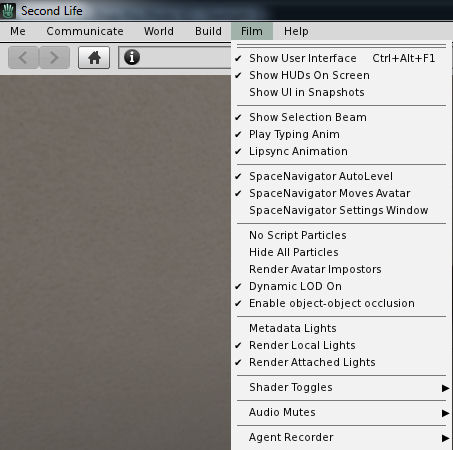
  • Film menu, for photography and machinima fans
  • Inclusion of a “lite” version of PhotoTools
  • Comprehensive Shadows, Rendering, Depth of Field and Local Lights settings in Preferences > Graphics
  • Assorted UI layout improvements / updates.

For a full list of such options and updates, please refer to the Starlight wiki page.

Starlight-7_001
Starlight also offers a range of UI options, including updated floater layouts, new floaters, additional toolbar buttons, easy access Draw Distance slider and more. Click for full size, if required

Installing Starlight

Note that while available for the official viewer, Starlight is a third-party product, and isn’t supported by Linden Lab.

  1. Log out of Second Life.
  2. Go to the Downloads section of the Starlight wiki page.
  3. Read the notes on downloading the correct version.
  4. If you download the .ZIP file (suitable for Windows, OS X and Linux) following the manual installation instructions on the wiki page.
  5. If you download the Windows Easy Installer:
    • Launch the installer and follow the on-screen instructions
    • Make sure you install Starlight to the installation location of the viewer with which it is to be used
    • If you use different RC and project viewers, and wish to have Starlight available for all of them, you must install it for each one.

Note that if a new version of the viewer is subsequently installed to the same location used with Starlight, the Starlight files will be removed as a part of the installation process. You’ll therefore need to re-install the latest version of Starlight in order to keep using it. However, as the Second Life settings files are not removed during viewer updates / installations (they are only removed if you manually carry out a completely clean installation), the viewer should revert to the last active Starlight skin once you have re-installed your Starlight files.

For photographers and machinima makers, Starlight adds the Film menu to the viewer's menu options (Starlight Mono Teal skin shown)
For photographers and machinima makers, Starlight adds the Film menu to the viewer’s menu options (Starlight Mono Teal skin shown)

Running Starlight

  1. Launch the viewer.
  2. Select a Starlight skin from the drop-down displayed below the log-in button.
  3. Re-start the viewer and log-in.

Repeat these steps should you wish to change skins.

Selecting a new Starlight Skin

Additional Notes

Well documented and supported, Hitomi generally has an updated version within hours of any new official viewer de facto release, offering a good cross-section of UI skins and some excellent UI additions, Starlight remains the add-on for the official viewer.

As per Wolf Baginski’s suggestion, I’ll be adding links to Starlight wiki page to my Current Viewers Release List and my weekly viewer release summaries going forward, to help people more easily find it.

Firestorm 4.7.9.50527: “I see jelly people!”

firestorm-logoMonday, August 8th saw Firestorm release version 4.7.9.50527 of their viewer. Coming a little over four months since the last release, 4.7.9 brings with it a lot of important changes from the Lab – perhaps most visible Avatar Complexity and graphics pre-sets – as well as a large number of nips, tucks, fixes and improvements from the Firestorm team and open source / TPV contributors.

As per my usual MO, what follows is  not an in-depth review of the release, but rather an overview, highlighting some of the more significant / interesting changes, updates and  fixes, which I feel will be of most interest to users.

For full details of all changes, and all due credits to contributors, etc., please refer to the official release notes.

When installing this release, uninstall the existing version and then install the new 4.7.9 release – no need for a clean install.

Available Downloads

Prior to getting stuck into the details, please note that with this release:

  • There is no 32-bit Havok version for OS X, due to incompatibilities with the RLVa update
  • Firestorm have discontinued producing a 32-bit Havok version of the viewer for Linux, due to the relatively low demand for it.

Firestorm is and will continue to be available as a 64-bit non-Havok (“OpenSim”) version for OS X and in both 32-bit and 64-bit non-Havok (“OpenSim”) versions for Linux. These versions can obviously be used with Second Life, and are available for the 4.7.9.50527 release.

This means it is unlikely there will be any Firestorm Havok support for either Max OS X or linux until Linden Lab release the 64-bit versions of the Havok library alongside their own upcoming 64-bit viewers. In the meantime, the Firestorm team offer their apologies for any inconvenience caused, and ask that those on either OS X or Linux who require Havok functionality (e.g. for mesh uploads reliant on Havok physics or for pathfinding purposes) to briefly switch to the LL viewer.

Log-in Credentials Display Update

The first noticeable aspect in this release is the log-in credentials area at the bottom of the splash / log-in screen have been revised, offering a slightly more Viewer 4 style look and bringing all the options together alongside of a single, obvious log-in button.

The revised log-in credentials area of the splash / log-in screen

Note that if you prefer the old login screen layout, you can set the debug setting FSUseLegacyLoginPanel to TRUE.

Another change with this update is that opening Preferences from the log-in screen should no longer cause splash screen layout problems, thus fixing FIRE-17518.

Lab Derived Updates

Firestorm 4.7.9 brings the viewer up to parity with the Lab’s 4.0.6 code base, and so includes the Avatar Complexity (aka “Jelly Dolls”) and graphics presets, as noted above, and includes many maintenance fixes, things like Voice updates and the most recent HTTP updates.

Avatar Complexity – or “Why is everyone I’m looking at an odd colour?”

Avatars can often be the biggest single rendering load on our computers. Hence why the bottom falls out of your viewer performance in a crowded place. Avatar Complexity is a means to offset this impact by allowing you to set a “complexity limit” for avatar rendering. Any avatar (including their attachments) exceeding this limit will be rendered as a solid colour – a “Jelly Doll” – putting a lot less load on your computer. You can adjust the limit according to your needs, and you can also override the setting for individual avatars around you. Do note as well that the setting only applies to other avatars in your view; your own avatar will always be rendered fully.

When first installed, a viewer with Avatar Complexity will set a default limit for you based on your current viewer graphics settings. Hence why you might see a lot of solid colour avatars around you when logging-on for the first time with Firestorm 4.7.9. These default limits are:

  • Low: 35,000
  • Low-Mid: 100,000
  • Mid: 200,000
  • Mid-High: 250,000
  • High: 300,000
  • High-Ultra / Ultra: 350,000

You can adjust you Maximum Complexity setting at any time in Firestorm in one of two ways either via Preferences > Graphics or via your Quick Preferences.

In both cases, moving the Max(imum) Complexity slider to the right increases your threshold, allowing more avatars around you to be fully rendered, while moving it to the left decreases your threshold, increasing the number of avatars liable to be rendered as solid colours.

"Avatar

Note that you can set the Max(imum) Complexity slider to No Limit (all the way to the right). However, this isn’t recommended simply because it leaves your viewer vulnerable to any graphics crashers some inconsiderates still occasionally try to use. It’s far better to simply set your viewer to a high limit (e.g. 350,000) if you don’t want to be bothered by seeing Jelly Dolls

Displaying Avatar Complexity Information

You can display Avatar Complexity information for all avatars (including your own) in Firestorm in one of two ways, depending on your preference (or both can be active at the same time, if you so wish):

  • By going to the Advanced menu (CTRL-ALT-D if not visible) > Performance Tools > Avatar Complexity Information (previously Show Render Weight for Avatars). This displays three items of information over the heads of all avatars Including yours):
    • The render complexity for each avatar
    • A ranking of the avatar’s distance from your camera (1=closest)
    • The attachment surface area for an avatar, expressed in square metres
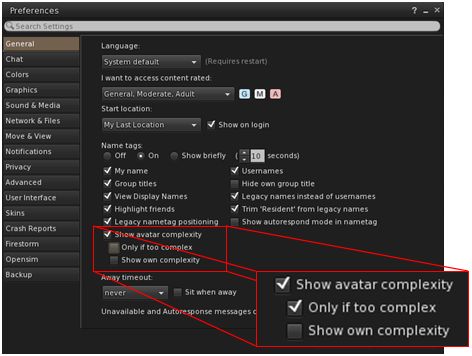
  • Or by going to Preferences > General and checking Show Avatar Complexity (if not already enabled). This will display the render complexity for each avatar in their name tag, and includes two sub-options, which are pretty self-explanatory:
    • Only [show avatar complexity, when enabled] If Too Complex
    • Show Own Complexity.
The Firestorm options for displaying Avatar Complexity information in the viewer

Continue reading “Firestorm 4.7.9.50527: “I see jelly people!””

2016 viewer release summaries: week 31

Updates for the week ending Sunday,August 7th

This summary is published every Monday, and is a list of SL viewer / client releases (official and TPV) made during the previous week. When reading it, please note:

  • It is based on my Current Viewer Releases Page, a list of all Second Life viewers and clients that are in popular use (and of which I am aware), and which are recognised as adhering to the TPV Policy. This page includes comprehensive links to download pages, blog notes, release notes, etc., as well as links to any / all reviews of specific viewers / clients made within this blog
  • By its nature, this summary presented here will always be in arrears, please refer to the Current Viewer Release Page for more up-to-date information.

Official LL Viewers

  • Current Release version: 4.0.6.315555 (dated May 23), promoted July 5th – formerly the Inventory Message RC viewer download page, release notes
  • Release channel cohorts (See my notes on manually installing RC viewer versions if you wish to install any release candidate(s) yourself):
    • Visual Outfit Browser viewer updated to version 4.0.7.318263, on August 1 – ability to preview images of outfits in the Appearance floater (download and release notes)
  • Project viewers:
    • No updates.

LL Viewer Resources

Third-party Viewers

V4-style

  • No updates.

V1-style

  • Cool VL viewer Stable branch updated to version 1.26.18.18 and the Experimental branch updated to version 1.26.19.20, both on August 6th (release notes)

Mobile / Other Clients

Additional TPV Resources

Related Links

Behind the Curtain in Second Life

Behind the Curtain - Dathúil Gallery
Behind the Curtain – Dathúil Gallery

Behind the Curtain,” Daze Landar (DaisyDaze) says of her exhibition now open at Dathúil Gallery, “is the beginning of my exploration of who we are in the spotlight and out.  The circus without a doubt is a great metaphor for life; the big show under a massive tent.  The greatest show on earth!”

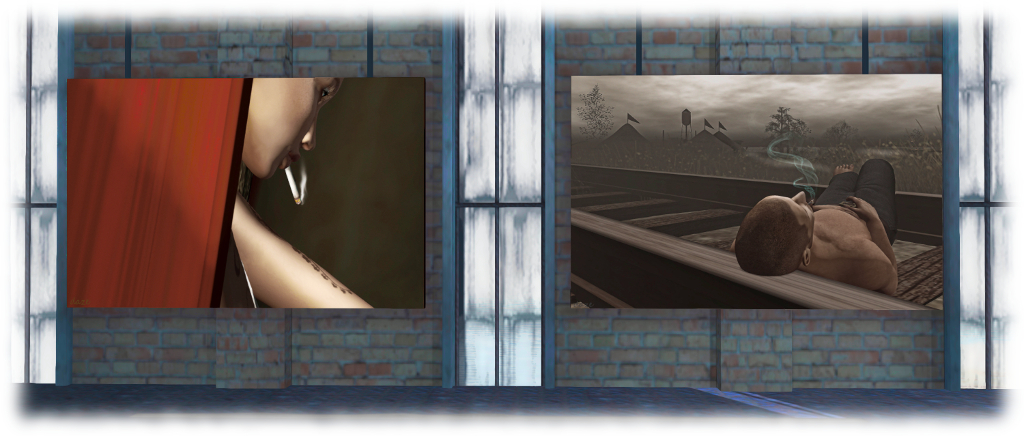
The exhibition is the first Daze has presented built around a specific theme, although as hinted by her introductory comments, the theme isn’t what one might first expect. While our eyes are immediately drawn to the huge image of a big top, and several of the images (all of which variously feature Daze, her partner Owen lander, and Elizabeth Nantes, Dathúil’s Lucy Diamond, Syn (Beresford) Zane and Keane Addison as models) involve circus flavours and motifs, this isn’t a riff on circus themes. It’s an exhibition about us: how we project ourselves to the world at large, and who we are “behind the curtain” of those projections, either when on our own or with those with whom we are close.

Behind the Curtain - Dathúil Gallery
Behind the Curtain – Dathúil Gallery

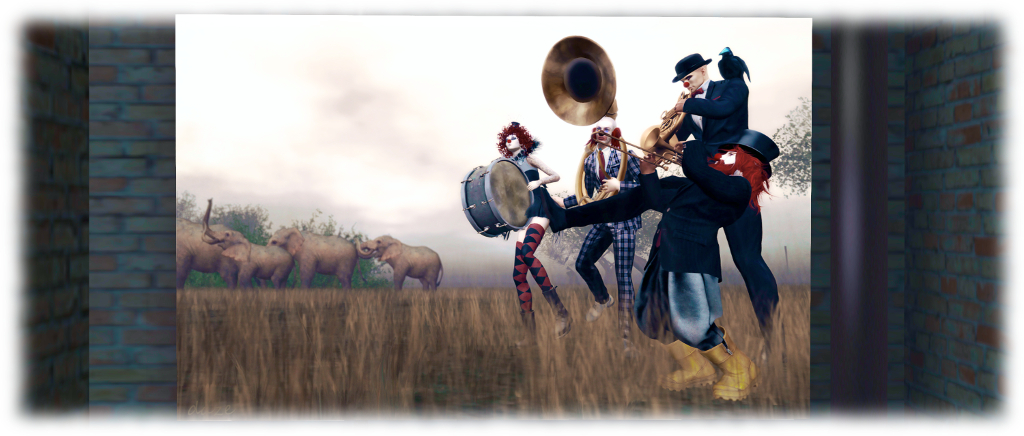
In this, the metaphor of the circus – all bright colours, loud noises, laughter, excitement and greasepaint – works excellently, allowing a range of ideas to be conveyed. Take Troupe (seen above), for example. With its quartet of circus musicians, apparently having a raucous time, it conveys the idea of our public self we tend to project when out and about with friends: loud, happy-go-lucky, fun, good to have around. But look a little more closely; none of the four appears to actually be playing their instrument; a subtle reflection, perhaps, that the outward projection of brashness is far removed from the inner person?

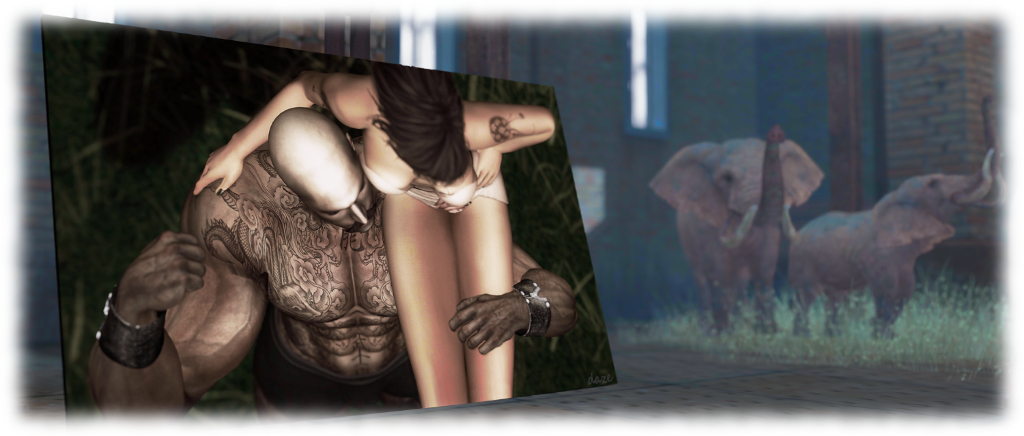
Then there is Strong Shoulders (top of this article). At first it would appear to be a study of a strong man act; the girl hoisted aloft with ease and sat upon a broad shoulder. But so too is it a metaphor of our reliance on those close to us and of their ability to lift us, through words and encouragement, supporting and nurturing us. Trust (which may suggest both escapology and adult bedroom activities!), more overtly carries a similar theme; whilst Hiding Spot and Break Time (below) convey those situations where we feel secure enough to let the masks slip away and just be ourselves.

Behind the Curtain - Dathúil Gallery
Behind the Curtain – Dathúil Gallery

In many respects, Behind the Curtain only scratches the surface of this captivating subject. Daze refers to it  as a “beginning” – suggesting she is considering more works along similar lines. I certainly hope so, not just because it is a fascinating subject, but it is also something which lies very much very much at the heart of environments like Second Life, and the abilities we have herein to both project – and more importantly, to shed – our masks and remove the metaphorical greasepaint.

In the meantime, Behind the Curtain will remain open through until the end of August 2016.

SLurl Details

Space Sunday: of Martian and lunar robots, distant worlds and ET

CuriosityAugust 2016 sees NASA’s Mars Science Laboratory rover Curiosity rack up four (terrestrial) years of operations on the surface of Mars.

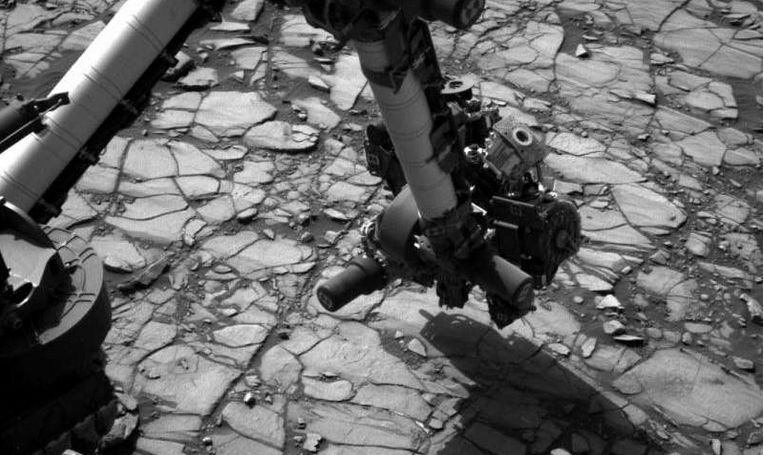
The rover marked this anniversary rather quietly, by preparing to take further rock samples, this time from a target dubbed “Marimba”. Once gathered, the samples will be subjected to on-board analysis by Curiosity using the compact laboratory systems contained the rover’s body.

The sampling take place as the rover is engaged in a multi-month ascent of a mudstone geological unit as it continues its climb towards higher and progressively younger geological areas on “Mount Sharp” (more correctly, Aeolis Mons), which will include some rock types not yet explored.

August 2nd, 2016 (Sol 1,418)T: the Navigation Camera (Navcam) on Curiosity's mast images the rover's extended robot arm over a section of the "Marimba" target rock, ready to use the wire brush mounted on the "hand" at the end of the arm in order to scour surface material which otherwise might contaminate and samples gathered from the rock, prior to the rover taking a drilling sample. Credit: NASA/JPL / MSSS
August 2nd, 2016 (Sol 1,418)T: the Navigation Camera (Navcam) on Curiosity’s mast images the rover’s extended robot arm over a section of the “Marimba” target rock, ready to use the wire brush mounted on the “hand” at the end of the arm in order to scour surface material which otherwise might contaminate and samples gathered from the rock, prior to the rover taking a drilling sample. Credit: NASA/JPL / MSSS

In the meantime, examining the samples gathered from “Marimba” will allow a direct comparison with mudstone samples gathered further down the slopes of “Mount Sharp” and from the flatlands of Gale Crater. This will enable scientists to  build a more complete picture of the mineral and chemical  environment the rover is travelling through, and so further understand the general conditions which may have once have existed within the crater.

Goodnight from a Lunar Jade Rabbit

China has finally bid farewell to Yutu (“Jade Rabbit”, named for the companion to the Moon goddess Chang’e), its first lunar robotic explorer, after 31 months of surface operations.

The little solar-powered rover arrived on the lunar surface as part of Chain’s Chang’e 3 lander / rover mission on December 13, 2013, and was deployed from the lander some  7.5 hours after touch-down.

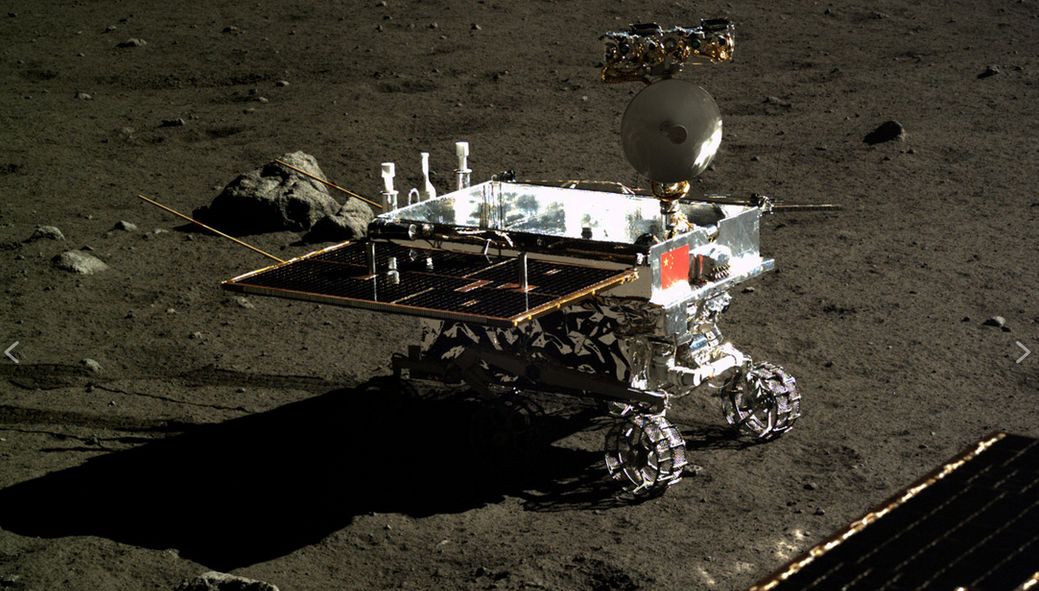
Yutu as imaged from the Chang'e 3 lander (part of the solar pnael from which can be seen in the lower right corner). Credit: National Astronomical Observatories of China
Yutu as imaged from the Chang’e 3 lander (part of the solar panel from which can be seen in the lower right corner). Credit: National Astronomical Observatories of China

However, due to the vast temperature differential experienced between the sunlit and shadowed parts of the rover at the time of the landing, operations didn’t commence until December 21st, when the rover was uniformly lit by the Sun. It’s first activity was to drive part-way around its parent lander and photograph it. After this, the rover travelled some 40 metres (130 ft) from the lander to commence independent science operations studying the lunar surface.

Yutu was designed to operate for just three months and travel up to 10 km (6.2 mi) within an area of 3 square kilometres (1.2 sq mi). Following its expose to the first 14-day long lunar “night”, the rover resumed operations in January 2014. However, as the second lunar night period approached (lasting 14 terrestrial days), the rover suffered a glitch in its drive mechanisms, leaving it susceptible to the harsh cold of the night-time, and on February 12th, following its second Lunar night, the rover was declared lost … only to resume communications with Earth within 24 hours.

Since that time, although immobilised, the little rover has maintained almost regular contact with Earth, but with each night period taking an increasing tolls on its systems. Even so, its continued survival gained it a huge and loyal following on the Chinese micro-blogging site, Weibo, where in a leaf firmly pulled from NASA’s book of social media engagement, Yutu had a first-person account.

It was via that social media account that Yutu’s final demise was announced, as if from the rover itself, on August 2nd 2016:

This time it really is goodnight. There are still many questions I would like answers to, but I’m the rabbit that has seen the most stars. The Moon has prepared a long dream for me, I don’t know what it will be like – will I be a Mars explorer, or be sent back to Earth?

The message gained a huge response from the rover’s 600,000 followers, and the Chinese space agency officially confirmed the rover had “died”, on Wednesday, August 3rd.

Continue reading “Space Sunday: of Martian and lunar robots, distant worlds and ET”