SL projects update week 13 (2): server releases, HTTP, and viewer notes

Server Deployments Update

On Tuesday March 26th, the SLS (Main) channel received the maintenance package previously deployed to BlueSteel and LeTigre in week 12, which includes a fix for a crash mode  – release notes.

On Wednesday March 27th, the RC channels received the following packages:

  • BlueSteel and LeTigre: a new maintenance package, which includes:
  • Magnum: should receive the same update as the Main channel (i.e. the package deployed in week 12 to BlueSteeel and LeTigre), otherwise retaining the updates and fixes deployed to it in week 12 – release notes.

As usual, there is a forum discussion thread for comments / feedback on the deployments.

Some issues have been reported following the Main channel deployment, but nothing which warranted any major action on LL’s part. Some reported noticeable improvements as a result of the pathfinding update.

Week 14 Deployments

While a final decisions has yet to be made on deployments for the week commencing Monday April 1st, Maestro Linden, hosting the  Server Beta group meeting on Thursday March 28th, indicated that the Magnum updates (which are all interest list related and include the vehicle region crossing fix for BUG-1814) is currently his personal favourite to be promoted to the Main channel and BlueSteel / LeTigre in week 14. If this proves to be the case, then he’s liable to have a lot of SL vehicle users very happy with him – myself included!

SL Viewer – CHUI, SSB and More

The SL development viewer moved to release 3.5.1.272979 on Thursday March 28th. As there are no release notes associated with development viewer releases, it is not always easy to determine what a new release contains; however, from tests, it would not appear that the release contains the viewer-side Server-side Baking (SSB) code.

The next major update to the release viewer is slated to be the Communications Hub User Interface (CHUI), which should be arriving “any time now” according the last-known plans from LL.

As previously noted, once CHUI reaches the release viewer, SSB will move to the beta viewer and make an appearance in week 14 – possibly (and coincidentally) on April 1st. Once in the beta viewer, it will remain there for up to four weeks (unless significant bugs are found), and no less than two weeks, prior to it moving to the SL release viewer. It is unlikely that any SSB server-side deployment will commence on the Main grid until after SSB has reached the release viewer – however, this is subject to final planning, and there may be a limited release of the server code while SSB is still in the beta viewer.

Work is still progressing on the materials code, and there is still no date for the release of a project viewer.

HTTP Project

On Wednesday 27th March, Monty Linden sent out an e-mail indicating the current beta testing on Aditi for his new HTTP capabilities will be drawing to a close “shortly”, and that anyone interested in carrying out tests in the three channels should do so sooner rather than later. Precisely when the beta test will close is unclear, but from Monty’s e-mail it would not be unreasonable to assume it will be within a week.

The next stage for this work is for it to progress to a Release Candidate channel – which will seem the “normal” configuration for HTTP services currently on channel DRTSIM-203 on Aditi carried forward to the selected RC channel(s). While there is no date as to when the HTTP work will reach a RC channel, Monty will be looking at the deployment as a more in-depth load test opportunity and seeing how well the new services might scale.

Other Items

Advanced Creation Tools Permissions

July saw the launch of the first phase of the Advanced Creation Tools, also referred to as experience tools. Following problems with an initial deployment of the tools in June, which resulted them being exploited as a means of griefing, the “first phase” of the release saw the tools implemented with existing permissions system in place, with the intention of updating the permissions system to allow the tools to be more fully used “in the future”.

After hearing that the work on the permissions system was again getting attention having been “stalled” for a time, there has been something of a further absence of news on progress. However, speaking at the Server Beta meeting on Thursday March 28th, Maestro was able to confirm the permissions system is currently on internal testing at LL – so it might be showing-up on Aditi (or in an RC deployment) in the not-so-distant future.

Scripted Avatar Rotation

The subject of scripted avatar rotation has come up for discussion at the last couple of server-related meetings. The idea is to use a scripted object to force the avatar to face a specific direction. It is not a new request, having been the subject of several JIRA in the past, most notably SVC-56, which also provides some suggestions as to how it might be achieved. Being able to turn the avatar to face a specific direction has a number of potential benefits – it could, for example, be used to have an avatar face a rock face which could then be “climbed”, or it could make avatar alignment for hugs / kisses a lot more accurate.

RLV already allows such rotation, although it may not be as accurate as required in some of the potential uses. Some objections to the capability have been put forward in the past – such as the potential for “griefing” others; although “griefing” of the kind envisaged perhaps shouldn’t necessarily prevent the development of such a capability, which would preferably be achieved by means of an attached scripted object, which wshould help minimise the risk of malicious use of the capability.

Andrew Linden, in discussing the idea at the Simulator User Group on March 26th commented:

Avatar rotation by script is actually hard to do. The reason it is so hard is a legacy thing… the protocol is basically set up such that the viewer tells the server where the avatar should be facing, and the server tries very hard to get it there. So in order for the server to turn the avatar, it would have to know when to listen to the viewer and when not; remembering such a state isn’t hard, but figuring out when to transition is hard … what would happen if a “turn the avatar” event was triggered and you started mashing on the keyboard to move the avatar elsewhere… what system should win?

Without committing to anything, Andrew concluded the discussion by saying, “I’ll think more about it. Maybe it’s possible. There must be a clever way. I don’t see it yet.”

Patterns moves to Steam’s Early Access platform

LL logoUpdate, October 9th, 2014: Linden Lab announced that development work on Patterns has been discontinued.

Patterns, Linden Lab’s sandbox building game available for Windows and the Mac, which launched on October 2012 utilising Steam as the initial download mechanism before becoming directly available via the Lab’s own Patterns website, has now moved to the Steam Early Access platform.

Launched on March 21st, Early Access allows users to play games that are currently in development. It initially kicked-off with a total of twelve titles in various stages of development, and which users can purchase and play. In return, developers gain access to community feedback, players can play games in alpha or beta stages, and Steam gets to remain the one-stop shop for digital downloads.

As such, Patterns – which remains in its Genesis Release phase and at the Genesis price of £6.99 ($9.99) – is an ideal candidate for the new Steam service, as it brings the game to the attention of a much wider audience than has perhaps been available to it until now.

Patterns now available as a part of Steam's Early Access platform
Patterns now available as a part of Steam’s Early Access platform

Coming alongside the move, the Patterns Community page on Steam has also been updated with news on the move, commenting in part:

We first launched Patterns as a ‘genesis release’ in October 2012, and we are now happy to make it available to everyone on Steam as part of the Early Access program. We are still very early in the game’s development, but have already made many updates. If you’re interested in seeing how Patterns has grown and improved so far, check out our update history in the News section.

As genesis release users, your feedback will help shape Pattern’s evolution. Please keep the comments, screenshots, videos and your thoughts coming! Know that we are reading and paying attention to your feedback, even if we are not able to respond to every post with a comment.

Since its initial launch, Patterns have continued to be enhanced, with both bug fixes and new features being regularly added to the game – many of the latter in direct response to ideas and input from Genesis users. These new features include additional worlds, more substances for building, more formations, some with new – such a slide, bounce and fly.

More enhancements and capabilities – again, some of which have been user-requested – are due in the future, including a multi-player mode, the ability to build personalised worlds and shared them with other users,

The caption says it all (courtesy Linden Lab)

Of all the new products launched to date by Linden Lab, Patterns is the one which potentially has the most visible traction  – the Steam / Genesis user community is active, the community pages contain a good mix of discussion, ideas and Q&A, and the game appears to have picked-up a good level of support and enthusiasm from non-SL users – something which could bode well now it is effectively available on a more widespread basis within the Steam community.

Related Links

With thanks to Daniel Voyager

SL10BCC: The last and next ten: celebrating a decade of Second Life

SL10B-CC_WordPress

While it may seem hard to believe, 2013 marks ten years since Second Life first opened its doors fully to the public. While SL has been around a little longer than a decade when you take into account the closed beta programme of 2002/03 and, even before that, Linden World, 2013 is nevertheless an important milestone in the platform’s history.

That’s why the organisers of this year’s Community Celebration have chosen to celebration SL’s “tenth birthday” with the theme Looking forward, looking back.

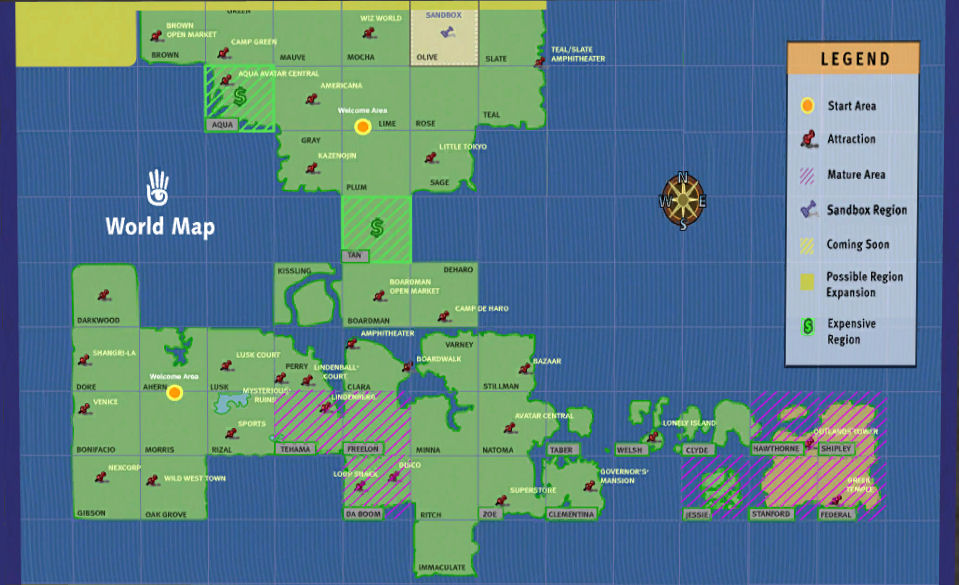
But what does that mean? Well, as mentioned above, SL has been around a long time. Some of those who were there right back at the start – as long ago as 2002 – are still here. People like Dr. Fran Babcock, who is already recalling those very early days, when Second Life was just 16 regions, and taking a look at them as they appear today. Many more of us will no doubt recall 2003 or the magical boom period of 2006 / 07, when Second Life was the media darling of the world.


Looking back: the birth of Second Life – Linden World – with video footage by Andrew Linden, who is still with the Lab today

And that’s what Looking back is all about: looking back over our involvement in Second Life and celebrating what it was that drew us here and what has, over the months and years, kept us engaged in-world since taking those first few hesitant avatar steps. Whether we’ve been involved with the platform for six months or six years, it is an opportunity to celebrate our time with Second Life: what we enjoy in-world, the communities and clubs we’re a part of, the things we love to do in-world and how Second Life has been a part of our lives as it has grown from a mrer 50-or-so regions in June 2003 to the digital world it has become today. Ten years is also a long time for

Second Life as it appeared on opening the doors to the public in June 2003

The Community Celebration theme is designed to be a launchpad for ideas and opportunities in which we can all express how we personally regard Second Life and what it means to us, and the hope it that it will lead to many fascinating builds and displays which reflect our memories of times past and our enjoyment with, and enthusiasm for, the platform.

At the same time, the looking forward part of the theme give all of us, no matter how long we’ve been involved in the platform the chance to consider what Second Life might grow into or give rise to in the course of the next ten years. Right now, we’ve only scratched the surface of what immersive 2D worlds might bring by way of entertainment and practical use.

Just what will Second Life look like in 2023? What might it have given rise to a decade from now? Will it be purely immersive, or will it be augmentive – or a mix of the two? How might immersive 3D works better entertain us and how will 3D environments augment our everyday lives at home and  / or at work? Let your imagination run free and bring your vision of the future of SL and virtual worlds to SL10B, and let us see where you think we’re headed in the years to come.


Bruce Branit’s moving glimpse of a possible immersive 3D world of the future (2009).

Applications for Exhibitor space on the Community Celebration regions will open on April 15th. So why not use the time between now and then to mull over ideas and seek inspiration – perhaps by visiting some of the earliest locations and builds in-world or for peeking into the future of Second Life and virtual worlds – and then apply to be a part of SL’s tenth anniversary?

Related Links

Dipping back into dio

dio-logoUpdate, February 19th, 2014: dio was discontinued by Linden Lab on February 19th, 2014. Links to the dio website, etc, have therefore been removed from this article.

dio, Linden Lab’s browser-based “social experience” reaches two months of age this week. Whether this will be accompanied by any updates remains to be seen. So far, there appears to have been only one significant update to the application, which appeared at the end of February, a month after the original launch. As I’ve not really commented on dio for a while, I thought I’d take time out and have a poke at some of the updated features.

The Updates

“Live Chat” / Comments

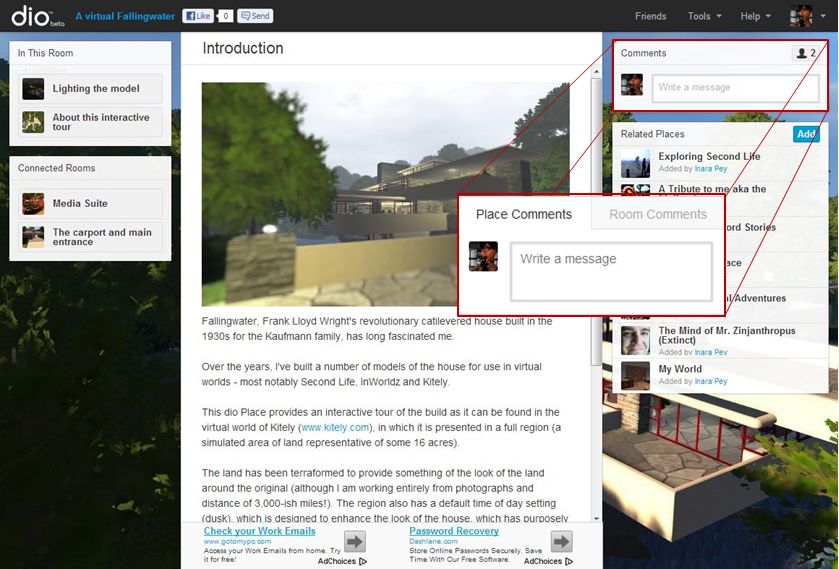
When browsing dio Places, perhaps the most obvious update is that Comments have now been expanded to include Places as well a rooms. I’ve previously been critical of the idea that dio presents “persistent live chat” when in fact the “chat” element is more of a basic message board service, limited by the fact it only applies to rooms – so any conversations which might occur in real-time can ge abruptly interrupted as one person shifts to another room without warning.

The dio product team have addressed this by adding a new tab to the Comments panel. Entitled “Place”, it does exactly what it says on the label – allows comments to be made about a Place, rather than a room, and to be accessible from any room visited within the Place.

The old dio Comments panel (main picture) and the new, tabbed approach for commenting on rooms and Places (inset)

New Editing Buttons

The updates also bring a set of new on-screen editing buttons what are immediately available at the top of a page on creating a room. These provide easy insertion / creation of:

  • Photos
  • Videos
  • Inventory objects
  • Exits to other rooms

All of these work on the same principles as the initial release of dio, although the editing screens for the options have been revised somewhat (see below).

The new buttons options displayed at the top of each room when in edit mode, allowing object, etc., to be added directly to the room.

Additionally, a new option is provided – that of Text, which opens a simple text editor which can be used to generate simple blog-style entries for a room. Currently, there is no means of formatting text, so how useful this option might be remains to be seen. Once created, text objects appear in the In This Room panel along with all other types of object. Text objects can also been assigned Actions as well, which offers interesting options with their use; for example, in an adventure game Place, a text object could be set as a map with both explanatory text (or perhaps a riddle as to what it means), which can be taken by others. They then have the choice of both looking at the map and reading the associated explanation / riddle.

Continue reading “Dipping back into dio”

Inside Firestorm at Virtual Ability Inc

Virtual AbilityOn Thursday March 28th, Virtual Ability Inc will be hosting a presentation by Ed Merryman and Lette Ponnier about the Firestorm viewer and project.

Entitled Overview of the Firestorm Viewer and Project, the presentation will take place in both voice and text, and will commence at 11:00 SLT at the Blue Orchid Cabana, Virtual Ability Island.

The promotional material for the presentation reads:

Learn about what makes the Firestorm Viewer and the project on the whole unique. We’ll discuss some of its most popular features and customizability options and cover how to find help and more information from our large and active support team and its resources.

The Presenters

Ed Merryman – Voice

Ed Merryman joined SL in September 2007. He is the Firestorm Support Team manager, and has led the team since the Firestorm Project was established in September 2010.  

Ed Merryman and Lette Ponnier - talking about Firestorm at Virtual Ability Island on Thursday March 28th, commencing at 11:00 SLT
Ed Merryman and Lette Ponnier – talking about Firestorm at Virtual Ability Island on Thursday March 28th, commencing at 11:00 SLT

Lette Ponnier – Text

Lette Ponnier has been involved in Second Life since early 2008. A keen member of SL’s small, but thriving, open chat trivia community, Lette has been an integral part of the Firestorm team since February 2011 where she head-up the English Language Support team. She also specialises in providing help to Firestorm Mac users.

As well as providing support to Firestorm users, both Lette and Ed are active teachers for the team, and present weekly classes about the viewer which are open to anyone to attend, no matter what level of experience they have with the Firestorm viewer.

So, if you’re curious as to why Firestorm is so popular among Second Life’s users, and / or about trying the viewer out for yourself, why not make a note to drop into Virtual Ability Island on Thursday March 28th?

Related Links

With thanks to Virtual Ability Inc.

Getting back to work and an Opportunity for comparisons

CuriosityThe Mars Science Laboratory rover Curiosity resumed full science operations on March 23rd, with the delivery of a second portion of cuttings to the Sample Analysis at Mars (SAM) instruments inside the rover. Earlier, on March 21st, Curiosity resumed continuous environmental monitoring of the “Yellowknife Bay” area of Gale Crater.

Full-scale operations with the rover had been halted following the discovery of a computer glitch in the primary computer system the so-called “A-side” computer, which prompted mission controllers to order the rover to switch to the redundant “B-side” computer.

Since then, engineers and scientists on Earth have been working to both recover the “A-side” computer while simultaneously working to transfer all relevant data and command sets to the “B-side” computer and run Curiosity through a series of tests in order to ensure the “B-side” computer can increasingly take over day-to-day operations on the rover.

The “A-side” problem was traced to the unit’s memory module which acts as the “table of contents” for accessing the computer’s memory, preventing data and instructions from being accessed and causing the computer to enter into an “endless loop”. The computer has now been fully recovered and is available as a back-up once more, should it be required.

Recovery to the “B-side” computer was drawn-out due to the need for the computer to “understand” various aspects of the rover’s condition, including the placement of the robot arm, so that it could correctly take-on command and control. This involved a series of tests carried out early in March. More recently, engineers had to confirm the “engineering camera” sets, were functioning correctly.

In all, Curiosity uses some seventeen camera systems. Of these, 12 are paired sets of “engineering cameras” comprising the black-and-white Navigation Cameras (Navcams) mounted on the rover’s mast, the black-and-white front Hazard Avoidance Cameras (Hazcams) mounted at the front of the rover’s body, and the rear black-and-white Hazcams. Of these cameras, three pairs (of Navcams and front/rear Hazcams) are hard-wired to the “A-side” computer, and three pairs are hard-wired to the “B-side” computer.

The last time the “B-side” engineering cameras had been used was in April 2012, when the Mars Science Laboratory was still en route to Mars (the “B-side” computer was used to “look after” the rover and its ancilliary systems during the long flight from Earth to Mars). As the rover was switched-over to the “A-side” computer shortly after arrival on the surface of Mars, the “B-side” cameras had never been actively used on the planet, and thus needed to be run through a similar set of commissioning tests and check-outs which marked Curiosity’s initial activities back in August 2012.

Looking at Curiosity’s left-front and left-centre wheels and tread marks, using the left Navcam on the rover’s mast, which is hard-wired directly to the “B-side” computer. Captured on March 22nd, 2013, or Sol 223 of the mission, this image marks the first time the “B-side” engineering cameras have been used in more than six months – and the first time they have been used by the rover on the surface of Mars. For reference, the wheels are 50 cm (20 in) in diameter.

Bringing the “B-side” computer up to a point where it could take over all on-board operations  was further delayed when it also suffered a glitch on March 16th which, although relatively minor in scope, caused engineers on Earth to order Curiosity back into a “safe mode” of operations while the glitch was investigated, diagnosed and corrected.

Continue reading “Getting back to work and an Opportunity for comparisons”