Lumiya 2.5.0: advanced rendering

Update August 29th: There have been two additional updates with Lumiya since this review was published. Versions 2.5.2 and 2.5.3 both offer the same additional functionality as reviewed here, but include further fixes for devices using Adreno GPUs.

lumiya-logoAlina has released versions 2.5.0 / 2.5.1 of Lumiya. The two versions, released on August 26th and August 27th respectively, comprises the same updates features-wise, but the 2.5.1 release includes an additional fix to correct a crash issue users encountered with devices using Adreno GPUs (such as the HTC One).

The focus for this release has been on rendering capabilities, with the 2.5.0 release notes summarising the updates as:

  • An advanced rendering mode for better visual quality
  • Limited windlight support (sky, clouds, stars, time of the day)
  • Drag-to-select pointer for easy selection of small objects in 3D mode
  • Ability to purchase objects
  • Fixed an issue with terrain not being rendered when 3D view is opened too early.

Advanced Rendering and Windlight

The number of rendering options already included in Lumiya is impressive. Advanced Rendering brings with it the ability to render in-world light and other visual effects, windlight support for clouds, night-time stars, setting the time-of-day in the world view, and anti-aliasing.

Advanced Rendering options. note that Advanced Rednering must be enabled via a separate option in the Settings menu in order to access the options
Advanced Rendering options: note that the capability must be enabled via a separate option in the Settings menu in order to access these options

The additional capabilities are added to the 3D View section of Lumiya’s Settings menu (device Menu button > Settings), although they are on by default. While they do offer some enticing options, they do make Lumiya very much more device dependent than perhaps has been the case with the client in the past.

For example, I found that with the Advanced Rendering options active, my Galaxy S2 struggled mightily to render an in-world scene, even with high quality textures disabled, max avatars dialled back to 1 and draw distance down to a minimal 48 metres. More particularly, it got very hot in my hand; something I’ve not encountered previously. Once rendered, the scene also lacked clouds (although I’d chosen a region with a cloudscape overhead on purpose), but stars were visible when switching the time to night. Because of this, I’ve not included images from my phone, but rather demo images Alina captured on a tablet device with more oomph than my S2 can manage, as they give a fairer indication of what can be seen when using the right hardware.

Lumiya has clouds - if your Android device has the power
Lumiya has clouds – if your Android device has the power

That my S2 struggled isn’t surprising. There’s an awful lot of work for a small hand-held device to manage, even with just some of the bells and whistles turned on. Just as it is unrealistic to expect older computer hardware with limited graphics performance, memory, etc., to be able to handle all the latest shiny in Second Life, it’s also unfair to expect devices which necessarily have limited capacity to present everyone with the same level of detail with all the options ticked.

Starry, starry night / Paint your palette the Lumiya way ...
Starry, starry night / Paint your palette the Lumiya way …

Drag-to-Select

Another major new addition to Lumiya in this release is Drag to Select. This comprises a small hand icon in the top left of the world view, with the label Drag to Select. Following the instruction allows you to drag the icon (which changes to an arrow) and point to objects in-world, enabling you to interact with them more easily. Releasing the icon when pointing at an object will bring up the initial interaction menu, allowing you to touch, sit, etc., depending on the object.

Use Drag to Select to interact with in-world objects which may be too small to otherwise use long touch on

This is especially useful when using a small screen, where the finger can easily cover multiple items, resulting in some frustration when trying to long touch something for its menu. Do note, however that as the option removes your avatar from the in-world view, you can’t use it to touch your own attachments; nor does it appear to work on other avatars’ attachments.

Making Purchases

You can now shop ’til you drop with Lumiya. Simply find a vendor or object set for sale, long-touch it, and the pop-up menu includes a Buy Object item. Tap this for a final confirmation before buying.

You can now purchase things with lumiya
You can now purchase things with Lumiya (account balance blanked on purpose)

Feedback

Another interesting update, albeit it one which may well tax some devices, prompting users to disable some of the options. Seeing windlight start to arrive in Lumiya is good, and helps the client to become more of a mobile alternative to a full-blown viewer for those on the move requiring their SL fix. Similarly, having the ability to make in-world purchases adds to Lumiya’s attractiveness. I also like the new Drag to select function, although its addition is starting to make the in-world view on small screens rather crowded. Even so, I’d rather have it than not.

I understand that in-world building is on the cards for a future release of Lumiya; now that will be interesting. I presume it’ll be a capability best suited to tablet devices rather than small-screened handhelds, but that’s no reason for seeing it excluded. It just means I’ll have to go buy myself a tablet! :D.

Related Links

CtrlAltStudio: Stereo 3D and first pass at Oculus Rift Support

CAS-logoCtrlAltStudio is a relatively new viewer to appear for use with both Second Life and OpenSim. The work of David Rowe, it is based on Firestorm, and the project is revisiting the use of stereoscopic 3D in the viewer, building on the release of the NVIDIA 314.07 video driver.  More recently, David has also been working at a first pass at Oculus Rift integration ahead of LL’s own work with the headset.

Version 1.0.0.34218: Stereoscopic 3D View

A proof of concept image with CtrlAltStudio (image: David Rowe)

After various proof-of-concept and beta iterations, the 3D-capable version of CtrlAltStudio appeared on July 27th, 2013.

Version 1.0.0.34218 of the viewer (release notes) uses OpenGL quad-buffered stereoscopic 3D, and requires NVIDIA graphics drivers with 3D Vision support (314.07 or later). It also requires monitors set to 120Hz, and for the viewer to be running in full screen mode. It should work with GeForce GTS250 or better, NVIDIA Quadro cards, AMD Radeon HD 6000 or better and FireGL V7600 or better with recent drivers.

To control the 3D capabilities, David has added an additional Display Output tab Preferences > Graphics, and an additional toolbar button, labelled 3D, which toggles the stereo view on / off.

Sadly, I don’t have the glasses to test the viewer itself, so will have to leave that to others to report on how things look.

Version 1.1.0.34244: Initial Oculus Rift Support

Second Life in Oculus Rift via CtrlAltStudio (image; David Rowe) – click to enlarge

On August 25th, David release version 1.1.0.34244 Alpha with initial Oculus Rift support (release notes). This is well ahead of the Lab’s own implementation of support for the headset, and people shouldn’t expect it to be in any way a complete integration of Rift support. As David comments on the blog post announcing the release:

If you want to stick your Rift-kitted head into Second Life or OpenSim and have a look around, well now you can. I’ve added some basic Oculus Rift support to CtrlAltStudio Viewer 1.1.0.34244 Alpha: you can look around and move about but there is no UI. Full Rift support including UI will come when Linden Lab release their viewer with Rift support in the not too distant future. But in the meantime you can now at least enjoy the sights of your favourite virtual world locations.

Options for Oculus Rift have been added to the Display Output tab in Preferences > Graphics, directly below those for the 3D stereo controls.

The Display Output tab of Preferences > Graphics, showing the 3d vision and Oculus Rift options
The Display Output tab of Preferences > Graphics, showing the stereoscopic and Oculus Rift options

To use the headset with the viewer, David recommends that you first sit down, then get to where you want to be before you don the headset. Once there, wear the headset and toggle “Riftlook” (using the 3D toolbar button or CTRL-ALT-3) to look around and use the arrow / WASD keys to move, remembering that “forward” is in the direction in which the Rift is pointing when “Rfitlook” is enabled.

So if you have the Oculus Rift SDK, why not download CtrlAltStudio and give it a go. Just do remember, the viewer is still Alpha, and subject to limitations, possible odd behaviour.

Related Links

Liquid Mesh: looking from all sides

I’m prefacing this article by saying I’m not a fashion blogger, nor am I particularly fashion-oriented SL purchaser. So this piece isn’t an examination of “Liquid Mesh” clothing from a fashion / fit standpoint. Nor is it intended to be an in-depth technical examination of the technique and how it deforms, its pros and cons, creation issues, etc. It is simply intended to offer up general information on what the technique is, what the concerns are, and how people might best determine whether it is an option for them.

A Little Bit o’ History

When the capability to support mesh within SL was first being developed, that it could be used to create clothing etc., didn’t appear to factor into the Lab’s thinking, and so how such items might be made to fit avatar shapes properly wasn’t of major concern to them. However, during the Mesh Closed Beta, a method was proposed whereby wearables could be weighed to the avatar’s collision volumes, a technique which, if used, would allow them to deform somewhat to the avatar’s shape.

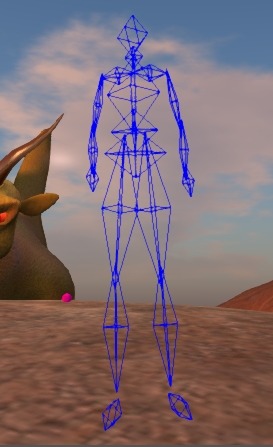
Avatar Collision volumes (image courtesy of Gaia Clary)
Avatar Collision volumes (Gaia Clary)

AshaSekayi Ra notes that at the time, Prep Linden requested clothing samples weighted using the technique be passed on to him so that the Lab could take a look at the idea. However, she didn’t hear anything further on the subject, despite supplying samples herself. Asha also thinks that Prep may have heard of the technique as a result of a conversation with RedPoly Inventor.

Collision volumes are essentially a simplified version of the avatar form primarily used to between your avatar and other avatars / objects. As Gaia Clary recently explained, they give a rough approximation of an avatar’s shape and they can be adjusted via the Edit Shape sliders. So, clothing items weighted to them can be adjusted somewhat in line with the avatar’s shape.

That said, there are limitations. For one thing, there are only 19 collision volumes; and this limits how and where they can be weighted by default, and how well clothing using them can deform with changes to the avatar’s shape. For example, there is no collision volume for breasts, so clothing using the technique won’t deform to breasts or breast size changes.

In June 2012, RedPoly Inventor again drew attention to the idea during a Content Creator’s meeting, releasing a video of the technique, as well as a demonstrator dress.

By his own admission, the solution was not perfect due to the lack of suitable weighting points in the collision volumes, as noted above. To overcome this, he suggested the development of addition “bones” (weighting points), which he called “cbones”. However, given there is generally little appetite within the Lab to tinker around with the avatar to any great extent, it was unlikely this latter idea was going to be taken-up, and after a while the use of collision volumes for mesh weighting / deformation seemed to quietly slip away.

Moving Forward

Since then we’ve had yet more delays with the development and release of the mesh deformer for a wide variety of reasons. That no official deformer has appeared has seen a number of content creators producing mesh wearables which use collision volumes for weightings / deformation in a manner similar to that demonstrated by RedPoly Inventor.  Perhaps the first on the scene was Redgrave, back in late 2012, with their Liquid Mesh range (the name which is now synonymous with the technique), with others such as Egoisme and Bax also producing their own items as well. As such, the debate around the approach has been ebbing and flowing for a while, and has recently seen renewed discussion.

The system isn’t perfect, as noted above; the need for alpha layers isn’t necessarily eliminated for example, and because collision volumes are only a rough approximation to the avatar shape, problems can still be encountered when making shape changes even where the two do align. But even with the potential shortfalls, the fact remains that in many cases, this method can result in clothing items which do fit an avatar’s shape more reasonably than by purely relying on a set of “standard sizes”, as Strawberry Singh demonstrated in a recent video which accompanied a blog post on the subject.


Continue reading “Liquid Mesh: looking from all sides”

Viewer release summary 2013: week 34

This summary is published every Monday and is a list of SL viewer / client releases (official and TPV) made during the previous week. When reading it, please note:

  • It is based on my Viewer Round-up Page, a list of  all Second Life viewers and clients that are in popular use (and of which I am aware) and which are recognised as adhering to the TPV Policy
  • By its nature, this summary will always be in arrears
  • The Viewer Round-up Page is updated as soon as I’m aware of any releases / changes to viewers & clients, and should be referred to for more up-to-date information
  • The Viewer Round-up Page also includes comprehensive links to download pages, blog notes, release notes, etc., as well as links to any / all reviews of specific viewers / clients made within this blog.

Updates for the week ending: August 25th, 2013

Official LL Viewers

  • The current release viewer updated on August 20th to version 3.6.3.279564 – formerly the Maintenance Viewer RC (download, release notes)
  • Release channel cohorts:
  • Project viewers:
    • None at present

LL Viewer Resources

Third-party Viewers

  • Black Dragon updated on August 21st to version 2.3.0 and then August 23rd to version 2.3.1 – core updates: inclusion of materials viewer RC rendering updates (ALM underwater, etc ), UI tweaks and general fixes (release notes: 2.3.0 and 2.3.1)
  • Kokua updated on August 24th to version 3.6.3.29169 – core updates: parity with LL 3.6.3 code base; implementation of .DAE format object export (respecting the SL permissions system), plus assorted updates (release notes)
  • Restrained Love Viewer updated on August 24th to version 2.8.5.3 (all versions) – core update: on-the-fly “z-offset” height adjustment ported from Cool VL Viewer; Linux and Mac version also updated to 2.8.5.3 (release notes)
  • Cool VL updated on August 24th to:
  • Metabolt updated on August 24th to version 0.9.69.0  – core updates: SL crash reporting implemented; sim Stats indicate if the sim has SSA enabled or disabled; “Attachments” button added to Object manager window; “Detach”button added to Worn Attachments window; New Protection to protect against attacks via chat, script dialogues and URL offers (release notes). Additionally, the METAnomy plug-in was updated with an SSA-related fix.

Additional TPV Resources

Depreciated / Discontinued Viewers

  • Niran’s Viewer – discontinued as of version 2.2.0.2701 & superceded by Black Dragon
  • SLiteChat removed from listing; no updates since 2011, removed from TPV Directory & no response from developer
  • SL Second Life Beta viewer – depreciated as of version 3.6.2.278491, July 15, 2103
  • SL Development viewer – depreciated as of version 3.5.2.274629 April 24, 2013
  • Zen Viewer – discontinued by developer and no longer available, January 27th, 2013
  • Phoenix viewer – development and support ended on December 31st, 2012

Related Links

From Niran’s to Black Dragon

Blackdragon logoOn Wednesday August 21st, NiranV Dean officially confirmed that Niran’s Viewer is now depreciated (or as he put it, “Dead”).

He first announced plans to end the viewer’s life in May 2013, when he also announced its successor, Black Dragon. Since that time, he has been working on the replacement viewer, producing a number of beta releases along the way, the latest being version 2.3.1, which appeared on August 23rd.

As I’ve not covered Black Dragon to date, I decided to take a quick look and provide a mini-overview – not a full review, just and overview of the viewer and some of the work Niran has been carrying out.

Download and Installation

The download weighs-in around the same file-size as the official viewer. As with Niran’s Viewer, this isn’t an installer per se, but rather a self-extracting archive which will install the viewer files in the required folder, but which will not generate a Start menu entry, desktop shortcut, etc. You’ll need to do that yourself (not that it’s particularly taxing).

Splash Screen and Logging-in

Black Dragon’s splash / login screen is very similar to that used with Niran’s Viewer. Instead of the usual Destination Guide, etc., options found with the official viewer and a number of V3-style TPVs. Instead, users are treated to one of Niran’s music videos.

Black Dragon Splash / Log-in screen

If the viewer has been installed for the first time, or is a completely clean install, the Create Account / Continue pop-up options will be displayed as per most V3-style viewers.

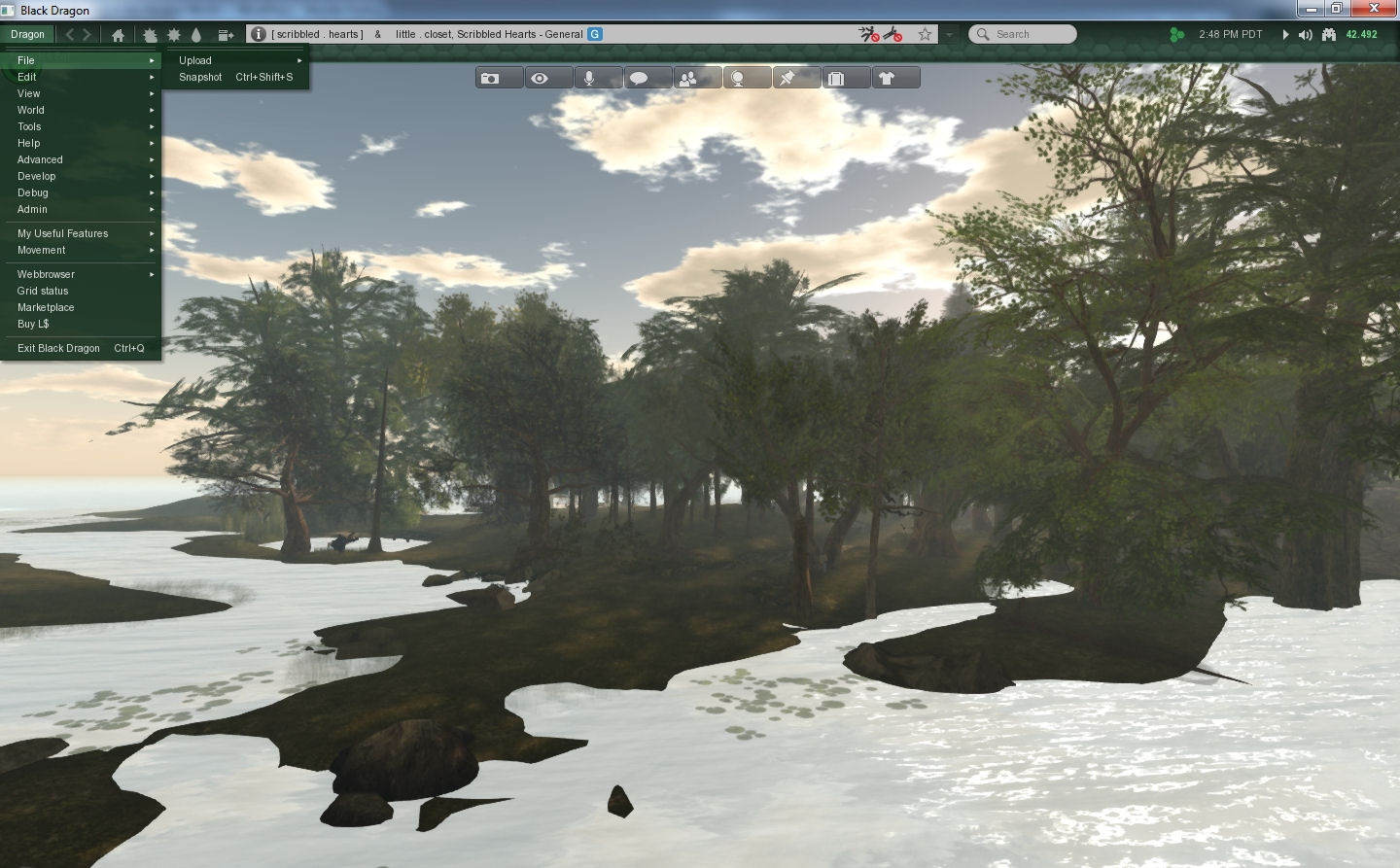
On logging-in, anyone who has used Niran’s Viewer will get a further feeling of familiarity – by default, Black Dragon has its toolbar buttons ranged at the top of the screen, and has a number of other Niran’s-like UI elements, including the vertical menu list, now called Dragon.

I confess, I’ve always liked this approach to the menus. Training the hand to use it doesn’t take long, and it offers a relatively tidy and compact means of having the menus available.

Black Dragon retain's Niran's approach to menus
Black Dragon retains Niran’s approach to menus

Preferences, Floaters and Panels

One thing that has always bugged Niran (and myself to a certain degree) is the amount of “white space” (or “wasted space”, as Niran calls it!)  some of the viewer’s floaters and panels have. While there is an understandable need to consider all levels of eyesight and readability, some of the viewer 3 panels do seem to have an over-abundance of blank space in them which could perhaps be better utilised. Black Dragon goes some way to reversing this; several of the floaters have been tided-up such that they do take-up less screen real estate, offering a more compact display.

However, Niran hasn’t (perhaps wisely) gone to some of the extremes seen in his older viewer, at least for the time being. Frankly, I hope he doesn’t. While a degree of tidy-up in floaters is welcome, I did feel that some of the large-scale redesign of evidenced in various floaters in Niran’s Viewer actually left a lot to be desired. A reduction in “wasted space” didn’t always correspond to an improvement in usability.

Materials and Build Floater

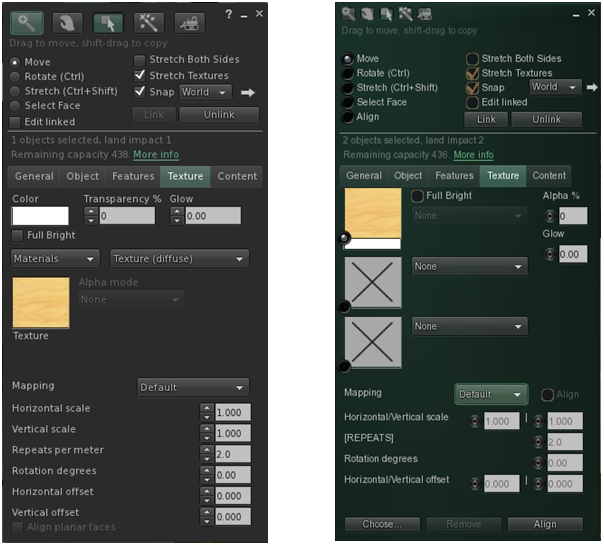
One of the new Lindeny shiny bits to appear in Black Dragon is materials processing, and it is an area where Niran has taken a slightly different direction to the official viewer, offering-up a completely re-worked Texture tab for the application of maps.

The revised Texture tab in Black Dragon's Build floater
The V3 build floater’s Texture tab (l), and Niran’s re-working in Black Dragon (r)

Continue reading “From Niran’s to Black Dragon”

Dolphin and SSA: a further word from Lance

dolphin-logoServer-side Appearance is now live, as we all know, and issues seem to be minimal / getting dealt with. The majority of maintained viewers used to access Second Life were ready for the event; but due to real life commitments, Lance Corrimal has been unable to get his Dolphin viewer ready in time.

He’s recently issued an update on things,  – and the good news is that an SSA-enabled Dolphin 3 is on the way. In his note, Lance says:

I’m working on it as hard as I can, and it shouldn’t be more than a couple of weeks now. I have to do a bit of QA on it, I do want to release something usable after all.

So, if you’re a Dolphin user, don’t worry. an update is on the way. When it arrives, I’ll plunge in and have a look :).