Original art debuts at Originalia

Travel to Originalia is the newest art exhibit on Amase Levasseur’s Originalia sim. It features three new works, Postcards Home by Callipygian Christensen, Adapt or Perish by Cherry Mangaand and Gateway to Hell by Fuschia Nightfire, together with a chance to once more enjoy Scottius Polke’s acclaimed The Docks.

The exhibit itself opens this coming weekend, but I was lucky enough to be invited to preview the installations ahead of the formal opening.

Teleporting to Originalia brings you to a small arrivals area, with the ominous title Adapt or Perish.From here lay a series of wooden or stone paths leading to the different exhibits in the installation, three of which are visible without excessive camera-panning, two under their own respective domes, while the third appears to be a quite rural English Post Office of yesteryear.

There is no specific order in which you should view the exhibits; however, as I am English, I naturally felt drawn towards the Post Office, which also seemed to have a small welcome area in front of it. So that is where this preview starts.

Postcards Home

If it wasn’t for the very obvious domes raising from behind and one side of it, one could almost imagine the Post Office is part of a set awaiting the arrival of Miss Marple and a BBC film crew. It’s a charming place, with a fountain out front and places to sit. There is also a poster for the exhibit, which provides an introductory notecard and a series of landmarks (which actually all resolve to the same arrivals point).
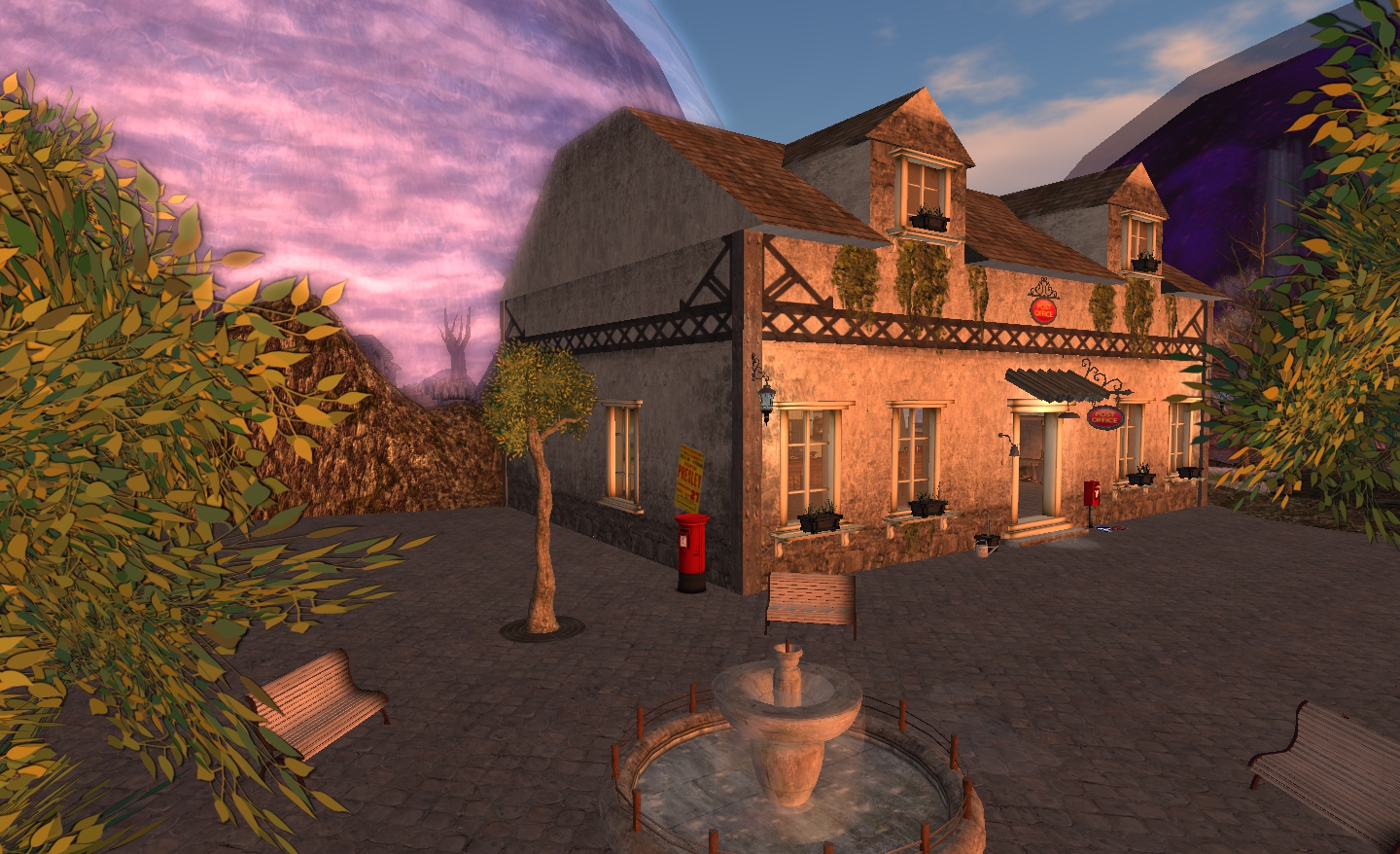
The Post Office

Inside are the orderly roped counter queue areas (we English so love our queues), a familiar counter and, on the walls, Callipygian Christensen’s images which form Postcards Home. Each, as the name of the exhibit suggests, features an image captured from somewhere within SL displayed as a postcard, complete with the “reverse” side tucked in behind it, some of the text just visible.
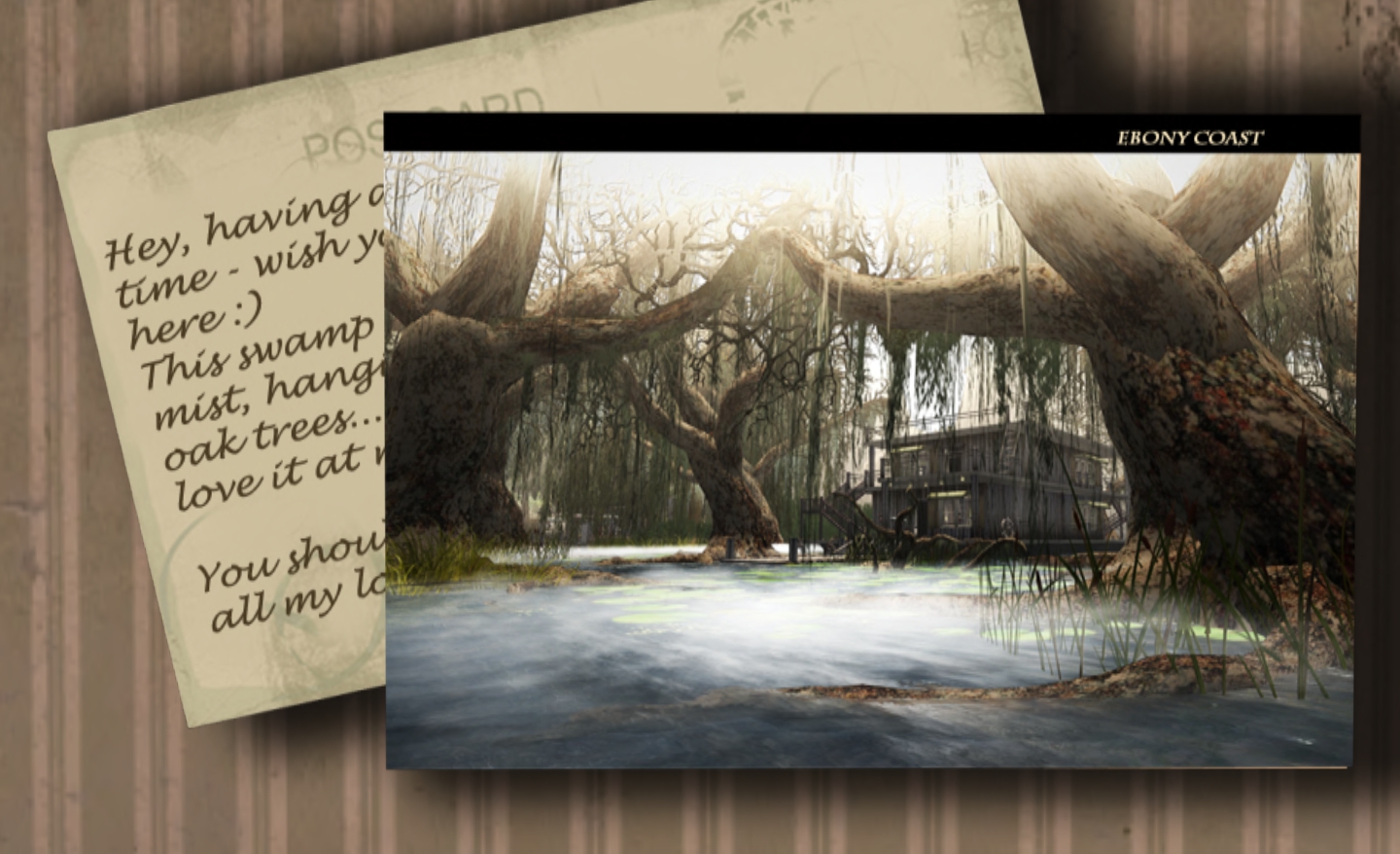
Callipygian Christensen’s “Postcards” – clever and evocative

It’s a clever approach; the images themselves can be evocative – there is one of AM Radio’s work which causes a slight pang given his sims are now sadly gone from SL. The partially viewed messages from the “backs”of the postcards give each one added depth, as we catch a small glimpse into the life and thoughts of the person who sent the cards.

Adapt or Perish

This is something of a cautionary tale about our need to remain in harmony with nature or risk destroying it – and ourselves.
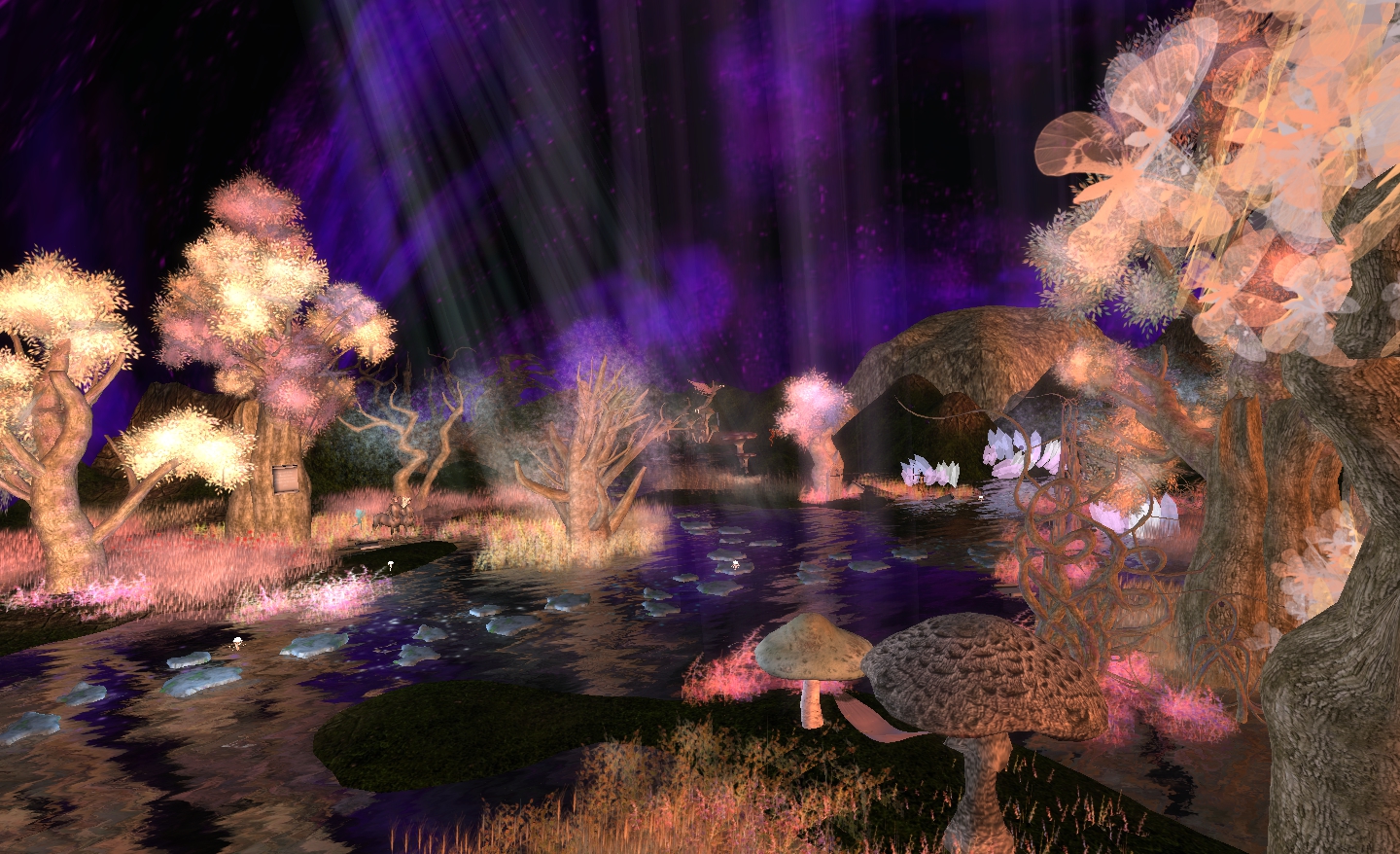
Cheery Manga: Adapt or Perish

Entering the dome, you enter a fantastical landscape, rich with flora, with fairies, fawns, centaurs. This is not a single tableau, however. Rather, it is as series of visual vignettes, all of them interlinked and accompanied by a short verse, which all build together into the overall piece and the story it tells.

Stone paths over the water lead you deeper into the piece, past those who have learned to adapt and accept what Nature has to offer, taking no more than what is needed, sharing, making nature their home and giving thanks for all that they have.

But as one moves deeper, so things grow darker. The grass dies. The leaves wither from branches overhead. The trees themselves become bare-branched, misshapen grotesques. So to, does the music change, a haunting, deadly voice slowly filling the air the further one continues.

Here is the realm of those out of harmony with nature; those, we are warned, who steal and kill, who always want more. Their footprint is that of desolation where a dank mist covers the ground and nothing but fungi flourish. The air is filled with the sound of leaden, warning drums and a deathly chanting, and the path leads us inevitably to chaos and death.
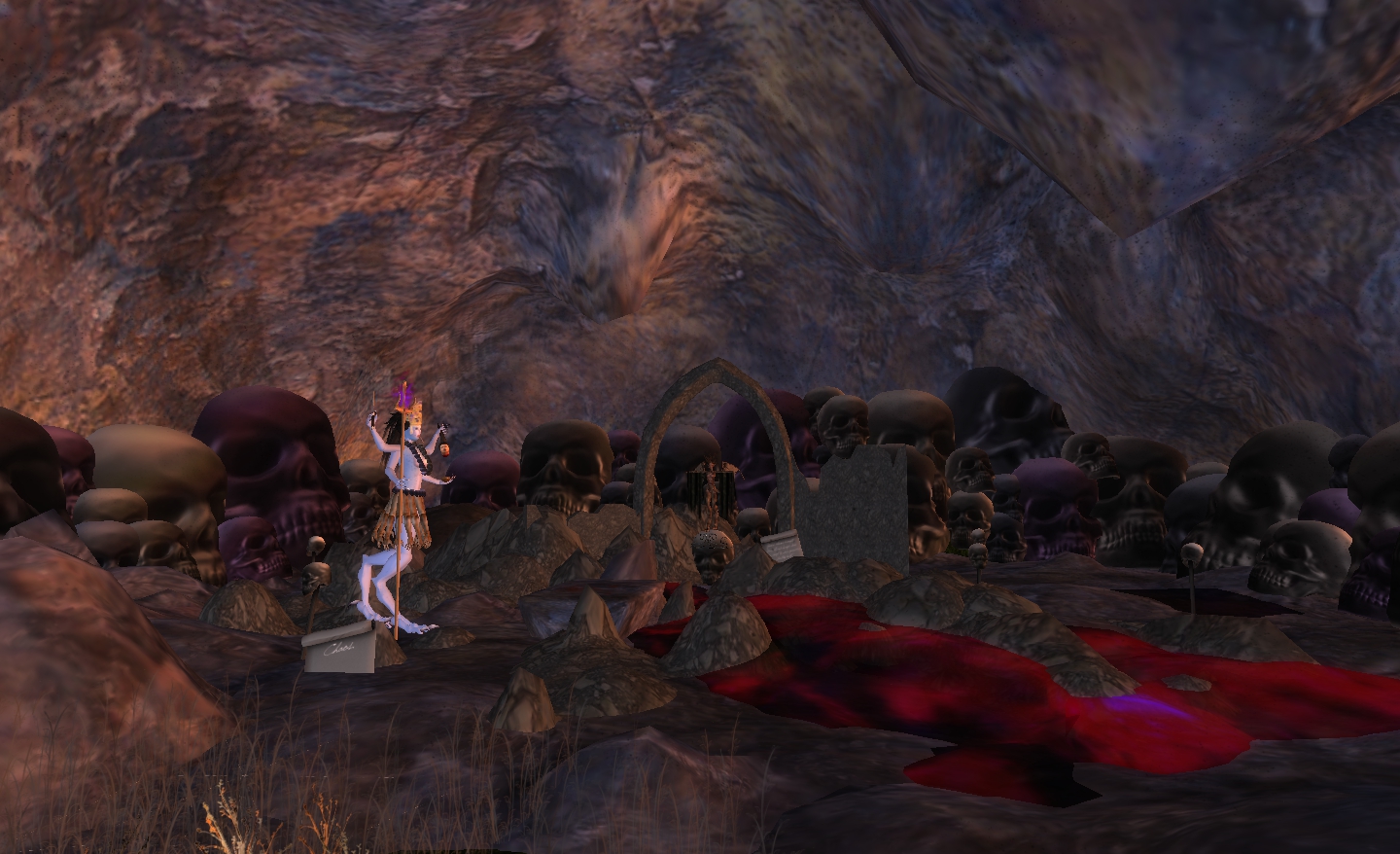
It is a sobering message, one only too clear in its meaning – and it is also one beautifully rendered, although I must admit that I wish something other than a refrain from the soundtrack of Kubrick’s Eyes Wide Shut had been used for the more menacing element of the background music; this tended to allow images from the film slip into my mind, spoiling my focus on the piece in front of me.

Gateway to Hell

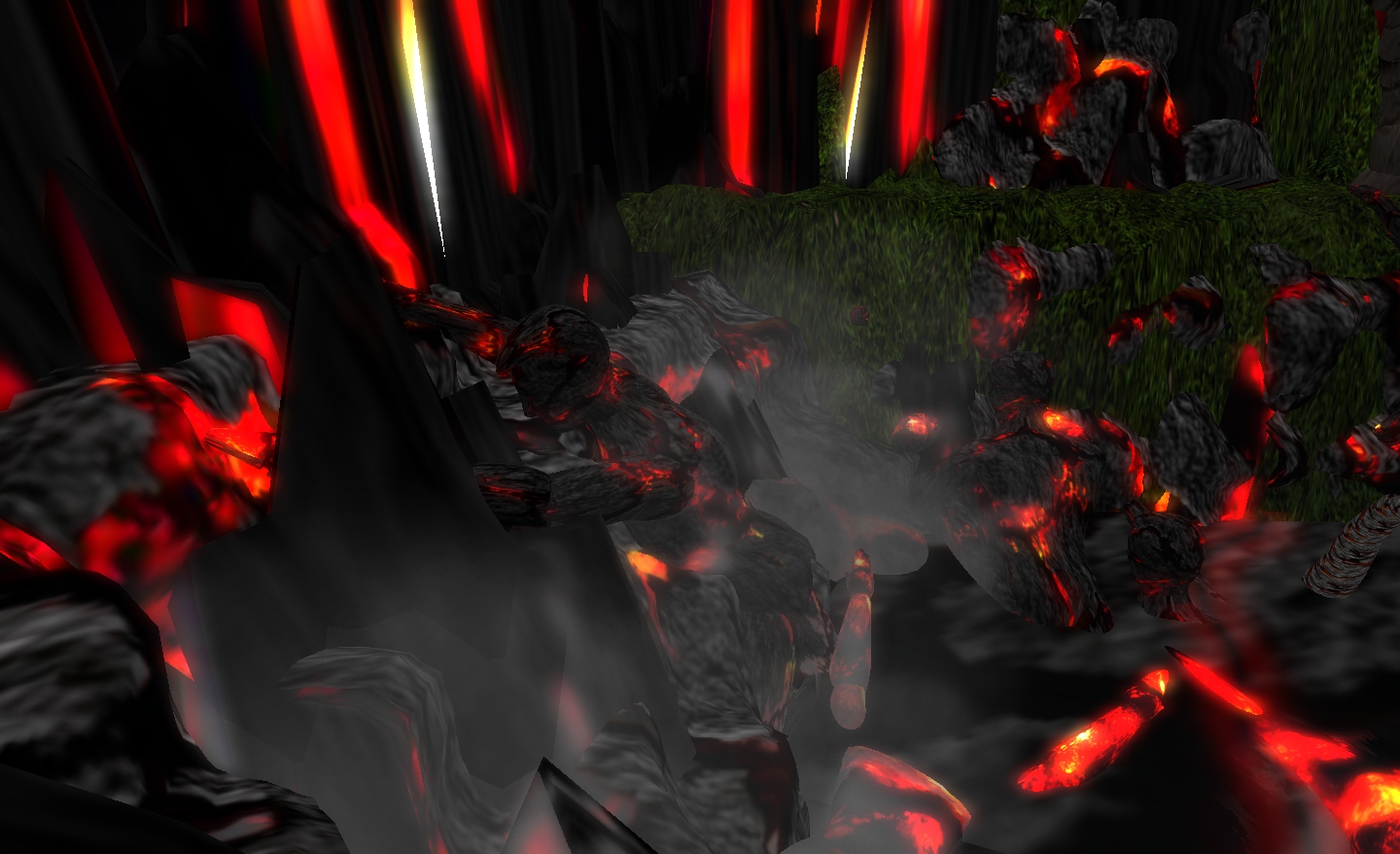
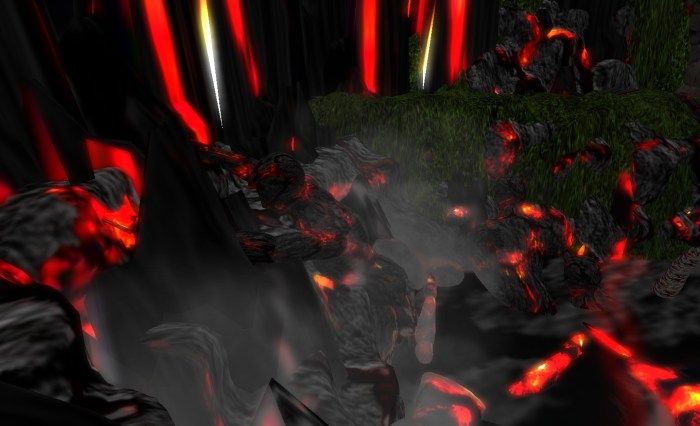
Gateway to Hell in some ways continues the theme of death and damnation as it presents us with burning image of the entrance to hell, the air heavy with ravens, a fire pit heaving and pulsating beneath, the tentacles of unknown creatures writhing up through the fiery rock. As lava flows down from the walls, so to become visible the spirits of the damned as they are pulled down through the pit into hell itself, few willing to go without a struggle.
The Docks

Scottious Polke’s The Docks won acclaim when first presented in SL, and became a popular subject for Machinima makers across the grid. Now it makes a welcome return to its original home. It is a haunting place to visit, one that is perhaps best summed up in What isn’t Underneath by Textcavation.

Opinion

Travel to Originalia is an interesting mix of exhibits, each with its own context and meaning, yet three of them  – The Docks, Gateway to Hell and Adapt or Perish carrying, for me at least, a common subtext. I enjoyed all four pieces – The Docks perhaps slightly more than the others, as I had missed it the first time around, and have only had machinima to allow me to see it; so having the opportunity to visit it in person gave me a sense of anticipation the other pieces, being original items, couldn’t match.

Which is not to say they are not worthwhile seeing. Rather then reverse, in fact. Whether see as a whole, and in a single visit, or as individual displays, each visited independently, they are well worth the trip. Should you visit all three together, I would recommend you do so in the order I used: start with the Post Office and Postcards Home, then go to Gateway to Hell via Adapt or Perish.

Travel to Originalia opens at 13:00SLT on Saturday October 22nd.
Another step or two for Direct Delivery

Alongside the new Viewer 3 UI that has reached the Development Viewer, further small steps have been taken with Direct Delivery (DD).

On the 18th October, DD related code previously released onto Le Tigre was rolled out on the main server release channel. Again, this does not mean that DD is now active, just that the road is being further prepared for DD’s arrival – or to allow for further code compatibility testing.

The code was rolled-out alongside an Agent Inventory update which means that any TPVs that have merged merged since Viewer 2.5.1 should experience much faster inventory response times than previously.

Direct Delivery: Received Items section added to the Inventory floater

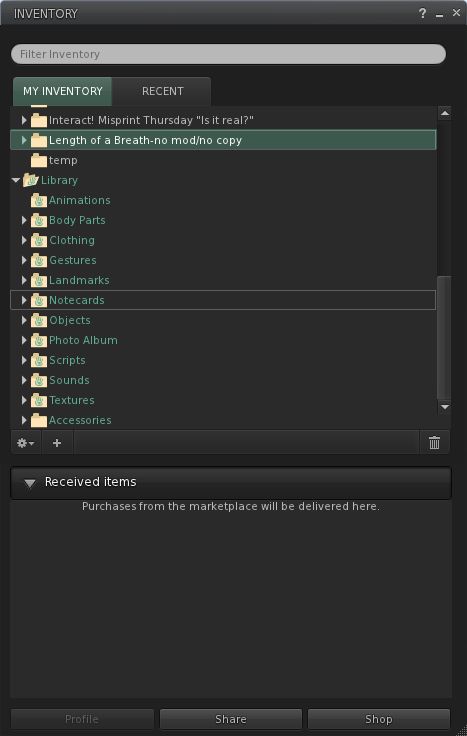
Alongside of this, the latest Development Viewer, as well as getting the new UI shiny, also gets an update aimed at Direct Delivery: a new section in the Inventory floater called RECEIVED ITEMS.

Click on this, and you Inventory floater opens a new panel (left), wherein any items you purchase via the SL Marketplace will be delivered once Direst Delivery goes live, either boxed or in a folder hierarchy (or both, in some cases).

One assumes items delivered to this area can be drag-and-dropped into your main Inventory folders; as I’m not in the DD beta, I’ve actually no way of testing this. However, until the DD system is active, Marketplace deliveries will continue to be made as before, with items arriving in the main section of Inventory.

There is currently no corresponding new section (or folder) that can be used by the system to retrieve merchants’ items that are to be listed on the Marketplace. One assumes this is to prevent any confusion with people thinking DD is now active and thus trying to use the capability.

So, that’s another couple of steps forward, although the silence that has followed what are valid and reasonable questions on the project from merchants has now been going on for long enough to give the crickets leave to start chiruping.

Mesh Land Impact now official

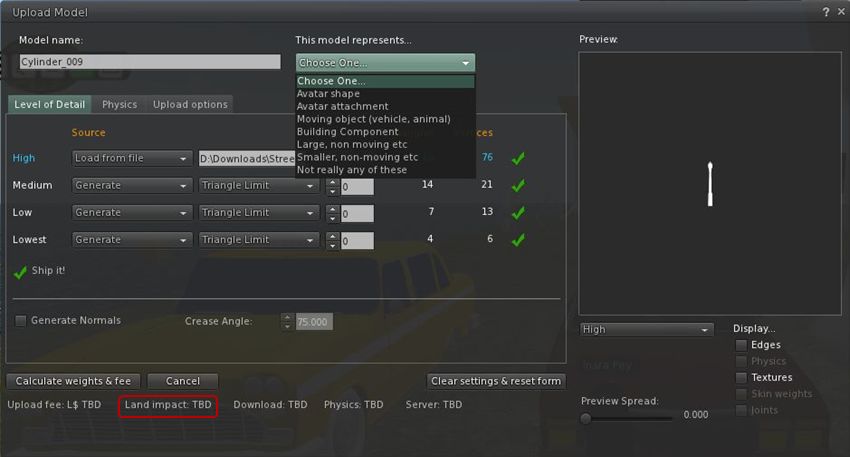
With all the excitement over the new UI reaching the Development Viewer code, it’s been easy to overlook the fact that the last few days saw the latest release of the Viewer, which includes the new mesh uploader floater, and sees prim counts and prim equivalency replaced with Land Capacity and Land Impact.

The new uploader floater provides improved capabilities for adjusting and optimising mesh objects prior to upload.

Mesh uploader floater – note Land Impact towards the bottom

Land Impact is introduced alongside the more familiar upload weights (Download, Physics, Server) in a new blog post from the Lab.

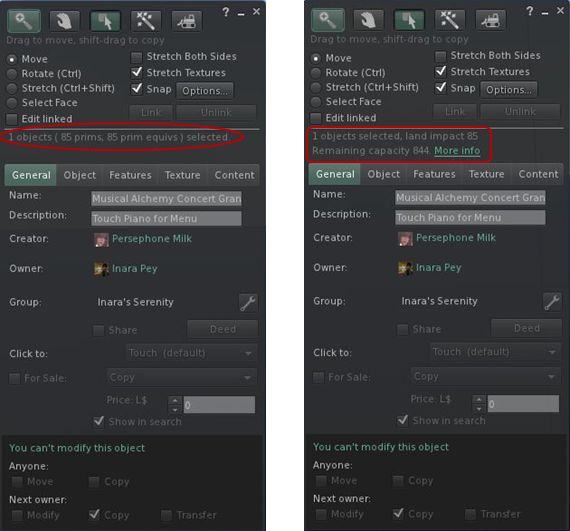
Land Impact itself can be seen in the Build floater, as shown in the image below, which compares how objects are now displayed (right) compared to how we’ve seen them in the past (left).

Land Impact (right) Replacing the Prim and PE values with a single figure

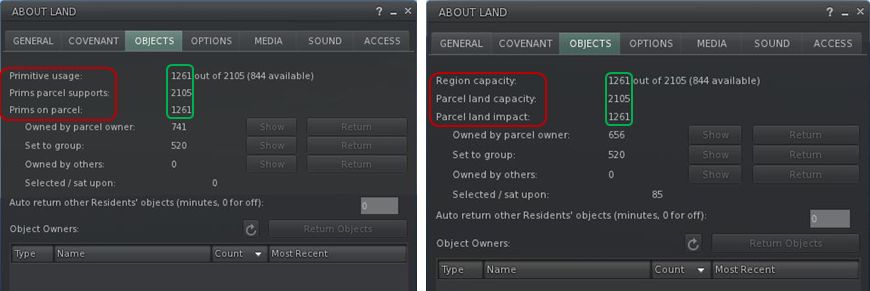
Similarly, the Land Capacity can now be seen under OBJECTS in the About Land floater, with the old (left) and new (right) shown below.

Land Capcity in ABOUT LAND (right) – replacing prim counts (left)

I’ve got a more extensive post on these changes, which includes a look at other options as well. With the changes now firmly in the Viewer release code, expect to start seeing Capacity and Land Impact in the About Land and Build floaters of your preferred V3-based TPV in the very near future.

In the meantime, for those trying out the latest Viewer release, be aware that there are upload issues with it that some people are experiencing, and a JIRA has been opened (SH-2595).

Viewer 3 new UI: first looks

The first phase of the new UI has arrived as a Development Viewer release (3.2.1 (243328)). So what do we have in store?

No Modes

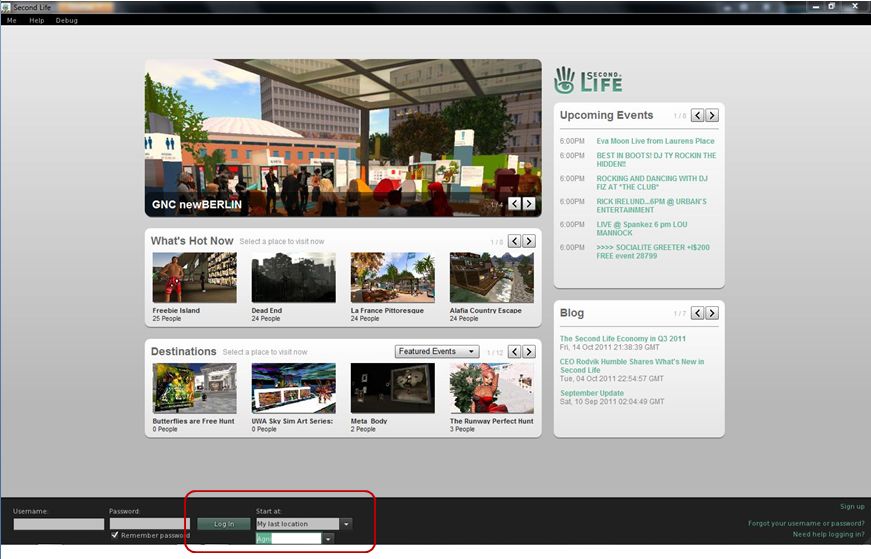
Well, actually, quite a lot, and it’s obvious right from the login screen, where the absence of the BASIC and ADVANCED modes is clear.

No mode options!

Once logged-in, more differences make themselves immediately felt:

  • The top of the UI has been revised so that the Navigation and Favourites bars have been combined, with a slider between the two allowing you to adjust their sizes relative to one another
  • There is a new button up on the Menu Bar I’ll return to shortly
  • There are no Sidebar tabs visible on the right of the screen
  • There is no chat bar at the bottom of the screen
  • There are two sets of buttons visible: one on the left, featuring icons only (by default), and one at the centre bottom of the screen, featuring text and icons (by default).
The default UI on logging-in

If you want to type, you can either click the CHAT button on the bottom toolbar, select NEARBY CHAT from the COMMUNICATE menu (as per previous versions of the Viewer) or, in a move that follows V1 behaviour, tap ENTER. All three options will display the chat bar in its own repositionable floater.

Buttons, Buttons, Buttons

As there are a lot of them, let’s start with the buttons – most of which should be perfectly obvious.

On the left of the screen, we have by default, seven buttons. These are: Avatar, Appearance, Inventory, Search, Places Map, Nearby Voice and Mini-map. All of these will be familiar to V2/V3 users. They perform the same functions as in earlier releases of the Viewer; although in the case of Appearance, Inventory and Places, rather than opening them in the Sidebar, the buttons open the Appearance (outfit), Inventory and Places panels in their own floaters.

I have to admit, Mini-map had me fooled for a moment – the button’s icon suggests it is something to do with Voice.

Only Avatar is a new button here, lifted directly out of the BASIC mode. Clicking it opens up  floater than enables you to pick an entire avatar look – shape, skin, clothes, etc. Four types of avatar are provided with the development release: human, animal, robot and vehicle. One suspects further choices (such as other races) will be added in time.

At the bottom of the UI is the more familiar toolbar with the following options: Chat, Speak, Destinations, People, Profile, View, Move and How To.

Of these, Chat enables the chat floater, as described above, while Speak, View and Move do exactly what they did in previous releases of the Viewer. People and Profile display the People and Profile panels from the Sidebar, now in their own floaters, leaving Destinations and How To.

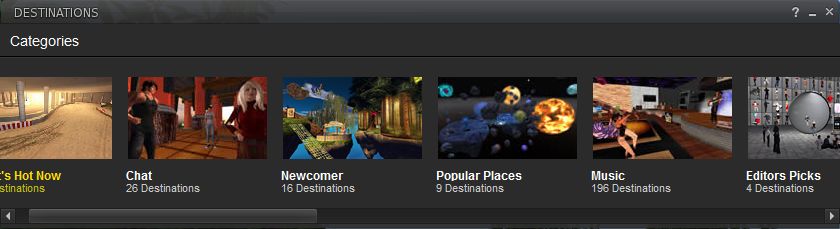
Both of these will be familiar to those who have tried the BASIC mode: Destinations displays a mini Destination Guide floater, with destinations split into categories: What’s Hot Now, Chat, Newcomer, popular Places, and so on.

Destinations Floater
How To

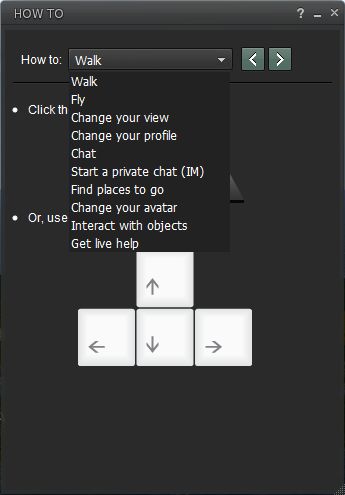
How To is something I’d speculated / hoped would be carried over from the BASIC mode as a part of the merge. I was a big fan of How To when it made its debut in the BASIC mode, as it is a simple, easy to use “cue-card” system for obtaining help, especially for those new to SL. If I’m honest, it is something I banged on at Rodvik about back when it first appeared, I was that enthusiastic about it, so I’m really pleased it has come up into the revised UI.

True, I’d personally like to see the range of topics it covers increased (without going completely overboard), but perhaps further topics will be added over time.

Within How To, the GET LIVE HELP option is new – it wasn’t in the BASIC mode. At first my oldbie heart soared on seeing it, as it seemed to herald the return of the long-gone and sadly lamented Live Help as used to be in Viewer 1.x.

Sadly, this is not the case. Selecting the option displays this message:

“Need help?

“Click the button below to teleport to a Help location where a Second Life guide is available to assist you between the hours of 10am – 6pm PST.”

Beneath it is a TELEPORT button, which in turn opens the Places floater, from which you should, in theory, be able to teleport to a suitable help location. Quite what or where this help location is and who staffs it (one assumes resident volunteers) is unknown. I’m not sure if it is because I tried the option after 18:00 SLT or simply that the function isn’t working as yet – but Places came up a blank, leaving me nowhere to teleport.

So, back to the buttons…

Looking at the layout, one might end up thinking that all LL have actually done is swapped a set of ugly tabs and screen-hogging slidey Sidebar and replaced them with a set of buttons on the left of the screen.

And one would be entirely wrong. Why? Because these buttons are movable buttons. Not only that, they are customisable (to a degree). For example, right-click on any of the sets of buttons and a prop-up displays a menu with the options CHOOSE BUTTONS, ICONS AND LABELS and ICONS ONLY.

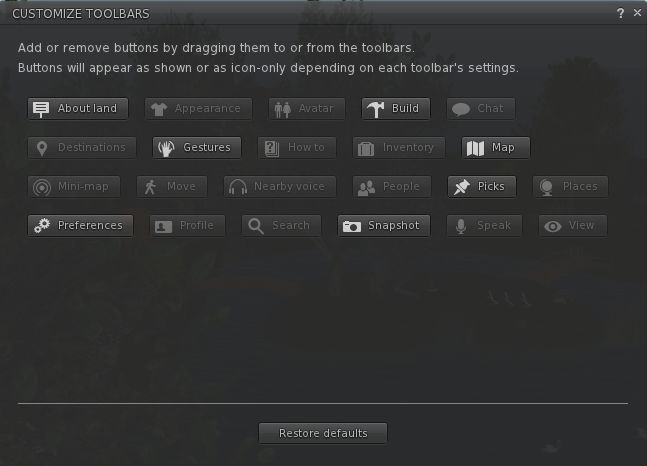
The latter two options allow you to switch between displaying the buttons with icons only (as is the case by default with the buttons on the left side of the screen) or with an icon and text (as is the case with the buttons on the bottom of the screen). But it is when you select CHOOSE BUTTONS that things start to get interesting, because this displays a Button Toolbox floater (which can also be accessed via CTRL-T or the TOOLBARS option of the ME menu).

Button Toolbox

This contains all the buttons available to you within the UI. Any buttons that you haven’t yet used are highlighted for easy identification. Note here, as well, that there are a few new buttons to play with, notably ABOUT LAND, PICKS AND PREFERENCES (yes, you can now have one-click access to the Viewer Preferences!).

To add a button to your UI simply position the mouse pointer over it, click and hold the LEFT mouse button and drag the button from the toolbox.

As you do this, you’ll notice the border on three sides of the Viewer turns blue, indicating you can position the button either on the left, bottom or right side of the screen. Nor does it end there.

You can also move buttons between locations (left side, right side and bottom of the screen) using the same method: simply left-click and hold over each button you wish to move in turn, and drag it to your preferred location. Thus, it is perfectly possible to have all your buttons placed at the bottom of the screen a-la V1, or you can split your buttons between the bottom and right of the screen, a-la a “traditional” V2 style.

You choose where the buttons go

Continue reading “Viewer 3 new UI: first looks”

Viewer UI: Rhett gives a little more information

Tateru Nino carries some news relating to the initial changes to the official Viewer UI, obtained courtesy of Rhett Linden.

Rhett’s revelations, while interesting reading, are not entirely earth-shattering, and don’t actually go that much beyond what Rod Humble himself has already said concerning the Viewer, and what some of us were speculating as a result.

In a nutshell, Rhett has confirmed:

  • The Sidebar is to go. This is something that wasn’t hard to guess at, given Rod himself said as much at SLCC 2011
  • There is to be a more flexible approach to the UI in general, that will allow users to, “Arrange the UI to fit the way they use Second Life.  This is important because it moves us toward a model more like most creative software

This latter point more than likely refers to things like the “Customise Toolbars” and the “FUI” (which people have taken to mean “Flexible User Interface”), both of which are mentioned in passing / hinted at in the SL Helpfile wiki pages (although no specific information is available on either right now). Certainly, the release notes for the merge (see below) point in this direction as well.

What is worthy of note is that Rhett confirms that the initial code for the UI changes, which should also see the arrival of things like click-to-move and the new camera palette (again as revealed by Rod Humble, this time talking on the SL Universe forum), was merged into the Development Viewer code today – although TPV developers had been expecting as much, going on comments passed elsewhere during the day.

For those planning on trying out the latest development Viewer, be aware that the release notes state:

  • The Viewer floater camera views and presets do not work
  • The Nearby Voice panel does not update to a new call or from nearby voice info once opened
  • Viewer crashes when updating UI size in preferences
  • The Speak button is activated when dragging and dropping between toolbars and/or moving back to the toolbox
  • Viewer crash when moving the speak button from one toolbar to another when there is an active call request
  • Teleport history doesn’t display visited locations
  • Viewer crash when double-clicking the mini-map in People > Nearby
  • Notification and conversation chiclets overlap
  • WASD controls don’t move avatar while move floater is in focus
  • Closing voice controls while a group or p2p call also closes the group call / IM window
  • Viewer crash after teleport
  • Hitting back in the ‘Create Group’ panel or ‘Blocked’ panel requires multiple clicks for action to occur.

Login2life: a review

It has been almost four years in the making – growing from the seed of an idea planted some five years ago -, has a truly global reach in terms of those involved, and spans two rich virtual environments.

Login2Life, a documentary directed by Daniel Moshel,  follows a group of people from around the world, each of whom spends some of their time engaged in either Second Life or World of Warcraft – and in some cases, both. On the 17th October, the film received its premier in Germany, and is being streamed for this week only on the ZDF website.

At a touch under 85 minutes in length, the film doesn’t have a specific narrative flow – there is no narrator’s voice-over to guide us from a given starting-point vis-a-vis virtual worlds or lead us to a particular conclusion. Instead, we’re left to meet each of those the film involves, and follow them as they engage in their virtual lives and voice their views and feelings on their lives, what virtual worlds provide for them, about love and relationships and family living and much more. Obviously there is a degree directorial influence involved here – the selection of which part of people’s stories made it into the final cut, etc., but on the whole, the approach leaves the person watching the film free to consider all that they see and draw their own conclusions.

The film opens in real life, with the story of Corey Shea Franks, a young man from California who, in 2002, was left paralysed from the neck down following a car crash. From here we journey to Aurora, Colorado and Alice Krueger, perhaps better known in SL as Gentle Heron. She is watching a performance in Second Life by Jaynine Scarborough (real name: Juliane Gabriel), a singer and vocal music teacher from Berlin, Germany.

Alice has severe multiple sclerosis, which leaves her reliant upon both crutches, or more usually, a powered wheelchair, rarely able to venture out of her own home. Within Second Life, as Gentle Heron, she has been central in the creation of a Second Life community dedicated to those with disabilities – Virtual Ability, with its hub at Virtual Ability Island.

Inspirational: the creation of Virtual Ability and Virtual Ability Island seen through Login2Life

However, it was not her original intention to found and build a community; rather she arrived in SL together with two friends she met via the Internet looking for a community in which they could join. This grew out of feelings that, as disabled people in real life, they were not a part of the respective geographical communities in which they lived. When they failed to find what they were looking for, they decided to make it, and bring people to it.

It sounds so simple – and the machinima accompanying Alice’s description of those early days is touching without being overly sentimental. Yet it is here that we see one of the powers of Second Life revealed: that it is an environment where people can come together openly and, with the right impetus, create something that is truly marvellous and beneficial.

The laughing gnome: Philippe Fatoux and his WoW character

Elsewhere in the film we get to meet Philippe Fatoux, a machinina creator in World of Warcraft – in which he delights in being a cheeky little Gnome, getting up to various amounts of mischief, and Thomas Bengtsson, Guild leader for Ensidia, also within World of Warcraft. There is also Chinese family who play WoW together with the express aim of farming gold – which can be exchanged for real-world currency.

This part of the did leave me feeling rather discomfited; there was something unsettling about seeing almost an entire family almost desperately farming gold in WoW as a source of income while others engaging in the game gave the impression they looked down on those who do this with either pity or disdain.

We also once more meet up with Corey Shea, himself a skilled player in WoW, and his family; and we gain a candid look into the life Kevin Alderman, better known to many in SL as Stroker Serpentine in SL, owner of Eros LLC and the SexGen brand, although he originally started out in  Seducity.

What is striking about the film is the way it naturally blends people’s virtual lives with their real lives. There is no sense of delineation between the two as the film moves back and forth between the virtual and the real. Nor should there be – what happens within the virtual environs is as much a part of these people’s lives as anything they do in the real world. I think it fair to say anyone who invests themselves in a virtual world to a similar degree will readily identify with this lack of delineation as well.

For me, the stand-out elements of the film are with Alice and with Corey’s family – in particular, his mother. Both women are dealing with the massive impact a disability has had on their real lives – Alice in terms of the limiting factors MS has created for her, including her inability to easily socialise and meet people in her every day life; Margeau Janae Franks in dealing with Corey Shea’s condition and the impact it has had upon her family. Seeing both women working through Second Life to bring Margeau Janae’s book, The Length of a Breath to an audience and in the hope of helping others is particularly moving. I felt very privileged to be able to share a part of both of these women’s lives through the lens of Daniel’s camera.

Margeau Janae Franks (podium) and Alice Krueger (Gentle Heron) with her back towards us, work on Margeau Janae’s presentation in SL

Similarly, it is fascinating to follow Kevin Alderman and his family. Here is a man who clearly loves and values his family and who, with them, has demonstrated how very disparate real and second lives can be brought together relatively harmoniously, to the benefit of both. Several of my favourite moments in the film came from being allowed to witness Kevin’s interactions with his family. I also very much liked the scene showing Kevin / Stroker meeting with Alice /  Gentle – to discuss the creation of a couples dance animation that would enable someone in a wheelchair in-world to dance with someone more able-bodied.

Alice and Kevin meet via Gentle and Stroker to discuss dance animation (inserts my own)

Given the range of subject matter covered by the film – including sex – Daniel Moshel is to be congratulated on his overall handling of the subject matter. What we see in this film are not oddballs or people who are socially inept – which is all too often the way the media like to portray those engaged in virtual lives.

Instead, we have people who both directly and indirectly have found that through the virtual medium they have been able to hugely extend their and enrich their real lives. This makes Login2Life one of the few films out there that provides clear insight into why people are motivated to spend a good portion of their time engaged in virtual worlds without pandering to the need to titillate through overt sexual references. The sex is there, certainly, but there is none of the nudge-nudge, wink-wink that many in the media find hard to avoid when looking at virtual world environments. Instead, Login2Life simply introduces us to some amazing people who in turn invite us to share a little of their lives.

Some might critique Login2Life for the lack of narrative flow – or at least the lack of narration; it’s fair to say that at times the jumps in the film are a little disconcerting as we move from story to story, and one’s focus is broken in the mental gear-shifting that follows some of the jumps. If I’m honest, it also makes the film hard to review – I’ve really only scratched the surface in this article and focused on those elements that held the core of my attention. There is so much more going on within Login2Life that in some ways, had there been more of a narrative arc, it would have been easier to review and give feedback.

But the film has not been made simply to be reviewed. It has been made to be experienced, and in that regard, I think the lack of narration / narrative arc works and makes the film more engaging than might otherwise have been the case. Without an apparent central message, the film is far more a voyage of discovering for the audience, and thus that much more satisfying to watch and absorb, as we are free to be drawn into those elements that engage us and come to our own conclusions as the vignettes unfold.

Which is not to say the film does not lead up to something very special. The last fifteen minutes bring so much of what has gone before together in a series of very poignant moments which I’m not about to spoil by describing. You’ll have to watch and see for yourself.

Daniel and the production team are to be congratulated for putting in the years of hard work and effort that were required to make this film. Their effort has been more than worthwhile. Login2Life is a tremendous film, and all those who participated also deserve our thanks for allowing us into their lives.

Login2Life  – why not login and watch it yourself? You can do so all this week, and you won’t be disappointed.