While Phoenix remains by far the most popular of the Third Party Viewers on offer for use with Second Life, a new arrival in the last couple of months is beginning to show some promise – particularly when it comes to implementing features from the Viewer 2.x stable – and which again, like Phoenix and Imprudence, does not require the initial installation of either the “official” 1.23.5 or Snowglobe Viewers as a prerequisite to its use.
Ascent has probably caused some eyebrows to rise, given it is apparently based on the Inertia Viewer code base. Inertia was a non-TPV compliant Viewer that was developed by the infamous “Hazim Gazov” – who was by turns, banned from Second Life by Linden Lab, the “whistle-blower” who first started to “reveal” genuine concerns around the Emerald Viewer (while also sharing in the rumour-building) and who was the target of Phox’s failed (and idiotically suicidal as well as moronically childish) DDoS attack which was in part responsible for Emerald being “banned” as a Second Life Viewer. Ascent is now maintained by one Charley Levenque, aka Charlotte Wirtanen, an unknown quantity in both cases, although in the latter guise, has been around since 2006.
Now to the Viewer itself. The setup EXE downloaded smoothly. It did cause a raised eyebrow, however, as it came in at almost twice the size of the likes of the Phoenix, Imprudence and other 1.23.5 Viewers – although I’ve been informed this is often the case with Viewers based on the Snowglobe code, which apparently forms the foundations for Ascent. An anti-virus scan revealed nothing untoward in the EXE (not entirely unsurprisingly) so I went ahead and ran it. As one would expect from a TPV of this nature, the overall installation was quick and clean, ending with an option to run Ascent at once.
The splash screen showed the Ascent download page, and was in the “official” blue skin display. Logging-in revealed the familiar 1.23.5 UI – but with the ADVANCED menu already listed on the menu bar, so no need to press CTRL-ALT-D.
At first glance, Ascent looks little different to the likes of Phoenix, Imprudence and others: the menu bar and toolbars along the bottom of the screen are largely unchanged, the in-world View is obviously the same – but just a little digging reveals that thought has been put into making Ascent not only different to other TPVs – but potentially more useful.
Clicking on COMMUNICATE, for example reveals several new features. At the top of the CONTACTS list is a CONTACT SEARCH box. Enter the first few characters of a name here, and a list of matching contacts is displayed. Type in a full name, and just display that avatar. Above this is a CONTACT GROUP drop-down, although functionality for this appears to be awaiting implementation. Replacing the Import / Export buttons found in the CONTACTS list of some Viewers is a count of the number of Contacts one has (and the number actually online), and a count of the number currently highlighted within the list. The Search function I can see being very handy for those with massively long Contacts lists – such as store owners – who need to contact someone quickly.
The RADAR (Avatar List) window offers the same functionality as most of the TPV’s that now include this function ported originally from Meerkat. However, unlike Phoenix, Ascent still includes the majority of avatar functions as a series of buttons at the bottom of the display, rather than moving them to a context menu displayed when right-clicking an avatar’s name in the list. When originally introduced into Emerald, this latter functionality caused divisions among users: people either accepted it, or demanded the return of all the buttons. Phoenix has something of a compromise, in that some of the buttons are back at the bottom of the screen; however, I find the context menu just fine, and personally think that Ascent has taken a step backwards here: the Avatar List is a useful tool in many ways, but Ascent’s simply takes up too much screen real estate.
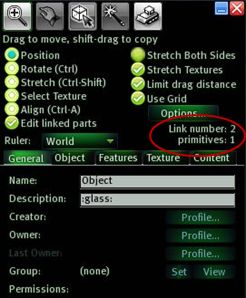 BUILD incorporates functionality found in other TPVs, albeit relabelled. For example: the ability to OPEN the Group profile for a selected object is called VIEW. A nice touch on the Build menu is that when editing linked parts of an object, the “Selected Objects” count common to some other TPVs is replaced by a “Link number” display, as shown on the left. This functionality can be found in “Experimental” releases of Imprudence, but of the standalone installation TPVs, Ascent is the first to offer it in a “full” release.
For people utilising scripts that handle primitive counts to set a specific prim to a specific display (say, lettering on a scrolling prim notice), this strikes me as a useful little feature, and one I’d like to see pop up in other viewers.
INVENTORY offers pretty much the standard fayre for good TPVs, including the ever-handy RESTORE TO LAST POSITION option in the event you TAKE a linkset back to inventory, only to find you’ve missed linking a couple of prims. God knows, *I’ve* needed it enough!
Preferences
As with the majority of TPVs it is in the Viewer Preferences that Ascent shows clear differences. All the usual tabs are there: General, Input & Camera, Network, Web, Graphics… and so on. Two two unique tabs here are ASCENT SYSTEM and ASCENT VANITY.
ASCENT SYSTEM offers a number of additional tabs – less than the likes of Phoenix – each with either a less confusing array of options, or with options that have been better-organised. In summary:
- General: offers a subset of functionality found in the TP/Login tab from Phoenix and others (double-click teleport, always allow fly, always rez under land group when available, as well as several Ascent-specific functions:
- Enable Power User functionality: “unlocks” the ability to set an animation priority up to 7, rather than the usual limit of 4. How this is reflected when said animations are used in other Viewers is unclear.
- Destroy Objects: anything you have the power to DELETE is deleted permanently, bypassing the Trash can.
- Explode Objects: temporarily renders an object physical and then delinks it.
- Chat/IM: neatly combines the more welcome elements of the IM and CHAT tabs again found in other TPVs, providing access to options such as allow MU* poses and auto OOC actions in chat; turning off the typing sound for chat, use vertical IM tabs, toggle the announcement of incoming IMs. This tab also includes the very useful Auto-response option for IMs, and (for some reason) includes options to display the time in either 12- or 24-hour notation and the date in US or European formats.
- Performance: captures the progressive draw distance option from other TPVs, although without the slider bar to adjust. It also includes:
- An option to turn off the annoying wind howl, pulled up from the Windlight settings and made easily accessible
- The ability to turn off the Classic Cloud layer (the one that exists at around the 200m level) at log in, rather than having to twit around and find the option in your Windlight settings. I’m very in favour of this, as it does lead to a nice little performance boost.
- Command Line: sees a subset of the text short cut commands available through the likes of Phoenix continued in Ascent.
- Security: gathers together the more innocuous options from Emerald’s infamous “shield” options, presenting the user with a degree of privacy without going too far in the direction of impinging on the privacy of others.
- Building: offers a subset of options originally found in the Emerald Build tab.
ASCENT VANITY gathers together the kind of settings one might like to set for one’s various avatars (if you happen to have more than one), and includes options to set tag and map colours to highlight friends, etc., as well as turn things like the teleport screens on/off or set breast and other dynamics.
Ascent does away which much that has in the past been looked at as controversial in some Viewers: IM encryption, for example is not present, nor are some of the more intrusive options to bounce in on people. It does have a couple that some may yet object to, although in the scheme of things, they are trivial. The first is the ability to fake your AWAY status – when active, AWAY will say visible in your tag even while you are camming around or engaging in IMs with others, etc. The second is the ability to see how long the people around you have been inactive.
Elsewhere, the pie menus have been reordered somewhat. Imprudence did this as well, with the aim of rationalising the pie menus and making them flow more logically – and it succeeded. It also offers the option of reverting to the more familiar pie menus if people have trouble getting their heads around the reordered versions. Ascent both reorders and adds functionality. I had no problems with the pie menus, but I can see those who want “all the latest but leave it as it is” bemoaning the pie menus at times.
Viewer 2.x Functions
As one would expect, Ascent includes Viewer 2.x’s Alpha Mask and Tattoo layer support – so no surprises there. What is a very pleasant surprise, however, is the inclusion of the Viewer 2.x multi-attachment support for prim attachments. This means that you can now wear multiple items on the same attach point (multiple rings on one HAND, for example) – and have them render correctly in all Viewers. This is a major step forward when compared to the likes of Phoenix and Imprudence – and the work in getting it into Ascent is largely down the Henri Beauchamp. With multiple clothing layer support also promised (i.e. wear 2 jacket layers at the same time), this puts Ascent head-and-shoulders above other TPVs of its kind.
Beyond this, Ascent has the welcome inclusion of a client-side AO, the ever-useful Area Search functionality, and just about everything else that has proven useful in other TPVs. If it lacks anything at all, it is potentially that the Radar / Avatar List doesn’t include the additional listing fields found in Henri’s CL Viewer and, more to the point for many within SL, RLV/a support is lacking at the moment (although it is on the “to do” list) – which seems to be an odd feature to miss out.
There are a couple of functions I don’t entirely understand – such as using the “Ascent System Inventory”, which adds a couple of additional folders to the Inventory window whose precise function is unclear to me. Are they intermediary way points for uploads, located on Ascent’s own servers? The option to upload temporary textures suggests this – in which case, I have to admit to being leery of the functionality. I’ve searched the Ascent wiki for further information here, but have drawn a blank. “Downloading Inventory in the background” also seems to be an odd option. How is this different to the usual inventory caching, which is already dynamic and a background task?
Performance-wise Ascent feels a lot more stable than the likes of Phoenix, and certainly comparable to the “full” release of Imprudence. For me, it scores over the latter in having a wider range of skin options, and also retaining the more usable “large” Avatar List. Although it does miss out in not having a spell checker.
Ascent also appears to run somewhat faster (for me) than the official 1.23.5 Viewer, Imprudence and Phoenix. In comparison with the latter, my preferred Viewer at the moment, Ascent runs at around 10-12 fps faster on a “busy” sim and about 15 fps faster on a “quiet” sim. I have no idea if Ascent is SSE optimised, but overall the performance is good.
I have noted a couple of very minor issues, and given I’ve only been fiddling with it for 24 hours will doubtless find things that will niggle me – but currently, the fact that the Tp screen still momentarily flashes up, despite my setting the option to disable it and relogging after – does cause a frown, if nothing else.
Overall, Ascent is a commendable effort; I’m not qualified to look under the bonnet, so to speak, but from a pure user perspective, I have to say that it has the potential to become a Viewer of choice when certain other functionality has been added. That said, I would prefer to see higher visibility where the developers are concerned before I committed to a full jump to Ascent – and again, kudos to Jessica over at Phoenix in this regard. Nevertheless, providing no unpleasantness emerges around Ascent (one feels there should not be any, but the pedigree of the Inertia viewer hovers in the background), Ascent could come to easily rival Phoenix in the TPV environment. It is already off to a very good start.
 Inara Pey: Living in a Modemworld