UKanDo 3.7.15

logoOn Thursday September 18th, the windows version of the UKanDo viewer released version 3.7.15.28043 (at the time of writing, the Linux version is to follow), the first update to the viewer since April 2014.

Given the passage of time since the last release, this new version brings with it both a significant jump in version number and a lot of merges with the Lab’s official code. As well as these, the viewer also has a number of tweaks, fixes, additions and removals, which come from both the UKanDo team and other sources.

The following is a quick overview of some of the significant changes to the viewer; as always, please refer to the release notes for the full list of changes and updates.

Lab Code Updates

UKanDo 3.7.15 comprises merges with the following LL code releases:

  • Release 3.7.7 – viewer-side Project Interesting improvements to how the viewer and server work together to know what scene objects to draw, and how the viewer utilises the information it has cached
  • Release 3.7.8 – Maintenance release with crash fixes and performance improvements
  • Release 3.7.9 – the “Memshine” release, incorporating the Sunshine / AIS v3 updates and a variety of fixes to address memory leaks in the viewer and improve crash rate
  • Release 3.7.10 – the SLShare two release, with uploads to Twitter and Flickr and updated upload to Facebook (to incorporate the filter support also included in the Twitter / Flickr image uploads)
  • Release 3.7.11 – Snowstorm contributions release which includes the requirements that Windows XP users have Service Pack 3 (Win XP 32-bit) or SP 2 (Win XP 64-bit) in order for this (and future viewer releases) to install
  • Release 3.7.12 – Maintenance release
  • Release 3.7.13Group ban functionality release
  • Release 3.7.14 – viewer build libraries update, providing security, stability and consistency improvements to this and future viewers
  • Release 3.7.15 – Snowstorm contributions viewer, including the unified snapshot floater, and support for ‘older than’ when inventory filtering.
UKanDo includes a large number of Lab-driven updates, right up to the more recent (at the time of writing) 3.7.15 release with the unified snapshot floater

In addition to the above, the viewer is also brought up-to-date with Marine Kelley’s latest updates to RLV.

Preferences Updates

Version 3.7.15 of UKanDo includes the following Preferences updates:

  • A button to clear inventory cache has been added to Preferences > General > Miscellaneous
  • Option added to toggle between web or legacy profile floaters added to Preferences > General > Miscellaneous panel, with web profiles the default
  • Preferences > General > Basics tab has been cleaned-up
  • An option to display your avatar’s name in the viewer’s title bar has been added to Preferences > General > Miscellaneous (via Kokua (?))
  • An option to set teleport action when clicking on the Mini-map has been added to Preferences > Move & View
New option to select teleport action when clicking on the Mini-map

Other Updates and Changes

This release of UKanDo also features the following updates and changes from various sources and the UKanDo team:

  • The viewer now uses the Catznip multi-user log-in in drop-down code
  • Options for raising Abuse Reports have been added to the various chat context menus
  • The text entry widget’s background colour will change according to chat type (via Kokua (?))
  • The Avatar height offset slider (from the Restrained Love Viewer) has been removed, together with all associated code
  • The viewer logo and version number has been added to progress screens (e.g. teleport progress)
  • The region restart countdown displays in minutes and seconds rather than just seconds
  • Inventory folder icons have been updated
  • Various tweaks to buttons  / icons on the Nostalgia skin.

 Summary

A comprehensive set of code merges from the Lab’s repositories brings UKanDo back up to parity with the SL viewer, while the nips and tucks offered by the development team and from other TPV sources serve to further enhance the viewer.

Related Links


UKanDo viewer 3.7.6: nips, tucks, tweaks

logoConnor Monaron issued the latest version (3.7.6.27995) of the UKanDo viewer on Tuesday April 22nd.

The update sees the viewer maintain parity with the Lab’s 3.7.6 code base, and introduces a number of tweaks and updates, as defined in the release notes.

Most notable among the latter are some further updates to the Preferences floater, a revised camera floater, and the import of some capabilities from other TPVs, notably Firestorm.

Preferences Updates

There are a number of updates to the UKanDo Preferences tabs with this release, including:

  • General > Avatar tab: check boxes for avatar turning added / re-introduced
  • Graphics > Hardware: now has a drop-down with options for Anisotropic Filtering
  • Move & View tab: camera mouse sensitivity slider added (slider to the left = slower, more controlled camera movement; slider to the right = faster camera movement); also numeric values added to sensitivity sliders (Mouselook and Camera)
  • Advanced tab: the check boxes (Allow Multiple Viewers, etc.) are now arranged in two columns
Avatar turning options in Preferences > Move and View, UKanDo 3.7.6

Firestorm Pose Stand

UKanDo 3.7.6 adds the Firestorm pose stand by Cinder Roxley with updates from Ansariel Hiller. This can be found on the UKanDo menu. This enables you to fit and adjust attachments, etc., wherever you are. The option does not require a physical pose stand to be rezzed – so it  can be used anywhere, regardless as to whether object entry / rezzing is disabled.

UKanDo 3.7.6 gains the built-in pose stand developed for Firestorm

The pose stand animations will override those in your AO – unless your AO animations are very high priority. So if you find that you are not being posed when the Pose Stand window is open, then turn off your AO.

Firestorm produced a brief tutorial video when they originally released the pose stand. Note that the UKanDo implementation has a warning to remind users to disable their AO when activating the pose lock feature.

Other Items

As well as the above updates, UKanDo 3.7.6 includes:

  • camera
    The revised UKanDo Camera floater

    A smaller camera floater with button fixes (which could perhaps benefit for a drag-to-resize option)

  • Ability to prevent your avatar from automatically turning to face a selected object (from Firestorm / Ansariel Hiller)
  • Optional Viewer 1.x behaviour so your avatar turns to the camera direction after hitting ESC (see FIRE-6357 / Zi Ree)
  • Hide my group title option (via Kokua / Firestorm).

Related Links

UKanDo announces support for automatic updates and version control

logoConnor Monaron has confirmed that the UKanDo third-party viewer is now using Linden Lab’s automatic update capability and viewer version manager.

This means that as of the current version of UKanDo  (3.7.4). As well as providing the option for users to have UKanDo automatically update on a new release, these changes mean that only the current release of UKanDo and the two immediately prior to it will be allowed to connect to Second Life; older versions will be automatically blocked, requiring users to update them.

The UKanDo blog post announcing these changes reads in full:

UKanDo now uses the Linden Lab® Viewer Version Manager (VVM) system for automatic updates and version management. As a user you have the option to set automatic or manual updates in Preferences-> Setup-> Software updates (by default it is set to Install automatically).

The release candidates tick-box is disabled as there are no plans what-so-ever to use this feature.

VVM is also used to control which versions can or can’t login to Second Life®. The versions which can login are the Current Release plus the two previous releases, all versions before these are now blocked!

One side effect to this is as a new version is released the older of the two previous releases will then become a blocked version.

Another side effect is, if you are trying to use a blocked version, it will update to the latest release before it allows you to login.

TPVs are being encouraged to adopt the automatic update / version management capability and / or to restrict their users to using the more recent releases of their viewer so as to lighten the load of having outdated versions of viewer which fail to leverage more recently improvements and capabilities (HTTP, interest list updates, fitted mesh, etc.). As such, UKanDo becomes the latest TPV to do so.

UKanDo 3.7.4

logoI actually managed to miss this earlier in the week, but on Tuesday March 25th, UKanDo updated to version 3.7.4.27968.

This release brings UKanDo up to parity with the LL 3.7.4 code base (so HTTP et al included), and also includes a number of additions and updates. It also updates the viewer’s RLV to version 2.8.5.11.

The following is a short overview of the release.

Viewer Skin

The last version of UKanDo (3.7.2) included the option to swap between the viewer’s own skin and the original LL viewer skin. At the time, while the option added a further degree of customisation to the viewer, I was a little critical of it because of the need to download a ZIP file, shunt files around, restart the viewer etc. I also mused on whether or not UKanDo would move in the direction of other TPVs offering skinning options, and provide a less cumbersome means to select and change skins via a Preferences option.

With the 3.7.4 release, the LL skin has been included as a part of the viewer installation, eliminating the need to download it separately, and an option has been added to the viewer to switch skins without manually moving (and renaming) files. In addition, the default skin used by UKanDo has been changed, and is now the Starlight Orb Blue skin.

The new default skin is one I hadn’t used prior to taking UKanDo 3.7.4 for a spin, and it is certainly very stylised in comparison to the likes of Firestorm’s skin options and the LL viewer skin, utilising rounded or oval buttons and drop-down list items. For those who prefer the previous look, it is also included under the title Nostalgia Blue.

Unlike other v3 TPVs offering skinning options, UKanDo doesn’t provide the mean to change skins through the viewer Preferences. Instead, the option is found at the bottom of the viewer’s log-in splash screen, alongside the log-in options. Simply click on the button drop-down and select your preferred skin and restart the viewer to log-in.

UKanDo 3.7.4 allows users to set the viewer skin from the log-in splash screen

Should you choose, once you have switched to your desired skin, the skin selection option on the log-in splash screen can be hidden via Preferences > Advanced > uncheck Show Skin Selection at Log-in.

Preferences Updates

UkanDo 3.7.4 sees further updates to the Preferences floater. The most prominent changes here lay with the removal of the UKanDo tab and its replacement by the Building tab. The latter now contains all of the options which used to reside under the Preferences > UKanDo > Building sub-tab.

The new Preferences > Building Tab in UKanDo 3.7.4

The Avatar and Chat (- IM) sub-tabs previously found under the UKanDo tab have been relocated under the General tab, together with the Camera, Inventory and RLV sub-tabs.

Film Menu

The Starlight Film menu in UKanDo 3.7.4

This release of UKanDo includes the Starlight Film Menu as well.

Turned off by default, this can be toggled on / off via Preferences > Advanced > Show Film Menu.

When enabled, the menu appears at the top of the viewer, between the RLV and Help menus, providing quick access to those options which may be of assistance when involved in shooting in-world video.

Scene Refresh

UKanDo 3.7.4 includes the Refresh Scene option from Kokua, which can be found under the UKanDo menu (or use CTRL-ALT-SHIFT-R). This is primarily aimed at mitigating the missing prim issue, and when selected, carries out a number of tasks in quick succession, effectively re-rednering the in-world scene:

  • Basic Shaders are deselected, increasing the viewer’s frame rate and allowing the viewer to more quickly pull-in the basics of a scene
  • A message is sent to the viewer log, allowing the viewer to run a little longer without the shaders
  • Basic Shaders are re-enabled to complete re-dressing the scene, which should now be correctly rendered.

Along with this, the UKanDo menu also includes an option to toggle wireframe on / off (also: CTRL-SHIFT-R), also to assist with missing prim issues.

Other Items

The 4.7.4 release also includes:

  • Alt-Shift-S now toggles sit/stand
  • Removal of the multi Username login box
  • Ability to temporarily derender objects, attachments, and/or avatars until a region change or log-out
  • Addition of a “Teleport Here” option to go along with the “Sit Here” in context menus
  • New status bar widgets hidden when in Mouselook mode
  • Help->About Release notes now points to the UKanDo Release Notes URL.

For a full list of updates and changes, please refer to the viewer’s release notes.

Feedback

Another small, tidy update. The addition of the skin selection option is an improvement over the 3.7.2 release, while the Scene Refresh capability from Kokua could well be welcomed by UKanDo users.

Related Links

UKanDo 3.7.2: More nips and tucks

logoConnor Monaron issued a further updated to the UKanDo viewer on Thursday February 27th.

Version 2.7.2.27938 brings the viewer up to parity with the Lab’s 3.7.2 code base and with RLV 2.8.5.10 and offers a series of inventory-related TPV updates, some rebranding and fixes, and the ability to re-skin the viewer with the default LL viewer skin. Release notes for the update are available here.

Inventory Updates

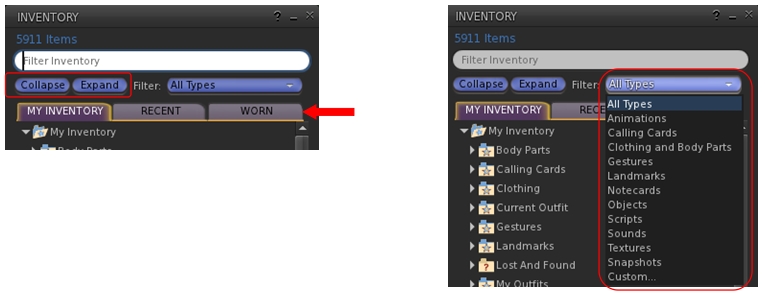
Version 3.7.2.27938 now incorporates three additions to the inventory floater which are popular among several other TPVs:

  • A pair of Collapse and Expand buttons: the first of these will close all folders and sub-folders in your inventory floater; the second will open all folders and sub-folders in your inventory floater, displaying the full tree
  • An inventory search filter drop-down list: allows inventory searches to be filtered by criteria on the drop down (e.g. only search for Landmarks matching the search term)
  • An inventory Worn Items tab: displays everything your avatar is wearing, by folder.
The new (to UKanDo) inventory floater options: the Collapse and Expabnd buttons and the Worn items tab (l): the inventory search filters drop-down (r)
The new (to UKanDo) inventory floater options: the Collapse and Expand buttons and the Worn items tab (l): the inventory search filters drop-down (r)

UKanDo Preferences Tab Updates

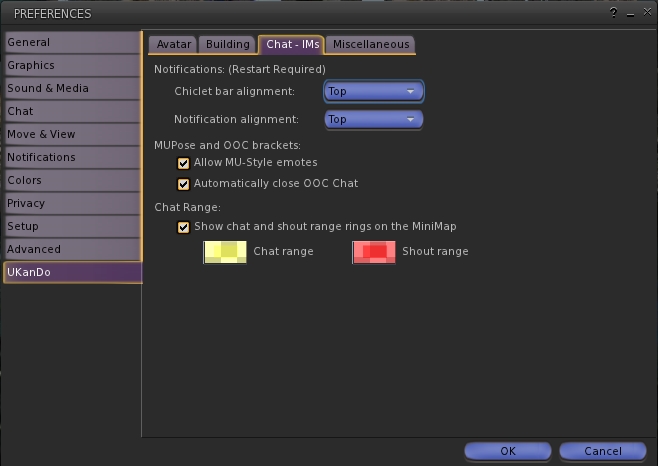
The UKanDo tab in Preferences has also been overhauled, with the options rationalised. A new sub-tab is added: Chat – IMs, which pulls together the chat / IMs related options previously found in the Miscellaneous sub-tab into a tab of their own (chat range indicators for the mini-map, notifications alignments, MUpose* and OOC options). Similarly, the Group Land Rez option is moved from Miscellaneous to Avatar (under the new Inventory heading) and also appears in the Build sub-tab as well.

UKanDo 3.7.2 sees the UKanDo tab in Preferences re-worked to make finding options easier.
UKanDo 3.7.2 sees the UKanDo tab in Preferences re-worked to make finding options easier, including a new Chat – IM sub-tab

LL Default Skin

UKanDo users can now opt to re-skin their viewer with the default Lab viewer skin. This is reported as being a part of the UKanDo 3.7.2.27938 update, but appears to work with earlier releases as well (tested with 3.7.0). Be warned, the process does require some fiddling on the user’s part:

  • UKanDo must be shut down
  • The skin folder  must be downloaded from the UKanDo website download page as a ZIP archive
  • The user needs to locate the viewer  install location (e.g. for 64-bit Windows: C:\Program Files (x86)\UKanDoViewer) and then rename it (e.g. “skins_old”)
  • The downloaded skins folder then needs to be dragged from the ZIP archive and dropped into the viewer’s install location (e.g. for 64-bit Windows: C:\Program Files (x86)\UKanDoViewer)
  • UKcanDo can then be restarted, and will use the LL default skin.

The original UKanDo skin can be restored by following the steps above, making sure the original skin folder is renamed “skins”.

Feedback

Another small-ish update, aimed at keeping the UKanDo viewer on a par with LL code updates whilst also incorporating a few nips and tucks.

The option to change the viewer skin is a somewhat convoluted process, especially compared to those TPVs which allow you to select a skin style from within them (e.g. through a Preferences tab) and then applies the selected style with a simple re-start. Whether UKanDo will also move in that direction, remains to be seen; as it is the copying / renaming of folders following each update to the viewer could get a little tiresome for some users.

That niggle aside, a compact and useful update for UKanDo users.

Related Links

UKanDo updates with Fitted Mesh

logoUKanDo updated on February 14th to version 3.7.0.27930 (release notes).

The core update to this release is that it brings the viewer to par with the Lab’s 3.7.0 code base, and thus it joins the list of viewers with fitted Mesh support.

In addition to this, the viewer is also brought up to par with Marine Kelley’s RLV 2.8.5.9 and incorporates a fix to ensure MUpose and OOC brackets work correctly when RLV is disabled.

As well as the above fix, both MUpose and OOC also get their own radio button options in Preferences > UKanDo > Miscellaneous.

MUposes and OOC get their own options in UKanDo's Preferences
MUposes and OOC get their own options in UKanDo’s Preferences

A further addition is the debug setting ShowLookAtText, which gives the current status of another avatar’s camera (e.g. focused on another avatar or an in-world object; idle; freelook), when ShowLookAt is enabled in the viewer.

ShowLookAtText defines the status of cameras in SL above avatar's heads
ShowLookAtText defines the status of cameras in SL above avatar’s heads

This is seemingly small update to the viewer – but it is one which keeps it pretty much on a par with the released LL code (barring the Facebook Hotfix), and also keeps the viewer to the promise of close alignment with the official viewer with  just some of the more popular TPV UI additions.

Related Links