On Wednesday October 15th I blogged about the Lab having issued a Grid Status update warning, those who use the viewer’s built-in browser may not be able to access certain websites. The notice was issued by the Lab as a result of the Padding Oracle On Downgraded Legacy Encryption (Poodle) vulnerability reported by Google.
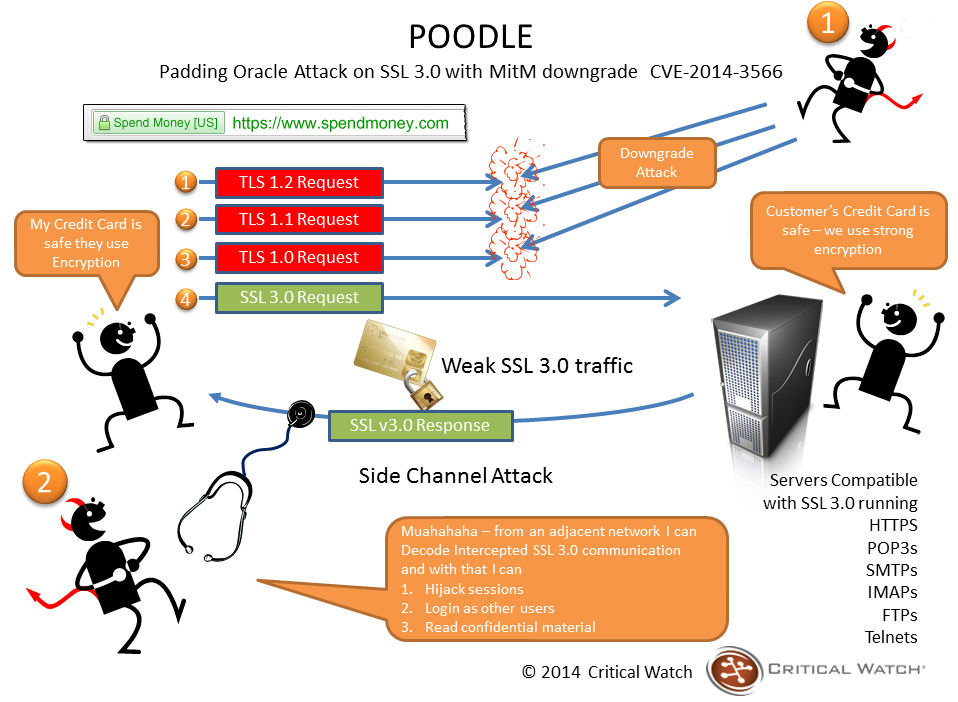
As noted in my original article, the Poodle vulnerability exploits a flaw in the design of the SSL 3.0 protocol, which despite being 18 years old, is used as a fallback security protocol within most browsers. By using a series of connection failures between a browser and website, an attacker can trigger what is called a “downgrade dance” where the browser eventually falls back to using the SSL 3.0 protocol to maintain communications. When this happens, the attacker can use the exploit within SSL 3.0 to grab sensitive data.
How a Poodle attack works (image courtesy of Critical Watch)
There are a couple of caveats to the vulnerability; for the attack to work, the attacker must be on the same wireless network as you or in the path of your communications (as shown above), and your client must be running JavaScript. However, it caused Google to issue an advisory that SSL 3.0 support is disabled or that tools that support TLS_FALLBACK_SCSV (Transport Layer Security Signalling Cipher Suite Value) are used be websites, which prevent the “downgrade dance” attacks. This prompted some websites to remove / disable SSL 3.0 support, which in turn resulted in some websites becoming inaccessible when using the viewer’s internal browser or browser-related services.
At the time the Grid Status update was issued, the Lab indicated they are working to fix the problem within the viewer’s browser capability. This has now been done, and release candidate version 3.7.18.295539 of the viewer, referred to as the “Browser Fix” viewer, removes SSL 3.0 usage from the viewer’s internal browser, allowing it to connect to sites which have disabled SSL 3.0 support.
If you do use the official viewer and prefer accessing websites using the internal browser, you may want to download this RC. For those not using the official viewer and who have experienced issues accessing websites through the viewer’s internal web browser, try switching to using an external browser to open web links (set via Preferences), as per the advice on the original Grid Status update from the Lab.
Unless indicated otherwise, the notes below are taken from the Server Beta meeting held on Thursday October 16th, 2014. The transcript is available here, and the support agenda notes here.
There was no code promotion to the Main (SLS) channel on Tuesday, October 14th – this follows from there having been no deployments to the primary RC channels in week 41
On Wednesday, October 15th, the primary RC channels were updated as follows:
Bluesteel received the CDN texture & mesh fetching capabilities – release notes
LeTigre and Magnum both received a new server maintenance package, which includes a crash fix and improves the delivery pipeline for abuse reports.
SL Viewer
HTTP Pipelining RC
On Wednesday October 15th, the Lab released the HTTP Pipelining RC viewer. Version 3.7.18.295372 brings with it:
Pipelined HTTP Operations for Mesh and Texture Fetches: this feature allows the viewer to issue multiple asset fetches on a connection without waiting for responses to earlier requests. This reduces the impact of a user’s physical location on scene loading and generally improves the experience for everyone
Inventory Fetch Improvements: Inventory folder and item fetches are getting some of the same treatment that textures and meshes did in previous releases. Initial inventory load should be quicker and more robust for all users.
A blog post from Monty Linden accompanies the release, which provides further information on the HTTP project alongside of the viewer release notes.
A blog post from Monty Linden arrived with the Pipelining RC viewer, and explain how the viewer (and CDN) should generate further improvements in texture and mesh fetching operations
Maintenance RC Viewer Removal
The latest Maintenance RC viewer, version 3.7.17.294943, has been withdrawn from the release channel due to significant issues and a range of attachment bugs which affect it (see my week 41 update from the TPV developer meeting, under “AIS v3 Issues”).
CDN
As noted above, use of the CDN service for texture and mesh data was extended to the BlueSteel RC in week 42, and there is some anticipation within LL that it could be deployed to all three of the primary RCs sooner rather than later.
An issue has been noted on some regions running on the Snack RC where people are seeing very slow parcel information updates (e.g. the name of the parcel taking up to a full minute to appear in the status bar, for music stream changes to occur, etc.).
The thinking from the Lab is that these problems are a result of the Snack sim hosts receiving a top-heavy load of regions with high traffic counts, resulting in possible resource contentions with certain data lookups as a result – contentions which may have actually brought the regions down had it not been for the CDN, as Maestro Linden commented:
In the cases I’ve seen so far, the slowness was due to a rapid rate of requests from all the users logged into the regions. If the sim were serving all the texture and mesh requests as it traditionally would, the regions would have ‘fallen over’ before becoming that populated.
So this would seem to be an unintentional cloud with its own silver(ish) lining (at least the regions didn’t fall over). Nevertheless, the issue isn’t welcome. Given that BlueSteel has a more even distribution of regions across sim hosts (e.g. the servers are not all packed to the gills with high volume traffic regions), It is hoped that the issue will not exhibit itself there. Checks (either by the Lab or residents or both) are likely to be carried out on busy regions on the RC to see if the problem does raise its head, which might indicate some further investigations might be required.
Assuming all goes well with the BlueSteel deployment, it is thought that CDN support will likely extended to the remaining RCs sooner rather than later. In the meantime, for those interested in seeing how use of the CDN works for them, a list of regions by RC can be obtained via Tyche Shepherd’s Grid Survey website, allowing BlueSteel regions to be easily located. Just click the RC Server Regions button (note the list will require a little cleaning-up, post download).
There was no code promotion to the Main (SLS) channel on Tuesday, October 14th – this follows from there having been no deployments to the primary RC channels in week 41
On Wednesday, October 15th, the primary RC channels should be updated as follows:
Bluesteel should receive the CDN texture & mesh fetching capabilities – release notes
LeTigre and Magnum should both receive a new server maintenance package, which includes a crash fix and improves the delivery pipeline for abuse reports.
SL Viewer
As noted in my report here, Monday October 13th saw the release of the latest version of the Oculus Rift project viewer. Version 3.7.18.295296 includes support for the Oculus DK2.
Viewer-managed Marketplace (VMM)
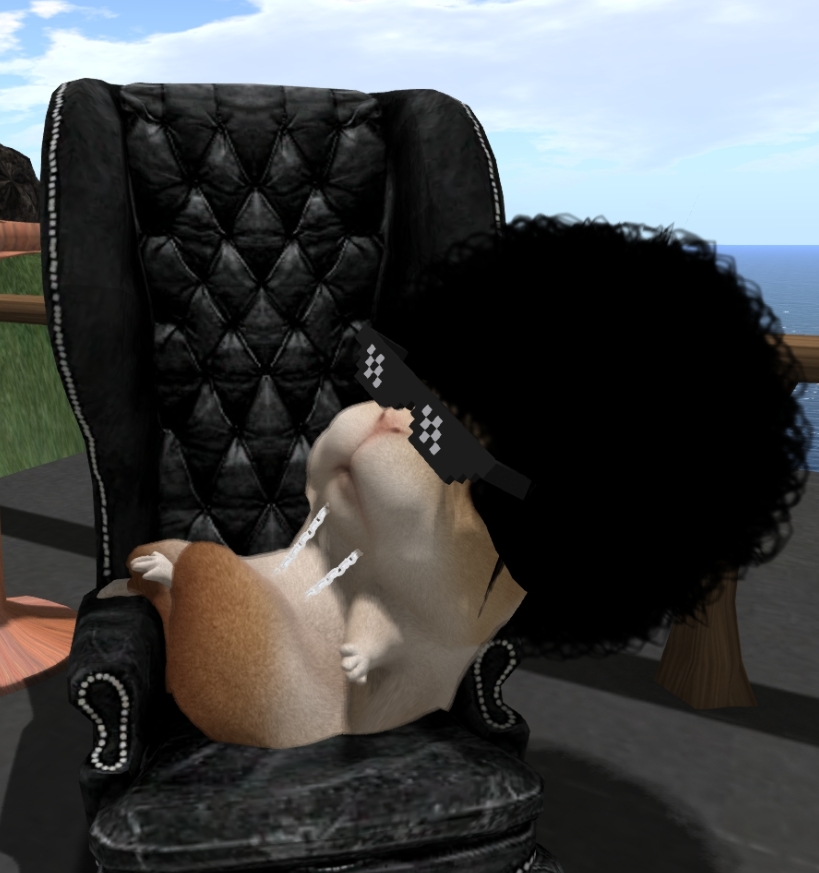
Baker Linden sports a new look, but keeps the hair, shades and bling – as all hamsters should!
Baker Linden, who has been carrying out a lot of the back-end work on support of the forthcoming viewer-managed Marketplace, was on-hand that the Simulator User Group meeting on Tuesday October 14th to talk a little more about the project.
He reconfirmed that the new capabilities, which will allow merchants to carry out a number of Marketplace-specific tasks from within the viewer (create new listings with stock, Associate inventory to an existing listing, remove items from a listing, unlist goods entirely) will commence testing on Aditi in November, together with a new project viewer. This testing is liable to run well into the first quarter of 2015, and will involve both Marketplace merchants and TPV developers.
Various additional safeguards are being built into the updated delivery mechanism, both within the Marketplace web interface (which is the responsibility of one of the Lab’s web developers) and the back-end of things. For example, if someone leaves an item in their shopping cart and either the price for the item changes or it is unlisted in the intervening period prior to them continuing to the checkout, they will receive a notification of the change when they do so.
Baker himself is working to eliminate issues with No Copy items, such as preventing a race condition in which a region restart can be exploited to obtain more than one version of a No Copy item. He also indicated that when a No copy item runs out of stock, the listing for it will no longer be delivered to users’ browsers by the Marketplace (presumably until the merchant “restocks” the item) and the listing may even be deactivated.
He also provided more information on the ability to link more than one items to a Marketplace listing, stating:
For merchants, you will be able to choose which “version” is listed so you can have a special holiday-skinned object, and then simply right-click, say “use this version” and then it will start selling the new holiday version of your object! When you’re done selling the holiday themed object, just switch back to the original version.
However, a problem here is that some people tend to let items accumulate in their Marketplace shopping cart for a period of time – perhaps a week or so – before proceeding to the checkout. It is therefore possible that if they add a “special” version of an item to their cart and leave it there for a while, the merchant may subsequently swap the listing back to deliver the “normal” version of the item – which the buyer will receive when then do eventually proceed to checkout and pay for the items in their shopping cart, leading to complaints and upset. This is something the Lab hadn’t actively considered, so Baker has taken the issue back to the office where it will be given further thought.
The discussion of the new Marketplace capabilities lead to a number of suggestions being put forward, some of which may be on their way to being filed as JIRA feature requests:
The ability to mark stores as favourites in the Marketplace
The ability to obtain a demo version of an item directly from the item’s listing page
The ability to associate different coloured versions of the same product in a single listing
The ability to view an item’s contents like the contents of in-world objects can be inspected.
A request was also made for some kind of in-world meeting to discuss the Marketplace. This is not the first time such a request has been made. However, the last time the Commerce Team directly responded to such requests, it was with a refusal to hold in-world meetings. However, there was a lot going on with the Marketplace at that time, which was causing a lot of angst; it’s fair to say a lot has changed since then. Certainly, with an extended period of testing for the new viewer-driven capabilities about to commence, which will involve both merchants and TPV developers, it would seem that putting a mechanism in place by which the Lab, merchants and developers can discuss things would benefit the project tremendously.
On Tuesday October 7th, the Main (SLS) channel was updated with the server maintenance package deployed to the three primary RC channels in week 40, which fixes a bug related to viewing parcel details in gaming regions
There are no planned deployments / restarts scheduled for the three primary RC channels of BlueSteel, Magum and LeTigre
On Wednesday October 8th, the Snack RC, which is currently being used with the CDN project, should receive the same server maintenance package deployed the Main (SLS) channel.
SL Viewer
On Monday October 6th, the new log-in screen viewer was promoted to the de facto release viewer, version 3.7.17.294959. This viewer offers a revised log-in / splash screen for both new and returning users, based on feedback gathered during A/B testing (release notes).
CDN Update
There is still no list of all the regions now running on the Snack RC and using the CDN for mesh and texture data retrieval, although Bay City – Sconset is one to add to any unofficial lists out there. It also appears that a number of Blake Sea regions may have been added to Snack, and are being blamed for region crossing issues.
The CDN service itself shouldn’t result in any worsening of region crossing issues, but Simon indicated that in moving regions onto the Snack Rc, the Lab, “inadvertently overloaded the servers on the Snack channel…. In this case, we picked a bunch of popular areas and put them all on the same machine, which was bad” (this overloading also might be related to BUG-7444 – note the comment from Maestro Linden). “We did get some very good info on how things get overloaded, however,” Simon added. “…And possible future work to keep us busy.”
In the meantime, it is still not clear when a wider deployment of CDN support might take place. However, there do not appear to be any major blockers to a possible wider deployment to one (or more) of the primary RCs. It will be interesting to see if anything is announced for week 42 (week commencing Monday October 13th).
On Tuesday September 30th, the Main (SLS) channel received the server maintenance package previously deployed to the three primary RC channels (BlueSteel, Magnum and LeTigre), and which focuses on the Experience Tools project
On Wednesday October 1st, the three primary RC channels all received the same new server maintenance package which fixes a bug related to viewing parcel details in gaming regions.
The RC update was to fix BUG-7329 “RemoteParcelRequest cap returned by a skill gaming region does not exist (returns HTTP error code 404)”. In the official viewer, this capability is mainly used to show parcel script info, but some TPVs use it to show the parcel_id of parcels as well.
SL Viewer
The new log-in screen RC viewer was updated to version 3.7.17.294762 on September 29th, although it didn’t appear on the Alternate Viewers wiki page until either September 30th or October 1st.
A new Maintenance RC entered the viewer release channel on Thursday October 2nd. Version 3.7.17.294943 contains around 40 updates focused on voice, privacy, rendering, texture animation, avatar distortion, inventory management, sounds, and mouselook in Mac, together with a scripting crash fix and multiple UI fixes in script editor, Pay flow, chat, stats floater, edit menu etc. See the release notes (linked-to above) for details.
CDN News
Speaking at the Server Beta Meeting on Thursday October 2nd, Maestro Linden confirmed that there are now 28 regions using the CDN service for texture and mesh asset data. A full list of regions is still not available, but among the new additions are Morris, Dore, Ahern, and Bonifacio.
These regions are all running on the Snack RC. There is unlike to be any wider deployment to a larger RC in week 41 (commencing Monday October 6th), as the Lab is still fine-tuning their gathering data. However, there are still a few slots left on Snack for those wishing to have their regions added to it. Requests should be sent to cdn-test@lindenlab.com. Note that regions should be those with a relatively high texture / mesh count,
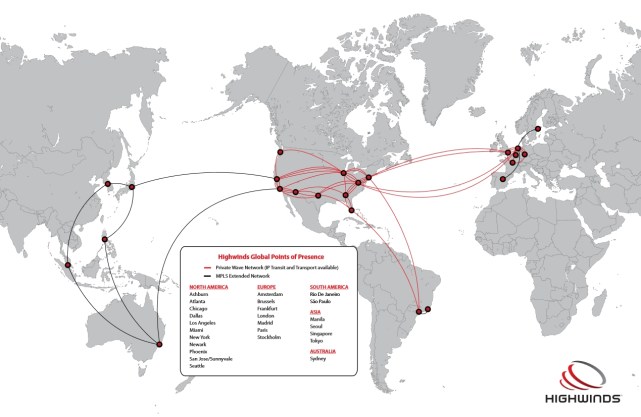
The CDN service being used by the Lab is operated by Highwinds Network Group, which the Lab has also been using in support of server-side appearance.
Highwinds supply their CDN service to a broad range of businesses, including a number of games companies such as Valve (Steam), Funcom, Meteor Entertainment, GameFly and Virgin Gaming. They operate 25 centres around the world, with 11 in North America, seven in Europe, 4 in Asia, one in Australia and two in South America, over their own network infrastructure, which they call “RollingThunder”, which peers with more than 1,600 provider networks worldwide and over 14,000 ASNs, and uses the anycast network addressing and routing methodology.
Highwinds data centres – click for full size, or see additional information via Highwinds here (image courtesy of Highwinds)
Group Chat
As I’ve previously reported, one of the biggest issues of chat delays in group chat sessions is to do with the numbers of updates the chat server has to send as people join / leave session and log-in / out of SL (which causes an update to their status in the group member’s list).
Some work has already been carried out in ways to reduce the volume of update messages being sent with the aim of lessening the impact they have on the flow of actually text messages, and Simon Linden is attempting to further refine this work, again with the agin of reducing the volume of update messages and their impact on group chat test messages.
The Server Beta User Group meeting on October 2nd saw a further test of his work in order for him to gather data on the effectiveness of these changes, and feedback on his findings will likely be given at one of the user group meetings next week.
The following notes are drawn from the TPV Developer meeting held on Friday September 26th, and shown in the video above. Time stamps, where relevant, have been included for ease of reference to the video. Note that items are listed according to subject matter, rather than chronologically, so time stamps may appear out-of-sequence in places. My thanks as always to North for the recording.
Benchmark Viewer & GPU Table
[01:00] As noted in part 2 of this report, a new GPU Benchmark project viewer is available (version 3.7.17.294710), designed to put an end to the need for a dedicated GPU graphic table as the mean by which the viewer determines a computer’s initial graphic settings.
Instead, if there is no settings file for the viewer (such as after a clean install), the viewer will measure how quickly data can be copied back and forth between GPU memory and your computer’s main memory. This, combined with a couple of other benchmarks, determines the initial graphics settings in the viewer. It may not always pick the most preferred settings (it might still set things a little high or a little low), but testing has shown it to be reasonably accurate, and it does prevent the viewer opting for the lowest settings simply because a card isn’t listed on the GPU table. As is currently the case, any subsequent adjustments you make to the graphics settings should be saved within the viewer and take precedence.
Feedback on the viewer is encouraged (a wipe of any SL viewer setting files on your computer will be required), particularly if you encounter issues such as finding the viewer “sticks” with the settings it has determined, rather than allowing you to adjust them. When filing JIRA, the Lab requests that log files are attached.
HTTP and CDN
[09:39] The anticipated HTTP pipelining viewer should be appearing as a release candidate viewer in the early part of week 40 (week commencing Monday 29th September). This is the viewer that the QA team in LL have been referring to as QA, “weaponized viewer”, it is so fast as a result of leveraging the HTTP streaming.
This viewer works with the CDN, with Oz Linden indicating a personal experience of logging-in to a CDN-enabled region with an empty cache and having the textures and meshes for the region loaded by the time the log-in process had finished, so it will be interesting to see how the viewer performs under more widespread use.
TPVs are being encouraged to adopt the HTTP updates as soon as their integration / release cycles allow. In the meantime, those wishing to test this viewer, when it appears, with the CDN can do so via one of the following regions: Denby, Hippo Hollow, Hippotropolis,Testsylvania, Brasil Rio, Brocade, Fluffy, Freedom City, Rocket City or Whippersnapper. It is anticipated further regions will be added to the CDN channel (Snack) in the next week or so, prior to CDN support rolling to one of the server RC channels.
Voice Updates
[17:16] Another batch of viewer updates due out, and which TPVs are being urged to adopt as soon as they can, are for voice. These mostly relate to managing voice sessions rather than voice improvements, and are aimed at helping Vivox with problems at their end, and should make troubleshooting genuine issues within voice a lot easier. However, this update should plug the hole where stalkers can track where someone using voice has teleported to just by monitoring their voice channels.
Z-offset Height Adjustment
The z-offset hegiht adjustment option should help in situations where the current Hover option is unusable – such as trying to adjust you avatar’s height when using a preferred AO sitting pose
[18:42] Vir Linden is now working on the z-offset height proposal. The work is in the early stages, so no date on when it will appear in a viewer.
The current plan is for a new option to be added to the right-click avatar context menu which will access an adjustment slider. However, at present, any adjustments made using it will not be persistent across log-ins, although it will work alongside the existing Edit Appearance > Hover option (allowing for the No Mod shape limitation of the latter).
It has been suggested the offset setting could be made persistent by tying it to a debug setting. This is something the Lab has said they’ll think about; should they opt not to go that route, there will hopefully be no reason why TPVs should not go that route if persistence was deemed vital to their users’ experience.
[48:13] Adjustments made using the slider will occur locally until such time as the mouse button is released; only then is an update message sent to the server & relayed to other viewers, to prevent multiple messages spamming a server as people make adjustments. It is hoped that this approach will also allow z-offset adjustments to interact with other active animations relatively smoothly (e.g. adjusting your height to prevent appearances of dancing on air when using couples dance poseballs).



 Inara Pey: Living in a Modemworld