The Lab launched its latest Amazon offering to US residents on Friday April 12th: Trooble Pigs. The accompanying blog post gushes:
We’re happy to announce a new special offer for Second Life on Amazon – a pack of virtual pets!
The Troobles have arrived and are squeaking with excitement to be the stars of our third limited-time, special promotion on Amazon. From now to April 24, 2013, you can get the Pet Pack – The Troobles (a $9.95 value) for free.
The Pet Pack includes an adorable family of Trooble Pigs including Daddy, Mommy, baby sister, and baby brother. Each Trooble has their very own fashion accessories and special talents. Mommy Trooble offers customized greetings to your visitors, Daddy Trooble can go into guard mode and teleport trespassers, and the babies are always up for a cuddle.
This is the latest of “premium packs” and “special offers” being supplied to SL users / Amazon customers located in the USA through Amazon’s online game service, presumably as a means of promoting Second Life to the latter – something which didn’t exactly start off overly well when the original offer backfired and resulted in much amusement. Well, for me it did.
I’ve actually nothing against the Lab trying to reach out to new audiences and build new, engaged users. Rather the reverse; I believe it is more important they do so than it is for them to cut tier. As I’ve previously pointed out, tier cuts (for the foreseeable future) are liable to do more harm than good, whereas building an engaged user base can only be for SL’s betterment.
However, what I do feel – and continue to feel – is that offers like this tend to miss the point, and that if the Lab really is after attracting new users from the masses who use Amazon (even if only those located in the USA), then there is fair more they could do in which to make SL appear attractive and worth the investment.
As it is, the virtual pet / fashion accessory pigs are here and will remain “free” until Tuesday, April 24, after which they’ll presumably continue to be offer at $9.95. So if you’re of a mind and in the USA, you can hop over there and pick them up – dare I say – with no trooble at all.
Update, April 10th: Use of some of the mateirals processing capabilities – notably Alpha Masking and Emissive Masks – can have a significant affect on Land Impact valuse – see my week 14 SL projects update for details.
On Monday April 8th, Linden Lab released the first public cut of the Materials Processing project viewer. As the server-side of the materials processing support was deployed to the main grid earlier in the year, this release means that materials processing – with some caveats – can be experimented with by all.
These caveats are that the viewer is still very much an alpha release, and as such is both subject to change and should not be relied upon as a primary viewer for everyday use in SL. Also, as elements of the viewer may change before it reaches a release status, it is viewed as advisable by LL that people do not use the materials capabilities on MOD / NO COPY items.
So how does it all work? I provided an introduction to materials processing as it applies to Second Life back in 2012. However, the following will hopefully provide a summary for those who haven’t kept up with the news as well as providing a look at the viewer itself.
What is Materials Processing?
Materials processing is the combining of various computer graphics “maps” to significantly increase the level of detail that appears on any object or surface within a computer game. Within Second Life, textures (themselves a form of computer graphics map called a “diffuse map”) are used to add detail to in-world objects and surfaces. The new materials processing capability will introduce two further kinds of computer graphics map – normal and specular – to Second Life which can be used alongside textures to dramatically increase the detail and realism of objects and surfaces.
Normal maps are a means of faking high levels of detail on an otherwise bland surface by means of simulating the bumps and dips that create the detail. Normal maps can be created in several ways – such as from a texture (diffuse) map using a suitable graphics application (and plugin, if required), or by producing a high-quality model (mesh) and using an overlay process to generate a normal map which can then be applied to a lower-quality model of the same object (i.e. one with a lower triangle count) to simulate the same level of detail as the high quality model, as shown below.
Using a normal map to enhance the detail on a low-polygon model. The image on the left shows a model of some 4 million triangles. The centre image shows a model with just 500 triangles. The image on the right shows the 500-triangle model with a normal map taken from the model on the left applied to it (credit: Wikipedia)
In the real world, every highlight we see in an object is actually the reflection of a light source. Surfaces reflect light differently to one another, depending on a range of factors (material, lighting source point(s), etc.). Specular maps simulate this by allowing individual pixels in an object to have different levels of brightness applied to them, giving the appearance of different levels of light being reflected by different points on the object. Like normal maps, specular maps can be produced in a number of ways, both within 3D graphics modelling programs and in tools like PhotoShop.
A rendering of a lemon using diffuse, normal and specular maps to create a life-like look and feel
The new capabilities in Second Life allow diffuse (texture), normal and / or specular maps to be applied to in-world objects (prims, meshes), to achieve a much greater level of realism in their appearance.
First, Create Your Maps
In order to use the new capabilities, you must obviously have the required maps. These ca be created in numerous ways, and I’m certainly not qualified enough to give a hands-on demonstration myself. As such the following are intended merely as possible pointers.
Normal maps can be readily produced directly from an associated diffuse (texture map), which may be the most common way to do so. Both Photoshop and Gimp, for example, support normal map creation in this way, each using a suitable plugin. Photoshop uses the nVidia normal map filter for example, while Gimp uses a plugin of its own. There are numerous tutorials available on YouTube explaining how to create normal maps using either Gimp or Photoshop and these plugins.
Left: A diffuse map (texture); right: a normal map created directly from the texture
As a user of Gimp, I found the following tutorial by vscorpianc provides a sold look at getting going with normal map creation, as it covers installing the required Gimp plug-in and also offers-up various resources for image files to play with, if you don’t have anything suitable yourself.
For those working with mesh, there are also various ways in which to produce a suitable normal map – including, as mentioned above, using an overlay from a high-quality model on an identical model of lower quality. Again, as I don’t use the likes of Blender, Maya, et al, You Tube offers what appears to be some easy-to follow tutorials for those who need them.
Update: subsequent to this article being published, the Lab issued their own blog post on the new project viewer.
Linden Lab released a project viewer for materials processing on Monday April 8th, to go with the server-side support already released.
Materials Processing video demonstration
This is very much an “alpha” status viewer, and as such comes with a series of caveats, including:
The viewer is still very fragile
It is still subject to change in various ways
It should not be used on content you care about – particularly if said content is MODIFY / NO COPY.
As Oz Linden wryly commented at the Open-source Dev meeting where the release was announced, “Regular attendees may notice some small changes in my raft…. I had to reconstruct it because I messed it up playing with this viewer (mostly my fault).” So, if you plan to download and play with the viewer, be warned!
For information on the materials project, please read my overview.
Bitbucket repository (it is recommended that this code is not merged into existing viewers at this time, as it is buggy, without the sunshine merge and liable to change)
A recent set of interpretive guidelines (PDF) issued by the US Department of the Treasury’s Financial Crimes Enforcement network (FinCEN) is starting to see questions asked as to the possible future status of the Linden Dollar.
In short, since April 30th, 2010 the Linden Dollar has, under the Lab’s Terms of Service (ToS), been classified as a “token” rather than (as was previously the case, a “currency”). Section 5 of the ToS states:
5.1 Each Linden dollar is a virtual token representing contractual permission from Linden Lab to access features of the Service. Linden dollars are available for Purchase or distribution at Linden Lab’s discretion, and are not redeemable for monetary value from Linden Lab.
However, under the guidelines issued by FinCEN, the Linden Dollar actually meets criteria specified for being recognised as a virtual currency in that: it operates through an “official” exchange, the Lindex (as well as some third-party exchanges); Linden Lab falls under FinCEN’s view that they are both “an administrator and an exchanger of virtual currency”; and Linden Dollars effectively have a real world exchange rate (around L$260 to the USD).
US Treasury’s FinCEN: examining virtual currencies
Alex Kadochnikov, who has been looking into virtual currencies and the FinCEN guidelines as they might affect them, has blogged on the possible ramifications for the Lab should FinCEN’s view move beyond guidelines. He notes that while the guidelines should not have any significant impact on casual SL users (i.e. you and me), the situation may not be the same for LL:
Linden Lab does not want to consider the Linden Dollar as a virtual currency. Second LIfe’s terms of service refer to Linden Dollar as a transferable license. Also according to Linden Lab, when a player “sells” the Linden Dollar, that player transfers a license, not currency. However, Linden Lab terms of service will play no role in FinCEN’s decision to classify Linden Dollar as virtual currency.
FinCEN goes by the approach “If it looks like a duck, and quacks like a duck, it is a duck.” And Linden Dollar sure does “quack” like one. Linden dollar is a virtual currency because it has value in real currency.
As such, should the guidelines result in a more regulatory stance being taken by the US Treasury towards virtual currencies, then it is unlikely the Linden Dollar (and Linden Lab) will be entirely unaffected. Again, Alex Kadochnikov comments:
It matters for Linden Lab because they are now both an administrator and an exchanger of virtual currency. Both of these are a Money Services Business (“MSB”) under the treasury regulation. An MSB must register with the Treasury Department and make Anti-Money Laundering and periodic reports. These reports are not little one page chores a trained monkey can do. There is a reason corporate compliance departments are stacked with lawyers and accountants. As you can imagine both of these items cost a lot of money.
Money laundering – a significant regulatory threat to Second Life?
But there would appear to be questions as to how justified concerns over compliance (and the cost thereto faced by the Lab) actually are.
When it comes to money laundering in particular, Linden Lab already has a number of safeguards in place. Whether these are compliant with any requirements specified by the US Treasury is open to debate; I’m certainly not conversant with the details and therefore not in a position to comment reliably. However, it would seem unlikely that such safeguards would be without reference to any legal / regulatory compliance, even if they only meet the bare minimum required.
As such, the potential impact on the Lab may not be as great as imagined. There are also arguments to suggest that despite the apparent size of the SL economy, the safeguards the Lab have already put in place make the platform unsuitable for “serious” money-laundering operations.
There is another aspect to these guidelines as well, which hasn’t been really touched upon – the flip side of the coin, if you will pardon the expression – and which is perhaps more positive.
Were the Linden Dollar to become a recognised digital currency, it could encourage further transparency in terms of how the Lab manages the SL economy, and make it and the Linden Dollar more trustworthy. In turn, both of these factors could in turn make SL a more viable proposition for potential investors and / or those wishing to utilise the platform as a business enabler.
However one looks at the FinCEN document, it is evident that virtual currencies are very much in the US Treasury’s sights, possibly more so now due to the meteoric rise of Bitcoin over the last few years. Doubtless, they are also going to be the subject of more detailed thinking on the part of the EU and others. As such, this isn’t a matter which is liable to go away. Whether this is a good or bad thing for Second Life is still very open to debate.
As noted in my week 14 (2) update, prims missing from linksets / builds is not a new issue, it’s been going on for some months now. In my own case, I’ve found that on teleporting to my home, an internal wall I’ve added to the build is routinely missing from my view. Right-clicking on the area of the wall has caused it to immediately render. As the wall in question tends to rez OK when I log-in to SL, I’ve tended to look on the matter as a viewer issue.
However, following the week 14 deployments, the incidences of missing linksets seems to have both risen in both numbers and size of “missing” prims. There have been numerous reports on the deployment discussion thread, including questions as to whether it is a viewer issue or server issue, and things seem to have become a lot more visible.
My Linden Home and “missing” prims on Wednesday 3rd April. House is located on the SLS (Main) channel
My personal experience has been that things are worse – as shown in the image above. Prior to the April 2nd, The wall on the far side of the house, with the two pictures and turning to run under the bedroom balcony rails, would fail to render following a teleport. Since the Main channel deployment on Tuesday April 2nd, that wall now renders flawlessly – but a huge section of the linkset for the house itself is almost constantly missing following a teleport home. Camming around my home region reveals other houses in the same condition.
Such has been the level of discussion on the thread about the matter, lead by Wolfbaginski Bearsfoot and others, that Maestro Linden stepped-in and posted some pointers to help people determine if they have a viewer or a server-side issue, stating:
Hi Wolfbaginski, I would do the following to determine whether objects are missing due to a server bug or viewer bug:
1) Note whether the missing objects are whole linksets or only certain prims in linksets. Interest list issues would generally affect whole linksets. A viewer rendering issue or maybe a message-packing/decoding issue would seem more likley if only certain prims in linksets are affected. It sounds like you’re seeing at least part of the linkset, since you’re able to select it.
2) While the prims are missing, enable Develop -> Render Metadata -> Bounding Boxes, and see what bounding boxes appear. You should see a prim-aligned bounding box for each prim, as well as a world-aligned bounding box that covers the linkset. If you see a bounding box where a missing prim is located, or if the linkset bounding box extends to include the missing prims, then it’s almost certainly the viewer’s fault.
3) While the prims are missing, enable Develop -> Show Info -> Show Updates to Objects. With this setting enabled the viewer will render a particle from each linkset/prim that it got an update for:
Red means a full update was received from the server (which has a full description of the object’s visual parameters)
Blue means a terse update was received (which only includes information about a few properties, such as position and velocity)
Green means that an ‘objectdelete’ update was received (meaning that the object was either derezzed or is out of range for the viewer)
If you enable this feature, and observe that the missing prims appear without a full object update being sent, then it’s probably a viewer bug (in that the viewer knew about the missing prims the whole time, but initially failed to render them).
4) If you leave a region, then return to it, the viewer will load cacheable objects from the local cache, instead of getting the object details from the simulator. If the object was loaded from cache and the appearance has been either fixed or broken since the last time you saw it, this would indicate a viewer bug. You can verify that an object was loaded from viewer cache by enabling Develop->Rendering Metadata->Update Type; objects loaded from cache are shaded blue, with this mode enabled.
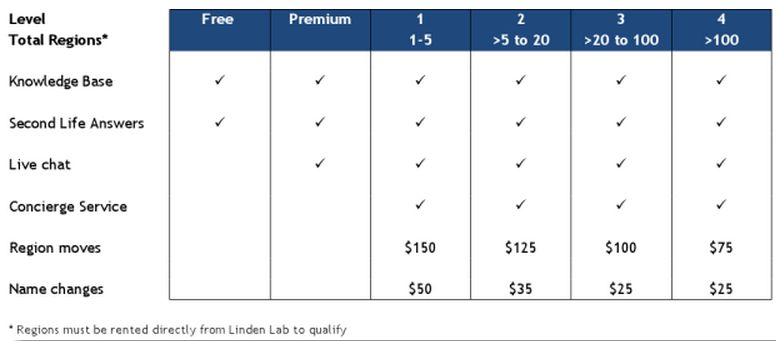
On Tuesday April 2nd, Linden Lab issued a blog post on pricing for private region moves on the grid (i.e. moving a region from one location to another on the grid map), and for renaming regions.
If you have a private region in Second Life, there are several special services you might occasionally need, like region moves and name changes.
The charges for these services depends on the number of private regions you have, and to make it easier for all of our customers to understand the fee structure, we now have laid it out in this chart in the Knowledge Base:
(New region fees – poor readability due to original also being of poor quality – click to enlarge)
To request one of these private region management services, please submit a case through the support portal.
The guidelines for actually moving / renaiming private regions remain unchanged.
Also unchanged is the cost of transferring a region to new ownership. This remains at $100 per region (plus VAT for Europe), which includes moving and renaming the region, transferring billing for the region and changing the estate ownership settings.
 The Lab launched its latest Amazon offering to US residents on Friday April 12th: Trooble Pigs. The accompanying blog post gushes: