Linden Lab issued one of their (increasingly rare) blog updates on ongoing work with Second Life. The updates comes on the heels of the release of CHUI, the Communications Hub User Interface, which reached LL’s development and beta viewers on the 26th and 27th February respectively, and which I’ve briefly overviewed. Until now, the only official notice of CHUI’s arrival had been via a forum post which hasn’t been entirely visible, so the blog update include Torley Linden’s informative YouTube video on the release.
The update also references the e-mail preference changes made to the Marketplace at the start of February, as well as passing comment on region crossings, noting:
We have made several improvements to region crossing that allow a smoother transition between regions, instead of the jerky transition some users experienced in the past. This change also reduces the rate of teleport failure rate. This went out the full grid on January 25, 2013. Since that date, the number of reported teleport failures has dropped by 91%.
While teleport failures may have been reduced, many are still seeing continued issues with vehicle crossings …
The Cocoa project for the Mac builds of the viewer, which I made mention of in week 8, and offers a link to the Cocoa Project viewer for Mac users.
Finally, the post looks ahead to upcoming features and updates – but sadly, only makes passing mention of the materials processing project. One can hope that as CHUI is now in the beta viewer and there was, s of week 8, apparently only one remaining issue with materials to be dealt with, a project viewer will finally be appearing sooner rather than later …
Update February 24th: Henri Beauchamp has filed a SUN JIRA on the Z-offset issue mentioned in comments following this article. Z-offset is an opton found in many TPVs which allows the vertical height at which an avatar stands / kneels / sits / lays to be adjusted through the viewer, allowing users to compensate for their avatars appearing to float in mid-air. The SSB code effectively “breaks” this capability. The JIRA description carries a comprehensive description of the issue for those unfamiliar with the problem.
Update, February 23rd: The Catznip team (which includes Kitty Barnett, have added a post to their blog on the subject of RLVa and SSB. Be sure to read it!
Following the recent Server-side Baking (SSB) pile-on / load test, I took a little time out to try-out the various viewer versions which are starting to appear which provide SSB support. This was not intended to be an extensive break test or anything – just something to sate my own curiosity on a number of points.
As such, the tests I conducted were simple, and as they were performed on Aditi, they may have been influenced by some of the inventory issues being experienced there. For the tests, I used my main account, and my CTA – Crash Test Alt, which routinely gets used when testing experimental viewers, etc.
Testing covered the Cool VL experimental branch, Singularity Alpha release with SSB support and Radegast 2.8. Throughout the tests, my CTA was running the official Sunshine (SSB) project viewer 3.4.5.270409. Testing did not include Lumiya, which has SSB support implemented. The reason for this is that I remain unable to log-in to Aditi with Lumiya.
I started with a couple of baseline tests to remind people of what is going to happen once SSB is deployed to the main grid.
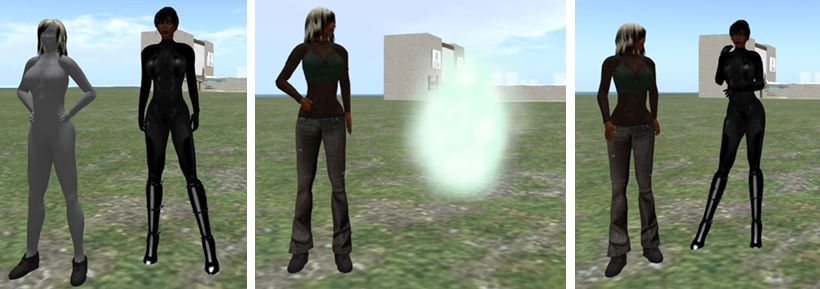
The three faces of SSB:On the left, what is seen when running a viewer which does not support SSB: the viewer user looks fine, but everyone else is a grey ghost. In the centre, what is seen when looking at someone who is using a viewer which does not support SSB: they are a cloud. Right: what is seen when both parties are using a viewer with SSB support: properly rendered and dressed avatars (remember: SSB does not affect prims / sculpts / mesh, hence why these render OK in the non-SSB viewer)
Following this, I switched to using Singularity first and then Cool VL.Results wer as expected – both accurately rendered outfits and outfit updates without any significant issues.
SSB on Singularity: Top: as I render in Singularity with SSB, as seen by myself (l) and with the official SSB viewer (r). Bottom: as I appear after an outfit change to both myself in Singularity (l) and the official SSB viewer (r).
Testing Radegast 2.8 also generated the expected results: outfits rendered correctly in both the Radegast 3D viewer, and in the SSB viewer, as did any outfit changes made via Radegast. Furthermore, and as expected, outfit changes made using one viewer were accurately reflected when logging into another viewer (so outfit changes made in Singularity were accurately rendered by Radegast, for example).The only issue I actually encountered was that footwear would not render correctly – which is not an SSB issue.
Baking on Radegast: (top) outfit changes on an SSB-enabled region render correctly in Radegast and (bottom) are also correctly rendered in other SSB-enabled viewers
SSB and RLVa
While carrying out these tests, I also took a look at RLVa on SSB, and confess to not finding any obvious issues when using Singularity or Cool VL (which uses RLV). All RLV/RLVa options functioned as expected:
Items “locked” as non-detachable remained undetachable until “unlocked”
Restrictions applied through RLV/a all functioned as expected (e.g. map restrictions prevented access to the World or Mini-Map; inventory denial prevented inventory access, etc.)
Remote access to #RLV Shared Folders worked as expected (i.e. remote changes of outfit worked and were accurately rendered)
Remote (HUD-based) access between avatars worked as expected
Control zone restrictions applied / released as anticipated.
This does not necessarily mean that RLVa is not “broken”. I actually have no idea if the Cool VL experimental or Singularity Alpha contain specific updates for RLV/RLVa outside of any work Kitty Barnett may be undertaking for RLVa and SSB.Aslo, just because the basic functionality of RLVa appears unaffected by SSB does not means that there are deeper, more subtle issues which need to be addressed in order to ensure all of RLVa continues to function correctly under SSB.
Summary
SSB is beginning to find its way into TPVs and appears to be working well – which is not to say that there are not bugs and issues still to be resolved with the service as a whole. Doubtless, we’ll find out more on this as LL continue to analyse the results of the initial pile-on test, and further tests are undertaken in the future. As a result of this quick-and-dirty play with the service over a number of viewers, I’m certainly curious to know if some of the issues encountered during the pile-on / load test (such as a noticeable slow-down in the time needed for outfits to render after a change) might be indicative that the system still needs tweaking in order to handle larger numbers of outfit changes, rather than all the problems being related to other issues on Aditi itself.
In terms of potential RLVa issues, I draw no conclusions; as mentioned above, the fact that the most obvious RLVa functions worked OK for me is not to say RLVa and SSB are without issues; there is much which goes on “under the hood” with RLVa which could very well be affected by the arrival of SSB which requires code refactoring but which does not result in outright / obvious breakages.
If you’d like to have a play with SSB for yourself, use the links below.
Not too long ago, I discussed the matter of tier and revenue. The main thrust of the piece was an attempt to point out why tier cuts, rather than being the magic bullet which will solve all of SL’s perceived woes, are actually likely to inflict a mortal wound.
As a part of that piece, I scratched the surface of other options open to LL for revenue generation – including the use of advertising. Now, to be fair, the idea wasn’t mine – it is something my dearest Lord of Dee, Ciaran Laval suggested in his blog (which, if not on your reading list, should be).
Indeed, outside of SL, the Lab have already dipped a toe into the use of web advertising as a potential source of revenue in launching dio – which is specifically geared towards revenue-through-ads.
dio: LL dipping a toe into the waters of revenue-through ads
Well, now it seems as though LL are taking Ciaran’s advice on board: advertising using Google AdSense / AdChoice is starting to filter into the SL webpages.
Again, Ciaran reported on this ahead of me, and a thread is up on the forums concerning the move – and the negativity is strong, sadly. The ads themselves comprise a banner at the top of some pages, together with a vertical ad space down the right side of a page. As such, they are not overly obtrusive, but they are noticeable.
Google AdSense / AdChoice ads starting to filter through the SL website
I could have sworn I actually had an ad appear on my dashboard earlier, but I was scootling around so much, I’m not sure – and repeated clicks on my browser’s BACK button failed to turn up anything.
As mentioned above, the reactions on the forum thread haven’t been overly positive to this move – but it is hard to fault it. Advertising is a fact of life on the web, and if LL can use it to generate a modest additional flow of revenue to their coffers, then all power to them – it’s not as if we can’t avoid the ads if we so wish; there are plenty of browser plug-ins available for those wo don’t wish to see ads popping-up hither and thither.
Currently, the ads have yet to hit the SL Marketplace, which would appear to be an ideal target for advertising, given the volume of traffic it receives, providing the page layout can be tweaked sufficiently enough so that real world ads aren’t getting confused for SL product ads. As I mentioned back in January, when discussing tier, the Marketplace would potentially be the ideal spot for LL to try-out Ciaran’s idea for strategic partnerships with other companies.
It has been suggested that perhaps the system could be extended to provide in-world businesses the opportunity to use the advertising space as well. I’m actually not convinced this would actually work, for a number of reasons. Which is not to say it shouldn’t be tried, is the software would allow for it in a meaningful way (i.e. links to in-world stores and / or SLMP listings. Certainly, it wouldn’t be the first time LL had offered direct advertising opportunities to users, as those of us who remember the MOTD promotional “opportunity” from 2010. However, were LL able to walk a similar path again, I would hope they’d avoid trying to charge people between $1,500 and $4,500 USD, as they did with that offer …
Overall, there is no real harm in LL seeking to generate money in this way – and it really shouldn’t be taken to mean the company is in “dire straits” financially. It may not generate a significantly large amount of revenue when compared to land, but that doesn’t invalidate the move as a means of removing at least a further small portion of reliance on tier as the company’s sole means of revenue generation.
While I’ve been buried in dio, working on an interactive guide to … something … Linden Lab slipped out another little surprise this week via the blog.
Reaching Out into Second Life looks at the use of Leap Motion for interacting with SL. The work is being carried out by Simon Linden, and is clearly tagged as experimental, but it shows the potential of Second Life as a platform for exploring gesture-based interactions with controllers like Leap Motion.
Nor are the Lab keeping matters to themselves. The blog post states:
If you have a Leap Motion controller and would like to experiment with the Second Life Viewer, you can find the source code for these experiments at http://bitbucket.org/simon_linden/viewer-rabbit. The indra/newview/llleapmotioncontroller.cpp file contains most new functionality. The Viewer is built to work in several different modes. These modes can be used to control the avatar while flying, send data into Second Life for scripts to intercept, detect hand motions that trigger avatar gestures, or control the camera and avatar movement. To switch between these modes use the “LeapMotionTestMode” value in the Debug Settings, accessible from the Advanced menu.
Commenting on his work, Simon Linden re-emphasised the experimental nature of the work and it’s possibilities, “It’s nowhere near a real feature. But it’s certainly fun to make things happen waving your hand around … I think we’ll see some very interesting stuff in the future.” He went on, “I think there’s potential there, along with touch screens, but it’s going to take a lot of work and experiments to see what really is good or not.”
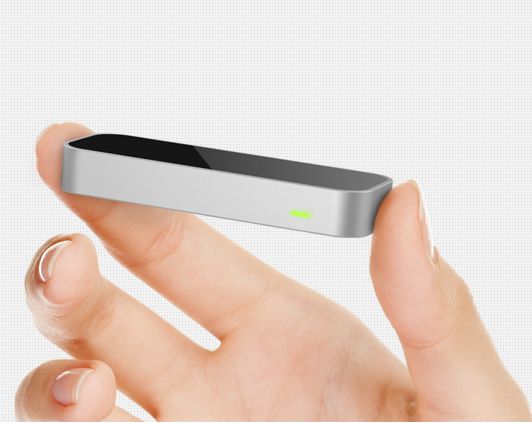
The Leap Motion device for Windows / Mac (image courtesy of leapmotion.com)
If you’re wondering why Simon has his hand cocked sideways when firing the pop-gun in the video, he’s not trying to emulate any cool Hollywood or gangster-style of shooting, the Leap Motion device sensors demonstrated a blind spot when he was testing the unit, and would not register his thumb motion if he had his thumb pointing upwards.
For those wishing to try things out for themselves, Leap Motion can be ordered from the Leap Motion website, with prices starting from $69.99 + shipping (for the USA), which does not make it prohibitively expensive. It’s also capable of being put to a wide variety of uses as Leap Motion’s own promo video demonstrates.
The server-side materials code reached the main grid in week 5, with a deployment to the BlueSteel Release Candidate channel. As stated in my project report marking the deployment, the code will not be usable until there are suitable viewers on the grid which can utilise it, and they have yet to be released.
As it stands, viewer-side work is progressing, and it is likely that a project viewer will be made available in the near future, although time frames are still a little hard to determine. Commenting on possible viewer availability on Wednesday January 30th, Geenz Spad, lead developer for the viewer, stated, “At this point, it’s hard to say; the majority of the rendering bits are finished at this point. The UI’s there, but needs a bit of polish; so all in all I’d say a public testing version should be out really soon.”
During the conversation, Geenz provided further preview pictures to those in attendance, some of which are reproduced here.
Materials in action: a prim with a texture (diffuse map) and normal map applied (courtesy of Geenz Spad)
Viewer UI
In week 4 I was able to provide a quick look at the changes to the Build floater’s Texture tab which are directly relevant to materials processing. Since then, the developer leading this work, Tonya Souther, has progressed the tab to a point where it is close to finished. In particular, pickers have been added to the normal and specular map options, and the diffuse (texture) option now has a drop-down for the alpha mode selection, also as discussed in a previous project report.
Materials Build floater Texture tab revisions (31-01-13): The diffuse (texture) option, showing the Alpha mode drop-down options (l); the normal map options, with map picker and default texture list drop-down (c); the specular map options, in which the Use texture drop-down displays the familiar low, medium & high shiny options (r). Materials can be applied per face of an object, with scale, rotation, etc., applied across all maps on a face / object – click to enlarge
Viewing Materials: How Things Will Look
Materials processing will require viewers to be running in deferred mode (i.e. with lighting and shadows enabled, although not necessary with shadows activated – see my notes here). While it is not possible for materials to be implemented in such a way that it can run in a non-deferred mode, materials should not have any major negative impact on how second life looks to those who are unable to run their viewer in deferred mode. In fact, SL should continue to look to them much as it does today, hopefully as show in the image below.
With and without: how materials will look when running a viewer in differed mode (top) and in non-deferred mode (bottom). The differences are clear, but the in-world experience in non-deferred mode is not in any way “broken”
In the meantime, Linden Lab are continuing to try to gather data on the number of users running their viewers in differed mode and – perhaps equally as important – the number of users who could be running with deferred active (again, if not with shadows active), particularly given the continuing improvements being made to the rendering system.
So materials processing is progressing and drawing close to an initial release. There is a lot going on within Second Life as a whole at the moment in terms of projects coming into the viewer, with both avatar baking/server-side baking (SSB) and the Communications Hub User Interface (CHUI) also on the horizon as well. As such, the Lab still need to establish priorities on the various projects and plan releases accordingly. Similarly, TPV’s need to consider the impact of these various projects on their work and determine their own priorities for integrating the projects into their viewers. Given the complexity some will face in implementing CHUI, it would appear likely that the materials capabilities might reach some TPVs ahead of that work, even if CHUI and materials are released in relatively close order.
As always, updates will be provided as news emerges.
Another preview of a normal map and a diffuse map (texture) in action (courtesy of Geenz Spad) – click to enlarge
There was a time when the words “Torley Linden” and “Second Life” were synonymous with one another. His was frequently the first Linden name and voice users would encounter on entering SL, where his weekly TuTORial and Tip of the Week videos were a much-loved and enjoyed Thursday event through the old (and vibrant) Second Life website.
That’s how I started a post back in November 2012, both celebrating Torley Linden’s presence in SL over the years and lamenting the fact that of late, we’ve rarely heard from him other than via his profile feed (I think the last “official” output from him which was in any way visible to many was a TuTORial video in July 2012).
In that post, and elsewhere in this blog, I made mention of both Torley’s video TuTORials and “Tip of the Week” videos which over the years helped many an SL user (old and new) make better use of the viewer and get deeper into the many and varied things which can be done in SL.
An early Tip of the Week video from Torley Linden
The Tip of the Week videos were often an anticipated part of people’s SL on Thursdays, and were, back in the “old” days of the SL website, a featured part of the SL home page and (for a time) the TuTORIAL videos did actually feature on the dashboard.
Then LL, in their wisdom, saw fit to stop the production of these videos and remove them from the dashboard. In doing so, something was lost in terms of getting people – especially those new to SL – familiar with both using the viewer and getting around and doing things in-world.
Now, it seems they are back in the form of a new “Quick Tips” series of videos, the first of which launched yesterday, and which are once more hosted by Torley himself.
The first of the new “Quick Tip” videos
The new video is designed to give beginners a quick overview on how to use the Avatar floater to quickly change one’s own appearance.
At 1.01 minutes long, it is a very superficial soundbite and doesn’t touch upon the deeper nuances of avatar customisation – but this doesn’t necessarily detract from it. In a world where people want instant answers and have short attention spans, it provides enough of a kick-start to get people playing with their appearance – particularly since the Avatar floater was (wisely) replaced as the “open by default” floater by Destinations when the Basic and Advanced view modes were merged – so the ability to change your in-world appearance isn’t that obvious from the get-go. If there is any niggle with the new video, it is perhaps in that it references another without indicating where it can be found (because it has yet to be released …), which might cause some frustration*.
The blog posts indicates that the Lab intends to release a series of these videos “over the next few weeks”, which suggests there may be a finite number of videos in the run. Hopefully, this will not be the case, and the Lab will continue the series beyond a “few weeks”, giving tips, tricks and explanations in much the same way as the Tip of the Week videos used to provide. Given that the company has recently taken the plunge with Amazon and will shortly be linking-up with Steam, it is important more guidance and support for new users is provided in some manner, particularly as the new user process is still (for the time being at least) very hands-off.
In this, the question as to how visible the videos are / will be is a concern. Simply posting links to them to the SL dashboard potentially isn’t enough. The videos – and the YouTube channel carrying them – needs to be more fully presented, preferably in a dedicated panel in the dashboard where they might have a higher visibly than on a rolling list of blog links. It would also be handy – and assuming the current new user process isn’t going to be massively overhauled – if the videos could be made available in-world at the current Destination Islands, to at least provide some guidance to new users the first time they arrive in-world (although this would perhaps be more informative if more basic guidance on “getting started” were also covered – such as using the Camera floater and controls).
That said, and even if LL don’t fully leverage the videos, and assuming broadcasting YouTube videos within SL is less of a challenge now than it was following changes at the Google end of things, the videos might hopefully be a useful resource for the various help islands and mentor areas run by groups and communities within SL.
As it stands, it’ll be interesting to see where this new series goes, how long it lasts – and how effectively LL will try to put it in front of new users. In the meantime – Friendly Greetings, Torley, and welcome back!
* Update: Having just dug around the SL YouTube channel, I wonder if the reference is to this video, and we’ll be seeing it resurrected in the near future? The video is apparently e-mailed out to new users on signing-up (although I didn’t receive it when I last signed-up for the purposes of keeping an eye on the “new” Destination Islands), so are the new “Quick Tips” also going to be mailed to new users?




 Inara Pey: Living in a Modemworld