On Wednesday April 9th, I reported on an error with the Transaction History page on people’s SL dashboards which lead to some upset and confusion after the familiar page was replaced with one that failed to show totals, and which had the familiar .XLS and .XML download options replaced by a single .CSV option. The change lead to forum comments and a JIRA report (BUG-5664).
The page itself was reverted around an hour after concerns were first raised, and Ebbe Altberg stepped into the forum to offer apologies and an explanation:
In an attempt to improve we made a few mistakes and caused some misunderstandings as well. We rolled back the changes and will work on getting it right. The team is looking at feedback and will communicate a plan for how to get there.
On Thursday April 10th, the Lab issued a blog post on the matter, providing further information on the situation, including the fact that they will be seeking input from users on proposed changes to the Transaction History page.
The post reads in full:
Earlier this week, we rolled out a few changes to the Account Management web pages for logged-in users at SecondLife.com, which were aimed at improving these tools for users. One of the changes we made updated the Transaction History page, and we heard lots of feedback that not all of the changes to that page improved our customers’ experiences or met their needs. So, we quickly reverted to the old Transaction History page.
We’d like to get some additional user feedback on the new Transaction History page so that when we make the changeover, the functionality best matches what Second Life users want and need. Once we are ready, we will post instructions on how to review the new page and provide feedback. We will not take down the old page until we have had a chance to review feedback and make appropriate changes to the new page. Check back on this blog for more details as they become available.
This is a positive step by the Lab, both in rectifying the error rapidly and in admitting their mistake. Hopefully, I’ll have a further follow-up once the additional information is published by the Lab.
Update, April 13th: the full transcript of Ebbe’s VWBPE 2014 address is now available.
On Friday April 11th, Ebbe Altberg, Linden Lab’s CEO addressed a pack amphitheatre at the 2014 Virtual Worlds Best Practice in Education (VWBPE) conference in Second Life. Some 200 people were in attendance in what was around a 90-minute session which comprises an opening statement from Ebbe, followed by a Q&A / discussion session.
I’ll have a full transcript of the meeting available shortly. However, as a part of his opening statement, Ebbe made a series of comments relating to the Lab’s Terms of Service, which I think are worth highlighting on their own. So here is a full transcript of his comments on the subject:
Terms of Service. I am working with my Legal Counsel to try to try to figure out how we can make it more obvious – or very obvious – that the creators of the content own the content, and we obviously have no intent of ever stealing your content or profiting off of your content independently of the creators in some fashion.
The current terms might indicate that we might somehow have some plan to steal people’s content and somehow profit from it for ourselves, without benefitting the creator, and that’s obviously not our intent at all. It would be very damaging to our business if we started to behave in that way because this whole platform is all about the content you all create. And if you can’t do that, and trust that it is yours, that’s obviously a problem. So I’m working on that, and I can ask you right now to trust us that we’re not going to do what the current clause might suggest we’re going to do, but we’re working on some simple tweaks to the language to make that more explicit.
We also have no interest in locking you in; any content that you create, we feel you should be able to export, and take and save and possibly if you want to move to another environment or OpenSim, that should be possible. So we’re not trying to lock you in either. Obviously, it’s very important to us to get content both in and out, so I just want to put that right out there.
Quite what will come out of this obviously remains to be seen, as will whether or not the changes successfully quell all concerns. However, it would appear that the wheels are finally in motion, and that hopefully, an equitable resolution will be forthcoming.
The Commerce team have issued a blog post and Knowledge Base article aimed at helping people ensure the clothes they buy will actually fit their avatar.
I’ll be honest and admit that I hadn’t realised that there was a particular issue with clothing that needed any clarification; but I’m also biased in that I’ve been around SL long enough and reporting on it, that understanding the various clothing types doesn’t actually present me with a problem. However, I can understand a new arrival being confused by terms such as “system clothing” or “clothing layers”, and “mesh clothing”, “fitted mesh clothing”, “rigged mesh clothing” and so on, and wondering what the heck it is all about and where the differences lie.
The blog post is aimed at content creators, and is intended to encourage them to define the clothing they produce in terms of three avatar types, and to label their clothing accordingly with icons.
However, to get a clearer understanding of what is being proposed, it is perhaps best to refer to the Knowledge Base article, which provides far more comprehensive information.
Essentially, it has been decided that clothing should be defined in terms of avatar categories. These are defined by the Lab as:
Classic – Classic avatars are the original default Second Life avatars. They have a modifiable humanoid shape, and can wear clothing in the form of textures and attachments added to that shape. Most of a classic avatar’s appearance and clothing can be modified by pressing the Appearance button in the Second Life Viewer, but cannot take advantage of newer graphical features such as normal and specular maps.
Standard mesh – A standard mesh avatar is a classic avatar that is wearing a rigged mesh attachment, usually a full-body avatar, and whose classic body is hidden by a full body alpha mask. It is classified as “standard” if it was created using the standard fitted mesh model available on the Second Life wiki.
Custom/branded – A custom avatar is a classic avatar that is hidden by a full body alpha mask and is wearing a customized rigged mesh attachment or attachments that otherwise replace the classic avatar body. These avatars can come in a wide variety of shapes and sizes, and each model typically requires clothing specifically designed to work with such an avatar.
Hints to help a consumer determine what category of avatar they are using are also provided,
In addition, the Lab is asking that creators define their clothing as one of four types in order to indicate which categories of avatar it is most likely to be compatible with:
Classic only – The “layer-based” textured clothing applied directly to classic avatars. This clothing type only displays properly on classic avatars and is rendered completely invisible by the alpha mask worn by most mesh avatars.
Mesh only – An attachment that is designed to appear as clothing on a standard mesh avatar. It may appear to be a layer-based texture, but does not work properly on classic avatars. Mesh only clothing must be created outside Second Life in a 3D modeling tool.
Classic/Mesh – Attachments primarily designed for standard mesh avatars that can be made to work on a classic avatar. In order to be classified as classic/mesh, the clothing must include an appropriate alpha mask designed to hide the affected parts of a classic avatar.
Branded – A catch-all term meant to encompass the many possible custom avatar designs. Such avatars can typically only wear clothing specifically designed for that specific avatar; therefore each custom designed avatar and its compatible clothing may be considered a “brand”. Likewise, clothing designed for a custom avatar shape should not be expected to work properly with classic or standard mesh avatars, or even other custom avatars.
In order to help shoppers find clothing that properly fits their avatars, Merchants are additionally being asked to use one of two label images to use when advertising their clothes, and to update any clothing they have listed on the SL Marketplace so that it is defined by one of the three avatar categories (so that it is defined as being compatible with Classic Avatars or Mesh Avatars or, in the case of a specific custom avatar, it is defined by the avatar’s brand name.
The two logos the Lab are requesting content creators use to denote their clothing are:
Further details can be obtained directly from the Knowledge Base article, which also includes notes on why custom avatar types should ideally have a unique brand associated with them.
The new definitions do appear be to perhaps as confusing as the current terminology (“system”, “fitted mesh”, etc.), as such it will be interesting to see the response to this proposal / request, and how well things work in practice.
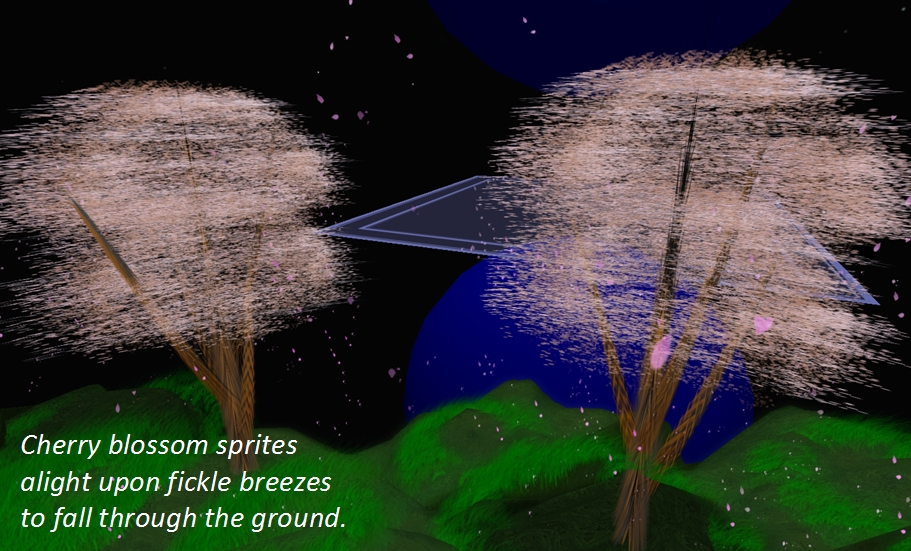
The llParticleSystem haiku, with particle creation from Catharsis, by Tyrehl Byk
Ciaran Laval alerted me to a project which, having been announced on April 1st, might have been considered a joke; it seems, however, that it isn’t.
Posting over on SLU (twice, it seems), LSL Portal editor and scripter Strife Onizuka, who is spearheading the project, describes matters thus:
Long have we struggled with how to make the documentation more accessible. One of the most common complaints is that is simply too technical and we are hearing this more often than you would believe from one of SL’s more traditional content creators: descriptive writers. So I am proud to announce that after many sleepless nights we have come up with a way to address this. As the core problem is that the documentation relies upon very specific, technical language we have come up with a way to bring more mundane verbiage into the documentation.
To achieve this end we are announcing the LSL Portal Poetry Project! The goal of the LPPP (or LP³ as I like to think of it), is to provide poetry for every LSL Event, Function and Constant. More specifically, the form of poetry we have chosen is Haiku. Screen real estate being at a premium haiku requires the minimum amount of space while packing the greatest metaphorical punch.
It appears that the essential element of the haiku – the five-seven-five syllable arrangement – is key to any submitted verse; the traditional invoking an aspect of nature or the seasons being not quite so important, as with this example for llSetTorque:
Spinning, all a blur… Small moment of inertia. They say torque is cheap.
There have already been a number of LSL articles which have gained their own haiku, and people from across SLU (and SL) are being invited to consider putting forward suitable pieces for those articles still lacking a verse.
While haiku is the preferred medium, other forms of poetry are not ruled out. Strike admits the limerick ran the haiku a close second for choice of verse form, and it may be that some LSL functions may be better suited to the limerick or other forms of verse. For example, lSetLinkPrimitiveParamsFast leant itself to this limerick Atasha Toshihiko:
I once had a hair full of scripts, When I wore it, Estate Owners had fits. The creator, at long last Learned llSetLinkPrimParametersFast Now I can wear hair without getting kicked!
Strife also says of the project:
Programming is a part of life. It doesn’t have a holiday. People don’t think to write songs or poems about it except in jest. We treat it as a second class citizen, something utilitarian to be used and ignored. But culture has to come from somewhere, it can’t all be about, love and dancing and taking selfies. Eventually someone has to write a song about cloth-driers and warm socks (Who doesn’t like warm socks fresh out of the dryer?) …
There is nothing about LSL that will sustain it past SL’s death, except maybe some obscure poetry. How many programming languages after all encourage their users to write poetry? It will tell future anthropologist just who we were. Not just about our preference for indentation.
So, you may not be a coder, but if you have an inner poet, and feel you’d like to help enshrine LSL in words of verse, now is your opportunity to do so!
Important note: The SL Go service is to be shut down on April 30th, 2015. For more information, please read this report.
In March 2014, Linden Lab and OnLive, the games streaming service, announced the open beta of OnLive’s new SL Go service, a means by which SL users could access Second Life via tablets and mobile devices using a full viewer streamed directly to the user’s device.
At the time of the launch, I was one of a number of people who were able to provide a review of the service, having been offered access to it ahead of the launch.
One area of upset with the service which quickly became apparent was the payment plan, which was based on a pay-as-you-go approach, with an hour of use costing $3.00, three hours $8.00 and ten hours $25.00. In response to criticism of the model, OnLive sought to make it clear through various mediums – notably Designing Worlds and Drax Files Radio Hour – that the plan was only an initial step, a means to gain data and feedback, and that options such as subscription plans had not been ruled out. The service also came in for criticism that it was only available in the USA, UK and Canada.
SL Go by OnLive: streaming Second Life to your tablet – but the initial pricing model caused upset
On Thursday April 3rd, OnLive followed-up on these comments by announcing they are both introducing a revised payment plan and extending the service to more regions. Linden Lab also followed-up with a post of their own. The OnLive announcement reads in part:
Since launching the beta of SL Go about a month ago, OnLive reports they’ve seen a very positive response to the Second Life® Viewer for Android™ that allows users to access Second Life over wifi or 4G LTE on tablets and laptops. Today, OnLive has updated the SL Go beta with new pricing:
Monthly unlimited-use subscription for $9.95 (USD) / £6.95 (GBP). No contract and no commitment
Reduced hourly rate: $1 / £0.70 per hour.
The previously available offer of a 20-minute free trial still stands.
In addition, and with the announcement, SLGo is now available in 36 countries worldwide, including Austria, Belgium, France, Greece, Iceland, Israel, Luxembourg, Scandinavia – even the Vatican City! The full list of supported countries can be found in the OnLive blog post.
SL Go on my Nexus 7 HD + keyboard
Commenting on the move, OnLive’s Vice President of Product and Marketing, Rick Sanchez, said:
We’re grateful for the opportunity to support the Second Life community, and pleased to be working with such a passionate and creative group. We look forward to further developing SL Go with their feedback and suggestions.
How popular this makes the service, remains to be seen. But for those on low-end computer systems who would like to have access to Second Life in all its glory, $9.95 might not be considered too much to pay per month until such time as they upgrade their systems.
Certainly, the $9.95 price-tag for the monthly is lower than the figure I had been anticipating following post-launch activities by OnLive; I’d been expecting the price to perhaps be on a par with their CloudLift service ($14.95 a month), which launched at the same time as SL Go. Similarly, dropping the pay-as-you-go rate to flat $1.00 per hour should make the occasional access via tablet or mobile device even more attractive you those who might need it. For those who are interested, and following-up from my initial review, I also have an article about running SL Go on a Nexus 2013 HD.
On Tuesday April 1st, I previewed the new SL Share 2 project viewer, which has options to share messages and photos with your Twitter account, and upload photos to your Flickr account. The viewer also includes updated photo capabilities for Facebook sharing (as well as a new Facebook Friends tab).
On Wednesday April 2nd, the Lab officially announced the launch of the project viewer with a blog post which reads in part:
This SLShare update will allow you to share your Second Life experiences beyond Facebook. Twitter and Flickr sharing is just as quick and easy, complete with specific options relevant to each social network.
For Flickr, you will be able to name and add a description to your image. We have tagging capabilities so you can ensure other users can find the images you want to share. Maturity settings are a requirement for Flickr, so we’ve made it easy for you to set this right from the Viewer.
As noted in my preview, the viewer includes new photo processing capabilities, which the blog post describes thus:
This update will also introduce a set of post-processing filters that you can run your pictures through to create cool one-of-a-kind images! The new filters were inspired by the images posted to Flickr by Second Life Residents. With more than a million uploads, most of them enhanced by some post-processing, we thought it would be great to include this feature right in SLShare. These filters will work regardless of which social network you choose to share your Second Life pictures to.
But it doesn’t stop there. For those more technically savvy, we designed this feature to be modifiable by our users. If you’d like to create your own filters, check out the wiki page on this for more information.
The Twitter floater and preview pane, showing one of the preset photo filters applied – users can also create their own filters for inclusion in the floaters (Twitter, Facebook and Flickr)
As noted in my preview, the project viewer can be obtained from the release notes page, which includes download links to the Windows, Mac and Linux versions (as does the viewer’s entry in the Alternate Viewers wiki page). or by following the link in the Lab’s own blog post.




 Inara Pey: Living in a Modemworld