On Wednesday October 15th, Monty Linden blogged about his HTTP work and the CDN, using the rather unusual title, The Sky Over Berlin (and Elsewhere). It’s a great piece of reading, although I can’t help thinking that Monty’s sign-off at this end of it would have perhaps suited the subject matter far better: nous sommes embarqués – “adventure is ours for the taking”!
The first part of the post recaps on Monty’s initial work in improving Second Life via the HTTP project. This started as far back as mid-2012, with the first pass focused on improving the mechanism by which textures could be obtained for rendering via HTTP, which entered widespread use around November 2012, with the release of the 3.4.3267135 viewer.
This work was followed by Monty labouring to improve mesh fetching as well, and to improve the overall reliability of HTTP, which I blogged about in March 2013.
At the start of 2014, Monty blogged on his work up to that point, and looked ahead to future activities. As a part of the post, he included a graph showing how the work carried out up to that point improved texture and mesh request handling.
In January 2014, Monty blogged about his HTTP work, and indicated how the work had raised the request rate ceiling within the viewer for texture and mesh data from A up to the blue line of C
In his latest post, Monty picks-up where his January post left off, demonstrating how more recent improvements are starting to improve things further – notably through the use of HTTP pipelining (the release candidate viewer for which has now been issued – see below), and the ongoing deployment of the Content Delivery Network service for texture and mesh data delivery.
In his latest blog post, Monty indicates how both HTTP pipelining (the “post 3.7.16” markers, denoting the introduction of the pipelining viewer) and the use of the Highwinds CDN service (denoted by the DRTSIM-258 markers) should further help improve data transmissions and performance
All told, Monty’s work has been a remarkable undertaking which benefits Second Life enormously, and helps to set the path towards possible further improvements in the future. As such, he really is one of the heroes of Second Life and the Lab.
HTTP Pipelining RC Viewer
The HTTP Pipelining viewer was issued as a release candidate viewer shortly after Monty’s post went to press.
Version 3.7.18.295372 enables the viewer to issue multiple asset fetches on a connection without waiting for responses to earlier requests. This should help inprove things like initial scene loading quite aside from any additional benefits gained through the CDN deployment work. In addition, the viewer includes improvements to inventory fetching, as Monty noted in his blog post:
The HTTP Project has focused on textures and meshes. But the inventory system, which maintains item ownership, is often described as… sluggish. So as an exercise in expanding the use of the new HTTP library, the pipelining viewer was modified to use it for inventory fetches. As with textures and meshes before, inventory is now fetching in the ‘C’ region of its specific performance graph. The difference can be surprising.
Having had the opportunity to test the pipelining viewer somewhat prior to its appearance as an RC, I can attest to this. While I keep my “active” inventory to a modest size (around 10,000 items unpacked, the rest boxed until needed), I found that an inventory download with a cleared inventory cache (nothing saved on my computer) averaged 9-10 seconds using the pipelining viewer, compared with an average of 2 minutes 50 seconds to 3 minutes with the current release viewer (3.7.17.294959). Whirly Fizzle, using a 105K inventory had even more impressive results: with a cleared cache, her inventory loaded in under 3 minutes on the pipelining viewer, compared to 16-18 minutes on the release viewer.
The release notes for the viewer contain additional information about the updates, again written by Monty, and these make worthwhile reading alongside of his blog post.
The Lab has announced the latest round of the Premium Membership promotions – this one with a decidedly Halloween feel.
As usual, the offer is 50% off of membership for those upgrading, but only if they opt for the Quarterly billing plan, and the discount is applied only to the first quarter billing period. The offer begins on Wednesday the 15th of October at 08:00 am Pacific Daylight Time (PDT) and expires on Monday the 3rd of November 2014 at 08:00 am Pacific Standard Time (PST).
Alongside of the membership discount, comes the Premium gift offer, which this time has a Halloween theme, which includes “jack o’lanterns, witches’ brooms and more – including a bone-shaking skeleton avatar”. The gift pack can be obtained through the Premium Gift kiosks.
I admit I’ve not picked-up my gift, as it doesn’t really appeal. This being the case, I’ll also avoid my usual grumblings about the way Premium membership is pitched, and instead say that whether or not you feel upgrading to Premium is worthwhile is purely a matter of individual choice. However, I would say that if you’re considering on the basis of “exclusive gifts” or “more privacy”, then you’re probably better off sitting down and thinking again.
Part of the Halloween 2014 Premium Gift (image va Linden Lab)
Launched alongside the Premium Membership offer, and included in the same blog post as the Premium offer stuff, is news about the Haunted Halloween Tour, the latest offering from the Lab to feature Experience Keys. This can be accessed via the Lab’s Portal Park, and I’ve covered it in a companion article to this one.
On Wednesday May 21st, Linden Lab publicly released the Oculus Rift project viewer, offering initial support for the Oculus Rift DK1.
Things have moved on since, most notably with the release of the Oculus DK2, versions of which the Lab received in July 2014, and have been using to update the project viewer to provide DK2 support.
Oculus Rift: Lab launches project viewer with DK2 support
On Monday October 13th, the Lab announced that the updated version of the viewer is now available.
A few months ago, we released a Project Viewer that made it possible to use the first generation Oculus Rift development kit (DK1) anywhere in Second Life.
Since then, Oculus Rift has released a second generation development kit, DK2. The new hardware offers an even more immersive experience when used with Second Life – there’s less likelihood of feeling motion sick thanks to the motion-tracking features, and less of the “screen-door effect” on the visuals, thanks to higher resolution and brighter display.
We’ve integrated the DK2 with Second Life, and today are releasing a new Project Viewer so that virtual reality enthusiasts with the DK2 can use it anywhere in Second Life, just as DK1 users can.
Unfortunately, though, there are still some bugs impacting the experience, which we won’t be able to fix until we receive the next SDK from Oculus Rift. Because Second Life uses OpenGL in its browser, we cannot support direct mode in the Rift until Oculus releases a version of the SDK that supports that.
In addition, juddering is an issue (as it is with most DK2 demos).This can be significantly improved on Windows by turning off Aero, which allows the Rift to use its full refresh rate rather than being limited to the refresh rate of the primary monitor. This refresh rate is a major factor in the judder and turning off Aero can significantly improve your experience.
We’ll continue to fix bugs and improve the experience as quickly as we can once we get the next SDK, but in the meantime, we wanted to get this Project Viewer out into testers’ hands. If you have an Oculus Rift development kit, you can download the new Project Viewer here.
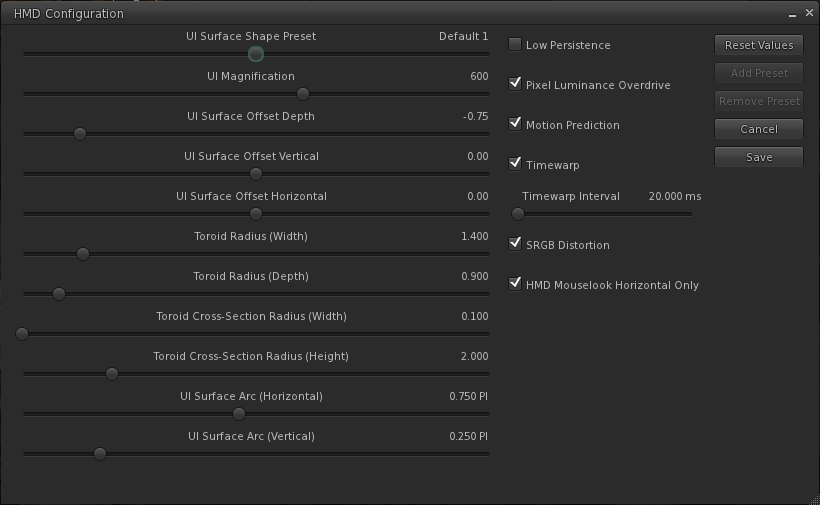
The update includes an expanded HMD configuration panel, which can be accessed via Preferences > Move and View > click on the Head Mounted Displays button.
The expanded HMD configuration panel
As with the original project viewer, this configuration panel can also be accessed via a dedicated toolbar button.
The release notes for the viewer include some additional hints and tips:
In Windows 7 turn OFF Aero (go to Windows Basic setting in the “Personalize” right-click menu on the desktop).
In the Windows display settings, adjust the refresh rate on the DK2 to 60hz rather than 75hz.
Make sure your Oculus config runtime and firmware are up to date.
Make sure the power cable is plugged in to the Rift.
If using an NVIDIA card, update to the latest drivers, which have some Oculus/VR specific optimizations.
Turning on Triple buffering in the NVIDIA control panel may help in some cases. Results may vary.
To increase framerate try reducing the Second Life Viewer draw distance and/or disable Shadows and the Ambient Occlusion.
On the HMD setting panel in preferences try experimenting with turning low persistence mode on and off. We’ve found that is some cases it can exacerbate ghosting and jitter.
If you’re in Mac OS X, it is recommended that you exit HMD when uploading files, such as images or models. There is currently an issue that can get your viewer stuck in a bad state if you attempt to upload files while HMD Mode is enabled.
Key Controls
Enter HMD mode – CTRL + SHIFT + D
Align to look – Q
Center Mouse Pointer – Z
Action key – X
Camera Mode – M (Press multiple times to cycle through 3rd Person, HMD Mouse look, and 1st Person modes)
The blog post from the Lab also includes the video released at the time the original Oculus Rift project viewer was launched.
Since November 2013, the Lab has been attempting to operate in compliance with US Internal Revenue Service requirements by ensuring those Second Life users meeting “certain transaction thresholds” have filed required IRS documentation with the Lab (whether or not they are US residents).
News of this move first broke via an SL Universe forum thread, and was subsequently followed-up by bloggers such as Ciaran Laval and myself, and by the Lab also blogging on the matter.
As the tax and documentation requirements continued to cause some confusion, clarification was sought from the Lab, and additional documentation was published in February 2014 to further help people understand the requirements and how to comply with them. However, as the year has progressed, there have continued to be occasional issues with people actually getting the required paperwork processed by the Lab, affecting their ability to withdraw funds.
As reported by Ciaran Laval at the start of October, some people have once again recently encountered delays in seeing their submitted documentation processed by the Lab. His post prompted a reply from Pete Linden, providing some insight into why delays are occurring:
Due to a significant volume of payout request in recent weeks, payout requests may take longer to process than expected. We apologize for the delay, and we are working hard on clearing the backlog and process requests as quickly as possible. In the meantime, we advise residents to please address any specific questions through their Support cases. We appreciate the cooperation and patience from all residents, and hope to have payout request processing times back to normal soon.
As Ciaran notes in following-up on Pete’s comment, it’s not clear why there has been a significant volume of payouts recently, although he suggests that it could be tied to the recent changes to the Lab’s Skill Gaming policy, which may have caused an increase in the number of people filing payment information with the Lab in order to engage with skill gaming regions.
Whatever, the reason, the Lab is aware of the situation, and hopefully taking the necessary steps to ensure delays are minimised and, as Ciaran states, “everything will be back on track in the near future and normal.”
During the TPV Developer meeting on Friday October 10th, the Lab announced that there will be changes coming in 2015 to how merchants interact with the SL Marketplace.
These changes are in part the result of the Lab working to resolve outstanding issues around Direct Delivery, including the fact that not all use cases for Marketplace sales could be solved through Direct Delivery, but still require the use of Magic Boxes.
Brooke Linden was on-hand at the meeting to provide and overview of the forthcoming changes – which are unlikely to be implemented in full until the end of the first quarter of 2015, although broader testing with them is set to commence towards the end of October or in early November 2014.
The new functionality is discussed in detail in the October 10th meeting video. The following notes are intended to provide a general overview of what is planned, and includes audio of key statements from Brooke for reference.
The major aspects of these changes will be:
The changes are being referred to as “viewer-managed marketplace”, or VMM
Items for sale on the Marketplace will not longer be stored on the Marketplace servers – they will remain in the merchant’s inventory (so there will not longer be any need to upload stock to the Marketplace)
There will be a new panel (as yet apparently unnamed) within the viewer. This will replace the Merchant Outbox and provide merchants with more information on their stock (e.g. information on whether or not an item is listed, stock levels on No Copy items, etc), and allow them to carry out the following Marketplace tasks from within the viewer:
Create new listings with stock
Associating inventory to an existing listing
Remove items from a listing
Unlist goods entirely.
(Note that other Marketplace activities will still require logging-in to the SL Marketplace web interface as is the case today.)
Brooke Linden provides an overview of the upcoming changes to the Viewer and the SL Marketplace
As a part of these changes, there will be a migration process, which the Lab hopes to make as smooth as possible. This will involve updating current Marketplace listings so that they correctly point to the inventory servers (rather than the inventory store on the Marketplace servers), and which will return items to the merchant, where they will be visible in the new Marketplace panel.
The plan is to make the migration process as automated as possible, with migration times scheduled with larger merchants as stores and listings will be temporarily unavailable during the migration process. However, for those who prefer, their will also be a manual migration process.
Brooke Linden on the migration process once the new functionality starts rolling-out in 2015
As noted above, the Lab is looking to deploy the new functionality around the end of the first quarter of 2015. In the meantime, a project viewer with the new panel will be deployed, most likely before the end of October, and it will be possible to under take testing on the new capabilities on Aditi (the Beta grid) starting wither towards the end of October or in early November.
Testing will initially involve those merchants who have been involved in providing input into the development of this new functionality, together with TPV developers. However, the plan is to then broaden it out and invite other merchants into the testing to generate broader feedback and input. Following the Aditi testing and feedback, there will be a beta phase using the production Marketplace prior to a full migration / switch-over.
Full updates on the changes will be forthcoming through future meetings as well as, hopefully, via a Lab blog post at some point in the future.
On Monday October 6th, Designing Worlds, hosted by Saffia Widdershins and Elrik Merlin, broadcast a special celebratory edition, marking the show’s 250th edition, both as Designing Worlds and its earlier incarnation, Meta Makeover. To mark the event, the show featured a very special guest: Linden Lab’s CEO, Ebbe Altberg.
The following is a transcript of the interview, produced for those who would prefer to read what was said, either independently of, or alongside, the video recording, which is embedded below. As with all such transcripts in this blog, when reading, please note that while every effort has been made to encompass the core discussion, to assist in readability and maintain the flow of conversation, not all asides, jokes, interruptions, etc., have been included in the text presented here. If there are any sizeable gaps in comments from a speaker which resulted from asides, repetition, or where a speaker started to make a comment and then re-phrased what they were saying, etc, these are indicated by the use of “…”
The transcript picks-up at the 02:25 minute mark, after the initial opening comments.
Ebbe Altberg, appearing on the 250th edition of Design Worlds via his alter-ego, Ebbe Linden
0:02:25 – Ebbe Altberg (EA): Hi, thank you. Thank you for having me on this very special occasion of yours, and ours. 250, that amazing! It’s incredible, incredible; I’m very honoured to be here.
Saffia Widdershins (SW): Well, we’re very honoured to have you here … Now, you’ve been in the job for around nine months now.
EA: Yes, since February, I think. Yeah.
0:02:59 SW: Is it what you were expecting, or how has it proved different?
EA: It’s fairly close to what I expected, because I’ve had a long history of knowing Second life, even from the beginning. So Second Life, the product, was not a mystery to me. Obviously, as you dig in and look under the hood, you see some things that you wouldn’t have expected; and some of the other products in Linden Lab’s portfolio were maybe a little bit surprising to me, but we’re getting that cleaned-up. But with regards to Second Life, it is not too much of a mystery, as I’ve been following it so closely since way back in the beginning … So it felt very natural and quite easy for me to come on-board and figure out where to take things.
0:03:59 – Erik Merlin (EM): And keeping this next question as general as possible: is there anything that’s been a pleasant or unpleasant surprise?
EA: Not that many unpleasant surprises; well, it was a little unpleasant how far we had managed to disconnect ourselves from the community and our customers and residents. So that was a bit shocking to me, because I had missed that part of the history. I remember the beginning of the history, where there was a very close, collaborative relationship between the Lindens and the residents. so that was a bit shocking to me, that … some effort had to be put in to try to restore some of those relations and some of the processes that had introduced here that we had to reverse. You know, the fact that Lindens couldn’t be in-world [using their Linden account] and stuff like that. So that was a little strange to me and unfortunate.
Positives? There are many. There are so many talented people here, so that’s been a lot of fun to get to know people here. some people have been here for a very long time; some absolutely incredible people have been here for over ten years working for Linden, so just getting to recognise what incredible talent we have here has been a positive … it was a little bit low-energy when I first came here, which was a little bit unfortunate, but I think we’ve come quite a bit further, and so the energy today in the office and amongst people working here has gone up quite a bit, so I’m very pleased with that.
0:06:03 SW: That’s brilliant. Have there been any stand-out “wow!” moments when you’ve come in-world and seen something and gone “wow!”?
EA: The “wows” for me may be less visual – I think we could do better with that in the future – but just the communities, and the types of creations and how people collaborate to make these things happen. the variety of subject matter and the variety of things that Second Life helps people to accomplish, whether it is games or education or art – its just incredible, the variety. And also the interactions with people are wild moments, where I can just drop-in somewhere and just start chatting with people, and that’s always a lot of fun and creates “wow!” experiences for me.
So the fact that this is all user-generated, in some ways that just wows me every day. It’s incredible that we can enable all these things to happen. But I’m certainly hoping we can get to a point where it’s more of a visual “wow!” in the future.
0:07:32 SW: I’ve been at the Home and Garden Expo this week … and there’s certainly some things there that are stunning examples of what creators are working on at the moment.
EA: Yeah. It’s taking everybody a while. A lot of new technologies have been introduced, and we’re still trying to make adjustments and fixes and improvement s in some of those things. But as more and more creators figure-out how to take advantage of these things, whether it’s mesh or experience keys and all kinds of stuff that just creating a new wave of different types of content and experiences, it’s fun to watch happen. It’s a lot of fun to be able to enable and empower people that way.
0:08:33 SW: We wanted to talk a little bit about the new user experience.
EM: Ah yes, and talking to different people working with new users, both English and Japanese speakers, interestingly enough, both have talked about problems with the new mesh avatars … One of the first things that people enjoy when they first come to Second Life is [to] customise their appearance, but the mesh avatars don’t really allow this, or they don’t allow it easily. Is there something that can be done about that?
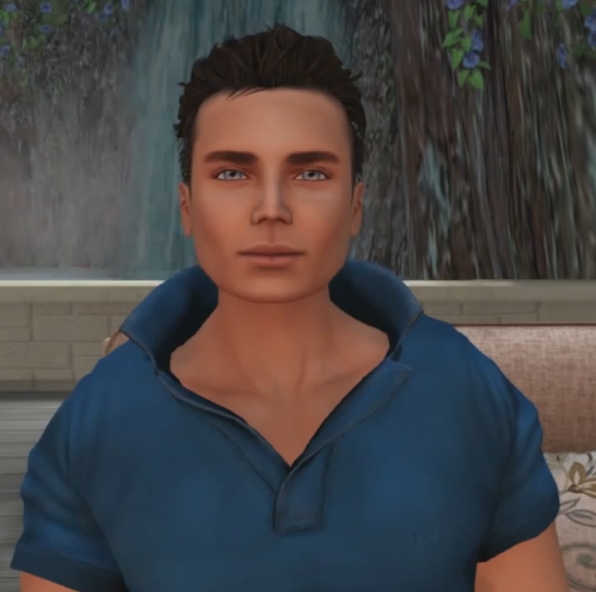
One of the things the Lab is trying to solve is the “dead face” – the fixed facial expression – on current mesh avatars, coincidentally demonstrated in the video by Ebbe’s (non-mesh) avatar
EA: I don’t have a specific list of good things there; the team is working on making improvements to the avatars, from little things that we might see as bugs, and also trying to solve the “dead face” , get some eyes and mouths [to] start moving. But some of the clothing issues is probably also issues with the complexity of understanding what things can I shop for that are going to be compatible with what types of avatars and all that. Some of it is hard to tell with how much of it is complications with the transition… or the fact that you have two different ways of doing things happening simultaneously; we’re sort-of in this transitional period where you can obviously still go back to using any of the previous avatars, those are still all there. But we wanted to push ahead with what we figure is where the future is going to take us, and there’s probably some growing pains in doing that; but other time, this is where it is going to go.
So we just have to try to understand the bugs and the complexities and react to is as fast as we can. but I don’t, off the top of my head, have a list of known issues that we’re fixing with regards to the complexities around avatars, other than the stuff with getting the face to wake up. but I can look into that for a follow-up later on, but right now I don’t have anything right off the top of my head.
0:10:50 SW: As someone who directs dramas like The Blackened Mirror, we’ve long said that we would give anything for the ability to raise a single eyebrow …
EA: Yeah … ultimately over time, as [real world] cameras improve, if you’re willing to be in front of a camera, there are things you can obviously do to really transmit your real-world facial expressions onto your avatar, and we’re going to look at that further out. That’s not something we’re actively working on right now; but there’s certainly other companies, including HiFi that are looking at that, and we know companies that have already proprieted the technology behind it that we could license and do some of those things.
But there are very few of those types of camera around, so even if you would do that kind of functionality, very few people would be able to take advantage of it, so it’s a little bit early to jump on that. We need more 3D cameras in the world. Otherwise, there’s some other techniques – it wouldn’t necessarily be facial expression – but there’s a company working on technology to be able to have your mouth … make the right movements based on the audio. That’s an interesting technology, but they haven’t figured out how to make it real-time yet.
What they’ve found is that regardless of language, if you make a sound, your mouth makes a very specific movement and a very specific shape, and they’ve constructed all of the internals of the mouth and know exactly what your tongue and your cheek bones are doing in order to make that sound. Right now, not in real-time, but they’re working to get there. so then we could get the mouths to actually react to the sounds that you are making through the microphone.
So over time, more and more of this will come, but today it would be difficult to do something that would auto-magically make it work for everybody.




 Inara Pey: Living in a Modemworld