SL project updates 21/2: NEW project: applying baked textures on mesh avatars

During the Content Creation User Group meeting held on Thursday, May 25th, Vir Linden announced that Linden Lab is now formally investigating applying baked textures to mesh avatars in Second Life, a project that has been on the request list since at least the Bento project.

In short, if it can be implemented, it would mean that textures such as skins and make-up layers could be applied to a mesh avatar in much the same way as system layer clothing can currently be applied to system avatars, thus in theory reducing the complexity of mesh avatars by reducing the number of “onion layers” they currently require in order to simulate the capabilities of the baking system.  This in turn should ease the rendering load mesh avatars place on CPUs and GPUs, thus hopefully improving people’s broader Second Life experience.

HOWEVER, the project is only at its earliest stages, and it will be a while before there is anything visible to see with regards to it. The following is a summary of the project’s current status:

  • The first aspect of the work will be to update the existing baking service.
    • This currently operates at a maximum texture resolution of 512×512.
    • For mesh purposes, this needs to be increased to 1024×1024 (which can already be used directly on avatar meshes via textures and / or applier systems).
    • As the baking service hasn’t been touched in some time, updating it may take a while, and any progress on the rest of the project is dependent upon it being completed.
    • Once the baking service has been updated, then the actual work of extending it to support mesh avatars should be fairly straightforward.
  • The exact specifications for how the bakes will work have yet to be defined, so there are no feature / capability details at present.
  • The capability will not support the use of materials, as the baking service as a whole has no notion of materials at present; it only produces a composite of diffuse textures, and there would be a considerable amount of additional work required to make it “materials aware”, marking it as (perhaps) a separate project.

It is important to note that this capability is not necessarily intended to replace applier systems; rather it is to add flexibility to using texture bakes with mesh, and potentially reduce the complexity of mesh avatars.

Further updates on this work will come via the Content Creation User Group (CCUG) meetings, and I’ll report on them through my usual CCUG meeting updates.

The following is an audio extract from the May 25th CCUG, at which Vir announced the project.

Note: there was a broader discussion on the avatar baking service, and this will be covered in my upcoming report on the CCUG itself.

Second Life mesh upload prerequisites revised

The Mesh Upload Tutorial is no more

When mesh content was being introduced to Second Life, linden Lab implemented a “gate” on people’s ability to upload mesh models to both Agni (the Main grid) and Aditi (the Beta grid).

In both cases, anyone wishing to upload mesh had to:

  • Provide payment information to Linden Lab
  • Complete a mesh intellectual property rights tutorial / questionnaire.

This has now been streamlined so that all someone who wishes to upload mesh needs to do is

  • Provide payment information to Linden Lab
  • Confirm they have read / agree to Linden Lab’s Terms of Service and Intellectual Property Policy, and acknowledge they may be subject to Linden Lab’s removal procedures should you fail to comply with these policies.

For those already “cleared” to upload mesh to Second Life, nothing changes – you remain approved.

However, if you are new to uploading mesh models to SL, you now have a far more streamlined process to complete in order to do so, as noted below.

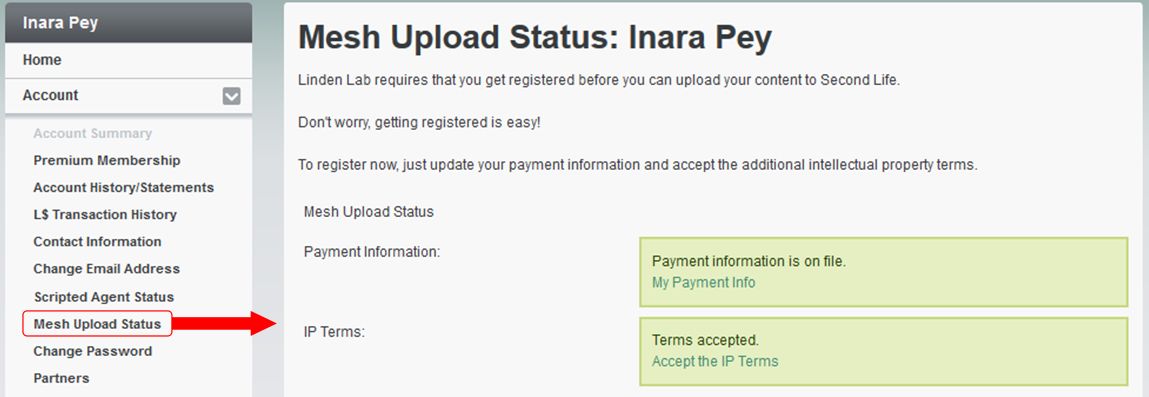
Go to your dashboard at secondlife.com, and select Mesh Upload Status from the left-hand Account menu. This will display a summary page of your current status. If you have previously provided payment information to linden Lab and previously completed the Mesh Upload Tutorial, your information will be shown in green (below).

If you are registered for uploading mesh, both parts of the Mesh Upload status page will be shown in green

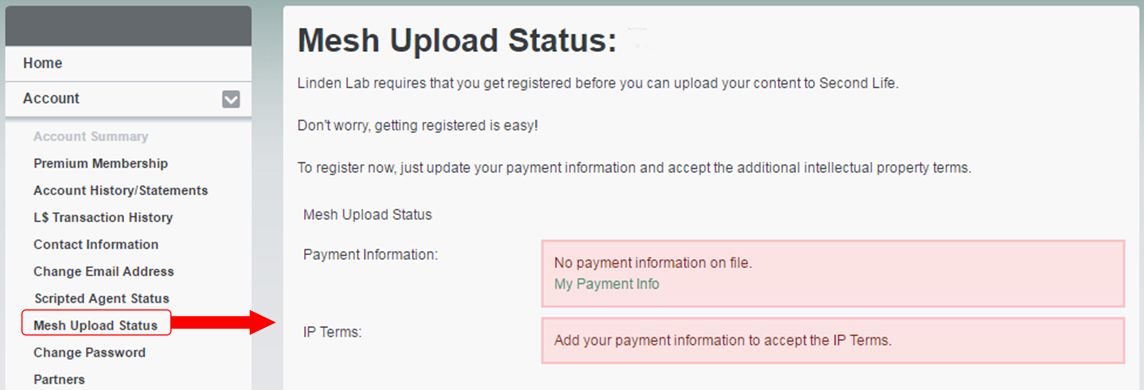
If you have not provided payment information to Linden Lab (only required for uploads to the Main grid) and / or you have not confirmed you have read the Terms of Service (ToS) / the Intellectual Property Policy, one or both of the status boxes on the page will be red.

Further, note that you cannot confirm acceptance of the ToS  / the Intellectual Property Policy until you have provided payment information, as shown in the image below (note the second red box).

The Mesh Upload status page for someone who has not provided payment information to Linden Lab. Note they cannot accept the Terms of Service / Intellectual Property Policy until they have.

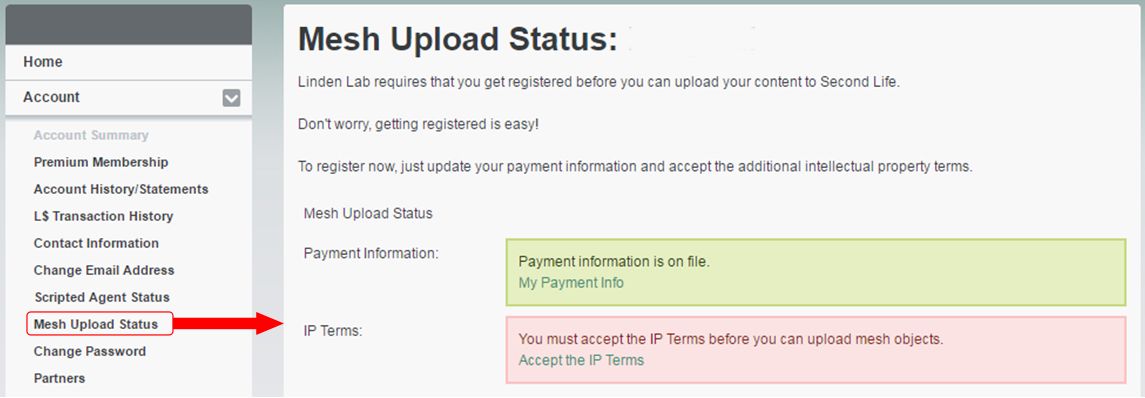
If payment information needs to be filed, clicking the My Payment Info will display your account’s Billing Information Page, where you can add a payment method. When you have done so, you can return to the Mesh Upload Page, which will show the payment information section in green, indicating your payment method is on file.

You can now proceed with accepting the terms and policy, by clicking on the Accept The IP Terms link.

The Mesh Upload status page for someone who has provided payment information, but who has not confirmed they have read the ToS / Intellectual Property Policy

Doing so will display the Accept IP Terms page, which has a large I Accept button, and links to the ToS and the Intellectual Property Policy. note that both of these will open in the same browser tab as used by the Accept IP Terms page, so use your browser’s Back button to return to it when you are ready to accept.

When you are ready to do so, click the I Accept button to confirm your agreement to adhere to the ToS / Intellectual Property Policy. The Mesh Upload status page will update to show the required fields are green, and you are cleared to start uploading mesh models via the viewer.

Again, if you were already able to upload mesh to Second Life, nothing has changed. You do not need to re-affirm your ability to do so. The reason for this change, so far as I can tell, is because the tutorial  / questionnaire was seen as a little cumbersome and top-heavy.

With thanks to Whirly Fizzle for the nudge for me to take a look.

Second Life – Ozimals closes

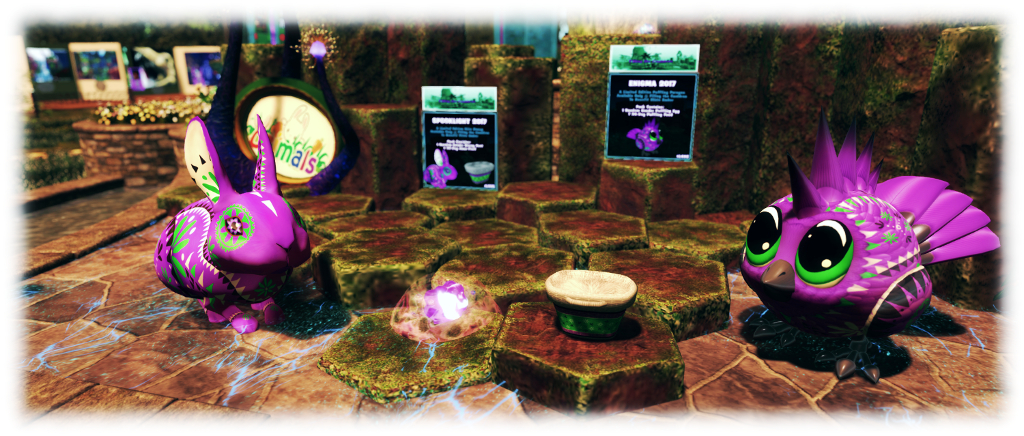
Ozimals donated a limited edition bunny and Puffling to help raise funds during Filling the Cauldron, to help Second Life creator Elicio Ember and his family

Update, May 18th, 2017: As per the  comment below from Neobokrug Elytis, further information pertaining to the situation has been published via Google Docs here: https://drive.google.com/file/d/0B-_7k-VigxufaTM5b18yVXpvZU0/view, offering additional information on the situation from the claimant’s perspectives.

Update, May 17th: As per the comment below from Sue W, the Ozimal blog, including the post referred to in this article, has been cleared down.

Sonya Marmurek indirectly brought this to my attention via an image posted to her Flickr stream: Ozimals, the brand of breedable rabbits and Pufflings is closing its doors with immediate effect.

The cause is apparently a Cease and Desist letter forwarded to Ozimals founder Malkavyn Eldritch. No specific details of the cause of the letter have been made available. However, Malkavyn broke the news in an Ozimals blog post on Tuesday, May 16th, 2017, which reads in part:

At 8:00 am on Monday, May 15, 2017, I received a Cease and Desist letter from legal counsel representing Edward Distelhurst and Akimeta Ltd. This letter demands that I cease all use of Ozimals intellectual property.

I don’t personally agree with this claim, but I do not have the means to fight this in court, therefore I have no choice but to comply.

As of the morning of Wednesday, May 17, 2017, my products and their associated games will cease to function.

This means:

All databases supporting the bunnies and Pufflings will be off-line.

Support, both in-world and through the ticket portal, will cease.

All Ozimals in-world groups will be closed.

Pufflings will cease to function.

Any bunny who is Everlasting will continue to function, as he or she does now: without cost.

Any bunny who is not Everlasting will be unable to eat and will hibernate within 72 hours.

This is not the first time Ozimals have faced a legal situation, having been involved in a lengthy dispute with Amaretto Horses which ran from late 2010 through 2013.

Alongside her image, Sonya notes:

If you read this before it’s too late, there’s free eternal timepieces and other goodies in the Ozimals main store to make sure you can keep your bunny pets with you even when the servers go down.

Whatever the ups and downs or ins and outs of this situation, Ozimals have proven extremely popular across Second Life, and  Malkavyn closes his post with an apology and thanks to all those who have supported Ozimals over the years:

It was never my intention for the time we’ve all spent with the bunnies and the Pufflings to end like this. I want to thank you from the bottom of my heart for all of the support this community has given me over the last seven years. I wish there was more I could say.

Linden Lab advises: verify your e-mail

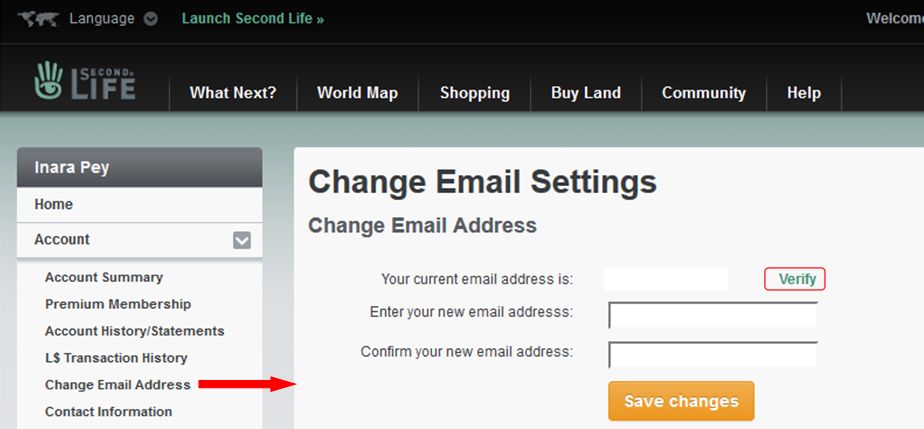
Back at the end of January, I posted instructions on how to verify your e-mail address. I did so, because the Lab was indicating that in future, outgoing e-mails (including IMs-to-e-mail, Merchant and information from the Marketplace) will only be sent to those e-mail addressed that have been verified by the owners. So, failure to verify would mean no more off-line IMs delivered to you (among other things).

While it’s taken slightly longer to get officially announced that anticipated at the time I wrote that report, on Wednesday, April 19th, the Lab did finally post notice of the upcoming change see Making Email From Second Life (More) Reliable) explaining the reason behind it pretty much as I did back at the end of January:

One of the most important reasons mail doesn’t get through is that many Second Life accounts have bad email addresses – when something in Second Life sends to one of those bad addresses, it generates errors. The number of those errors causes many network providers and spam detectors to block even perfectly good email if it comes from Second Life. To fix that, we need to cut down on the bad addresses, so…  over the next few months we will be converting all the sources of email in Second Life to not even try to send to an address that has not been verified.

The official post provides an outline on how to verify your e-mail address. If you require more step-by-step instructions (although the process isn’t hard), please refer to my January 28th, 2017 post, Important: verifying your e-mail address with Second life.

Makes sure your e-mail is verified if you want to continue receiving off-line IMs to your e-mail

New region and parcel access controls coming to Second Life

At both the Server beta meeting on Thursday, April 6th and the TPV Developer meeting on Friday April 7th, Grumpity Linden and Oz Linden revealed more about the upcoming changes to region and parcel access settings.

The server-side update for thee control are currently on the three RC channel (server maintenance package (17#17.03.31.325149) – but the changes as a whole will not come into effect until after there has been a significant UI update to the viewer.

So what is changing?

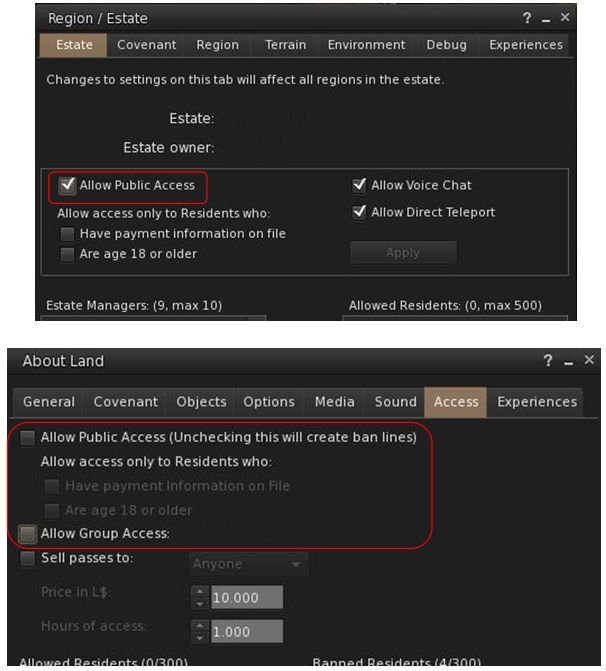
In short, the new controls – once they are available through the viewer – will mean that when a region is explicitly set to Public Access via the Region / Estate floater, parcel owners will no longer be able to unhceck Allow Public access or set other restrictive access (e.g. Group Only) in the About Land floater for their parcel – so no more ban lines on regions explicitly set to Public Access. However, parcel-level ban lists will still apply and if things like security orbs are allowed with the region in question, they will still work as well.

Note that no change will occur where Allow Public Access has not been explicitly set within the Region / Estate floater. In these instances, parcel owners will still be able to set their own access.

This change is being made for several reasons. For example, it is something many region owners (and those who sail / boat / fly  / drive through ostensibly public regions) have requested; it is also something many estates have in their covenant but cannot actually enforce; and so on.

With the upcoming changes, if an estate is set to Allow Public Access (top), parcel holders on that region will no longer be able to override the public access using the About Land access options (above). However,the parcel ban list and and installed security system will still apply

These changes mean that the viewer UI – as noted – will be undergoing some significant changes.  Exactly how extensive thee changes will be is unclear. However the Lab is conscious of the need to ensure there is no ambiguity in the controls, and that issues such as BUG-4994 which results in a parcel being set to Group access (and gaining ban lines) if both the Public and Group access options are checked, are also resolved as a part of the work.

At the Server Beta meeting on Thursday, April 6th, Grumpity Linden commented on the UI updates thus:

We are trying to find the best way to express the access sets most clearly … The UI is changing to better convey what your actual settings permit …

1) EO & EM can now force parcels to be no more restrictive than the Estate level setting.

2) UI for both Estate and Parcel access management is confusing. We’re making changes to make it less confusing. The weirdness where you check “Public access” and “Group access” and end up with group ONLY unless you also check “PIOF” and then you get group + public w/PIOF … that will not stand.

UI will grey out unavail options; also, estate level setting will include a warning dialogue to hopefully deter EM from messing with this override willy-nilly.

It is anticipated that a viewer (project or RC) with the required updates could be appearing in week #15 (week commencing Monday, April 10th).

The changes and the upcoming viewer UI updates were also discussed at the TPV Developer meeting, from which the following audio excerpts were extracted and put together.

These comments can be heard in full on the video of the TPV Developer meeting, commencing at the 4:45 time stamp.

Lab announces improved region capacity and access in Second Life

On Tuesday, April 2nd, Linden Lab announced the roll-out of Improved Region Capacity and Access, which see increases in the default number of avatars able to access a region, and how regions are accessed when approaching the upper limit of avatars allowed into them.

The new limits are being rolled out gradually, so you may find the default for your region may not have changed. It will, however, as the deployment continues.

Overall, the default limits on avatars able to enter each type of region have been increased by between 10% and 25%, depending on the region type, so:

  • The default for Full regions is increased from 100 to 110 (10%)
  • The default for Homestead regions is increased from 20 to 25 (25%)
  • The default for Open Space regions is increased from 10 to 12 (20%)

Note that the percentage bonus remains the same if the region owner changes the maximum number of avatars able to access a region. So, for example, if the owner of a Full region has set a limit of – say – 50 avatars on their region, this is increased by 10% (to 55) under the new limits.

This is straightforward enough – now for the twist: this new bonus capacity is only available for entry purposes to Premium members. As far as Basic users are concerned – and only for the purposes of region access, the limits remain unchanged.

This means that if you’re a Basic user and trying to get into a Full region which has, say, 105 avatars (out of a default total of 110)  – you’ll be unable to access the region, and will get the Region Full notification on trying. However, up to 5 more Premium members will be able to still get in.

Note also that once an avatar is in a region, whether they are Premium or not will not matter; they count the same as anyone else. It doesn’t matter what the mix of Premium, Basic, or owner/managers in the region is: they all just each count as one occupant.

As a final piece of the changes, the region occupancy limit does not apply to a region owner or an Estate Manager for the purposes of entry. They will always be able to enter the region, even if it is full. However, once they have accessed the region, then will increase the avatar count for the region. So, if a region is at its limit and the owner enters, then two avatars will have to leave before a non-owner/manager would be able to enter.

Again, do note that the new limits are being rolled out gradually, so you may find the default for your region may not have changed. It will, however, as the deployment continues. If you are unclear on any of the above, please refer to the Lab’s blog post.