Linden lab, as pointed to by Daniel Voyager, has overhauled the new user sign-up pages, making them cleaner and more direct. Gone are the old static pages, instead, a newcomer clicking on JOIN NOW is taken to a page that displays the new default avatars, which can be previewed in motion (to some extent) prior to selecting the most preferred one.
Once selected, the avatar slides over to a page requesting you assign it a user name, before sliding over to a third screen where the rest of the default information required to create an account is displayed (password, e-mail addy, etc. – all of which are mandatory).
Michelle Leckrone has produced a nice little video of these initial steps, which can be seen below.
Following these screens, you’re given the option of going for a free account, or a Premium, as shown on the left; once selected, you reach a screen inviting you to download and install the Viewer, as “Your avatar is awaiting you!”
Overall, it is a clean, slick approach to the sign-up process, although it does have a few teething troubles right now, and it again demonstrates the mistake LL made in doing away with the first name / last name format for avatar names.
The problems are in the fact that – once again – Linden Lab seem to have shot themselves in the foot when it comes to testing and QA: many users are reporting issues with the new sign-up system across all flavours of browsers. These are as minor as the selection bar on the first screen appearing OVER the avatars themselves, right up to the screen failing to load any avatars at all.
This isn’t really very clever, and needs fixing quickly. For my part I rant the process on the latest Chrome and Opera iterations, and found the selector bar issue in Opera, while Chrome displayed everything faultlessly.
The loss of a last name for an avatar is more of an issue inasmuch as it severely limits the choices available to users – hence the massive rise in names like “Jodie1234 Resident”. While it can be argued that the use of Display Names overcomes this limitation, the removal of the last name option – even when using a pre-selected list – has potentially lessened the external view of Second Life as being a digital “reality” and moved it closer to being viewed as just another game.
That said, this is overall a good move in cleaning up the user sign-up process – assuming the idiotic browser compatibility issues are rapidly sorted out (and for which there is simply no excuse). I certainly hope that the rest of the sign-up process is similarly revamped in a positive manner. As it stands, it still suffers from the bland (and misleading) videos and slide shows that do very little to entice new users or offer an actual meaningful explanation as to what SL is and what people can do within it. Hopefully, these will be addressed in the near future, and replaced with something more vibrant an appealing.
Why this is the case is subject to some debate in the official forum. While it would be dangerous to blame any single factor for the decline anyway,the parallel between the implementation of LL’s more unpopular policies couldn’t be clearer. At the start of 2009, concurrency was on a high, as the Alphaville Herald shows. However, the start of that year saw what many took to be the final bait-and-switch tacttic in the OpenSpace fiasco, to be followed later in the year by the Adult Change debacle, which was at best handled with a certain degree of outright incompetence by Linden Lab, and so on.
While things did rally a little at the end of the year, the downward trend continued throughout 2010, rallying briefly at the start of 2011 – mostly likely because of a combination of it being the holiday season (and people collectively the world over having more time to log-in) and hopes for the platform rising as a result of the announcement that Rod Humble had been appointed the new CEO.
However, Linden Lab aren’t solely to blame for the decline. much has happened to change the landscape of virtual worlds over the last 2-3 years. Blue Mars pitched up (albeit briefly) and carried a lot of attention away from Second Life – some of which is now drifting back). More importantly, OpenSim Grids started to show signs of maturity and stability. Some of these have become very attractive to SL content creators as being new and exciting markets in which to plunge; as a result of new content becoming available elsewhere, there has been a trend for people to start splitting their time between Second Life and other similar grids such as InWorldz that are now readily available. These other grids are also themselves more attractive to users because their pricing models significantly undercut Linden Lab’s own; whether such prices are sustainable as such platforms grow is debatable – but it cannot be denied that the absurdly high prices charged by LL for server space is limiting SL’s ability to grow, and is indicative that there does need to be a re-emphasis / re-alignments of LL’s revenue streams.
As well as spending more time elsewhere, or whatever reasons (and yes, it’s easy to point the finger and say, “I’m only in X because LL [fill in the blank]”, even when such a statement is not entirely accurate), the users of SL also share in some of the blame: this is a world that exists because we imagine it and create it – yet we seem to be failing ourselves in creating the kind of compelling content that once existed in SL.
What this decline does again demonstrate is that there needs to be a re-evaluation of the LL/ user relationship. If the downward spiral is to be halted, the Lab and the user community need to work more closely together, both in creating a stable, vibrant economy and in the promotion of Second Life to a wider audience. I don’t wish to appear to be blowing my own trumpet here – but the fact is that observations made in post such as Tell Me A Story… and Business, Growth and Collaboration aren’t exactly rocket science – and many SL commentators are saying more-or-less the same things in their own ways.
Stopping the decline is going to take a concerted effort – and no single thing is going to reverse it: not bouncing bewbs, not a revamped new user experience and certainly not mesh; nor is simply taking potshots at LL and blaming them for everything. Second Life is a boat we’re all sitting in together – Lab and users.
It would be nice if we could all start rowing together under the guidance of Coxswain Humble.
So, SL is all lit up about the forthcoming bouncing bewbs et al in Viewer 2; so much so that people are stampeding over to the website and downloading the Snowstorm latest development version (2,6,3) of the Viewer in which Avatar Physics are to be found.
Setting the Avatar Physics rendering slider
To determine how well your Viewer renders Avatar Physics, go to ME -> PREFERENCES -> GRAPHICS, click on ADVANCED at the bottom of the tab, and then adjust the Avatar Physics detail slider.
In what might cause a little confusion for those used to using breast physics in TPVs, Avatar Physics are treated as a new clothing layer in Viewer 2. To enable them, therefore, you need to:
Open your Inventory and click “+” at the bottom of the Inventory tab
Select NEW CLOTHES -> NEW PHYSICS from the drop-down menu that appears
A new clothing layer is created called, by default, “New Physics”.
Once created, wear the new clothing layer, and:
Swap to the My Appearance tab in the Sidebar
Click on WEARING
Right click on the New Physics clothing layer (or whatever you’ve renamed it to) and select EDIT OUTFIT
Click on the tools icon to the right of the selected layer to display the Avatar Physics options tab.
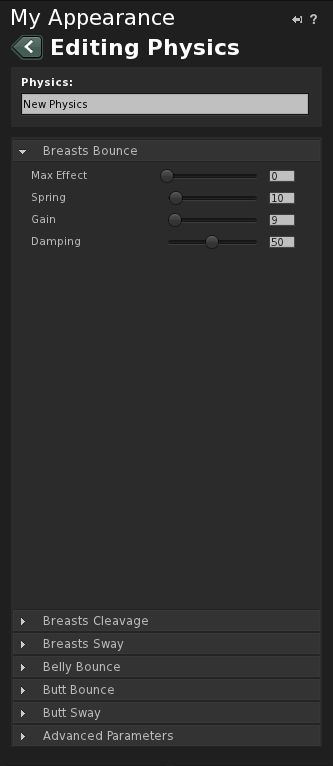
Avatar Physics - main options
This tab contains a number of controllers:
Breast Bounce (open by default on first use)
Breast Cleavage
Breast Sway
Belly Bounce
Butt Bounce
Butt Sway
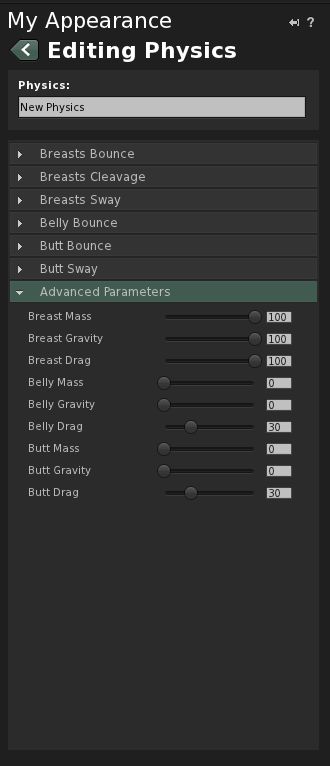
Advanced Parameters
Each of the first six options comprises a series of sliders rated from 0-100 which adjust four parameters: mass effect, spring, gain, and damping.
Advanced Parameters contains an additional set of parameters (mass, gravity, drag) for breasts, belly and butt respectively. Again, each of these is controller by a slider rated from 0-100.
In all cases, 0 = effect not seen; 100 = effect on maximum exaggeration. The best way to sort out how to set the sliders is through experimentation and finding something you’re happy with. Once you’re happy with things, click the SAVE button at the top of the tab, or SAVE AS at the bottom, if you wish to rename the layer.
Some things to note:
Like the Breast Physics in TPVs, activating Avatar Physics in Viewer 2 broadcasts the effects to other compatible Viewers
The Avatar Physics system is not compatible with the Breast Physics in TPVs – you won’t see bouncing bewbs for others using a TPV with Breast Physics enabled; similarly, they will not see your Avatar Physics.
Breast physics are not new to the world of Third-Party Viewers (or Third-Pervy Viewers as I once saw them called in a forum post). First introduced with Emerald, they are now available in most TPVs.
Until now, however, they’ve not been available in the “official” Viewer; but all that is about to change. Yes, bouncing bewbs are coming to Viewer 2. And not only bouncing bewbs, but also physics to make bellies and butt do their own thing.
Whether this leads to a wider uptake of Viewer 2 remains to be seen; I’ve personally found the bouncing bewbs thing to be a nevermind situation – I’m not particularly fussed if someone out there has parts of me madly boinging up and down to aid their visual jollies in a TP, but at least here, as a clothing layer, I retain full control of what is seen. This alone means there should be less screaming from people in terms of sexist attitudes or degrading the female form, as we’ve had in the past.
At the end of the day, if bouncy bits are fun to have and further mimic what we get in real life (well, if not taken to extremes), then well done to LL for finally jumping on the band wagon!
In the meantime – and with grateful thanks to Opensource Obscure, here’s a fun little video marking the soon-to-arrive features, currently available in Snowstorm.
On the 16th March, Linden Lab pushed a new version of Viewer 2 into a Development release. Version 2.6.1.223988 has two modes associated with it: “Advanced” – the Viewer we are all now familiar with, and “Basic” – a version with a trimmed-down feature-set designed to get new users familiar with the Viewer and UI.
I downloaded a copy of the Viewer (thanks, Ann!), and took it for a spin. Here’s what I found.
Installation and Start-up
Installation is as you’d expect from a Second Life Viewer: simple and direct. Given this is a Development copy, it goes into its own folder, but be warned: the Viewer appears to use the same folders for caches, etc., as the Release version.
On starting the Viewer however, there is an immediate difference: the splash screen now has an additional button, which allows you to set the default mode of the Viewer – either BASIC or ADVANCED, with the former selected by default following installation.
The new Mode button
Toggling between the two modes is a little clumsy: you have to select the alternate mode, then quit the Viewer (you are prompted to do so) before manually re-starting. This shouldn’t be too much of an issue for those moving up from Basic to Advanced, but it would still be nice to see the re-start handled automatically: confirm your wish to quit and have the Viewer resume without you having to go find the icon and clicking on it once more.
The User Interface
Once the Viewer is started, things get interesting. For a start, there is no menu bar at the top of the screen, nor are there any options available to display one, or the Favourites bar by right-clicking up there. Instead, there is just the address bar and the media play / pause button and the volume control.
There is also no Sidebar.
The button bar at the bottom of the screen also demonstrates noticeable differences. The familiar chat box, Gesture and View buttons are there, everything else is somewhat different.
The Basic Mode Button bar
Replacing Speak (the Basic Mode does not support Voice), Move and Snapshot buttons, the new user has a range of function-specific buttons:
Destinations
Opens up a full-width window across the bottom of the UI, displaying all the major destination categories, thus:
The Destination window
Click on a category, and a new set of options is displayed, complete with a Browser-analogous “back” option to get back to preceding views. Clicking on an actual destination will teleport the user there – something that is potentially a little disconcerting the first time it happens, as there is no pop-up to warn the users as to what is about to happen; the screen simply blanks to the black teleport screen. Given there is no World Map or search function, the Destination button is pretty much the only way of getting around the Grid with the Basic mode.
My Avatar
Opens up a full-width window in much the same way as Destinations, but this one featuring a range of avatar looks, defined both in terms of ethnicity and dress style
The My Avatar window
Clicking on an avatar option will automatically drive the user’s appearance and clothing to change to the selected option – again, a very clean, easy way for new users to quickly change their look and style to something they are happier with. Given there is no way to edit appearance, or get to any form of Inventory, it is also the only way to change an avatar’s appearance.
People
Opens up a compact form of the People tab from the more familiar Viewer 2 sidebar. Most of the functionality here is the same as for the full Viewer, other than the options found under the Tools “cogwheel” icon. This has been simplified to have only the View Profile, Add Friend, IM, Teleport and Block, Report and Zoom In options.
Profile
Opens up the Viewer Browser to display the avatar’s profile.
How To
This is potentially the most useful button for new users, and is well-presented for what it does. As the name implies, it presents a series of what I’d call “cue cards” on how to perform basic tasks: walking, talking, starting an IM, flying, changing the user’s view, using the keyboard to change the view, and using the Destination and Avatar buttons.
Options can either be paged through using the intuitive “>” and “<” buttons, or by clicking on the top menu and selecting an option from the drop-down list.
Two of the How To button “cue cards”
In-world Interactions
In terms of in-world interactions, the Basic Mode of the Viewer functions pretty much as with the “full” Viewer, but with a reduced option set; as one might expect, there are no options to build or edit objects, for example. However, there are also some nice touches: left-click on the centre of another avatar, for example, and a blue dot is displayed. Release the mouse button and your avatar walks directly to them (although this can cause a few bumps and shoves if the route is not clear between the two avatars!).
Right-clicking on another avatar displays a simplified menu, comprising View Profile, Add Friend and IM, and the Block, Report and Zoom In options. Simply pointing at another avatar displays the familiar name pop-up and “information” symbol that in turn leads to their “mini-Profile” and IM / Profile / options buttons.
Similarly, right-clicking on an object provides a four-function menu comprising: Sit Here, Stand Up, Zoom In and Touch. The last displays any menu associated with the object (providing the menu is contained in the root prim, obviously).
One further thing that is glaringly absent from the Basic mode UI and in-world interactions, is that the user has no ability to either purchase Linden Dollars or make purchases. Given this is designed to be a basic introduction to Second Life, one can understand why such options have been left out. However, while “Shopping” itself is not included as a category in the Destination options, the new user isn’t going to travel far before they do encounter opportunities to buy things – and the fact that they can’t using the Basic mode could see it being abandoned before it has served its purpose.
Impressions and Thoughts
As a first-cut “introductory” Viewer, the Basic mode is not that bad; it offers what is essentially a point-and-click approach to finding your way around in-world – something that pundits have been crying out for – while at the same time presenting a relatively clean and easy-to-follow user interface that will help the new user gain familiarity with the basic functionality of the Viewer as a whole.
The Destinations button is particularly useful in getting new users out and about, again given there is now search or world map; while the avatar button makes it relatively easy to change looks – albeit it with shape as well.
However, while the How To button and “cue cards” have been well laid-out, one cannot help but think they would benefit from a few more items: how to jump, a quick explanation of left and right clicking on objects, etc., just for those that are nervous about simply diving in and click all over the place. Similar, a brief overview of common terms would not go amiss: what is a Profile? What is the “cogwheel” button? What does “Report” mean? And “Block”? “How do I unblock someone I blocked by mistake?”
Another concern is that while the Basic mode is very good as a first look, the step up to the “full” version of the Viewer is nevertheless huge. It would be useful if, on first detecting the mode has been changed, the Viewer itself could direct the use to the Quick Start Guide and offer the new user a smoother transition from Basic to Advanced modes. This would be invaluable, given the fact that core elements of functioning in Second Life – inventory, search – are completely absent from the Basic mode, and as such, liable to leave the user somewhat confused.
Finally, and given the recent RedZone situation, and the fact that devices like it are still very much in operation in-world, one would prefer to see the Viewer start-up in either Basic or Advanced modes with the media turned off – together with a How To “cue card” on how to turn it on. It would also be nice to see the Media Filter included as a part of the Basic Viewer, again with a simple “cue card” guide.
These points aside, the Basic mode is a good first step for users entering Second Life for the first time. Even the lack of any ability to buy things can be forgiven, despite my earlier reservations; it provides enough impetus for people to find their feet in SL and get the basics under their belt. Certainly, given this is only a first look, there doubtless can and will be opportunities to tweak it as people coming into SL are exposed to it, in order to ensure it does adequately meet the needs of new users.
Kudos to the team who have been working on it!
If you wish to have a look yourself, the Development version can be found here.
The account belonging to zFire Xue, creator of RedZone, together with at least one of his alts, “theBoris Gothly”, has gone from Second Life.
So to have the contents of zFire’s store. The news came at around midnight, UK time with posts appearing both in the ever-Epic SLU Thread and people Tweeting on the matter as well.
As the news spread, people started heading for the sim where zFire had his shop – and sure enough, the place was empty.
So – is this a cause for celebration? Is the great hoo-haw over and done with?
Well…sadly, no.
Sure, there is some reason to celebrate; RedZone has been the focus of a lot of effort, and deserves a moment of celebration; but the fact remains that at the time of writing:
Certain locations across the grid were apparently still running RedZone
RedZone remained available on SL Marketplace
Others whom seem to be involved with zFire Xue remain active in Second Life – indeed, one such individual ejected the 30-or-so people checking over zFire’s shop…
That the product is still on the Marketplace could be down to nothing more than a delay in getting things sorted over at LL. That those associated with him have not gone could be down to just that – they are associated with him and his device, rather than clearly and unequivocally part and parcel of its creation or a part of selling it directly in-world or via the Marketplace (where zFire Xue used his “TheBoris Gothly” alt). That RedZone devices are still appear to be functioning in-world is again a little confusing: unless purging them from the LL servers is taking time as well.
Assuming that zFire has gone, and that RedZone is to be removed from the Grid and the Marketplace, than there is cause for celebration to a point. However, the media exploit still exists, there are other devices still out there, and so there is still more work to be done.
Addendum 16th March 16:45
A further quick tour of sims known to be using / hiding RedZone showed that none of them caused a media filter alert of any kind that pointed towards the RedZone URL, or anything of suspicious concern.
Elsewhere it is reported that RedZone devices have had scripts pulled from them. Given that RedZone users were previously instructed by zFire to move the scripts from his own device to prims of their own making, this would seem entirely logical: zapping the scripts would be more effective that simply pulling devices tagged with zFire Xue as the creator.
zFire Zue himself went on the warpath prior to his ban from SL (the interview took place on the Saturday prior to him being banned, but was published – ironically – on the day of his ban), and indicated a potential link between himself and the Knights of Mars, a vigilante group that can allegedly – and for a fee – get any user banned from SL. Given his companions are still involved in world, some are speculating on whether this matter has entirely closed with regards to RedZone.
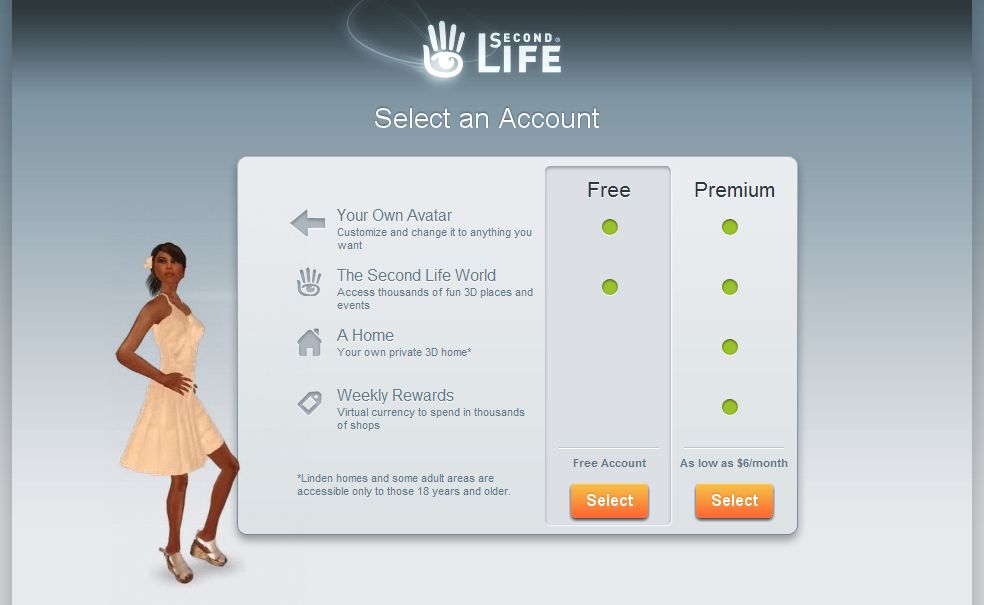 Following these screens, you’re given the option of going for a free account, or a Premium, as shown on the left; once selected, you reach a screen inviting you to download and install the Viewer, as “Your avatar is awaiting you!”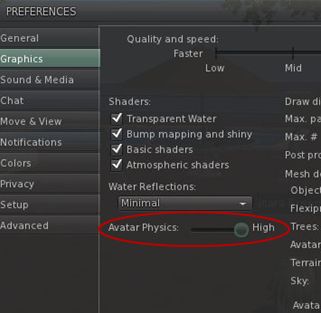





 Inara Pey: Living in a Modemworld