Linden Lab says “someday / maybe” to mesh parametric deformer

Linden Lab has gone to a lot of effort to provide mesh. Some of it perhaps hasn’t been handled too well at times (given the problems around Prim Equivalency, the weakness of the uploader, etc., would it really have hurt to delay the launch by a month so that some of these issues could be address as they are being already in the latest Mesh Project Viewer?).

One of the biggest issues around mesh is clothing. Simply put, the way mesh works means that options to resize worn items are limited. In some cases very limited. Even with alpha layers, it can be a case of modifying your shape to fit the item – and there are times when alpha layers aren’t suitable…leading to more and bigger issues.

Maxwell Graf suggested a means of handling the problem – a parametric deformer. He’s blogged about the idea – so have many others. He’s raised a JIRA on the subject and received the support of just about every mesh clothing designer in SL. It’s generated a lot of discussion.

It appears to have been universally ignored by Linden Lab.

Charlar Linden has commented elsewhere on the subject and suggested there might be alternative methods to employ, etc., but the lack of open commentary is confusing.

And now the JIRA has been downgraded to someday / maybe – a stance that doesn’t sound too hopeful.

Theories have been put forward as to why the JIRA has been downgraded – some have cited the recent code breakages for attachments and PRIM_PHYSICS – the suggestion that these and other issues have higher priorities, et. But such explanations really don’t make sense: this issues are under the control of a different team at LL.

Are the Lab generating an alternative? Do they simply think this is a non-issue? It’s impossible to say.

Only one this is clear right now – the stubborn silence evidenced from linden Lab isn’t winning them any favours. We’ve long been promised better and more informed communications (wasn’t that, after all what all the hoo-ha with the Lithium “Community Communications Platform”?) Rod Humble himself has promised (via Twitter) that the silence would end some time back – yet the fact remains that outward communications from Linden Lab are sporadic and frequently noteworthy for telling us what we’ve already discovered for ourselves.

Of course, one doesn’t expect LL to inform users of absolutely everything that is going on – but given the ballyhoo around mesh, the concern over limitations on mesh clothing / body attachments (which otherwise have the potential to be a huge market in-world), it would really help matters if someone, somewhere inside Battery Street actually stood up and said something on the matter of what on Earth is going on.

Rodvik? Over to you.

In the meantime, if you are cuious about mesh clothing – limitations and all – I recommend a read of Couldbe Yue’s excellent overview and guide.

Attachment update fix rolled-out

The “showstopper” bug affecting the update of worn attachments, as reported on two weeks ago saw the initial fix rolled out across the entire Main grid (with one or two exceptions), a week after it was rolled-out to the RC channels.

So far, feedback on the JIRA, SVC-7283, has been largely positive, and it appears that for most content creators impacted with the issue, the core problems are resolved.

However, there are still some outstanding issues to be addressed:

  • SVC-7321: llRemoteLoadScriptPin() does not allow injection of an O:VMCT script into an O:PERM_ALL worn attachment
  • SVC-7294:The simulator is too strict when llGiveInventory() adds restricted-permission items to fullperm attachments which already contained other restricted-permission items

Not dates are currently available on potential fixes for either.

Update: 27th Sept: Since drafting / releasing this update, testing has revealed that even with all current fixes in place, a problem still remains wherein should an update fail, existing scripts in the receiving item can still be deleted. There is currently no direct fix for this.

Mesh and the Beta grid

There are now numerous tutorials on creating mesh objects in the likes of Blender for upload to Second Life; however, getting everything just right with mesh objects, their LODs, textures, etc., isn’t easy. The unwary might even end up sending a little too much uploading and adjusting items. To this end, it is best to use the Beta grid (also known as Aditi or the Preview grid) to work on models until you’re satisfied, and then upload them to the Main grid.

As many have never logged into the Beta grid, here’s some simple instructions and pointers.

Note that this article assumes you are certified for mesh uploads on the Beta grid (if you are already certified on the Main grid of uploads, you may still need to re-certify yourself on Aditi (with thanks to Opensource Obscure for the reminder)).

Updating Your Beta Grid Account

If you have not logged-in to the Beta grid in a while, the chances are your account information (including your inventory data) is going to be stale. If you already have items in your inventory you wish to work with, this may be an issue. So the first step may well be to refresh to Beta grid details. This is done quite easily:

  • Change your login password:
    • Go to your Dashboard at http://www.secondlife.com
    • Click on the down arrow button in the ACCOUNT window near the top left of your Dashboard
    • Click on CHANGE PASSWORD
    • Set a new password for yourself and SAVE it – remember this will be immediately applied to all your SL log-ins, including the Viewer
  • Wait 24 hours.
  • Log into the Beta grid.

Logging-in to Aditi, the Beta Grid

If you’ve never logged-on to the Beta grid before, there are some additional steps to complete, depending on whether or not you have the grid selection option displayed on your Viewer’s log-in screen.

Notes

  • Obviously, as we’re talking specifically in relation to mesh, remember to use a Viewer with mesh upload capabilities
  • If you opt to use the official Mesh Development Viewer, you will, by default, be logged into the Beta grid (unless you change the grid selection option).

Displaying the Grid Selection Option

  • Start your Viewer.
  • If the grid selection option is displayed, continue with Logging-in to Aditi, below
  • To display the grid selection option:
    • Display your Viewer’s preferences (Me -> Preferences in the case of Viewer 3 or use CTRL-SHIFT-G)
    • Access the ADVANCED tab
    • Make sure SHOW GRID SELECTION AT LOGIN is checked
    • Click on OK to close the Preferences floater.
Displaying the grid selection option

Logging-in to Aditi

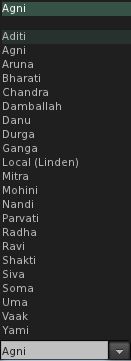
  • With the Viewer log-in window displayed, click on the grid selection arrow to display a list of available grids (see right)
  • Click on ADITI for the Beta grid
  • the log-in splash window will change to display the fact you have selected the Beta grid
  • Log-in using your avatar name and password as you would with the Main grid
  • You should be logged into one of the Beta grid welcome areas
  • Note you will have a L$ account balance, which is not transferrable to the Main grid!

Where to Work

As with the Main grid, the Beta grid is host to a number of sandboxes. Some of these are for general use, some are for very specific purposes; the majority have rules assoicated with them, again as with the Main grid – and you should, as always, familiar yourself with the rules and things like return times in order to avoid upsets.

While mesh is enabled across the Beta grid, there are a number of dedicated mesh sandboxes (SLurl). These tend to have the most recent releases of the server-side code related to mesh, and while they can be crowded at times in turns of the amount of items to be found on them, they tend to present the best place to work.

How Do I Preserve Upload Settings between Grids?

The Viewer should save all settings you use with a model, so when you log-in to the Main grid and select the model for upload, your settings for the model should appear in the upload floater.

What Else?

The following Linden Lab resources may be of additional assistance:

Help People Island closes today

Help People Island

Today marks the end of an era in resident-to-resident  help in Second Life: Help People Island will be closing its doors today, with a final farewell party at 13:00 SLT.

Help People Island (HPI) was founded six years ago and has provided resident/volunteer help to other residents that includes everything from self-learning through to one-to-one assistance and teacher-lead classes in all major aspects of living in Second Life and working with the tools and technology, including the Viewer. Around 1,000 people visit the island per day seeking help and advice – and also simply to visit and have a little fun during one of the HPI parties. Over the last six years, an estimated 500,000 residents have passed through the island.

One of the self-help areas

HPI has been sponsored by Help People Inc., a private research and development company founded in 1969 to study human behaviour in the service industry with the stated purpose to learn how to increase sales through service. Sadly, the Board of Directors of Help People Inc. have decided it is now time for the company to focus its efforts elsewhere; hence the closure of HPI.

A farewell statement to all those that have been involved in HPI in part read:

“HPI has been a staple within the Second Life Community for 6 years, it’s hard to believe it started out on a small little area that barely got 10 people per day, in comparison to the 1000+ per day that we now have. Over the years, with the help and perseverance of all of you, it exploded into the greatest of ALL Help Group’s in Second Life and we feel what we have all contributed will in fact linger on for year’s to come. In our history within Second Life, we have helped and assisted in excess of 500,000 residents.

“It’s absolutely unbelievable how many people we have all touched, but there is nothing but fact in those number’s. We cannot begin to describe the amount of joy that we have all felt on a daily basis just knowing that ALL of us were and are in fact making a difference. A positive difference. And while this is an extremely sad time, that joy is even larger.”

Classroms and auditorium

Groups related to HPI will also be closing following the party and closure of the sim. It is hoped that a forum for those interested will be established in the next few months at Help People Inc’s website, and the letter sent to group members asks that they keep their eyes on that site for news once the sim and Groups in-world have closed. It is not clear as to whether the HPI blog will close – one hopes it will be left as an archival document.

HPI tourist office: helping people find their way around SL’s sights

The Farewell Party

Billed as HPI’s “Goodbye, Farewell Amen” party, the event will commence at 13:00 SLT, and feature “Five DJ and three hours of music, dance, fun” to take place at the Island’s Sky Garden. The five DJs participating in the event are:

  • The Lord Charles
  • Kahuna Chrome
  • DJ Timmy
  • Kew the Music
  • Keif Denimore

The venus for the party is HPI’s Sky garden – teleport to Help People Island (teleports routed to an arrival point) and look for a teleport totem (right) – one is located on the right side of the arrival area plaza.

Another code breakage hits SL

On top of the recent attachment update bug, JIRA (SVC-7283) (as well as the releated SVC-7294) – there is now another scripting breakage that has been deployed to the grid.

PRIM_PHYSICS used in the likes of llSetPrimitiveParams, no longer functions as expected on server release code 11.09.09.240513, leaving scripted vehicles and animals (among other things) not working, malfunctioning and/or running amok.

A JIRA (SVC-7305) has been raised for the issue, which has a widespread impact.  And it has to be said that the JIRA is starting to read like a poorly executed farce, with LL responsible for the script.

  • It appears one creator of scripted vehicles running on the mainland which are now effectively out-of-control, and her account has apparently been suspended as a result
  • Other creators are reported issues with potentially thousands of sold products which, while there is a potential code alternative available (via STATUS_PHYSICS) – this still means considerable re-coding for many creators and a massive product update (and why should they, when the cause isn’t their fault?)
  • Responses from Linden Lab are hinting a fix (again) will not be available for RC channel release until next week, with the implication a full roll-out could be two weeks away – and that, despite the clear severity, there is resistance to accelerating the fix within the company!

Two breaks to basic scripting functionality in Second Life coming a week apart isn’t liable to win Linden Lab awards in the popularity stakes. It’s also liable to have the tinfoil hat brigade nodding to themselves and muttering comments about event numbers, coincidences and conspiracies.

As if we don’t already have enough of that doing the rounds.

The simple guide to Age Verification

Update July 10, 2012: This article is now out-of-date as a result of Linden Lab changing the Age Verification Process. For updated information, please refer to this blog post

Back in July of this year, I reported on Linden Lab’s overhaul of the Age Verification process (and the small part I may have played in the thinking around it – pardon the horn toot).

It would appear that either people are continuing to avoid verifying themselves (hardly surprising given Linden Lab didn’t actually, well, tell anyone about the changes) or are unaware of any reason why they might want to verify themselves. As a result, Linden Lab are, some time in the next two weeks, going to be e-mailing all those using SL who are over the age of 18 to advise them of the Age Verification process and what it means.

If you’ve not already age verified and wish to gain access to all of Second Life (assuming you are over 18) and get ahead of Linden lab’s mail-out. Here’s how:

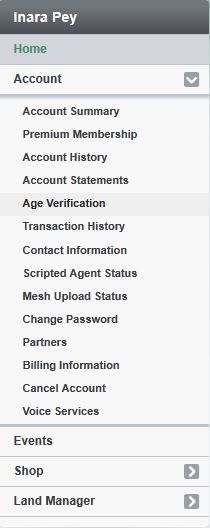
  • Log on to http://www.secondlife.com. This will display your Dashboard
  • On the left of the Dashboard is a panel with your name at the top. In this panel are a number of options: ACCOUNT, EVENT, etc.
  • Click on ACCOUNT. This will expand a list of account-related options
  • Locate the AGE VERIFICATION option on the drop-down list (highlighted, right) and click on it
  • You will be taken to the age verification page.

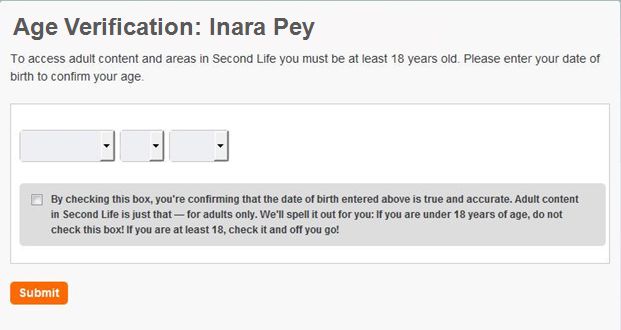
The Age Verification page will display a form requesting that you confirm your date of birth (as given when you signed-up for Second Life. If, for any reason your date of birth is incorrect or doesn’t display, you can select the month, day, year by clicking the appropriate arrow button and making a selection for each from a drop-down list.

To confirm your age, make sure you click on the confirmatory check box, then click on SUBMIT. That’s it.

You’ll be taken to a page confirming you’ve been age verified with the message, “You now have access to Adult-rated areas in Second Life! time to explore. Have a great time!”, together with information on how to update your Viewer’s maturity preferences and a link to the Destination Guide.

Maturity settings are generally found under the GENERAL tab of a Viewer’s preferences, and should be set to General, Moderate, Adult (Viewer 3.x & TPVs) or PG, Mature, Adult (Viewer 1.x TPVs) to get the full benefit from Search.