I covered Rod Humble’s first year at Linden Lab last month – counting his time from the announcement of his appointment as CEO.
However, he didn’t “officially” log-in to Second Life as Rodvik Linden until the 11th January 2011 (although from his comments, he was busy exploring with an alt prior to that date).
To this end, just a quick note to say, “Happy Rezday, Rodvik! May you enjoy many more!”
Rodvik at an early public outing, with Pete Linden (left)Rodvik at SL8B – and in a cunning disguise (l), with a hanger-on(!)
It’s an interesting read, which is bound to draw wide-ranging feedback, positive and negative. Leaving aside the look back over the Viewer, mesh (which I’ve already commented upon) and 2011 in general, here are some thoughts on Rodvik’s outline for 2012.
The tools developed in the creation of Linden Realms roll-out to the community
Linden Realms: game tools to roll-out in 2012
Undoubtedly a good move – there are a lot of content creators who have been fairly bouncing up and down at the thought of being able to use these tools, and their potential to revolutionise aspects of the SL experience in very dynamic ways is huge. Obviously, there are also certain risks that have to be managed as well – a auto-teleport feature and an auto-attaching HUD capability could easily be put to the wrong use if not properly safeguarded.
Tiggs Linden, one of the major brains behind Linden Realms was well aware of the issues even before Linden Realms was launched, and commented that he’d been working to lock-down the teleport aspect pretty tight. So Linden Lab certainly aren’t walking into this blind. Even so, its welcoming to hear Rodvik also raise this issue, as he states, “To prevent abuse of these tools, we will introduce a “creators” program in which verified members will be given access to these very powerful capabilities.” Precisely what form the program will take is unclear. Certainly, one expects it to be somewhat more robust than the mesh upload status process.
“Pathfinding” to be a major focus of 2012
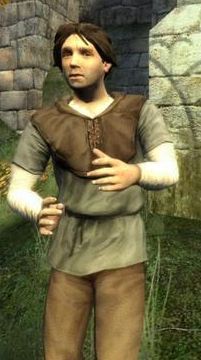
“Mr Grimsdale!” – NPCs for SL
Keeping to the creativity front, Rodvik also confirmed that 2012 will se the roll-out of advanced tools that will incorporate the updated AI capabilities he spoke about earlier in the year. Again, some may see this as window-dressing, but the fact is, it is a capability that many in SL have been requesting for a very long time – so it could be said that the provision of such tools (some of which may be based on capabilities already within the SL software, as Tateru speculated a while back).
As a part of this process, Q1 has been earmarked from the roll-out of “pathfinding” tools “That will allow objects to intelligently navigate around the world while avoiding obstacles,” as Rodvik describes them. Again, given the unfortunate situation that occurred earlier this year wherein automated vehicles started running amok across the Mainland, these capabilities are also likely to find beneficial use among creators and coders.
Server-side performance a priority
There is also the promise that server-side performance and bug-fixing will remain a high priority in Q1 of 2012. We’ve already seen massive effort to install critical OS updates across the grid, and moves to improve overall stability and performance. Some of these have, ironically, caused SL to get rather bumpity while work has been carried out, and caused angst and annoyance at times. However, if all goes according to plan, then as Rodvik says, things should be much improved as time goes on.
One hopes that the longer-term work into things like region crossings forms a part of the overall push on performance. As Ciaran Laval points out, this is a big task, but hopefully we’ll see more information appear in the blogs as progress is made.
No tier increases in 2012
Tucked away in the middle of the piece is this nugget, which is going to please many. Particularly as Rodvik outright refused to comment on tier at SLCC 2011, despite several questions on the subject being asked during his presentation, gave rise to concerns that increases may well be on the way.
The flipside to this of course is that many will argue that tier actually needs to be coming down. In the longer term, this may well prove to be the case. However, there is a fine balance to be struck, at least as far as Linden Lab is concerned simply because so much of their revenue is currently linked to tier. However, if the promised tools Rodvik mentions in passing do result in increase traffic flow to in-world stores and destinations, and landowners do in fact see an increase in their own revenues as a result, it’s entirely possible than the calls for a lowering of tier may actually be reduced.
New Premium features and content
This, like the comment on tools for landowners and store owners is a little nebulous, but it suggests that LL are possibly looking beyond the idea of periodic gifts for Premium members and towards something more substantial. Certainly the terms “features” and “content” are interesting. The provision of additional capabilities for Premium members that moves away from the concept of gifts and towards things that clearly and obviously enhance their SL experience (and I’m not just talking sandboxes here) would be a welcome move and one that is liable to increase the overall value of Premium membership in a more positive and beneficial manner than is currently the case – and I’m speaking as a premium member. As such, I’m looking forward with interest as to what LL has planned in this area.
New products on the way
New products – mobile devices?
The final paragraph of the blog is the one that is liable to create some of the strongest reaction, good and bad.
That LL were to work on and launch new products beyond Second Life was first announced by Rodvik himself at SLCC-2011. I gave some speculation on this after the convention, which while not particularly deep, did draw comment back from Rodvik.
Details still aren’t clear on what the products will be – although there has been a lot of speculation as to what these might be, some of which met with some chortles coming out of Battery Street, as those who spend time on the SLU forums are aware!
Some are bound to see this as a good thing, others bad. Indeed, Hamlet Au has already gained a very mixed bag of feedback at the news. Like I did a few months back, Hamlet sees the development of these tools as helping offset LL’s reliance on tier for its revenue – although that’s not to say I agree with the rest of his analysis. As such, diversification could be very good for the company and for Second Life, provided things are properly ring-fenced within the company as a whole (i.e., so that SL doesn’t become a means of subsidising new revenue streams at the cost of its own growth).
Second Life isn’t a game!
Alongside the comments on new products hitting the market and users, the other aspect of Rodvik’s post that I can’t help feel will have some shivering in horror, is all the talk of gaming mechanisms, tools and even Rodvik’s comment that they, “Will make the polished creation of full MMORPG’s or people/animal simulators within Second Life easier and of high quality.”
In fact I can almost hear the oft-repeated cry of “But Second Life ISN’T a game!” from afar…
Well, true, Second life isn’t a game; it’s a platform that is capable of being put to a multitude of uses – one of which is gaming. As such, it is right and proper that LL should take the gaming environment into their consideration, particularly if it can be done in a way that a) doesn’t impact on the many other ways in which the platform is used; b) it drives more traffic into the platform, encourages growth and opens new in-world economic options. Indeed, in this respect, I find myself in agreement with much of Ciaran Laval’s thoughts on gaming opportunities.
At the end of the day, it doesn’t have to be one or the other – which is sometimes how I feel things are painted when I hear the “it isn’t a game” complaints. Second Life is a broad canvas. Linden Lab are right to use as many colours as they have on their palette with which to paint it.
All-in-all, the blog post makes interesting and overall positive reading. One would like to hear more on the practical details – but hopefully these will come in detailed blog posts as things like roll-out dates draw closer and ideas and more fully thrashed out at LL. Again, it leaves me feeling, on the whole, pretty positive towards the next twelve months. Obviously, there are still issues that go unmentioned I’d personally like to see addressed (such as more communications such as this blog post) – but for now I’ll leave it as Rodvik does, and wish him and everyone else at the Lab a very Merry Christmas and Happy New Year!
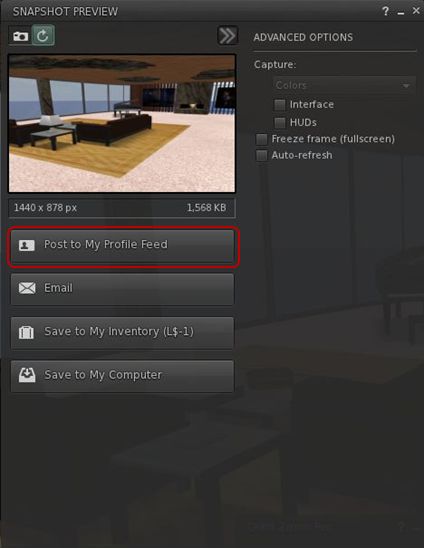
Viewer 3 has had a release slipped out. Version 3.2.4.246439, dated December 8th, brings with it the long-awaited (for those not using a recent TPV or either the Beta or Development versions) updated snapshot floater, allowing you to send snapshots directly to your web profiles feed.
I’d actually missed this release, if it did surface around the 8th, which is a little ironic, as I’ve been trying to keep a weather eye on Viewer 3 updates, but admittedly have had my attention elsewhere in the run-up to Christmas and also trying to put a few upcoming blog posts in order as well.
Installer loses Viewer number
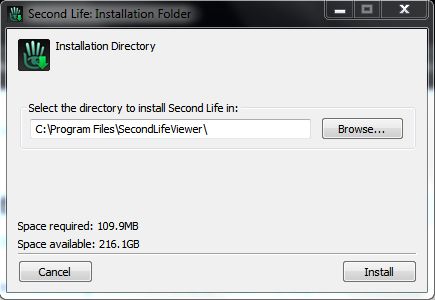
Another change that should make Tateru a little happier 🙂 – is that the installer now simply calls the Viewer the “SecondLifeViewer” (on Windows at least, I can’t speak for other O/s versions of the Viewer) and installs into a folder of that name – the version number is now gone. I can’t speak for the issues on disconnects or those of grpahics issues, but I am assuming it has the OpenGL fixes included (which would, I believe, roughly fit the release date).
Sadly, the click-to-walk still results in mouse steering being, as we say in England, arse-backwards.
I’ve not looked too deeply at the release for other updates, but those using it should have been prompted to update if running an older version; although (again with Windows release at least), because of the install location name change, you need to uninstall the prior version yourself afterwards.
Snapshot floater makes it to a release version of the Viewer, complete with profile feed option
Dec 13 22:45: post updated with new information at the end.
Well…here’s interesting – and with thanks to Daniel Voyager, who is ever-vigilant on so many fronts, for picking-up on it and relaying the news.
It seems that the campaign to see a return of the last name option has gained traction in Linden Lab. As pointed out by Daniel, Rodvik commented on the last name situation via his web profile feed, thus:
This is excellent news – not only do last names seem set to return, Rodvik has gone so far as to indicate a planned implementation of early in the new year (albeit with the caveat of “hopefully”) – see update at the end.
This revelation is excellent news and demonstrates that in some areas, LL are still quietly listening and taking things on-board – so kudos to them.
What is especially interesting in Rodvik’s post is the comments on identity – these would seem to suggest that the new last name facility might be free-format (rather than selecting from a proscribed list that changes periodically, as with the “old” last name system), or that it might include an option for people to use their real name as their avatar name on signing up. If this is the case, then Rodvik’s comments on identity make perfect sense – people need to understand that providing their real life name as their avatar name is not a requirement of SL, or those that do need to understand the possible implications of doing so.
So – last names are set to return – good news indeed!
Update: 22:45 BST, 13 Dec
As this news has been spreading, Rodvik has made a further post on the subject:
Just to be clear Jan is when we will be giving a timeline/ plans on what we will be doing 🙂 Expect Q1 2012 for it actually to be done.
So the actual change will be later in Q1 2012 (quite possibly mid-to-later Q1, I suspect, given Rodvik’s clarified caveat).
Update Dec 2nd:I spoke to Tiggs Linden today regarding the HUD issue, and he has now fixed the problem.
Linden Labs have announced that Linden Realms, the crystal-hunting game is now open to everyone.
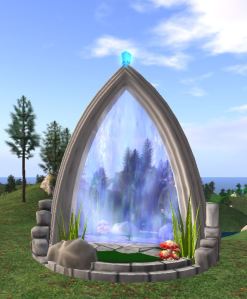
Portals are now available across the grid, allowing users to teleport to the game areas.
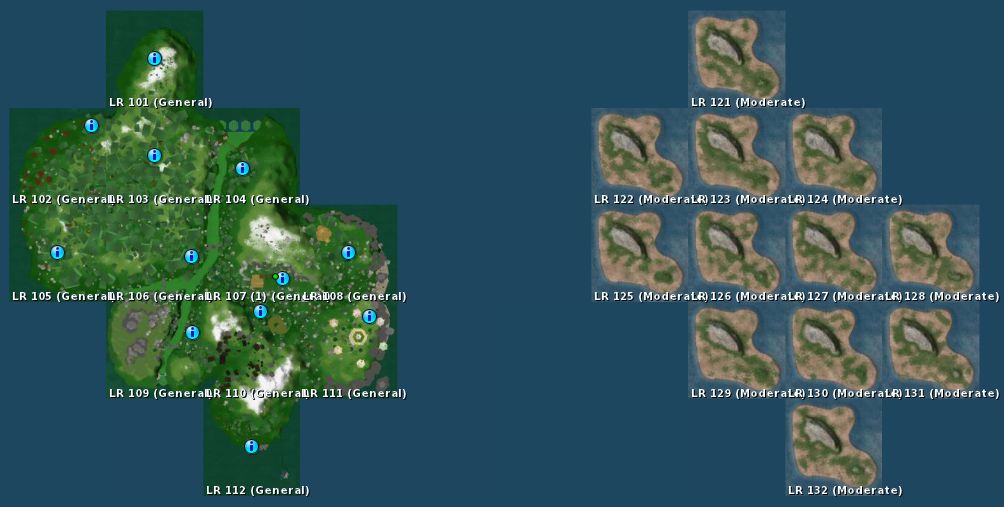
Some six “island clusters” of 12 regions each have been established to provide space for users to play the game without undue lag. From the map, it would appear another two further “islands” of 12 regions apiece may be under development for further expansion of the game, should they be deemed necessary – or perhaps they’re being prepared for the next Linden Realms project?
Linden Realms 12-region game “island” (l) and another Linden Realm area apparently under development (r)
Note that you cannot teleport directly to the game areas – you must go through one of the designated portals.
Game Portal
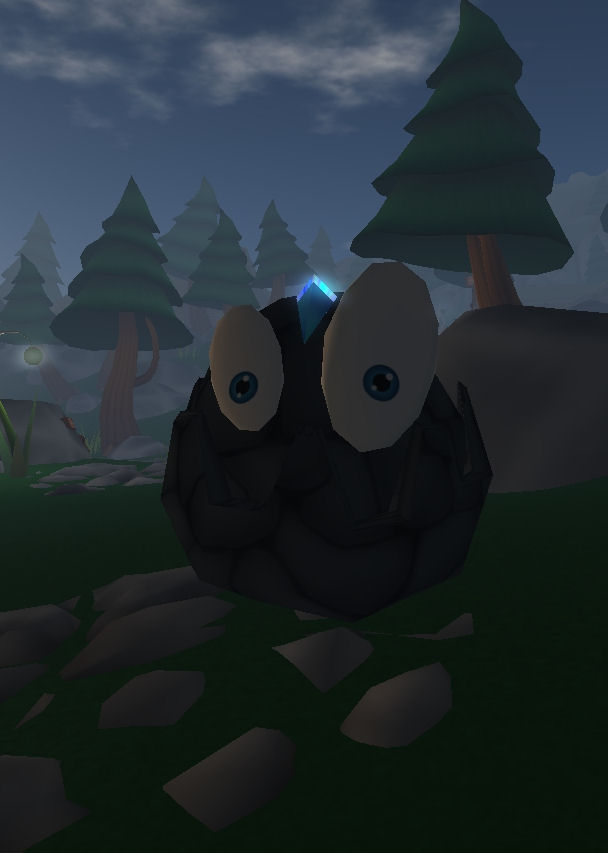
I reviewed the game a while back, the objective is to collect crystals, avoid various rock monsters and other obstacles and, as a side benefit, earn L$ (but don’t look to make a fortune – that not the point!).
I took a quick look at the expanded gaming areas earlier, and did find there seemed to be a slight issue: some people were arriving and failing to receive the game HUDs. As these also provide instructions – and the LL blog post announcing the game to be open doesn’t mentioned them at all, I actually encountered quite a few very confused people wandering around wondering what was going on and what they were supposed to be doing. I actually tried the portals at Barbarossa, Eldervale and Degrand – and failed to receive a HUD through any.
Hopefully, this issue will be fixed in short order.
The game is a lot of fun – and there is a rumour further quests may be added; if true, I’m not overly sure it’s a good idea. The aim of the game (from LL’s perspective) is to introduce mechanics and features that are to be made available to all – as such building an entire multi-quest game smacks a little of biting the hand of content creators – who are the people who should be using the tools to make engaging, fun and very different experiences for people to enjoy.
That said, I recommend that if you have 30 mins to spare – and once the initial rush has died down (and the HUD issue fixed), why not give it a try?
Spelling checkers are something TPV users tend to take for granted; or if you’re a Guardian reader, quite possibly for grunted (sorry, a little English humour….). We’ve been able to bask in the glory of having our misspellings highlighted ready for us to correct (or in some instances, had them auto-corrected, depending on the sophistication of the checker code itself). Those using the official Viewer, however, haven’t been so lucky.
But that is about to change. Enter Storm 83. A year plus old, barely watched or voted upon, and now a coming soon feature. So as Oz comments on the JIRA, “Everyone thank Kitty for volunteering to contribute this feature!” Kitty being Kitty Barnett, who is the assignee for the project, and who has been a prolific contributor to TPV code, including RLV/a.
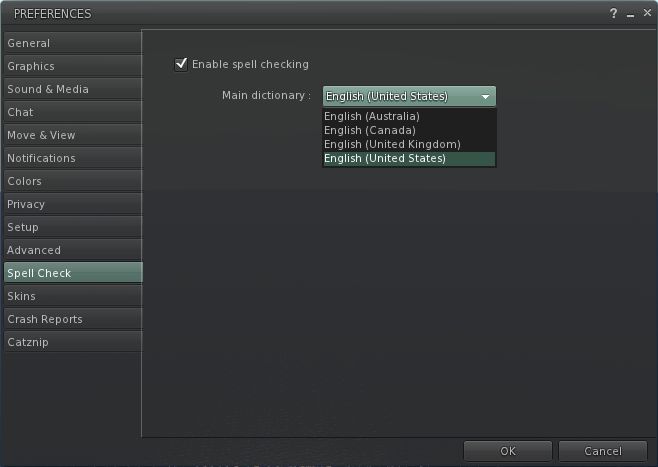
It’s not clear exactly how the feature will be integrated – different TPVs have added it in various tabs within Preferences. However, if we take Kitty’s own Catznip Viewer as a lead (given it is based on Viewer 3), one might hazard a guess and say that rather than being hidden away inside Preferences, as is the case with come TPVs, the Spell Check option will get a tab of its own.
With Catznip the spelling checker is very straightforward: simply tick the check box to enable. American English is the default, but other options are available from a drop-down menu. Spelling errors are then underlined in red in chat, and right-clicking on them will display a nice little menu listing alternatives as well as an option to add the word to a custom dictionary, should you prefer. One suspects the Viewer 3 functionality will be similar.
I’ve no idea whether the dictionary will include the ability to download other language dictionaries, a-la the likes of Phoenix and (shortly) Firestorm. I’ll hopefully take a closer look once the code reaches a Development Viewer or enters the Beta code base.