Second Life “March Mobile Millions”

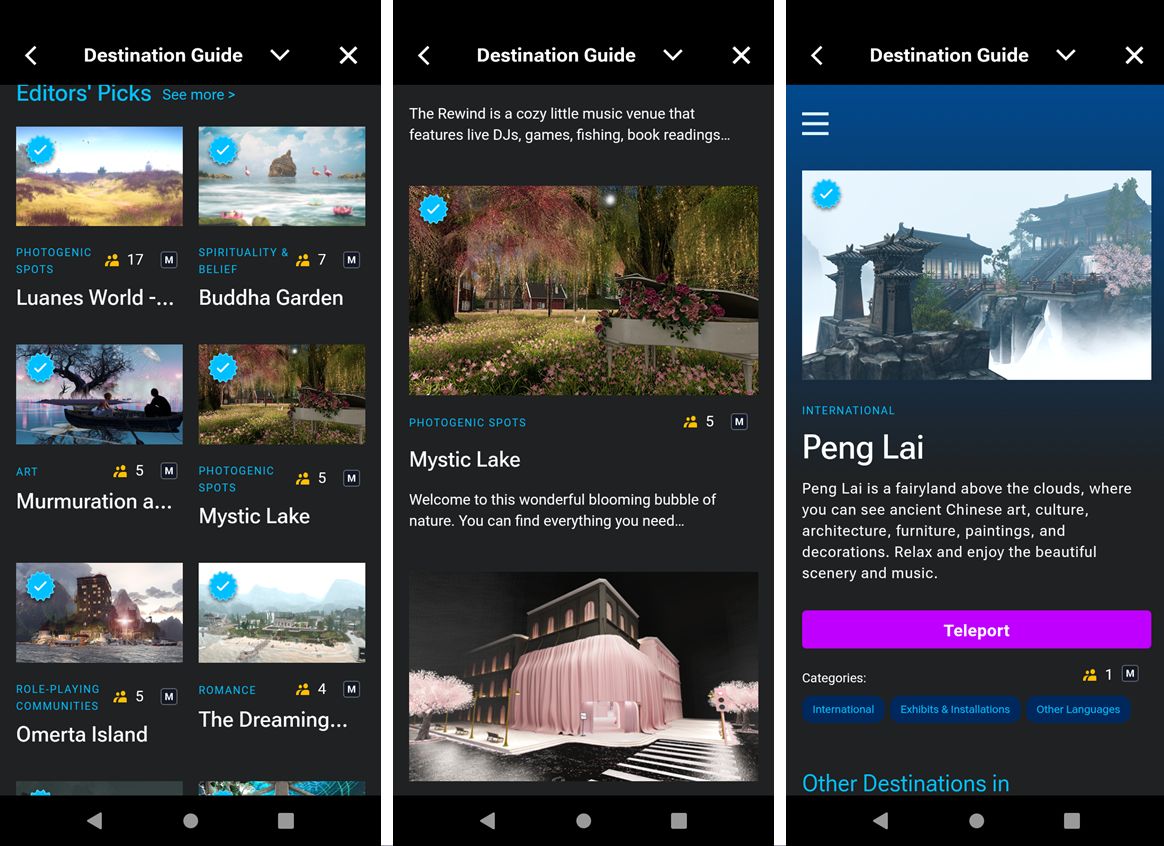
The Destination Guide on the SL Mobile – part of the first March Mobile Millions challenge

On Monday, March 3rd, 2025, Linden Lab announced a new promotion to encourage the use of the SL Mobile app, with a stated prize pool of up to L$31 million, with up to L$1 million in individual prizes to be claimed. The promotion is available to all Second Life users – Basic and any subscription tier – with no purchase necessary.

How It Works

  • Log in to Second Life Mobile and complete each week’s challenge every day in March.
  • Challenges will be announced every Monday through until March 24th, 2025 and will run through until 12:00 noon on the following Monday.
  • Each challenge must be completed every day for the time it is running.
  • One participating user will be randomly selected for a “March Millions MegaWheel Ticket”.
  • Winners get access to the “VIP Spin & Win Event”, where they can spin for up to L$1 million Linden Dollars (winners will be notified in-world).
    • Prize amount start at L$10,0000, approx. USD $40.00 (15 in 48 opportunities), and rise to L$1 million, approx.: USD $4,000 (1 in 48).
    • Winners of amounts valued at USD $600 or above will be required to submit either Form W-9 – Request for Taxpayer Identification Number and Certification (US citizens) or Form W8-BEN – Certificate of Foreign Status of Beneficial Owner for United States Tax Withholding and Reporting (Individuals) (non-US citizens).
  • This “Spin & Win Event” will take place weekly in a mystery inworld location inside Second Life, and will be streamed live to the Second Life YouTube channel.
  • For full rules and prize details, please refer to the official blog post.

Week One Challenge

Open from Monday, March 3rd through 12:00 noon, Monday March 10th.

  • Use SL Mobile to log-in to Second Life and teleport to three different locations listed in the Mobile Destination Guide.
    • Launch SL Mobile.
    • Navigate to Places in the menu.
    • Select the Destination Guide and pick a Destination to visit.
  • Then pick two more from the Destination Guide and visit them as well.

Note that the next challenge will be announced on Monday, March 10th, 2025.

Again, please refer to the official blog post for full details.

February 2025 SL Mobile UG meeting summary

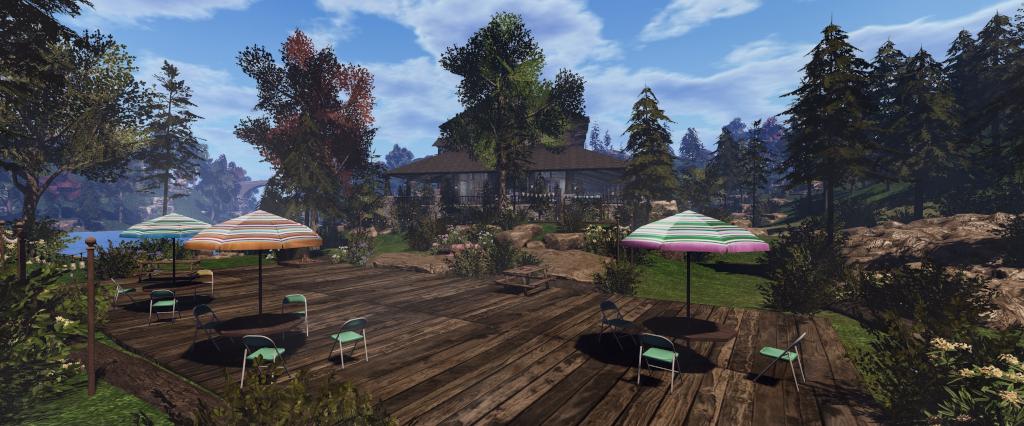
Campwich Forest grounds: location for the Monthly Mobile User Group (MMUG)
The following notes were taken from the Thursday, February 27th 2025 Monthly Mobile User Group (MMUG) meeting.

These notes should not be taken as a full transcript of the meeting, which was largely held in Voice, but rather a summary of the key topics discussed. The meeting was recorded by Pantera, and her video is embedded at the end of this summary – my thanks, as always to her in providing it.

Table of Contents

Meeting Purpose

  • The Mobile User Group provides a platform to share insights on recent mobile updates and upcoming features, and to receive feedback directly from users.
  • These meetings are conducted (as a rule):
    • The last Thursday of every month at 12:00 noon SLT.
    • In Voice and text.
    • At Campwich Forest.
  • Meetings are open to anyone with a concern / interest in the above topics, and form one of a series of regular / semi-regular User Group meetings conducted by Linden Lab.
  • Dates and times of all current meetings can be found on the Second Life Public Calendar, and descriptions of meetings are defined on the SL wiki.

Resources

Re-Cap on Recent Releases

[Video: 2:58-3:49]

  • Version: 2025.1.542 (Android) / 0.5.533 (iOS).
  •  Create / Delete accounts – see: SL Mobile gains account creation workflow (and more).
  • Improvements to the format of Group notifications.
  • Streaks rewards (see here for more) broader release among subscription accounts.
    • [Video: 8:59-9:25] There is no guarantee as to how long the Rewards scheme will run. However, it will not end at the start of March, and there is potential for “new cool things happening with log-ins in March”.

Bone Attachment Point Handling

The new Bone Attachment Developer Tools option (requires restart)

[Video: 3:56-5:31]

  • A new Developer Tool option (Menu → Settings → Developer Tools).
  • This is off by default – so no behaviour change from previous versions of the app.
  • When enabled and SL mobile is restarted, it can improve avatar mesh appearance handling.
    • However, it might also cause cause new problems!
  • More debug information relating to rigged meshes is sent for developers to use.
  • A request was made for users to enable the option an provide feedback either through the app (Help → Feedback) or via the Feedback Portal.

Campwich Forest Cloning

[Video: 24:26-26:54]

  • In line with the account creation capability mentioned above, Campwich Forest in Bellisseria is currently the initial Landing Point for users signing-up to Second Life via SL Mobile.
  • As this has seen a lot of traffic with new users within the Linden homes around the Campwich location, the decisions has been taken to clone Campwich Forest and use that as the Landing Point.
  • The clone will be located separately from Bellisseria.

Roadmap Updates

[Video: 5:59-7:01]

Still in progress:

  • Addition of an Address Bar to the app,  making it possible to:
    •  Search landmarks /create landmarks.
    • Share SLurls with people on other apps (Discord, Reddit, WhatsApp, etc.) via the native share cards found in Android and iOS.
    • Allow maps.secondlife.com work on the Mobile App.
  • Providing quicker access to chat when using the app – e.g. a button on the in-world view to go directly to Chat, rather than having to go via the menu.
  • Improving in-world interactions within the app – making it easier to identify objects with which an avatar can interact, and know that something is happening when long-pressing an interactive object.
  • [Video: 14:17-15:51] Pluto Linden indicated:
    • The work on improving in-world interactions may be surfacing in the Mobile app during March.
    • The work to provide quicker access to chat is also a step along the road to having chat as an overlay on the in-world view.

Lobby Alpha Testing

[Video: 11:41-14:16]

  • Lobby is a new feature, intended to enable communications, allow users to see who is on-line and provide general information whilst the app continues to load things like the 3D world view in the background.
Coming soon: the SL Mobile: Lobby
  • Announced in December 2024, Lobby was made available to users on the SL Mobile Alpha testing programme on Thursday, February 27th, 2025.
    • This is an initial release, and will be iterated upon and improved, potentially with more information being provided.
    • Note that currently, when using the Lobby, scene loading will continue in the background, and you will arrive in-world at the last location at which you were previously present, be it when using the viewer or SL Mobile; you are not held in a separate environment.
    • However: the plan is for Lobby to be accessible to users without any in-world loading taking place, thus making SL Mobile even more of a “lightweight client” for those on lower / mid-tier mobile devices to use it as a communications tool.
  • As I am not a part of the Alpha Testing, I will have an article on Lobby as it is made more generally available.

Texture Loading

[Video: 19:41-22:35]

  • Texture resolution, as currently handled, is not very well optimised in terms of resolution.
  • In short, two channels are used for loading textures, one for in-world objects and one for avatars. however, as neither are currently optimising, they can load larger objects requiring higher resolution textures using the same resolution as small objects that can get away with lower resolution textures.
  • One of the reasons for this has been trying to get everything rendering under the memory constraints imposed by mobile devices (e.g. 500-800Mb), with the intent of then going back and adjusting things for better rendering / performance.
  • An outcome of this is particularly noticeable on avatar rendering (see also the discussion from the January meeting), is where avatars may not load, or only load as far as a transparent outline.
  • Adam Sinewave is currently working to optimised texture resolution when loading, and this is now at a point where it allows avatars to be automatically refreshed on loading, which should help make the problems of avatar load failures / transparency be greatly reduced / go away.
  • This work will also help towards the proper prioritisation / re-prioritisation of texture loading within Mobile, making more efficient use of memory.
  • The plan here is that as memory use is improved, then it will be possible to start looking towards PBR materials support within Mobile (PBR requiring 2x or 4x the memory compared to textures).
  • Adam also noted that there have been a “couple of tweaks to the defaults” on texture handling, but these have yet to surface in any version of SL Mobile.

Beanie Linden’s Tips’n’Tricks

[Video: 27:14-34:03]

  • View account  / L$ balance: Menu → tap the down arrow alongside account name to open the Account draw. Can be used to verify payments made via SL Mobile have gone through.
  • Reporting a bug: Menu → Help → Feedback. Can also be used to give general feedback / suggestions.
    • If you encounter issues while logging-in via Mobile, tap the gear icon at the top right of the screen, and this will open the Feedback form.
  • Abuse Reports: can be accessed several ways:
    • Log-press on the avatar responsible for the abuse display the context menu → Report Abuse.
    • In Chat (nearby / IM) locate the three dots alongside the avatar’s name to access the context menu
    •  → Report Abuse.
    • People list: tap on the avatar name to open Profile → tap the … More option → Report Abuse.
  • Togging audio stream on/ off: tap the menu → tap the location displayed at the foot of the screen to open the Location Tray → tap the audio icon to toggle audio stream. Use the volume slider to increase / reduce audio stream volume.

In Brief

Please refer to the video for details on the following.

  • [Video: 23:23-24:20] Culling distances: currently the app has a set of “fairly pessimistic” set of default culling distances.
    • This will be changing in future updates to respond according to hardware (e.g. those with new mobile devices with better capabilities / more memory will show more content before culling commences; with culling on devices with lower specifications also better optimised for memory use).
    • These changes will also allow for the loading / unloading of avatars as they move out of / into range.
  • [Video 34:45-49:48] A run through of some of the top bugs / features, including:
    • HUDS:
      • HUDs are difficult to render in a meaningful way because of the form factor involved with size of the screen on mobile devices, coupled with the fact that HUDs can function in multiple ways(expanding / collapsing, paging etc), all of which requires careful consideration in order to be implemented/
      • As such, the work is liable to b split, with an initial focus on addressing HUDs, etc. that call for llDialog menus / responses, as these seem to be the easier option to implement, and then build towards more complex HUD support over time.
    • Inventory:
      • Regarded as a very large project that needs to be broken down into areas of functionality that can be implemented and built upon.
      • Current thinking is to enable the ability to buy items from the Marketplace and receive them in inventory using SL Mobile, and then interact with them.
      • This would require an initial view of inventory and a number of functions to allow the required interactions with items visible in that view (e.g. potentially the ability to add / remove items to / from your avatar; view sub-folders, etc.).
      • Use this as a bassline to build-out inventory functionality.
  • A further note, following from those at the January meeting, that work is continuing to improve avatar rendering and to try to chase down those issues where avatars do not render correctly.

Date of Next Meeting

SL Mobile gains account creation workflow (and more)

Second Life accounts can new be created directly through SL Mobile

On Tuesday, February 4th, 2025, the SL Mobile app updated to version 2025.01.542 (Android) / 0.5.533 (iOS). Chief among the enhancement included is the promised Create Account options, together with the ability to delete an account (if you really want to).

Account Creation

The Create Account workflow is similar to that found when signing-up to Second Life via the official Second Life website, but laid out in a manner suitable for smaller screens, and the key points aspects are:

  • Account creation is initiated directly from the SL Mobile log-in splash screen, which now has a Create Account option directly under the account credentials fields.
  • Tapping this option takes the user to the Account Creation screen where a user name, password, email address, date of birth, etc., can be entered.
    • As per the web sign-up process the e-mail account must be verified within 24 hours by replying to the message that has been sent to it.
  • This page also requires the acceptance of the Terms of Service and Second Life Terms of Service – again, just like the web-oriented sign-up, and which are presented to links to read both.
  • There is also an option to opt-in to the receipt of emails, etc., from the Lab, and a requirement to check a Capcha box.
Initial steps in account creation via SL Mobile: the splash screen option (l) and the sign-up page ((c) and (r)
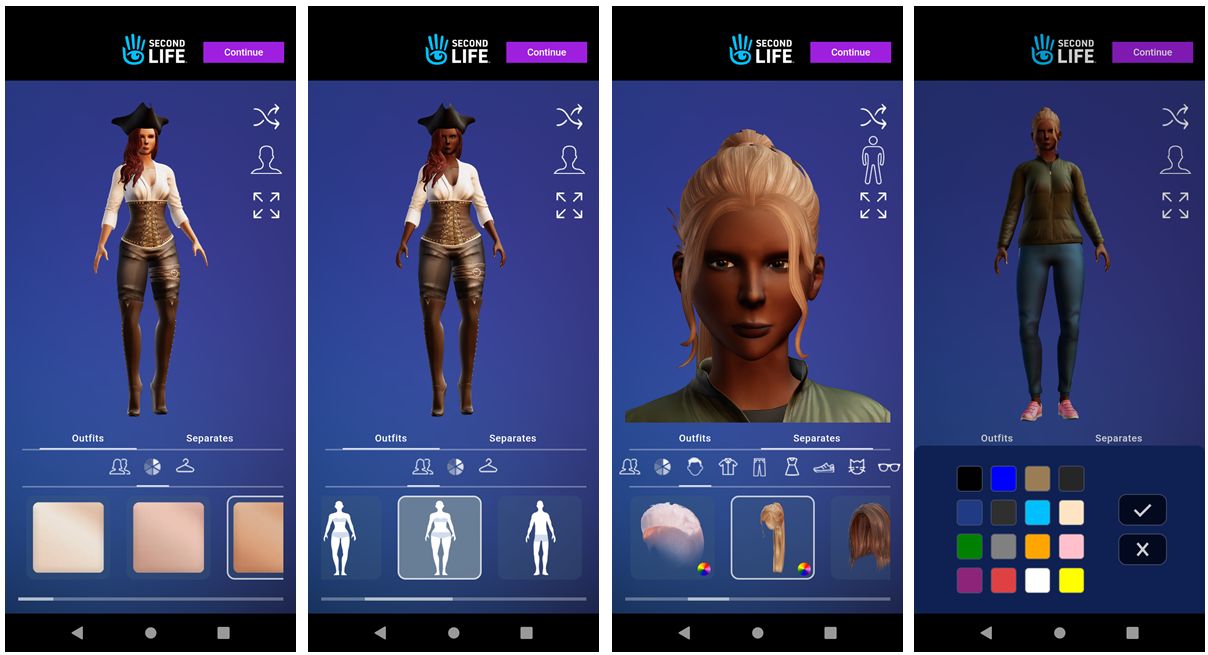
  • Once completed, the form is processed and the user moves on to avatar selection – gender, facial appearance, hair style, outfit selection / clothing selection, etc, again much as the web sign-up process operates.
  • This section uses sliders and tap options to move between selections and to make specific choices (e.g. skin, clothing hair colours, style on clothing, footwear, etc.).
  • Once that avatar shale, gender, skin, clothing, etc., have by set to the user’s satisfaction, tapping the Continue button at the top of the screen will complete the avatar selection process and take the used back the the SL Mobile logging splash screen, complete with their user name entered in the top field.
The avatar selection process through SL Mobile flows much the same workflow as seen when signing-up via the SL website
  • The new account password can then be entered, and the account logged-in, delivering the avatar to Campwich Forest, the default arrival location for those joining via SL Mobile.

Account Deletion

It is now possible to delete an account directly from the SL Mobile app, should you wish:

  • Display the app’s menu.
  • Tap Help
  • Tap the Delete Account option and follow the required steps. Options to progress through the deletion request process will become enabled as required fields are completed.
It is now possible to delete accounts through SL Mobile, with options to progress becoming enabled as required fields are updated by the user

Additional Updates

  • The new Bone Attachment Developer Tools option (requires restart)

    A fix for the formatting issues with off-line Group notices.

  • A new setting in Developer tools – Bone Attachment Point Handling.
    • This is off by default – so no behaviour change from previous versions of the app.
    • When enabled, can improve avatar mesh appearance handling – although a restart is required after changing the setting to see the results.
    • Warning: this option might also cause new problems! If you see anything untoward as a result of enabling – please provide feedback to the Lab.
  • More debug information relating to rigged meshes is sent for developers to use.

Personal Feedback

My own experience of the sign-up process was – painful, with the first page of the sign-up process repeatedly causing SL Mobile to repeatedly freeze.

I have no idea where the problem lay (my hardware – Android 13, with Octa-core (2×1.6 GHz Cortex-A75 & 6×1.6 GHz Cortex-A55) CPU; Mali-G57 MP1; 8Gb primary RAM + 8Gb from 256Gb internal storage -; my wi-fi or something within the app and how it was processing the sign-up page (the avatar selection / customisation process was a lot smoother). Hopefully, this is not a common problem, as adding account creation to SL mobile is a good move for obvious reasons.

As a general note to the Lab, I would suggest placing an avatar mover at the default landing point at Campwich Forest. My test avatar arrived among a group of 12 so tightly packed together no-one could move without slamming into one another (and getting stuck, as push did not appear to be working).

By contrast, account deletion was straight-forward (bye-bye test account!), but I did not experiment with the new Bone Attachment option, as I’ve not noted any issues with the rigged meshes I routinely wear, so see no reason to toggle the setting.


January 2025 SL Mobile UG meeting summary

Campwich Forest grounds: location for the Monthly Mobile User Group (MMUG)
The following notes were taken from the Thursday, January 30th 2025 Monthly Mobile User Group (MMUG) meeting.

These notes should not be taken as a full transcript of the meeting, which was largely held in Voice, but rather a summary of the key topics discussed. For this initial meeting, video recording was not permitted, we hope that changes with future meetings.

Table of Contents

Meeting Purpose

  • The Monthly Mobile User Group provides a platform to share insights on recent mobile updates and upcoming features, and to receive feedback directly from users.
  • These meetings are conducted (as a rule):
    • The last Thursday of every month at 12:00 noon SLT.
    • In Voice and text.
    • At Campwich Forest.
  • Meetings are open to anyone with a concern / interest in the above topics, and form one of a series of regular / semi-regular User Group meetings conducted by Linden Lab.
  • Dates and times of all current meetings can be found on the Second Life Public Calendar, and descriptions of meetings are defined on the SL wiki.

Re-Cap on Recent Releases

  • Version: 2025.01.538 (Android) / 0.1.530 (iOS)
  • Push notifications for group notices.
  • Mobile chat history.
  • Avatar Improvements.
  • Streaks rewards testing (see here for more).

Upcoming Updates and Roadmap

A look at upcoming features for SL Mobile based on information supplied to bloggers – including myself – at the end of 2024, and referencing my blog post on that meeting – see: Second Life Blogger Town Hall, December 2024: Mobile, marketing and more:

  • Ability to create accounts via Mobile, including creating an initial avatar and logging in using the existing new joiner workflow.
SL Mobile – the ability to create a Second Life account from within the app
  • Addition of an Address Bar to the app,  making it possible to:
    •  Search landmarks /create landmarks.
    • Share SLurls with people on other apps (Discord, Reddit, WhatsApp, etc.) via the native share cards found in Android and iOS.
    • Allow maps.secondlife.com work on the Mobile App.
Coming soon – the SL Mobile: Address Bar
  • The new Lobby feature, intended to enable communications, allow users to see who is on-line and provide general information whilst the app continues to load things like the 3D world view in the background.
    • This is also seen as a means for those on lower / mid-tier mobile devices to make use of the App as a communications tool.
Coming soon: the SL Mobile: Lobby
  • Other work in progress includes:
    • Providing quicker access to chat when using the app.
    • Providing the means to indicate which Group notifications  you wish to see pushed to your mobile device.
    • Improving in-world interactions within the app – making it easier to identify objects with which an avatar can interact, and know that something is happening when long-pressing an interactive object.
      • The identification will initially likely be the display of a timer under the finger when placed on an interactive object – when the timer expires (approx. 1 second), the interaction (e.g. a dialogue box) will be initiated.
      • Once available, this will be iterated over time to include selections form things like list views, where appropriate, limiting selection by distance, etc.

Roadmap Approach

  • Grumpity Linden reiterated the approach to Mobile development is focused on batching together requests and feedback on what users would like to see (allowing for us all having different expectation / needs / wants), to build end-to-end experiences covering a specific aspect (“journey”) in using the app.
  • To help with this, Grumpity also indicated that feedback (preferably through the Mobile app using the Feedback option in the menu) is greatly appreciated and does go into thinking about the roadmap and feature set for SL Mobile.

Avatar Rendering

  • As there are numerous differences between avatar rendering / operation in Second Life and Unity (e.g. in SL the Z axis references vertical movement; in Unity it references horizontal back / forth movement; each system handles rigged meshes differently, etc.), the entire rendering system for SL Mobile has had to be built for the ground-up over a period of over a year.
  • While much progress has been made, the team acknowledge avatar rendering within Mobile is not as yet on a par with avatar rendering in the viewer, therefore more work is to be done in this area.
  • However, because the SL avatar system is so open, there are still numerous specific issues where avatars may not render correctly in SL Mobile for assorted reasons (such the the way an attachment has been made, how it attaches to the the avatar, etc).
    • These issues require fixing on a case-by-case basis (and the team already have a library of 50 such “avatar classes”), and each one must undergone extensive regression testing to make sure any custom fix does not break avatar rendering elsewhere.
    • This is a current focus of work, and users noting persistent rendering issues as a result of clothing / attachments are asked to report it via the Mobile app’s feedback option, including information on the attachment / item which seems to cause the problem they are seeing, and where a copy of it might be obtained.
  • Once the focus can turn from the above work, there are plans to further improve avatar rendering performance, making it more efficient – and thereby improve app performance as a whole.
  • There are some tonal differences in how avatars appear SL Mobile (e.g. skin tone). This is because SL and Unity use different approaches to rendering ambient light. Again, the hope is that in time, lighting in the Mobile app can be made more “viewer-like” to help reduce such issues, but, this work will take time to develop and deploy.

Avatar Transparency Issues

  • During the run-up to the initial release of the Mobile app there was concern as to whether or not the app would get through the vetting process and onto the major app stores, particularly in terms of the risk of avatars appearing nude during rendering.
  • The transparent avatar approach was specifically to solve this risk; keeping the avatar transparent until such time as it has fully loaded and be preventing it from rendering properly should an attachment fail to apply as expected.
  • Unfortunately, the system is not fool proof, and false positives can be received which result in an avatar becoming “stuck” in the transparent mode.
  • There is thought being given to help overcome this (e.g. by forcing the avatar transparency mode to time-out after a set period to allow the avatar to complete loading), but this has yet to be finalised.
  • Those who do have repeated issues with being stuck in transparent mode, even after an outfit change (e.g. via the Desktop viewer) should file a feedback report, and if possible indicate the item they think might be causing the problem.

Memory Use (and PBR Rendering)

  • Another key difference between Mobile and the viewer is (obviously) available system and video memory.
  • Computers running the desktop viewer generally have at least 4Gb of memory to play with, with those with dedicated GPU cards also have dedicated VRAM.
  • Mobile has around 500MB-1Gb to play with. This necessarily limits Mobile in some ways (e.g. dropping texture resolutions as limits are more easily hit, etc.). However, there is work being put into this in the hope of again making Mobile more efficient in its use of memory.
  • In the meantime, the fact that memory is limited is one of the primary reasons why, as yet, there has been no attempt to implement PBR rendering into the Mobile app, and it significantly ups memory use.
  • The memory limit is also the reason why the number of avatars SL Mobile can render is set so low: avatars have a high rendering / memory cost, and can push the app to its limits, stopping other things from rendering – including leaving avatars transparent.

In Brief

  • A run-down of the top requests for Mobile (and the official viewer in some cases).
    • HUDs: something the Lab would like to implement for Mobile, but the volume and complexity of HUDs in use, the screen space they require, etc., does make coming up with a suitable means of handling them difficult.
      • The likely approach to this will again be iterative: initially offering support for very basic HUDs, and then working up from there.
      • However, team resources are such that focusing on this as a multi-month project when there are other areas of Mobile to be enhanced and features possibly more easily implemented, means it is somewhat lower on the list.
    • Inventory:
      • Another intensive task.
      • A preview of the work currently being done is in the Mobile app – the Select Outfit option, which is seen as a first step towards inventory support in Mobile.
      • Exactly what will follow this as it is implemented, is still subject to a final decision.
  • Mobile is generating a lot of new user traffic into SL, although precise metrics were not available at the meeting.

Date of Next Meeting

Looking at Streaks reward testing on the SL Mobile app

Streak rewards are available to some users of the SL Mobile app as an experiment

The most recent update to SL Mobile – version 2025.01.538 Android) / 0.1.530 (iOS), dated January 14th, 2025 – introduced an experimental rewards scheme for some of those those using the app to log-in to Second Life, in order to encourage daily engagement through the app.

Encouragement of this kind is referred to as “streaks”, and can be used as a form of incentive to encourage or maintain specific routines or achieve daily goals through game mechanics, or some form of reward in return for engagement. Snapchat for example offers “collectible” emojis to users who exchange Snaps through the app with one another on a daily basis; meanwhile Roblox includes the ability for users to build their own streaks rewards systems into their games. With SL Mobile, the rewards take the form of modest (and incremental) offerings of Linden dollars.

The idea behind the experiment with SL Mobile is to see how rewards might influence people’s use of the Mobile app – particularly those referred to as “lapsed” Second Life users; those who have walked away from the platform and who have, according to Brad Oberwager, cited a lack of Mobile access as being one of the contributing factors for them doing so. This aim was also reiterated by Bridie Linden, the Project Manager for SL Mobile during the inaugural Monthly Mobile User Group meeting.

Some of you may have noticed we are doing an experiment that is trying to encourage follows to come back to Second Life and increase their engagement. So [it is] a log-in rewards offering. Not everyone will see the same thing, because we’re trying different variations in incentives.

Bridie Linden, SL Mobile Project Manager, January 30th, 2025

As it is currently an experiment and subject to A/B testing related to the general use of SL Mobile, not all users downloading the app or currently using it will be able to engage with the streaks rewards, as Grumpity Linden also explained during the same meeting:

Currently, log-in rewards are only available to subscribers, but not all who are subscribers will have the same experience; so I’m not going to say you should subscribe if you want to get log-in rewards in Linden dollars, because that’s not always going to be the case. But if you’re already a subscriber, you should check-out Mobile, and come back every day and see whether, maybe [you have the option]– because we’re going to continue tweaking this programme. Obviously, we want people to be happy, and we want this to be successful.

– Grumpity Linden, January 30th, 2025

To find out if you are eligible to join (and have not already done so – I am intentionally late in reporting on this scheme as I’ve been poking at it for the last 8 days), proceed as follows:

  • Start SL Mobile on your device and log-in.
  • Click the Menu button (top left, three horizontal bars) to open the menu.
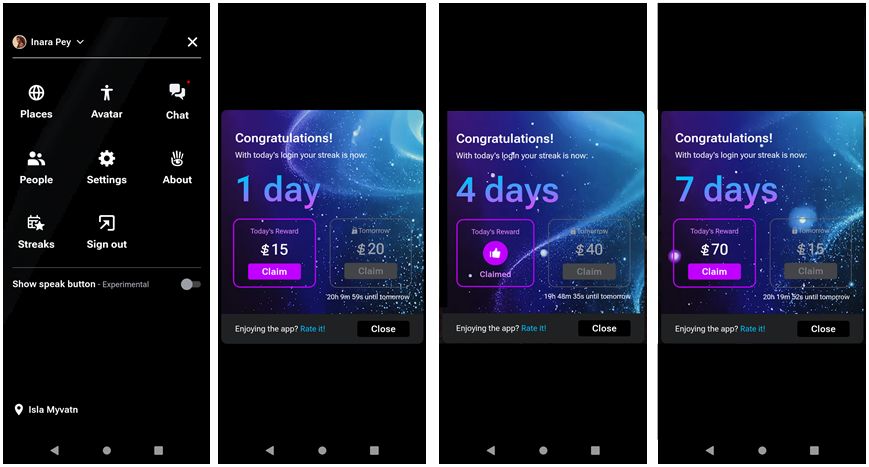
  • If you are eligible to join the experiment, you will have a Streaks button displayed in your menu Highlighted below, left).
  • Tap the Streaks button to opt-in to the scheme and start the clock counting down to when you can claim your first rewards (which appears to be set to L$15 for everyone).
Those who are included in the initial testing can opt-in to the Streaks rewards by going to SL Mobile’s menu and tapping the Streaks icon (if available), to opt-in to the the rewards
  • Note the two sliders t the bottom of the Streaks screen allowing you toggle daily streak messages as soon as you log-in to the app off/ on, and to opt out / in to Streaks, both of which are enabled (“on” and opted-in) by default.

Once you have joined Streaks, rewards can be claimed daily, starting with the initial L$15. In addition, please note:

  • The amount of the reward offered each day increments (e.g. L$15 on “day 1”; L$20 on “day 2”).
  • The amount by which the daily rewards increments also increases the longer a streak continues (e.g. rising from a L$5  increment per day to (first) L$10 increments per day).
  • Streaks appear to last for 7 consecutive days before the reward amount automatically resets to L$15 (or you miss a daily log-in), and you start over again.

To claim a daily reward:

  • Log-in to the SL Mobile app. Your Streaks status should be automatically displayed unless you have turned off the daily login message, in which case, open the app’s menu and tap the Streaks button.
  • The display should tell you the amount available to claim, and the incremented amount that will be available for you to claim in 24-hours’ time (below left).
  • Tap the Claim button to claim the available amount and have it added to your SL amount L$ balance, and update your Streaks status (below centre).
Claiming daily Streaks is required to transfer them to your account L$ balance (left and centre). Streaks appear to rest to the baseline L$15 after around 7 days
  • Per the notes above,  Streaks rewards appear to increment of a 7-day period, and then reset to the initial L$15 (see the image above right) and build up again. However, whether this is an infinite cycle or also limited; I have no idea.

As a means of encouraging users (current and “lapsed” to use SL Mobile, this is an interesting approach; I’d been particularly interested in how much traction it gets amount its intended primary audience  – “lapsed” users – over time, and in how well it might act as incentive as new users are able to sign-up to Second Life through the app. However, we’ll hear more on both in due course.

Lab adds SL Mobile User Group to in-world meetings

Campwich Forest grounds: location for the Monthly Mobile User Group (MMUG)

In response to various requests, Linden Lab has announced that a new in-world user group meeting is to launch at the end of January 2025.

The announcement of the Mobile Monthly User Group (MMUG) was made (oddly) via a Feedback portal post by Bridie Linden (have Linden Lab completely given up using their own blogs to make announcement?), who noted:

We will be using WebRTC Voice and text to share updates and listen to feedback. Use the Second Life desktop viewer or Second Life Mobile to join the conversation. We look forward to seeing you there!

– Bridie Linden

The meetings will take place as follows:

  • Last Thursday every month, commencing Thursday, January 30th, 2025.
  • Time: 12:00 noon SLT.
  • Location: Campwich Forest.

The new meeting brings the current total of Second Life active user group meetings to seven (with the Governance user group currently on hiatus). The other active meetings are:

  • The Simulator User Group:
    • Purpose: to discuss simulator issues and technology.
    • Frequency and time: weekly, every Tuesday, 12:00 noon SLT
    • Location: Simon Linden’s place, Denby.
    • Format: text (local chat)
  • Sill Gaming:
    • Purpose: to discuss anything pertaining to the Skill Gaming Programme. How to be part of the SLSG Programme, questions about processes, and any known issues or concerns.
    • Frequency and time: generally, the 2nd Tuesday of the month, 11:00 SLT.
    • Location: Gaming Island.
    • Format: text / Voice.
  • Content Creation User Group:
    • Purpose: to discuss of SL content creation.
    • Frequency and time: generally, alternate Thursdays, 13:00 SLT.
    • Location: Hippotropolis Camp Site.
    • Format: Text / Voice.
  • Open Source Development:
    • Purpose: to discuss SL development, including open source contributions.
    • Frequency and time:  every 4th Wednesday, 07:00 SLT.
    • Location: Hippotropolis Camp Site.
    • Format: text.
  • Land and Support:
    • Purpose: discussion of topics related to land and Mainland issues.
    • Frequency and time: every 4th Wednesday, 12:00 noon SLT.
    • Location: Linden Estate Services.
    • Format: text / Voice
  • Web User Group:
    • Purpose: discussion of Web properties such as Marketplace, Profiles, Place Pages, Search, etc.
    • Frequency and time: generally every first Wednesday of the month, 14:00 SLT.
    • Location: Alexa Linden’s Barn.
    • Format: text / Voice.

To keep abreast of all meeting, please refer to the SL public calendar:


As a reminder, I attempt to provide summaries of as many meetings as I can attend, and Pantera Północy provide videos of the meeting she attends on her You Tube channel.