Viewer-managed Marketplace: beta testing and a look at the project viewer

In October 2014, I reported on the viewer-managed Marketplace (VMM) project, which the lab has been developing for several months.

The aim of the project is to enable merchants to manage the creation and management of Marketplace product listing through the viewer, bypassing the need to use the Merchant Outbox (and have copies of items stored on the Marketplace inventory servers) or using Magic Boxes.

VMM does this by adding a new Marketplace Listing panel to to viewer, of which more below.

On Friday, November 21st, the Lab announced that wider beta testing of VMM is now ready to start on Aditi (the Beta grid). and is inviting merchants to download a new VMM project viewer they can use to test creating and managing product listing through the viewer.

Alongside of the announcement, the Lab also made available:

If you are a merchant and wish to test the VMM functionality, you’ll need to download and install the project viewer, and use one of the following three test regions on Aditi: ACME D; ACME E and ACME F. Using the viewer anywhere else can generate error messages when first logging-in (designed to indicate VMM is not available, and which will not interfere with using the viewer for other activities).

If you’ve never logged-into Aditi, please refer to the instructions on how to do so on the beta grid wiki page.

You may also wish to be logged-in to the Aditi Marketplace place.

When testing VMM, remember that it is not intended to enable all Marketplace-related activities through the viewer. Rather, it is intended to allow merchants to create new Marketplace listings with inventory, associate inventory with an existing Marketplace listing, remove items from a listing and unlist goods entirely. All other Marketplace activities will still have to be carried out within the Marketplace itself.

Also note that at present there is a bug within the Aditi Marketplace that will cause purchases to fail. The Lab is working to address this, and it shouldn’t interfere with testing VMM to create and modify product listings.

The following notes are intended to get you started with the project viewer and beta testing, please refer to the Lab’s VMM FAQ for other pertinent information.

The Marketplace Listings Panel

An active Marketplace Listings panel showing the four tabs used to manage inventory

The heart of the viewer-managed Marketplace is the new new Marketplace Listing panel within the viewer. This will eventually replace the Merchant Outbox,  although both are provided in the project viewer.

The Marketplace Listing panel allows a merchant to carry out a number of Marketplace tasks from within the viewer, such as:  create a new product listing, modify a listing, change the items associated with a listing, etc.

It does this by enabling merchants to directly associate products in their inventory with product item listings on the Marketplace, eliminating the need to either upload copies of products to the Marketplace inventory servers via the Merchant Outbox or, in the case of limited stock items that are No Copy for the merchant, having them stored in-world in a Magic Box. When a customer purchases an item listed via VMM, it is delivered to them directly from the Lab’s asset servers.

This does mean that care must be taken when handing product items in inventory in order to avoid occidentally deleting items associated with Marketplace listings. To help with this, the folder associated with the Marketplace Listing panel remain hidden from view (as far as is possible) when working directly in the inventory .

Google Form

The first time you open the Marketplace Listing panel, it may display the following message:

This feature is currently in beta. Please add you name to this Google form if you would like to participate

If this happens, it is likely because you logged-in to a non-VMM region and then teleported to the test regions. To correct, simply log-in directly to one of the three ACME test regions (ACME D; ACME E and ACME F). The Marketplace Listing panel should open correctly; if you haven’t already created an Aditi Marketplace store, it will display a message requesting you do so, with a link to the Marketplace.

Continue reading “Viewer-managed Marketplace: beta testing and a look at the project viewer”

Lab asks: how is SL for you?

Just Another Tequilla Sunrise, Isle of Love; Inara Pey, October 2014, on FlickrSL should be looking and feeling a lot better for many of us as a result of recent work by the Lab – how’s it going for you? The Lab asks you drop them a line in the forums or via Twitter (image: Just Another Tequilla Sunrise, Isle of Love (Flickr) – blog post)

Following-on from the grid-wide deployment of CDN support and the promotion of the HTTP pipelining viewer as the de facto release viewer, the Lab has blogged about recent improvements to Second Life, finishing with the question “how is it for you?”

The blog post, entitled, Performance, Performance, Performance, opens thus:

Has Second Life seemed a bit faster for you lately? Improving performance for all Second Life users has been an important focus for us at Linden Lab, and we’ve recently seen some great results from several projects that should make your Second Life experiences faster, smoother, and more reliable.

It goes on to make fair mention of the CDN / HTTP work, noting:

Faster Texture & Mesh Loading
The entire grid is now using a CDN service for textures and meshes. This change means that textures and meshes should load more quickly, particularly for those who login to Second Life from places that are far from our US data centers. Our testing showed dramatic improvements: average download times for textures and meshes have been reduced by more than 50% on average, and the improvement is even more dramatic outside of North America.

Quicker Viewer-Server Communications
Another way we’re enhancing Second Life performance is through our HTTP project, which improves the way your Viewer communicates with grid services. With the HTTP Project Viewer out now, the faster content download times you’ll see thanks to the CDN change get even better – we’re talking 80% faster!

For those who may have missed news on the HTTP pipelining viewer and the CDN support, you can catch-up with things via a couple of posts on this blog: SL project updates week 42/2: Monty’s HTTP update and the HTTP pipelining viewer, and HTTP pipelining viewer reaches release status as CDN support is grid-wide.

Mention is also made of the recent Group Chat updates (work is still continuing on this, and you can get updates via the Group Chat tag in this blog).

However, perhaps the most interesting aspect of the blog post is the news that there have been some significant infrastructure updates with the SL Marketplace, which appear to have slipped mention through other mediums such as the var UG meetings. Here the blog post notes:

Speeding Up the Marketplace
If you visit the Marketplace today, you should be seeing a much snappier experience than in the past. We recently deployed infrastructure upgrades for the Marketplace, and the site has since shown some of the best performance we’ve ever seen from it. Even during peak usage periods over the weekend, when in the past performance would degrade, we’re seeing response times that average 70% faster and page load times that are 30% faster than before the changes.

I’ve not used the Marketplace of late – although I have been covering the upcoming Viewer-managed Marketplace (VMM) changes that will be occurring in 2015, and which the Lab is currently gearing-up for, along with merchants and TPVs.

So have you noticed changes and improvement in your Second Life experience? If so, then why not follow the Lab’s request:

So, How’s Second Life Performing for You?
Performance improvements are generally behind-the-scenes work, and we know it’s not always as exciting as rolling out a new feature, but these changes directly impact all our Second Life experiences and our daily lives in-world. We hope you’re starting to notice the effects of these improvements – if you are, please let us know in the Forums, on Twitter, or however you prefer.

Note that is let the Lab know – not me (although general views are always welcome here, they might not be picked-up by the Lab)!

SL project updates week 43/3: TPV dev meeting, inc. viewer-managed Marketplace

The following notes are drawn from the TPV Developer meeting held on Friday, October 24th, and shown in the video above. Time stamps, where relevant, have been included for ease of reference to the video. Note that items are listed according to subject matter, rather than chronologically, so time stamps may appear out-of-sequence in places. My thanks as always to North for the recording.

SL Viewer

[00:10] There have been a couple of end-of-week viewer updates:

  • The HTTP Pipelining viewer was updated on October 24th to version 3.7.19.295700, incorporating the most recent viewer releases
  • The Benchmarking viewer (which removes dependencies on the GPU table) was also updated on October 24th, to version 3.7.19.295759, incorporating the most recent viewer updates.

Both of these viewers have performed well both in the RC role (HTTP Pipelining) and project viewer (in the case of the Benchmark viewer), and it is likely one or the other will be promoted in week 44 (week commencing Monday, October 27th), although the promotion may not occur until later in the week, depending on how these new releases perform.

[01:58] The Experience Keys project viewer is in the “final throes” of bug fixing. However, it is unlikely to appear as an RC viewer until after the next set of server-side Experience Keys have been deployed. When this will be is unclear. It is not “imminent”, but by the same measure, it is not “distant”.

[02:33] The Oculus Rift work continues, but again, this is unlikely to move beyond being a project viewer until such time as the Oculus hardware is more generally available. The Lab will continue to keep the viewer code base current with releases, and will doubtless continue to test and refine as further SDK updates appear (such as the just-released 0.4.3).

Viewer-managed Marketplace

[03:16] Progress is continuing to be made with the viewer-managed Marketplace updates (VMM). There is now a technical wiki page for the web API available, and Skylar Linden was on-hand to provide and overview of the page, which by his own admission, is “pretty dry stuff”, but includes things like:

  • Figuring out if a user is a merchant or not, and how the system will respond (loading the correct page or not)
  • A data dictionary that gets transmitted back and forth between the viewer and the Marketplace
  • Links to obtain listings, create listings, modify listings, associate inventory with listings, and delete listings (which are the Marketplace functions specific to the new capability).

[08:40] The ability to delete listings is a feature that is new to the Marketplace as a result of VMM, although it is somewhat confusing in that  – as Brooke Linden explained in the meeting – it doesn’t actually delete anything, but gives a means for merchants to remove listing information by making it unavailable. As such, listings deleted in this way will be non-recoverable.

VMM Testing

[10:03]  The Lab is now “very close” to getting the VMM updates available on Aditi’s Marketplace. When this happens, testing will initially be with a “small group” of merchants and TPV devs using a project viewer, the code for which will be made available as the testing starts in order to allow TPVs to integrate it into test versions of their viewers. If all goes according to plan, this initial test could start in the next couple of weeks, with the aim of getting initial feedback.

Once this has been done, testing will by opened-up to allow wider involvement. This is expected to happen “within the next couple of months”, and will be aimed at allowing anyone who would like to try VMM. There will be a beta testing application form made available for those interested.

Group Chat

[13:45] The Lab have been continuing to roll changes to group chat, and the thinking is that the results of the changes are “pretty good”, and the Firestorm support team are reporting they’ve seen an improvement as well. As noted in part 2 of this week’s update, the work isn’t finished – Simon is looking at the possibility to improve code elsewhere in the system; there is also liable to be a round of code clean-up as well. However, Oz cautioned that the Lab may have implemented the changes which may have the biggest noticeable impact in terms of improving the group chat experience.

CDN Progress

[14:49] Again, as noted in part 2 of this week’s report, the CDN is now supporting all the primary Server RC channels. so far, the results have been “excellent”, but the Lab is waiting to see how things fair over the weekend, when the grid is liable to see its heaviest use in terms of numbers of users on-line since the RC deployment was completed this week.

The load on the sim host Apache services is described as “way, way, way, down”, which is a good thing, as it means that all the other things the Apache services have to do (such as participating in region crossings) are no longer being impacted by the simulators handing the texture and mesh fetching loads.

One offshoot of the CDN work is that the Lab is likely to spend time validating whether the viewer cache is working as well as it could be, even allowing for the interest list updates. There are apparently differences in how well the cache works across different code-bases, so this is something that TPVs may well be involved in as well.

Z-offset height Adjustment

There has been no further progress on this since the last TPV meeting.

Continue reading “SL project updates week 43/3: TPV dev meeting, inc. viewer-managed Marketplace”

SL project updates week 41/3: TPV Developer meeting

The following notes are drawn from the TPV Developer meeting held on Friday October 10th, and shown in the video above. Time stamps, where relevant, have been included for ease of reference to the video. Note that items are listed according to subject matter, rather than chronologically, so time stamps may appear out-of-sequence in places. My thanks as always to North for the recording.

SL Viewer

HTTP Pipeline Viewer

[0:26:35] As noted in part 2 of this week’s report, the HTTP pipelining viewer was looking close to being ready for deployment as an RC viewer, possibly in the next week. However, it hit a final QA snag, and in Oz’s words, “Monty is busily correcting the problem and getting it back in the queue.” Or as Monty put it in chat “:(“. Apparently a workaround for a CURL bug “tends to disable pipelining”.

Benchmark and Experience Tools Viewers

[0:27:20] It is hoped that these two project viewers will be updating and moving into the viewer release channel as release candidates “pretty soon”.

Viewer Build Tool Chain

[0:41:51] The tools upgrade project for building the viewer has been subject to a few delays. Currently, the Lab has just about finished putting together all the build prerequisites for building the Mac version of the viewer directly on OS X 10.9, and are about to commence test builds of the viewer using the new tool chain. This has also led to some progress being made on updating the Linux build process as well. The windows environment will require further work, so it will be a little longer before things are fully in place.

Group Chat

[0:28:58] Again, as noted in part 2 of this week’s report, the latest updates for group chat are being deployed to various back-end chat servers by the Lab, and may be deployed to all of the chat servers in the next week.

While investigating group chat, the Lab has noticed that in general it is “unbelievably spikey”, with chat sessions having peaks of really good performance followed by troughs of really bad performance regardless as to whether the groups are regarded as being “good” or “bad” in handling group chat. There is no real pattern to these peaks and troughs, other than the larger the group, the more it seems to swing between the two extremes, and nothing to correlate them with anything in particular beyond the bad times occurring when a lot of people in a group are online.

Z-offet height Adjustment

[0:31:52] Work is continuing on the z-offset height proposal, which Vir Linden has been engaged upon. However, it appears the Lab has encountered some issues which have made it “a little more complicated” than had initially be thought. hopefully, these will be overcome, and they won’t bring the work to a halt.

CDN

[0:32:28] As noted in part 2 of this week’s report the number of regions on Snack and utilising  the Highwinds CDN for mesh and texture data servicing had reached around the 270 mark, but has since come down a little as a result of the Lab overloading the Snack sim hosts with regions running high volumes of users.

Metrics gathered by the Lab have been positive, and even though the Snack sim hosts were initially overloaded, the Lab feel they performed significantly better thanks to texture and mesh fetching being off-loaded to the CDN than would have been the case had the “old” method of texture / mesh fetching still been in use.

One aspect of the move to using the CDN is that until now, the sim host Apache service was being used for texture and mesh data handling and “lots” of other things which are timing critical to operations such as region crossings. With the move to the CDN, much (if not all) of the texture and mesh data handling is removed from the Apache service, making it easier for it to better handle time-critical activities.

If all goes according to plan, the CDN support will be expanded to the BlueSteel release candidate channel in week 42 (commencing Monday October 13th). This will allow the Lab to gain data on performance using the CDN support which can be directly compared with historical data available for region / sim host performance in BlueSteel. Those regions already running on Snack will continue to do so alongside of BlueSteel, so that around 5% of the main grid will be using the CDN service.

Continue reading “SL project updates week 41/3: TPV Developer meeting”

Lab announces “viewer-managed Marketplace” on the way

secondlifeDuring the TPV Developer meeting on Friday October 10th, the Lab announced that there will be changes coming in 2015 to how merchants interact with the SL Marketplace.

These changes are in part the result of the Lab working to resolve outstanding issues around Direct Delivery, including the fact that not all use cases for Marketplace sales could be solved through Direct Delivery, but still require the use of Magic Boxes.

Brooke Linden was on-hand at the meeting to provide and overview of the forthcoming changes – which are unlikely to be implemented in full until the end of the first quarter of 2015, although broader testing with them is set to commence towards the end of October or in early November 2014.

The new functionality is discussed in detail in the October 10th meeting video. The following notes are intended to provide a general overview of what is planned,  and includes audio of key statements from Brooke for reference.

The major aspects of these changes will be:

  • The changes are being referred to as “viewer-managed marketplace”, or VMM
  • Items for sale on the Marketplace will not longer be stored on the Marketplace servers – they will remain in the merchant’s inventory (so there will not longer be any need to upload stock to the Marketplace)
  • There will be a new panel (as yet apparently unnamed) within the viewer. This will replace the Merchant Outbox and provide merchants with more information on their stock (e.g. information on whether or not an item is listed, stock levels on No Copy items, etc), and allow them to carry out the following Marketplace tasks from within the viewer:
    • Create new listings with stock
    • Associating inventory to an existing listing
    • Remove items from a listing
    • Unlist goods entirely.
  • (Note that other Marketplace activities will still require logging-in to the SL Marketplace web interface as is the case today.)

Brooke Linden provides an overview of the upcoming changes to the Viewer and the SL Marketplace

As a part of these changes, there will be a migration process, which the Lab hopes to make as smooth as possible. This will involve updating current Marketplace listings so that they correctly point to the inventory servers (rather than the inventory store on the Marketplace servers), and which will return items to the merchant, where they will be visible in the new Marketplace panel.

The plan is to make the migration process as automated as possible, with migration times scheduled with larger merchants as stores and listings will be temporarily unavailable during the migration process. However, for those who prefer, their will also be a manual migration process.

Brooke Linden on the migration process once the new functionality starts rolling-out in 2015

As noted above, the Lab is looking to deploy the new functionality around the end of the first quarter of 2015. In the meantime, a project viewer with the new panel will be deployed, most likely before the end of October, and it will be possible to under take testing on the new capabilities on Aditi (the Beta grid) starting wither towards the end of October or in early November.

Testing will initially involve those merchants who have been involved in providing input into the development of this new functionality, together with TPV developers. However, the plan is to then broaden it out and invite other merchants into the testing to generate broader feedback and input. Following the Aditi testing and feedback, there will be a beta phase using the production Marketplace prior to a full migration / switch-over.

Full updates on the changes will be forthcoming through future meetings as well as, hopefully, via a Lab blog post at some point in the future.

SL Marketplace search: Lab asks for feedback

secondlifeIn a blog post dated Tuesday 17th December, the Lab has asked for feedback on the SL Marketplace search functionality, and have set-up a survey for people to take as a means of offering their views.

The blog post reads in full:

Next year, we’ll be making some improvements to the Second Life Marketplace search functionality. To help focus those efforts, we’d like to get some feedback from Marketplace users (both buyers and merchants) about how Marketplace search is working for you today and, more importantly, what you’d like to see in the future.

Please take a few minutes to help us improve this feature for all Residents by completing this brief survey here.

The survey will be available for feedback through January 6, 2014, and your input is greatly appreciated!

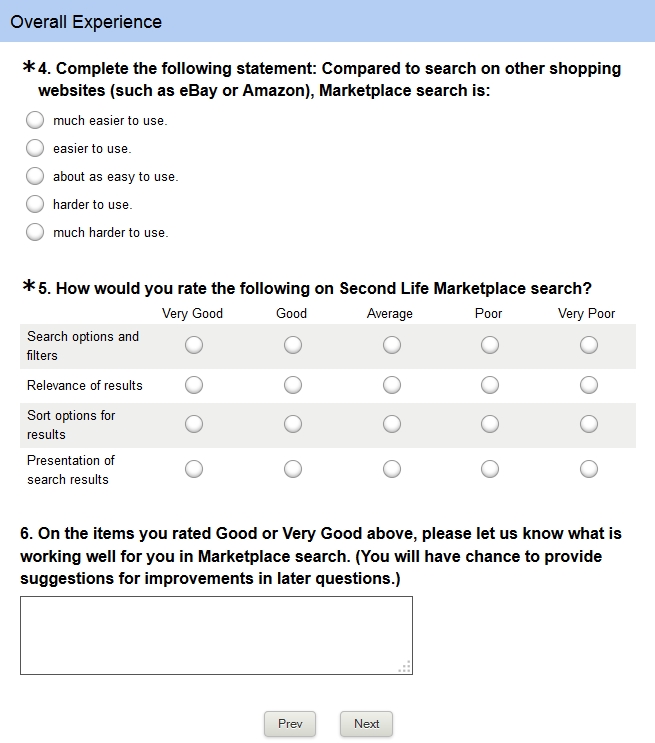
Marketplace search survey: open for input until January 6th, 2014

The survey presents a dozen sections, some of which are multi-part, asking for elements of the search functionality to be rated, and some of which offer users the opportunity to provide direct input / suggestions on things like the current search filters, relevance and sorting of results, presentation of search results, etc., and any specific changes people would like to see. It takes about 5 minutes to complete.

For those frustrated by Marketplace search, this would appear to be a good opportunity to provide feedback as to how things might be improved, which will hopefully be taken on-board. A discussion thread on the survey and feedback given has been started within the Merchant’s forum.