At the time of writing, no deployment notes had been published. However:
There was no deployment to the SLS (main) channel on Tuesday, October 29th, leaving it on server release 2019-10-03T01:12:11.531528.
There are two RC deployments planned for Wednesday, October 30th:
2019-10-24T19:07:13.532143, comprising further internal script improvements, internal logging changes and improvements to simulator state saves.
2019-10-26T00:06:48.532192, comprising a previously released hotfix to fix teleports being 5%-7% less reliable and makes the simulator take a little bit longer to report as “Up” to the Lab’s internal tools to more accurately reflect when residents can actually access a region.
SL Viewer
The Project Muscadine (Animesh follow-on) project viewer updated to version 6.4.0.531949 on October 28th. The update brings it to parity with the release viewer, but contains not project updates.
. The rest of the viewer pipelines remain as follows:
Current Release version 6.3.2.530962, formerly the Vinsanto Maintenance RC viewer, dated September 17th, promoted October 15th – NEW.
Copy / Paste viewer, version 6.3.3.531844, October 21st.
Legacy Profiles viewer, version 6.3.2.530836, September 17th. Covers the re-integration of Viewer Profiles.
360 Snapshot project viewer, version 6.2.4.529111, July 16th.
Script Event Order
It was asked if the script updates would affect the order in which script events are handled, Rider Linden stated:
Some events have always had priority just by virtue of the order in which they were collected. The order of collection has changed. For instance, sensor events were collected and posted before chat events and then touch events. Chat events are now posted immediately upon processing in the simulator. It should still be FIFO… just don’t bet on what event gets collected when.
In addition, it was noted in regards to event messages:
Generally, event handling should not to be counted on in any sort of coding since it may change again in the future.
Link messages:
If multiple link messages are sent from a single source to a single receiver script, the ordering should be preserved. Similarly, when using llLinkMessage to send a message from script A to script B in the same prim, they are posted immediately, and the order is maintained.
If the same message is sent to link A and then to link B, the order the links get them is not always the same. Similarly, if script A and script C are using llLinkMessage to post to B, all bets are off which gets there first.
Linden Lab is aware that there are still script processing issues that are causing problems, and which have come to light following the SLS channel deployment of .531528. For examples of specific issues please refer to BUG-227786 together with this blog post, and also BUG-227776.
SL Viewer
The Ordered Shutdown RC viewer updated to version 6.3.3.531767 on Monday, October 21st, bringing it to parity wit the current release viewer. The rest of the viewer pipelines remain as follows:
Current Release version 6.3.2.530962, formerly the Vinsanto Maintenance RC viewer, dated September 17, promoted October 15th – NEW.
Legacy Profiles viewer, version 6.3.2.530836, September 17. Covers the re-integration of Viewer Profiles.
Project Muscadine (Animesh follow-on) project viewer, version 6.4.0.530473, September 11.
360 Snapshot project viewer, version 6.2.4.529111, July 16.
Available via direct link only, and may not function fully or correctly:
Linux Spur viewer, version 5.0.9.329906, dated November 17, 2017 and promoted to release status 29 November 2017 – offered pending a Linux version of the Alex Ivy viewer code.
Obsolete Platform viewer, version 3.7.28.300847, May 8, 2015 – provided for users on Windows XP and OS X versions below 10.7.
No significant news. A lot of back and forth on region crossings and whether they are “worse” and personal views on how they can be fixed.
Simulator Deployments
Please refer to the server deployment thread for the latest updates.
On Tuesday, October 14th the SLS (main) channel was updated with server release 2019-10-03T01:12:11.531528, previously deployed to an RC channel and comprising:
Fixes: BUG-227645 EEP issue; windlight no longer rendering properly.
Internal logging changes.
Improvements to simulator state saves, which should make rolls smoother.
On Wednesday, October 16th, a new server update, 2019-10-11T18:12:36.531693, should be deployed. This comprises all of the above updates plus the internal script improvements previously documented in these updates. This deployment will expand these updates (originally deployed to one RC on Wednesday, October 9th in release .531529) to all of the primary RC channels.
SL Viewer
The Vinsanto Maintenance RC viewer, dated September 17th, 2019 was promoted to de facto release status on Tuesday, October 15th. The remainder of the pipelines remained unchanged at the time of writing:
Legacy Profiles viewer, version 6.3.2.530836, September 17. Covers the re-integration of Viewer Profiles.
Project Muscadine (Animesh follow-on) project viewer, version 6.4.0.530473, September 11.
360 Snapshot project viewer, version 6.2.4.529111, July 16.
Linux Spur viewer, version 5.0.9.329906, dated November 17, 2017 and promoted to release status 29 November 2017 – offered pending a Linux version of the Alex Ivy viewer code.
Obsolete platform viewer, version 3.7.28.300847, May 8, 2015 – provided for users on Windows XP and OS X versions below 10.7.
Fixes: BUG-227645 EEP issue; windlight no longer rendering properly.
Internal logging changes.
Improvements to simulator state saves, which should make rolls smoother.
2019-10-03T01:23:43.531529, comprising the same updates as above, with the addition of the internal script improvements previously deployed and subsequently rolled back.
An important point to note with this is that when release 2019-10-03T01:23:43.531529 has been deployed, any scripts that still exhibit the kind of communication issues indicated by the blog post will likely need to be altered by their creator to match the example scripts supplied in the blog post, or at least follow the communications process defined within it.
We’ve also learned a bit more about esoteric scripting behaviour; for example, if an event happens and it’s going to get picked up by multiple handlers, there is NO promises about the order they get it. And with communication or transfers between prims and objects, the big lesson is to make sure everything is ready with “hello” exchanges and confirmations that both sides are ready. It’s like passing a ball – make sure the other side is ready to catch it.
– Simon Linden
SL Viewer
The long-awaited Voice RC, version 6.3.2.531587, was issued on Tuesday, October 8th. Primarily intended to improve voice detection when you’re speaking, this voice includes the following fixes (non-public Jira reports):
BUG-227356 [Win] ‘SLVoice.exe’ starts an unexpected cmd window
VOICE-56 Voice is cutting out – seems like a threshold is too low
SL-11958 viewer-manifest should treat missing files as errors
The remainder of the official viewer pipelines remains as follows
Current Release version 6.3.1.530559, formerly the Umeshu Maintenance RC viewer, dated, September 5th – No Change.
Release channel cohorts:
Love Me Render viewer, version 6.3.2.531296, September 30th.
Ordered Shutdown RC viewer, version 6.3.2.530972, September 24th.
Vinsanto RC viewer, version 6.3.2.530962, September 17th.
Legacy Profiles viewer, version 6.3.2.530836, September 17th. Covers the re-integration of Viewer Profiles.
Project Muscadine (Animesh follow-on) project viewer, version 6.4.0.530473, September 11th.
360 Snapshot project viewer, version 6.2.4.529111, July 16th.
Linux Spur viewer, version 5.0.9.329906, dated November 17th, 2017 and promoted to release status 29th November 2017 – offered pending a Linux version of the Alex Ivy viewer code.
Obsolete platform viewer, version 3.7.28.300847, May 8th, 2015 – provided for users on Windows XP and OS X versions below 10.7.
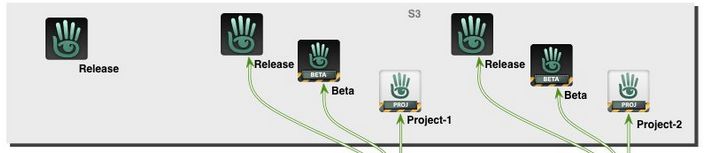
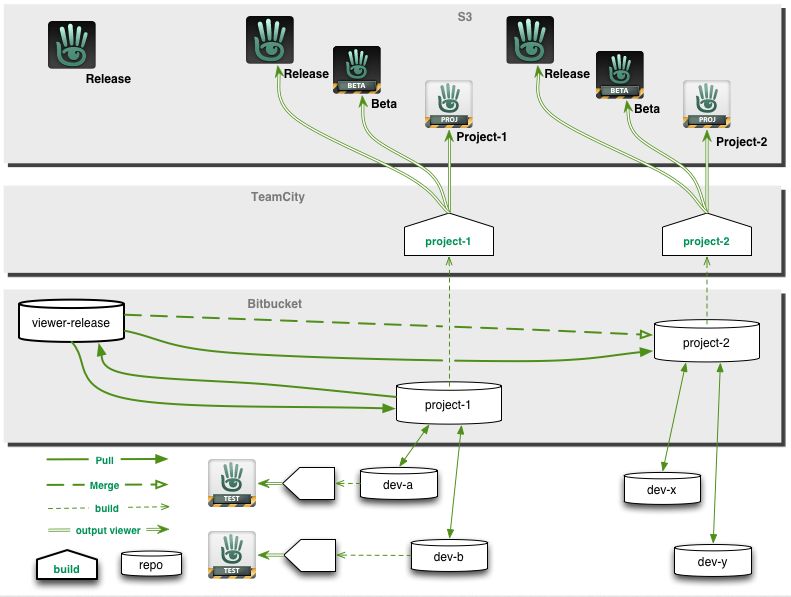
Part of the official viewer release process (see below for the full diagram). Credit: Linden Lab
Many of us are familiar with the Lab’s approach to viewer and simulator releases – but equally, many only have a passing understanding of what goes on. This was something reinforced to me as a result of in-world conversations I’ve had recently, so I thought I’d reach back to 2013, when I provided a guide to the viewer release process (see: New viewer release process implemented), and use that and some additional notes on simulator releases to try to provide and easy-to-follow overview of how the Lab manages official viewer releases and simulator updates.
The Viewer Release Process
Overview
Note: just to avoid any confusion, please remember these notes only apply to the official Second Life viewer supplied by Linden Lab (and which from the last Lab-derived comment on numbers (late 2016) I have could account for approximately 15%-20% of user usage).
The current viewer release process was introduced in July 2013 as a result of a number of issues occurring in 2012 that combined to produce a severe bottleneck in the Lab’s ability to make timely viewer releases and deploy everything from bug fixes to major new releases.
With it, the Lab can produce multiple versions of the viewer in parallel with one another, some of which may initially follow their own development / testing path independently of other versions, but which can, when they are ready, be tested for their suitability for promotion as the next de facto release viewer through direct monitoring of their performance and through comparison of that performance, one to the next.
The Viewer Release and Integration Process is intended to allow viewers to be better developed tested and prepared for release in parallel. Image credit: Linden Lab
Types of Official Viewer
The process achieves this by allowing viewers to be developed on a rolling basis, defined by project internally, and which eventually appear for public use in one of two “pre-release” versions, as it were: Project viewers and release candidate viewers.
Project viewers are generally viewers dedicated to a single new feature, capability or function within the viewer. They are essentially “first look” / experimental viewers designed to expose new features and capabilities (and any new viewer UI that might come with them) to users interested in them, who can then test and provide feedback (including bug reports) to the Lab, allowing the feature or capability to be refined and improved.
Release candidate (RC) viewers are viewers considered to be close to the point where they can be promoted as the de facto release viewer.
They might be former project viewers that have progress to a point where the Lab is considering formally releasing them, OR they might start as RC viewers in their own right without ever having been a project viewer.
It is these RC versions that allow the Lab to gather statistics on the behaviour of individual viewers in order to help determine their suitability for promotion to full release status.
Broadly speaking, whether a viewer starts its public life as a project viewer or a release candidate viewer depends on what it contains. A viewer containing a major new feature – such as Animesh, Bakes on Mesh or EEP, for example – will generally make an initial public appearance as a project viewer for the reasons noted above. Maintenance releases, hot fixes, and things like updates to the viewer rendering system will – in general – tend to appear directly as release candidate viewers.
No viewer ever goes directly from project status to a full release – all project viewers will go by way of progressing first to being a release candidate, then being judged as ready for promotion to full release status.
Where to Find Them and How They are Handled
Both types of viewer appear on the Alternate Viewers Page, but how they are handled is somewhat different – and this is one of the important aspects in understanding them.
Project viewers are largely “independent” viewer versions.
Users must opt to visit the Alternate Viewers Page and select, download and install one.
Each project viewer installs into its own dedicated location (although they share the same settings files and cache locations as the release viewer), so they can be run alongside the release version of the official viewer, if installed.
Release candidate viewers are considered as “alternative release viewers”.
Release candidates are assigned a “cohort number” the Lab believes will present a reasonable cross-section of users.
When a release candidate viewer is made available, the system automatically triggers the viewer update process among randomly selected users on the current official release viewer, moving them to the release candidate.
When the cohort number for a release candidate viewer is reached, it is no longer made available for automatic download / installation.
Once a user has been selected to receive a release candidate version of a viewer, they will continue to receive updates for that particular RC on a mandatory basis until it is promoted to release status – they will not be selected to receive other RCs (or updates to others RCs) until the RC they have been using in promoted to de facto release status.
The reason for doing this is to allow the Lab to monitor the performance of individual viewer release candidates and capture data on things like performance, stability, crash rates, etc. This data, together with bug reports, etc., filed by users is then used to determine an individual RC’s suitability for promotion to release status.
Alternatively, users can opt to manually install any RC viewer that interests them directly via the Alternate Viewers Page. Again, by default, any RC viewer installed in this way will overwrite any existing installation of the official release viewer (unless an alternative installation location is provided by the user), and the user will thereafter receive updates for that RC.
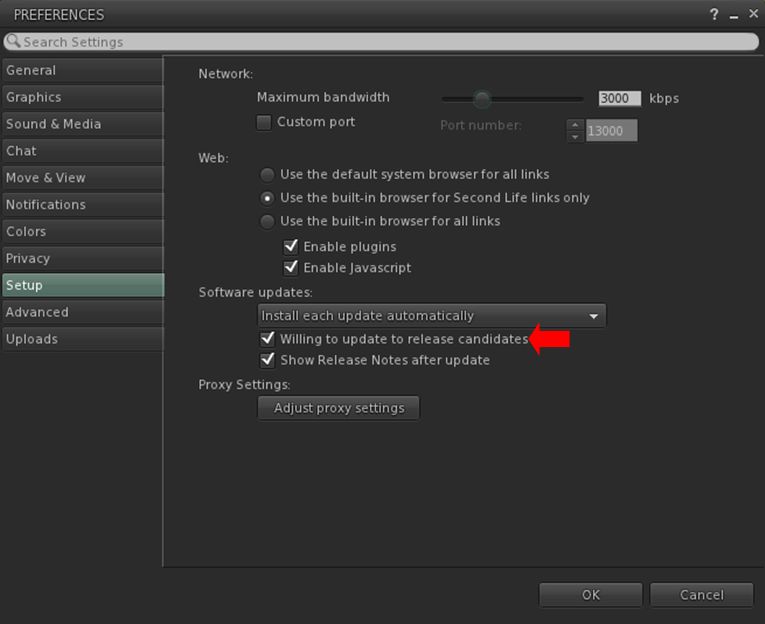
Note that users who do not wish to have RC viewers installed on their system can, if they wish opt out of the release viewer update loop from within their viewer, as shown below.
Users of the official viewer who do not wish to be involved in testing any release candidate viewers can opt out of the selection / download process by unchecking the Willing to Update to Release Candidates option in Preference. Note that having the option checked does not mean you will be subject to RC testing: users for each RC issued by LL are selected entirely at random from the poll of official viewer users.
How are Viewers Progressed to Release?
As noted above, project viewers follow defined path: they initially appear as a public project viewer, and then may go through multiple iterations of improvement, updates, added capabilities, bug fixes, etc., before they reach a point where the Lab determines they are ready for upgrade to release candidate status.
Release candidate viewers are more closely monitored by the Lab through their various cohorts, whilst similarly being subject to multiple iterations designed to remove bugs, help with performance, address further perceived shortfalls in functionality, etc., based on things like bug reports and feature requests from users.
While this approach means that multiple viewers can be developed, tested and readied for promotion to de facto release status, it often means that at any one time, there are several RC viewers vying for release. When this happens:
The Lab will select a viewer or promotion based on a number of factors, including stability, performance, number of remaining bugs / issues, the potential impact of said bugs issues, the urgency with which an RC needs to be released (e.g. an “late breaking” RC with a hot fix could well be promoted ahead of other RCs that have been available for longer) and so on.
Generally speaking, the Lab tries to promote no more than one RC to de facto release status every two weeks. However, depending on the overall state of individual RC viewers, the period between promotions can be longer.
Once a release candidate has been promoted to release status, the first order of business is to merge the code it contains into all over available RC viewers and then monitor them to see how they behave when built using the “new” release code, a process that also feeds back into determining which of them might next be promoted.
What this all Means in Summary
Simply, put, that official viewer and viewer updates can be produced on a rolling basis, with some starting as project viewers, others directly as release candidates, with the latter being objectively monitored both individually and in comparison with one another to determine which is best suited to become the next de facto release viewer.
On Friday, October 4th, 2019 Linden Lab blogged about the recent script related issues that caused widespread disruption (notably with rezzing systems) across Second Life following the SLS (Main) channel deployment made on Tuesday, September 24th, 2019, and which ultimately resulted in a complete rollback from the grid on the 27th/28th September.
As noted in my Simulator User Group Updates, the release that caused the problems – simulator release 2019-09-06T22:03:53.530715, included a number of updates intended to improve overall script performance, including how scripts are scheduled and events are delivered. However, these changes resulted in an unintended impact which, due to the region sampling, was not revealed by the update initially being deployed to a release candidate (RC) channel on Wednesday, September 11th.
The October 4th blog post from Linden Lab indicates that improvements have been made to the code, and once deployed, these should help prevent a recurrence of the problem. As an aside, it has been hoped that these updates might have been deployed to an RC channel on Wednesday, October 2nd, but a last minute bug prevented this (see: Deploy Plan for the week of 2019-09-30), so the updates will likely be deployed during week #41 (commencing Monday, October 7th).
However, even with the fixes, there blog post goes on to note there are come best practices when using parent / child script communications between a parent object and a child it rezzes:
One common cause of problems is communication between objects immediately after one creates the other. When an object rezzes another object in-world using llRezObject or llRezAtRoot, the two objects frequently want to communicate, such as through calls to llRegionSayTo or llGiveInventory. The parent object receives an object_rez() event when the new object has been created, but it is never safe to assume that scripts in the new object have had a chance to run when the object_rez event is delivered. This means that the new object may not have initialised its listen() event or called llAllowInventoryDrop, so any attempt to send it messages or inventory could fail. The parent object should not begin sending messages or giving inventory from the object_rez() event, or even rely on waiting some time after that event. Instead, the parent(rezzer) and the child(rezzee) should perform a handshake to confirm that both sides are ready for any transfer.
The blog post goes on to define the sequence of events between a parent and rezzed child object as they should occur, and provides sample code for such parent / child operations.
An important point to note with this is that when the fix from the Lab is re-deployed, any scripts that still exhibit these kinds of communication issues will likely need to be altered by their creator to match the recommendations provided by the blog post.
Those wishing to know more are invited to read the original blog post in full, and address and questions and / or feedback through the associated forum thread.



 Inara Pey: Living in a Modemworld