Update: following the publication of this article, Linden Lab published their own official announcement blog post.
In 2023, at SL20B, Linden Lab announced a pair of “limited availability lifetime memberships”: Second LifeTime Premium and Second Lifetime Premium Plus. As I reported at the time, these accounts:
Featured a one-off payment and provided all of the benefits applicable to either the Premium Account subscription package or the Premium Plus Account subscription package, depending on which LifeTime membership is applied for.
Would remain in effect:
Even if the account holder cancels their membership – if they re-join later, they will be able to continue with their Second LifeTime membership.
As long as Second Life remains operational.
Were offered on a first-come, first-serve basis.
On June 28th, 2024, Linden Lab announced these Lifetime Memberships are once again available on a first-come, first-serve limited number basis, specifically:
121 applications for SecondLifeTime Premium.
21 LifeTime Premium upgrades to LifeTime Premium Plus for those who took out a LifeTime Premium membership in 2023.
21 applications for SecondLifeTime Premium Plus.
These packages are offered at the following on-off payment prices of:
US $859.00 at the time of upgrade for SecondLifeTime Premium.
US $1150.00 at the time of upgrade to go from Second LifeTime Premium (2023) to SecondLifeTime PremiumPlus
US $$1,899.00 at the time of upgrade for SecondLifeTime Premium Plus.
As with the original offer, Lifetime memberships:
May not be available to upgrade to other account types (e.g. from SecondLifeTime Premium to Premium Plus). However, requests for upgrade can be submitted via support ticket for case-by-case review.
Will not be available for downgrade, but will become the base-level membership account type for the holder.
Click the orange Submit A Ticket button on the top right of any page of the support portal, and sign in if you have not already.
In the support ticket form, select the ticket type Account Issue, and choose Request SecondLifetime Premium Account from the second drop down that appears.
Select which membership type you would like – SecondLifeTime Premium, Second LifeTime Premium to Premium Plus upgrade or SecondLifeTime Premium Plus.
Check the box that states, I accept the fee. This will be required for support ticket submission, and will allow your membership to be processed as quickly as possible.
Fill out any additional necessary details in the description section (e.g. if you have recently renewed either your Premium or Premium Plus subscription, add the date of renewal) and click Submit.
Allow up to 10 business days for Second LifeTime membership support ticket requests to be processed.
Premium Plus Mediterranean Theme Linden Homes, as revealed at the SL Xmas Expo 2023
Update, December 19th, 2023: the Mediterranean Theme homes for Premium Plus are now available via the Linden Homes Store.
The newest Linden Homes theme – this one again for Premium Plus subscribers – was open for preview during the RFL Xmas Expo (December 1st-10th, 2023). Once again offering a range of homes occupying 2048 sq metre parcels, the overall theme for this upcoming release is “Mediterranean”, bringing with it a Tuscan theme – perhaps one of the most popular styles of house used within SL, which may be reflected in how popular the theme might prove, once available through the Linden Homes store.
As with more recent releases of Linden Homes, the theme comprises a total of four designs, each available in “normal” (with a fixed set of rooms) and “open” (with a more open-plan design allowing holders to define the spaces within with additional walls, etc., as they prefer), for a total of eight styles. Not all variants of the new theme were displayed at the Expo reveal, but those which were are described below.
Bella Vista: the open-plan version of a single-storey house, with a central terrace to one aspect, flanked on two sides by the house wings, and the third by the rest of the house, which also opens onto a second terrace. This version of the house presents a large L-shaped room to one side of the entrance hall, two smaller rooms on the other.
Premium Plus Mediterranean Theme Linden Homes: Bella Rosa / Bella Vista styles
Bella Rosa: “normal” version of the Bella Vista, no preview available at the Expo reveal.
Favola: a two-storey house with central stone turret enclosing the entranceway, in which a curved staircase rises to a galleried landing overlooking the entrance. An archway provides access to two lower-floor rooms, also linked by an archway. The largest of the latter further accesses a terrace which is shared with one of the side rooms, which are accessed from the main room via a doorway. The galleried landing provides access to three upper-floor rooms.
Felicita: the open-plan version of the Favola, presenting two large ground floor rooms linked by a doorway and two linked upper floor rooms, the staircase rising directly into the larger of the two.
Premium Plus Mediterranean Theme Linden Homes: Favola / Felicita styles
Grande Vista: a large, two-storey house with turreted front entrance complete with external stairs circling around it to reach the upper floor and provide access to both balcony there and the upper floor hallway, also reached via the internal stairs from the front entrance. A small room opens off of the entrance, and a central hall parallels that of the upper floor, providing access to (respectively) four rooms on the ground floor, the largest of which has a small terrace area opening off of it to one side of the house, and (upstairs) three rooms, two of which have their own balconies.
Gran Palma: the open-plan version of Grande Vista, with the entirely lower floor opened-out into a large single room space, archways linking it to the entrance hall, with the upper floor rooms as described above.
Premium Plus Mediterranean Theme Linden Homes: Grande Vista / Gran Palma styles
Primavera: a central 2-storey area with entranceway to front and large main room, flanked on either side with two single-level wings, one with two individual rooms, the other with two linked rooms (ideal for a kitchen space and dining room), both of which are linked to the main room via archways. Doors from the rearmost room on either side provide access to a roomy terrace overlooked from the main room by large windows. Reached via a dog-leg staircase to the front of the house, the upper floor provides large landing area which might be used as an open room / study, and two rooms suitable for use as a bedroom / bathroom combination or perhaps two bedrooms.
Precioso: an open plan version of the Primavera, not displayed as a part of the Expo reveal.
Some of the versions of the houses at the reveal were furnished, offering some idea of how they might look in use – a good twist on these reveals by the Lab, and perhaps a little overdue. As is usual for the modern range of Linden Homes, all of the styles / versions can be accessed by an off-parcel rezzing system, allowing the full capacity of the parcel on which a house sits to be used for furnishings, garden landscaping, etc.
Premium Plus Mediterranean Theme Linden Homes: Favola style with décor suggestion
When the first selection of Premium Plus Linden Homes – the Ranch theme – was released, I noted that I felt it lacking character, and not something sufficiently appealing to give me pause to consider upgrading from Premium to Premium Plus. I still do not feel the need to make the jump, but in terms of character I do find this theme to have far more in the way of character. Set within a sub-tropical environment, they would clearly have their own unique attractiveness; hence another reason to feel they could well prove popular on release.
Availability
According to Patch Linden, at the time of the reveal there is no release date for the Mediterranean theme, and the advice to Premium Plus subscribers with Ranch Theme homes was not to abandon them to await a pre-end of the 2023 release of this theme, as it may not come until 2024. At the time of writing, a new area of Bellisseria, north and east of the current Ranch Theme homes, appears to be in preparation – possibly for this new theme.
On Monday, October 9th, Linden Lab sort-of formally launched the new Linden Homes Store for Second Life, showcasing all the Linden Home types and themes available to those users holding a qualifying subscription account (at the time of writing, Premium / Premium Plus), and which had been previously semi-previewed in a September 27th official blog post.
The new Linden Home Store is part of a project to completely overhaul what Linden Lab calls the “Land Journey” in order to provide a resource hub for all matters pertaining to land holdings in Second Life: how to lease one or more regions from Linden Lab, types of regions available, how to obtain Mainland, even how to go about locating and renting land from private estates / land providers.
The first part of this work actually launched in February 2023 in the form of the Land Portal, the core of the new hub. At that time, the Portal was little more than a “front page” showing what was to come, so rather than devote a full post to it, I covered it in one of my Web User Group meetings, as it was at one of those meetings where the launch of the portal was announced. While it does gather together information related to buying / renting land from existing sources, the Linden Homes Store is really the first major piece of meat on the bones in terms of a new suite of pages for the Portal – so what’s been done and how does it look?
The upper part of the new Linden Homes Store main page, as seen by someone in possession of a Linden Home.
General Overview
Store Home Page
In terms of looks, the first thing that hits the eye is that the store has – unsurprisingly – been produced using the new general page style and colours which have started to roll out across the Second Life web properties, as was the case with things like the Destination Guide. The Linden Home Store also borrows from DG in some elements of its look and feel, thus helping to further instil a sense of platform identity in to the pages whilst encouraging a degree of familiarity to help promote confidence of use.
But to get down to specifics. The Store’s home page offers two slightly different layouts, depending on whether a user is either logged in our out of their secondlife.com account and / or has a qualifying subscription account with a Linden Home already associated with it or not, per the images above and below.
upper part of the new Linden Homes Store main page, as seen by someone who does not have a qualifying account type / is not logged into the the Second Life web properties.
The What Next? section of pages displayed for qualifying accounts has some curiosities within it which raised my eyebrows:
The “Your home’s content pack” links to third -party purchasable add-ons for “2019+” Linden Homes. Whilst these are a handy resource, they actually have bugger all to do with the Content Packs actually supplied with the various themes – so why name the link thus? It’s unnecessarily confusing for those interested in seeing the different selections of items supplied with the various Linden Home themes.
Why on Earth utilise a video from 2010 which has nothing to say about the far more recent Linden Homes themes, which are liable to be of the most interest to recently upgraded account holders? Could not a more up-to-date video have been produced prior to the launch? If nothing else, a video that properly encompasses all of the Linden Homes products also lends itself to acting as a promotional tool aimed at anyone accessing the Store, regardless of their account type.
Why on Earth is “Choose a different home” so called? It’s a link to the SL wiki page serving to introduce and describe “2019+” Linden Homes – so why not call it “Introducing Linden Homes” or something? As it is, the title suggests that by clicking it, the user will be magically whisked to where they can swap their existing home without the need to scroll further.
A closer look at the What Next? section of the Linden homes Store, as displayed to qualifying account holders with the niggling links (your home’s contents pack, Video tutorial and Choose a different home).
Beneath the What Next? / Amenities section of the page, is the main store listing. This comprises information panels for all Linden Homes, 2019+ and 2010., with panels listing slightly different information:
2010 Linden Homes only provide a photograph of the house type, the name of its theme (e.g. “Tahoe” or “Meadowbrook”), and the parcel size.
“2019+” Linden Homes are listed by theme name (e.g. Ranch, Log House, Silt House, etc.), provide a photograph of one of the styles from the theme, number of layouts (styles) within the theme, location and parcel size.
This listing is periodically updated to reflect the current status of all Linden Homes: available themes / types are listed firt in the order Premium Plus Homes then Premium 2019+ Homes then Premium 2010 / 51w sq m parcel homes. And themes or types currently unavailable are then listed in the same order and labelled NOT AVAILABLE.
For those on non-eligible (for Linden Homes) accounts / who are not logged-in to the SL web properties, the Store will go on to display additional useful information on Linden Homes below the index list.
House Panels / Information
Clicking on a specific house / theme in the Store’s index list will refresh the page and display expanded information on the selected house / theme that the top, with the more recent Linden Home themes having more information available than the 2010 Homes, per the images below. The listing of homes will then continue below this expanded panel.
An information panel within the Linden Home Store for one of “2010” styles of Linden Home. Note the information on the left.
That the “2019+” homes have more information associated with them is not surprising, simply because they have more to offer. however, it did again give rise to some niggles:
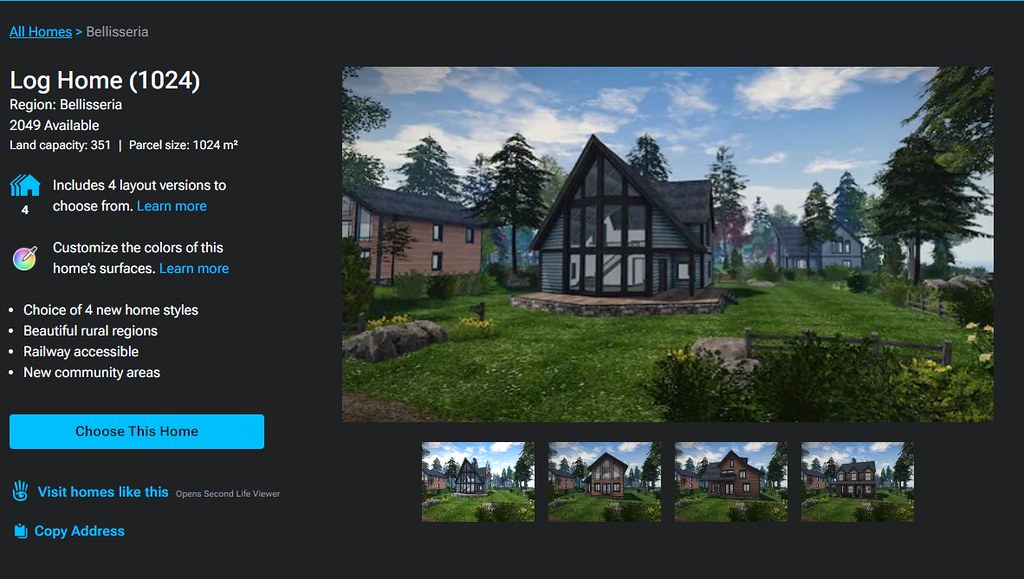
The text “Includes X layout versions to choose from” (where X is a number) is followed by a link called Learn More. This gives the impression that clicking the link will display further information directly related to the theme (such as what the layouts are). Instead, it takes the user out of the Land Store and to the 2019 Linden Homes wiki page.
While this does contain some information related to the various themes, it’s hardly more informative that the information displayed within the Store and totally disrupts what has thus far been a relatively contained, seamless experience.
Given the effort put into the Store, it’s a shame time wasn’t taken towards building more detailed pages (with images) for the themes ahead of any launch.
Similarly, the text “Customise the colours of this home’s surfaces” is perhaps mis-labelled, and would be better called “About the Linden Homes Controller”, given it links to the section of the SL wiki page devoted to all of the Controller’s options, not just decorating.
An information panel within the Linden Home Store for one of “2019+” themes of Linden Home. Note the expanded information on the left, and the critquies of it noted in the above bullet points.
Some have also commented that listing the “2019+” Linden Homes within the Store in terms of their collective theme (e.g. Houseboat) rather than style (e.g. Windlass, Barnacle, Jolly Roger, etc.), and doing the reverse for the “2010” Homes, listing them by style (e.g. Aspen, Birch Cedar) rather than collective theme (e.g. Tahoe) is further confusing.
However, while I can understand thinking this way, I’d actually point out that it does in fact make sense: all “2019+” Lindon Home styles within a given are available through a rezzing system on the parcel, allowing the user to swap between them whenever they wish. However, this is not the case with the “2010” homes; regardless of the over-arching theme (Tahoe, Meadowbrook, etc.)., the only way to swap from one theme to another is to physically swap homes through the Store – ergo, listing them by style rather than trying to group them by theme does in fact make sense.
General Observations
I will confess, other than kicking the tyres of the new Linden Home Store as described above, I’ve not taken it for a drive in terms of using it to obtain a Linden Home; frankly, I’m perfectly happy with the location of my current Linden Houseboat, and I have no desire to pack-up and be randomly moved for the sake of a test. Sorry.
That said, it should be noted that whilst you can see the various types and themes of Linden Home currently available when browsing the Store, while the actual house type / theme you pick might be in-world is still down to a random selection from the available stock; you cannot puck a specific parcel in a specific region. Nor should this be expected: building a system to list all the locations of a given house type / theme when these could run into the hundreds just isn’t reasonable; thus Support ticket remains the means but which to request a specific location.
I do find several other points in the design niggling / confusing. Why, for example, are “2019+” Linden homes on 512 and 1024 sq m parcels listed as “Free with Premium Membership” when they are in fact available to both Premium and Premium Plus? Why do Basic and Plus members who might not realise have to get half-way through the Choose This Home before being told they are not eligible? Would it not be better to divert them to the account updates page on clicking the Choose button, rather than displaying angry red text when they try to Confirm Their Choice? Why wasn’t the store hooked into the Linden Homes widget in the top right of the secondlife.com dashboard for Premium / Premium Plus members from the outset (and which currently still links to the “old” Linden Homes store)?
The updates page for choosing a Linden home. It is only at this point that Basic and Plus users are informed they are ineligible for a Linden Home and need to upgrade – diverting them to the account upgrade page on chick the earlier Choose This Home button might be friendlier.
These are all small points, and to be fair, LL does have a long history of releasing not-quite-baked features and updates into the wild and then tweaking them after the fact. As such, there is the potential for all of these personal annoyances to be be address as a natural part and parcel of that work. However, the fact that there are all these little niggles and potential points of confusion does negatively impact first impressions. Which is a shame, because overall, it has to be said this new Linden Home Store is a significant and welcome improvement to to previous version.
On Monday June 26th, Linden Lab launched the first Linden Homes theme expressly for Premium Plus subscribers. As had been promised, the theme is “Ranch”, and comprises a total of seven styles. Also as promised, these houses are on 2048 sq metre parcels with a land capacity of 703 LI. For the initial release, a total of 28 regions have been established by LL, located in their own group alongside Bellisseria’s major Stilt Home regions.
The houses themselves are of various footprint, the smallest looking suitable for a 512 s m parcel, and the largest looking like they might feel a little squeezed were they to sit on a 1024 sq m of a Premium home. Here, however, they fit the plots well, although the little cabin-style units do – to my eyes – look very out-of-place.
Premium Plus Ranch Theme: the Stable View (the Spring View is almost identical, but with a slightly smaller footprint)
The landscaping around the houses is well designed, undulating nicely to offer different heights throughout, dirt tracks offering through routes and drives which almost reach onto the parcels. The latter are marked by fences which exist just outside of their boundaries, given a nice sense of property without encroaching on the parcel LI. Lanterns hang from posts which have an unfortunate resemblance to a simple gallows whilst grain silos, water towers, tractors, windmills and other items perhaps common to ranchlands helping to give a sense of place.
As well as presenting different footprints, the houses are a mix of single and two storey units, all framed and clad in wood and incorporating the expected porches. All of those set out for viewing in the region are referenced as “open plan”, even though they have individual rooms. However, whether this means the versions rezzed by default are “open plan”, with their more open spaces to be sub-divided at the owner’s discretion, whilst there are other versions available through the rezzers with their larger interior spaces already sub-divided, or whether these seven styles with their mix of open-plan spaces and individual rooms marks the entire theme, I’ve no idea. However, given I am unsure, the following descriptions may not fully reflect all of the the styles available via the rezzers:
Buffalo Pastures: a large house with 1.5 floors. A full-length front porch with double doors provides access to to a large front-to-back room with rear door accessing a smaller porch. A second front-to-rear room features a staircase at the front rising to a galleried landing and single upper floor room.
Grizzly Point: essentially the same as the above, but with larger footprint to allow a larger main room on the lower floor.
Creek Stone: a small cabin-style house, with front and rear porches. This appears to either only have a single room, or is presented only in its open-plan format.
Knotty Pine: a large, single-storey building with full-length porch to the front and half-length porch to the rear. A single front door provides access to a large front-to-back main room with a door to rear porch. A central hallway parallels the main room, providing access to three further rooms, all with doors and with front, side and rear aspect views respectively, as well as connecting to the main room via both an arched entry and a door towards the rear of the room. A hatchway within this hall provides access to a loft area (with fold-down steps).
Premium Plus Ranch Theme: Silver Spurs
Sliver Spurs: a single-storey L-shaped house with full-length front porch and centre-placed rear porch to half length. A single front door provides access to the main room with views to the rear aspect and door to the porch. An inner hall provides access to two additional rooms.
Stable View: a large two-storey house featuring full-length front and rear porches and double front doors opening into an entrance hall with dogleg stairs to upper floor. Two large connecting rooms (both connecting to the entrance hall on the lower floor. Galleried upper floor landing leading to two side-by-side bedrooms on one side and a further bedroom on the other.
Spring View: similar to the Stable view, but with slightly smaller footprint and only featuring the two upper side-by-side bedrooms.
I’m not entirely sure what it is with this theme – or whether I’m just increasingly jaded – but I admit to finding them lacking appeal and character. Out of the seven styles, Grizzly Point and Stable View are little more than Buffalo Pastures and Spring View on a light dose of steroids, whilst several of the builds seem to have deliberately oddly-shaped permanent (i.e. those with fixed doors) rooms, some of which seemed cramped even sans furnishing. And while the Knotty Pine does have a novelty of an attic (with window), it’s not enough to lift it into the realm of “like” for me. There is also the weird novelty of stone chimneys rising from several of the designs but without any connection to an actual fireplace. Whist this obviously leaves a freedom of choice as to any actual fireplace actually installed on the part of the owner, it still potentially limits where any fireplace might go if sensibilities of look are to be maintained, which seems to defeat the object – so why not just include one to start with?
Premium Plus Ranch Theme: Grizzly Point (the Buffalo Pastures is almost identical, but with a slightly smaller footprint)
Which is not to say the Theme isn’t proving popular. Whilst writing this piece, the houses around me were being snapped up with horses and stables appearing even before furnishings! For those who are Premium Plus and who like horse riding, will likely find much to enjoy with this theme. For me, however, it’s not enough to tip me anywhere close to considering pumping my subscription up to PP.
On Monday, June 26th, Linden Lab announced a pair of “limited availability lifetime memberships”, wherein Second Life users have the opportunity to make a one-time payment to Linden Lab in return for a “lifetime” membership to Second Life based on either the Premium Account type or the Premium Plus account type.
Offered as a part of the Second Life 20th Birthday celebrations, these memberships are described by Linden Lab as follows:
For Second Life’s 20th birthday, we will be offering a limited number of lifetime memberships for both Premium and Premium Plus! This will give Residents who upgrade to this membership type the benefits of a Premium or Premium Plus membership for the lifetime of their account! You can see a comprehensive list of what Premium and Premium Plus Memberships are being granted on a first come first serve basis.
Provide all of the benefits applicable to either the Premium Account subscription package or the Premium Plus Account subscription package, depending on which LifeTime membership is applied for.
The currently list of benefits for each account type can be found here.
Cost:
US $749.00 at the time of upgrade for SecondLifeTime Premium.
US $1,749.00 at the time of upgrade for SecondLifeTime Premium Plus.
Are limited to:
200 applications for SecondLifeTime Premium.
20 applications for SecondLifeTime Premium Plus.
Will remain in effect:
Even if the account holder cancels their membership – if they re-join later, they will be able to continue with their Second LifeTime membership.
As long as Second Life remains operational.
Due to there nature, LifeTime memberships:
May not be available to upgrade to other account types (e.g. from SecondLifeTime Premium to Premium Plus). However, requests for upgrade can be submitted via support ticket for case-by-case review.
Will not be available for downgrade, but will become the base-level membership account type for the holder.
Are being granted on a first-come, first-serve basis.
Click the orange Submit A Ticket button on the top right of any page of the support portal, and sign in if you have not already.
In the support ticket form, select the ticket type Account Issue, and choose Request SecondLifetime Premium Account from the second drop down that appears.
Select which membership type you would like – SecondLifeTime Premium or SecondLifeTime Premium Plus.
Check the box that states, I accept the fee. This will be required for support ticket submission, and will allow your membership to be processed as quickly as possible.
Fill out any additional necessary details in the description section (e.g. if you have recently renewed either your Premium or Premium Plus subscription, add the date of renewal) and click Submit.
Allow up to 10 business days for Second LifeTime membership support ticket requests to be processed.
On Tuesday, November 1st, 2022, Linden Lab announced that Homestead regions are now available to Premium Plus members directly from Linden Lab and without the need to hold a Full region.
The offering was first indicated as a “coming” Premium Plus benefit during the Lab Gab session with Grumpity and Patch Linden held on October 21st – see here for a summary of that event – and the November 1st announcement builds on this.
In short the details are:
Premium Plus members are now able to hold one private Homestead region from Linden Lab against their account:
Those intending to avail themselves of the option should also review the Private Regions knowledge base article.
Regions can be requested using a Support Ticket via support.secondlife.com. Tickets should:
Place an order via Land & Region → Order Private Region.
Provide a unique name for the region (in accordance with the region naming rguidelines) and a preferred location on the grid for placement.
The region can be held only as long as the member maintains their Premium Plus account. Should they downgrade to Premium (or any forthcoming Premium subscription level that does not include the Homestead “benefit”) or to Basic will lose the region.
There are no other changes to Homestead ownership, including the fact that anyone is able to own Homestead regions as long as there is at least one Full private region owned on that account as well, and pay the required fees.
Does This Make Premium Plus More Attractive?
Whether the ability to hold a Homestead region when taken on its own will make Premium Plus a worthwhile upgrade is questionable.
If you are not already a Premium or Premium Plus member, then looking at Premium Plus purely in terms of a means to obtain a Homestead region probably isn’t a worthwhile proposition.
When you add the minimum monthly fee for Premium Plus (US $20.75) to the Homestead region tier of US $109, it likely comes out to more than the monthly cost of renting a Homestead region from an established private rental estate.
Both renting privately and holding a Homestead via Premium Plus have the same core risk: paying the monthly tier.
If you are currently a Premium Member, then looking at Premium Plus purely as a means to obtain a Homestead region is a little less clear-cut.
On the one hand, upgrading to Premium Plus from Premium costs at least an extra US $12.5 a month.
On the other, this fee, plus the month Homestead tier will still be a competitive outlay when compared to renting a homestead through a private estate.
If you are a Basic or Premium member who already sees value in other Premium Plus benefits (such as the reduced fee for Name Changes, the other reduced fees, etc.), and are attracted to the idea of holding your own region, then upgrading to Premium Plus is liable to be worthwhile and cost-effective.
This last point is really the key to this offer: obtaining a Homestead is not the sole benefit available to those upgrading to Premium Plus, so it needs to be considered as a part of the overall package of benefits, and any decision made on upgrading should be made on that basis. For example, the option of holding a Homestead region is of little interest to me – but the forthcoming Premium Plus Linden Homes do. I’m therefore waiting to see what happens on that front before I make any decision on a potential move from Premium to Premium Plus.




 Inara Pey: Living in a Modemworld