Mesh is coming: testing on the Main grid has started, LL are feeding us snippets of information and those watching it draw nearer are getting excited / concerned / upset / indifferent.
But what exactly does it all mean for those of us who have only a passing interest in such things? What will be the impact on the consumers among us rather than the content creators? What are we going to be seeing, what do we need to be aware of?
There are a lot of very basic questions such as these that are being asked – some of which are, in fairness, addressed in the SL mesh wiki pages (albeit with a lot of techspeak) – so I thought I’d try to put together a very simple outline of some of the key aspects to it all.
Note that this is not in any way a technical discourse on mesh and its pros and cons or how to create and upload mesh objects – articles penned by others far more competent than I are available in a number of blogs. Nor is it meant to be an exhaustive overview of mesh. It is simply a primer on the subject from the point-of-view of the consumer rather than the creator, and a look at what some of the fuss (good and bad) is about.
What is mesh?
A mesh – or rather a polygon mesh – is a means of generating 3D computer graphics. Polygon meshes come in a variety of forms, and can be created using a range of software applications. Second Life actually already uses meshes to some degree: avatars, for example are basic mesh objects. “Mesh” within Second life therefore really refers to the ability for users to create polygon mesh objects using suitable 3D rendering tools and then import them into Second Life for general use.
Why have mesh?
Second Life has often been critiqued for it’s somewhat primitive look: the in-world tools and shapes can be very limiting when it comes to trying to replicate more organic, natural, and real-world shapes. The use of mesh should allow content creators and Second Life users to import far more realistic-looking objects and items, overcoming this perceived limitation.

Three types of mesh can be imported into Second Life:
- A simple mesh is a mesh with a single face. It can have a single colour and texture
- A multi-face mesh is a mesh that can have multiple colours and textures
- A rigged mesh is a mesh that conforms to your joints and motions. This means that you can wear a rigged model that changes the length and orientation of your avatar’s limbs and animates accordingly.
Note: it is possible for a mesh object to be a combination of these types; it can, for example be a multi-face rigged mesh, like “Seymour” in the image above. Meshes can also be textured prior to upload, as a part of the creation process, or once in-world.
Mesh objects for use in SL can be created in any 3D modelling tool that support the use of Collada 1.4 .DAE files for export. Such tools include high-end applications such as Autodesk Maya ($3,000+) through to the free tools like Blender and Google’s Sketchup. Linden Lab maintain a list of suitable applications on their wiki pages.
Common terms associated with mesh
Those familiar with building in SL may find it easier to consider mesh in the following ways:
- Mesh – A collection of triangles with a single transformation matrix, roughly analogous to a “Prim” in SL (although not necessarily the equivalent of a prim – see PE, below).
- Submesh – A subset of a mesh, equivalent to a face/side on a normal prim.
- Model – A mesh or collection of meshes, equivalent to a coalesced (or linked) prim object.
PE – Prim Equivalence (now Land Impact)
Prim Equivalence (or to give it the official title: Prim Equivalent Weight) – abbreviated to PE, is one of the most important concepts for the “casual” mesh user / consumer, as well as a vital consideration for mesh creators. It has also been the subject of much controversy even before mesh has been launched on the Main grid. So with these points in mind, excuse me if I go on about it at some length.
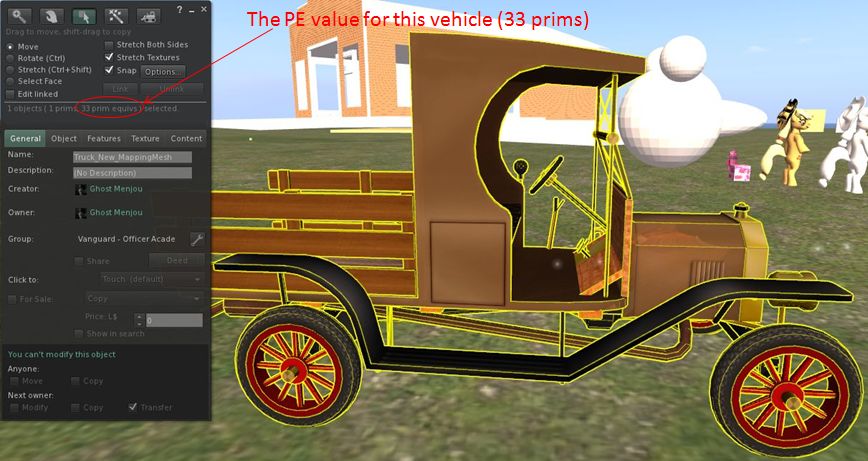
Basically, PE is a means of trying to ensure that mesh objects and traditional prim objects receive fair shares of Viewer and server resources. Perhaps the easiest way to understand PE is to think of it as the number of prims that would be required to achieve the same level of detail, were they to be used instead of the mesh object.
PE itself is arrived at by taking the highest result from three performance weighting calculations made at the time a mesh is uploaded to Second Life. These are:
- The server weight – (also referred to as the simulation weight in the wiki) the impact an object has on the server-side resources needed to manage it.
- The streaming weight – essentially the bandwidth required for an object to be downloaded to your Viewer and rendered. Basically, the more complex the object = the higher the streaming weight
- The physics weight – possibly the hardest to grasp, refer to the complexity of an object’s physics model. (This is also where Viewer developers have issues with coding their Viewers to enable mesh uploads, as I’ve reported on previously, as the code used by LL to calculate the physics weight utilises the Havok physics engine, which is not open-source. Therefore TPV developers need to find a means of calculating the physics weight either by using a suitable open-source physics engine, or by obtaining a Havok license.)
These weightings are calculated based on the complexity of the mesh itself and how well it has been defined and optimised during the creation process; they can also (in the case of the streaming and physics weights) be adjusted during the upload process. Get everything right, and a mesh object should have a manageable PE value. Get anything wrong, and one can end up with a horribly-massive PE count.
And even when it is done right, it is possible for an object to still end up with a PE count in the high hundreds, or for a mesh object to come off less favourably than it’s prim / sculptie equivalent (take a mesh tree with a PE of 9 or 10; are you more likely to buy that, or a sculptie tree that is just 1 or 2 prims, even if it is of a potentially lower visual quality?).
The PE for a mesh object can be seen using the Build menu of any mesh-capable Viewer, as shown below.



 Inara Pey: Living in a Modemworld