Kokua 3.6.2: all set for auto-update

Update August 21st: Nicky Perrian from Kokua has added a comment about a Windows issue with uninstalling, due to a change in the installer.

kokua-logoKokua released version 3.6.2.29072 on August 16th, becoming the first TPV to start operating LL’s viewer update capability since the Lab formally announced it was making the capability available to TPVs if they want to make use of it (Catznip has actually has an auto update capability since release R7, but I’m not clear on whether that uses any of the LL code, or is something the Catznip team built for themselves). Along with this change comes a number of smaller updates.

Download and Installation

The latest Kokua installer (Windows) weighs-in at 36.8 Mb. As expected, the installer runs without a hitch. As I’m still getting around to re-installing viewers on an “as needed” basis on the new PC, I didn’t have to perform a clean install (not that one is recommended in the release notes).

Auto Update

Oz Linden announced that the Lab would be making their viewer release mechanism available to TPVs via an e-mail earlier in the month and also at the TPV developer meeting on Friday August 9th, when he indicated that the Lab were already working with some viewer development teams to help them implement it, Kokua clearly being one of them.

Kokua implements LL's viewer update mechanism code
Kokua implements LL’s viewer update mechanism code

With Kokua, the update options are presented exactly as they are in the official viewer – complete with the check box to update to release candidates. Whether this means Kokua will be completely following suit with the overall release process implemented by the Lab, I’ve no idea.

Obviously, while the code is from LL, viewer updates obtained via it are still coming from Kokua – it doesn’t mean people sill suddenly start getting SL viewer updates!

The change does mean that from now on, updates will be obtained from Kokua’s SourceForge repository as the code does not work with BitBucket. However, the team are at present continuing to post updates to both BitBucket and SourceForge.

Additional Updates

This release brings the viewer up to parity with the Linden Lab 3.6.2 code base, which means it has the more recent materials processing code updates, although not necessarily the very latest to surface in the SL Materials Project viewer, and well as other recent updates within the official viewer. Other notable updates comprise:

  • A return to standard SL viewer Debug for the login menu. This allows the selection of Debug level before logging in
  • “Stop animating me” short cut has been assigned to Shift-S
  • There are several Linux build changes to allow compiling on current compilers (builds on gcc-4.7 and gcc-4.8 have webkit runtime issues)
  • Maximum number of groups has been corrected for OpenSim
  • Freeze/Unfreeze and Eject/Ban context menu options have been added to the people / radar floater, as per Feature Request #1254
  • The Reach Out slider on the people floater mini-map is renamed Radar Range, has been repositioned above the mini-map and now has a maximum range of 4095 metres
  • The Map button in the tool bar is renamed World Map
  • Clicking on the bandwidth or packet loss graph will bring up the Statistics floater
  • The middle mouse button can now be used as a paste function and / or to scroll the world map.

This is another small but very tidy update for Kokua, and the release notes are available on the Kokua blog. While I only had a very brief time to try it out over the weekend, I didn’t notice any issues of import / impact (other than the issue of mesh clothing on other avatars failing to render, which I frequently encounter on Firestorm and the official SL viewer, so is not a Kokua issue).

All-in-all a tidy update.
Related Links

Kokua catch-up

kokua-logoKokua 3.6.0.28975 was released on Friday 21st 2013, joining the in-development Black Dragon viewer (NiranV Dean) in becoming one of the first v3-style viewers to fully adopt Materials Processing.

I’ve been remiss in my coverage of Kokua’s development, which has been fairly steaming along over the last several months (the last update I gave was for Kokua 3.4.4 in January 2013), so this piece is a little bit of a catch-up on some of the major updates – such as SSB/A support – since then, starting with the 3.6.0 changes.

Straddling Worlds

Despite all the hoo-haw over the Lab’s move to sub-licence code libraries from Havok (a move which was incorrectly interpreted by some as being an attempt to stymie OpenSim), Kokua is one of the viewer which continues to happily straddle the SL / OpenSim divide by providing capabilities which work in both, as well as options specific to one or the other (such as SSB/A support for SL, and enhanced OSSL support and the ability ro disable SL’s build constraints for OpenSim use, for example).

Accepted onto the Linden Lab Thirty-party Viewer list in April, and listed in the Third-party Viewer Directory, Kokua avoids the Havok complication by providing pathfinding support without the navmesh visualisation capabilities (potentially no great loss to the vast majority of users) and by using the third-party mesh upload code for importing mesh objects, thus allowing it to comfortably span both environments.

3.6.0 Download and Installation

The Windows installer weighs-in at 36.3 MB, putting it towards the upper end of the installer list by file size, which is hardly surprising given the punch of extras the viewer includes. Installation itself was, for me, straightforward, the viewer neatly over-writing my previous version (I opted not to go my usual clean install route).

Firing-up the viewer yielded no anti-virus warnings from AVG Pro (which has recently being getting a little vociferous over SLplugin.exe of late with some viewer installations, despite having given it a pass in previous installs – the most recent flag going up with my installation of the latest SL viewer with materials support).

The current Kokua message of the day (MOTD) – coming from LL – raised a smile, using a little humour to underline the fact that SL users need to update their viewers.

A light-hearted reminder of the need for SL users to update to an SSB/A-ready viewer

Materials Processing Support

The release of Kokua 3.6.0 marks it as the first v3-style viewer to provide full viewer-side support for materials processing in for Second Life (if you’re on OpenSim, there are server-side updates required to make materials capabilities work, but there is already a preliminary effort to get these implemented).

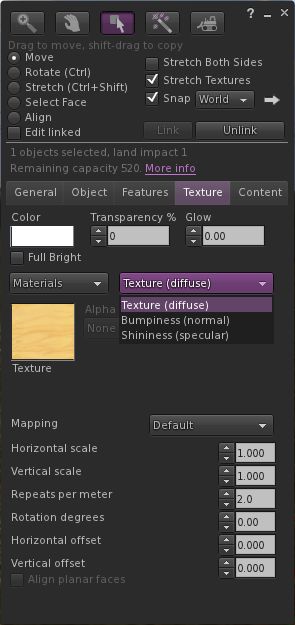
The updated Texture tab of the Build floater

If you’re not sure what materials processing means, please take a look at my primer provided for the SL viewer’s beta release.

As one would expect, materials support has been implemented as it is presented through the SL viewer: the Texture tab in the Build floater has been updated to provide support for normal and specular maps, which can be selected from a high-level drop-down (see right), and which include their own additional attributes (the “old” Bump and Shine options). Note that each materials map can be set with independent repeats and rotations.

Materials also includes some additional updates – the most noticeable of which is perhaps the ability to include an alpha mode when working with alpha masks. This can be set to one of:

  • None –  the alpha channel is ignored, rendering the face opaque, or
  • Alpha blending – essentially the same as we currently have for any alpha texture, or
  • A 1-bit alpha mask with each pixel either 100% transparent or 100% opaque, with a cutoff setting to determine where the threshold is (alpha masks should render faster than alpha blending, and eliminate issues with alpha layer sorting), or
  • Emissive mask – so the alpha layer is interpreted as a per-pixel glow setting.

Materials support also includes gamma correction capabilities within the rendering system. This may cause scenes to render more darkly than in non-materials capable versions of Kokua, and as reported with the SL viewer, may cause some alpha rendering issues.

Graphics Updates

Materials Processing has seen various other changes made to the viewer to improve rendering, some of which have resulted in improvements to the GPU support table, and adjustments made to the graphics defaults themselves. While these may have been included in versions of Kokua prior to 3.6.0, they’re covered here for completeness.

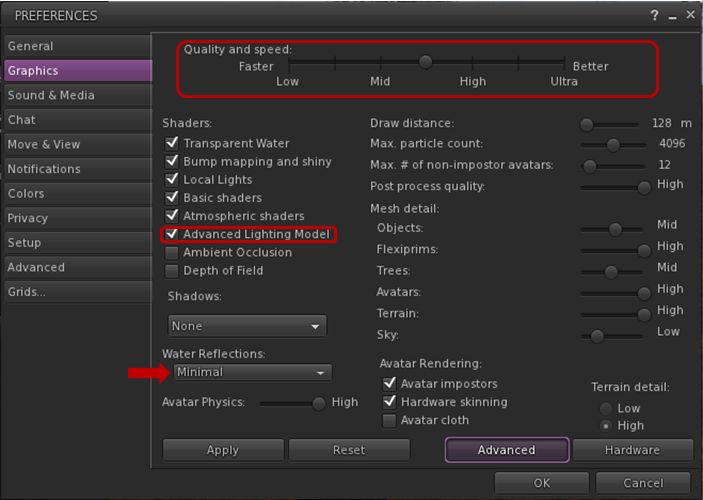
Graphics tab changes in Preferences and water reflections

First and foremost, the Quality and Speed slider now has seven pre-sets instead of four, adding mid-point settings between Low and medium, medium and high, and high and ultra. These are designed to better reflect the capabilities of supported graphics cards and to determine whether or not a card has the ability to support materials rendering by default (whether you actually want it to do so is up to you). As such, you may find that if you’ve not updated Kokua in a while, your default graphics setting is different from previous versions.

The other notable change (again, if you’ve not updated Kokua in a while and haven’t been following SL viewer changes over the last few months) is that the “lighting and shadows” check box has been renamed “Advanced Lighting Model” (ALM), and the option needs to be checked in order for you to see materials capabilities being rendered in your viewer.

Finally, and purely by way of a side note, if you enable ALM in SL and find you’re having  issues with alphas rendering correctly with this release of Kokua (they appear entirely black), try changing Water Reflections (arrowed above) to anything other than Minimal. This may help resolve the issue for you. Another possible workaround for the “black alpha” problem is to disable ALM, click on OK to accept and close Graphics, then re-open Graphics and re-enable ALM.

Command Menu, Build Floater Updates and Look AT Options

The 3.6.0 release also sees a new Command menu implemented, which brings together those commands moved from other menus, popular commands and a number of chat commands imported from Firestorm and turned into menu options (such as “tp2cam” to teleport to your current camera location).

Additionally, the Build floater’s Object tab gets a port of the build parameters copy paste function from the (now defunct) Zen viewer as its implementation was newer than other LGPL licensed viewers, and which is completed with fine tuning tweaks from Firestorm.

Continue reading “Kokua catch-up”

Kokua 3.4.4 goes CHUI

Update February 28th: Nicky has posted that the CHUI code has now been merged with the main Kokua code, and a new version of Kokua is available for testing with it.

kokua-logoNicky  Perian, working on the Kokua viewer for SL / OpenSim, issued an experimental version of the viewer on January 24th which includes the new SL Communications Hub User Interface (CHUI).

Release 3.4.4 (CHUI) has a dedicated repository, and is available for Windows and Linux.

As reported on its launch, CHUI complete overhauls the communications floater within the official viewer, and introduces a new Conversations Logs floater, allowing users to access saved chat and IM histories from within the viewer. In updating the Conversations floater, CHUI brings some functionality to it which users of several TPVs may find somewhat familiar, even if the presentation doesn’t match anything they’ve been used to in the past.

CHUI goes purple: the initial integration of the CHUI code into Kokua

A Kokua blog post accompanying the release of the experimental viewer provides additional information:

The Communication Hub UI  has Instant Messaging , Chat,  and Voice controls in one floater as was done in version 1 viewers.

Imprudence users have asked that Kokua implement the Imprudence UI for communications. I would like comments from Imprudence users about this interface .

This merge affected many parts of Kokua code. Please test and report problems using our bug tracker.

There is also a link to the Kokua wiki page on recommended practices for using Kokua experimental viewers.

The implementation appears to be a “straightforward”  merge of the code, with the familiar Kokua UI colour changes, but otherwise no additional updates. “Straightforward” is given in inverted commas because, as the Kokua blog post notes, the CHUI changes impact many areas of the viewer’s code, making integration somewhat difficult – particularly if the TPV merging the code already has modifications to how  communications within the viewer are presented to the user.

The experimental viewer also includes the default “account creation” prompt found in the beta and development versions of the SL viewer which appears to be in relation to the forthcoming SL / Steam link-up, and which is displayed on the viewer’s log-in splash screen if no account details are found on the local computer when the viewer loads. As with other viewers which have merged-up with SL viewer development code, this should be taken as a sign that the code has been included in Kokua by default rather than having any deeper meaning associated with it.

Other recent updates for Kokua (from the 3.4.4.25633 release of January 13th, 2013) include:

  • The use of Vivox as the default Voice system, as a result of the latter relaxing licencing requirements for grids
  • The addition of a draw distance slider to the top right of the menu bar
  • The ability to set a minimum draw distance of 3 metres (seen as a means of improving performance for those involved in close-quarter combat / duelling)
  • Minor UI changes (such as the “Me” menu being renamed “Avatar”).

Overall, this looks to be a clean implementation of CHUI, and one which gives OpenSim users a further opportunity to get a look ad feel for the revised  / new floaters for communications.

Related Links

Kokua and Firestorm: moves and views

It’s been relative quiet on the Viewer front of late. However, there is now news emerging about two TPVs: Kokua and Firestorm.

Kokua

Nicky Perian has updated the Kokua code on Bit Bucket to release 3.1.1.22989(Beta-1), dated June 11th. Available for Windows and Linux, it is unclear as to how “official” this release is  – there is no blog post associated with the release, nor does it appear on the Kokua wiki download page. Notice of its arrival has, however, been doing the rounds on Twitter.

I’ve not had a close look at it as yet, but it appears the release is more about bug-fixing and general enhancements of the current code (with fixes code that addresses both SL and OpenSim) more than prepping a major release and shouldn’t be treated as such – or even as a recognised experimental until the team release further information. As it stands, the release still references itself in places as the “Second Life Viewer” rather than Kokua, again indicative that this is very much still a work in progress. One thing it does do away with is the console window that would open on starting the Windows version of Kokua (and which you had to keep open while logged-in to SL in order to avoid the Viewer crashing).

I’m not recommending the release be put to general use – that is down to the Kokua team; rather I’m reporting that the version’s availability has been reported on via Twitter. Those wishing to know the exact status of the project should keep an eye on the Kokua blog, where hopefully there will be an update soon.

Firestorm

After an extended period of quiet from the Firestorm end of things, I recently noticed Jessica Lyon logging back in to SL once more after what appeared to be something of a period of absence. She’s provided a blog post at Firestorm entitled “Progress Report” , which indicates that the team had in fact  eased off from development; with some taking an outright break from things, as burn-out was becoming a factor.

The announcement highlights three things:

  • The team has new developers in the form of Holy Gavenkrantz, who has been a regular code contributor to both Firestorm and Phoenix, and Armin Weatherwax who, co-incidentally enough given the information on Kokua above, was formerly a lead developer on that project
  • And update on the status of the Firestorm 4.1.1 release, which is still officially labelled “coming soon” but which will include various requested tools and capabilities including Growl support, an LSL pre-processor, additional Windlight effects an “improved build floater”, and a host of goodies
  • The news that the team is branching development for Firestorm between Second Life and OpenSim.

This last point is interesting, as Firestorm has been gaining popularity among OpenSim users (Kitely even set it as their default Viewer).

The use of Viewers to access both SL and OpenSim has been the subject of much debate in the last couple of months since Linden Lab announced they were sub-licencing elements of the Havok physics engine. This requires that any applicable Viewer using the licenced code to only connect to LL’s own servers. In May, Jessica gave a hint that the Firestorm team were considering their options vis-a-vis SL and OpenSim, commenting on SLU that:

There is the possibility that we could have Havok code disable when the viewer is not logged into the SL grid. I have asked Oz if this would be acceptable and he is looking into it. If it turns out this is NOT acceptable, we will provide two versions of our Firestorm viewer. One for SL and one for everything else.

While she has not followed-up the comment with further information directly, it would appear from the blog post that – for whatever reason – the Firestorm team has opted to take the route of developing two flavours of the Viewer. It will be interesting to see how this actually plays out.

Call for Imprudence volunteers – meeting this weekend

When the decision to proceed with the development of Kokua was made, a problem remained for the Kokua / Imprudence team in how to support those users in the wider metaverse who still prefer to use – or even rely on – Imprudence. While the team hoped to be able to bring the 1.4 release of Imprudence to maturity, it was noted that this would only be done if it did not impact work on Kokua.

Following on from this, Onefang Rejected, aka David Seikel who is known to many as the developer of the Meta-Impy Viewer (itself based on Imprudence 1.4) stepped forward with a stated desire to continue Imprudence development.

As a result of Onefang’s willingness to volunteer himself, the Kokua team have opted to bring him into the fold as a team member, where he can hopefully build and lead an Imprudence-focused team that will work alongside of, but independently from, the core Kokua team.

To help establish this new Imprudence team, the Kokua / Imprudence project has put out a call for volunteers, requesting that anyone interested in getting involved in Imprudence as a  developer or tester or some form of support category put themselves forward. Those wishing to join the team are asked if they can attend the next All Hands meeting, which will be devoted to Imprudence and its future.

As ZATZAI (Sean Greyhound) put it in the Kokua blog, “This will not be a ‘reboot’ of the project but a continuation. So for all of you out there who lamented the ‘death’ of Imprudence, here is your chance. Join us this Sunday, be you a potential developer or tester and help us to bring Imprudence into the future alongside Kokua.”

The meeting will take place at the usual time and venue: 12:00 midday SLT (20:00 GMT), Sunday February 26th at the Hoagie sim of the 3rd Rock Grid. Requests for further information should be directed to the Kokua / Imprudence blog.

Kokua team issues “small update”

kokua-logoIt’s been a little over two weeks since the Imprudence/Kokua team announced they’d be moving towards focusing on Kokua for future development, but work is progressing. On the 16th, ZATZAI (sean Greyhound) from the team put out a “small update” on progress, which reads in part:

Work continues on the new Kokua viewer. We’re moving forward using the v3.2 Linden viewer as a base, we feel this version of the viewer is stable enough and has solved enough of the UI problems from v2 that our users will be happy with it. It’s also what many of you recommended in previous blog comments and at our meetings. We’re currently focusing on releasing a stable viewer on at least three platforms, Linux 32bit, Linux 64bit and Windows 32bit. You can follow our progress by trying our experimental viewers if you’d like, but buyer beware, these are alpha viewers and you should read the warning label carefully before use. You’ll find the link to our experimental viewers page on our wiki below…

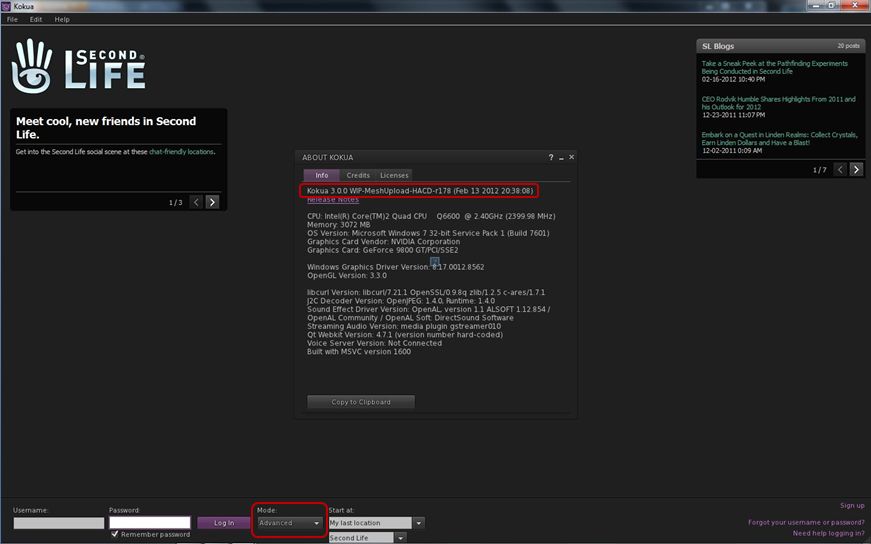
There follows a link to the Kokua wiki and links to the Windows and Linux release 3.0.0 downloads. However, before you get too excited, it should be pointed out that while the blog post refers to V3.2, the release available on the wiki, and the one immediately prior to it (0.1.1) are not based on the current V3.2 code, but rather on V3.0 code. Those installing and running either experimental will notice, for example, that the log-in splash screen still has the BASIC / ADVANCED mode toggle button.

Kokua *will* be moving to V3.2, but for now it is still based on V3.

I raised this point with ZATZAI, who was able to confirm after checking that, “The current Experimentals are indeed based on v3 … future ones (I don’t know how soon) will be based on 3.2+.” A clarification on the releases has since been posted on the blog entry itself.

So for those wishing to see a release of Kokua based on V3.2 code will have to wait just a little longer – and should keep an eye on both the blog and the wiki page!

How to Get Involved

For those who are further interested in the Viewer’s development, the team hold a weekly meeting every Wednesday at 20:00GMT on the Hoagie Sim in the 3rd Rock Grid. The meetings are for Dev and Project Contributor discussion and open to the public – although the meetings are not intended to deal with support issues. Transcripts of recent and past meetings cane be found on the wiki.

People can also join the Developer Mailing List (again: please note that this is not intended to deal with support issues).

Related Links