Firestorm is (SL) Go – and across multiple grids!

SL go logoImportant note: The SL Go service is to be shut down on April 30th, 2015. For more information, please read this report.

On Tuesday, December 16th, 2014, OnLive, the providers of the Second Life streaming service, SL Go, announced a new addition to the SL Go service: The Firestorm Viewer.

The announcement follows several months of collaboration between the Firestorm Team, lead by Jessica Lyon, and the folk at OnLive, lead by Dennis Harper, the results of which now mean that with immediate effect, SL Go now provides a choice of TWO viewers to subscribers and users:

  • The existing SL viewer – which OnLive are referring to as “SLV” – can be used from any Mac computer, PC, and from Android devices and iPads to access Second Life
  • AND The Firestorm viewer, initially available for Mac computers and PCs, which can be used to access Second Life and OpenSim grids.

SL Go’s pricing options remain the same whichever viewer you opt to use, and you can swap between them at any time you like, should you wish. Simply make your choice from the SL Go selection screen.

SL Go users access the service via PC or Mac now have a choice of viewer: the SL Viewer (SLV, as OnLive refer to it) or Firestorm
SL Go users accessing the service via PC or Mac now have a choice of viewer: the SL Viewer (SLV, as OnLive refer to it) or Firestorm (image via OnLive)

Since its launch in March 2014, which I covered in-depth at the time, the SL Go service has proven to be very popular with people who are using low-end systems which traditionally have problems when trying to run the viewer locally. Because the viewer is streamed from OnLive’s dedicated servers,  it’s the servers that do all the heavy processing, delivering a fast, smooth service to users, thus helping to give a new lease of life to older hardware.

Of course, because SL Go is streamed, it means that – like the SL viewer offered by OnLive – certain functionality within the Firestorm offering has either been removed for security reasons (such as the Develop menu, and no access to debug settings and content cannot be uploaded), or has been disabled (such as the option to save snapshots to a hard drive – as that would effectively mean saving them to the OnLive server).
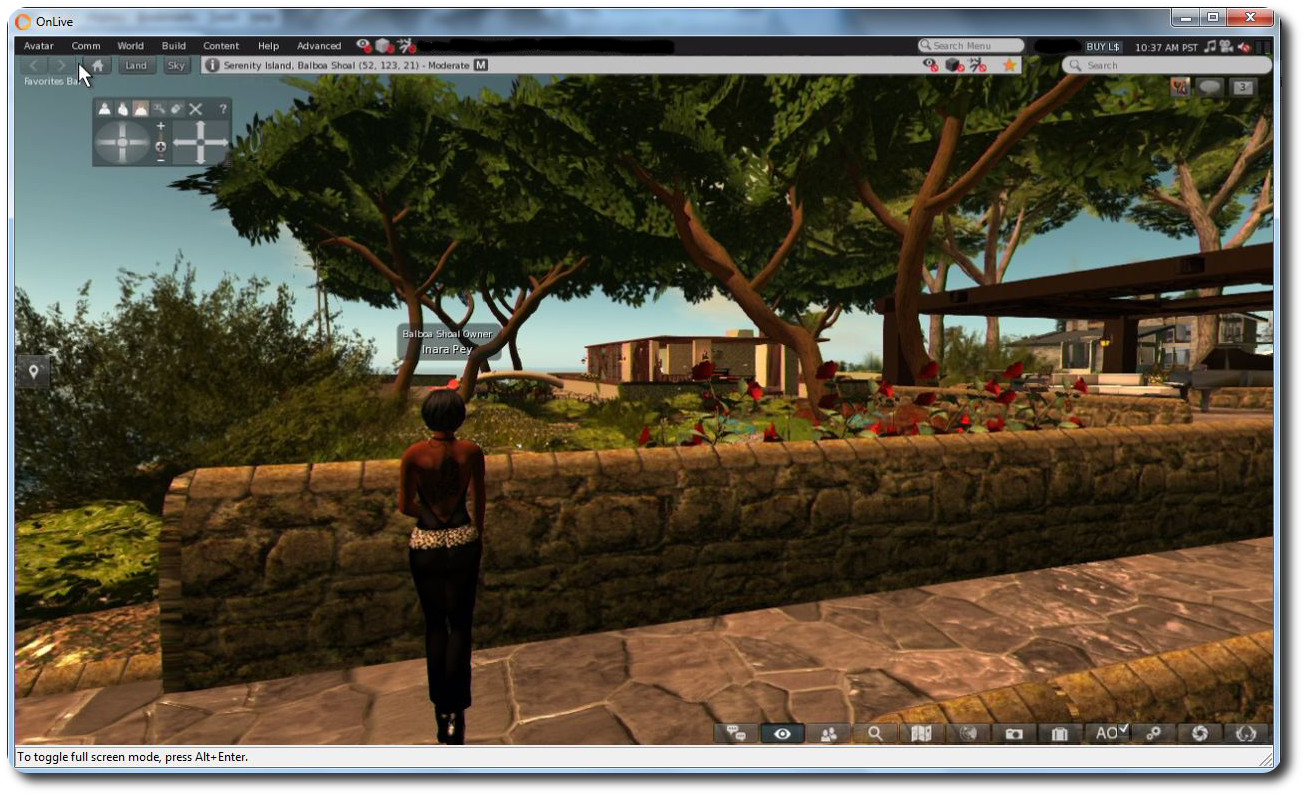
Firestorm viewer on SL Go from OnLive - click for full-size
Firestorm viewer on SL Go from OnLive (click for full-size)

The big benefit in using Firestorm through SL Go is that – with the noted exceptions due to security issues, etc., – it brings the richness of Second Life’s most popular third-party viewer to those on older systems who have perhaps felt themselves to be increasingly edged out of Second Life, something Firestorm Project Manager Jessica Lyon commented on when discussing the release with me.

“I’m really happy about this,” Jessica said. “For years folk on lower-end systems have seen significant improvements to Second Life, particularly with how the world looks, pass them by because their systems are unable to run them. We’ve even heard from many that they simply cannot use Firestorm or any other viewer and as being pushed out of SL completely.

“This release of Firestorm through OnLive, together with the existing SL viewer, hopefully gives those people a new way to enjoy Second Life. I really hope this works for them!”

I can personally attest to that. In 2010, I purchased an Asus PC EEE 1201N notebook, which has found running a viewer like Firestorm increasingly heavy going. With Firestorm through SL, with all the bells and whistles turned-up, I’m averaging around 60 fps!

Firestorm on SL Go from OnLive: almost 60 fps on a Asus PC EEE 1201N notebook with all the bells and whistles active! (this image replaces an earlier version, after I realised I'd uploaded the wrong screen cap - one with shadows disabled)
Firestorm on SL Go from OnLive: almost 60 fps on a Asus PC EEE 1201N notebook with all the bells and whistles active! (this image replaces an earlier version, after I realised I’d uploaded the wrong screen cap – one with shadows disabled)

That SL Go does bring a new lease of life to older hardware can be seen in the fact that since the launch of the service in March, 2014, the largest take-up among users has been by those using the service through the OnLive PC and Mac clients. But those who want Firestorm on their mobile devices need not fear – it will be coming in 2015.  This is something Jessica is also looking forward to.

“A could of years ago we fooled a great many people with our April Fool’s joke of a Firestorm Mobile client,” Jessica said. “The excitement over the announcement, and the outcry when it turned out to be just and April Fool’s joke, was overwhelming. The great news is – and no joke this time! – that OnLive will be making this capability real very soon!”

And it doesn’t end there. One capability that Firestorm brings to OnLive and SL Go  users is the ability to log into other grids as well as Second Life. The version of the viewer supplied to OnLive is the OpenSim version, which means it is complete with the grid manager and start-up grid selection drop-down, allowing you to log into all your favourite grids – as I did, logging-in to Kitely and Fallingwater at the Seanchai Library.
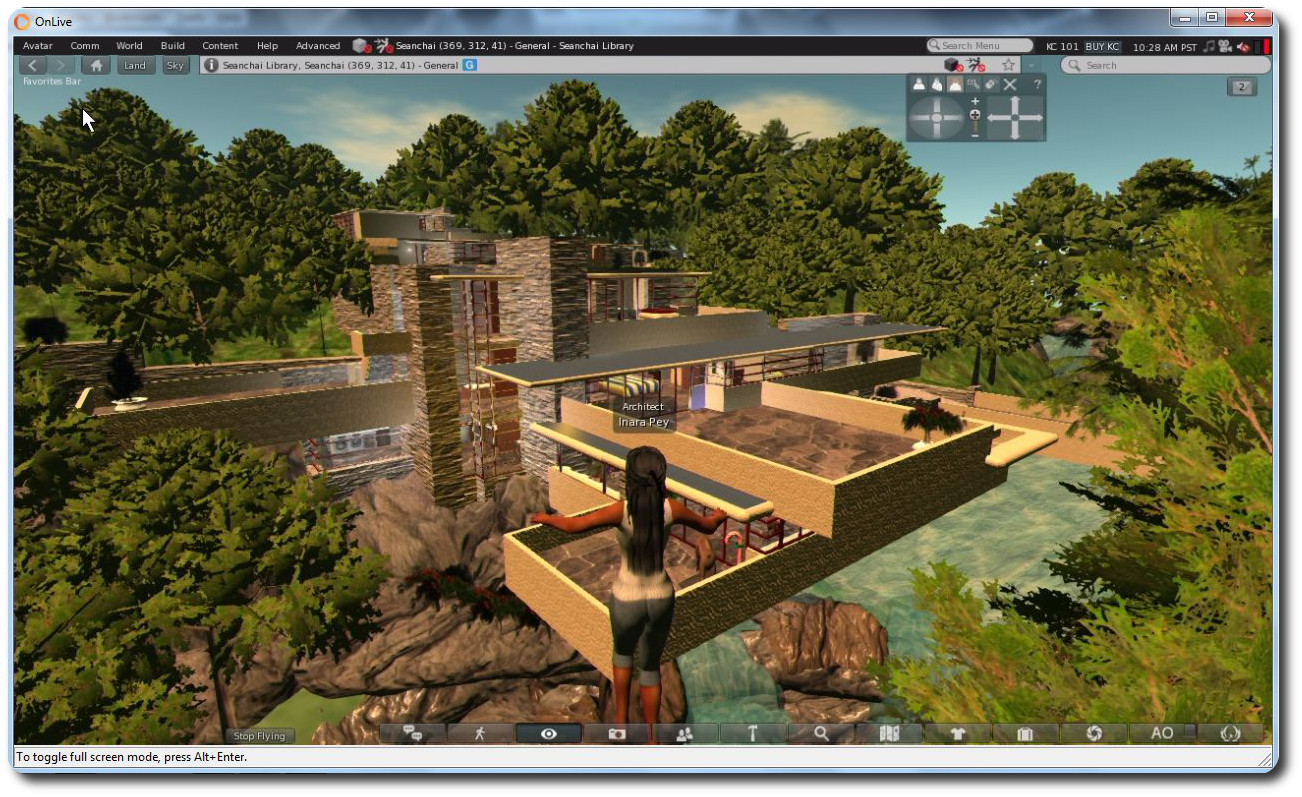
Use Firestorm on SL Go and any PC / Mac / laptop to access your favourite OpenSim grids (click to enlarge)

Thus, with a single subscription to OnLive, you gain access to the entire metaverse from any low-end PC or Mac in your home.

“We’re happy to be able to empower SL Go users with more choice. They’ve told us they want a choice of viewers, so offering the popular Firestorm viewer was a natural next step.” said Rick Sanchez, VP of Product and Marketing at OnLive, at the launch of the new offering.

I’ll have a more in-depth look at Firestorm on SL Go available shortly.

Firestorm 4.6.9.42974 hotfix released

firestorm-logoAs indicated in my update to the Firestorm 4.6.9.42969 release review in this blog, a couple of issues have been found within that release, which may affect some Firestorm users.

As a result, the Firestorm team have released a hotfix update to the viewer, which includes fixes for those issues and offers three more the team has also implemented.

The blog post on the fixes reads in full:

After releasing 4.6.9.42969 we discovered a few bugs that affect just enough users to warrant a hotfix update. However, if none of the issues addressed in this hotfix affect you personally there is no need for you to update to it.

The issues are listed below.

We have replaced the 42969 links with the new version 42974 on our download pages.

As per the blog post, unless one of the issues addressed by the fixes above affect you, there is no need to update your version of Firestorm. None of the fixes should directly impact on the elements of the viewer included in my 4.6.9.42969 review.

Firestorm 4.6.9: a Christmas feast of features and fixes!

firestorm-logoUpdate Thursday, December 11th: There will be a hotfix update for Firestorm, which will likely be made available on Friday, December 12th. This is to correct a couple of issues related to voice and RLV/a discovered with the 4.6.9.42969 release, and will likely add some additional fixes as well. I’ll have a further report available once the update is available.

On Wednesday, December 10th, the Firestorm team announced the release Firestorm 4.6.9.42969.

This is a hefty update which brings with it a lot of new functionality, together with bugs fixes and assorted improvements and updates.

As always, the complete list of changes, together with all attributions,  can be found in the release notes / change log, and I refer readers to that document for specifics on all contributors, FIRE JIRA links, etc. The following is intended as an overview of some of the more major / interesting changes, updates and  fixes to be found in the release.

The Before We Begin Notes

For best results when installing this release:

Firestorm Blocking

Note that as a result of the Firestorm team’s policy to keep only 3 versions running, version 4.6.1 will be blocked, most likely early in the new year. The advice from the team is that If you are on 4.6.1, to please update now. Version 4.4.2 will continue to remain for Mac users until all the major Cocoa Mac bugs have been resolved. However, if you are not a Mac user, then there really isn’t any reason for you not to have updated, and the team again ask that you update as well

Lab Updates

This release sees Firestorm remain on a parity with the Lab’s 3.7.8 code-base. However, a number of updates and fixes have been cherry-picked from upstream (such as the group ban functionality – see below), particularly bug fixes and stability improvements – please refer to the change log for details.

Building and Scripting Updates

The new buttons for cycling through objects in a linkset

Some additional updates and tweaks have been made to assist builders and scripters:

  • There are two new buttons located in close proximity to the Edit Linked check box.
    These buttons cycle forward or backward through a selected linkset, in the same way as the existing keyboard short cuts. note the buttons will only be active when Edit Linked is checked
  • The issue of the script editor failing to open scripts in copied objects (see VWR-27512), which has affected v2 and v3 viewers, is corrected with this release of Firestorm, and the fix has been contributed to Linden Lab for inclusion in the official viewer code
  • The build toolbar button should no longer be disabled when it shouldn’t be.

Communications Updates

Firestorm 4.6.9 brings with it a large number of features, updates and improvements to communications. These include, but are not limited to, the following.

Audio / Voice

  • Parcel media and audio now have a separate auto-play option (Preferences > Sound & Media > General > Allow audio to auto-play/Allow media to auto-play). Parcel audio should now auto-play correctly on logging-in
  • A reset voice button has been added to Preferences to help with fixing voice issues (Preferences > Sound & Media > Voice Settings)
The new voice reset button to help fix voice issues
  • You can now “zoom in” on a speaker using voice to hear them more clearly (Comm > Nearby Voice > Right click a name >Zoom in)
  • Voice level icons in the radar are now independent from other voice level icons
  • Sounds used for opening scrip dialogues can now be customised (Preferences > Sound & Media > UI Sounds 2 > Script Dialog)
  • The viewer now automatically adds http:/ to the music URL in the parcel audio panel.

Auto-response Updates

With Firestorm 4.6.9, auto-response messages are now localised. There is also a new option for an item of inventory to be automatically sent with your auto-response messages, when set. The selected item must be COPY / TRANSFER in order for this capability to work, and will be sent when one of the following is set:

  • Busy / do not disturb
  • Away
  • Autorespond
  • Autorespond to non-friends.

To set an item of inventory to be sent with auto-response messages, drag and drop a suitable item from your inventory and into Preferences > Privacy > Autoresponse > Autoresponse Item.

Firestorm 4.6.9 allows you to send an inventory item when auto-responding into incoming IMs. The item must be COPY / TRANSFER in order for this to work

In addition, this release fixes getting an IM from yourself to yourself saying “Autoresponse sent” if somebody answers from an off-line IM via email. Also, having both “Autorespond to non friends” and “Only friends and group can call me or IM me” set no longer results in you getting two new IM sound alerts for every non-friend IM plus the non-friend receives your auto-response twice for each IM sent.

Contacts List

The Contacts List floater has been revamped to match the look of the nearby chat and IM session floater, for a smoother and unique appearance. In addition, an option to pay someone directly from your Contacts List has been added to the right-click context menu (Comm > Contacts > Right click a name > Pay).

New to Firestorm 4.6.9 as well is the ability to choose which name columns should be displayed in the Contacts List. You can now choose between choose between user name, display name, full name, or a combination of these, and you can now display full names in your Contacts List as “Username (Display name)“. Finally, a option has also been added to hide the permissions columns (whether those in your Contacts List can see when you’re on-line, map you, etc.). 

All of these options can be found under Preferences > Firestorm > General.

The Contact List display options in Preferences

Continue reading “Firestorm 4.6.9: a Christmas feast of features and fixes!”

Firestorm warns: “be careful what you wish for”!

firestorm-logoPssst! The next release just might have group bans after all!

Jessica Lyon, project manager for the Firestorm team has officially announced the upcoming release of the next version of SL’s most popular viewer, although no actual release date is given.

A new release has been hinted at several times over the last few weeks, and the team is working hard to keep to a 3-monthly release cycle. At the moment, the upcoming release is focus of the Firestorm QA team and is being poked at by beta testers.

Releasing a viewer isn’t necessarily straightforward as might be thought; new features and shiny have to be measured against current code status, stability, and so on, and bugs and their fixes must be weighed against the opportunity to add new shiny or not. All of this made for a balancing act for all concerned; one in which  – especially given the size of Firestorm’s user base – not everyone is going to come away happy when a release arrives.

There have been a lot of updates flowing out of the Lab during the past year, many of which have yet to find their way into Firestorm. But as Jessica notes, stability tends to win-out over trying to crowbar everything into a viewer release:

Firestorm is not, and has never been, a “bleeding-edge” viewer. We have always focused on quality over quantity, stability over shiny. Slow and steady wins the day. Despite complaints and objections, this strategy has helped make Firestorm the most widely used viewer in Second Life by a long shot. In code, almost anything new has bugs and kinks that need to be worked out regardless of who wrote it and how vigilant they were at it. That’s because despite how much testing you do, it isn’t until it lands in the hands of the many that the deepest rooted software glitches start to crop up. Knowing this is one of the reasons we do not merge in and release new features from Linden Lab right away.

While the updates coming out of the Lab have all be to the good, they’ve also not been without their own problems. The AIS v3 code updates, for example, resulted in some od bugs and issues of a non-trivial kind, some of which have only recently been fixed in the new Attachments RC viewer (version 3.7.20.296355) that appeared on Wednesday, November 5th. And while the CDN and the HTTP pipelining viewer have brought improvements to the majority of SL users, they also have generated some issues.

The SL Share 2 features for sharing photos with Flickr and Twitter, and adding post-process filters to images, will probably not be in the next release of Firestorm
The SL Share 2 features for sharing photos with Flickr and Twitter, and adding post-process filters to images will probably not be in the next release of Firestorm

The upshot of this is that while the upcoming release of Firestorm will have new features, bug fixes and improvements, in order to keep code merges, etc., as straightforward as possible and avoid issues which may arise from cherry-picking features and updates from different LL releases, Jessica warns that when released, the new version of Firestorm will be without AIS v3, HTTP (although obviously, it will work with the CDN, just as all viewers do already), SL Share 2, and may not have group bans.

But it’s not all bad news, as Jessica notes:

But we absolutely will have plenty of other features, bug fixes and improvements worth updating for to which I’m very excited about!

Testing is still underway, so it will be another few weeks, most likely, before the new Firestorm release appears. When it does, if you’re a Firestorm user, please do keep in mind that if the feature you were really looking forward to isn’t in the release, it doesn’t men they’ve forgotten it or are ignoring it; they’re just trying  to bring you the best, more reliable experience they can whilst trying to avoid showering you with unwanted bugs and issues.

I’ll of course have the usual review of the release when it appears.

Firestorm turns four on the third

firestorm-logoOn Wednesday September 3rd, the Firestorm viewer turns four, and the team are inviting all who can to join them in a 4th anniversary party.

The blog post announcing the event reads in part:

September 3rd we turn four! Hard to believe but it has already been 4 years since we started developing viewers! First the popular Phoenix viewer and now of course the crazy popular Firestorm Viewer. Firestorm is by far  the most popular viewer used in Second Life and we have you to thank for that! After all… we couldn’t have done it without your support and encouragement! So as a show of our appreciation and with what is becoming a bit of a tradition for us… we have partnered with a couple of content creators to bring you some really cool free gifts AND organized a Rockin anniversary party with Rockin entertainment!

Things will kick-off at 13:00 SLT on Wednesday September 3rd, at the Phoenix-Firestorm support Island, where Mankind Trace (aka Seth Regan in the physical world) will be starting things with a live performance, and he’ll be followed by Firestorm’s Ed Merryman, who will be spinning the discs until the last avatar drops (which in 2013 added up to a 18+ hour party!).

Do keep in mind that the region’s capacity is liable to be limited, but people will be coming and going – so if you don’t get in the first time – try later!

To further mark the event, two special gifts will be on offer. The first of this is another Firestorm cat from KittyKats. This one is called FireBall, and like the 2013 kitty, is fully interactive – it can wander, follow and even be held –  and comes complete with a party hat, engraved collar and a cute matching bed!

The Firestorm 4th anniversary KittyKat and custom bike from
The Firestorm 4th anniversary KittyKat and custom bike from Desert Morning Motors

Also on offer for a limited time is a Firestorm themed Cafe style easy rider bike, donated by Desert Morning Motors. Inspired by the Classic American Motorcycles of the late 1930′s to the late 1960′s, and capture the spirit of the American chopper bikes. So get ready to be a Firestorm Easy Rider!

Locations for obtaining both of these limited-time gifts will be announced through the Firestorm blog on Wednesday September 3rd, and will doubtless be available at the party!

Which just leaves me to pass on congratulations and best wishes to Jessica, Ed, and the team on reaching their 4th anniversary!

Firestorm issue blocking warning for version 4.5.1

firestorm-logoFollowing the recent release of Firestorm 4.6.7 (see my overview for details), the Firestorm team has announced that Firestorm 4.5.1 will be blocked as from Friday September 12th, 2014.

The blocking of version 4.5.1  – which does not affect any of the more recent releases of Firestorm, is in keeping with the Firestorm team’s agreement with Linden Lab to only allow – as far as possible – only the most recent three releases of Firestorm to connect to Second Life.

Also unaffected by the block, and for the benefit of Mac users, is version 4.4.2 – in keeping with their promise to Mac users, Firestorm will not be blocking version 4.4.2 until such time as more of the Mac-specific bugs which have occurred in more recent SL viewer releases (and inherited by Firestorm and other TPVs) have been dealt with.

However, although the blocking is related to Second Life, please note that this announcement does mean that as from September 12th, Firestorm version 4.5.1 will no longer be able to connect to OpenSim grids as well.

If you want to know why Firestorm block versions, you can find an explanation on their blog. Similarly, if you wish yo know how Firestorm implement a block, you can do so via the Firestorm wiki.

In terms of the upcoming block, those users who are still running 4.5.1 are asked to update to a more recent very of Firestorm sooner rather than later. As the official blog post from the team notes:

If you wait until the last minute to update you will have a harder time reaching support since most people seem to wait until the last minute and then contact support for help.

Related Links