Firestorm 4.6.5: steady as she goes

firestorm-logoOn Sunday May 11th, the Firestorm team released Firestorm 4.6.5.40833. Given this release comes just two months after the 4.6.1 release, it does not have a huge raft of new shiny. What it does offer is a nice package of new features and updates, together with a fair few bug fixes from both the Lab and the Firestorm team.

As always, the complete list of changes, together with attributions, can be found in the release notes, and I refer readers to that document for specifics on all contributors, FIRE JIRA links, etc. The following is intended as an overview of some of the more major / interesting changes, updates and  fixes to be found in the release.

The Before We Begin Notes

  • Downloading – a reminder: while the Firestorm download server performed perfectly for the 4.6.1 release, please remember it is the only server handling downloads. So in the unlikely event you encounter delays or a slow download, please be patient / consider re-trying a little later
  • Version blocking: Jessica informs me that there are no plans to block any older Firestorm versions following this release
  • Installation: as always, a completely clean install of the viewer is recommended.

Lab Updates

This release sees Firestorm reach parity with LL’s 3.7.4 code-base, and add a number of fixes and updates from the Lab, including (but not limited to):

  • Vivox 4.6.x updates
  • Advanced Lighting Model can no longer be enabled for Mac OSX 10.6.8 as Mac OSX 10.6.8 is no longer supported by Linden lab (The ability to enable ALM on 10.6.8 was removed because it caused rendering glitches when enabled)
  • Fix for huge amounts of memory being used & viewer crashing when opening large chat histories from the conversation log
  • Fix for BUG-5537, introduced as a result of changes made to the avatar_lad.xml for Fitted Mesh. These changes caused a non-rigged mesh attachment object worn on the chest attachment point shape to look fine in the wearer’s view whereas anyone else it would appear as if the wearer’s chest was showing through the clothing item
  • Fix for crash when editing certain rigged meshes at high altitude
  • Fix for crash when uploading corrupt .DAE file (BUG-4961)
  • Fix for BUG-997,terrain texture changes caused by changing texture elevation ranges or terraforming can not be seen until after relog or teleporting out and back to the region
  • Fix for a suspected thread race crasher in the FmodEx library.

A Note on Interest List Updates

The recent LL viewer-side interest list updates are not a part of the Firestorm 4.6.5 release. As noted elsewhere in this blog, the interest list code is a non-trivial merge due to the extent of changes included alongside of the core interest list updates. It’ll therefore take a little longer for this work to appear in Firestorm.

Building and Scripting Updates

Firestorm 4.6.5 see the Build options in Preferences revised, with two Build sub-tabs (Build 1 and Build 2) under Preferences > Firestorm.

The revised Build-1 sub-tab in Preferences > Firestorm

Build 1 (above) contains the options for setting defaults for all newly created prims (size, settings, texture, permissions and pivot point) and the LSL pre-processor options.

The Build 2 sub-tab contains the six check-boxes (Save Scripts Edited from Inventory to Mono, Save Textures from Inventory to Disk as PNG Instead of TGA by Default, etc, which had been in the previous Build sub-tab). It also contains four new options.

The new Build 2 sub-tab in Preferences > Firestorm

The new options are:

  • Limit select distance (meters) – disallows selection of objects beyond the specified selection distance from your avatar
  • Limit drag distance (meters) – when enabled, this limits the translation distance of objects in a single operation of the translate tool (metres from start point)
  • Constrain rotations to multiples of X degrees, when not using ‘snap to grid’ – all rotations via the rotation tool are constrained to multiples of this unit (degrees)
  • Preview animations on own avatar during upload – when enabled, you can preview animations during the upload process on your own avatar instead of on the avatar dummy in the upload window.

Firestorm 4.6.5 also includes the following build related items:

  • An option to prevent avatar from turning to selected object when editing (Preferences > Move & View > Firestorm > Turn Avatar Towards a Selected Object)
  •  A fix so that when previewing an animation for uploading it (in paused mode), moving the track of the slider will now correctly change the displayed frame of the animation.

Communications Updates

There are a number of new options for communications with this release, together with a number of fixes. The new features include:

voice-warn
The new multiple voice instances option should enable you to run voice on multiple viewer instances on the same computer & without generating warnings like this
  • An option to allow voice to connect in multiple viewer instances simultaneously (Preferences > Sound and Media > Voice Settings), allowing you to run voice on multiple viewer instances, and without seeing the connection warning pop-up message (shown right)
  • An option to hear voice equally from everyone, rather than being dependent upon either avatar position or camera placement. This is a useful addition for meetings, etc., where attendees may be located at difference distances from your avatar / camera position, thus impacting voice quality when they are speaking.
The new voice options in Preferences > Sound and Media > Voice Settings
  • A new option has been added to enable the full profile of an avatar to be opened when clicking on an inspect SLurl (Preferences > Firestorm > General > Open Avatar Profile Directly When Clicking on its Name).

Continue reading “Firestorm 4.6.5: steady as she goes”

Firestorm 4.6.1: Firestorm full-on

firestorm-logoUpdate: Shortly after release, Jessica Lyon dropped me a note to say the Vivox files didn’t actually make it to the release, but will now be made available via a separate download.

On Wednesday March 12th, the Firestorm team released Firestorm 4.6.1.40478, bringing with it a lot of features, fixes, updates and enhancements.

The complete list of changes, together with attributions, can be found in the release notes, and I refer readers to that document for specifics on contributors, FIRE JIRA, etc. The following is intended as an overview of some of the more major / interesting changes to be found in the release.

The first thing to note with this release is that it is, with the exception of the Linux 64-bit version (which is beta), a full release, not a beta or alpha or anything else.

So, if you’ve been avoiding trying 4.5.1 because it was a beta release, now is the time to consider updating. Do make sure when doing so that you take a look at the Firestorm 4.5.1 release notes, which provide a lot of information on that release as well which will of benefit to you as you gain familiarity with 4.6.1. You can also read my review of the 4.5.1 release here.

Downloading – a Reminder

This will be the first release of Firestorm following changes at Google forcing Firestorm to discontinue using Google’s download service (see the Download Server section of my Feb 15th FS meeting transcript for an explanation). This means that all Firestorm downloads starting with this release are via the team’s own download server.

As this is the only server the team has at their disposal for downloading the viewer, you may experience some delay / issues when attempting to download the viewer due to the volume of downloads the server is handling, particularly during the period following the release announcement. Should this occur, the Firestorm team request a little patience, and if you can, to consider re-trying a little later.

Installation

As always, a completely clean install of the viewer is recommended.

Windows 64-bit Installer

Those who have previously installed the windows 64-bit version will be aware that the installer could be painfully slow. With this release, the Windows 64-bit installer has been overhauled, and should be appreciably faster, and also includes some additional tweaks:

  • Added estimated installation size (200 MB)
  • Add/Remove panel icon (shared with 32bit installer for simplicity)
  • Added website URLs (shown in the bottom section of the Add/Remove panel)

Viewer and Installer Blocks

The release of 4.6.1 means that all versions of Firestorm prior to 4.4.2 will be blocked from accessing Second Life in around a week’s time. Additionally, and in reference to the Windows version of Firestorm, note that:

  • The 32-bit installer blocks the installation on any Windows operating system below Vista, except for 32-bit Windows XP with Service Pack 3
  • the 64-bit installer blocks the installation on Windows 64 bit on versions older than Windows XP with Service Pack 2.

Updates from the Lab

This release brings Firestorm to parity with many of the Lab’s more recent updates, highlights of which include:

  • Code parity with Linden Lab’s 3.7.2 code base
  • Fitted mesh support – for those unfamiliar with Fitted Mesh, I have an overview here
  • HTTP updates for improved rendering
  • Request Teleport feature
  • Region Restart updates
  • Vivox 4.6.x updates
  • SL Share (link to Facebook)
  • Temporary attachments no longer get removed improperly
  • … and more

Request Teleport

The Request for Teleport option (show from the People floater) and request.

A feature contributed to the SL viewer by Jonathan Yap, Request Teleport allows users to pass a request to others asking that they be teleported to their location.

I covered the capability when it first appeared in an SL project viewer in September 2013, so in brief:

  • Select the person to whom you wish to teleport (from your Friends list or Nearby list, etc.), and select Request Teleport
  • Enter a message in the pop-up, if required, and click OK.
  • At the “other end”, the recipient of the request will receive the request and can either accept the request, sending a teleport offer, or reject it, in which case no message is sent
  • If the request is accepted, the sender see the usual teleport offer pop-up.

Note that Request Teleport is not a replacement for Firestorm’s “teleport to” capability, which remains unchanged.

SL Share and Facebook

The four tabs of the SLShare floater (as seen on the SL viewer), which allow those who want to to share their SL times via their Facebook account
The four tabs of the SLShare floater (as seen on the SL viewer), which allow those who want to share their SL times via their Facebook account

SL Share is a means by which those who have no issue with linking their SL account with their Facebook account can do so and send messages, photos, etc. to their Facebook account.

This was a feature released by Linden Lab again in September 2013, and I provided an overview at that time. however, it is probably worth repeating a couple of core points:

  • The feature is opt-in, and available to those who have no problem linking their SL identity with that of their Facebook identity
  • It has proven very popular among many users who have no problems doing so
  • It’s not about the “Facebookisation” of Second Life or trying to “make” SL users also use Facebook.

Region Restart Updates

The region restart updates comprise two main elements:

  • The new on-screen region restart warning, accompanied by a sound and camera shake
    The new on-screen region restart warning, accompanied by a sound and camera shake

    A new region restart warning notification, which is displayed in the centre of the viewer window every minute, on the minute, for the last five minutes prior to the region restarting, and which includes a countdown (in seconds) until the regions restarts

  • A camera-shaking warning which occurs every minute, on the minute for the last five minutes prior to the region restarting, causing the world view to shake., and which is accompanied by a region restart sound.

Note that both the new format notification and the camera shaking can be disabled / enabled as follows:

  • New region restart notification: Preferences > User Interface > Toasts > Use new region restart notification
  • Camera shaking: Preferences > User Interface > Toasts > Don’t shake my screen when region restart alert message is shown.

In addition, teleports to regions which are in the final 60 seconds before a restart will be prevented and the viewer will display a message in the format: “The region you’re trying to enter is about to shut down”.

Phototools

Phototools is updated to version 1.2, bringing with it a lot of enhancements, including:

  • An option to enable / disable screen space reflections (when shadows options are enabled)
  • The removal of legacy specular highlight and camera aspect ratio controls
  • Additional sliders/spinners and controls for RenderShadowBias, RedershadowBiasError,  CameraMaxCoF, FSRenderShadowSplitExponentY, FSRenderShadowGaussianX, FSRenderSSAOEffect and FSRenderShadowGaussianY
  • Increased editable value ranges for many spinners allowing greater control
  • Numerous other updates and amendments.

Details on the Phototools floater can be found here.

In addition, William Weaver, who first developed Phototools, has produced a series of video tutorials on using the floaters, the latest of which is provided below, which also looks at some of the most recent updates:

Contact Sets

Contact Sets, which allows Firestorm users to group their friends / contacts into groups or categories (friends, business contacts, members of s specific RP group, etc.), has been completely revised with this latest release of Firestorm.

Contact Sets now form an additional tab in the Conversations / Contacts floater, and as well as the familiar means of accessing it (via the Contact Sets toolbar button, or by Comm > Contact Sets or by pressing CTRL-ALT-SHIFT-C), it can now be displayed by any of the following methods, and then clicking on the Contact Sets tab:

  • Via Comm > Conversations / CTRL-T or via the Conversations toolbar button
  • Via Comm > Contacts / CTRL-ALT-SHIFT-F
  • Via Comm > Friends / CTRL-SHFT-F  or via the People / Friends toolbar button
Contact Sets is now integrated into the Conversations - Contacts floater (image courtesy of Firestorm)
Contact Sets is now integrated into the Conversations – Contacts floater (image courtesy of the Firestorm team)

The new layout is tidier and more integrated into the Firestorm UI, although a couple of options – such as the Rolodex functionality – are no longer present. New buttons provide a more intuitive approach to managing Contact Sets, and include the able to display friends and contacts using their Display Names or even set your own aliases for them (only visible in your Contacts Sets tab).

An overview and instructions on using the new Contact Sets can be found here.

Continue reading “Firestorm 4.6.1: Firestorm full-on”

Firestorm 4.5.1: living in a materials world

firestorm-logoThe long-awaited Firestorm update has arrived in the form of Firestorm 4.5.1.38838. And for windows, it comes in both 32-bit and 64-bit flavours. If you’ve read my recent interview with members of the Firestorm team, or the transcript of the Firestorm Q & A held on October 26th, you’ll know both versions essentially have the same functionality, although there are some slight differences, which I’ll come to anon.

As far as the 32-bit release is concerned, however, there are a few  of up-front notes to be read:

  • It is a beta release, not a “final” release. What does this mean? Essentially that it is coming out with both new functionality and with a fair few bugs, some of which may well continue to irritate while others people should be able to live with
  • The reason it is not a “final” release is that there is a lot more coming down the pipe from Linden Lab – additional SSA + inventory work, further viewer-side interest list updates, new HTTP updates, group ban functionality, and so on. However, none of this has been officially released by LL, and so while it has been hoped to bring to users in a 4.5.1 release, the Firestorm team have (wisely) opted to draw a line under what they have and clear the decks for the next round of code integration and updates (which will also hopefully resolve a number of the more irritating bugs to be found in the viewer – any viewer – where things like inventory, interest list work, etc., is concerned)
  • Although the release is “beta” it is fully supported by the Firestorm support volunteers.

These releases see Firestorm reach parity with the Linden Lab 3.6.7 code base, and all fixes up to that release. What follows here is not intended as an in-depth review of Firestorm 4.5.1.38838, but rather an overview of what is likely to be the more popular features and updates and a look at some aspects of the Windows 64-bit version. This being the case, please also check the release notes / change log for a full list of updates and all attributions thereof.

Download and Installation – 32 bit

It is strongly recommended that users perform a clean install of the new release. For Windows users, this means ensuring you remove the Firestorm folders found in C:\Users\[username]\AppData – under the Local and Roaming folders respectively, as well as uninstalling the program. Do make sure you use the settings back-up option (Preferences > Backup) to back-up your settings prior to uninstalling your current version of Firestorm and deleting these two additional folders.

The 32-bit installer weighs-in at just over 44MB in size, which is pretty much par for the course for Firestorm, and (for me) installation was smooth and didn’t trigger any AVG Pro alerts.

Once started, I noted this release appears to follow the menu bar colour scheme introduced by the Lab alongside of their updated viewer release process. Rather than being the default Firestorm colour, the menu bar is tinged a deep purple, indicating it is a beta release.

CHUI Updates

As Firestorm already had a communications interface which does much of what Linden Lab’s Communications Hub User Interface (CHUI) does, Firestorm does not implement CHUI in its entirety, although some features have been added. These include:

  • Block tab added to the people panel
  • Support for showing/hiding timestamp and names, replacing own name with (You)
  • Added expandable chat entry fields (Firestorm specific improvements made by Cinder Roxley)
  • A new menu item, Comm > Conversation Log (see below)
  • Access to Conversation Log and Chat History from the People floater
  • Sounds for teleport and inventory offers.

Conversation Log

The conversation log allows you to review saved logs of past conversations from within the viewer. As noted above, options can be accessed via the Comm menu or via the People floater.

The Firestorm 4.5.1 Conversation Log floater

Using Comm > Conversation Log opens a floater listing all available conversation logs. Right-clicking on any name in the list will display a series of options: IM, view profile, offer teleport (if the person is online), etc.

Open Chat Transcript will open up the conversation history with that person in a viewer floater, or if you prefer, Open Chat Transcript Externally will display the conversation history with that person in an external application such as Windows Notepad. These options are also available from the gear cog button at the top right of the floater, while the button next to it allows you to sort the order in which logs are displayed and access the Nearby Chat history.

When using the People floater, right-clicking on an individual’s name will display an option to view your chat history (if available) with them within the viewer. If there is not available history, the option will not be displayed.

Export / Back-up and Import

Firestorm becomes the latest in a number of TPVs to include the capability for users to back-up or export their own creations to their hard drive. Version 4.5.1 provides two file formats for this:

  • .OXP format for backing-up your own creations – which can include prims, textures, sounds, animations and note cards
  • .DAE format (Collada) for exporting objects as mesh.

Both options will export objects and their textures (the .DAE export code is from Singularity), and both are fully compliant with the Second  Life permissions system, meaning:

  • Objects must belong to you, and all parts made by you or export will fail.
  • All textures on the object must be in your inventory, and be made by you. This includes sculpt maps
  • If you are not the creator of any element in an object, it will be replaced by the default when saving to your hard disk (so any prims you did not create will be replaced by a default cube, for example)
  • Any items contained inside the object (e.g. scripts, notecards, etc) must also be made by you
  • Back-up cannot be used to save mesh objects or objects containing mesh parts.
Back-up (l) to .OXP format and export (to Collada .DAE) from Firestorm
Back-up (l) to .OXP format and export to Collada .DAE (r)  from Firestorm. Note that as I am attempting to back-up / export an object which uses textures I did not create, Exportable Textures is set to 0 – on saving the file, the three  textures in the object will be replaced with the default plywood texture

Objects which have been backed-up should be imported using the Import Linkset option via the Avatar / Build > Upload menu. Objects exported as Collada .DAE files can be uploaded using the mesh importer.

To initiate a back-up or export, right-click on the object in question in-world and select Save As > Backup or Save As > Collada as required (if you’re using the pie menu: right-click and More > More > Save As and select the required option). The required dialogue floater is displayed – please then follow the Instructions on the Firestorm wiki.

When importing a back-up, it’s worth noting the following:

  • Importing a backed-up object
    Importing a backed-up object

    If you back-up a textured object to your hard-drive, note that as long as you have the textures in your inventory, you do not have to re-upload them when importing the object once more. Therefore, you can leave Upload unchecked and avoid paying to re-upload the textures. Once the object has been uploaded, the texture will be applied from your inventory

  • If the object contains textures, sounds or animations which have been completely flushed from your inventory since the object was backed-up, you will either need to check the Upload box on the importer and pay to re-upload them as a part of the import, or import them separately
  • You can opt to restore the imported object to the same region co-ordinates as recorded when it was backed-up (use with care) and opt not to have the object re-attach itself to you if it was originally attached when backed-up.

Materials Processing

Full materials processing support (diffuse, normal and specular maps) are included with this release. See my article on materials processing if you’re not already familiar with it. Or if you prefer, simply watch the video.

Movelock

Movelock is designed to provide a means of “replacing” avatar phantom (which no longer works as a result of other changes within LL’s viewer code) as a means of deterring people from trying to push your avatar around (such as when you’re afk, or simply because they are being an 18-karat wombat).

It uses LSL through the Firestorm bridge in order to try to “lock” your avatar wherever it stands (although you can still move around yourself with Movelock is enabled – it comes into play when others try to bump you around).

Movelock can be activated via Avatar > Movement > Movelock or by CTRL-ALT-P, or through the Movelock toolbar button. Once enabled, your avatar can still be pushed by other avatars and objects, but will return to its prior position when the pushing ceases. North, who coded the feature, produced a video on her early work with Movelock, demonstrating it in action.

Again, this isn’t the same functionality as avatar phantom,  but will hopefully act as a deterrent to those who insist on shoving others around.

New Particle Capabilities Support

This release of Firestorm includes the “new” particle system capabilities, comprising:

Arton Rotaru has produced a video demonstrating the ribbon particle effect to create tyre tracks left by a vehicle.

Particle Griefing Alleviation

Note that these new particle capabilities include the ability to right-click on a particle stream / any rendered particles and mute their associated emitter, effectively blocking them. This can greatly simplify dealing with unwanted particle effects, such as during a particle griefing attack be eliminating the need to find the actual emitters and muting them. Also, as part of a general anti-griefing measure, particles will automaitcally cease rendering if FPS drops below 4 (both of these are Linden Lab improvements).

Continue reading “Firestorm 4.5.1: living in a materials world”

Firestorm 4.4.1: It’s time to update

firestorm-logoUpdate July 2nd: version 4.4.2 has been released by the Firestorm team, and Firestorm 4.4.1 has been blocked from accessing Second Life. If you have previously installed Firestorm 4.4.1, you can install 4.4.2 without needing a clean install. If you are updating from Firestorm 4.4.0 or earlier, a clean install is strongly recommended. The downloads can be found on the Firstorm website.

Firestorm 4.4.1(.34164) arrived as a release on Thursday June 27th. This is another major update to SL’s most widely used TPV, and one which all Firestorm users should update to sooner rather than later.

The reason for this latter comment is one which should be familiar to anyone who regularly reads this blog – Server-side Baking / Appearance (SSB/A) is a-coming.

Subject to final confirmation, the Lab plans to start deployment of the server-end of the capability on July 9th, and while it might take a while to encompass the entire grid, it will mean that anyone using a pre-4.4.0 version of Firestorm is going to start seeing increasing numbers of grey avatars around them as they travel the grid and (quite likely) finding themselves being told they are a cloud when seen by others.

Updating sooner rather than later will also greatly assist those volunteers who give up copious amounts of time to help with the in-world Firestorm Support groups. Right now, the Firestorm team estimate more than 77,000 users are still running versions of Firestorm older than 4.4.0, and thus have no SSB/A capabilities. It’s going to be impossible to supply all of these users with support and advice if they all leave updating their viewer until the 9th July or later – so please, if you are reading this review and you are using a version of Firestorm older than 4.4.0, consider updating now.

Doing so means that should you need to contact the Firestorm support team directly, because you are encountering problems and cannot find help through the Firestorm wiki or the troubleshooting index, you’ll be far more likely to receive a timely response to your request for assistance.

Even those who have updated to 4.4.0 should make the move to 4.4.1, as it includes the very latest updates and fixes for the SSB/A code from LL. Outside of SSB/A, release 4.4.1.34164 offers a number of important fixes for 4.4.0, and so it’s again important for 4.4.0 users to step up to 4.4.1 to gain these benefits.

As always, there is a lot to cover in a Firestorm release, so I’m not going to plough through everything here – the official change log provides a breakdown of all updates and fixes. Instead, this review focuses on what I regard as the key updates / changes. As always, credits for the various updates and contributions to Firestorm which are mentioned here can be found in the release change log – again, please check them there.

What is NOT in this Release

I’m actually going to start with what is not in the 4.4.1 release. It does not include the following major updates from the Lab:

  • The Communications Hub User Interface
  • Materials Processing

The reasons for this are simple. For one thing, the Firestorm team have been largely focused on fixing issues and problems with Firestorm and on getting the viewer ready for the SSB/A release. This  left them with little time to get changes resulting from the CHUI release by LL integrated into the viewer, although considerable work has been carried out in refactoring the code.

Similarly, there is no Materials Processing capability included with this release. This is in part because the Lab themselves have only recently moved the materials code to a release status (and it still has a number of very visible bugs associated with it), but mostly because changes made to the viewer as a result of the introduction of CHUI affect files which are also changed by the materials project. It is therefore important that the Firestorm team implement the changes in the same order – changes as a result of CHUI first, then the materials changes.

So those wanting to use materials in Firestorm are, unfortunately, going to have to wait a while longer.

New Features and Improvements from the Lab

Note these also include work by the Firestorm team arising from LL-development viewer updates.

  • “Missing prims fix” – MAINT-2647 / BUG-2116 / FIRE-8950 – this should hopefully resolve the majority of issues around prims / linksets failing to render in the viewer until an action such as right-clicking on them or toggling atmospheric shaders off / on is taken
  • Merge up to 3.4.5 codebase plus cherry picked fixes plus server-side appearance support improvements
  • Major under the hood refactoring in preparation for the CHUI merge
  • Added RegionHandshakeReply flags for Server-side Appearance – a fix for the SUN-74 issue.

Snapshots Fixes

Firestorm 4.1.1 includes an interim fix for the issue of black rectangles appearing in snapshots taken at very high resolutions. Note that this fix is not the recently released additional fixes arising from MAINT-628 made by Linden Lab. These fixes will be included in an upcoming release of Firestorm, and so the current fix should be considered interim.

Communications Updates

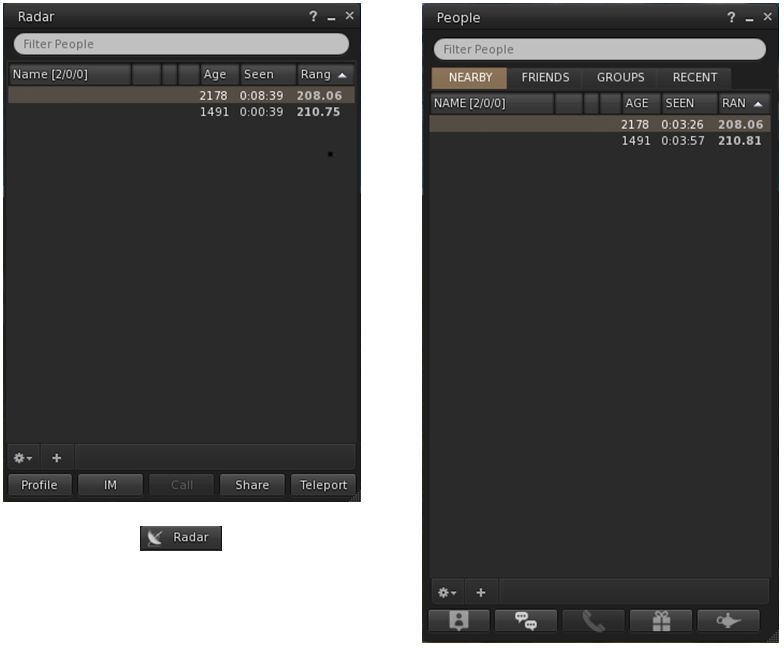
Radar can now be accessed via its own button / menu option / floater for those who prefer not to access it via the People floater. The new button can be selected from the Toolbar Buttons floater, which will open the new Radar floater. Additionally, Radar can be accessed via World > Radar from the menus.

The new Radar floater (left) and optional Toolbar button, compared to Radar as it appears in the Nearby tab of the People floater

The Radar retains all functions found when displaying it in the Nearby People floater, including the ability to display the mini-map within it.

The Payment icons on the Radar / Nearby People floaters have also been updated: $ indicates the user has Payment Information on File; $$ indicates Payment Information Used.

For those who use the Friends list (Comm > Friends or CTRL-SHIFT-F), highlighting a person’s name in the list and then tapping ENTER will start an IM conversation with that person (no need to click the IM button).

For those who use Growl, dialogue messages and inventory received from object messages are now displayed with Growl. In addition, all Growl preferences check boxes will only be enabled if Growl is installed on the user’s system.

Navigation Updates

Beacon distances are now shown for the
Map beacon ranges now show the distance from the avatar, not the camera

Firestorm 4.4.1 removes the 2-second delay when using the click-to-teleport functions or teleport chat shortcuts (gtp, etc.) or the Teleport To function in Radar.

A new option allows region grid coordinates to be displayed on the World Map (Preferences > Move & View > Firestorm > Show grid coordinates on the world map), which OpenSim users might perhaps find more beneficial than most SL users.

Also, map beacon ranges now show the distance from the avatar, not the camera.

Continue reading “Firestorm 4.4.1: It’s time to update”

Firestorm clouds

One thing I neglected to mention in my recent review of Firestorm 4.4.0 is the inclusion – by Cinder Roxley – of Vincent Nacon’s alternative cloud maps, which can be used to change / enhance the rendering windlight clouds.

The default cloud layer seen over Extropia, using the
The default cloud layer seen over Extropia, using the AnaLutetia-outdoor windlight setting and the sun adjust to around 10:00.

I’ve no excuse for this, given Cinder actually nudged me on the matter prior to the release; just blame it on me having a blonde moment…

So, what is it all about? Quite simply, Firestorm now includes additional cloud maps made by Vincent Nacon, and which Cinder has added to the Preferences > Firestorm > Windlight tab for easy selection.

The Windlight cloud options

This presents you with four basic cloud types – the default map, Altocumulus (a middle altitude cloud, usually characterised by globular masses or rolls in layers or patches), Cumulonimbus (the familiar towering cloud formations associated with thunderstorms) and a “Layered” map. Do note that selecting any option other than the one already in use appears to require a viewer re-start in order to take effect.

Exactly what effect these different maps will have on your in-world view is a matter of experimenting with the various available windlight settings within Firestorm (a task made easier thanks to William Weaver’s Phototools). However, they can be used to produce some stunning effects – the images here are simply to provide some form of comparison.

Extropia
Extropia seen under the same windlight setting as the first image in this article, but using the Layered cloud map.

What’s more, as Cinder indicated in her little nudge to me, you can create (or obtain) cloud maps of your own and add them to Firestorm to create your own unique cloud looks. “Drop any 8-bit grayscale tga with a power of 2 size you make or find under app_settings/windlight/clouds,” she comments, “And they’ll be automatically added to the list.”

For those wishing to try the cloud maps on other viewers, Vincent provides forum thread in which his discusses the maps and provides guidelines and caveats on their usage in viewers. Links to download the maps are also provided.

The Cumulunimbus map applied to the sky, using the same windlight setting and time of day - note the "stacking" effect visible in the formations on the right of the image
The Cumulonimbus map applied to the sky, using the same windlight setting and time of day – note the “stacking” effect visible in the formations on the right of the image, given the impression of some additional vertical height

The maps appear to be particularly well-suited to sunrise / sunset images, where the combination of sun and clouds can be particularly dramatic and result in some incredible images.

Why not have a play yourself?

With thanks to Cinder Roxley.

Related Links

Firestorm 4.4.0 bake, backup and roll!

Updatefirestorm-logo April 29th: Don’t forget my additional piece on the new cloud options in Firestorm 4.4.0.

Firestorm 4.4.0.33720 made its formal debut on Monday 22nd April, although it has been well and truly put through its paces by both the Firestorm beta testers and the preview group for some time now, in order to ensure it is as ready for mainstream release as possible.  It includes a huge number of updates and revisions, both from the Firestorm team and their contributors and from Linden Lab.

Given the size of the release, this is not intended to be a review of absolutely everything within Firestorm 4.4.0 – please refer to the release change log for that. Instead, this review focuses on what I regard as the key updates / changes. As always, credits for the various updates and contributions to Firestorm which re mentioned here can be found in the release change log – again, please check them there.

Server-side Baking /Appearance Support

Note that this item is Second Life-specific.

This isn’t actually a visible change to the viewer in term of UI, etc., – but it is an important one.

Server-side Baking / Appearance is a major change within Second Life which is primarily aimed at reducing or eliminating issues of “bake fail” (when the avatar skin & clothing layers fail to render correctly and with remain blurred or show the avatar wearing the “wrong” outfit). This capability is being introduced in two parts: viewer-side support and server-side support.

Viewers which do not have the viewer-side support will not work with the Server-side Baking  / Appearance service once it starts being deployed on the grid – people using them will increasingly see grey avatars around them. Therefore, it is essential that Firestorm users update to Firestorm 4.4.0.

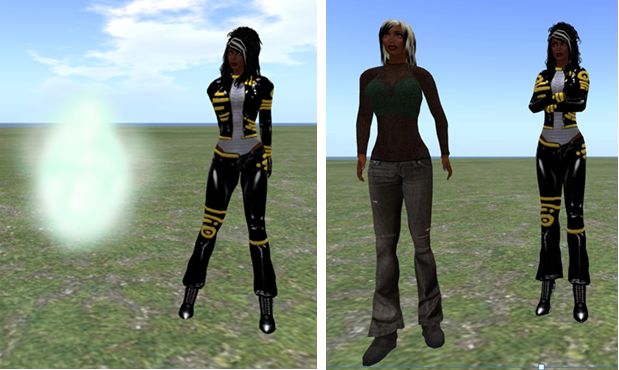
Server-side baking and how others see you: (l) if you continue to run Singularity without SSB support when the new service goes live, others will see you as a cloud, (and, other than attachments, you'll see them as grey); (r) when you're running Singularity with SSB support, you'll appear correctly to everyone else - and they will to you.
Server-side baking and how others see you: (l) if you continue to run a viewer without SSB support when the new service goes live, others will see you as a cloud, (and, other than attachments, you’ll see them as grey); (r) when you’re running a viewer with SSB support, you’ll appear correctly to everyone else – and they will to you.

For further information on Server-side Baking / Appearance, see the following blog posts:

Preferences Updates

This release sees a large number of Preferences updates, all of which are reported in the change log, and which include:

  • Chat:
    • General: new option to select display name format for IM tabs – a drop-down list of: Display Name, Username, Display Name (Username) and Username (Display name)
    • Notifications: a new option to Show group chat in chat console (useful if you opt to hide chiclets – see below); new drop-down option for IM receipt sounds: Play sound only if not in focus
  • Graphics:
    • General: the Quality and Speed slider incorporates additional settings (Low-Med, Med-High and High-Ultra); Lighting and Shadows is renamed Advance Lighting Model (as per the LL viewer); the Depth of Field check box is moved to the Depth of Field tab; the Windlight Sky Detail slider and the Avatar Physics slider swap positions
    • Rendering: Max number of concurrent HTTP GET requests slider removed; check box to Enable rendering of screen space reflections added
  • Sound and Media > General: uses radio buttons to show stream title notifications in chat, toasts or to be turned off
  • Move & View:
    • View: new check boxes to: disable the mouse wheel from controlling camera zoom; Show user interface in Mouselook; Enable context menus in Mouselook and Leave Mouselook after regaining focus
    • Firestorm: new check boxes to Reset camera position on avatar movement and Show the default camera controls mini-floater always as opaque
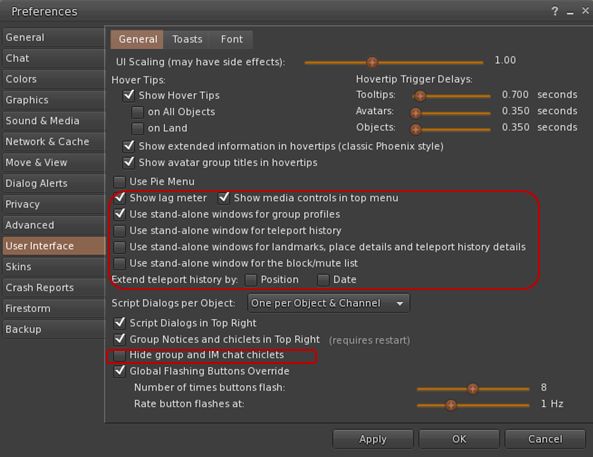
  • User Interface > General: new check boxes to open group profiles, teleport history, landmarks, place details, block / mute list in their own floaters; adds an option to show / hide the media control in the menu bar (useful when using a skin which includes the media controls elsewhere) and an option to hide IM and group chat chiclets completely (the notifications envelope and the number of IM’s will remain on the screen all the time whether or not chiclets are disabled)
  • New User Interface > General options
    New User Interface > General options
    • Skins: new colour option (Ectoplasma) for AnsaStorm
    • Firestorm:
      • Windlight: new capability to define cloud texture
      • Build: options to default prim settings, texture and permissions on creation – see the Firestorm Custom Prim Parameters video tutorial and the Firestorm wiki
    • Backup tab – see below.

    Custom Quick Preferences

    A popular feature with Firestorm is the Quick Preference floater which, as the name suggests, provides fast and easy access to some of the most frequently used options in the viewer without having to open the “full” Preferences floater.

    With release 4.4.0, the Quick Preferences floater has been made somewhat customisable – essentially allowing almost anything which is a debug setting to be added to the floater. However – be warned that this capability is considered to be for advanced users, and does require a willingness to delve deeper into the viewer than some users may be used to. Further, not every debug setting can be added to the floater.

    Cutomising Quick Preferences (click to enlarge)
    Cutomising Quick Preferences (click to enlarge)

    For those wishing to find out more, Firestorm have produced a tutorial video on using the Customise Quick Preferences option, and a Firestorm wiki page.

    Settings Back-up

    Often, when installing a new version of a viewer, the recommendation is that one performs a “clean install” – removing all cached and settings files. This can make any viewer installation labour-intensive, as settings all need to be restored after the installation is complete, and this can take time and effort.

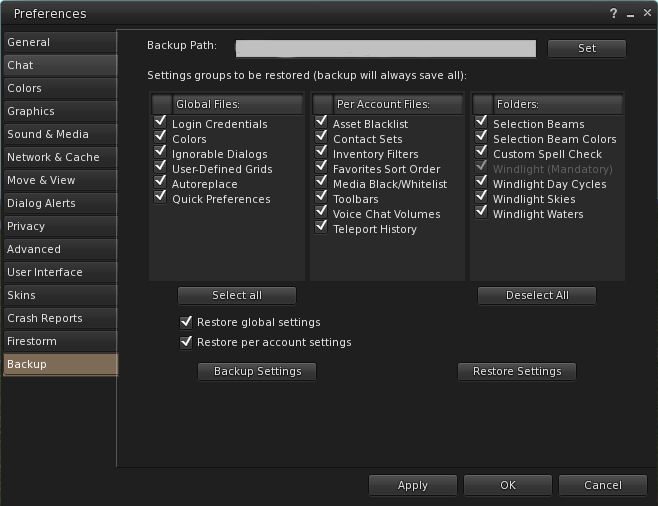
    Firestorm 4.4.0 attempts to ease some of the pain by presenting users with a Preferences option which allows them to back-up many of their global and account settings to a local hard drive. Once done, the back-up can then be restored to an updated version of Firestorm following installation; so providing the back-up is kept up-to-date, restoring the majority of preferred settings is no longer a chore.

    The Preferences Backup tab and options
    The Preferences Backup tab and options

    The back-up option can be found in Preferences > Backup. To use it, simply select a folder on a local hard-drive as the back-up location, then select those options which are to be saved; you can then delete all files associated with Firestorm prior to performing a clean install.

    Continue reading “Firestorm 4.4.0 bake, backup and roll!”