Firestorm 4.3.1.31155: the wait is over

Firestorm: forking development

On November 17th, the Firestorm team made a beta release of their latest update to Firestorm in order to offer users access to the new Group Services updates for managing large groups. At the time, it was indicated that the “full” release would occur in early December.

Keeping to their word, the team released 4.3.1.31155 on December 3rd, which includes everything featured in the beta release, and a few more goodies besides.

Given I’ve already given a comprehensive review of the beta release, this article will be focused primarily on the updates made between it and 4.3.1.31155 – although there will be some overlap.

As always, please refer to the Firestorm release notes for full details on credits, etc., for code contributions to the viewer, and for details of known issues and problems (known issues carried over from the LL code can be found here).

Download and Installation

As noted in the last review, the download .EXE is big – 40MB, which is unsurprising given that Firestorm packs so much into it. Installation – at a least for Windows users – is where the first set of changes occur, and it is worth recapping on these for people who have not installed the beta release:

  • A pop-up requesting whether or not the user wishes to have a Windows Start menu entry created for Firestorm during installation
  • Addition of the version string and estimated installed size to the installer
  • Addition of new OS detection code to warn if Windows Service Packs are not up-to-date and to prevent Firestorm being installed on Windows XP with
  • Publisher data, Phoenix URLs and Firestorm icon for the Firestorm entry in the Windows uninstall list
  • Automatic deletion of all previously installed skins to reduce issues arising from an unclean install
  • Addition of a DETAILS button in the installer pop-up window to allow the installation to be reviewed.

Havok Sub-licence

As noted last time, Firestorm has now signed a Havok sub-licence agreement with Linden Lab. This means that Firestorm is now available in two flavours – one for SL and one for OpenSim grids, with the SL version having both the –loginURI capabilities and the Grid Manager functionality removed.

This change means that Firestorm is now able to access the new LL-supplied Havok libraries, allowing the viewer to immediately include the pathfinding navmesh visualisation tools (as covered in my review of the beta release), and which could allow Firestorm to switch over to using the official LL mesh uploader code in the future, should they so wish, rather than using the current HACD code for mesh uploads.

For those using OpenSim, Firestorm 4.3.1.31155 can be downloaded here, and I’ve included an update on the OpenSim-specific updates to the viewer at the end of this article.

One point to note is that it is possible to use the OpenSim version of Firestorm on SL – the only difference is the OpenSim flavour of the viewer will not be able to access the SL Havok libaries or use any functionality associated with them.

Updates from Phoenix

Further updates from Phoenix have been added to Firestorm 4.3.1 in addition to those found in the 4.3.0 beta:

Texture Comment Metadata

When opening any texture, this will display the uploader name with a link to their profile together with the date / time the texture was uploaded. If permissions are sufficient, it will also display the asset ID on the texture preview floater.

Progressive Draw Distance (PDD)

A popular Phoenix feature, when enabled, this causes Firestorm to use a progressive Draw Distance stepping after a teleport, to help improve rezzing times. The Firestorm version includes an option to cancel stepping in progress if Draw Distance is manually changed (Preferences > Firestorm > General).

More Phoenix-like default settings for Phoenix Mode

The following Phoenix-like behaviours have been added to Firestorm when running in the Phoenix mode (selected via the Firestorm log-in splash screen):

  • “Resident” is not trimmed off legacy names
  • L$ balance changes will be shown in nearby chat instead of toasts
  • Received Items folder is shown as a normal Inventory folder
  • Firestorm will now send accept/decline responses for inventory offers after the according button has been pressed and not if the item has been received at the receiver’s inventory already
  • Group and IM notifications are now sent to the nearby chat console (v1-style) instead of toasts (v3-style)

Legacy Search

Firestorm 4.3.1.31155 re-introduces the V1-style “legacy” search capability for those who prefer it to the V2/V3 web-style search functionality.
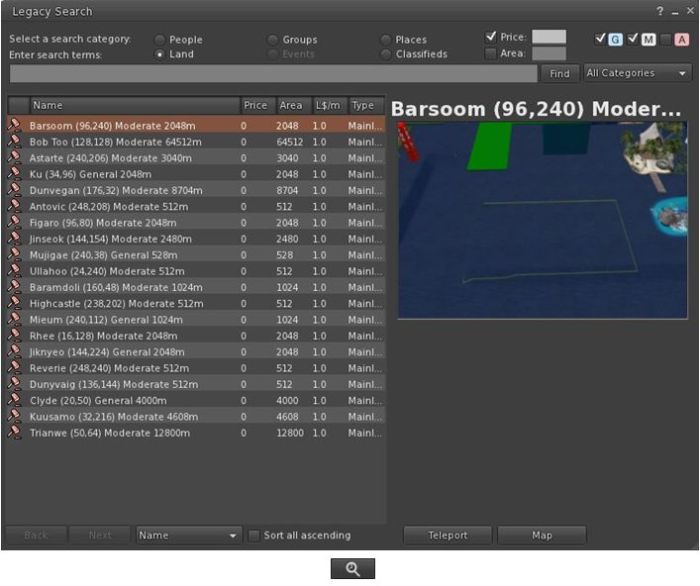
The Legacy Search floater and its associated toolbar button
The Legacy Search floater and its associated toolbar button shown in icon mode

Provided by Cinder Roxley, the legacy search option is currently available via a menu option (Content > Legacy Search) or via a dedicated toolbar button, and works for all search categories except Events, which will be added in a future update.

Documentation on the search function is available via the Firestorm website.

Phototools, Windlight and Snapshots Updates
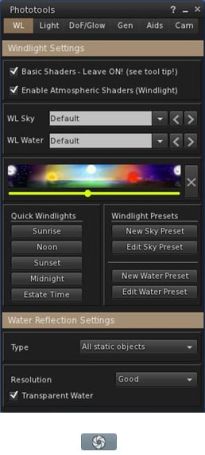
The main Phototools floater and dedicated toolbar button, shown in icon mode
The main Phototools floater & toolbar button, shown in icon mode

Phototools is a suite of floaters which bring together a range of controls, debug settings and options available within the viewer into a single, cohesive set of options aimed at the SL photographer and machinima artist. I’ve covered them in detail previously, and provided a further update in my last Firestorm review. With this release of Firestorm the Phototools floaters (Phototools and revised Camera floater) can be accessed via a menu option: World > Photo and Video.

Alongside of these comes a windlight update of some 100+ presets for water and sky developed by Phototools developer William “Paperwork Resident” Weaver.

These additional presets can be accessed either via the Fixed Sky / Water presets menu option (World > Environment Editor > Environment Settings) or via the Phototool floater (shown right). All of the Phototools presets have “Phototools” at the start of their name.

Also, the Flickr tab on the Firestorm snapshot floater includes Katharine Berry’s update which add the parcel name to the location option.

Continue reading “Firestorm 4.3.1.31155: the wait is over”

Firestorm 4.3.0: Cry “Havok!” and let slip the goodies of update

Firestorm 4.3.0 has arrived slightly earlier than expected, in the form of an initial beta release made as a result of the implementation of new Group Services code across the main grid.

While this is only a beta, and the associated Firestorm blog post gives fair notice that it may yet be somewhat wobbly while final work on getting it QA’d and ready for a formal release is ongoing, there is more than enough in the release to make it something people are liable to be hungry for. So here’s a preliminary review of the release as it stands today, with the caveat that things may change between now and the full release, which is currently scheduled for December.

Download and Installation

The download .EXE is big – 40MB, which is unsurprising given that Firestorm packs so much into it. I’ve been running pre-releases of this version for a while now, and the size has been consistent between them and while much bigger than other TPVs and the official viewer, it hasn’t grown overly much since the last release.

The installer is actually the place where the updates to the viewer begin for Windows users, as it now incorporates:

  • A pop-up requesting whether or not the user wishes to have a Windows Start menu entry created for Firestorm during installation
  • Addition of the version string and estimated installed size to the installer
  • Addition of new OS detection code to warn if Windows Service Packs are not up-to-date and to prevent Firestorm being installed on Windows XP with
  • Publisher data, Phoenix URLs and Firestorm icon for the Firestorm entry in the Windows uninstall list
  • Automatic deletion of all previously installed skins to reduce issues arising from an unclean install
  • Addition of a DETAILS button in the installer pop-up window to allow the installation to be reviewed.

Lab Updates

Version 4.3.0 of Firestorm sees the viewer merged-up the official Linden 3.4.1 code base and the inclusion of later updates which are just filtering through to the official viewer 3.4.2 code pipe. Together these mean that this release incorporates and number of LL updates, including:

  • Recent updates and improvements to the viewer-side pathfinding code
  • Memory leak and memory crash fixes
  • Translation updates (together with further updates from members of the Firestorm team)
  • Incorporation of the official LL spelling checker (contributed to LL by Kitty Barnett to LL) and the official Auto-replace function (contributed to LL by Kitty Barnett, Jonathan Yapp, Tankmaster Finesmith and LordGregGreg Back)
  • Rendering fixes and optimisations
  • Group Services (group management) update (from the LL 3.4.2 code branch) allowing groups with more than 10K members to be edited and updated
  • Objects by multiple creators show creator details when viewed in inventory (Properties), rather than “unknown”

This release also incorporates the new LL maturity rating function which:

  • Notifies a user when trying to enter a region without having set the required maturity level in the viewer and presents the option to change their maturity setting (subject to age verification)
  • If applicable, sends a message to the person offering a teleport that the recipient is unable to access the region due to their maturity level.

Havok Sub-licence

Firestorm 4.3.0 sees the implementation of the Havok sub-licence agreement between the Firestorm team and Linden Lab. This means that this is the first version of Firestorm to be released without any support for OpenSim access. Both –loginURI capabilities and the Grid Manager functionality have been removed.

However, as Jessica Lyon has previously noted, development of the viewer will be forking, and OpenSim support will continue in the future via a version of Firestorm which excludes the code required to access the LL Havok libraries. How tailored the OpenSim version will be for use on those grids is not clear, and those who use Firestorm to access both SL and OpenSim grids should read Jessica’s comments on support in the future.

The Havok sub-licence agreement does mean that this release of Firestorm can access the new LL-supplied Havok libraries which in the first instance, enable TPV viewers to visualise and model the pathfinding navmesh.

The pathfinding navmesh can now be visualised in Firestorm 4.3.0

Group Services

The Group Services update was the main reason for pushing out a beta release of Firestorm  4.3.0.

This code allows for improved loading of membership lists of very large groups, together with improved reliability in editing such groups (i.e. assigning roles, removing people, etc.), by the group moderators. The server-side element of this code has been available on the RC channels for the last couple of weeks, and was deployed to the main release channel on Tuesday November 13th, making it available right across the main grid.

However, in order to be used, it requires additional viewer-side code. Without this additional code, the viewer will be unable to display membership lists for groups with more than 10K members (although any groups with fewer than 10K of members can still be edited using any viewer). Thus, the decision was taken by the Firestorm team to release 4.3.0 in a beta version so that users responsible for managing groups with very large members lists can continue to edit them.

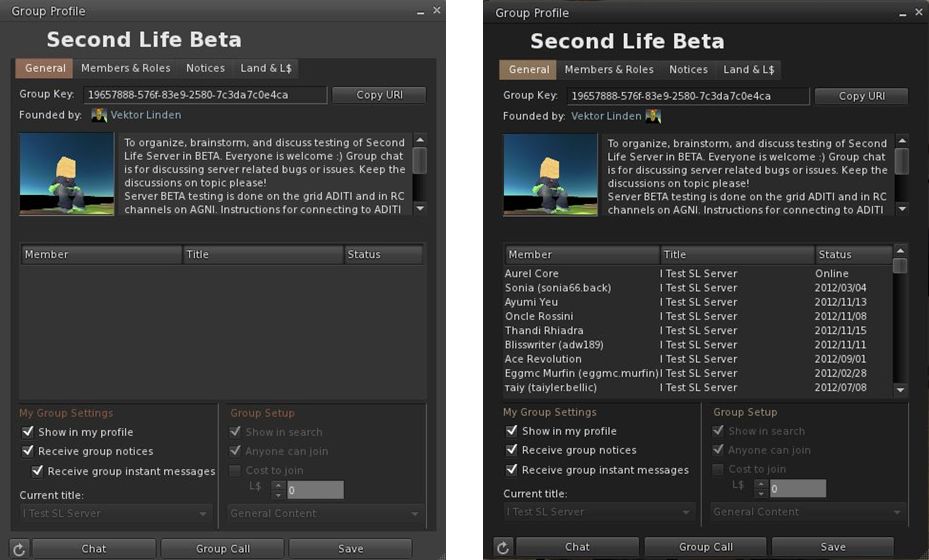
Group Services update – the difference: On the left, an attempt to load a group with almost 20K of members in the current release of Firestorm 4.2.2. On the right, the same group loaded using the new Firestorm 4.3.0 beta.

In making this release, Firestorm joins Cool VL and Niran’s Viewer in being able to handle large groups alongside the official SL beta viewer. However, the remaining TPVs are likely to have updates to support the capability out in the near future (and the code will soon be available in the SL release viewer as well).

Please use the page numbers below to continue reading this review
top of page

William Weaver’s Phototools: create glorious shots with Firestorm

Update: Phototools is fully integrated into Firestorm.

Not long after joining Second Life, William Weaver, known in-world as Paperwork Resident, became interested in both SL photography and machinima. While he quickly realised the viewer has a huge capability for making both, he found that even in a TPV like Firestorm, many of the controls remain spread across multiple floaters and tabs and buried within the debug settings, making it hard to use the viewer to its fullest potential for in-world picture production without a lot of frustrating shuffling of floaters and tabs.

His solution was to develop Phototools, a menu system for Firestorm that pulls together all the various settings and options within the viewer that a photographer or machinima maker is liable to need during a shoot. With Phototools, it is possible to quickly and relatively easily set-up the viewer to produce stunning visual images in a one-stop pass using a dedicated floater; allowing some stunning results to be had without the need for any post-processing through Photoshop or similar tools.

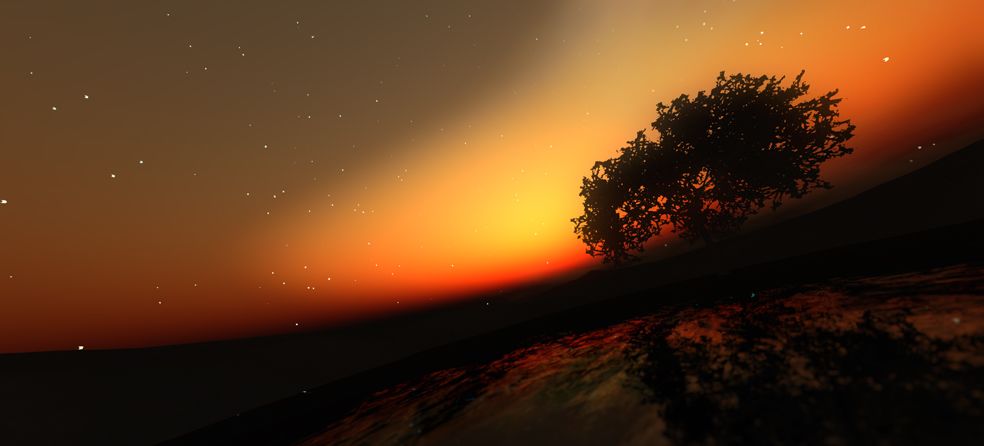
“Discover” by William Weaver – an image produced in Firestorm using the options made available through Phototools and with no external post-processing

Phototools has been around now for a while, available from Williams, blog, Paperwork Shows, and has been gaining popularity among Firestorm users. However, William has been working on preparing it for full integration into the viewer, and as a part of this work, he has made a number of changes to it which have just been released as version 0.94.

Essentially, Phototools replaces several of Firestorm’s default floaters with updated versions. In the original release, these included a replacement camera floater, which presented a wealth of additional camera and mouse / joystick options. However, as it was also relatively large and cumbersome, William has reverted to using the original camera floater in the new release, with the additional controls incorporated into the main Phototools floater. For those who have been using the earlier version of Phototools, the new release includes an .XML file for the original Firestorm default camera floater.

The Phototools Floater

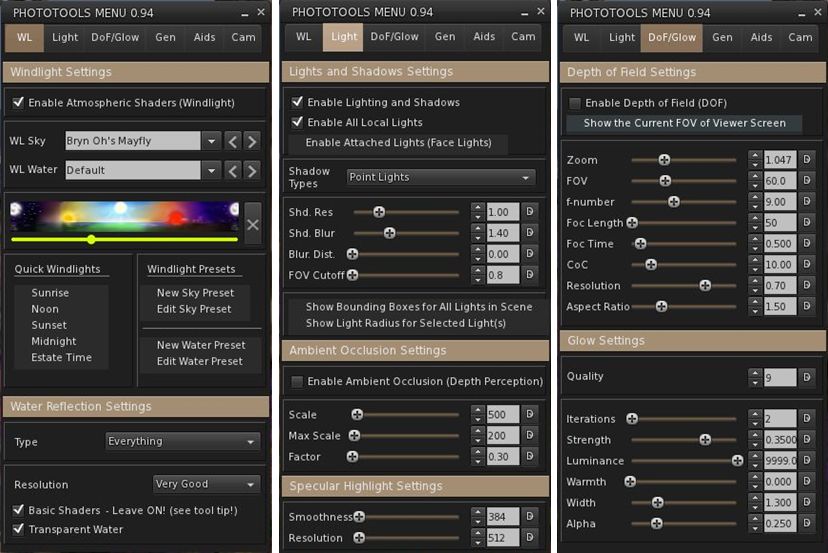
The main floater replaced by Phototools is the Firestorm Quick Preferences floater. For those who find this a very handy tool to have at your fingertips, it is not entirely lost: most of the options it contains are still available in its replacement, which I like to call the Phototools floater. This comprises six tabs: WL – for Windlight settings Light – for lighting and shadows; DoF/Glow – for depth of field and glow effects; Gen – for setting Draw Distance, terrain detail, avatar counts, etc; and Cam – for camera and mouse options.

Three of the Phototools floater tabs (click to enlarge)

Anyone familiar with Firestorm’s Preferences tabs will immediately recognise many of the options presented within the Phototools floater; others may not be so instantly recognisable, as they’ve been pulled from the debug settings. This is where the power of Phototools lay: not in providing new options or functions, but in making those already present in the viewer a lot easier to access and use from a single reference-point with the minimum of fuss and without taking up huge amounts of screen space (and having a heavy impact on frame rates).

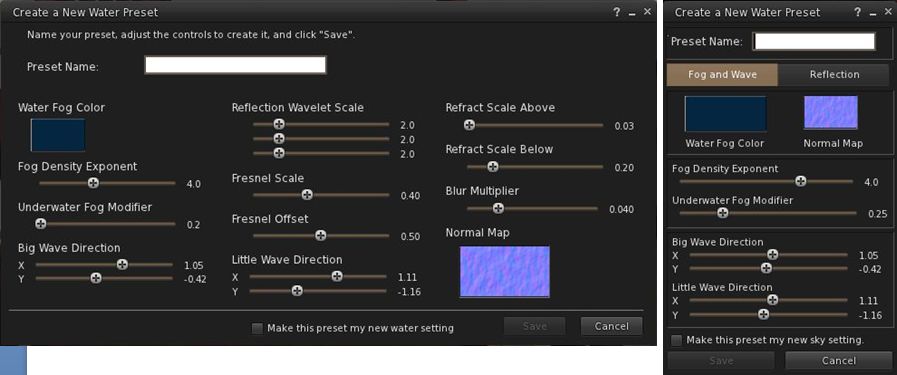
The first tab in the floater is for Windlight settings and this includes options to open the Windlight water and sky presets floaters (which can also still be accessed via World-> Environment Editor ->Sky Presets / Water Presets). Both of these floaters have been extensively re-worked to make them much more compact and screen-friendly when compared to the default versions found in most viewers.

Windlight Water Presets: the default floater (l) and the Phototools updated floater (r) both to scale (click to enlarge)

Taken together, the Phototools floater and revised sky and water presets floaters present all the options needed to manipulate the environment, as seen through your viewer, in three panels which are compact enough not to overwhelm the screen; a major benefit when trying to set-up lighting, etc., for a specific shoot or film sequence and you need to see the impact of changes on your world-view as you adjust lighting and other effects to achieve a specific result.

Another of William Weaver’s images created entirely using the viewer options presented through Phototools

How it all Came About

I recently caught up with William with a view to finding out more about Phototools and the future holds for them. I started by asking him how he got started on the road of developing them.

“When I first started in SL I was using it to write,” he explained. “I would role-play and write chapters in a story from the events of the role-play. While doing this, I started taking some pictures and I noticed SL has a great deal of potential for very good image making.”

He also noticed that a lot of people relied on external post-processing to achieve their finished results, “While I appreciate people who are good with Photoshop and after effects, I enjoy working with the limits of the viewer.” This started him thinking about how the capabilities within the viewer could be presented in a more user-friendly and accessible manner. At the same time, and while also involved in the role-play, William got to make his first SL machinima, which brought him up against additional problems.

Continue reading “William Weaver’s Phototools: create glorious shots with Firestorm”

Firestorm 4.2.2.29837: pathfinding, Flickr and more

Monday 27th saw Firestorm 4.2.1.29803 released. Unfortunately, this included a visual bug being inadvertently introduced into the release which made moving items such as doors and wheels appear to be “broken”. While this was only a visual impact rather than a code breakage, the decision was taken to withdraw 4.2.1 and replace it with 4.2.2 once the problem had been fixed.

As a result, and in case the release of version 4.2.2 included additional updates necessary as a result of fixing the issue, I opted to hold-off on my review of 4.2.1, and wait until I’d been able to look at 4.2.2 before Pressing a review.

So here it is, a look at Firestorm 4.2.2, featuring some of the key changes and updates which include an initial implementation of pathfinding. Alongside this, the release sees includes Katharine Berry’s snapshots-to-Flickr option, temporary uploads from the snapshot floater, new toolbar buttons and more.

A Note on OpenSim

This release does not include any fork between Second Life and OpenSim. That will be coming in a future release, which, as Jessica reports in her blog post on this release, might be a while in coming as the team have a lot of work on their collective plate.

Installation

The windows installer is some 33.7Mb in size – so par for the course with Firestorm. If you’ve previously installed version 4.2.1.29803 then a clean install is not required. However, if you’re upgrading from 4.1.1.28744 or earlier, a clean install is required / recommended.

Pathfinding Tools

As mentioned above, and with the exception of navmesh visualisation, all the main pathfinding tools are present in this release, complete with the expected Firestorm finesse when it comes to Rebake Region.

The Linksets and Characters floaters can be accessed using both the context and the pie menu when right-clicking on an object or character. The Build and Object Profile panels also have their pathfinding information panels added.

The Firestorm team have implemented the Rebake Region functionality somewhat differently to Linden Lab. Rather than incorporating a button displayed at the bottom of the viewer window when a rebake is required, the team have combined the rebake function with the pathfinding icon displayed in the Menu Bar / Navigation Bar (if displayed). Thus, when the icon is displayed (either with or without the initial warning pop-up, as shown in the image below), clicking on the icon will display a dialogue allowing a rebake to be initiated.

Region rebaking in Firestorm: The Menu Bar icon is used to trigger a rebake, rather than a button displayed within the viewer window. The default warning of the need for a rebake (top) may also be displayed, depending upon whether you have left the option enabled or not after its first appearance.

Combined with disabling the initial pop-up (by checking Do not show this again),  this option makes the need for rebakes less intrusive when using Firestorm.

New Buttons

There are three new toolbar buttons in the 4.2.0 release: Asset Blacklist and Sound Explorer, both of which toggle open / close the Asset Blacklist floater or the Sound Explorer floater respectively (each otherwise accessible via the World menu), and Ground Sit – which is pretty self-explanatory.

Snapshots: Flickr, Temp Upload and More

Flickr option on Snapshots floater

Flickr is a popular medium for SL photographers, so having an option to save pictures directly to it is likely to be a benefit to many. With this release, Firestorm obtains Katharine Berry’s code to enable snapshots to be uploaded directly from the viewer to a Flickr account.

In order to work, this functionality requires Firestorm is authorised to access a Flickr account. Therefore, the first time the Flickr tab on the snapshot floater is clicked, a pop-up is displayed, both explaining the need for authentication and what will happen. Clicking on NO on the pop-up will stop the process, and you can use another option on your snapshot floater for saving the image.

Clicking on YES will take you to the Flickr authorisation page, which will outline the possible risks of connecting Firestorm to Flickr (a standard alert page, common when using inter-application authorisation). Read the warning carefully, and if happy, confirm you wish to proceed (refusing cancels the link and denies Firestorm the ability to upload to Flickr).

Confirming that you’re happy to proceed will display a code number on the Flickr web-page. Type this into the authorisation pop-up displayed in Firestorm to complete the authorisation process. Once done, you’ll be able to upload pictures to your Flickr account without further hindrance.

This release of the snapshot floater also includes an option to temporarily upload a snapshot to your inventory. Temporary snapshots are saved to your Photo Album, where they will be available for personal use (e.g. non-transferrable, etc) until your next re-log. Finally for the snapshot floater, all settings changes are saved between sessions.

Use the page numbers below left to continue reading

Firestorm 4.1.1.28744

firestorm-logoWednesday July 11th saw the release of Firestorm 4.1.1.28744. Using the Linden Lab 3.3.3 viewer code base and bringing RLVa support up to 1.4.6, the release includes and extensive range of updates, improvements and changes. I don’t propose covering all of these in detail – that’s what release notes are for – but will attempt to give a broad flavour of what are likely to be the more popular changes and outline where you can find them.

Download and Installation

The download is 32.9Mb in size for Windows, and installation threw out no surprises. As per usual, I did a completely clean install – something that is actually strongly recommended for the release. If you’ve not performed a clean install of a viewer before, the Firestorm team have some notes to help you.

Menus

There are a number of updates to the menus, which can be seen in the table below:

Firestorm 4.1.1.28744 menu updates (click to enlarge)

The World menu gets two brand new options, the Sound Explorer and Asset Blacklist:

  • The Sound Explorer displays all current sound sources within audible range. The list will continue to update as new sounds are played. Sounds can be located, played locally for you to hear and can be blacklisted.  directly from the Sound Explorer. You can read more details in the Phoenix wiki
  • The Asset Blacklist works with an updated object de-render. With release 4.1.1, objects can now be “permanently” de-rendered (on previous releases, any object de-rendered would re-appear in your view following a teleport or re-log). With this release, all objects  so treated are listed in the Asset Blacklist, from where they can be re-rendered if required. You can read more details on this in the Phoenix wiki

Vaalith Jinn’s Local Bitmap Browser has been removed from the Build menu because this release of Firestorm sees the incorporation of Vaalith’s Local Textures functionality, as contributed to Linden Lab (which is also available for clothing and skins uploads). However, all those who use Temporary Textures need not panic – that option is still available as well.

Preferences Changes

There has been further rationalisation of the various Preferences tabs. I’ve summarised the updates in a PDF file for ease of reference, and will focus on the notable changes here.

The most significant additions to Preferences are the new Crash Reports and OpenSim tabs.

New Crash Reports tab

The Crash Reports tab offers an enhanced means of supplying crash reports to the Firestorm team and includes a link to the team’s Privacy Policy.

The Firestorm team recently repeated their commitment to support of the OpenSim environment, and this tab can been seen as evidence of that. However, given Linden Lab’s requirements around the Havok sub-licence arrangement, this tab is liable to be vanishing from future “SL flavours” of Firestorm once the new sub-licencing comes into effect.

OpenSim Grid Manager

One important element in Preferences that needs additional emphasis is the option to Enable Lossy Texture Compression, found under GRAPHICS->HARDWARE SETTINGS. This enables texture compression during rendering, which can give improved performance and a smaller graphics memory footprint – but at the cost of lower quality rendered textures which may end up pixellated. As such, it is not recommended that this be enabled unless you have little video memory on your system.

Buttons

There are two new buttons making their début with this release:

  • Fly – a dedicated button to enable you to easily fly
  • Region/Estate button – provides access to the Region / Estate floater (WORLD->REGION DETAILS or ALT-R).

Additionally, buttons now display their keyboard shortcuts in their tool tips.

Floaters

In addition to the options that can be set for various floaters in the updated Preferences (see the PDF file linked-to above), a number of the floaters themselves have new or revised options:

  • AO floater: A new safeguard added to the DELETE THIS ANIMATION SET button so that everything that’s not an animation link is moved to “lost and found” to prevent accidental deletion
  • Appearance floater–>Edit Outfit – now includes the Local Textures picker (from the gears button)  for testing self-made skins and clothes
  • Conversations floater
    • Contacts tab uses new coloured icons for options (Friends can see when you’re online, etc).
  • Build floater:
    • Now includes the Local Textures picker
    • Allows colours to be defined as hex values as well as RGB and will generate LSL vectors
Colours can now be defined using hex values, and have LSL vectors generated

Continue reading “Firestorm 4.1.1.28744”

Firestorm goes FUI

Firestorm 4.0.1.27000 has rolled-out alongside Phoenix 1.6.1.1691, and brings with it a whole host of changes – including the implementation of the team’s take on the Flexible User Interface (FUI).

As is common for Firestorm, it is recommended that you perform a completely clean install with this release.

The changes to the Viewer are apparent from right off the bat: on logging-in for the very first time, a pop-up is displayed asking you if you wish to have which Viewer you are using displayed in the Phoenix / Firestorm support group chat windows – a requirement resulting from the recent TPV Policy changes. Clicking Yes will append “(FS)” after your name when using Phoenix / Firestorm support group chat sessions, clicking No will not display your Viewer choice in the group chat. This is a one-time only pop-up, and only occurs the very first time you use Firestorm (just check the box above the options). Should you wish to change your mind later, you can enable / disable the option directly through a Phoenix / Firestorm support group chat window.

The FUI

The biggest single change to this release of Firestorm is the adoption of LL’s 3.2 FUI – although with the exception of a single button on the left side of the screen, you’d actually be hard-pressed to know Firestorm is now using the FUI. Quiet and full of cunning is the Firestorm team…!

The new UI: only a single button reveals the truth…

If you do need further proof that this is FUI, simply right-click on the buttons at the bottom of the screen and select TOOLBAR BUTTONS; the familiar button picker toolbox will be displayed – and is filled with a tidy range of additional buttons beyond those offered by LL.

Buttons: we haz them

As is common with V3.2-based Viewers, buttons can be placed to the left and/or right of the screen and/or along the bottom of the screen, and can be displayed as text or icons or both. However, in a welcome departure from the norm, buttons on the bottom of the screen can be left / right aligned and those on the left or right aligned to the top or bottom, rather than simply sitting in the middle. Hoorah!

Button alignment and size options

Additionally, and allowing for your screen resolution / size, you can set the buttons along the bottom so that they:

  • Fill the available space (as shown above, where they fill the entire space between the chat bar and the right side of the screen), and will dynamically resize according to how the chat bar is sized
  • Will auto-size themselves to the smallest possible size (depending on whether you opt to use icons, labels or icons and labels & the number of buttons on the bar, this may cause the buttons to wrap over two or more lines
  • Will fix the buttons to a given size (again, depending on the amount of space available, this may wrap the buttons over two or more lines)
Auto-sized buttons

In another move away from a weakness in the FUI, the chat bar in Firestorm is, by default, anchored to the lower left corner of the screen – again: hoorah!

Gimme Some Skin(s)!

Firestorm has, for a goodly while, had an appearance option in the log-in splash screen offering a set of default UI skin effects. These were called Phoenix, V3 and Hybrid. The Firestorm team caught a lot of flak over the use of “Phoenix”, because the UI didn’t look like Phoenix when used.

With 4.0.1.27000, the appearance option button is still there – but it now has four buttons, and does a whole lot more. For a start there are now four options:

  • Firestorm: which displays the default skinning and look seen so far in the screen shots in this article
  • V3: displays a more V3.2-like feel to the viewer (the chat window includes chat headers, etc.) and uses Hitomi Tipomi’s Starlight skins
    • Hitomi’s Starlight CUI option is also available from PREFERENCES->SKINS, which allows you to set custom button colours, etc.
  • Hybrid: uses the MetaHarper skin and utilises a degree of transparency around various elements of the UI (such as the buttons)

However, it is the final option – currently still called “Phoenix”, but potentially to be re-named “V1” – that should silence critics over the use of the “Phoenix” label. Here’s why:

Firestorm goes V1

Obviously, the UI isn’t totally V1 – “Radar” is called “People”, the menus are still the V3.x menus, pop-ups may not appear as expected – but various additional options (such as IM notifications appearing in the chat console, bottom left) can be set through Preferences. Given the layout has been built from scratch by Zi Ree, herself a V1-style Viewer user, this should satisfy the requirements of most who prefer that look and feel, offering a more than acceptable compromise.

Snapshot Floater Update

Snapshot floater updated

Firestorm 4.0.1.27000 sees the snapshot floater overhauled, with the “slider” effect used on the Build floater being used to open / close the additional snapshot options. PLUS – in a move that will have many cheering – you can now send snapshots to your web profile feed!

Direct Delivery and Other Bits

With Direct Delivery due for roll-out on Wednesday 21st March, this release incorporates the required support for Received Items.

This release also gets the Destination Guide floater (re-worked by Leyla Farazha) and the Avatar Picker floater common to Viewer 3.2 (and their associated buttons).

There are a host of other fixes, tweaks and revisions all of which can be found in the release change log (complete with originator attributions), and which include:

  • Growl support for Windows (still a work-in-progress)
  • Optional viewer tag colors based on distance (chat, shout, beyond shout range)
  • Option to include distance to other avatars in their name tag
  • Toolbar buttons for area search, statistics, web browser, debug settings
  • “Eject from Group” on the group participant context menu
  • RLVa updates
  • Ability to hide empty system folders in a dynamic way
  • The AO button is now a single button for configuration with an inset button for turning AO functions on / off.

Feedback

Possibly one of the most anticipated Firestorm updates since the Viewer was first launched, this release packs a lot into it, and it is clear the entire team has worked hard to incorporate a lot of features and people’s feedback, and rise to the challenge of producing a Viewer that can meet the needs of a very diverse audience.

And I think they’ve succeeded.

There is much here to please those who still feel frustrated with the V3.2 in terms of buttons and alignment, those who like the existing Firestorm layout and those who prefer a V1-style approach to their Viewer. Equally, there are probably a couple of things that are going to be missed for those who liked them, such as the Sidebar-like sliding of floater from the right side of the screen (although obviously, panels can be moved there and will persist on opening between log-ins). But we should all try and move with the times…

Performance-wise, this release is on a part with other Viewer releases of late, with fps rates around the mid-30s on reasonably busy sims, dropping to mid-teens with shadows enabled. I’ve not run the Viewer fast or hard enough as yet to really consider stability, but in logging between appearance settings I didn’t have any of the “locking up” on log-out I’ve experienced of late with 3.3.0.24880 (in particular) and .24882.

While it may be my eyesight and the lateness of the hour, shadows appear to render somewhat more sharply with this release, and I’m finding myself wishing Firestorm has a gamma correction capability for photography – but we can’t have everything!

I’m particularly enamoured of the button alignment / autosize functions. These have allowed me to retain the look-feel from 3.3.0.24882 and be able to position my custom “multi-HUD” where it is both within reach and nicely tucked out of the way. Coupled with the anchoring of the chat bar, this alone makes this release of Firestorm a winner in my book.

Firestorm Videos

Two videos introducing the Firestorm FUI Beta

Related Links