Firestorm 4.7.5: something for everyone

firestorm-logoTuesday, November 17th saw the release of Firestorm 4.7.5.47975.  While not as major in terms of LL features and updates as the August 4.7.3 release, the new version of Firestorm nevertheless brings with it plenty of general fixes and improvements, both via the Lab and the Firestorm team and contributors.

As per my usual MO, what follows is an overview of the release, highlighting some of the more significant / interesting changes, updates and  fixes to be found in the release.  For full details of all changes, and all due credits to contributors, etc., please refer to the official release notes.

The Usual Before We Begin Notes

For best results when installing this release:

Details of any versions of Firestorm to be blocked as a result of this release will be announced in due course.

Lab Derived Updates

Firestorm 4.7.5 brings the viewer to parity with the Lab’s 3.8.6 code base, and so includes the new Notifications updates and changes to the mesh uploader. These and other key updates from the Lab are listed below.

Notifications Update

The notifications update presents a new floater for managing all your incoming notifications and notices, the result of a feature request to the Lab from Aki Shichiroji. Within this floater, incoming notifications are split between four tabs: System, Transactions, Invitations and Group, with each tab displaying the total number of notices stored within it.

Notices are initially displayed in summary format presenting the title, date of receipt and other immediately relevant data, and can be opened in one of two ways:

  • Clicking on a notice directly will open in a new floater (shown below left) – this is a Firestorm-specific feature for the floater
  • Clicking on the small downwards arrow to the right of the notice will expand it within the existing floater (show below right).
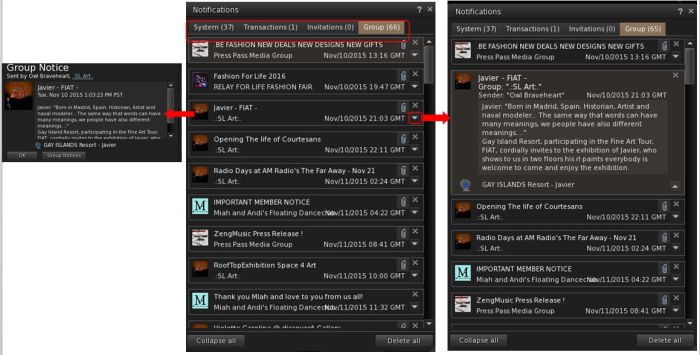
The new Notifications floater from the Lab is included in Firestorm 4.7.5.

The floater also includes two buttons: Collapse All and Delete All. Both do as they suggest: collapse all notices open within a tab in the floater and delete all notices with a tab. Two further Firestorm-specific aspects of the notifications floater are:

  • An improved display of condensed group notices and show group name instead of sender name
  • The floater remembers the last selected tab after a relog.

Mesh Uploader Updates

Firestorm 4.7.5 includes the updated mesh uploader from Linden Lab, as seen in the SL viewer 3.8.4.305119 release.

This feature modifies the mesh importer to (optionally) improve debug output, perform name-based LOD association, and handle models with many materials, and allows models with more than 8 unique faces to be imported. When using it, note that:

  • The same limitations on LODs and materials remain in place (e.g. your low LOD mesh materials must be a subset of the full LOD materials).
  • LODs and Physics reps can now be explicitly associated with a given mesh in the full LOD model using name-based matching.
  • By properly naming the meshes in your lower LOD meshes and physics reps, you can avoid issues with ordering of the meshes within your DCC tool and other material mismatching errors.
  • An ImporterDebug option has been added to the settings.xml file which, if enabled, causes more information to be output during import than you can shake a stick at.
    The extra output can be very helpful for diagnosing authoring errors (e.g. violating the material subset constraints mentioned above) and pinpoint what needs to be fixed in the source model for successful import.

Further information can be found in the Lab’s Knowledge Base article.

Other Updates from the Lab

Other notable updates from the Lab include, but are not limited to:

  • A fix for unable to wear a copy of a wearable until relog or swapping to a wearable with a different UUID (see: BUG-8388 and FIRE-16097)
  • A fix for viewer crashing at logout if wearing clothing textured with a local texture (BUG-8872 and FIRE-15787)
  • A fix for viewer crashing if you open Help > About while a group member list is loading (see BUG-9396)
  • A fix for deleting objects too quickly from contents of another object results in viewer crash (see BUG-9492 and FIRE-16352)
  • A fix for alpha masking not working when ALM is enabled if the object has a legacy bump set (see BUG-7263)
  • Fixes for mesh models sometimes failing to load completely (see: BUG-6803, BUG-7239, BUG-8806, and FIRE-15690)
  • A fix for the inventory count sometimes not displaying (see BUG-7263)
  • A fix for group members of large groups in a role which has “Invite people to this group” ability not being able to send group invites (see BUG-9404)
  • A for fox errors when texturing a linkset “Unable to add texture. Please wait a few seconds and try again.” (see BUG-9957 and FIRE-16755)
  • A fix for the massive slowdown when opening “Place Profile” or “About Land” dialogue when the Covenant text is long
  • A fix for broken texture animation on rigged mesh
  • A fix for building block type changing to Torus after cancelling changing of texture for sculpted object
  • The time remaining is now displayed before the avatar name in the parcel ban list for timed bans
  • A huge number of maintenance fixes from various LL Maintenance viewer updates – for the full list, please refer to the Firestorm notes.

Continue reading “Firestorm 4.7.5: something for everyone”

Firestorm 4.7.3: are you ready to rock?!

firestorm-logoUpdate:this release has seen further issues for those using Webroot anti-virus (problems include low FPS, high ping rates to the simulator, very slow rendering, etc.). If you have Webroot installed on your system and are experiencing issues, please try manually whitelisting the viewer’s cache folder.

Tuesday, August 18th saw the release of Firestorm 4.7.3.47323. This release comes a little later than had been planned, thanks largely to a series of last-minute blockers caused be assorted external influences (such as win 10 driver issues for Intel).

This is once again a major release, packing a huge amount into it, and which brings Firestorm pretty much to parity with the Lab’s code base. It also sees the return of the Linux 64-bit build to the fold.

Given the sheer number of updates in the release, I do not intend to cover everything here, but rather offer an overview of some of the more major / interesting changes, updates and  fixes to be found in the release.   for full details of all changes, and all due credits to contributors, etc., please refer to the official release notes.

The Usual Before We Begin Notes

For best results when installing this release:

Version Blocking

As this is a full release, expect an announcement on the blocking of version 4.6.1 and 4.6.5 to be made once the dust from this release has settled.

Log-in Screen Updates: Text Mode and Remember User Name

Login Screen > Select Mode >Text

When enabled, this disables the viewer’s 3D rendering, allowing Firestorm to be used as a “text viewer” for low-end systems and launches the viewer with the in-world view blanked out, but all of the menu options and tool bar buttons accessible HUDs (which are not displayed) and other attachments can be manipulated via the Touch option in the Inventory context menu.

The Text Mode option, accessed from the Select mode drop-down on the right of the log-in / splash screen enables you to run Firestorm without 3D graphics on a low-end system - menus and buttons will still be accessible, as will floaters. The Remember user name check box (highlighted above left) is also a new feature, restoring the functionality last seen in Pheonix
The Text Mode option, accessed from the Select mode drop-down on the right of the log-in / splash screen enables you to run Firestorm without 3D graphics on a low-end system – menus and buttons will still be accessible, as will floaters. The Remember user name check box (highlighted above left) is also a new feature, restoring the functionality last seen in Phoenix

The Remember Username check box has been added to Firestorm in response to a series of requests to bring back this functionality from the Phoenix viewer – see FIRE-5735.

Additional Log-in Screen Fixes

  • The issue of Remember Password box checking itself after a failed log-in attempt and refusing to uncheck itself (see FIRE-16535) has been fixed
  • Several focus issues within the login panel have been fixed (see FIRE-6930)

Lab Updates

The 4.7.3.47323 release brings Firestorm up to parity with the Linden 3.8.2 code base (with some additional updates from the current 3.8.3 code base). Chief among the LL updates are the following.

Viewer Build Tools Update

This release means that Firestorm is now built using the updated viewer build tools, notably Visual Studio 2013 for windows and Xcode 6.1 for Mac, with some additional tool improvements, all designed to provide improved performance and stability, as well as easing the viewer build process. Details on the new build tools can be found in my blog post on the subject, however the key points with this change are:

  • The Windows version of this viewer will not install on Windows XP systems, regardless of the Service Packs also installed  (previous versions of the release viewer would install on Windows XP system which had Service Pack 3 installed)
  • The Mac version of the viewer will not install on any version of OS X below 10.7.

Attachment Fixes

Firestorm 4.7.3 includes the Lab’s Project Big Bird fixes for a wide range of viewer attachment loss issues, which tend to noticeably occur after regions crossings (physical or teleport), such as: attachments appearing to be detached in your view, but not to others, and vice-versa; attachments appearing to have detached from you, but showing as attached in Inventory, and so on. These also fix issues such as adding multiple attachments at the same time failing to attach everything selected, and attempting to wear an outfit with too many attachments failing.

Project Layer Limits

This changes how system clothing layers (shirts, pants, under shirts, jackets, etc.), are handled. Prior to this update, an avatar could wear a maximum of 5 items of any single layer – say the jacket – at one time. With this change, an avatar can wear any combination of layers up to a global maximum of 60 – so you can wear 1 pair of pants and 59 jackets if you so wish, or just 60 jackets, etc.

Note that this change does not apply to body layers – skins, shapes, eyes, etc., for which the limit is still one of each, nor is it applicable to attachments, which retain a limit of 38 per avatar.

Experience Keys / Tools

Firestorm 4.7.3 adds the full set of Experience Keys / Tools controls and floaters in the viewer. For those not familiar with Experience Keys / Tools, I offer my own overview from July 2015.

This update means that on entering an area where an Experience is running, Firestorm users will see the full permissions request dialogue, rather than an abbreviated version.

With release 4.7.3, Firestorm users can access the Experience floater and review information on those Experiences they have allowed, blocked, owned, etc., and display individual Experience profiles
With release 4.7.3, Firestorm users can access the Experience floater and review information on those Experiences they have allowed, blocked, owned, etc., and display individual Experience profiles. Land owners can also display information on Experiences running  / blocked on their land through World > Region Details and / or the About Land tab

In addition, Firestorm gains the additional Experiences-related panels and floater options. So users can now access the Experiences floater via Avatar > Experiences, and the Region and About Land floaters have also been updated to include Experiences tabs and information.

Viewer-Managed Marketplace

Firestorm 4.7.3 incorporates the Marketplace Listings folder
Firestorm 4.7.3 incorporates the Marketplace Listings panel (Avatar > Marketplace Listings)

Viewer-Managed Marketplace (VMM) is designed to enable merchants to manage the creation and management of Marketplace product listings through the viewer, bypassing the need to use the Merchant Outbox (and have copies of items stored on the Marketplace inventory servers) or using Magic Boxes (as VMM fully supports the sale on No Copy objects). It was fully deployed in July 2015, and all merchants have had their Marketplace listings migrated to VMM, and should by now have also migrated their Magic Box listings and items to VMM.

Firestorm 3.7.3 now fully supports VMM functionality, providing the Marketplace Listings panel and hiding the Marketplace Listings folder by default.

Those still requiring information on VMM are referred to my blog posts on the subject, which also include links to the Lab’s official information resources.

Dragging Folders into My Outfits

A recent change to viewer functionality meant that it was no longer possible to drag and drop sub-folders of items into the My Outfits  / Outfits folder – see BUG 9209 (FIRE-15603). This changed caused some consternation among those who use My Outfits to order their outfits. As a result of the use-cases supplied to the Lab within the JIRA, this has been reversed in an upcoming release, and has been cherry-picked for inclusion in Firestorm 4.7.3.

Continue reading “Firestorm 4.7.3: are you ready to rock?!”

Firestorm 4.7.1 Beta: It’s here!

firestorm-logoSunday, May 3rd saw the release of Firestorm 4.7.1.45325 Beta. This is another big update which brings Firestorm pretty close to being up-to-date with the Lab’s viewer.

However, it has been given a beta status as there are further important updates coming out of the Lab, such as fixes for AIS v3 attachment issues, the new Viewer-Managed Marketplace functionality, etc. As such, the Firestorm team will be working on a further release, which will be made available once the Lab has made these updates and new functionality generally available through their viewer release channel, and this will count as a “full” release of Firestorm.

Given the sheer number of updates in the release, I do not intend to cover everything here, but rather an overview of some of the more major / interesting changes, updates and  fixes to be found in the release.   for full details of all changes, and all due credits to contributors, etc., please refer to the official release notes.

The Before We Begin Notes

For best results when installing this release:

Version Blocking

As this is a beta release, there will be no blocking of any older releases of Firestorm until after the next “full” release is made.

Lab Updates

The 4.7.1.45325 release brings Firestorm up to parity with the Linden 3.7.26 code base (with some updates from the 3.7.27 and 3.7.28 releases). Given the last release (4.6.9) brought Firestorm to parity with the Lab’s 3.7.8 code base, this means this release includes a significant number of updates direct from the lab, which include, but are not limited to, the following.

Avatar Hover Height

The Lab’s Avatar Hover Height option is included in this release, allowing users to make on-the-fly adjustments to their Avatar’s relative position above the ground / the  floor / an object it is sat upon, via a slider or spinner, with a range of +/- 2 metres. The option is accessible via the avatar right-click context menu  / the pie menu, which displays the slider / spinner.

Avatar Hover Height allows for on-the-fly adjustments to your avatar's relative position above the ground, etc.
Avatar Hover Height allows for on-the-fly adjustments to your avatar’s relative position above the ground, etc.

Avatar Hover Height can be used whether you are standing, sitting, using a poseball, etc. However, note that it is a change to the graphical representation of your avatar – the option does not make any associated change the avatar’s height in terms of platform physics.

Default Permissions

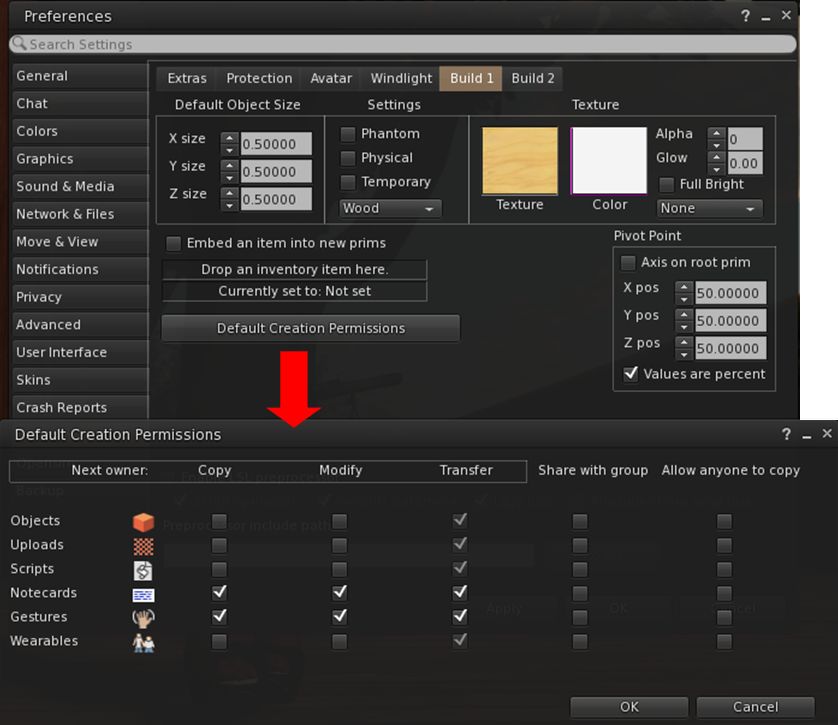
Firestorm 4.7.1 includes the new default permissions panel for setting the initial permissions on created items – objects, uploads, scripts, notecards, gestures and wearables.  contributed to the official viewer by Jonathan Yap under STORM-68, the new panel can be opened via Preferences > Firestorm > Build 1 > Default Creation Permissions.

The STORM-1968 default creation permissions are now integrated into Firestorm
The STORM-68 default creation permissions are now integrated into Firestorm

Other Lab Updates of Note

  • GPU Benchmarking Feature: in common with the Lab’s viewer, Firestorm no longer uses the GPU table to define your GPU and initially set the viewer’s graphics. Instead, a test is carried out when the viewer is first installed to determine the GPU type and graphics settings are initially set as a result of this test. You can, of course set alter your graphics settings to suit your needs  / load your settings for any saved presets you have
  • Server-side Appearance (SSA) polish / Advanced Inventory System (AIS v3): stability and performance improvements for SSA, including retry logic, removing redundant requests, detecting various appearance stuck conditions; the removal of code related to the old client-side baking framework; appearance bug fixes 
  • HTTP Pipelining and faster inventory fetching: significantly improves the download of data (currently avatar baking information, texture data, and mesh data) to the viewer and improves inventory fetching and loading on logging-in
    • As HTTP fetching using HTTP is now used exclusively by SL (support for UDP fetching has been removed from the simulators), the option to disable HTTP Inventory has been removed from the Developer menu
  • Joint offsets in rigged mesh attachment fixes: removes the unpredictability from attaching multiple meshes with joint offsets which meant you could see yourself with different joint positions at different times, and the way you saw yourself might not match up to what others saw. Instead, wearing the same set of meshes should always produce the same joint positions, and the way you see yourself should consistently match the way others will see you. The process for removing attached meshes is also more robust, so you should be able to reliably get your old joint positions back after meshes are removed.
  • Obtain LSL syntax table from the simulator so that it is always up to date: see STORM-1831
  • Added glossy reflections for projectors: This feature makes use of the glossiness parameter to calculate the “gloss” of projector reflections – see STORM-2067
  • New unified snapshot floater and updated SL Share 2 capabilities: see Snapshots and Photography Updates, below.

Preferences Overhaul

Perhaps the most noticeable update in this release is the complete overhaul of the Preferences panel, tabs and sub-tab. Every major tab in Preference has been revised and rationalised, and most of the sub-tabs have been revised / added-to, along with a number of new sub-tabs being added to various tabs.

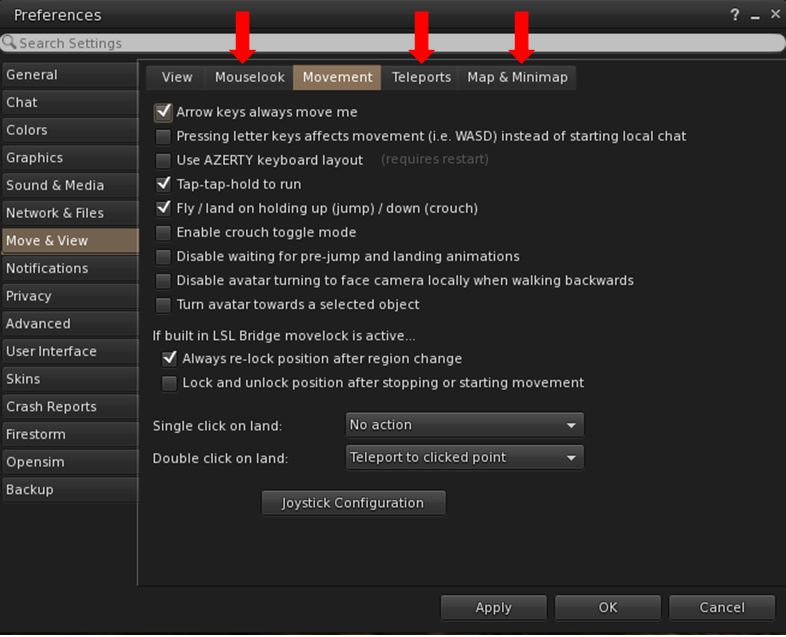
Firestorm 4.7.1 sees the Preferences panel extensively overhauled, with revised tabs and updated / new sub-tabs, such as the new Mouselook, Teleports and Map & Minimap tabs under Movement
Firestorm 4.7.1 sees the Preferences panel extensively overhauled, with revised tabs and updated / new sub-tabs, such as the new Mouselook, Teleports and Map & Mini-map tabs under Move & View

The result, while possibly confusing when first discovering a particular option has been moved, is actually a better, more logical set of Preferences tabs and sub-tabs.

Documenting all of them is beyond the scope of a review such as this, and the recommended means for finding options and to gain familiarity with the new layout is to use the Preferences search bar.

Continue reading “Firestorm 4.7.1 Beta: It’s here!”

Firestorm 4.6.9: a Christmas feast of features and fixes!

firestorm-logoUpdate Thursday, December 11th: There will be a hotfix update for Firestorm, which will likely be made available on Friday, December 12th. This is to correct a couple of issues related to voice and RLV/a discovered with the 4.6.9.42969 release, and will likely add some additional fixes as well. I’ll have a further report available once the update is available.

On Wednesday, December 10th, the Firestorm team announced the release Firestorm 4.6.9.42969.

This is a hefty update which brings with it a lot of new functionality, together with bugs fixes and assorted improvements and updates.

As always, the complete list of changes, together with all attributions,  can be found in the release notes / change log, and I refer readers to that document for specifics on all contributors, FIRE JIRA links, etc. The following is intended as an overview of some of the more major / interesting changes, updates and  fixes to be found in the release.

The Before We Begin Notes

For best results when installing this release:

Firestorm Blocking

Note that as a result of the Firestorm team’s policy to keep only 3 versions running, version 4.6.1 will be blocked, most likely early in the new year. The advice from the team is that If you are on 4.6.1, to please update now. Version 4.4.2 will continue to remain for Mac users until all the major Cocoa Mac bugs have been resolved. However, if you are not a Mac user, then there really isn’t any reason for you not to have updated, and the team again ask that you update as well

Lab Updates

This release sees Firestorm remain on a parity with the Lab’s 3.7.8 code-base. However, a number of updates and fixes have been cherry-picked from upstream (such as the group ban functionality – see below), particularly bug fixes and stability improvements – please refer to the change log for details.

Building and Scripting Updates

The new buttons for cycling through objects in a linkset

Some additional updates and tweaks have been made to assist builders and scripters:

  • There are two new buttons located in close proximity to the Edit Linked check box.
    These buttons cycle forward or backward through a selected linkset, in the same way as the existing keyboard short cuts. note the buttons will only be active when Edit Linked is checked
  • The issue of the script editor failing to open scripts in copied objects (see VWR-27512), which has affected v2 and v3 viewers, is corrected with this release of Firestorm, and the fix has been contributed to Linden Lab for inclusion in the official viewer code
  • The build toolbar button should no longer be disabled when it shouldn’t be.

Communications Updates

Firestorm 4.6.9 brings with it a large number of features, updates and improvements to communications. These include, but are not limited to, the following.

Audio / Voice

  • Parcel media and audio now have a separate auto-play option (Preferences > Sound & Media > General > Allow audio to auto-play/Allow media to auto-play). Parcel audio should now auto-play correctly on logging-in
  • A reset voice button has been added to Preferences to help with fixing voice issues (Preferences > Sound & Media > Voice Settings)
The new voice reset button to help fix voice issues
  • You can now “zoom in” on a speaker using voice to hear them more clearly (Comm > Nearby Voice > Right click a name >Zoom in)
  • Voice level icons in the radar are now independent from other voice level icons
  • Sounds used for opening scrip dialogues can now be customised (Preferences > Sound & Media > UI Sounds 2 > Script Dialog)
  • The viewer now automatically adds http:/ to the music URL in the parcel audio panel.

Auto-response Updates

With Firestorm 4.6.9, auto-response messages are now localised. There is also a new option for an item of inventory to be automatically sent with your auto-response messages, when set. The selected item must be COPY / TRANSFER in order for this capability to work, and will be sent when one of the following is set:

  • Busy / do not disturb
  • Away
  • Autorespond
  • Autorespond to non-friends.

To set an item of inventory to be sent with auto-response messages, drag and drop a suitable item from your inventory and into Preferences > Privacy > Autoresponse > Autoresponse Item.

Firestorm 4.6.9 allows you to send an inventory item when auto-responding into incoming IMs. The item must be COPY / TRANSFER in order for this to work

In addition, this release fixes getting an IM from yourself to yourself saying “Autoresponse sent” if somebody answers from an off-line IM via email. Also, having both “Autorespond to non friends” and “Only friends and group can call me or IM me” set no longer results in you getting two new IM sound alerts for every non-friend IM plus the non-friend receives your auto-response twice for each IM sent.

Contacts List

The Contacts List floater has been revamped to match the look of the nearby chat and IM session floater, for a smoother and unique appearance. In addition, an option to pay someone directly from your Contacts List has been added to the right-click context menu (Comm > Contacts > Right click a name > Pay).

New to Firestorm 4.6.9 as well is the ability to choose which name columns should be displayed in the Contacts List. You can now choose between choose between user name, display name, full name, or a combination of these, and you can now display full names in your Contacts List as “Username (Display name)“. Finally, a option has also been added to hide the permissions columns (whether those in your Contacts List can see when you’re on-line, map you, etc.). 

All of these options can be found under Preferences > Firestorm > General.

The Contact List display options in Preferences

Continue reading “Firestorm 4.6.9: a Christmas feast of features and fixes!”

Firestorm 4.6.7: rolling forward

firestorm-logoOn Sunday August 17th, the Firestorm team announced the release Firestorm 4.6.7.42398. As with the 4.6.5 release in May, this is far more of a stability and bug addressing update more than it is a release of major new features, although it does contain a lot of updates which most Firestorm users will find to their liking.

As always, the complete list of changes, together with attributions, can be found in the release notes / change log, and I refer readers to that document for specifics on all contributors, FIRE JIRA links, etc. The following is intended as an overview of some of the more major / interesting changes, updates and  fixes to be found in the release.

The Before We Begin Notes

For best results when installing this release:

Firestorm Blocking

Note that as a result of the Firestorm team’s policy to keep only 3 versions running, version 4.5.1 beta will be blocked in the coming weeks. The advice from the team is that If you are on 4.5.1, to please update now. Version 4.4.2 will continue to remain for Mac users until all the major Cocoa Mac bugs have been resolved. However, if you are not a Mac user, then there really isn’t any reason for you not to have updated, and the team again ask that you update as well

Mac 64-bit Version And Mac Fixes

This release of Firestorm sees the arrival of a Mac 64-bit version. As with the original windows and Linux 64-bit versions, this first release of the Mac 64-bit variant of the viewer is regarded as a beta release. However, the Firestorm team fully expect it to have far greater stability than the 32-bit version, and better performance, so Mac users in a position to do so are encouraged to download it and try it.

Blog posts on the 64-bit version can be found on Tonya Souther’s blog and in my blog.

As a heads-up to Mac users, please note that this release of Firestorm also includes a couple of partial fixes for known issues:

  • Alt-clicking while moving the mouse moves the camera significantly (see STORM-2041 and FIRE-12241) has been partially fixed by Linden Lab
  • The Firestorm team have implemented a partial fix for the keystroke entry lag issue (see FIRE-12172).

These may not entirely solve the issues to which they relate, but hopefully they’ll give at least some Mac users a degree of improvement.

One thing those experiencing the typing lag, and who are in a position to do so, might like to try is to create a clean virtual desktop in Spaces, switch to it and then start Firestorm, pinned it to that desktop, and make it full screen (see the suggestion from Spikeheel Starr here).

Lab Updates

This release sees Firestorm reach parity with LL’s 3.7.8 code-base, together with cherry-picked updates from later releases. Updates and fixes directly from the Lab include, but are not limited to) the following.

Project Interesting Scene loading Updates

Project Interesting has been a part of the Lab’s long-term Project Shining updates which were recently officially drawn to a close. The interest list work, primarily led by Andrew Linden prior to his departure from the Lab to join High Fidelity, is a set of improvements to how the viewer and simulator work together to know what information the viewer has or needs in order to render the world around your avatar.

The interest list updates provide more predictable and faster scene rendering, such as large objects and those closest to you appearing first, rather than at random. More use is also made of the viewer's cache (so the warning for not clearing cache as a first action in "fixing" issues becomes even more important
The interest list updates provide more predictable and faster scene rendering, such as large objects and those closest to you appearing first, rather than at random, as with the scene shown here. More use is also made of the viewer’s cache (so the warning for not clearing cache as a first action in “fixing” issues becomes even more important

The work has seen several server-side and viewer updates, and the updates included with this release of Firestorm enable the viewer to more intelligently store and reuse scene data, helping to make regions you’ve previously visited load faster (as long as you don’t clear cache!), and help improve viewer performance.

Further information on the project interesting work can be found in the following blog posts:

Google Breakpad Updates

Google Breakpad is the tool used in gathering information used in reporting underpinning reasons for viewer crashes to help with tracing causes, etc. Linden Lab have been engaged in a programme of improving when and where Google Breakpad becomes active as the viewer starts, and ceases reporting as the viewer shuts down. This release of Firestorm sees the most recent updates and improvements made to Google Breakpad integrated into the viewer, allowing the support team to improve the triaging and debugging of issues.

Other Updates of Note

  • Added a viewer check box to extend parcel entry limits to a higher ceiling (World > Region Details > Region > Block parcel fly over): when checked, extends access checks vertically to prevent parcel flyover
  • Opening large chat histories from conversation log no longer eats huge amounts of memory resulting in a viewer crash (see: BUG-4517 and FIRE-12242)
  • Searching inventory for “online” now correctly returns online friends calling cards in search results (see BUG-4409 and FIRE-12178)
  • Merchant Outbox fixes: includes fixes for accurately detecting Merchant status and improves recovery for Merchant Outbox errors
  • Improved discoverability of the Region Debug console has been moved to Develop > Consoles > Region Debug Console. Also added to World > Region Details > Debug > Region Debug console
  • Having a space after your cursor and pressing return to add a new line no longer forces an extra space to be made in the next line in notecards and script editor
  • Opening square textures now sets the 1:1 size constraint.

Building and Scripting Updates

LSL Functions for Materials

Firestorm 4.6.7 sees the addition of LSL support for materials capabilities. Materials can be added to object faces with llSetPrimitiveParams() and llSetLinkPrimitiveParams functions using the following parameters:

  • [PRIM_SPECULAR, integer face, string texture, vector repeats, vector offsets, float rotation_in_radians, vector color, integer glossy, integer environment]
  • [PRIM_NORMAL, integer face, string texture, vector repeats, vector offsets, float rotation_in_radians]
  • [PRIM_ALPHA_MODE, integer face, integer alpha_mode, integer alpha_cutoff]
    • Valid alpha_mode options are PRIM_ALPHA_MODE_NONE, PRIM_ALPHA_MODE_BLEND, PRIM_ALPHA_MODE_MASK, PRIM_ALPHA_MODE_EMISSIVE
LSL support for materialsarrives in Firestorm with the 4.6.7 release
LSL support for materials arrives in Firestorm with the 4.6.7 release

Materials can be read with  llGetPrimitiveParams() and llGetLinkPrimitiveParams functions using the following parameters:

  • [PRIM_SPECULAR, integer face] returns [string texture, vector repeats, vector offsets, float rotation_in_radians, vector color, integer glossy, integer environment]
  • [PRIM_NORMAL, integer face] returns [string texture, vector repeats, vector offsets, float rotation_in_radians]
  • [PRIM_ALPHA_MODE, integer face] returns [integer alpha_mode, integer alpha_cutoff].

For further information, please refer to the relevant LSL documentation as linked-to above.

In addition:

  • CTRL + mouse grab of objects is now disabled by default in all of Firestorm’s log-in modes other than V3. This is because the option offers no “undo” option should it be used accidentally. A toggle option has been added to Preferences > Firestorm > Build 2 (Use CTRL+mouse to grab and manipulate objects) to enable / disable the ability.
  • Clicking the area in between the Full Bright check box and the Materials drop down box no longer incorrectly opens the colour picker.

Continue reading “Firestorm 4.6.7: rolling forward”

Firestorm 4.6.5: steady as she goes

firestorm-logoOn Sunday May 11th, the Firestorm team released Firestorm 4.6.5.40833. Given this release comes just two months after the 4.6.1 release, it does not have a huge raft of new shiny. What it does offer is a nice package of new features and updates, together with a fair few bug fixes from both the Lab and the Firestorm team.

As always, the complete list of changes, together with attributions, can be found in the release notes, and I refer readers to that document for specifics on all contributors, FIRE JIRA links, etc. The following is intended as an overview of some of the more major / interesting changes, updates and  fixes to be found in the release.

The Before We Begin Notes

  • Downloading – a reminder: while the Firestorm download server performed perfectly for the 4.6.1 release, please remember it is the only server handling downloads. So in the unlikely event you encounter delays or a slow download, please be patient / consider re-trying a little later
  • Version blocking: Jessica informs me that there are no plans to block any older Firestorm versions following this release
  • Installation: as always, a completely clean install of the viewer is recommended.

Lab Updates

This release sees Firestorm reach parity with LL’s 3.7.4 code-base, and add a number of fixes and updates from the Lab, including (but not limited to):

  • Vivox 4.6.x updates
  • Advanced Lighting Model can no longer be enabled for Mac OSX 10.6.8 as Mac OSX 10.6.8 is no longer supported by Linden lab (The ability to enable ALM on 10.6.8 was removed because it caused rendering glitches when enabled)
  • Fix for huge amounts of memory being used & viewer crashing when opening large chat histories from the conversation log
  • Fix for BUG-5537, introduced as a result of changes made to the avatar_lad.xml for Fitted Mesh. These changes caused a non-rigged mesh attachment object worn on the chest attachment point shape to look fine in the wearer’s view whereas anyone else it would appear as if the wearer’s chest was showing through the clothing item
  • Fix for crash when editing certain rigged meshes at high altitude
  • Fix for crash when uploading corrupt .DAE file (BUG-4961)
  • Fix for BUG-997,terrain texture changes caused by changing texture elevation ranges or terraforming can not be seen until after relog or teleporting out and back to the region
  • Fix for a suspected thread race crasher in the FmodEx library.

A Note on Interest List Updates

The recent LL viewer-side interest list updates are not a part of the Firestorm 4.6.5 release. As noted elsewhere in this blog, the interest list code is a non-trivial merge due to the extent of changes included alongside of the core interest list updates. It’ll therefore take a little longer for this work to appear in Firestorm.

Building and Scripting Updates

Firestorm 4.6.5 see the Build options in Preferences revised, with two Build sub-tabs (Build 1 and Build 2) under Preferences > Firestorm.

The revised Build-1 sub-tab in Preferences > Firestorm

Build 1 (above) contains the options for setting defaults for all newly created prims (size, settings, texture, permissions and pivot point) and the LSL pre-processor options.

The Build 2 sub-tab contains the six check-boxes (Save Scripts Edited from Inventory to Mono, Save Textures from Inventory to Disk as PNG Instead of TGA by Default, etc, which had been in the previous Build sub-tab). It also contains four new options.

The new Build 2 sub-tab in Preferences > Firestorm

The new options are:

  • Limit select distance (meters) – disallows selection of objects beyond the specified selection distance from your avatar
  • Limit drag distance (meters) – when enabled, this limits the translation distance of objects in a single operation of the translate tool (metres from start point)
  • Constrain rotations to multiples of X degrees, when not using ‘snap to grid’ – all rotations via the rotation tool are constrained to multiples of this unit (degrees)
  • Preview animations on own avatar during upload – when enabled, you can preview animations during the upload process on your own avatar instead of on the avatar dummy in the upload window.

Firestorm 4.6.5 also includes the following build related items:

  • An option to prevent avatar from turning to selected object when editing (Preferences > Move & View > Firestorm > Turn Avatar Towards a Selected Object)
  •  A fix so that when previewing an animation for uploading it (in paused mode), moving the track of the slider will now correctly change the displayed frame of the animation.

Communications Updates

There are a number of new options for communications with this release, together with a number of fixes. The new features include:

voice-warn
The new multiple voice instances option should enable you to run voice on multiple viewer instances on the same computer & without generating warnings like this
  • An option to allow voice to connect in multiple viewer instances simultaneously (Preferences > Sound and Media > Voice Settings), allowing you to run voice on multiple viewer instances, and without seeing the connection warning pop-up message (shown right)
  • An option to hear voice equally from everyone, rather than being dependent upon either avatar position or camera placement. This is a useful addition for meetings, etc., where attendees may be located at difference distances from your avatar / camera position, thus impacting voice quality when they are speaking.
The new voice options in Preferences > Sound and Media > Voice Settings
  • A new option has been added to enable the full profile of an avatar to be opened when clicking on an inspect SLurl (Preferences > Firestorm > General > Open Avatar Profile Directly When Clicking on its Name).

Continue reading “Firestorm 4.6.5: steady as she goes”