VWBPE 2024: Catching Up With the Lindens – a summary

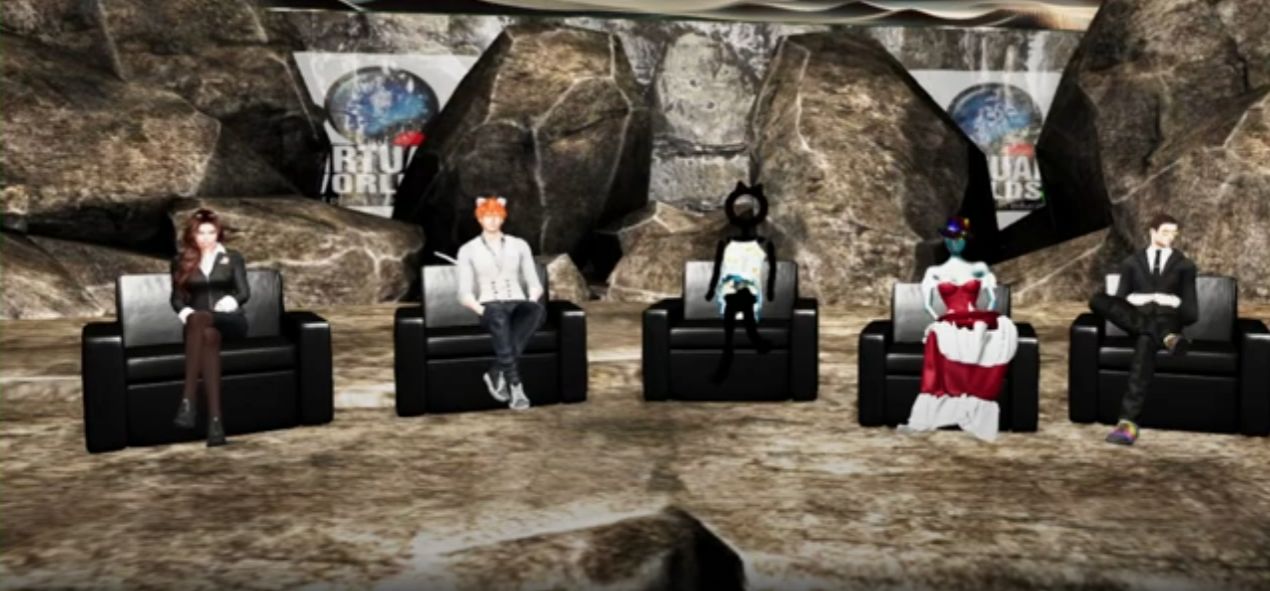
Screen cap of Catching Up With the Lindens (l to r): Elli Pinion, Patch Linden, Grumpity Linden, Kali Linden and Kyle Linden
On Friday, April 4th, 2025 the Virtual Worlds Best Practices in Education (VWBPE) conference held another of in their sessions featuring representatives from Linden Lab and various called over the years Above the Book, What’s Up at the Lab and now Catching Up With the Lindens.
Table of Contents

The following is a summary of the session covering the core topics raised. Notes are based on the official video of the session, which is embedded at the end of this article. Time stamps are also provided to the relevant points in the video for those who wish to listen to specific comments.

On hand for the session, hosted by Elli Pinion, were:

  • Grumpity Linden, Senior Vice President of Product and Engineering.
  • Patch Linden, Senior Vice President of Product Operations.
  • Kali Linden, Director of Engineering Web & Platform
  • Kyle Linden,  Product Manager (viewer).

Notes:

  • This is a summary, not a full transcript, and items have been grouped by topic, so may not be presented chronologically when compared to the video.
  • Timestamps are included to allow a direct jump to a subject.
  • Given these sessions are part of the VWBPE annual conference, there is obviously a lean towards matters of education and learning.

SL Mobile and Project Zero

SL Mobile

Resources:

[Video: 4:14-13:37]

  • A re-cap on work to date on SL Mobile, from the baseline starting point: could an app be built that could render avatars much as they appear within the viewer?
    • All the work tends to be iterative in nature – so, for example, avatar appearance and fixes form a tranche of on-going work as they are refined and improved.
    • Features are being added in terms of “journeys” – what would people like to do in SL when using a mobile app + what is practical to be able to to on a mobile device, and then building-out a specific “journey”.
    • The first such “journey” was called “going to a club” (although it can be applied to other in-world activities), and which incorporated capabilities  such as logging-in, seeing Friends on-line, finding an event / location, going to it, being able to chat / IM, listen to music, interact with objects, etc.
  • As the project has been opened out through the on-going Beta:
    • Development has been adjusted to try to take into account feedback and feature requests from users. developed and more and more feedback has been supplied by users (e.g. feature requests), and all of this is reviewed and considered in building-out the development roadmap.
    • One aspect of the Beta has been the need to better support incoming new users – hence the integration of the new user sign-up process with Mobile, the provision of an arrival / “welcome” area specifically for new users coming into SL via Mobile, etc.
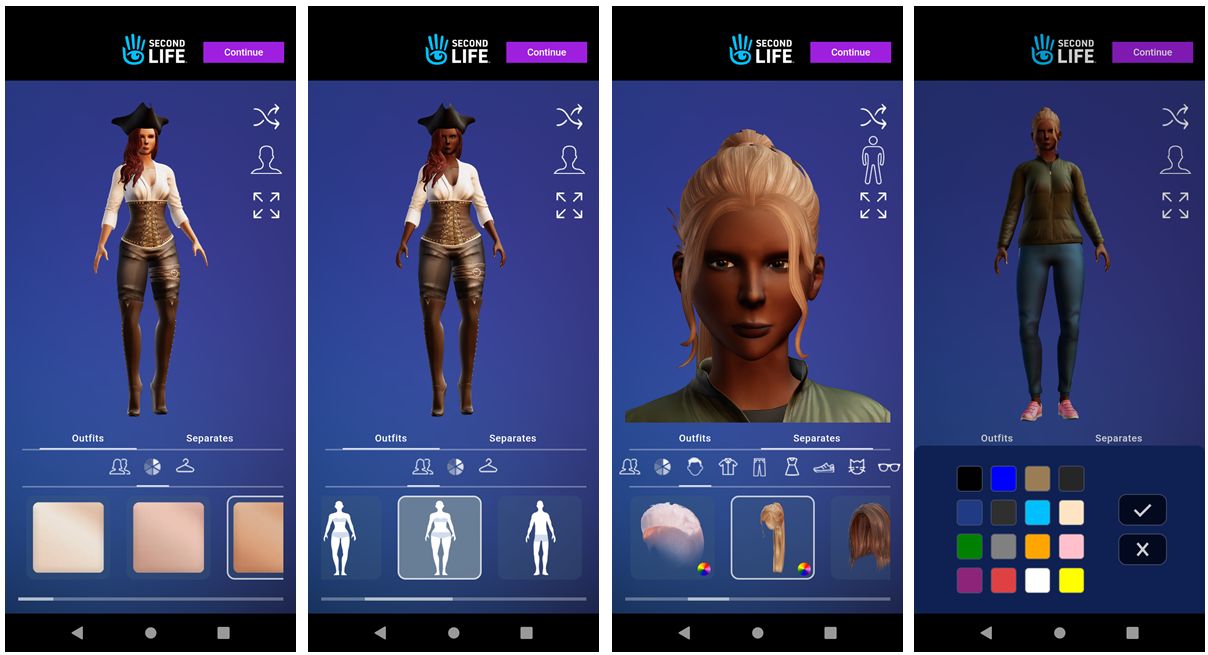
One of the recent updates to SL Mobile was to integrate the new starter workflow – including avatar selection  – into it
  • The goal with the Mobile app is to have it as a companion means of accessing Second Life alongside of the desktop experience, with the eventual aim of having it stand on its own as a window into SL – but there is a lot of work / functionality to add before that point is reached.
  • However, some functionality will not be fully developed – such as the ability to build content from within  Mobile; screen size and other limitations do not allow for this, but users can expect the ability to interact / move content around on Mobile to customise spaces.

Project Zero

Resources:

[Video: 13:38-21:13]

  • Multi-faceted project:
    • Providing easier on-boarding for incoming / returning users by offering a direct path from sign-up to using the official viewer within a browser (Project Zero).
    • Providing a suitable new UI to with with the viewer when offered through a browser (React / HTML) (Project Zero).
    • Providing ability for existing users to access Second Life using a third-party viewer.
  • The payments aspect is in flux; streaming has costs associated with it, which LL need to cover (at the time of writing, around US $1.75 an hour per session – see: here and here for more), but at the same time those costs are gradually decreasing.
  • Firestorm Zero (see: Project Zero Update: Firestorm in your browser as well) has been a “first pass” at trying to offer access to a third-party viewer via a browser. This has been:
    • A limited-availability (in terms of available passes) offer.
    • A experiment in charging a nominal fee for access (L$250 for 5 hours) to see how that was received by existing users.
    • Testing the ability to have viewer settings persist across multiple log-ins using a browser-based version of the viewer.
  • LL are aware of the appetite among users to have browser-based access to SL, and more will be “coming, but not immediately coming.”
  • In terms of pay-to-use: LL are looking at various ways to reduce the cost to users (e.g. bundling so many hours of access per month to the SL subscription tiers before users on those tiers would have to start paying) – but this is all very much still in discussion.

WebRTC

[Video: 21:15-24:52-31:25]

  • Project recap: replacing Vivox Voice service and plug-in with the WebRTC communications protocol (RTC=”real-time communication”). Key benefits:
    • WebRTC supports a wide range of real-time communications tools in common use (e.g. Google Meet), supporting audio, video and data communications, and is thus something of a “standard” approach.
    • Offers a good range of features: automatic echo cancellation, better noise cancellation and automatic gain control, much improved audio sampling rates for improved audio quality.
    • Opens the door to features and capabilities to voice services which could not be implemented whilst using Vivox (e.g. text-to-speech / speech-to-text).
  • Currently, the majority of up-to-date viewer support both Vivox and WebRTC, and regions are running either WebRTC or Vivox on the back end.
    • The intention remains to turn off Vivox altogether on the back-end at some point, leaving only WebRTC.
    • This has been delayed due to the (now decreasing) number of users still using older versions of viewer which do not have the WebRTC updates, and so are reliant on Vivox.
    • It is hoped that, all things being equal, the switch-over can be made before the end of the second quarter of 2025 (e.g. by the end of June 2025).
  • In the meantime, region / estate holders wishing to try WebRTC on their regions can submit a support ticket to have their region moved from Vivox to WebRTC, with the understanding that (at the time of writing) WebRTC is still under development and might be a little unpredictable.

Combat 2.0

Resources:

[Video: 31:45-34:28]

  • Recap: a project (currently on hiatus) to overhaul the Second life Combat System (SLCS) and update it to support better combat capabilities and options, and make user engagement in combat simulations easier and more enjoyable.
  • Key additions to SLCS thus far include:
    • Damage Limit, Regeneration Speed, consequence of death (e.g. teleport victim home as per current SLCS or to a telehub  / landing point or take no action).
    • An on_damage event to account for intervening elements which may result in less severe damage being caused (e.g. when riding inside an armoured vehicle).
    • A new Region Combat Event Log (aka “Brigadier Linden”).
  • More work to come, with discussions often taking place during the weekly Simulator User Group meetings.

AI Integration

[Video: 35:51-40:45]

  • Recap:
    • LL originally launched the AI Character Generator utilising Convai, a platform for developers and creators proving an intuitive approach to designing AI characters, and with limited access in December 2024.
    • There was a lot of negative feedback, prompting the alpha test to be suspended, prior to re-opening in March 2025, with increased access, as a part of the March Membership Madness promotions.
  • LL is looking to work with various groups to make the capability more accessible / usable.
  • Due to the negativity from many towards AI (and some of the issues the wider use of generative AI has genuinely caused), the the Lab is looking to follow-up on Philip Rosedale’s promise to have a dedicated Town Hall / Community Round Table on the subject of AI, and get such a meeting scheduled.
  • There is acknowledgement that AI characters have a use within SL (e.g. the AI helper for new users that can answer questions, provide assistance, etc), and such use-cases could be widespread.
  • In developing AI capabilities for use with / in SL, LL is trying to be as thoughtful as possible, and respective of people’s views.
  • Concerns have been raised about people being able to know whether the character in front of them is an AI-driven agent rather than an avatar operated by a human.
    • Traditionally, the requirement has been for any scripted agent used in-world to be noted as so by the creator.
    • However, LL acknowledges that AI agents have a more nuanced capability over that of scripted agents (“bots”), and so a more granular distinction is likely required so that people do understand the nature of the avatar which whom they are interacting.

In Brief

From approx. 42 mins to end.

  • Mention of the SL server-side implementation of Luau scripting – referenced as “SLua”, currently in alpha testing on Aditi (the Beta grid).
  • SL22B: general notes that the birthday event will run from Friday, June 20th, 2025 through until Sunday, July 20th, and that (at the time of writing) performer and exhibitor applications are open.
  • Mention of the first cut of the glTF mesh model import to run alongside COLLADA – see my Content Creation User Group summaries for more.
  • Mention – without specifics – of two Linden Home releases that are on the horizon.
  • A reminder that SL users are welcome to attend all user group meetings.
2025 week #14: SL CCUG meeting summary

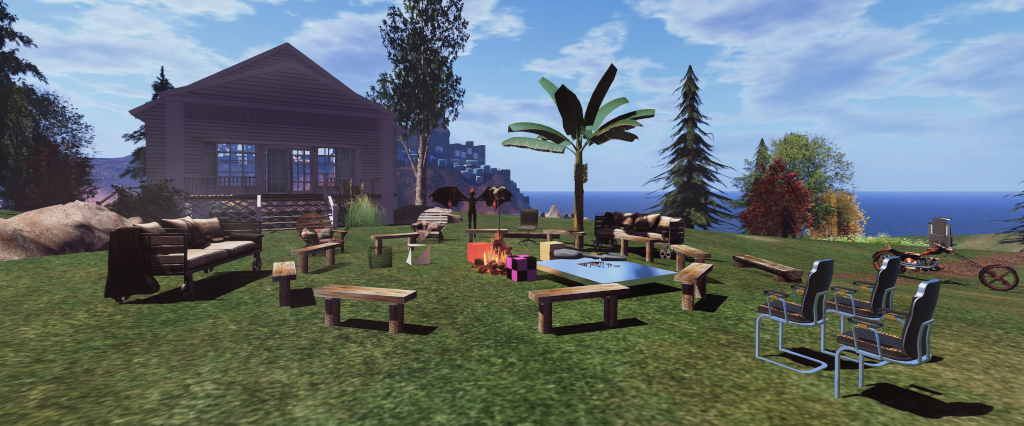
Hippotropolis Campsite: venue for CCUG meetings
The following notes were taken from my audio recording and chat log of the Content Creation User Group (CCUG) meeting of Thursday, April 3rd, 2025.

Please note that this is not a full transcript, but a summary of key topics .


Table of Contents

Meeting Purpose

  • The CCUG meeting is for discussion of work related to content creation in Second Life, including current and upcoming LL projects, and encompasses requests or comments from the community, together with related viewer development work.
  • This meeting is generally held on alternate Thursdays at Hippotropolis.
  • Dates and times of meetings are recorded in the SL Public Calendar, and they are conducted in a mix of Voice and text chat.

Official Viewer Status and Updates

Viewer Status

Upcoming Viewers

  • The current version of 2025.03 will remain in soak for the next few days in the hope that it will be ready for promotion to de facto release status “in the very near future”.
  • The April release – 2025.04 – is provisionally targeting:
    • The glTF mesh uploader (based on the current .DAE mesh uploader and doing pretty much the same). Again, please note that this is not the full glTF scene importer which has been discussed at previous CCUG meetings; that work is being broken down into smaller, more easily managed projects.
    • Possibly – and subject to confirmation – re-enabling subfolders within the My Outfits folder.
    • Hover height improvements.

glTF Mesh Upload / Importer

  • The outline of this work can be found in Add Simple (llmesh) GLTF Model Import.
  • In short: it should be taken that whatever can be done within the existing .DAE uploader will remain so for uploading glTF mesh models at the first pass, and enhancements will come later.
    • This means that anything that is compliant with COLLADA which can be currently imported to SL via the uploader will work under glTF.
    • Any “new” capabilities not available to the current uploader will then be duly considered an implemented over time.
    • This is not a replacement for COLLADA format uploads – it is an addition to; uploading of .DAE objects will remain possible unless support for COLLADA becomes untenable.
  • The reason for this approach is to avoid having a large-scale glTF import project (variously referred to has “scene import” or the “Post-Materials Features Project” or PMFP), which would take months / years to develop, enhance and ship, and instead be more spritely in development and improvements.
    • This does not mean that everything that had been targeting the scene import / PMFP work will be abandoned.
    • Rather, it means those aspects which could end-up delaying it due to the amount of research, development and testing required to support them (e.g. custom skeletons / rigged meshes) can be put to one side for future development, rather than preventing the foundations to enable them from being laid.
  • The back-end format for imported mesh objects (“SL mesh”) will not be changing at this time.  One of the reasons for this is the “SL mesh” format allows for easy upload of selected LODs.
    • However, this does not mean the format will not be improved upon in the future (and even a possible hybrid glTF / SL Mesh format implemented).
  • One aspect of the new mesh uploader will be the potential for adding materials-related glTF extensions to the current Khronos glTF specification.
    • These include (but are not limited to) the likes of the glTF specular extension, transmission, IOR, iridescence, emissive strength etc.
    • Geenz Linden is particularly interested in these, as the uploader allows them to be quickly added, and he would like to put together a package of extensions that a) creators can readily use; b) help move things towards being better placed to support other aspects of the PMFP work.
  • There was more discussion on support for uploading complete mesh region surrounds – this again was seen as something for consideration after the initial phases for implementing the glTF upload have been completed, and something possibly requiring the implementation of something like a node hierarchy.

Texture “Stutter” Issues

  • The recently introduced changes to texture use of VRAM have resulted in some users experiencing “viewer stutter” when the viewer is loading / uploading textures in a scene.
  • As a result, the options to define texture VRAM settings have been disabled in the 2025.03 RC.
  • Geenz Linden is anticipating being able to work on this issue later in April with a view to determine the cause and hopefully rectifying it.
    • This work will likely also look at texture streaming in general and make adjustments where textures tend to get loaded at resolutions that “don’t make sense” at the time of loading, and so improve that.
  • It is not anticipated that this work will start to surface much before the 2025.06 viewer development cycle.

Removing Scale From LI Calculations

  • Signal Linden highlighted a Feedback Ticket he has raised, proposing the removal of scale from Land Impact calculations, which has been touched upon at the last couple of SUG meetings.
  • However, there are now a few caveats starting to appear possibly impacting “everything from rendering to physics”, which require further internal discussion at LL.
  • One of these is the LI goes in both directions – so while removing scale from the calculation may be positive for a net reduction in the LI of objects that have been scaled up in size – it could have a net negative for objects scaled down (e.g. you have a group of objects each with 20 LI, and have scaled them down so each only has 10 LI, removing scale would reset them to 20 LI apiece).

In Brief

  • Allowing larger Linksets: raised at recent SUG meetings as well, this has not been ruled out for the future, but has some inherent issues, notably:
    • Limitations within the current physics engine, which would probably have to be updated.
    • Interest List issues – if a scene has a particularly massive linkset within it, it could simply fail to render in a viewer using a limited Draw Distance, simply because the root prim is outside of the viewer’s DD, even if child elements of the object are within range.
  • PBR Bakes on Mesh: this is seen as having a minimum of two requirements:
    • Providing PBR specular support.
    • Being able to set blend modes for different layers. This has some added complications in how blend modes should work for different types of maps, and this needs to be worked through in terms of implementation.
  • LSL Support for PBR:
  • The viewer / graphics roadmap is being reviewed, and it is hoped that and updates / decisions on direction will be available for discussion at the next CCUG meeting.
  • The is no time frame on the delivery of “water exclusion volumes” (i.e. the ability to hide Linden Water entirely from the inside volume of an underwater room). Again, it is not because this cannot be done, but rather there is other work deemed as having a higher priority LL wish to address.
  • It was found that the water shoreline fade was causing issues with shoreline water effects (e.g. things like mesh shoreline elements using alphas to simulate the ebb and flow of shoreline tide looking broken / patchy / flickering), and so the fading has been disabled until the issue can be corrected.
    • It is possible this might for a wider piece of work to improve water / sky environment assets in general to make the ambient environment rendering less likely to break content.
  • Improving light sources (e.g. punctual lights, better point lighting, etc.) is seen as a future issue to be addressed before of current limitations within the current forward rending. Forward+ is one potential way forward, but this would require proper scoping ahead of any attempt to change the current rendering system.

Next Meeting

Second Life Mobile “Dash for Cash”

Enabling push notifications on the SL Mobile App

On Thursday, April 3rd, 2025, Linden Lab announced a further promotion to encourage the use of the SL Mobile app through a giveaway of Linden Dollars. The promotion – called Dash for Cash – is available to all Second Life users – Basic and any subscription tier.

How It Works

  • Throughout April, the Lab will send out a notification to Mobile users.
  • Users then have a limited time period to log-in to Second Life via the Mobile app and claim a L$ prize.
  • To ensure a chance to claim:
    • Make sure you are using the latest release of the Mobile app (at the time of writing, 2025.3.548 (Android) / 0.5.537 (iOS)).
    • Enable push notifications on the app to receive the Dash notifications via Menu → Settings → Notifications → enable App Communications, per the images at the top of this article.
      • Note you may have to click on a blue button at the bottom of the Notifications screen and confirm you wish to allow the app to send notifications, if you are doing this for the first time.
    • You’ll also see a Dash for Cash announcement in the mobile app’s Lobby, reminding you to check in daily.
You can view the official Dash for Cash blog post in your device’s browser directly from the SL Mobile Lobby, if required.
  • Wait for the Dash for Cash notification & on receipt, log-into SL via the Mobile app.
  • Those doing so within the specified time will have the amount specified in the notification credited to their SL account.

Notes

  • Linden Dollar amounts may change.
  • Everyone can win, but Premium Plus, Premium and Plus members are eligible to receive higher L$ rewards than Basic users.
  • Note that Dash for Cash is in addition to the Streaks Rewards, which currently remain unchanged in format and availability.

Again, please refer to the official blog post for full details.

April 2025 SL Web User Group: Project Zero and AI on the MP

The Web User Group meeting venue, Denby
The following notes cover the key points from the Web User Group (WUG) meeting, held on Wednesday April 2nd, 2025. These notes form a summary of the items discussed and is not intended to be a full transcript.

A video of the meeting, recorded by Pantera Północy, is embedded at the end of this summary, with sections of this summary times stamped to the relevant points in the video for those wishing to refer to the audio. My thanks as always to Pantera for recording it and making it available.

Table of Contents

Meeting Overview

  • The Web User Group exists to provide an opportunity for discussion on Second Life web properties and their related functionalities / features. This includes, but is not limited to: the Marketplace, pages surfaced through the secondlife.com dashboard; the available portals (land, support, etc), and the forums.
  • As a rule, these meetings are conducted:
    • On the first Wednesday of the month and 14:00 SLT.
    • In both Voice and text.
    • At this location.
  • Meetings are open to anyone with a concern / interest in the above topics, and form one of a series of regular / semi-regular User Group meetings conducted by Linden Lab.
  • Dates and times of all current meetings can be found on the Second Life Public Calendar, and descriptions of meetings are defined on the SL wiki.

General Updates Since last Meeting

[Video: 0:00-0:50]

  • Some clean-up of the What’s Next page – but no re-integration of the Destination Guide as yet (The DG situation is further discussed between 17:32-21:33].
  • Fixes for spaces within Map links, with more fixes for incorrect spaces in links still to come.
    • Requests were again made to be able to search maps.secondlife.com by region name, which is apparently a little harder to implement than had been thought.
  • Minor fixes to the Marketplace:
    • See Mature Content link was not working as expected.
    • Translations updates and added.

Project Zero / Firestorm Zero (SL  in a Browser) Update

[Video: 4:59-17:00]

SL Viewer Work

  • Recent work has been focused on stability and performance.
  • Work has resumed on the new viewer UI for the Project Zero SL Viewer, and the first iteration, featuring very small changes should be released “pretty soon”.

Firestorm Zero

  • A core focus has been on the Firestorm version of Zero (Firestorm Zero, launched in March), running through bugs and issues reported with that. Some issues include:
    • People purchasing time and having issues launching a session.
    • People being locked-out of Firestorm Zero after a session (or even during) – most likely as a result of Cookies being corrupted, thus requiring Cookies to be cleared from the browser & the browser restarted.
    • It’s also been suggested that using a private / incognito version of a browser works better, as this should clear all Cookies on exiting.
    • Note: I have experienced multiple “locks-outs” (one both “public” and “private” browsers – Chrome, Firefox, Opera, Brave) and have found that clearing / resetting Cookies within the browser does not work, and it requires LL to bang on things (indeed, as of this moment, I cannot access Firestorm Zero!). If you encounter the same, please file a report.

General to Both

  •  It was acknowledged there there is a degree of confusion around Project Zero and Firestorm Zero, and the fact there are differences between them:
    • Project Zero is effectively the official viewer, offered on a limited capacity basis, with the focus more towards incoming new users / returning users.
    • Firestorm Zero is the “paid” service utilising the Firestorm viewer and focused more towards current users.
  • Some aspects of this confusion might be seen in:
    • The link found at the top of the Second Life Dashboard (Launch Second Life in a Browser) will launch Firestorm Zero.
    • The fact that at the WUG meeting, people conflated issues of logging in to Project Zero which were likely due to the limited capacity / new user focus more than anything else, with a discussion on specific issues those attempting to use Firestorm Zero were experiencing.
  • As a result, Sntax Linden noted that there should be more / better differentiation between the two.
  • Shortfalls with both Zero and Firestorm Zero were (again) noted as:
    • Lack of ability to directly upload (mesh, textures, etc.) to your account.
    • Lack of ability to save snapshots, etc., to a local disk.
    • The noticeable latency in camera movement (and similar) for those more distant to the host computer running the viewer. [It has been hinted that this could be address by relocating host computers for Project Zero / Firestorm Zero in additional Amazon GameLift end-points such as Éire.]

AI Content on the Marketplace

[Video: 36:20-End]

A feedback request to Add marketplace policy regarding AI generated content sparked a request for clarification on what people would like (e.g. disclosure of the use of AI generated content / listing images; outright banning of anything related to the use of AI tools; filtering out content made purely with generative AI (as opposed to content which has been created by someone and which happens to use some AI elements), something in-between; limiting some forms of AI content, etc.).

  • Within the meeting, disclosure (e.g. clearly indicating a item uses AI generated content / the listing images are AI generated, etc.), was preferred by most.
    • It was noted that using purely AI-generated images (e.g. created using Midjourney) as a non-representative means to promote / sell content on the MP is already against policy (misleading advertising) and so can currently be reported.
    • Kali Linden indicated LL are looking to add reasons for flagging content, and something along the lines of “violates LL policy” might be considered, to make such reporting easier.
  • It was acknowledged that those using generative AI tools (e.g. Meshy) for content on the MP probably are not going to self-identify through marking check-boxes etc.
  • It was also noted that some people using generative AI images for advertising on the MP are not doing so with intent – but rather because it is the New Shiny for them to play with, and so some allowance should be made for this.
  • There’s also the issue with people who may take images of their creations and then heavily post-process them to the point where they are no longer fully representative of the item it promotes – so what should be done in these cases? Or with those using art pulled from the physical world?
  • Part of this conversation inevitably rolled over the idea of AI “companions” / bots and an expressed desire to “ban everything” about AI – including bots, despite there being nuances – such as with the latter (e.g. in-store CSRs, more dynamic role-play NPCs, etc.).

In Brief

Please refer to the video for details on the following.

  • [Video: 1:32-4:44] General discussion on the Second Life booth at the 2025 Games Developer Conference, which some at the meeting felt to be underwhelming based on the photographs posted to social media, etc.
    • LL also appear to have received feedback from the SL creators who attended the event, and it appears lessons are being learnt for future possible events / appearances.
  • [Video 17:32-18:50] Further  discussion over the lack of a visible-by-default chat bar in the official viewer.
  • [Video: 22:03-35:15] Discussion on use of the in-viewer browser vs. using an external browser – most preferred the external browser option.
    • However, most browser-based shopping stats the Lab has for the Marketplace point to the viewer’s internal browser being primarily used for purchases.
    • Sntax Linden noted that as the internal browser is the only option for accessing the web from within Project Zero / Firestorm Zero, LL do want to improve on it – such as making the responsive MP not only work on small device screens, but also work better within the in-viewer browser.
    • Traditionally, the in-viewer browser has been avoided due to concerns of general security (e.g. clicking on phishing links and opening them within the in-viewer browser). This led to a discussion on ways to block “bad links”.

Next Meeting

  • Wednesday, June 4th, 2025.

Previewing the VWBPE 2025 conference in Second Life

via VWBPE.org

The 18th Virtual Worlds Best Practice in Education (VWBPE) conference takes place between Thursday, April 3rd and Saturday April 5th, 2025 inclusive.

A grass-roots community event focusing on education in immersive virtual environments, VWBPE attracts 2200-3500 educational professionals from around the world each year. Its primary goals are to foster discussion on, and learning about educational opportunities presented through the use of such virtual spaces, a defining core values and best practices in doing so, including:

  • Helping to build community through extension of learning best practices to practical application of those ideas and techniques;
  • Providing networking opportunities for educators and the communities that help support education; and
  • Offering access to current innovations, trends, ideas, case studies, and other best practices for educators and the communities that help support education.

In the context of the conference, a “virtual environment” is an on-line community through which users can interact with one another and use and create ideas irrespective of time and space. As such, typical examples include Second Life, OpenSimulator, Unity, World of Warcraft, Eve Online, and so on, as well as Facebook, LinkedIn, Twitter, Pinterest or any virtual environments characterised by an open social presence and in which the direction of the platform’s evolution is manifest in the community.

Every year, the event has an over-arching theme. For 2025 this is Transitions, which the organisers describe thus:

Transitions, like pivotal shifts in a story, capture the profound changes educators and students have faced in recent years. These shifts highlight the need to adapt and redefine social dynamics within virtual environments as education evolves to meet new challenges.
Join us as we all share experiences and successes in how virtual technologies used in the classroom have helped shape education for the better.
VWBPE 2025 Gateway

Programme

As with previous VWBPE conferences, this year’s event includes speakers, workshops, presentations, social activities and more.

The best way to find out what is going on over the three days of the conference is through the VWBPE programme page,  However, here are some of the highlights of major events (note: all times SLT and held at the main auditorium unless otherwise stated):

  • Thursday April 3rd:
  • Friday April 4th:
  • Saturday April 5th:
    • 07:00-08:00: Workshop Area BImmersive AI Companion Design, presenter: ErlinaAzure (Helena Galani, TESOL International).
    • 08:00-09:00 Lecture Area BNavigating Transitions Through Community Learning, a roundtable discussion with host: Rhiannon Chatnoir (RL: Joyce Bettencourt, Avacon, Inc.).
    • 09:00-10:00 – Auditorium Keynote – Rabindra Ratan (SL: Rabidth Rote) – Auditorium Floating Meadows entrance; Auditorium Rainbow Basin entrance.
    • 10:00-11:00: Workshop Area A –  Round the Campfire on Student Agency, presenterBluebarker Lowtide (Vasili A. Giannoutsos, VBCPS).
    • 12:00 noon-13:00: Lecture Area BGo Ahead, Accept Failure, Fall Forward, and Fly, presenter: Zinnia Zauber (Renne Emiko Brock, Peninsula College).
    • 14:00-15:00: Lecture Area ATransitioning from Virtual World Student to Pro, presenter: Kreatya Shannon (Shannon Broden, Graduate, San Jose State University).

If you cannot get in-world to attend any of these or the other major talks and presentations at the conference, note that you can watch them via You Tube – check the VWBPE Livestream Guide for the full schedule of events streamed to the VWBPE You Tube channel.

WWBPE Wetlands Visitor Centre

Region Themes and Facilities

For 2025, the conference continues with its Earth build, with each region representing a different terrestrial biome, including wetlands, desert, badlands, grasslands, and forests. Conference attendees will be able to explore 3D immersive virtual representations of these biomes.

The VWBPE Gateway

At the VWBPE Gateway you can find information on the conference – including the schedule for the day, a Swag Bag which includes the conference teleport HUD for easy access to all locations and venues, information on the biomes comprising the conference regions, and more. And, of course, VWBPE volunteers are on hand to answer your questions!

The VWBPE 2025 Swag Bag (from the conference gateway) includes a Teleport HUD for hopping around the conference more easily

Core Facilities and SLurls

Within these regions the following core facilities for the conference can be found – but please refer to your conference Swag Bag (and teleport HUD!) for full  information on all locations and facilities at this year’s conference.

VWBPE 2023: The Hearth

To keep up-to-date with the conference, be sure to check the VWBPE website daily.

Additional Links

The Quieting in Second Life

The Quieting, April 2025 – click any image for full size

I’ve covered the region design work of Elo (WeeWangle Wumpkins) a number of times in these pages, both in terms of regions she has landscaped on behalf of others (such as Persephone Smythe (LeriaDraven) – see here) and in her own right, perhaps most notably – but by no means exclusively – with The Forgotten, which I originally blogged in April 2022 and again in January 2024.

While The Forgotten has since closed, its memory, in some ways at least, is carried on within The Quieting, a homestead region design by Elo which opened in March 2025. It abuts the home of Aardvark Animesh Pets & Animals, the store operated by Elo’s SL partner, Dash Phantom, with whom she landscaped that region.

The Quieting, April 2025

Although I’ve not met Elo, we appear to have a lot in common: a slightly whimsical / crooked sense of humour, an love of cats, books and fantasy, and an adoration of nature and natural settings. In fact, such is the beauty, whimsy and humour of The Quieting, that a simple description of the region just is not enough; it is a place deserving of careful exploration and observation, because it folds so much into itself. In this, it carries on the spirit of The Forgotten, and the words I used to describe that setting hold true here as well:

This is a place that offers itself as a book; the landscape seamlessly flowing from shore to shore … leading the visitor through vignettes and elements which stand as chapters to a story, each one unique unto itself but also joined to those which came before and which follow after, their tales combining to draw the explorer onwards as the words flowing across written pages draw the reader deeper into their narrative. 
The Quieting, April 2025

In fact, it is not unfair to say that whilst having its own unique personality, The Quieting has enough about it – the over-large full Moon that seems to reflect the light and colours of the clouds passing below it, the ritual stone circle with its central glowing crystal, the use of ruins – that those who recall The Forgotten will immediately sense the flow of unity between the two settings, even as The Quieting unfolds its own delights and stories.

From the Landing Point, located alongside a body of water that cuts deeply into the east side of the region, it is possible to strike out in several directions. Eastward, across a log bridge, offers a path through cavern rich in crystals and a tunnel to the beach, or if you prefer – a path up to the headland above said cavern and southward to where a little bookstore / reading corner sits within its own terrace. From there it is possible to pass through an avenue of trees and reach aged ruins enclosing a garden – a place also to be reached by stepping westward from the Landing Point and then heading south across the grass.

The Quieting, April 2025

Further to the west, beyond the greenhouse kitchen (where there appears to have something of a mishap!), it is possible to reach a pair of little cottages and, close by, the remnants of anther ancient structure huddled in a bowl of land alongside the walled and flower-carpeted walk to the local chapel standing within a darkly humorous (Here Lies Lester Moore, Four slugs from a .44 – No Less, No More) as well as quite touching. Above both chapel and ruins, sitting on the crown of a hill might be found a large greenhouse and yet more ruins which sit well-like in the hill, thick mist filing its deep.

Meanwhile, south of the cottages, the land rises to woodlands in which the noted ritual ring resides, surrounded by an almost mystical fog, reached via paths from both the grasslands and the high walls and walkway connecting the setting with Aardvark.

The Quieting, April 2025

Each of these locations – and the all points between offer their own stories, touches and humour. Some of these – the mentioned greenhouse kitchen, the mandrakes of folklore finding themselves the subject of unwanted attention from an Eagle, the goofy / homely charm of the bookshop / reading corner (keep an eye out for the chicken having a frank exchange with a bespectacled mouse).

Others might be more easily missed (whilst you may spot the piglet taking to the air in a makeshift balloon basket – will you spot the red-coated (and red faced!) individual about to bring piglet back to Earth with – if not a bang, then certainly a rata-tat-tat?!). Or how about the hang-gliding mouse, or the snide-looking llama almost daring you to blame it for the broken state of the chair next to it; or how about the little beagle behaving like a virtual interpretation of Greyfriars Bobby? And that’s barely scratching the surface of all that is waiting to be seen here.

The Quieting, April 2025

The fact is, The Quieting offers multiple vignettes, large (such as the ruins and their garden, the chapel and its graveyard) to the very small which sit both within the larger settings and entirely on their own (again, keep your eyes open as you follow the path around the base of the hill covering the cavern and tunnel, for example, or the opportunity to take to the air by a whimsical means).

Marvellously brought together, rich in details (and I haven’t really mentioned much of the wildlife scattered around, The Quieting is a richly engaging visit.

The Quieting, April 2025

 SLurl Details