Traci’s Fragments (of Life?) In Second Life

Traci Ultsch – Fragments – December 2023

Fragments, the latest collection of digital art by Traci Ultsch now on display (into the early New Year, I believe) at Inspire Space Park / Art Planet, is a slightly unusual exhibition. Not because it is out-of-the-ordinary when placed alongside Traci’s overall portfolio – far from it; Fragments is as visually layered and abstracted as much of Traci’s other work. No, what makes it unusual – or perhaps curious might be a better term – is that it has not one, but three introductions, allowing visitors to take their pick as to which they find resonates the most.

Two of the three might be taken as reflections on life – or more particularly, how life is not something we can plan or necessarily control; at least, not beyond the most basic needs and routines. Rather, when all is said and done, it is really a fragmentary passage of time and events; actions and reactions within the greater planning which can so often become confused and oddly juxtaposed one to the next as we look back and try to recall  cause and effect.

Traci Ultsch – Fragments – December 2023

Thus, within this exhibition – which must be viewed with Advanced Lighting Model (ALM) enabled via Preferences → Graphics for those using a non-PBR enabled viewer, Traci offers a series of panoramic (in terms of their image ratio) pictures, each one carrying within it the sense of a theme – buildings, nature, walls, plants. However, each image is fragmented into a series of elements, often presenting a different view of the same central object, each element within the complete picture carrying a beat of not-quite repetition which is almost musical in form.

Words flow through each image collage, words which Traci declares them as extracted lines from songs; however, they have about them a similar beat, one suggestive of thoughts of the past and half-reminded reflections, so matching the manner in which the images suggest juxtaposed remembrances a a half-forgotten memory. Also present within each canvas are what might been seen as reflections of other images, small and distant – or might they be reflections of the same image?  – further enhancing the idea of fragmented memories (or desires, perhaps?), confused and overlaying one another.

Traci Ultsch – Fragments – December 2023

So it is that -perhaps –  within these images we might see personified the idea that far from being a cohesive set of steps, life really is a string of interconnected events of happenstance; some of which might well appear to be repeated (and thus give rise to our desire to understand there is a purpose to it all), when in truth there is nothing of the kind; no preordination; just random collisions of planned and unplanned events which push us onwards whilst leaving us to look back and reflect and try to make sense of it all.Or, perhaps as Traci disarmingly suggests in her third introduction to Fragments, these are images reflective of a random desire to create, trapped between hangovers and called into being by a lucid turn behind the camera lens and when hand and eye work in unison to tweak pixels on a screen. But even if the latter is true (which I somehow doubt); does this actually negate the underpinning theme offered through the first two introductions?

SLurl Details

Firestorm 6.6.17: Getting back on track

On Wednesday, December 13th, 2023 (SLT), the Firestorm team released version 6.6.17.70368 of their viewer.

It should be noted that this is not a new release of the viewer, but rather a hotfix for issues found with the client-side animation overrider which caused the withdrawal of the Firestorm 6.6.16 release (November 29th) – see here for more. In addition, the release includes a number of additional updates and fixes.

Table of Contents

Given this, the following is not a complete review of the 6.6.17 update, but focuses on the changes within it which were not a part of 6.6.16, together with the important lead-in notes – for a complete list of major and minor updates and credits for those responsible, please refer to the Firestorm 6.6.17 release notes.

Therefore, if you did not update to Firestorm 6.6.16, please release to my overview of that release as well as reading the notes below.

General Notes

Installation

  • Only download Firestorm from the Firestorm website. Do not utilise and other third-party site purporting to offer the Firestorm viewer, and remember Firestorm will never ask for log-in credentials in order to download a release version of their viewer.
  • There is no need to perform a clean install with this release if you do not wish to.
  • Do, however, make sure you back-up all your settings safely so you can restore them after installing 6.6.17.

Version Blocking

As per the Firestorm’s teams standard practice of only supporting 3 active versions of the viewer at any time, note that version 6.6.3 will be blocked from accessing Second Life three weeks from the date of version 6.6.17’s release, as will version 6.6.16.

Important Additional Notes

End of 32-Bit Windows Support
  • Linden Lab has recently moved their automated viewer build process to Github Actions (GHA) – see here for more. This will allow Firestorm to produce more timely updates, more in line with LL’s major updates.
  • However, as the Lab’s new build process does not include the third-party libraries required to build a 32-bit Windows version of the viewer, and Firestorm is not in a position to continue to directly maintain those libraries, Firestorm 6.6.17 will be the last version of Firestorm to provide a 32-bit Windows version.
PBR Materials Support
A Note on Inventory Updates
  • Both Firestorm 6.6.16 and Firestorm 6.6.17 include numerous Inventory updates. some of these see changes in inventory service communications with the viewer, designed to correct a long-standing bug wherein some deleted items became orphaned from the inventory folders and thus invisible.
  • However, with the fix these “orphaned” items may now be randomly restored to your Lost and Found folder – which may require checking and clearing as a result.
  • This issue is waiting a fix from Linden Lab – see BUG-234508.

Core Updates in Firestorm 6.6.17

Animation Overrider

Following the release of Firestorm 6.6.16, it was found that the viewer’s client-side Animation Overrider was suffering issues which were affecting a large numbers of users, prompting that version to be withdrawn. Specific fixes to address these problems in this release are:

  • FIRE-33414 – “Built-in AO destroyed after installing the Firestorm 6.6.16 (70339) Nov 23 2023 19:40:32 (64bit / SSE2)”.
  • FIRE-33300 – “FS AO doesn’t load animations on login”.

Inventory

  • FIRE-33322 – “Inventory window randomly jumps to the top”.
  • FIRE-33337 – “[BUG-234770] [SL-20682] Misbehaving Folders – can’t rename.
  • Inventory Preview Images:
    • Inventory Thumbnail Images should not be displayed uniformly.
    • An option has been added to disable inventory thumbnail preview images (see: FIRE-33356).
    • A further option has been added to control the delay before showing the inventory thumbnail preview images (see: FIRE-33285).
New Preferences option for Inventory Preview Images
  • The issue of Inventory folder names failing to correct update after a rename should now be fixed (see: FIRE-33337 “[BUG-234770] [SL-20682] Misbehaving Folders – can’t rename”.
  • The issue of tooltips always showing in inventory even though not needed, has been addressed. They should now only show for inventory items with a thumbnail or if it exceeds the width of the window.

Log-in Hang Fix

Firestorm could hang at log-in. The issue was triggered by having the statistics window open from a previous session, causing a cascade of problems, resulting in the viewer hanging.

Sakura Cranes in Second Life

Sakura Cranes, December 2023 – click any image for full size

Occupying just under an eighth of a full region (which itself leverages the additional land capacity bonus available to private regions) sits Sakura Cranes, as attractive, Japanese / oriental themed setting created by Brian Ravenhurst, and which I recently visited by way of the Second Life Destination Guide. It is actually one of three parcels within the region Brian has designed, but will be the focus of this article – the other two can be reached via the raised walkway which wends its way through a part of Sakura Cranes.

The setting has – according to its About Land description – been inspired by the Takedera Temple, which I believe is a reference / alternate name for the Hôkoku-ji Temple (although the date given in the About Land description differs to that for Hôkoku-ji) – and additionally known as the Bamboo Temple, on account of its position deep within a bamboo garden. Like Hôkoku-ji, Sakura Cranes has its own bamboo feature – a curtain of tall trees which act as a curtain of green running west-to-east between the rocks and walls forming the north-south borders of the parcel.

Sakura Cranes, December 2023

South of this curtain and sitting high on the cliffs, sits an ancient pavilion guarded by two kitsune foxes as steps climb gracefully down along the instep of the long foot of rock extending northwards from the pavilion’s perch. Torii gates mark the stairway as reaches a raised wooden walkway set over mist-shrouded ground, the mist broken in several places by fingers of rock pointing to the sky. The bell towers of a shine sit either side of the walkway as it reaches another pavilion, this one set between the arms of the bamboo curtain, offering a view over a large body of water fed by dragon fountains and partially shaded by Sakura blossoms.

A second walkway winds through the bamboo trees, this one splitting so that one arm forms the connection to the neighbouring parcels, and the other to span – by way of a slightly off-centre bridge – the water and descend to the lowlands bordering the water on the far side. This northern half of the region presents a rich, calming garden. Gravel and cobble paths wind their way over the grass and down over the rocks and under the boughs of bamboo, Sakura and other trees as then pass between an assortment of buildings.

Sakura Cranes, December 2023

The garden is reached by another walkway and wooden steps descending from the bridge, a pair of open gates to one side provide access to a small market area, a further gateway providing the means to loop back along the path paralleling the fountain-fed waters, passing under the bridge as it does so.  At the far end of the this path is a shaded place in which to spend time, whilst mid-way along the path stepping-stones pass over the water to reach another place to pass the time playing a Chinese gu zheng within an open-sided pagoda rising from the rippling waters.

Mirroring the stepping stones crossing the water is a second set, these passing over the grass of the gardens to reach a teahouse where another gu zheng sits, together with the opportunity to enjoy some tea and appreciate the artist’s studio on the upper floor.

Sakura Cranes, December 2023

The tea-house is one of four structures within the low gardens, excluding the little market. Of the remaining three, one is a small shrine sitting next to the teahouse, around which a gravel path loops on its way north. The remaining two, located at the northern extreme of the setting and separated by another curtain of bamboo and a further body of water, are two rental homes. Both were available at the time of my visit, but this might not always be the case, so do please be careful about trespassing on people’s privacy. The waters between these two houses forms a home for a small boat, open to the public and offering another place to pass the time – possibly in contemplation of Buddha as he watches over the water.

Sakura Cranes, December 2023

With lanterns together with kites floating overhead, Japanese cranes dancing and nesting in or near the waters, and with enough paths winding through the landscape, Sakura Cranes offers a lot to appreciate within its comfortable, small space – and does so without ever feeling overcrowded for its size or in any way enclosed. In other words, it makes for a perfect and relaxing visit.

Recommended!

Sakura Cranes, December 2023

SLurl Details

Second Life Mobile App enters “private” Alpha testing for Premium Plus users

SL Mobile, December 2023 – screen cap via Linden Lab

Update, December 13th: – the Lab now has an official blog post on the Alpha.

Linden Lab have announced – by way of a You Tube video (at the time of writing, I’ve not seen any official blog or forum post commentary  to accompany it) – the launch of a Second Life Mobile “Private Alpha” allowing Premium Plus subscribers to sign-up for the opportunity to take the app for a test drive and provide feedback to help with development.

Narrated by – I believe – user Boston Blaisdale, the short video (just over a minute in length) introduces the features and capabilities those accepted into the alpha will be able to try. These include:

  • See your avatar & edit appearance / change outfits.
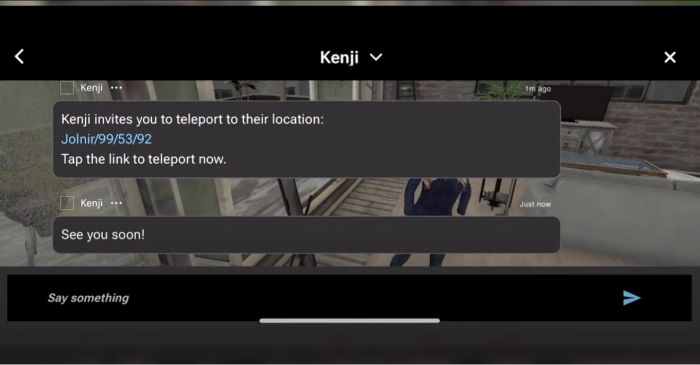
  • Explore the world via the Destination Guide, mobile showcase, teleport, deep links, TP offers.
  • Interact with the world through a limited set of movements (walk, run, fly, sit, stand) and object interactions (touch, sit) – or park your avatar and explore via flycam.
  • Socialise and stay connected (nearby chat, group chat, IM, group notices, find contacts, inspect profiles).
  • Create and log in with a new account.

The app is currently available on the following platforms:

  •  iOS (minimum: iPhone X running iOS 16.6.1).
  • Android: mid-to-high-end Android device (comparable to Google Pixel 6 or higher) running Android OS 13 or higher.

Those participating on iOS will also require the TestFlight app for testing and feedback, whilst Android users will need to provide feedback through Google Play.

Premium Plus subscribers can find out more by following this Support Page link and (I believe) submitting a support ticket. There is also a link on this page to a FAQ  on the Mobile app. It is not clear if this testing is subject to any form of NDA.

SL Mobile, December 2023 – screen cap via Linden Lab

Commenting on more general availability for the app, Linden Lab state:

It’s still early days for our mobile app. Our mobile team has been hard at work building a mobile-centred design and foundational features so that we can all enjoy Second Life anywhere we want. We’re ready to share what we’ve built so far with our most dedicated residents and we ask for your help as we continue to develop this project through this early Alpha stage, but we do not have a date for the next phase of testing or full release at this time.

Using Premium Plus members for initial feedback is an interesting choice. On the one hand, it would appear to greatly limit the potential resource pool of people willing to work on the app and give objective feedback; on the other it does allow Linden Lab to manage the size of the pool of likely applications at this point in time. Whilst some might feel snubbed at the restrictive nature of this initial Alpha, it is probably worthwhile noting that the SL Mobile app has already had input from users and will continue to do so; so will hopefully include more broad-based Alpha and Beta testing using an expanded pool of users in 2024, as LL continue to develop the app.

In the meantime, here’s the video.

2023 SL SUG meetings week #50 summary

Subcutan Art Gallery: Japanese Garden (lower area) blog post

The following notes were taken from the Tuesday, December 12th Simulator User Group (SUG) meeting. They form a summary of the items discussed, and is not intended to be a full transcript. A video of the meeting is embedded at the end of this summary, my thanks as always to Pantera for recording the meeting and providing it.

Meeting Overview

  • The Simulator User Group (also referred to by its older name of Server User Group) exists to provide an opportunity for discussion about simulator technology, bugs, and feature ideas.
  • These meetings are conducted (as a rule):
  • They are open to anyone with a concern / interest in the above topics, and form one of a series of regular / semi-regular User Group meetings conducted by Linden Lab.
  • Dates and times of all current meetings can be found on the Second Life Public Calendar, and descriptions of meetings are defined on the SL wiki.

Simulator Deployments

  • Tuesday, December 12th: the SLS Main channel was re-started without any simulator updates being deployed.
  • Wednesday, December 13th: the “Fall Colours” maintenance update should be expanded across all RC channels. This update includes llRezObjectWithParams, llIsFriend, but will not include the game controller updates.

Viewer Updates

On Tuesday, December 12th, the glTF PBR Materials Maintenance RC, version 7.1.1.7173980941, was issued. Among the updates / fixes included are:

  • Fix: BUG-234706 “[GLTF] [PBR] Performance unstable / massive performance loss compared to default release”.
  • Fix: BUG-234740 “[PBR] [Windows] Scaled/Offset Textures Quality Degrades at Short Distance”.
  • Fix: BUG-234632 “[PBR] – Regression – Lossless compression normal map upload via GLTF asset is broken”.
  • Fix: BUG-234740 “[PBR] [Windows] Scaled/Offset Textures Quality Degrades at Short Distance”.
  • Improvement: “SL-20611 Haze has no effect on local lights”.
  • Update: 17 new Materials available via the Library.
  • Please refer to the release notes for the full list of fixes / updates / known issues for this release.

Other viewers in the pipe remain as:

  • Release viewer: version 7.0.1.6894459864, the glTF / PBR Materials viewer, issued November 17, promoted November 28.
  • Release channel cohorts:
    • Maintenance V(ersatility) RC viewer, version 7.1.1.7039128750, December 1.
    • Maintenance X RC, version 6.6.17.6935636398, issued November 21 – usability improvements.
    • Maintenance Y, version 6.6.17.6935642049, issued November 21 – My Outfits folder improvements; ability to remove entries from landmark history.
    • Emoji RC viewer, version 6.6.15.581551, August 31.
  • Project viewers:

Game Controllers

From Leviathan Linden:

I’m trying to provide an updated viewer that allows for keyboard support: send game_control data even if you don’t have a game controller. I hope to have something available for download today, but just got the Mac version to build but it is missing some UI and I don’t know why yet.
What would be new in that game_control viewer are two things:
  1. The ability to map most avatar movement controls (e.g. push_forward, strafe_left, etc) that have keyboard bindings… to game_control axes and/or buttons.
  2. [A] small change where I negate the axis by default on the X-components of the joysticks on your controller. This to make it so that LEFT is in the positive direction [so] if you’ve already negated that channel in test scripts then you will need to remove your own negation.
What is NOT in the new viewer:
    • Remapping of controller inputs
    • Arbitrary keyboard mappings to game_control inputs — you can map the “Actions” of avatar movement/control that already have keyboard mappings… to game_control inputs.
    • Detection of odd game controller hardward — I still have a Thrustmaster HOTUS controller on order but it hasn’t arrived yet. I blame X-mas package traffic jams.

Combat Simulation

  • Rider Linden has published his outline document on improving SL’s combat capabilities, which can be found within the combat systems discussion thread on the forums, and is gaining good feedback on it.
  • This led to a general discussion on requirements / concerns over conflicts in trying to address multiple combat systems, managing Damage (and the potential for a “damage budget” / sliding scale of damage based on weaponry.
  • The new user group for combat systems should be starting up in the new year. For now, please refer to the meeting video for the general discussion, which starts around 18 minutes into the meeting and continues through until the end.

In Brief

  • Rider Linden continues to prove himself cool and hip – this week referencing Carl Reiner’s classic neo-noir mystery comedy film Dead Men Don’t Wear Plaid. At least he didn’t get in T-R-U-B-I-L for doing so.

† The header images included in these summaries are not intended to represent anything discussed at the meetings; they are simply here to avoid a repeated image of a rooftop of people every week. They are taken from my list of region visits, with a link to the post for those interested.

2023 SL viewer release summaries week #49

Logos representative only and should not be seen as an endorsement / preference / recommendation

Updates from the week through to Sunday, December 10th, 2023

This summary is generally published every Monday, and is a list of SL viewer / client releases (official and TPV) made during the previous week. When reading it, please note:

  • It is based on my Current Viewer Releases Page, a list of all Second Life viewers and clients that are in popular use (and of which I am aware), and which are recognised as adhering to the TPV Policy. This page includes comprehensive links to download pages, blog notes, release notes, etc., as well as links to any / all reviews of specific viewers / clients made within this blog.
  • By its nature, this summary presented here will always be in arrears, please refer to the Current Viewer Release Page for more up-to-date information.
  • Note that for purposes of length, TPV test viewers, preview / beta viewers / nightly builds are generally not recorded in these summaries.

Official LL Viewers

  • Release viewer: version 7.0.1.6894459864,the glTF / PBR Materials viewer, issued November 17, promoted November 28 – No Change.
  • Release channel cohorts (please see my notes on manually installing RC viewer versions if you wish to install any release candidate(s) yourself).
    • Maintenance X RC, version 7.1.1.7088410646, December 7 – usability improvements.
    • Maintenance-W RC viewer, version 7.1.1.7088402585, December 5 – bug and crash fixes.
  • Project viewers:
    • No updates.

LL Viewer Resources

Third-party Viewers

V6-style

  • Black Dragon updated to version 5.0.1 (PBR) on December 9 – release notes.

V1-style

  • Cool VL viewer updated to version 1.32.0.1 (Stable) (PBR) on December 9 – release notes.

Mobile / Other Clients

  • No updates.

Additional TPV Resources

Related Links