On Saturday January 11th, Nicky Perian announced a test version of a Mac build of Kokua is now available, and has also issued a call for assistance from Kokua / Mac users.
Several hours ago the first Mac build completed and I logged on to Second Life beta grid, Aditi. Rebranding from Second Life to Kokua is needed. If there are Mac users that would like to help in this area please respond and I’ll help set up a build environment on your system. I would like Mac users to test and provide look and feel opinions as comments to this post. If there are bugs please report them to our issue tracker.
Having a Mac build of the viewer has been one of the more popular requests made to the Kokua team, so if you have a Mac system and are willing to help out test-driving the new Mac build and reporting back both opinions (via the Kokua blog post) and on any issues you discover (the latter via the Kokua issue tracker, as indicated above), please download the viewer from the Kokua nightly builds directory.
Similarly, if you are willing to help with rebranding the viewer from Second Life to Kokua (which, as noted above, will require a viewer build environment created on your system which Nicky can provide help with setting-up), do please contact Nicky either directly (via in-world IM or through the comments on the Kokua blog post.
(Please do not leave feedback or offers of assistance on this blog, they may not be picked-up.).
The Lab’s Fitted Mesh project viewer has been out for a month, and has seen some good feedback from those who have been trying it out.
Already one update to the viewer has been released, correcting a number of problems, and the Lab has been working with content creators and users who have been providing feedback through the FITMESH project reporting on the JIRA.
However, Lab is keen to start progressing the project in the New Year, and so a “last call” for issues has gone out.
“If you’ve been seeing any issues with the current fitted mesh project implementation, or anything that needs to be added/changed, please make sure that the issues are filed by now, or as soon as possible,” Nyx Linden said at the Content Creation User Group meeting on Monday 16th December.
For those who missed the original announcement, Fitted Mesh is a means by which mesh garments are rigged to the collision bones of the avatar skeleton, allowing them the be resized as the avatar’s shape is changed using the Edit Shape sliders. In essence, it is the same approach as has been seen within Second Life and variously referred to as the “RedPoly method” or “Liquid Mesh”.
The technique uses both the existing bones in the SL avatar and an additional set of bones in order to work, and you can read more on it in my original preview article, if you’re not already familiar with the approach.
Oz Linden, also at the meeting, underscored the “last call”, saying, “To emphasise what Nyx said earlier … get your comments and issues in on Fitted Mesh ASAP so that we can do a release candidate after the holiday break.”
Quite when that release candidate will appear is unclear; there is a lot going on at the Lab, and several projects are likely to be vying for room in the release channel (although some will hopefully go to project viewer status first and give the rest some elbow room).
However, if you have been looking at the current Fitted Mesh viewer and wish to have input to the project, now is very much the time to do so. Similarly, if it is something which has been on your “to do” list, now is the time to move it to the top, or risking seeing your chance ot have input to the project, and influence on the Lab, vanish.
On Saturday December 14th 2013, the Firestorm team hosted another informal question-and-answer session. While the meeting was recorded, the Firestorm team are aware that many of their users have hearing difficulties, and / or prefer to read text. It is because of this that this transcript has been provided.
When reading it, please remember:
This is not a word-for-word transcript of the entire meeting. While all quotes given are as they are spoken in the video, to assist in readability and maintain the flow of conversation, not all asides, jokes, interruptions, etc., have been included in the text presented here
If there are any sizeable gaps in comments from a speaker which resulted from asides, repetition, questions to others etc,, these are indicated by the use of “…”
Timestamps are provided as guidance should anyone wish to hear the comments in full from any speaker on the video
Questions /comments were made in chat while speakers were talking. This inevitably meant that replies to questions would lag well behind when they were originally asked. To provide context between questions and answers, questions in the transcript are given (in italics) at the point at which each is addressed by a member of the Firestorm team, either in voice or via chat.
Please note: This transcript is provided for informational purposes only. As such, questions on technical issues relating to Firestorm and / or project-specific questions cannot be answered here unless one of the Firestorm team drops by.
The TL;DR Summary
The numbers in braces are timestamps which refer to the section of this transcript where more details can be read, and to the section of the video recording where the relevant comments can be heard.
Main Discussion:
The next release: will most likely be a stabilisation of the code currently in 4.5.1 rather than introducing major updates, although this is still to be determined. LL have a lot coming down the pipe, which Jessica was hoping would be ready for inclusion in the next release, but that is looking unlikely unless something significant happens to change things [0:00:25-0:02:48]
Response to the beta has been good, around 120,000 downloads, of which around 6,000 are for the Windows 64-bit version. A number of people have subsequently reverted back to the 4.4.2 release due to issues. There are significant issues with voice, Mac users have encountered issues arising from Cococa (Mac and Voice issues covered later as well).[0:02:48-0:06:03]
Reference is often made to “Linden Bugs”. This does not necessarily mean they are the Lab’s fault; it simply means that the SL viewer has the same issues [0:06:03-0:06:53]
Firestorm releases are currently roughly four months apart. Ideally this should be two months, which is a target, but needs to be balanced with the risk of overwhelming the support volunteers (who need to both learn and support new releases). Therefore, it might mean a compromise of a release every quarter [0:06:53-0:09:40]
Voice issues: Vivox problem, LL have it as well. Firestorm have a series of videos demonstrating the problem. If a user on FS 4.5.1 beta has the issue, the recommendation is to revert to the 4.4.2 release [0:09:53-0:10:46]
The FS Windows 64-bit has been well received and feedback has been positive. Most people are reporting imporved stability rather than improved performance compared to the 32-bit version [0:11:10-0:12:56]
Oculus Rift is coming to Second Life [0:13:10-0:15:27]
Leap Motion is coming to Second Life – and the Firestorm Team have taken a lead in the integration work with the viewer [0:15:27-0:22:49]
Firestorm 4.5.1 beta and Firestorm release numbering explained [0:23:02-0:26:35]
Why Firestorm block versions and why Phoenix isn’t currently blocked [0:52:02-0:58:41; 1::0036-1:02:56]
Firestorm Q&As qill be monthly from January, alternating between 08:00 SLT and 16:00 SLT month-by–month [1:12:03]
Q&A Session:
Would it be an option to have different branches for people to download …? – includes discussion on why FS does not have nightly builds and on joining the FS beta testers [0:27:56-0:37:32]
Can we hope for more tattoo layers? [0:37:35-0:39:19] – reply includes reference to Linden Lab User Group meetings, the forums in which such questions can be asked
Will the new version [of Firestorm] be in 64-bit, and is Fitted Mesh coming? [0:40:00-0:47:40]
Why is IM and local chat so laggy in the beta version of Firestorm? (Mac build) – known issue, with both Firestorm (FIRE-12172) and LL JIRAs raised against it [0:47:40-0:49:47]
Why will music streaming not work on 4.4.2 with the new Mac OS upgrade? – Mac OS X 10.9 Mavericks issue reported under FIRE-10630 There is also a list of Cocoa bugs specific to the Mac build [0:49:47-0:52:02]
Dealing with inventory “jump” issues and bug regressions [0:52:02-1:00:36]
Are older versions of Firestorm also blocked from OpenSim when they are blocked from SL? – any version prior to 4.4.2 will unfortunately be blocked from OpenSim when blocked from SL. All versions of FS from 4.4.2 onwards can be individually blocked from grids [1:02:56-1:04:13]
Has the FS team ever considered working on a mobile Firestorm product? – includes the FS April Fools from 2013, and accessing Firestorm remotely [1:04:16-1:10:17]
Has the FS team considered “drawing a line” on how far they’re veer from the LL codebase (e.g. additional feature input, etc.), in order to improve the release cycle and lessen the maintenance overheads? [1:13:20-1:21:01]
What drives the FS team to do what they do? [1:21:40]
Thursday December 12th saw the Kokua team release version 3.6.12.30743 of the viewer. This appears to be a fairly contained update, focused on updating the viewer with the recent SL viewer 3.6.11 GPU Table updates and the 3.6.12 NameUpdater changes. Neither of these involved functional changes to the viewer from LL’s side, but do bring Kokua to parity with the current SL 3.6.12 code base.
UK-english dictionary added to the spelling checker
Removal of packaged PCRE libraries from Linux 64-bit builds as they caused web kit to fail to load on newer Debian based distributions.
The release notes also point out that when the viewer is started for the first time following installation, there will be a notice and link to check graphics drive availability. The Kokua team urge caution if the option is taken to update drivers, as system breakages have resulted in the past. They also point out that the notice is a recommendation to check for updated drivers, not a requirement to update.
The CtrlAltStudio and UKanDo TPVs have both undergone self-certification and have been added to the Third-party Viewer Directory (TPVD).
The associated wiki page for CtrlAltStudio describes the viewer as :
The CtrlAltStudio Viewer has been set up in order to try out and share a number of ideas, the first being stereoscopic 3D display and some initial Oculus Rift support . It is based on the Firestorm Viewer which it tracks closely while adding particular features.
The associated wiki page for UKanDo describes the viewer as:
UKanDo gives a whole new perspective in Second life by using a camera placement adopted by the vast majority of third person video games.
Also includes RLV along with plenty of other useful tools. It won’t have all the gadgets/gizmos a lot of the bigger viewers have, the aim is to keep it as lite as possible with only the fixes, gadgets and gizmos we need to keep the Viewer stable and up-to-date! The Avatar happy! And to aid with building!
(Please note that descriptions are supplied by the viewer developers, not Linden Lab.)
Congratulations to both viewers, both of which I’ve been following in these pages. You can catch-up with them as follows:
As a part of the holiday period, and as mentioned in various SL projects reports of min over the last few weeks, Linden Lab operate a code freeze / no change window in which no major updates to either the viewer or the simulator code are made, other than those required to fix significant issues impacting Second Life. This code freeze, which this year comes into effect on Monday December 16th and extends through until the start of 2014, encompasses all thing server, and the SL viewer release channel (the release viewers and RCs). The aim is to give LL’s support personnel and contractors a chance to enjoy the holiday period as well.
However, as well as encompassing the server and LL’s viewer, the Lab also request that TPVs refrain from making major releases during the same period, again to help lessen the load on LL’s viewer support team, who take a lot of TPV-related calls when users encounter problems.
This means that the window for TPVs to get significant updates out is closing fast, and both Black Dragon and UKanDo have both had what is likely to be their last updates this side of the new year (although in Black Dragon’s case, it appears the reason is because Niran is having fun relaxing with a new computer game!). Both updates are small, tidy packages, and as such, both are overviewed here.
Black Dragon 2.3.9.2
Released on Wednesday, December 4th, hard on the heels of version 2.3.9 and 2.3.9.1, both of which appeared on December 3rd, Black Dragon 2.3.9.2 is described as “Maintenance #4”, and is the latest in a line of maintenance releases of the viewer which build on existing functionality and UI changes, rather than adding anything significantly new to the viewer.
That said, version 2.3.9.2 does offer what is something of a new feature: “realistic Mouselook”. Traditionally, when in Mouselook, the camera is positioned / locked towards the centre of the avatar frame (around chest level). With this release, Niran has moved the camera position so it is effectively in the avatar’s head.
This may sound a trivial, but it does make something of a difference when operating in Mouselook, as movement in Mosuelook as a lot more responsive to avatar animations. While it is somewhat dependent upon the animations you are using, it can mean, for example, that when running, your mouselook view with “bounce” in time with your avatar’s running strides.
To help demonstrate the difference, Niran has produced a video showing what happens when in Mouselook with Black Dragon 2.3.9.2; you might want to compare it to your own experience using Mouselook in a viewer without the updates.
The option can be toggled off / on via Preferences > Camera > Mouselook Options. Additionally, Niran recommends that when using it, Mouselook Smoothing (same section of Preferences) is enabled.
A further Mouselook fix with Black Dragon 2.3.9.2 comes by way of Adeon Writer, which corrects the issue of hand attachments (weapons, etc., behaving oddly and appearing to move away from the avatar when entering Mouselook or when crouching in Mouselook.
The remaining updates for the release as recorded in the release notes comprise:
Addition of all windlight presets found in other versions of Niran’s viewer (other than his own “realistic” settings)
Updates to a number of floaters, include People, which has been a little reduced in size and the addition of the Send button to the Notices floater
Updates to the loading screens and a fix to the version history link on the log-in screen.
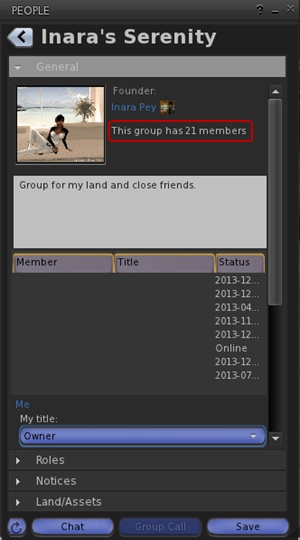
Total number of users in a group displayed for those groups you have joined (see below left)
This release offers another small package of tidy changes, several again gathered from other TPV offerings, and it’s good to see that credits for imported features are starting to appear in the release notes as well. The latter list the updates within the release as comprising:
Merged:
Updates from RLV
Tweaks:
Addition of Penny Patton’s windlight settings
Re-write/clean-up of the Status Bar code
Possible speed improvements
UKD_Logo icon updates.
Fixes:
Black background in the address bar combo list’s scroll bar fixed
An old bad merge for the avatar context menu in chat which didn’t show at the time
Net Stats graph now shows correct Kb and wdiget now clickable
Features Added:
Show the total member count on the Group panel’s General tab if you’re a member of that group
Edit option added to the Area Search floater’s context menu
Username login drop-down combo box for multiple accounts
Frames-Per-Second displayed on StatusBar (from NiranV Dean). Modified and clickable (Hidden by default)
Additional Status Bar show / hide options for FPS, Net Stats, Avatar Offset Slider and Draw Distance Slider.
Additional show / hide options for elements in the status bar (sliders, buttons, info displays)
Feedback
Both of these releases offer neat packages of updates to their respective viewers, both of which continue to be developed and enhanced in small, relevant steps and which also keep track with most of the recent code base updates from Linden Lab.
Performance-wise, both viewer showed more-or-less consistent performance levels on my primary PC as shown with earlier releases, and I had no difficulty in running both viewers with the major graphics bells and whistles enabled (ALM on, Ambient Occlusion Enabled, shadows set to Sun/Moon + Projectors, etc.), at home and in wandering.
On Monday November 18th, Firestorm will commence blocking older versions of the viewer from accessing Second Life.
This is a move that has been coming for some time, and has been announced on a number of occasions through the Firestorm blog, through Firestorm user meetings and Q&A sessions, and which has been repeated through various blogs, including mine.
As it is, there are a good number of users still running versions of Firestorm that pre-date the introduction of Server-side Appearance (“avatar baking”) and some which even pre-date mesh rendering. Not only does running such versions lessen the user experience and increase the workload Firestorm support volunteers have in trying to assist people on older versions of the viewer.
Nor are the Firestorm team doing this entirely off their own backs. For obvious reasons, the Lab would like to see more users benefiting from the broad range of improvements which have already been rolled-out to SL (and those still being deployed in terms of further viewer-side updates), including SSA, interest list updates, improvements to the rendering pipe, improvements to viewer / server communications, and so on, all of which should improve the user experience, even for those on older hardware.
Given that Firestorm does have the lion’s user of active users, just under 65,000 of whom are still logging-in to Second Life on versions of the viewer pre-dating the more recent SL updates such as SSA, the easiest way to encourage them to update is to block older versions of the viewer.
Many Firestorm users are still on versions pre-dating SSB and mesh rendering
This being the case, once the block comes into force, it means only users on Firestorm 4.4.0 through to the current version(s) will be able to access Second Life. As such, from November 18th, the following versions of Firestorm will be blocked from Second Life (numbers of people still using each version given in brackets):
4.3.1.31155 (40,451)
4.2.2.29837 (14,120)
4.2.1.29803 (60)
4.1.1.28744 (3334)
4.0.1.27000 Beta (4585)
3.3.0.24882 maintenance release (606)
3.3.0.24880 hotfix release (571)
3.2.2.24336 (881)
3.2.1.24179 (166)
For those who feel they may be unable to run later versions of Firestorm, the recommendation is to give a later version a go and to contact Firestorm support teams for assistance or try the Firestorm troubleshooting wiki pages, as issues encountered may be fixable. For those who have genuine issues in trying to run later versions of Firestorm, Linden Lab’s Third-party Viewer Directory offers a list of self-certified alternative viewers you might want to try.
For further information, please refer to the Firestorm blog announcement.
Please note: I cannot address technical questions relating to Firestorm through this blog. Please contact the Firestorm support groups if you have specific technical questions.
 On Saturday January 11th, Nicky Perian announced a test version of a Mac build of Kokua is now available, and has also issued a call for assistance from Kokua / Mac users.



 Inara Pey: Living in a Modemworld