Update, Thursday, December 4th: Black Dragon 2.4.1.4 bug fix update released on Wednesday, December 3rd.
It’s been a busy week for Niran V Dean and his Black Dragon viewer, with no fewer than four updates between Thursday, November 27th and Tuesday, December 2nd.
The first of these updates – which lifted the viewer from version 2.4.0.4 to 2.4.1 came on Thursday, November 27th, and was quickly followed by two bug fix updates, 2.4.1.1 on the 27th and 2.4.1.2 on Friday November 28th. Then version 2.4.1.3, also a bug fix update, appeared on Tuesday, December 2nd.
The major part of these updates, appearing in version 2.4.1, is a complete overhaul of the UI. Gone is the ability to place toolbar button up in the top left of the menu bar area, the ink blots surrounding floaters and panels, etc. Instead, the UI presents a look heavily influenced by Valve’s Steam client. The result is a striking, charcoal grey finish to floater and panels, on which the white text shows up somewhat better than it did with the previous UI, together with bold white lines denoting fields, input boxes, etc., and individual headings to sections within a floater or tab highlighted in blue, all in a manner that works quite well.
Black dragon’s 2.4.1 UI design
There are a few immediately noticeable “Niran-isms” on display: the Favourites bar, for example, is now above the Navigation bar, rather than under it, as with most viewers. There’s also a nice incorporation of the notifications icon into the navigation bar area as well, over to the right of the screen. And, of course, the Dragon menu single point-of-access to the viewer’s menu tree is retained.
Given this release was an extensive overhaul of the UI, 2.4.1 and its subsequent releases didn’t bring too much in the way of new features to viewer, which is unsurprising – there’s work enough involved in getting the UI sorted for a release. There were a few issues following the initial 2.4.1 update – hence the release of 2.4.1.1 through 2.4.1.3, but looking at the release notes, most of these seem to have been nips and tucks rather than major “oopsie” fixes.
The updated preferences panel showing the crisper layout of the new UI
In terms of LL code updates, Black Dragon 2.4.1 through 2.4.1.3 see the viewer again reach parity with the Lab’s viewer, including implementing the benchmark viewer code and HTTP pipelining (I believe).
As always, for a full breakdown of updates, please refer to the Black Dragon change log, which lists changes from the most release release (in this case, 2.4.1.1) on down.
I did encounter a couple of minor problems with the viewer – although these may well be operator induced. Setting neither the “Show Network Stats” and “Show L$ Balance in Statusbar” options in Preferences > Interface seemed to do anything for me. I was particularly keen to try the latter, as I personally find having my account balance displayed in the Inventory floater nothing short of the PITA. But, other than these, the – admittedly brief – drive I did take with the viewer revealed nothing exasperatingly unpleasant or unexpected.
Overall, and interesting and clean UI update; one which I personally prefer to the last outing.
Update, December 7th, 2014: Kokua 3.7.22.35091 was released on December 5th. This update includes fixes for issue #292 noted in the review below, and for an issue with the automatic updater (issue #322.
Nicky Perian released the latest update of Kokua for SL on Sunday, November 30th.
Given the last Second Life specific release of the viewer was in July, the new release, version 3.7.21.35082 sees the SL version of the viewer bounce up to parity with a lot of recent LL viewer updates, as noted in the release notes. This being the case, please note that a clean install is highly recommended.
The Kokua 3.7.21 release sees the addition of the unified snapshot floater
In addition, the viewer also includes the following LL updates which, at the time of the Kokua release, are still at release candidate status within the SL viewer:
3.7.20 code base:
Attachments updates – adds some fixes to previously released changes in the way joint offsets in rigged meshes are handled & fixes some issues found with adding and removing attachments after the recent AISv3 deploy
GPU Benchmarking update – removes the need for the GPU table by performing a series of tests when first setting the graphics defaults for the viewer (note this code contains fixes for issues found with the original benchmarking code release in the official SL viewer)
3.7.21 code base:
Snowstorm contributions release – Japanese input; improved rendering of projectors; fixes for object editing bug when rotating and for crash on exit on OSX Yosemite in full screen mode, etc
Maintenance updates – a broad range of fixes for voice, privacy, rendering, texture animation, avatar distortion, inventory management, sounds, mouselook in Mac, and more
Group Bans now a part of Kokua with version 3.7.21.35082 – click for full size
Kokua Team Contributions
In addition the the merging and testing of recent code release from the Lab, Kokua 3.7.21.35082 includes the following contributions:
The viewer has been updated so it will no longer automatically start following a Windows install
Custom currency support has been added so that the local grid currency symbol will be displayed (original work by Armin Weatherwax)
New option to hide account balance in snapshots: Preferences > Kokua > Privacy > Do Not Show Money Balance on Snapshots (original work by Armin Weatherwax)
An option to open the movement controls has been added to View > Movement Controls.
In addition, Nicky notes:
On Linux Mint 17 32 bit, the load library path was not set correctly, and this has been amended for both 32-, and 64-bit.
The gridargs.dat file is no longer reader when starting kokua. Instead pass parameters along the command line (e.g. ./kokua –channel “‘Kokua XonXoff'”)
There are a few known issues with the release, all of which are being tracked via the Kokua ticket system. These include:
The option to display your avatar’s name in the viewer’s title bar ((Preferences > Kokua), should only be set after logging-in; if set from the log-in splash screen, they will crash the viewer – Issue #289
Teleport from SL search fails. Teleports from Legacy and Map searches work. Landmarks from inventory work. Issue #292
The YouTube media volume control doesn’t work –Issue #312
[RLVa] Names are not all gone in nearby chat list of names –Issue #314.
Pssst! The next release just might have group bans after all!
Jessica Lyon, project manager for the Firestorm team has officially announced the upcoming release of the next version of SL’s most popular viewer, although no actual release date is given.
A new release has been hinted at several times over the last few weeks, and the team is working hard to keep to a 3-monthly release cycle. At the moment, the upcoming release is focus of the Firestorm QA team and is being poked at by beta testers.
Releasing a viewer isn’t necessarily straightforward as might be thought; new features and shiny have to be measured against current code status, stability, and so on, and bugs and their fixes must be weighed against the opportunity to add new shiny or not. All of this made for a balancing act for all concerned; one in which – especially given the size of Firestorm’s user base – not everyone is going to come away happy when a release arrives.
There have been a lot of updates flowing out of the Lab during the past year, many of which have yet to find their way into Firestorm. But as Jessica notes, stability tends to win-out over trying to crowbar everything into a viewer release:
Firestorm is not, and has never been, a “bleeding-edge” viewer. We have always focused on quality over quantity, stability over shiny. Slow and steady wins the day. Despite complaints and objections, this strategy has helped make Firestorm the most widely used viewer in Second Life by a long shot. In code, almost anything new has bugs and kinks that need to be worked out regardless of who wrote it and how vigilant they were at it. That’s because despite how much testing you do, it isn’t until it lands in the hands of the many that the deepest rooted software glitches start to crop up. Knowing this is one of the reasons we do not merge in and release new features from Linden Lab right away.
While the updates coming out of the Lab have all be to the good, they’ve also not been without their own problems. The AIS v3 code updates, for example, resulted in some od bugs and issues of a non-trivial kind, some of which have only recently been fixed in the new Attachments RC viewer (version 3.7.20.296355) that appeared on Wednesday, November 5th. And while the CDN and the HTTP pipelining viewer have brought improvements to the majority of SL users, they also have generated some issues.
The SL Share 2 features for sharing photos with Flickr and Twitter, and adding post-process filters to images will probably not be in the next release of Firestorm
The upshot of this is that while the upcoming release of Firestorm will have new features, bug fixes and improvements, in order to keep code merges, etc., as straightforward as possible and avoid issues which may arise from cherry-picking features and updates from different LL releases, Jessica warns that when released, the new version of Firestorm will be without AIS v3, HTTP (although obviously, it will work with the CDN, just as all viewers do already), SL Share 2, and may not have group bans.
But it’s not all bad news, as Jessica notes:
But we absolutely will have plenty of other features, bug fixes and improvements worth updating for to which I’m very excited about!
Testing is still underway, so it will be another few weeks, most likely, before the new Firestorm release appears. When it does, if you’re a Firestorm user, please do keep in mind that if the feature you were really looking forward to isn’t in the release, it doesn’t men they’ve forgotten it or are ignoring it; they’re just trying to bring you the best, more reliable experience they can whilst trying to avoid showering you with unwanted bugs and issues.
I’ll of course have the usual review of the release when it appears.
Things are liable to be getting busy in terms of TPV viewer updates over the next month or two. As noted in this blog, the Lab has now released their HTTP pipelining code for the viewer, which TPVs are being encouraged to adopt as soon as they can, and there have been a spate of other updates and fixes for the viewer that already are, and will be finding their way into TPVs.
Two of the most recent v3-style viewer to update have been Black Dragon and the Restrained Love Viewer, and the following is a quick overview of the most recent releases for both of these viewers.
Black Dragon 2.4.0.3 and 2.4.0.4
Black Dragon received two release updates in the space of around 24 hours. The first came when NiranV Dean released version 2.4.0.3 on October 29th, and the second saw the release of version 2.4.0.4 on October 31st.
A blog post on Niran’s website outlines the principle changes which appeared in the 2.4.0.3 version of his viewer, summarising them as:
A fix for the viewer failing to correctly apply maturity settings
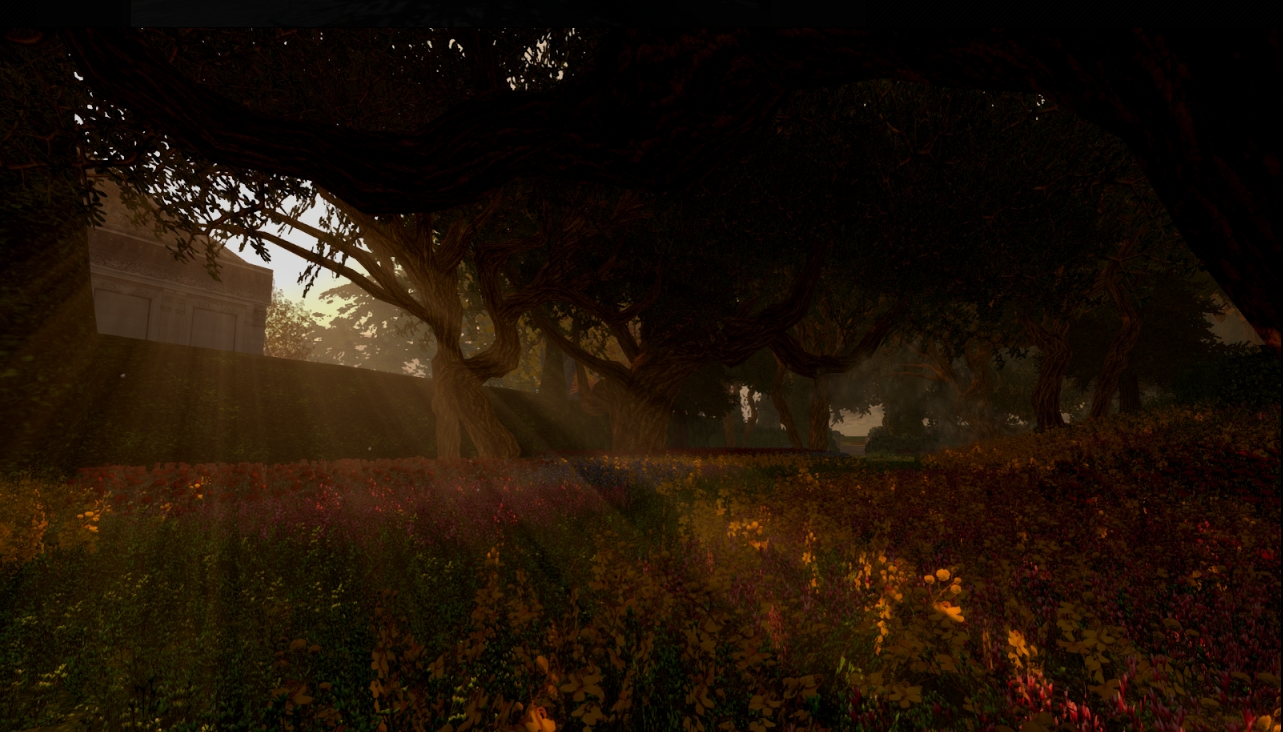
An experimental update to the Godrays feature by Tofu Buzzard so that they now cast a faked volumetric sunlight everywhere where light can fall
Godray default lowered to 32
A new option in Preferences > Display to switch between a new shadow softening kernel by Tofu Buzzard and the LL default
Keyboard shortcut for Depth of Field locking changed to CTRL-X in the hopes of correcting a clash with another (unknown) shortcut
Addition of Geenz Spad’s spotlight reflection changes.
The latest release(s) of Black Dragon see an experimental volumetic lighting capability added to the Godrays feature (images via the Black Dragon website)
The 2.4.0.4 release is, in terms of user functions, the same as the 2.4.0.3 release; the major difference is that he has the Lab’s HTTP Pipelining updates included (which Niran has, for some reason referred to as the “CDN code”).
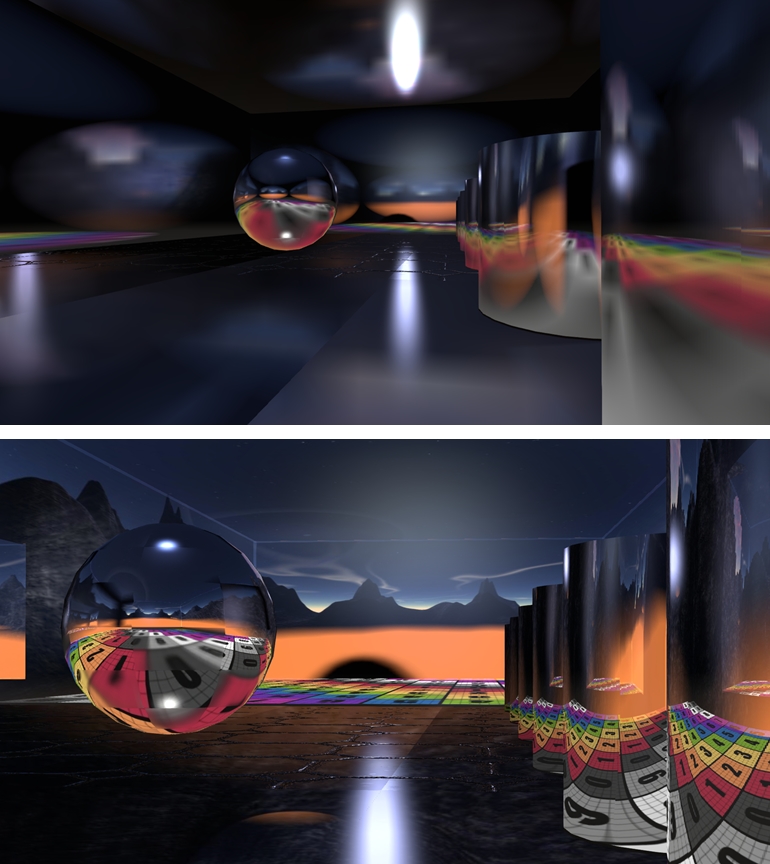
Geenz Spad’s work on glossy projectors can be found in JIRA STORM-2067. This corrects the tendency where, depending on a surface’s environment intensity, projected reflections they become more blurred as their intensity increases, they should become sharper for higher gloss values and more blurred for lower values.
Geenz’s work on projectors: as projected in the current viewer code (top) and in a viewer using Geenz Spad’s enhancements
As always, full details of all changes can be found in the change logs for the viewer.
This is another progressive step forward with Black Dragon, with Niran working to address issues as well as integrate updates from both LL and other developers which help further enhance the viewer and take it in a direction which matches the Lab’s important HTTP updates as well as enhancing the features Niran uses to help differentiate his viewer from other TPV offerings. Black Dragon users should be pleased.
On Monday October 27th, the Alchemy team released version 3.7.19.34077 Beta of their viewer. This latest release brings with it a series of updates, nips, ticks and tweaks which collectively move the viewer further towards a full release status.
As with the last release (for which I also provided an overview), the latest version is available for Windows on both 32-bit and 64-bit flavours, and a “universal” Mac offering suitable for both 32-bit and 64-bit (Linux is still “coming soon”). As is common for my reviews of viewer updates, this is not a detailed examination of every change made in the release, but rather an overview of those items which are liable to be of significant interest to users. Details of all updates can be found both on the Alchemy release notice for the viewer, and the change log.
Lab Updates
As this release of Alchemy is based on the Lab’s 3.7.19 code base, it has almost all of the most recent updates from LL, with the notable exception of the revised log-in splash screen – so the log-in area remains in its familiar place at the foot of the screen. And I say “notable” here only because I’ve become familiar with using the Lab’s log-in screen while playing with various versions of the official viewer, not as any indication of anything else.
The viewer does, however, get the latest bug fixes, etc., from the Lab to make it to release status and incorporates things like the updated snapshot floater and AIS v3. More particularly given the deployment of CDN support across the grid, it includes Monty Linden’s latest viewer-side HTTP updates, which should see the viewer handle scene loading a lot faster, as well as generate significant improvements in inventory fetching.
Search
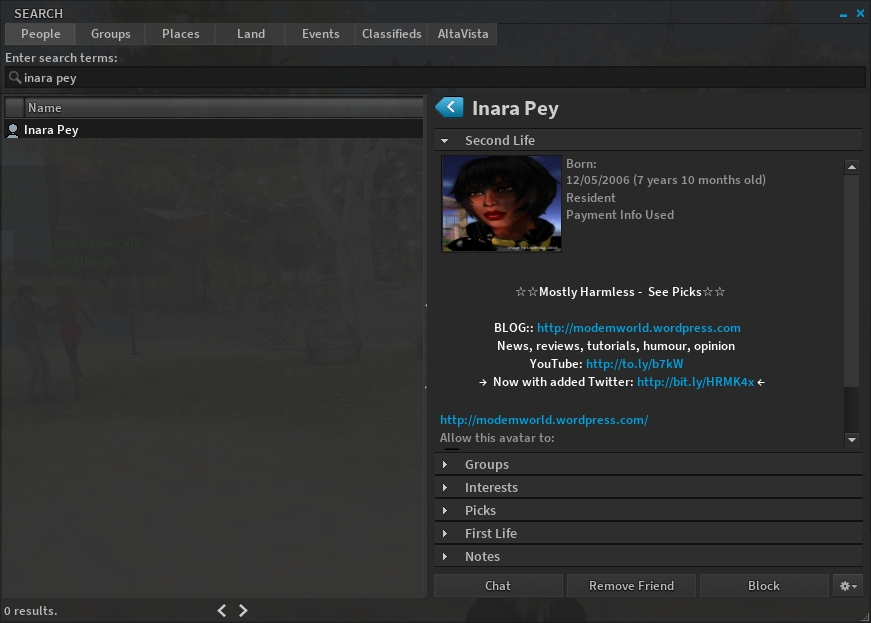
Search has been given an impressive overhaul with this release, allow the use of both the v3-style web search option and also legacy search. Considerable effort has gone into how results in the legacy search options are displayed, so that all the information relating to a specific search item can be shown in the right side of the search panel without the need to open additional floaters (see below).
Alchemy now has full legacy search support, which includes the ability to display all the information on a selected item (such as my profile, as seen above) on the right side of the search floater panel
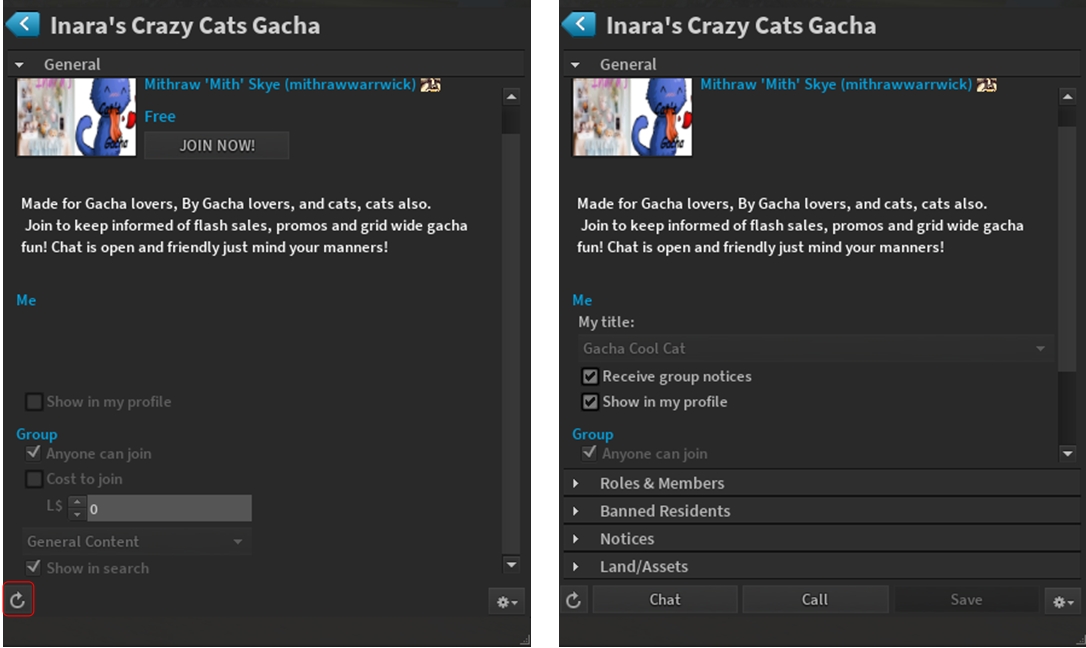
Another nice refine is that when searching for groups, if you select a group you have not joined, only the essential information is displayed – group description and purpose, the JOIN button, creator, who can join, etc. However, should you join the group, simply click on the reload button, and the displayed group will update to show all options and information.
When using the Search option to locate a group you have not joined, the results pane will only display the essential information on the group (l). However, should you then join the group, clicking on the reload button (highlighted on the left image) and the group information will update to a full display
World Map
The World Map gets an update with this release, with some trimming and realigning, together with a noticeable move of the legend and search options to the left of the map tile area. If I’m honest, I’m really not sure of how much of a difference this makes. There doesn’t seem to be that much space reclaimed, and the move of the legend, etc., to the left of the map seems as much as change for the sake of change rather than presenting a specific benefit. But then, that is the subjective nature of using viewers – we all see things differently.
Camera Floater
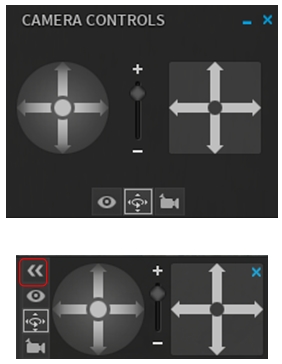
The old and new camera floater – note the button for minimising the controls on the latter
A potentially more appreciable change lies with the camera controls. Until now, Alchemy has defaulted to the v3-style camera floater which, as the website release notice states, takes a fair amount of screen space, a lot of which is made up of a blank panel.
The new Alchemy camera floater is a lot smaller and neater, making it a lot less real estate hungry without losing any of its useability.
For those who would like it almost completely out-of-the-way without having to close it entirely, the control buttons now include a button (highlighted in the lower image, right) which will hide / show the actual camera movement controls, sliding them neatly out of, and into view.
All told, a nice, tidy update.
Chat Updates
Alchemy 3.7.19.34077 includes a number of updates to chat, including:
When an avatar is typing in chat, “Typing” is displayed over their head (can be enabled / disabled via Preferences > Chat > Show Nearby Chat Indicators)
When someone engaged in an IM conversation with you is typing a message, a pen will appear alongside their name in the Conversations floater, indicating they are typing, and “XX is typing…” will appear in the header bar of the conversations floater, where XX is the other person’s name
You can prevent Alchemy from sending those people your own IM typing notifications via checking Preferences > Chat > Don’t Send Typing Notification in IM
You can change the nearby chat channel for use with translators and scripts:
/setchannel \ will set the desired channel (so /setchannel \1 will set it to channel 1)
/setchannel 0 will change it back
Alchemy will now allow up to 3096 characters in a single chat message.
Other Items of Note
Ability to display a pop-up when people enter / leave a region (People floater > Options > check Radar Alerts)
Option to select the display of user names, display names, both, etc., (Preferences > General > drop-down menu under Usernames (the Highlight Friends option the drop-down replaces can now be found under the Colors tab)
Preferences > Move & View includes three new check boxes:
Always enable flight ability
Moonwalk (aka don’t turn avatar around when walking backwards)
Nimble (aka don’t run certain animations, such as the landing “splat” when falling, to appear more nimble)
New movement options under Preferences > Move & View
Inventory auto-accept options moved from Preferences > Privacy to Preferences > Interface > Inventory
Preferences > Interface has two new sub-tabs, Mouselook and Security, and numerous new options throughout all the sub-tabs
Teleport progress bar now displays the region to which you are teleporting
A further nice update from the Alchemy team, which adds some neat additions to the viewer – the work on legacy search is particularly impressive. There has also been a lot of under the hood work as well, with memory leak fixes, fixes for bottlenecks, slowdowns, etc., which the Alchemy team say should lead to better performance in addition to the updates that have come from the Lab.
For those who tend to ask, there is still no support for the Restrained Love API as yet, but it the promise is there that it will be added in the future.
Updated, Thursday October 2nd, 2014: Niran released Black Dragon 2.4.0.1, a “feedback update” containing a number of additions and revisions based on feedback received for the initial 2.4 release. These includes a revision to the world map, see the end of this review for details, and the Black Dragon 2.4.0.1 blog post for a complete list of revisions.
NiranV Dean released the latest version of his Black Dragon viewer on Sunday September 28th. Version 2.4 Beta, which is supplied in two flavours, a “normal” version, which comprises Niran’s additions and modifications to the viewer merged up to the Lab’s 3.7.15 code base (and is thus also referred to as version 3.7.15.33763) and a “current” version, which also has Niran’s updates and additions, but merged with the Lab’s 3.7.17 code (and is thus also referred to as 3.7.17.34052).
As well as emphasising this is a beta, with work still to come, Niran notes that the 3.7.17 version has not been thoroughly tested, and as such, may be subject to issues which might not be found in the 3.7.15 version. Keeping this in mind, for the purposes of this look at Black Dragon 2.4, I opted to go with the 3.7.17 version.
Note that this isn’t intended as an in-depth review of the viewer, but rather an overview of some of the more significant updates, together with some initial feedback.
Log-in / Splash Screen
This release of the viewer does away with the YouTube video which has been a feature of many of Niran’s viewer releases, and the log-in credentials area of the screen has been updated. Gone are the bold links to the right of the log-in area, replaced by a set of smart-looking buttons directly above the log-in credentials fields, with the Quit button ranged to the right and a link to the Black Dragon change logs to the left. A large, friendly CONNECT button has also been added below the credentials fields.
The old log-in credentials area for Black Dragon (top) and the cleaner, smarter new version (bottom) – click for full size
UI and Toolbar Buttons
The 2.3 release of Black Dragon, as noted in my last look at the viewer, saw some changes to the UI and to the toolbars, The “ink blots” effect within the UI are still there, but are more subtle in nature that the last release, although they have now found their way onto the various panel floaters as well, giving them a ragged look I personally found distracting; I found my eyes being drawn to the edges of any floater I opened, particularly if opened against a much lighter in-world background, rather than focusing on the options within it.
In my last overview of Black Dragon, I pointed to the new toolbar button placement area Niran had implemented, up in the top left corner of the viewer window, where one would normally expect to see the menu bar options. Buttons displayed in this area default to Niran’s “Tiny” size, and while it was a good use of available space, it could quickly become overrun if button labels are used rather than icons, or someone went daft placing buttons there, leading to the buttons wrapping themselves over two or more rows. More particularly, displaying the Navigation Bar / Favourites would result in the Navigation Bar clashing with any buttons placed there.
Niran has solved this latter problem in version 2.4 Beta by providing a new toolbar button. This is displayed by default when clean installing Black Dragon (or can be selected from the Toolbar Button floater). When clicked, it “opens” the Navigation Bar and Favourites, hiding the top button area (and also the Dragon menu, it must be said). The Navigation Bar has a corresponding button on the right-hand end which will hide them again.
The new toolbar buttons in Black Dragon 2.4 Beta
Two other new toolbar buttons with this release are the Teleport History buttons, which allow you to teleport back to the last location visited, or on to the next location (if any) in your teleport history. Again, these buttons are displayed by default during a clean install, or can be selected from the Toolbar Buttons floater.
Preferences and Panel Updates
The Preferences panel witnesses improvements in layout, with a number of outdated options (such as Niran’s own Navigation Bar buttons for editing the sky, etc.) removed, and a general improvement on font and colour contrasts against the darker background of the viewer’s UI which does much to assist readability. Those perhaps small, these updates do much to make scanning through the Preferences options a lot easier on the eye.
Specific improvements to Preferences see the following panels overhauled: General, Display, Sound and Media, Chat, Camera, Interface and Viewer. Some of these see layout overhauls, some include new options or updated capabilities – please refer to the change log for specifics.
Alongside the Preferences panel, a number of other panels have also been overhauled, including the: People floater (incl. the Group tab), appearance panel, Outfit selection panel, Picks, and Destinations floater. Please refer to the change log for a full list of updates and changes.
World Map
Please refer to the end of this article for notes on the black Dragon 2.4.0.1 update, which revised the world map to address some of the comments mentioned below.
The World Map gets a further update with the 2.4 Beta, which sees the layout once again resemble the World Map found in other viewers – albeit with the legend moved to the left side of the map this time, rather than along the top, where they are joined with the coordinates display and the option buttons. The search options remain to the right of the map, and slide into view when an additional Show Search button to the left of the map is clicked.
The revised Wolrd Map showing the legend and options moved to the left of the map, and the open search options to the right (displayed by clicking on the button)
Personally, the World Map legend in something I tend to set & forget. It’s the search options I use a lot more frequently, together with the coordinate fields and Copy SLurl options. I think I’m likely not alone in this, so if the World Map is to be revised, I’m surprised that no-one has made the legend the section hidden by default (if, indeed, anything really needs to be hidden) and left the more frequently used search options available for use, be they to the left, right, top or bottom of the map itself. It may not result in so much of a saving in screen (or map display) real estate, but I’d take convenience of use over having to click buttons to reveal slide-out options.







 Inara Pey: Living in a Modemworld