Logos representative only and should not be seen as an endorsement / preference / recommendation
Updates for the week ending Sunday, July 26th
This summary is generally published every Monday, and is a list of SL viewer / client releases (official and TPV) made during the previous week. When reading it, please note:
It is based on my Current Viewer Releases Page, a list of all Second Life viewers and clients that are in popular use (and of which I am aware), and which are recognised as adhering to the TPV Policy. This page includes comprehensive links to download pages, blog notes, release notes, etc., as well as links to any / all reviews of specific viewers / clients made within this blog.
By its nature, this summary presented here will always be in arrears, please refer to the Current Viewer Release Page for more up-to-date information.
Note that for purposes of length, TPV test viewers, preview / beta viewers / nightly builds are generally not recorded in these summaries.
Official LL Viewers
Current release viewer version 6.4.4.543157, dated June 11th, promoted June 23rd, formerly the CEF RC viewer – ROLL BACK..
Uses new viewer build tool chain, but does not include any user-facing updates outside of bug fixes.
Release channel cohorts:
Tools Update 2 RC viewer, version 6.4.6.545538, released on July 24th.
Tools Update RC viewer, version 6.4.5.544639, dated July 17th, ROLLED BACK to RC status, July 24th.
Logos representative only and should not be seen as an endorsement / preference / recommendation
Updates for the week ending Sunday, July 19th
This summary is generally published every Monday, and is a list of SL viewer / client releases (official and TPV) made during the previous week. When reading it, please note:
It is based on my Current Viewer Releases Page, a list of all Second Life viewers and clients that are in popular use (and of which I am aware), and which are recognised as adhering to the TPV Policy. This page includes comprehensive links to download pages, blog notes, release notes, etc., as well as links to any / all reviews of specific viewers / clients made within this blog.
By its nature, this summary presented here will always be in arrears, please refer to the Current Viewer Release Page for more up-to-date information.
Note that for purposes of length, TPV test viewers, preview / beta viewers / nightly builds are generally not recorded in these summaries.
Official LL Viewers
Current Release viewer version 6.4.5.544639, formerly the Tools Update RC viewer, promoted to de facto release status, Friday, July 17th – NEW.
Uses new viewer build tool chain, but does not include any user-facing updates outside of bug fixes.
It’s been a little over a month since my last update on Speedlight, the browser based Second Life client, so here’s a quick round up of the major updates since then.
Note that unless otherwise stated, the following notes apply to the browser version of Speedlight, as at the time of writing they had yet to be applied to the dedicated Android app version or (so far as I’m aware), the beta iOS app version.
Group Support
Perhaps the most noticeable update to the browser version of Speedlight since June is the expansion of Group related capabilities, specifically:
Search your groups.
View group notices and send group notices.
Leave a group.
Invite someone into a group.
Obviously, all group actions are subject to the group permissions assigned to your role within the group.
Notes:
Groups are accessed via the Group option in the Speedlight client menu.
The Group option will display your current groups as a searchable list, via the Search option at the top of the list.
When using Speedlight on a mobile device, the group list is displayed as an overlay to the main group information display, and is shown / hidden by tapping the Groups>> link displayed at the top of the options menu.
Tapping on the name of a group in the list will open the Group Info panel, shown below (and auto-close the Group list mobile devices).
The updated group display panel showing: 1. The pre-existing Group Chat button; 2. the new Group Notices button; 3. the Button to Join / Leave a group; 4. the Group Invite button.
Group Notices
Note: at the time of writing, the group notices functionality was only available to the browser version of Speedlight (any browser / device).
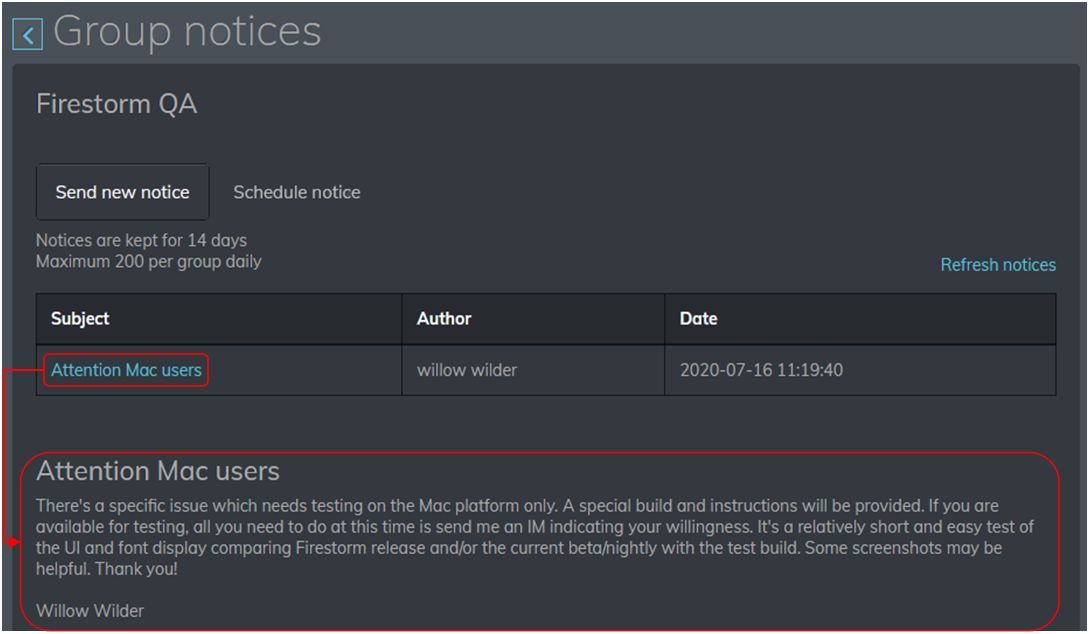
To view your group notices, click / tap the Group Notices button.
The Group Notices panel will open and load any available notices.
Click / tap on any notice to display it below the list of available notices.
Note that notice attachments cannot presently be viewed / opened, but are listed in the text of the notice.
View a group notice in the Speedlight browser version
The Group Notices panel has two buttons associated with it:
Send New Notice – described below.
Schedule a Notice – this option is either awaiting implementation or a Gold / Patreon subscription option. As I currently do not have either of the latter, I was unable to check, ergo it is excluded from this article.
Send a Group Notice
Subject to group permissions you can also create and send group notices from Speedlight:
From the Group Notice panel, click the Send New Notice button at the top of the panel.
The New Notice panel is display. Here you can:
Enter a title for the notice.
Enter the text of the notice. Note the character counter will turn red if you exceed the 512 character count for a notice, and the text beyond that point will be truncated when the notice is sent.
Click the Send Notice button when you’re ready to send your notice.
Send a Group Invite
Subject to group permissions you can send a group invitation to one or more users from Speedlight:
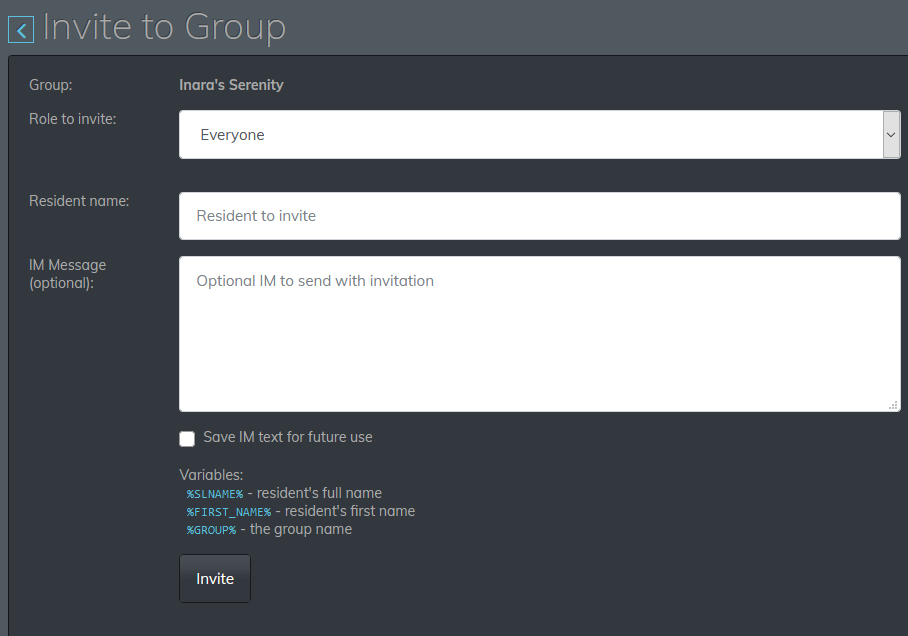
From the Group Info panel, click the Invite to Group button.
The Invite to Group panel is displayed.
Speedlight Invite to Group panel
Role To Invite: select the required role (if available) that will be offered in the invite.
Resident Name: enter the avatar name of the person whom you wish to receive the invite.
IM Message (optional): if you wish, you can send the person you are inviting an IM alongside the group invite – such as an explanation on why you’re sending it, etc.
Note you can use the listed variables to personalise the IM. For example, clicking the %FIRST_NAME% option will precede your IM with the recipient’s first name, while %GROUP% can be used to display the group’s name in the IM.
When you’re ready to send the invite, click the Invite button.
Additional notes for group invites:
Pressing ENTER after typing the recipient’s name will actually send the invitation, so if you want to send an IM with the invite, be sure to click / press TAB / tap to position the cursor in the IM field.
You can also append “sent from Speedlight” to the invite IM (and any other initial session IM you send to someone) by going to Settings in the left menu and then checking Append “Sent from SpeedLight” to my IMs (first message of the conversation only) .
Other Updates
Search Functionality
The Search functionality has been tweaked so that you can now:
Search for friends in your Friends List.
Search for IMs in you IM history by sender’s name.
Search for a group in your groups list (as described above).
Teleport Offers
You can now accept / decline teleport offers via the Notifications bar.
Multi-Line Text Entry (Chat and IM)
Both IMs and local chat accept multi-line text entry – use SHIFT-ENTER to start a new line / offer a paragraph break.
RLV Support
RLV support is now available to Speedlight Gold and Patreon users. However, it is not clear if this is Marine Kelley’s RLV API or Kitty Barnett’s RLVa API.
Android and iOS App Versions
The Android version has yet to receive the multi-line text input option and the group updates, as noted. However, it has received a series of bug fixes and allows errors or issues to be reported back to the developers.
The iOS version version of Speedlight is available for Speedlight Gold and Patreon users, and requires Apple’s TestFlight app to be installed on the device using it.
Feedback
The group updates are good to have, with the promise of more to come. Further performance improvements are in the offing as well, apparently. This may well be a good thing, as it appears the issue from April of an avatar refusing to stop moving once set in motion in the 3D World view, is back, and once again requires a relog to stop it. I’ve no idea how widespread this issue is, or if it is encountered on Android devices (as my poor little Nexus 2013 HD cannot run Speedlight’s 3D rendering, being stuck on Android 6.0.1), but for me, it is consistent and appears to be a regression. I shall await further updates with interest.
Logos representative only and should not be seen as an endorsement / preference / recommendation
Updates for the week ending Sunday, July 12th
This summary is generally published every Monday, and is a list of SL viewer / client releases (official and TPV) made during the previous week. When reading it, please note:
It is based on my Current Viewer Releases Page, a list of all Second Life viewers and clients that are in popular use (and of which I am aware), and which are recognised as adhering to the TPV Policy. This page includes comprehensive links to download pages, blog notes, release notes, etc., as well as links to any / all reviews of specific viewers / clients made within this blog.
By its nature, this summary presented here will always be in arrears, please refer to the Current Viewer Release Page for more up-to-date information.
Note that for purposes of length, TPV test viewers, preview / beta viewers / nightly builds are generally not recorded in these summaries.
Official LL Viewers
Current Release viewer version 6.4.3.543157, dated June 11th, promoted June 23rd, formerly the CEF RC viewer – No change.
Release channel cohorts:
Tools Update RC viewer updated to version 6.4.5.544474 on July 7th.
Arrack Maintenance RC viewer updated to version 6.4.5.544465 on July 5th.
Logos representative only and should not be seen as an endorsement / preference / recommendation
Updates for the week ending Sunday, July 5th
This summary is generally published every Monday, and is a list of SL viewer / client releases (official and TPV) made during the previous week. When reading it, please note:
It is based on my Current Viewer Releases Page, a list of all Second Life viewers and clients that are in popular use (and of which I am aware), and which are recognised as adhering to the TPV Policy. This page includes comprehensive links to download pages, blog notes, release notes, etc., as well as links to any / all reviews of specific viewers / clients made within this blog.
By its nature, this summary presented here will always be in arrears, please refer to the Current Viewer Release Page for more up-to-date information.
Note that for purposes of length, TPV test viewers, preview / beta viewers / nightly builds are generally not recorded in these summaries.
Official LL Viewers
Current Release viewer version 6.4.3.543157, dated June 11th, promoted June 23rd, formerly the CEF RC viewer – No change.
Release channel cohorts:
Love Me Render RC viewer updated to version 6.4.5.544028 on June 30th.
Project viewers:
Custom Key Mappings project viewer, version 6.4.5.544079, issued on June 30th.
Logos representative only and should not be seen as an endorsement / preference / recommendation
Updates for the week ending Sunday, June 28th
This summary is generally published every Monday, and is a list of SL viewer / client releases (official and TPV) made during the previous week. When reading it, please note:
It is based on my Current Viewer Releases Page, a list of all Second Life viewers and clients that are in popular use (and of which I am aware), and which are recognised as adhering to the TPV Policy. This page includes comprehensive links to download pages, blog notes, release notes, etc., as well as links to any / all reviews of specific viewers / clients made within this blog.
By its nature, this summary presented here will always be in arrears, please refer to the Current Viewer Release Page for more up-to-date information.
Note that for purposes of length, TPV test viewers, preview / beta viewers / nightly builds are generally not recorded in these summaries.
Official LL Viewers
Current Release viewer version 6.4.3.543157, dated June 11th, promoted June 23rd, formerly the CEF RC viewer – No change.
Release channel cohorts:
Arrack Maintenance RC viewer, 6.4.5.544024, issued on June 24. This viewer uses Viewer Manager 2.0.538279 and contains logging to check for Vulkan graphics support in Windows systems.
Tools Update RC viewer updated to version 6.4.5.544097, June 25. This viewer is built using VS 2017 / a recent version of Xcode, and Boost.Fiber. It contains no user-facing changes.