Logos representative only and should not be seen as an endorsement / preference / recommendation
Updates for the week ending Sunday, May 3rd
This summary is generally published every Monday, and is a list of SL viewer / client releases (official and TPV) made during the previous week. When reading it, please note:
It is based on my Current Viewer Releases Page, a list of all Second Life viewers and clients that are in popular use (and of which I am aware), and which are recognised as adhering to the TPV Policy. This page includes comprehensive links to download pages, blog notes, release notes, etc., as well as links to any / all reviews of specific viewers / clients made within this blog.
By its nature, this summary presented here will always be in arrears, please refer to the Current Viewer Release Page for more up-to-date information.
Note that for purposes of length, TPV test viewers, preview / beta viewers / nightly builds are generally not recorded in these summaries.
Official LL Viewers
Current Release version version 6.4.0.540188, dated April 15th, promoted April 20th. Formerly the EEP RC viewer – No Change.
Release channel cohorts:
CEF Special RC viewer, version 6.4.1.541204, April 30.
Zirbenz Maintenance RC viewer, version 6.4.1.540593, April 27.
Around a decade ago, a popular third party viewer (TPV) among Second Life photographers was Kirsten’s viewer, produced by KirstenLee Cinquetti (aka skilled coder Lee Quick).
At the time, it pushed hard to make the graphical appearance of SL rich and deep. It was also the first TPV to experiment with analgyph 3D, far back in 2011, long before “VR headset” was in common use.
Sadly, development of the viewer drew to a close in late 2011 as a result of personal circumstance (some of which is charted in these pages), although KirstenLee kept dabbling with it on-and off (such as returning to the S19 UI version and updating it in in 2013, and keeping pace with significant viewer updates from the Lab, such as Bento for the S22.x (current UI) version in 2017). Now – and as pointed out to me by Austin Tate – the viewer is more formally back, KirstenLee having completed the self-certification required to have the viewer once more added to the Lab’s Third Party Viewer Directory.
Available for Windows, the updated Kirsten’s Viewer is bang-slap up-to-date, in that it is built on the most recent release of the official LL code base (release 6.4.0.540188 at the time of writing), and so includes the viewer 3.x+ UI, and all significant updates from the Lab up to and including EEP, the Environment Enhancement Project, although as Kirsten noted with it’s release, some tweaks might still be required.
Kirsten’s Viewer is EEP capable
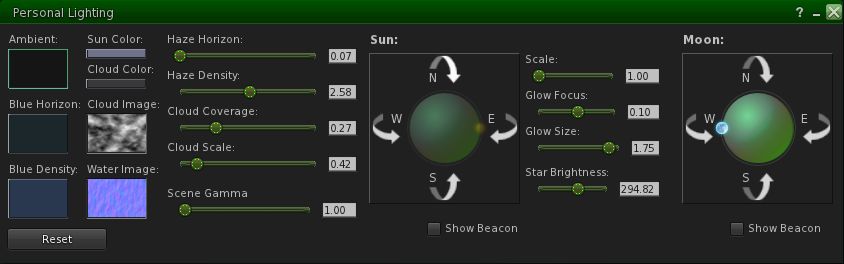
KirstenLee refers to the viewer as something of a “hybrid”, and when approaching it, it is as well to keep this in mind. “Hybrid” is this case is a reference to the fact that while it is based on the core LL code base, the viewer also pulls in elements from what might be LL project viewers (and so not necessarily ready for “prime time” use), and from other TPVs. In doing so, the focus is very much on code that improves stability / performance.
I tend as a rule to keep any feature or alteration within the existing code base and not add extras which cannot be integrated into the standard source. I also use LL code style and naming conventions.
In this regard, the viewer is also described as being “aimed specifically at experienced users, with emphasis on the visuals.” This is not so much to put people off, but to underline the fact that use of the viewer comes best if you have an understanding of the more esoteric aspects of viewer use – such as clearing caches and settings from any prior versions when installing a new version (aka, performing a “clean install”). Such capabilities are not hard to grasp, and can be found documented in various locations.
Given the S23.x release is based on the latest LL code base, you can comfortably expect all of the major Lab updates to be present, as noted, and may from time-to-time include elements from upstream of the release viewer (as with the Legacy Profiles, again as mentioned above). It also pulls some updates from TPVs like Firestorm; however, those familiar with the latter should not expect Kirsten’s Viewer to expose debugs or offer viewer-specific capabilities to anywhere near the same degree – that’s not the point of this viewer (although that said, it would be nice to see Kirsten’s adopt the client-side AO mechanisms, simply because it is available in several TPVs and used by many people as a result).
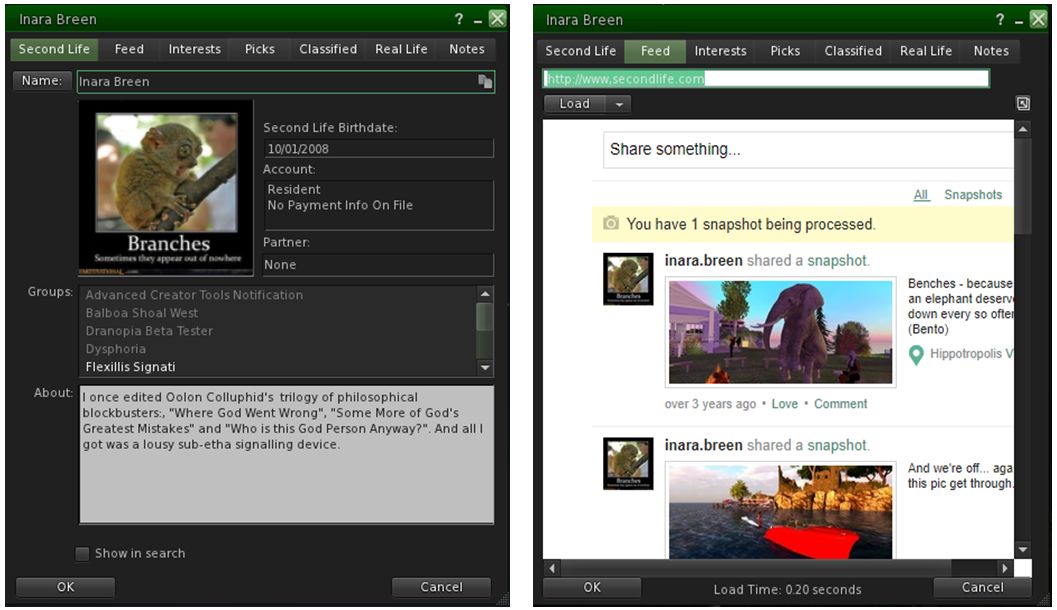
Kirsten’s Viewer includes the upcoming re-integration of viewer-based profile panels – which includes the profile feed from the web, and currently found in the Lab’s current Legacy Profiles project viewer
Given this, the viewer’s Preferences and Tool Bar options are pretty must as found in the official viewer, with just a trio of differences in the the former. The Move & View tab, for example, includes additional sliders for camera movement – lag, smoothness zoom time – again in keeping with the ideals of photography / visuals. Further, the Set-up tab does not include the auto update options, for reasons KirstenLee also explains:
I do not use the Linden auto build system. I host all the build libraries because I occasionally work on those in concert with the viewer code. It allows for much finer control over the entire process. I have a tendency to do custom compilations with different tool-sets which is something an official client would never do, for reasons of the broadest compatibility with the consumer.
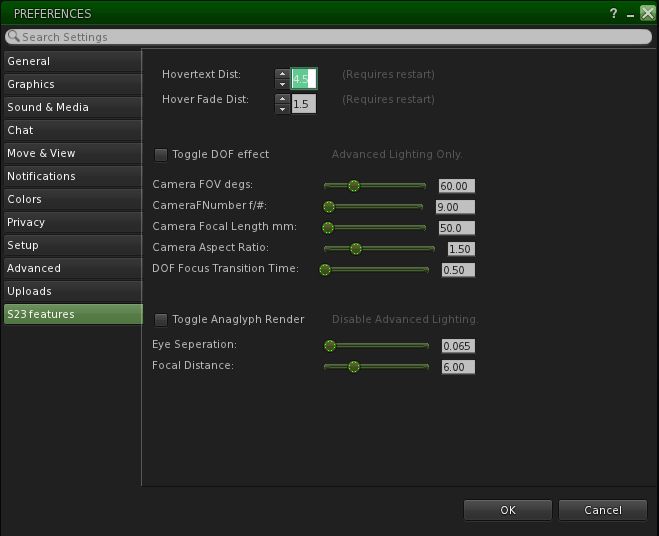
Thirdly, Kirsten’s Viewer includes a custom Features tab (called S23 Features in the current release, although this will doubtless increment to match future versions). This is again camera / visuals related, and includes the option for running the viewer in analgyph mode can be found. This includes sliders for adjusting the analgyph 3D view to account for eye separation and focal distance.
The Features tab in Kirsten’s Viewer is where you can find the analgyph options, for those with analgyph glasses
Should you have analgyph 3D glasses and use the option, the following points should be noted:
Activating it will disable the viewer’s Advance Lighting Model (ALM) shaders – so shadows, ambient occlusion and depth of field will all be disabled.
Toggling analgyph mode off will not automatically re-enabled ALM, you must do this yourself from the Graphics→Advanced Settings floater.
If you log-out with the analgyph option enabled, it will be disabled automatically on logging back in, but again, ALM + options will remain disabled until turned back on.
If you use a 3D mouse such as SpaceNavigator, you may find activating the analgyph capability will severely alter default 3D mouse movement. As the overall defaults for the SpaceNavigator (Move & View→Other Devices) were not altered and given I don’t actually have analgyph glasses to make it worthwhile, I confess I did not fiddle with settings to see if the issue could be corrected.
It may seem odd in “bringing back” a viewer after so long, but there are reasons for it, again as KirstenLee notes:
Its a matter of public record as to how development ended, a perfect storm of circumstances made continued work on it impossible. But as with all things time is a great healer. Besides after nearly 16 years of SL I find myself enjoying my in world life. And have the luxury of a good work balance and a happy and healthy home. So while the sun shines make hay 🙂
For my part, and while I’ve not not driven the S23 release hard or far, I can only say its good to see Kirsten’s Viewer back on the active list once more. While it was never my main viewer, it was a go-to viewer for me for photography. And while it may only be subjective, it does seems to add more depth to EEP skies than I’ve noted with the official EEP viewer – the stars seem to “twinkle” more noticeably.
It’s always tempting to offer a list of what a viewer “could” or “should” have, particularly if coming from something like Firestorm – but the point of TPVs are that they are not meant to all provide the same things. With its emphasis on visuals, performance and stability, Kirsten’s Viewer addresses a specific set of goals and as such, has – and likely will have – only the tools it needs to achieve that, my own earlier comment on the client-side AO above notwithstanding. As such, I’m looking forward to seeing the viewer’s progress, and reporting on it.
Speedlight, the browser based / Android Second Life client, continues to be developed and updated, with new or improved capabilities being added almost weekly. The following is a round-up of some of the more recent updates, and well as some I’ve not previously mentioned, including the Gold-only Mass IM tool.
Transfer Gold Status between Avatars
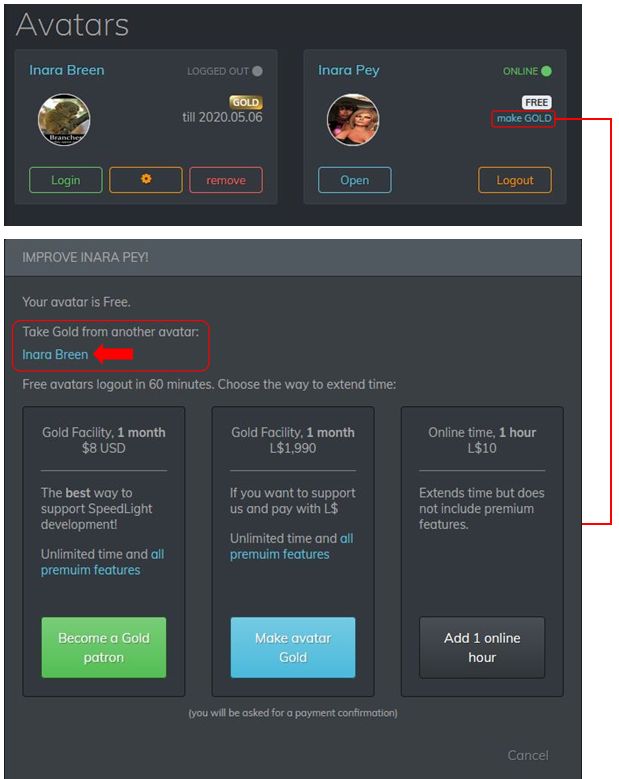
If you have two or more avatar accounts connected to your Speedlight account, one of which is Gold status, you can now transfer that status between your avatar accounts. Handy if you find you suddenly need a second account to briefly have the advantages of Gold, but not sufficiently long enough to justify an additional subscription or for becoming a Speedlight Patreon member.
To move your Gold status between avatar accounts:
Log-in to Second Life via your Speedlight account and then log-in to Second Life with the account that is not Gold.
Click / tap on the Make Gold option on the right of your avatar box.
The Gold upgrade screen is displayed. This now includes the name(s) of any Gold avatar accounts you already have under the title Take Gold From Another Avatar.
Click on the avatar name from which you want to transfer Gold status.
The Gold status will be removed from that account and conferred on the account you are using. Note that no confirmation is given, but the current logged-in account will list itself as being Gold.
Swapping Gold status between accounts
Word View
Rendering Updates
April 22nd, 2020 saw a series of updates to the rendering system generating the 3D world view. These include:
In-world objects are now load quickly in low quality, then get a higher quality when you look at them.
The distance fogging can be turned off if preferred.
The draw distance can be adjusted.
Linden Water level is correctly displayed.
Multiple performance improvements / fixes.
Updated scene information panel that can be toggled on / off.
UI touch joystick now allows walking and rotating.
Gold only: seated avatar mannequins are now rendered.
Overall 3D UI is more compact.
Updated Scene Information Panel
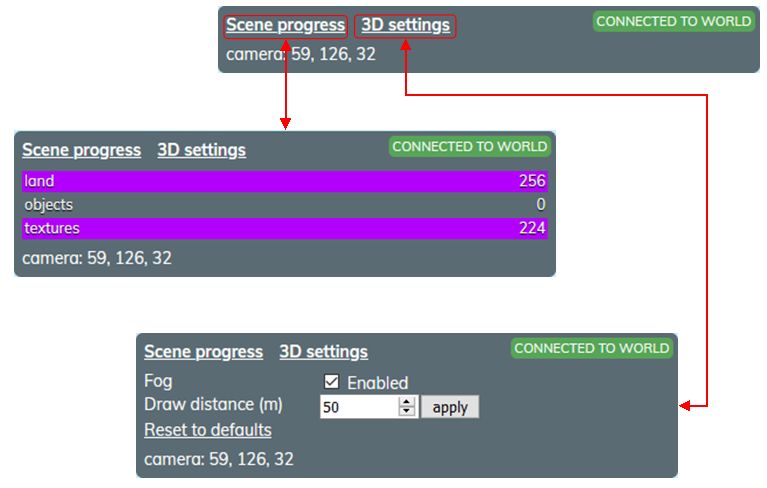
The world view information tab has been updated, and comprises four core elements:
The Scene Progress display link (generally open by default). When open, displays the land, object and texture load data.
The 3D Settings display. When open allows you to:
Toggle the distance fogging on/ off.
Increase / decrease your draw distance (default 50m).
Your connection status:
Green – you are connected to the region simulator.
Red – you are not connected to the simulator and will need to relog.
The current region coordinates of your camera.
The Scene Information panel and options
Notes on this panel:
It can be expanded / reduced by clicking on one or other of the scene process or 3D settings links.
One click will toggle from one to the other.
Clicking on the same link twice will either expand / close it or close / expand it, depending on its initial state.
Be careful with setting the draw distance too high; this could place additional data transfer load on your connection to the rendering server.
Accessing Avatar Profiles in World View
An option I’ve not previously covered in discussing the 3D world view is the ability to view another avatar’s Profile directly in the world view.
Click / tap on the avatar.
The avatar’s Profile opens on the right edge of the world view.
The Profile buttons will function as follows:
The Send IM and Notecard buttons will switch you to the IM window in the client.
The Pay L$ will switch you to the L$ and transactions window in the client.
Offer Teleport and Offer Friendship will open an invitation in the world view.
Another avatar’s profile can be displayed in the world view by clicking on the required avatar mannequin
Send Note Cards via IM
Introduced on April 16th, Speedlight’s Note Cards from IM allows you to:
Send a note card directly from an IM session.
Reply to a received note card in an open IM session with a *new* note card.
Sending a Notecard Using IM
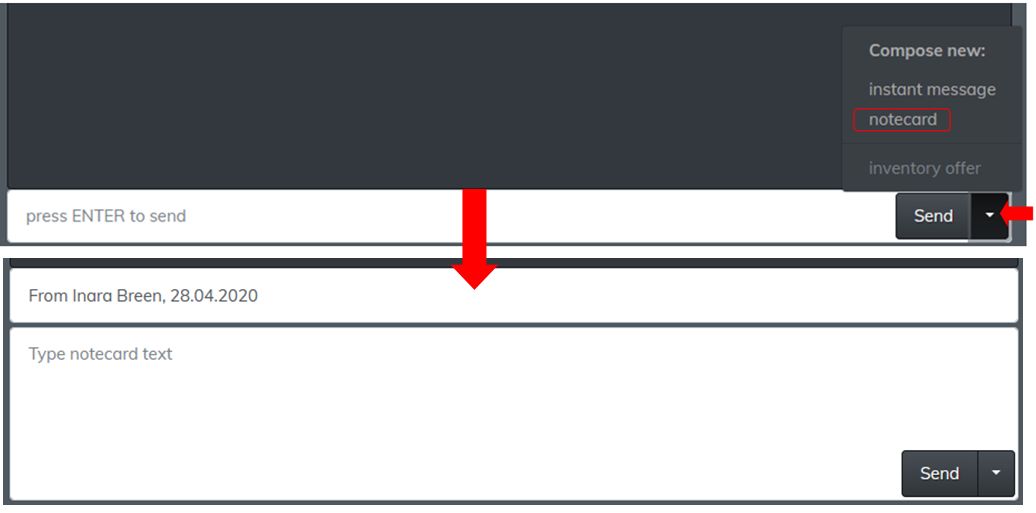
Open an IM session with the person to whom you want to send a note card.
Note that you can already be chatting with them, and simply wish to send additional information.
Click / tap on the down arrow to the right of the Send button at the bottom of the IM display to open a list of options.
Click / tap on notecard.
The text input area will expand to display:
The note card title field, which will default to “From [avatar name] [time stamp].
The body text area.
Change the title as required, and use the text entry field to write the contents of the note card.
Click / tap Send to deliver.
The send a note card from IM capability
Reading the Replying to Note Cards via IM
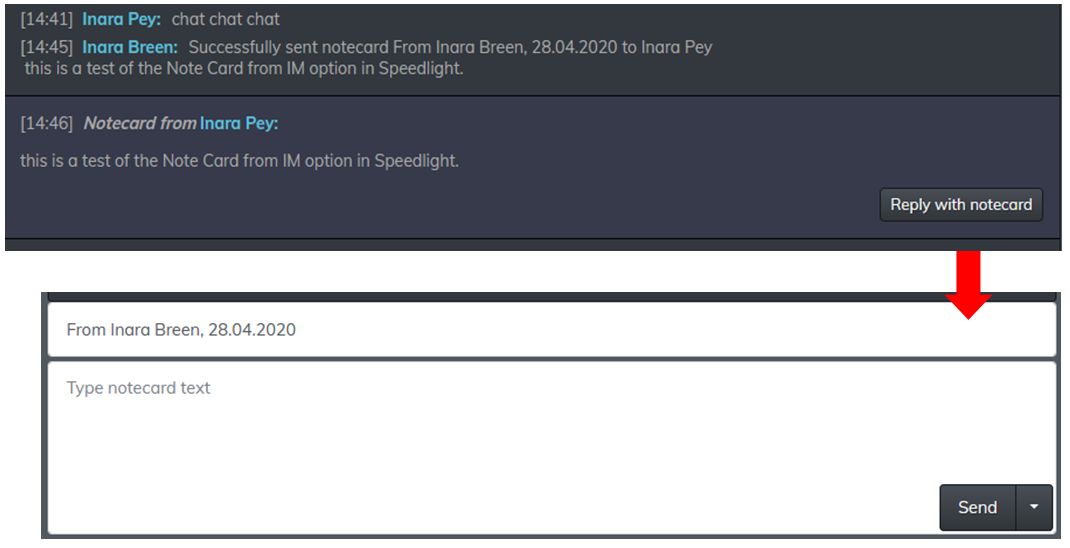
Should you receive a note Card via an open IM session, the text of the IM will be displayed in the main IM window, as shown below. A button displayed at the end of the note card text that allows you to reply using a fresh note card..
Receiving the text of a note card in IM, and replying using a note card
Again, the note card fields at the bottom of the IM window should be filled out as requires, and the Send button used to send it.
Gold Only: Mass IM Tool
This is not a new feature to Speedlight, but this is the first opportunity I’ve had to review it. In short, it does exactly what the title implies: allows you to send a single IM to multiple recipients.
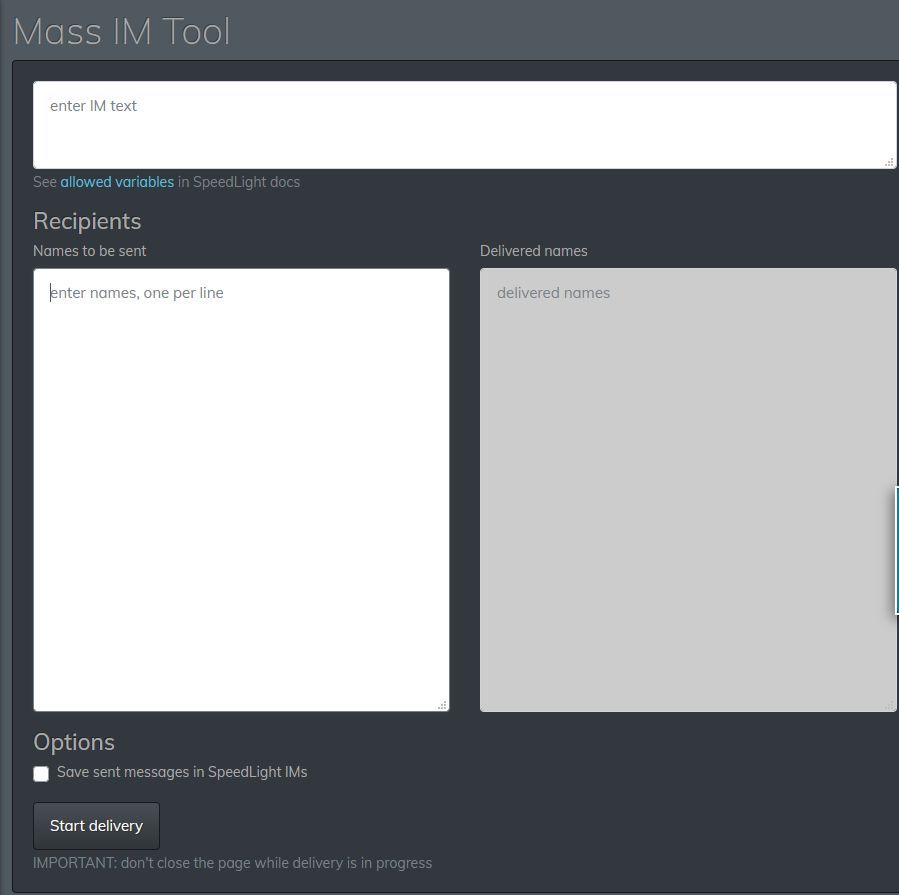
Accessed via the IM option in the left side menu, Its use is self explanatory as well:
Enter the message in the top field.
Add a list of intended recipients in the lower left field, one name per line (this must be avatar names, not group names).
If required, check / tap the Save Sent Messages to Speedlight IMs to save a copy of the message to your IM logs.
Click /tap the Start Delivery button.
As the IM is delivered to each name on the list, a confirmation of delivery is displayed in the lower right text field.
You’ll also receive a notification on the status of each delivery.
The Speelight Mass IM option (Gold only)
Observations
The ability to transfer a Gold membership between avatar accounts is an excellent move for those who may occasionally need to have an alt access the more advanced world view available to Gold accounts, or to remain on-line without hourly re-logs. Similarly, the notecard updates in the IM options makes Speedlight even more flexible as a communications tool.
The world view rendering performance improvements should also be a welcome update for Gold members (I didn’t notice and particular increase for free accounts, but that might have simply been my connection). I did find the the problem of the avatar not stopping walking once in motion, as reported in my April 8th Speedlight update, to still be present; while I’ve heard two other users say they’ve had the same problem as well, I’ve no idea how widespread it might be.
That issue aside, Speedlight – while still very much in an beta stage of development – continues to progress. Watching the Discord server channels for the client, I’ve been impressed with the degree of communications from the team responsible for Speedlight, and their willingness to engage with users.
Logos representative only and should not be seen as an endorsement / preference / recommendation
Updates for the week ending Sunday, April 26th
This summary is generally published every Monday, and is a list of SL viewer / client releases (official and TPV) made during the previous week. When reading it, please note:
It is based on my Current Viewer Releases Page, a list of all Second Life viewers and clients that are in popular use (and of which I am aware), and which are recognised as adhering to the TPV Policy. This page includes comprehensive links to download pages, blog notes, release notes, etc., as well as links to any / all reviews of specific viewers / clients made within this blog.
By its nature, this summary presented here will always be in arrears, please refer to the Current Viewer Release Page for more up-to-date information.
Note that for purposes of length, TPV test viewers, preview / beta viewers / nightly builds are generally not recorded in these summaries.
Official LL Viewers
Current Release version version 6.4.0.540188, dated April 15th, promoted April 20th. Formerly the EEP RC viewer – NEW.
Logos representative only and should not be seen as an endorsement / preference / recommendation
Updates for the week ending Sunday, April 19th
This summary is generally published every Monday, and is a list of SL viewer / client releases (official and TPV) made during the previous week. When reading it, please note:
It is based on my Current Viewer Releases Page, a list of all Second Life viewers and clients that are in popular use (and of which I am aware), and which are recognised as adhering to the TPV Policy. This page includes comprehensive links to download pages, blog notes, release notes, etc., as well as links to any / all reviews of specific viewers / clients made within this blog.
By its nature, this summary presented here will always be in arrears, please refer to the Current Viewer Release Page for more up-to-date information.
Note that for purposes of length, TPV test viewers, preview / beta viewers / nightly builds are generally not recorded in these summaries.
Official LL Viewers
Current Release version version 6.3.8.538264, dated March 12, promoted March 18th. Formerly the Premium RC viewer – No Change.
Release channel cohorts:
EEP RC viewer updated to version 6.4.0.540188 on April 15th.
I admit I’m getting to this somewhat late, although I don’t recall seeing it reported elsewhere among the blogs, etc., I try to read.
In January 2020, Bright Canopy, the one remaining streaming service for Second Life (and OpenSim) ceased operations. I’m actually a little embarrassed by not having noticed the change, given that I played a very small role in it getting started.
While possibly not a well-known service, Bright Canopy was officially launched at the end of August 2015, having come about (at relatively high speed) as a result of the folding of the SL Go streaming service. SL Go had, in turn, been the first functional SL streaming service, put together with LL’s help by former game streaming company OnLive. It established a small but loyal following before it came to an end after OnLive was forced to sell its IP to Sony as a result of not being able to generate the revenue through its various services (including SL Go) it needed to remain viable.
At the time of SL Go’s demise, I ruminated on the potential of the Lab running a streamed SL service through Amazon AppSstream (see: Could the Lab use Amazon AppStream to “replace” SL Go?), and that prompted Second Life user and app developer Bill Glover to comment:
Let’s just do it ourselves! You really got me thinking. I’d can launch a service right now if I get enough folks for Beta.
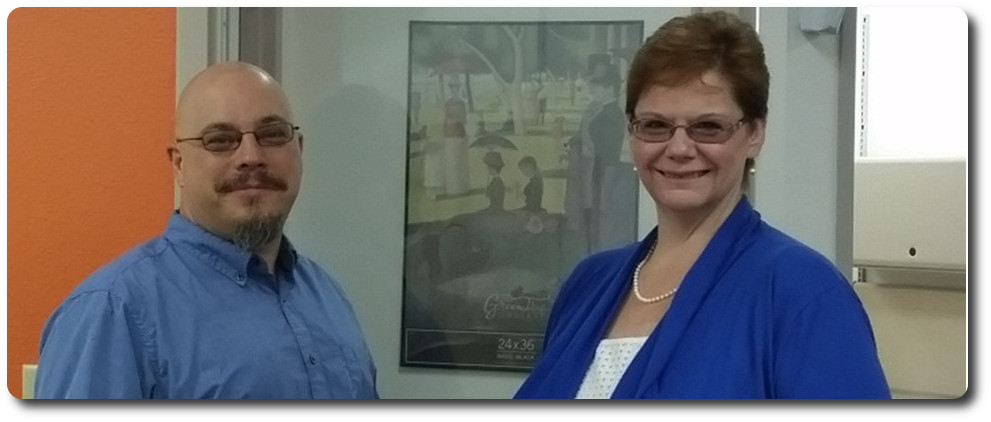
Bill and Jeri Glover: creators of the Bright Canopy service
Bill and his wife, Jeri, set about working on the idea whilst user Nebadon Izumi, also picking up on my ruminations, started his own tests using AppsStream,. I reported on his work a few days later (see: Using Amazon AppStream to stream a viewer – although sadly Nebadon’s video that originally accompanied that article was later removed from You Tube), and as a result of that article, Nikola Bozinovic, founder and CEO of Frame, a cloud-based service focused on delivering Windows applications to users, suggested his service could be used to deliver Second Life through the cloud.
Nikola Bozinovic, founder of Frame, worked with Bill and Jeri to make Bright Canopy happen, with Frame eventually acquiring Bright Canopy as a service in June 2016
Bill and Nikola quickly got their heads together, and within 24 hours, they had their own proof-of-concept running, delivering the official SL viewer over Frame via Amazon (as an aside, even while Bill and Nikola were in discussions, I tried Frame directly for myself).
As a streaming service, Bright Canopy did incur a cost for users – initially US $17.00 a month (necessary as operating costs from both AWS and Frame needed to be covered), but it continued where SL Go left off, offering both the official viewer and Firestorm to users for the same quality of graphics delivered to almost any computer / device as offered directly by the viewer. Over time the service expanded, adding Singularity to the list of viewers available, together with Blender and Gimp for those who might want CPU / GPU horsepower for their content creation work.
I actually lost track of Bright Canopy in the years post 2016, but it continued to be available, and several friends continued to use it as an away-from-home alternative to their viewer. My interest was stirred again in late 2018, when I caught the news the Frame itself had been acquired by Nutanix, as I was curious as to what it might mean for Bright Canopy. But as nothing appeared to change, I once again lost track of things.
However, as Jodi Serenity – who used the service on occasion – informed me, things did change at the start of 2020, with Nutanix discontinuing Bright Canopy and an offering. No reason (such as lack of subscribers) has been given, and Jodi informs me she has no recollection of any e-mail that may have been circulated ahead of the suspension of the service.
The ending of Bright Canopy means that currently, there is no longer a streaming service for Second Life. However, the landscape for accessing the platform without resorting to a full blown viewer has also changed in the years since SL Go and Bright Canopy first arose. Apps like Lumiya have shown what can be done in terms of client apps that can also render the world, and we currently have Speedlight the Android / browser client with its nascent world rendering capability, while LL themselves have hinted their own iOS / Android client may eventually progress to world rendering.
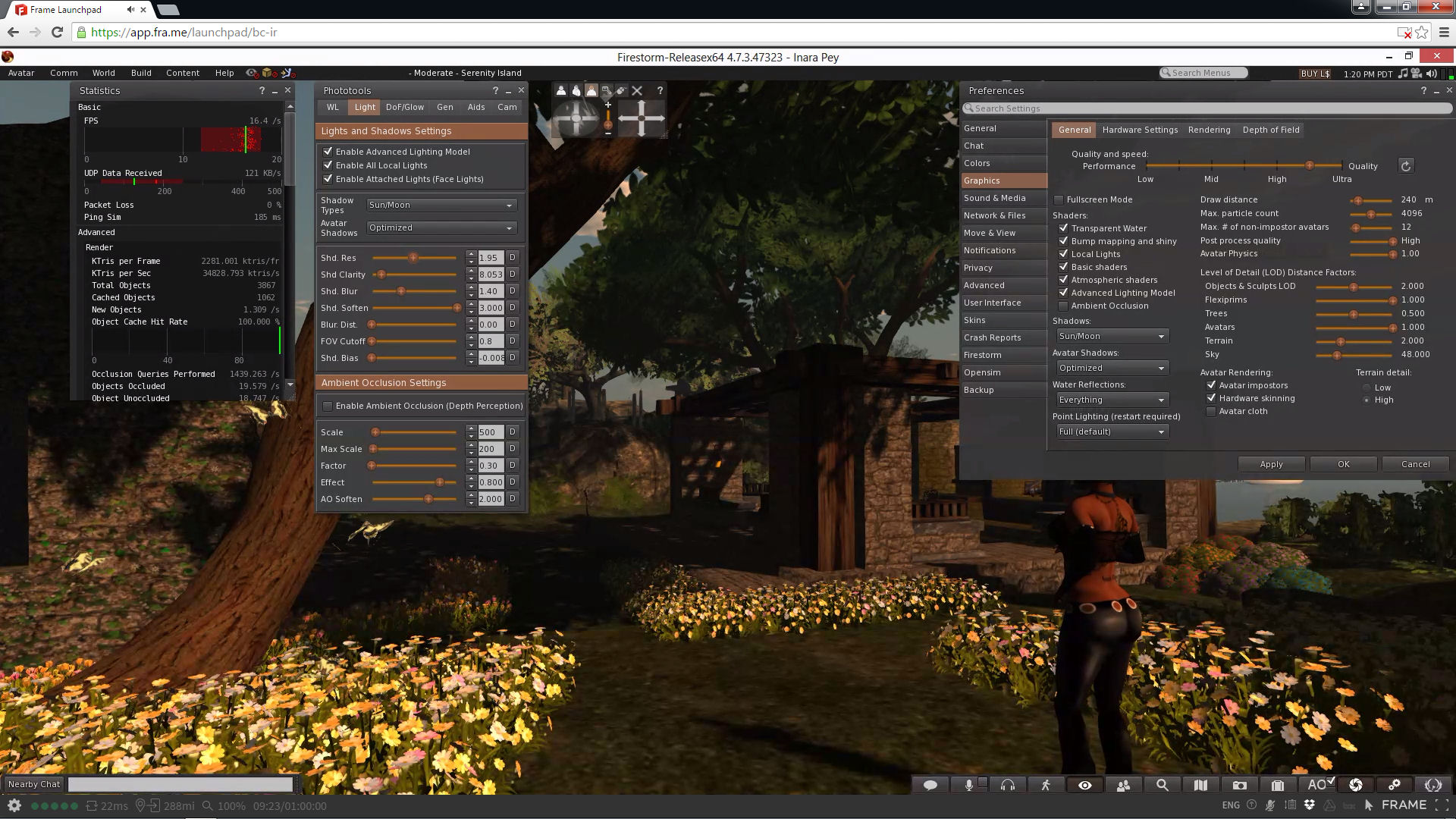
Bright Canopy running Second Life through Frame, offering those on low-specification computers to enjoy the full graphic richness of the platform with (allowing for network vagaries) low latency
Of course, none of these options render Second Life to a fidelity that can be achieved by a streaming service – but they have the advantage of being offered at a lower price. That said, the cost of streaming is also slowly changing, and even the Lab has been pondering whether they might want to offer a service at some point in the future – so it is very possible (if not probable) that Bright Canopy’s passing is not the last we’ll hear of a Second Life streaming service.






 Inara Pey: Living in a Modemworld